Introduction
The 12 factor agents methodology provides a principled framework for building reliable, production-grade LLM-powered software. Created by Dex Horthy, founder of Humanlayer, this methodology argues that the best AI agents are not autonomous loops that run until they hit a goal – they are mostly deterministic software with LLM steps sprinkled in at just the right points. With over 22,000 GitHub stars and endorsements from Andrej Karpathy and Shopify CEO Tobi Lutke on the importance of “context engineering,” 12-Factor Agents defines 12 principles that any developer can apply to build AI agents that actually work in production: own your prompts, own your context window, own your control flow, and make your agent a stateless reducer.
Most “AI agents” in production today are not truly agentic. They are deterministic software with LLM decision points. The 12-Factor Agents methodology embraces this reality and provides a set of modular principles that you can adopt incrementally into your existing codebase – no framework rewrite required. The project includes a working scaffold via npx create-12-factor-agent that demonstrates every principle in under 200 lines of TypeScript, using BAML for structured outputs and the Humanlayer SDK for human-in-the-loop interactions.
The Core Pattern – How Agents Really Work
The fundamental insight of 12-Factor Agents is that the agent loop is deceptively simple. It consists of four components: a prompt that tells the LLM how to behave, a switch statement that routes the LLM’s JSON output to deterministic code, accumulated context that stores what happened, and a for loop that iterates until the LLM emits a “done” signal.
initial_event = {"message": "..."}
context = [initial_event]
while True:
  next_step = await llm.determine_next_step(context)
  context.append(next_step)

  if (next_step.intent === "done"):
    return next_step.final_answer

  result = await execute_step(next_step)
  context.append(result)
This is not a framework – it is a pattern. The LLM decides what to do next, your deterministic code decides how to do it. The context window is the single source of truth for everything that has happened. The loop continues until the LLM signals completion or needs human input.
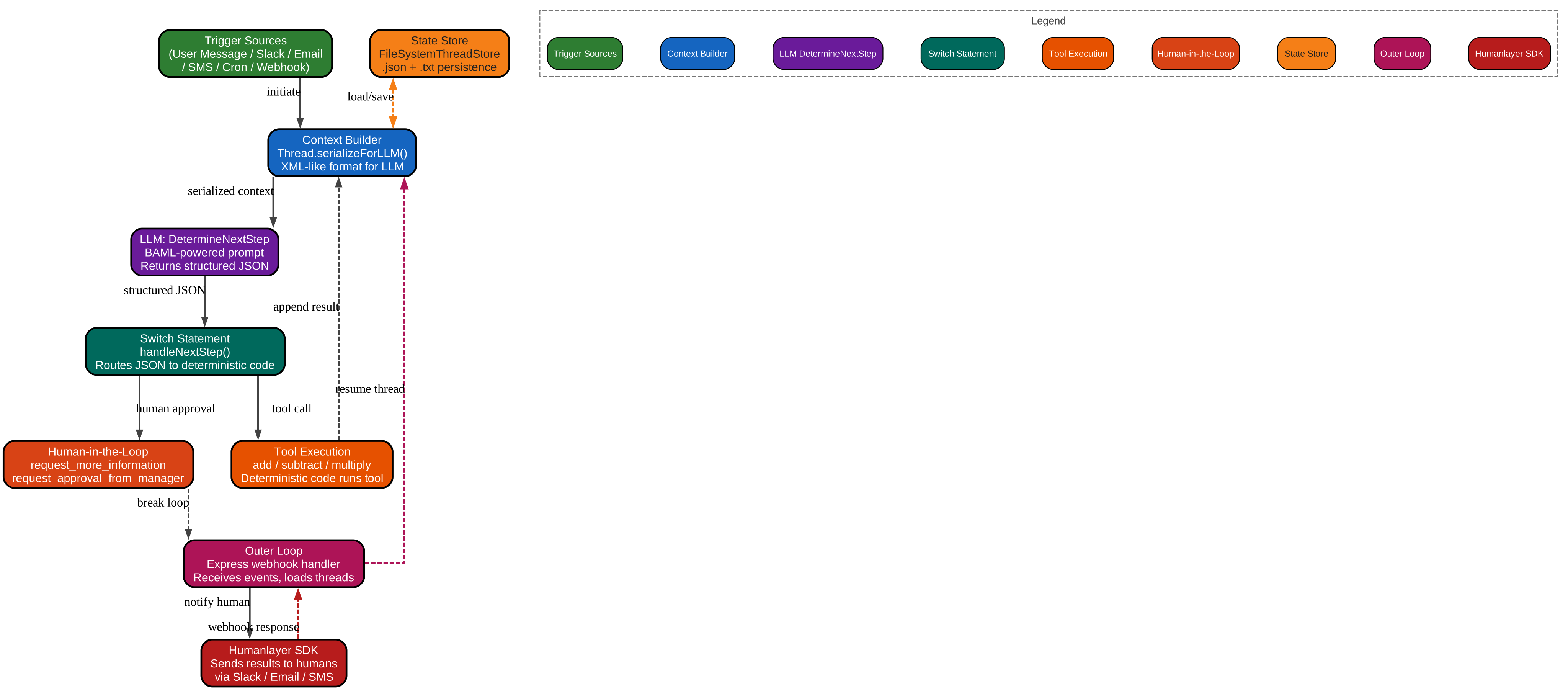
The architecture diagram above illustrates the complete agent loop as defined by 12-Factor Agents. Starting from the top, Trigger Sources (green) represent Factor 11 in action – agents should be triggerable from anywhere, not just chat interfaces. User messages, Slack events, emails, SMS, cron jobs, and webhooks can all initiate the agent loop. The Context Builder (blue) is the Thread.serializeForLLM() method that converts accumulated events into an XML-like format optimized for the LLM context window. This is Factor 3 (own your context window) in action – instead of using standard message-based APIs, you control exactly what the LLM sees and in what format.
The LLM DetermineNextStep node (purple) represents the BAML-powered prompt that takes the serialized context and returns structured JSON describing the next step. This combines Factors 1 (natural language to tool calls) and 2 (own your prompts) – you own the prompt and the LLM outputs a structured tool call. The Switch Statement (teal) is the handleNextStep() function that routes the LLM’s JSON output to deterministic code, embodying Factor 8 (own your control flow). Tool Execution (orange) runs the deterministic code for each tool call, implementing Factor 4 (tools are just structured outputs).
Human-in-the-Loop (coral) represents Factor 7 – structured tool calls for human interaction. When the LLM emits request_more_information, request_approval_from_manager, or divide, the loop breaks and waits for human input. The State Store (amber) is FileSystemThreadStore, which persists threads as both .json for structured access and .txt for LLM readability, implementing Factor 5 (unify execution state and business state). The Outer Loop (pink) is the Express webhook handler that receives events, loads threads, runs the inner loop, and sends results back, implementing Factor 6 (launch/pause/resume). Finally, the Humanlayer SDK (red) sends results back to humans via Slack, email, or SMS, completing the cycle.
Key Insight: The 12-Factor Agents methodology reveals that most production “AI agents” are not truly agentic – they are mostly deterministic software with LLM steps at the right points. The core pattern is deceptively simple: a prompt tells the LLM how to behave, a switch statement routes its JSON output, accumulated context stores what happened, and a for loop iterates until the LLM emits a “done” signal. This is not a framework – it is a set of principles you can apply to any existing codebase without rewriting your stack.
The 12 Factors Explained
Each of the 12 factors addresses a specific failure mode that teams encounter when building LLM-powered software. Together, they form a cohesive methodology that can be adopted incrementally – you do not need to adopt all 12 factors at once.

The features diagram above shows all 12 factors radiating from the central “12-Factor Agents” hub, plus the bonus Factor 13. Each factor is color-coded and includes a brief description of its core principle.
Factor 1: Natural Language to Tool Calls (green) is the foundational pattern. The LLM converts natural language intent into structured JSON tool calls, and deterministic code executes them. This is the core loop that replaces the traditional “give the LLM a bag of tools and let it figure it out” approach.
Factor 2: Own Your Prompts (teal) argues that you should treat prompts as first-class code with full control, testing, and iteration capability. Do not outsource prompt engineering to frameworks – own your prompts the same way you own your business logic.
Factor 3: Own Your Context Window (purple) is the most impactful factor. It advocates for controlling what goes into the LLM context through custom XML/YAML formats that are more token-efficient than standard message APIs. This is the factor that Andrej Karpathy and Tobi Lutke endorsed as “context engineering.”
Factor 4: Tools Are Just Structured Outputs (orange) recognizes that tool calls are just JSON the LLM outputs. Your deterministic code decides what to do with them. The LLM decides what, your code decides how.
Factor 5: Unify Execution State and Business State (coral) keeps all state in one serializable thread. Do not separate execution state from business state – one source of truth makes debugging, recovery, and auditing straightforward.
Factor 6: Launch/Pause/Resume (amber) makes agents pausable and resumable programs. This is especially important between tool selection and execution, where you may need human approval before proceeding.
Factor 7: Contact Humans with Tool Calls (pink) uses structured tool calls for human interaction, not just for API calls. This enables outer-loop agents that work for minutes then ask for approval.
Factor 8: Own Your Control Flow (red) tells you to build your own switch/loop statements. Do not let frameworks own the agent loop – you should be able to interrupt between tool selection and execution for human approval.
Factor 9: Compact Errors (gray) feeds errors back into the context window for self-healing, but limits retries to prevent spin-out. The LLM can learn from its mistakes, but only if it can see them.
Factor 10: Small, Focused Agents (lime) keeps agents scoped to 3-10 steps. Longer contexts cause LLMs to get lost. The micro-agent pattern embeds small, focused agents within larger deterministic DAGs.
Factor 11: Trigger from Anywhere (cyan) enables agents to be triggered by Slack, email, SMS, cron, webhooks – not just chat interfaces. Meet users where they are.
Factor 12: Stateless Reducer (indigo) models agents as stateless functions: thread + event = new_thread. This makes agents easy to debug, test, and scale.
Bonus Factor 13: Pre-fetch (brown, dashed border) suggests that if you know the model will call a tool, call it deterministically yourself. Pre-fetch all context you might need before the LLM loop begins.
| Factor | Core Principle |
|---|---|
| 1. Natural Language to Tool Calls | Convert natural language to structured JSON; deterministic code executes them |
| 2. Own Your Prompts | Treat prompts as first-class code, not framework abstractions |
| 3. Own Your Context Window | Control what goes into the LLM; custom formats for token efficiency |
| 4. Tools Are Structured Outputs | Tool calls are just JSON; your code decides what to do with them |
| 5. Unify Execution State | Keep all state in one serializable thread |
| 6. Launch/Pause/Resume | Agents should be pausable/resumable programs |
| 7. Contact Humans with Tools | Structured tool calls for human interaction |
| 8. Own Your Control Flow | Build your own switch/loop; do not let frameworks own it |
| 9. Compact Errors | Feed errors back into context for self-healing |
| 10. Small, Focused Agents | Keep agents scoped to 3-10 steps |
| 11. Trigger from Anywhere | Slack, email, SMS, cron, webhooks |
| 12. Stateless Reducer | thread + event = new_thread |
| 13. Pre-fetch (Bonus) | Call deterministic tools proactively |
Amazing: Factor 3 – “Own Your Context Window” – has become one of the most influential ideas in AI engineering. Two months after 12-Factor Agents was published, Andrej Karpathy tweeted “I think context engineering (not prompt engineering) is the right way to think about this,” and Shopify CEO Tobi Lutke echoed the same sentiment. The project provides working code showing how to replace standard message-based APIs with custom XML-like context formats that are more token-efficient and give you full control over what the LLM sees.
Working Code – The Agent Loop in Practice
The npx create-12-factor-agent scaffold provides a complete, working implementation of every 12-Factor principle. Let us walk through the key components.
The Thread Class
The Thread class is the heart of the agent. It serializes events to an XML-like format for the LLM context window and tracks whether the agent is awaiting human input:
export class Thread {
    events: Event[] = [];

    constructor(events: Event[]) {
        this.events = events;
    }

    serializeForLLM() {
        return this.events.map(e => this.serializeOneEvent(e)).join("\n");
    }

    serializeOneEvent(e: Event) {
        return this.trimLeadingWhitespace(`
            <${e.data?.intent || e.type}>
            ${typeof e.data !== 'object' ? e.data :
            Object.keys(e.data).filter(k => k !== 'intent')
              .map(k => `${k}: ${e.data[k]}`).join("\n")}
            </${e.data?.intent || e.type}>
        `);
    }

    awaitingHumanResponse(): boolean {
        const lastEvent = this.events[this.events.length - 1];
        return ['request_more_information', 'done_for_now']
          .includes(lastEvent.data.intent);
    }

    awaitingHumanApproval(): boolean {
        const lastEvent = this.events[this.events.length - 1];
        return lastEvent.data.intent === 'divide';
    }
}
Notice how serializeForLLM() converts events into XML tags like <add>a: 5\nb: 3</add>. This is Factor 3 in action – instead of using the standard OpenAI message format, you control exactly what the LLM sees, in a format that is more token-efficient.
The Agent Loop
The agentLoop() function is a simple while-true loop with a switch statement. No framework lock-in:
export async function agentLoop(thread: Thread): Promise<Thread> {
    while (true) {
        const nextStep = await b.DetermineNextStep(thread.serializeForLLM());

        thread.events.push({
            "type": "tool_call",
            "data": nextStep
        });

        switch (nextStep.intent) {
            case "done_for_now":
            case "request_more_information":
            case "request_approval_from_manager":
                return thread;
            case "divide":
                return thread; // break for human approval
            case "add":
            case "subtract":
            case "multiply":
                thread = await handleNextStep(nextStep, thread);
        }
    }
}
This is Factor 8 (own your control flow) and Factor 1 (natural language to tool calls) working together. The LLM decides what to do, the switch statement routes it, and deterministic code executes it. When the LLM emits done_for_now, request_more_information, or request_approval_from_manager, the loop breaks and returns the thread for human handling.
The Outer Loop
The outerLoop() in server.ts receives webhooks from Humanlayer, loads or creates threads, runs the inner loop, and sends results back to humans:
const outerLoop = async (req: Request, res: Response) => {
    const body = req.body as V1Beta3Event;
    const hl = humanlayer({
        runId: process.env.HUMANLAYER_RUN_ID || `12fa-agent`,
        contactChannel: { channel_id: body.event.contact_channel_id }
    });

    let thread: Thread | undefined;
    let threadId: string | undefined;

    switch (body.type) {
        case "conversation.created":
            thread = new Thread([{type: "conversation.created",
                                  data: body.event.user_message}]);
            break;
        case "human_contact.completed":
        case "function_call.completed":
            threadId = body.event.spec.state?.thread_id;
            thread = store.get(threadId);
            break;
    }

    // Run the inner loop
    const newThread = await innerLoop(thread);
    // Save and notify human
    store.update(threadId, newThread);
    // Send results via Humanlayer SDK
    hl.createHumanContact({ spec: { msg: lastEvent.data.message } });
};
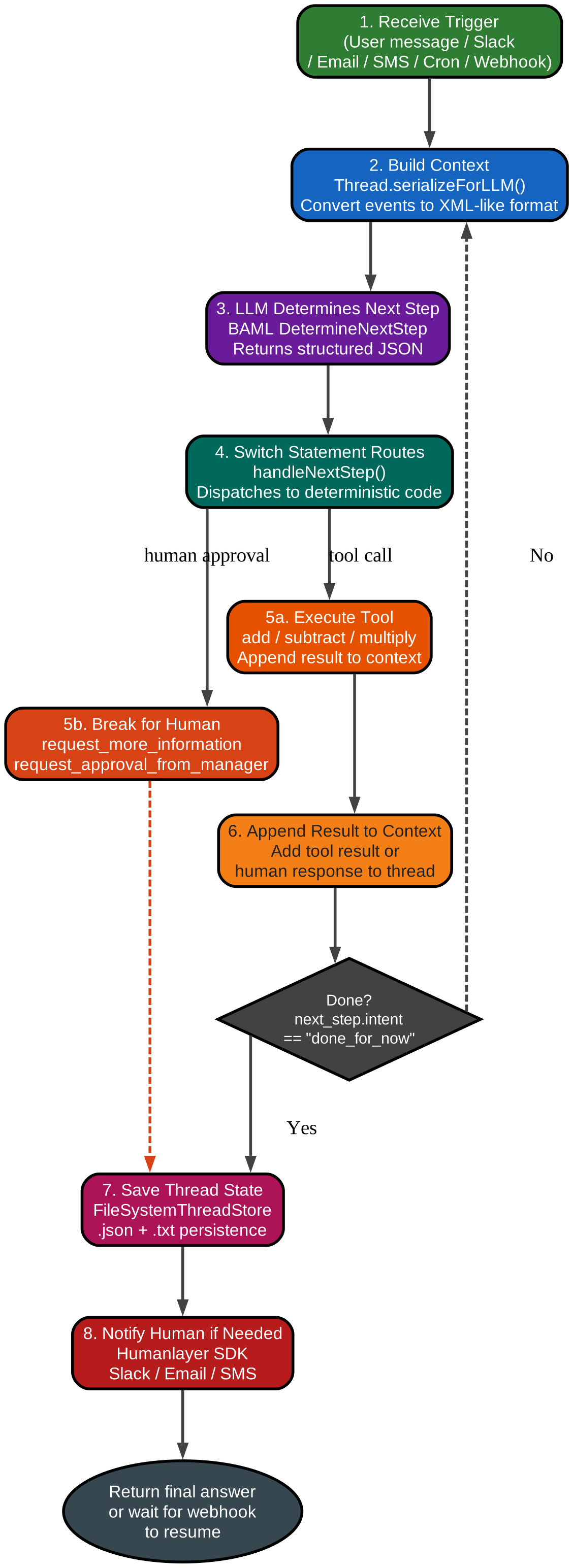
The workflow diagram above shows the step-by-step process flow of the agent loop. Step 1 receives a trigger from any source – user message, Slack, email, SMS, cron, or webhook. This is Factor 11 (trigger from anywhere) in action. Step 2 builds the context using Thread.serializeForLLM(), which converts accumulated events into XML-like format optimized for the LLM context window. Step 3 calls the BAML DetermineNextStep prompt, which takes the serialized context and returns structured JSON describing the next action.
Step 4 is the switch statement that routes the JSON output to deterministic code based on the intent field. Step 5 is the critical branching point: either execute the tool and append the result to context, or break the loop for human input or approval. This implements Factors 4 (tools are structured outputs), 7 (contact humans with tools), and 8 (own your control flow). Step 6 appends the result to the thread’s event list, whether it is a tool result or a human response.
The decision diamond checks whether next_step.intent == "done_for_now". If yes, the loop exits. If no, the loop continues from Step 2 with the updated context. Step 7 saves the thread state using FileSystemThreadStore, which persists threads as both .json for structured access and .txt for LLM readability. Step 8 notifies the human if needed, using the Humanlayer SDK to send results via Slack, email, or SMS. The process ends by returning the final answer or waiting for a webhook to resume the agent.
State Management
The FileSystemThreadStore implements Factor 5 (unify execution state and business state) and Factor 12 (stateless reducer) with a simple interface:
export interface ThreadStore {
    create(thread: Thread): Promise<string>;
    get(id: string): Promise<Thread | undefined>;
    update(id: string, thread: Thread): Promise<void>;
}

export class FileSystemThreadStore implements ThreadStore {
    async create(thread: Thread): Promise<string> {
        const id = crypto.randomUUID();
        await Promise.all([
            fs.writeFile(`${id}.json`, JSON.stringify(thread, null, 2)),
            fs.writeFile(`${id}.txt`, thread.serializeForLLM())
        ]);
        return id;
    }
}
The dual-format persistence (.json for structured access, .txt for LLM readability) is a practical implementation of Factor 3. When you need to inspect a thread programmatically, use the .json file. When you need to feed context to the LLM, use the .txt file.
Takeaway: The template code in
npx create-12-factor-agentdemonstrates every principle in action. TheThreadclass serializes events to XML-like tags for the LLM context window. TheagentLoop()function is a simple while-true loop with a switch statement – no framework lock-in. TheFileSystemThreadStoresaves threads as both.jsonfor structured access and.txtfor LLM readability. The outer loop inserver.tshandles webhooks, loads threads, runs the inner loop, and sends results back to humans via the Humanlayer SDK. This is production-grade agent architecture in under 200 lines of TypeScript.
Installation and Getting Started
Getting started with 12-Factor Agents takes minutes. The scaffold provides a complete working agent with BAML for structured outputs and Humanlayer for human-in-the-loop interactions.
Scaffold a New Agent (TypeScript)
npx create-12-factor-agent
cd my-agent
npm install
Scaffold a New Agent (Python)
uvx create-12-factor-agent
cd my-agent
pip install -r requirements.txt
Configure BAML
BAML provides type-safe structured outputs from LLM calls. The prompt definitions live in baml_src/:
# BAML prompt definition (baml_src/determine_next_step.baml)
# This defines how the LLM determines the next step
# The prompt is owned by you (Factor 2) and outputs structured JSON (Factor 1)
Configure Humanlayer
Set up your Humanlayer API key for human-in-the-loop interactions:
export HUMANLAYER_API_KEY=your_api_key_here
export HUMANLAYER_RUN_ID=my-agent
Run the Agent
npm run dev
# Server starts on port 8000
# Send a POST to /api/v1/conversations to trigger the agent
The Express server receives webhooks from Humanlayer, loads or creates a Thread, runs the inner agent loop, and sends results back to humans via Slack, email, or SMS.
Context Engineering – The Most Important Factor
Factor 3, “Own Your Context Window,” has become the most influential idea from 12-Factor Agents. The core argument is that standard message-based APIs (like the OpenAI chat format) are not the most token-efficient way to provide context to an LLM. Custom XML-like formats give you more control and use fewer tokens.
Standard vs Custom Context Formats
The standard OpenAI message format looks like this:
{"role": "system", "content": "You are a calculator agent..."}
{"role": "user", "content": "What is 5 + 3?"}
{"role": "assistant", "content": null, "tool_calls": [{"function": {"name": "add", "arguments": "{\"a\": 5, \"b\": 3}"}}]}
{"role": "tool", "content": "8"}
The 12-Factor Agents approach uses a custom XML-like format:
<conversation.created>What is 5 + 3?</conversation.created>
<add>a: 5
b: 3</add>
<tool_response>8</tool_response>
This custom format is more token-efficient because it eliminates the JSON overhead of role markers, function call wrappers, and argument serialization. It also gives you full control over what the LLM sees – you can include or exclude any information, reorder events, and add metadata that would be difficult to express in the standard format.
The Thread.serializeForLLM() Method
The serializeForLLM() method in the template code demonstrates this principle in action. It converts each event into an XML tag where the tag name is the intent and the content is the data:
serializeOneEvent(e: Event) {
    return this.trimLeadingWhitespace(`
        <${e.data?.intent || e.type}>
        ${typeof e.data !== 'object' ? e.data :
        Object.keys(e.data).filter(k => k !== 'intent')
          .map(k => `${k}: ${e.data[k]}`).join("\n")}
        </${e.data?.intent || e.type}>
    `);
}
This approach provides several key benefits:
- Information Density – XML tags are more compact than JSON role markers, reducing token usage by 30-50% in practice
- Error Handling – When the LLM makes a mistake, you can include the error in the context as
<error>...</error>for self-healing (Factor 9) - Safety – You control exactly what information the LLM sees, preventing prompt injection and information leakage
- Flexibility – You can include any type of metadata, not just the fields supported by the standard API
- Token Efficiency – Fewer tokens means lower cost, faster responses, and more room for actual content
The Karpathy and Lutke Endorsements
Andrej Karpathy, former Director of AI at Tesla and founding member of OpenAI, tweeted: “I think context engineering (not prompt engineering) is the right way to think about this.” Shopify CEO Tobi Lutke echoed the same sentiment, emphasizing that the way you structure context for LLMs matters more than the specific prompts you write.
The 12-Factor Agents project provides working code that demonstrates this principle. The Thread.serializeForLLM() method is not theoretical – it is a practical implementation that you can use in production today.
Conclusion
12-Factor Agents provides 12 principles that make LLM-powered software reliable enough for production customers. The core thesis is that good agents are mostly deterministic software with LLM steps at the right points. The anti-framework stance is not about dismissing frameworks – it is about owning the critical pieces of your agent: your prompts, your context window, and your control flow.
The project includes a working scaffold (npx create-12-factor-agent) that demonstrates every principle in under 200 lines of TypeScript. You can adopt Factor 3 (own your context window) without adopting Factor 12 (stateless reducer). Each factor stands on its own, and together they form a complete methodology for building agents that are reliable, debuggable, and scalable.
The 12 factors address the real failure modes that teams encounter when building LLM-powered software: framework lock-in, context bloat, unreliable agent loops, and the inability to get human input at the right moments. By treating agents as deterministic software with LLM decision points, you get the best of both worlds: the reliability of traditional software and the flexibility of LLM-powered decision-making.
Important: The anti-framework stance of 12-Factor Agents is not about dismissing frameworks – it is about owning the critical pieces of your agent. As Dex Horthy writes: “I don’t know what’s the best prompt, but I know you want the flexibility to be able to try EVERYTHING.” The 12 factors give you modular concepts that you can incorporate into your existing product without a greenfield rewrite. You can adopt Factor 3 (own your context window) without adopting Factor 12 (stateless reducer). Each factor stands on its own, and together they form a complete methodology for building agents that are reliable enough for production customers.
Links:
- GitHub: https://github.com/humanlayer/12-factor-agents
- Website: https://humanlayer.dev
- Discord: https://humanlayer.dev/discord
- AI Engineer Talk: https://www.youtube.com/watch?v=8kMaTybvDUw
- Original 12 Factor Apps: https://12factor.net
- Anthropic Building Effective Agents: https://www.anthropic.com/engineering/building-effective-agents

Enjoyed this post? Never miss out on future posts by following us


