9Router: Free AI Coding Router with Token Saver and Auto-Fallback
9Router is a free, open-source AI router and token saver that acts as a local proxy between AI coding CLI tools and 40+ AI providers with 100+ models. It provides a single OpenAI-compatible endpoint and intelligently routes requests with automatic fallback, format translation, and token compression – saving 20-40% on input tokens and up to 65% on output tokens. Whether you use Claude Code, Cursor, Codex, Cline, or any other AI coding tool, 9Router ensures you never stop coding because of rate limits or quota exhaustion.
The project has earned over 9,400 stars on GitHub, reflecting the developer community’s strong demand for a unified AI coding gateway that eliminates provider lock-in and maximizes the value of existing subscriptions. Built with Next.js 16, React 19, and SQLite, 9Router runs entirely on your local machine and never charges you anything – you only pay providers directly for the services you choose to use.
How 9Router Works
9Router runs as a local Next.js server on port 20128. It sits between your AI coding tools and upstream AI providers, accepting requests in any format via the /v1/chat/completions endpoint. When a request arrives, 9Router translates it to the target provider’s native format, routes it through a priority-based fallback system, compresses tool outputs using RTK filters before sending to the LLM, and streams responses back via Server-Sent Events (SSE).
Understanding the Architecture
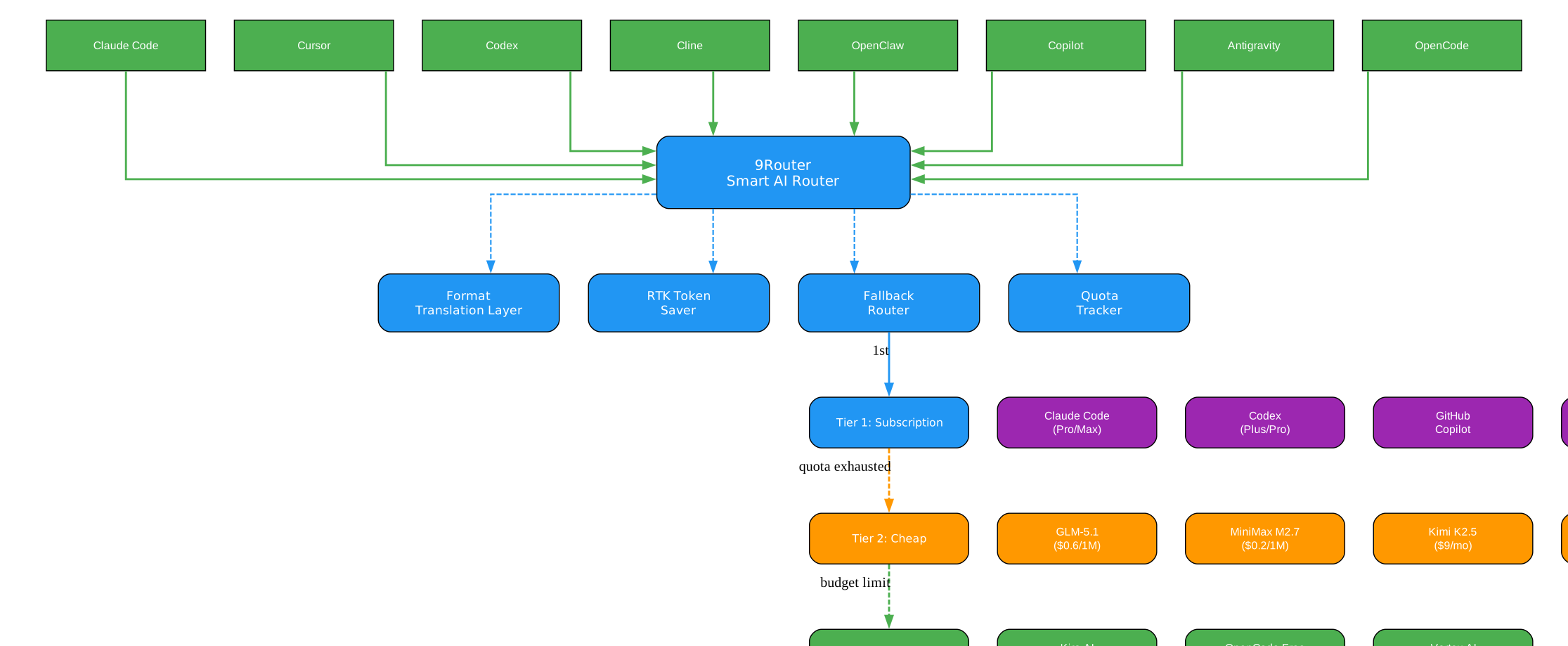
The architecture diagram above illustrates how 9Router serves as a smart gateway between AI coding tools and upstream providers. Let us break down each component and its role in the system:
AI Coding Tools (Left Side)
The left side of the diagram shows the various AI coding tools that developers use daily: Claude Code, Codex, OpenClaw, Cursor, Cline, and any OpenAI-compatible client. These tools all communicate using different API formats – Claude Code uses the Anthropic Messages API, Codex uses OpenAI Responses, Cursor uses its own format, and so on. Without 9Router, each tool requires its own provider configuration, API keys, and manual switching when quotas run out.
9Router Smart Router (Center)
The central component is 9Router itself, which exposes a single OpenAI-compatible endpoint at http://localhost:20128/v1. All coding tools point to this single URL. Inside 9Router, several critical subsystems work together:
-
Format Translation Layer: This is the first processing stage. When a request arrives in OpenAI format from Codex, it may need to be translated to Anthropic format for Claude, or to Gemini format for Vertex AI. 9Router handles this translation automatically, supporting bidirectional conversion between OpenAI, Claude, Gemini, Cursor, Kiro, Vertex, Antigravity, Ollama, and OpenAI Responses formats.
-
RTK Token Saver: Before any request is forwarded to a provider, the RTK Token Saver examines tool_result content and applies smart compression filters. Git diffs, grep results, directory listings, and log dumps are compressed losslessly, reducing the token count by 20-40% without losing any meaningful context.
-
Quota Tracking: 9Router monitors token consumption per provider in real-time, tracking 5-hour rolling windows, daily resets, and weekly limits. This information drives the fallback decisions and is displayed on the dashboard.
-
Auto Token Refresh: For OAuth-based providers like Claude Code, Codex, and Cursor, 9Router automatically refreshes tokens before they expire, eliminating the need for manual re-authentication.
Three-Tier Fallback System (Right Side)
The right side of the diagram shows the three fallback tiers. Tier 1 (Subscription) includes providers you already pay for, like Claude Code Pro, Codex Plus, and GitHub Copilot. Tier 2 (Cheap) includes budget-friendly API providers like GLM at $0.6 per million tokens and MiniMax at $0.2 per million tokens. Tier 3 (Free) includes genuinely free providers like Kiro AI, OpenCode Free, and Vertex AI with $300 credits. When a provider in a higher tier hits its rate limit or quota, 9Router automatically falls back to the next tier, ensuring zero downtime.
Data Flow
The complete request lifecycle follows this path: (1) A coding tool sends a request to localhost:20128/v1/chat/completions, (2) 9Router parses the model identifier and resolves it to a specific provider and model, (3) the RTK Token Saver compresses tool_result content, (4) the Format Translation Layer converts the request to the target provider’s native format, (5) credentials are selected from the account pool, (6) the request is sent to the upstream provider, (7) if the provider returns a 401/403 error, tokens are refreshed and the request retried, (8) if the provider returns a rate limit error, the next provider in the fallback chain is tried, (9) the response is translated back to the original format and streamed to the client via SSE.
RTK Token Saver: Cut Token Usage by 20-40%
One of 9Router’s most impactful features is the RTK Token Saver, which automatically compresses tool_result content before sending it to the LLM. Tool outputs like git diffs, grep results, directory listings, and log dumps often consume 30-50% of your prompt budget. RTK detects these outputs and applies smart, lossless compression filters.
Understanding the RTK Token Saver
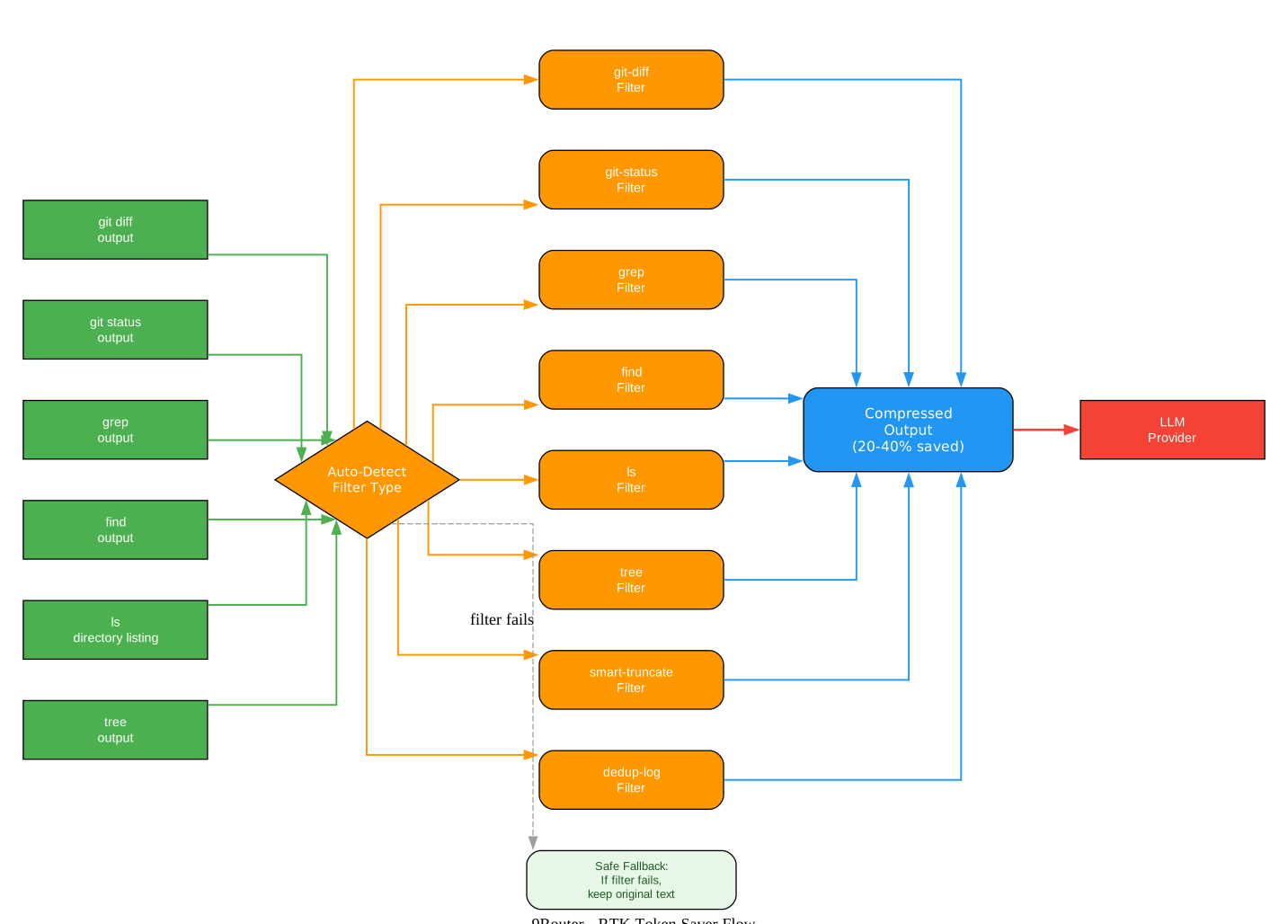
The RTK Token Saver diagram shows how tool outputs are processed before being sent to the LLM. Here is a detailed breakdown of each stage:
Tool Output Detection
When a coding tool like Claude Code or Codex executes a command (git diff, grep, ls, tree, find), the output is often verbose and repetitive. A single git diff can easily consume 10,000+ tokens, and grep results across a large codebase can be even larger. RTK intercepts these tool_result blocks before they reach the LLM.
Auto-Detection Mechanism
RTK peeks at the first 1KB of each tool_result and automatically identifies the content type. No configuration is needed – it recognizes git diffs by their diff --git header, grep output by its filename:line_number:content pattern, directory listings by their tree structure, and log dumps by their timestamp patterns. This auto-detection means RTK works out of the box with zero setup.
Compression Filters
RTK applies a suite of specialized filters, each designed for a specific content type:
-
git-diff filter: Strips line numbers, removes context lines that are unchanged, and consolidates hunks. A 47K-token diff can be reduced to 28K tokens while preserving all the information needed for the LLM to understand the changes.
-
git-status filter: Summarizes file status changes into a compact format, removing redundant path prefixes and grouping related changes.
-
grep filter: Deduplicates matching lines, removes duplicate file paths, and truncates extremely long matches while preserving the pattern context.
-
find/ls/tree filter: Collapses deep directory trees into summarized structures, removes redundant path components, and preserves the hierarchical relationships that matter for understanding the codebase.
-
dedup-log filter: Removes repeated log lines, collapses consecutive identical entries, and preserves error patterns and unique events.
-
smart-truncate filter: For content that does not match any specific filter, applies intelligent truncation that preserves the beginning and end of the content while summarizing the middle.
Safety Guarantee
A critical design principle of RTK is that it is safe by default. If any filter fails, throws an error, or produces output that is larger than the original, RTK silently keeps the original text. Errors never break your request. This means you can enable RTK with confidence – it will only ever reduce token usage, never increase it or corrupt your data.
Format Independence
RTK operates before any format translation, which means it works universally across all supported formats. Whether your tool sends requests in OpenAI, Claude, Gemini, Cursor, Kiro, or OpenAI Responses format, RTK compresses the tool_result content first, then the Format Translation Layer handles the provider-specific conversion. This architecture decision ensures that RTK savings are consistent regardless of which provider or format you use.
Key Insight: RTK Token Saver reduces a typical 47K-token request to just 28K tokens – a 40% reduction – while preserving all meaningful context. This translates directly to cost savings on paid providers and longer conversations on free tiers.
3-Tier Smart Fallback System
9Router’s 3-tier fallback system ensures you never stop coding because of rate limits or quota exhaustion. When a provider fails or hits its limit, 9Router automatically routes to the next available provider in your configured chain.
Understanding the 3-Tier Fallback
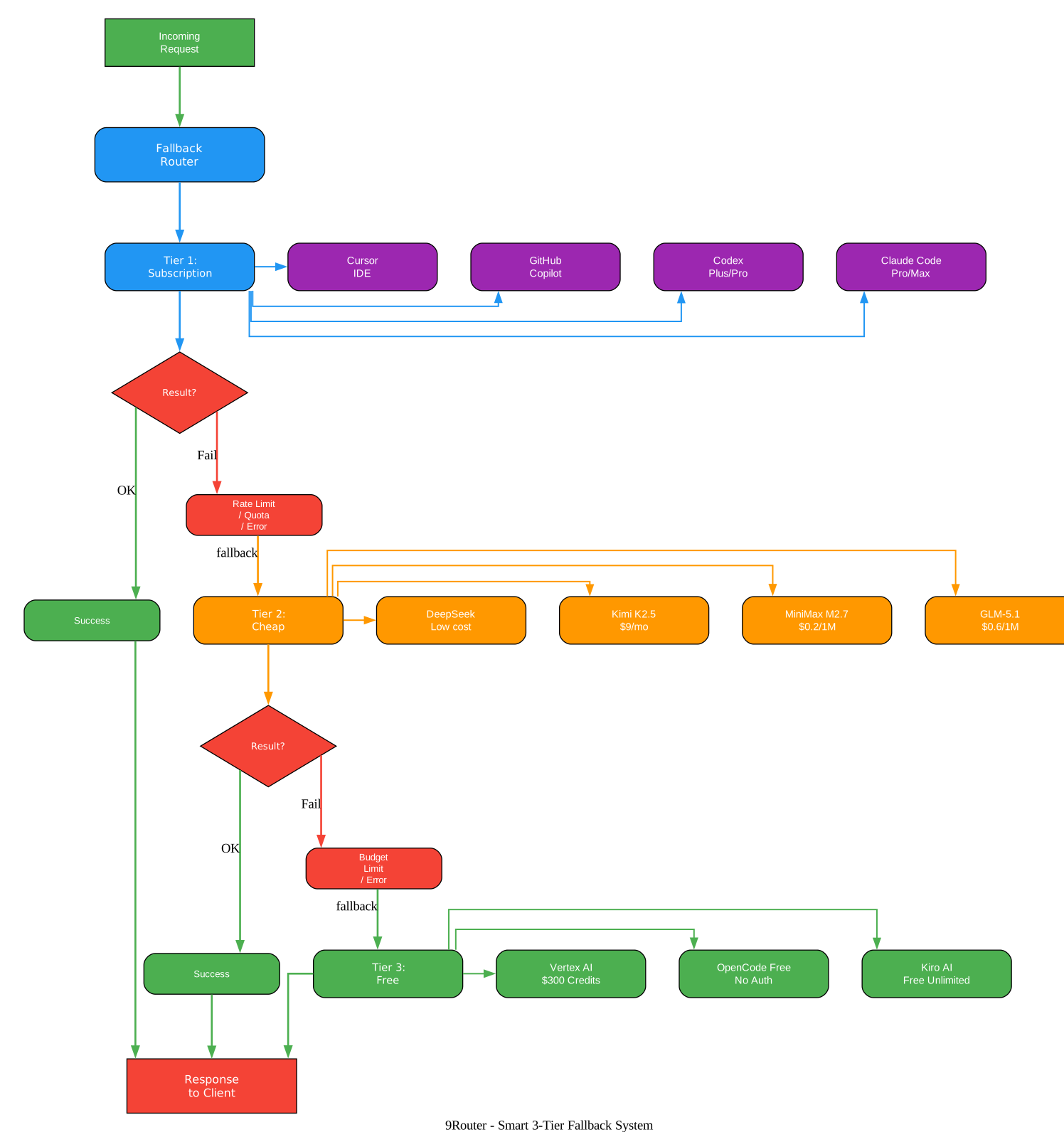
The fallback system diagram illustrates how 9Router routes requests through three priority tiers, each serving a different cost and availability profile:
Tier 1: Subscription Providers
The first tier consists of providers you already pay for through subscriptions. This includes Claude Code Pro/Max at $20-200/month, OpenAI Codex Plus/Pro at $20-200/month, GitHub Copilot at $10-19/month, and Cursor IDE at $20/month. These providers offer the best model quality and are preferred when quota is available. 9Router tracks quota in real-time with 5-hour rolling windows and weekly resets, so you always know exactly how much subscription value remains.
Tier 2: Cheap Providers
When subscription quota is exhausted, 9Router automatically falls back to cheap API providers. GLM-5.1 and GLM-4.7 cost just $0.6 per million tokens, MiniMax M2.7 costs $0.2 per million tokens, and Kimi K2.5 offers a flat $9/month plan. These providers offer good quality at a fraction of the cost, making them ideal as backup options. The fallback is seamless – your coding tool never sees an error or interruption.
Tier 3: Free Providers
The final tier consists of genuinely free providers with no hidden charges. Kiro AI offers unlimited free access to Claude 4.5, GLM-5, and MiniMax models. OpenCode Free provides no-auth passthrough with auto-fetched models. Vertex AI offers $300 in free credits for new Google Cloud accounts. These providers ensure that even if all paid options are unavailable, you can continue coding at zero cost.
Combo Configuration
9Router lets you create named “combos” that define your fallback chain. For example, a “maximize-claude” combo might use Claude Opus 4.7 as the primary, GLM-5.1 as a cheap backup, and Kiro Claude Sonnet 4.5 as a free fallback. A “free-forever” combo might use only free providers. You can create unlimited combos and switch between them based on your needs.
Multi-Account Support
Within each tier, 9Router supports multiple accounts per provider. If you have two Claude Code subscriptions, 9Router can round-robin between them, effectively doubling your available quota. When one account hits its limit, the next account is automatically used. This is particularly valuable for teams that share 9Router on a VPS.
Automatic Error Handling
The fallback system handles not just quota exhaustion but also transient errors. If a provider returns a 429 (rate limit), 503 (service unavailable), or network timeout, 9Router automatically tries the next provider in the chain. OAuth token expiration is handled separately through the auto-refresh system, which refreshes tokens before they expire to prevent unnecessary fallbacks.
Takeaway: With 9Router’s 3-tier fallback, you can create a “free-forever” combo using Kiro AI, OpenCode Free, and Vertex AI that costs $0/month while still providing access to Claude 4.5, GLM-5, and Gemini 3 Pro.
Format Translation: One Endpoint for All Providers
9Router’s Format Translation Layer is what makes it truly universal. Instead of configuring each AI coding tool for each provider’s specific API format, you point everything at 9Router’s single /v1/* endpoint and let it handle the translation.
Understanding Format Translation
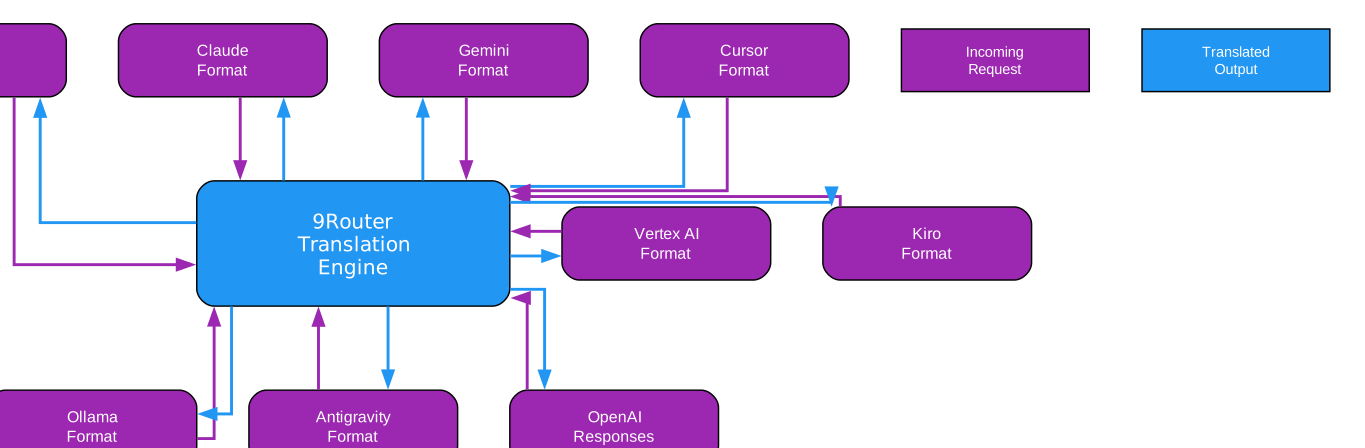
The format translation diagram shows how 9Router converts requests and responses between different AI provider formats. Here is a detailed explanation of each component:
Supported Format Pairs
9Router supports bidirectional translation between the following formats:
-
OpenAI Chat Completions: The standard
/v1/chat/completionsformat used by most AI tools. This is the input format that 9Router accepts from all coding tools. -
Anthropic Claude Messages: The
/v1/messagesformat used by Claude Code and the Anthropic API. Includes system prompts, user/assistant message turns, and tool use blocks. -
Google Gemini: The Gemini API format with its
contentsarray,generationConfig, andsafetySettingsstructures. Used when routing to Vertex AI or Google AI Studio. -
Cursor Format: Cursor IDE’s proprietary format for its AI coding features. 9Router handles the OAuth authentication and format conversion automatically.
-
Kiro Format: Kiro AI’s format for its free Claude and GLM models. Includes OAuth via AWS Builder ID, Google, or GitHub authentication.
-
OpenAI Responses: The newer OpenAI Responses API format (
/v1/responses) used by Codex and other tools. 9Router translates between this and the standard Chat Completions format. -
Ollama Format: The local model format for self-hosted LLMs. 9Router can route to local Ollama instances, providing a unified interface for both cloud and local models.
Translation Process
When a request arrives at 9Router, the translation process follows these steps:
-
Format Detection: 9Router inspects the request path and body to determine the source format. A request to
/v1/chat/completionsis OpenAI format, while/v1/messagesis Anthropic format. -
Model Resolution: The model identifier (e.g.,
cc/claude-opus-4-7) is parsed to determine the target provider (cc= Claude Code) and model name (claude-opus-4-7). -
Request Translation: The request body is transformed from the source format to the target provider’s native format. This includes converting message structures, tool definitions, system prompts, and parameters like temperature and max_tokens.
-
Response Translation: The upstream response is translated back to the source format before being streamed to the client. This ensures the coding tool receives responses in the format it expects, regardless of which provider actually processed the request.
Streaming Support
All translations support Server-Sent Events (SSE) streaming, which is critical for real-time coding assistance. 9Router translates streaming chunks on-the-fly, so you see responses appear token by token just as you would with a direct provider connection. The streaming translation handles differences in how each provider structures its SSE events, including delta formats, tool use chunks, and stop sequences.
Tool Use Translation
One of the most complex aspects of format translation is converting tool use (function calling) between providers. Claude’s tool use format differs significantly from OpenAI’s function calling format, and Gemini has its own function declaration structure. 9Router handles all these conversions, including tool result formatting, multi-tool invocations, and error handling for failed tool calls.
Amazing: 9Router supports bidirectional format translation between 9 different AI provider formats – OpenAI, Claude, Gemini, Cursor, Kiro, Vertex, Antigravity, Ollama, and OpenAI Responses – making it possible to use any coding tool with any provider through a single endpoint.
Installation and Setup
Getting started with 9Router takes just a few minutes. The simplest method is using npm:
# Install globally via npm
npm install -g 9router

# Start 9Router
9router
After starting, the dashboard opens at http://localhost:20128. From there, you can connect providers and configure your fallback chains.
Connecting a Free Provider (No Signup Needed)
Navigate to Dashboard, then Providers, then Connect Kiro AI (free Claude unlimited) or OpenCode Free (no auth required). Once connected, you can immediately start using free models.
Configuring Your CLI Tool
Point your AI coding tool to 9Router’s endpoint:
Endpoint: http://localhost:20128/v1
API Key:  [copy from dashboard]
Model:    kr/claude-sonnet-4.5
That is all you need to start coding with free AI models through 9Router.
Running from Source
If you prefer to run from source, clone the repository and set up the environment:
# Clone the repository
git clone https://github.com/decolua/9router.git
cd 9router

# Install dependencies
cp .env.example .env
npm install

# Start in development mode
PORT=20128 NEXT_PUBLIC_BASE_URL=http://localhost:20128 npm run dev

# Or start in production mode
npm run build
PORT=20128 HOSTNAME=0.0.0.0 NEXT_PUBLIC_BASE_URL=http://localhost:20128 npm run start
Docker Deployment
For server deployment, 9Router provides a Docker configuration:
# Build and run with Docker
docker build -t 9router .
docker run -p 20128:20128 9router
Default URLs after starting:
- Dashboard:
http://localhost:20128/dashboard - OpenAI-compatible API:
http://localhost:20128/v1
Key Features in Detail
| Feature | Description |
|---|---|
| RTK Token Saver | Auto-compresses tool_result content (git diff, grep, ls, tree) before sending to LLM – saves 20-40% input tokens |
| Caveman Mode | Injects terse prompt to reduce LLM output tokens by up to 65% |
| 3-Tier Smart Fallback | Auto-routes: Subscription to Cheap to Free with zero downtime |
| Real-Time Quota Tracking | Live token count and reset countdown per provider |
| Format Translation | OpenAI to Claude to Gemini to Cursor to Kiro to Vertex to Antigravity to Ollama to OpenAI Responses |
| Multi-Account Support | Round-robin between multiple accounts per provider |
| Auto Token Refresh | OAuth tokens refresh automatically, no manual re-login needed |
| Custom Combos | Create unlimited model combinations with named fallback chains |
| Request Logging | Debug mode with full request/response logs |
| Cloud Sync | Sync config across devices |
| Usage Analytics | Track tokens, cost, trends over time |
| Deploy Anywhere | Localhost, VPS, Docker, Cloudflare Workers |
| Multi-Modal | Chat, image generation, TTS, STT, embeddings, web search, web fetch |
| OIDC/SSO | Authentik, Keycloak, Google, Okta SSO login |
| MCP Bridge | stdio-to-SSE bridge for local MCP plugins |
| MITM Proxy | Built-in MITM for OAuth providers |
Use Cases
Maximize Your Subscription
If you already pay for Claude Pro ($20/month), 9Router helps you extract maximum value. Configure a combo that uses your Claude subscription first, then falls back to cheap and free providers when quota runs out:
Combo: "maximize-claude"
  1. cc/claude-opus-4-7        (your subscription)
  2. glm/glm-5.1               (cheap backup, $0.6/1M)
  3. kr/claude-sonnet-4.5      (free fallback)

Monthly cost: $20 (subscription) + ~$5 (backup) = $25 total
Zero-Cost AI Coding
For developers who want AI coding assistance at no cost, 9Router provides access to genuinely free providers:
Combo: "free-forever"
  1. kr/claude-sonnet-4.5      (Claude 4.5 free unlimited)
  2. kr/glm-5                  (GLM-5 free via Kiro)
  3. oc/<auto>                 (OpenCode Free, no auth)

Monthly cost: $0
24/7 Coding with Zero Downtime
For teams that cannot afford any interruption, 9Router provides 5 layers of fallback:
Combo: "always-on"
  1. cc/claude-opus-4-7        (best quality)
  2. cx/gpt-5.5                (second subscription)
  3. glm/glm-5.1               (cheap, resets daily)
  4. minimax/MiniMax-M2.7      (cheapest, 5h reset)
  5. kr/claude-sonnet-4.5      (free unlimited)

Result: 5 layers of fallback = zero downtime
Important: 9Router itself never charges you anything. It is free, open-source software running on your own machine. You only pay providers directly for the services you choose to use. The dashboard shows estimated costs for comparison purposes only – it is a savings tracker, not a billing system.
Pricing Overview
9Router is completely free and open source under the MIT license. The costs below are for the upstream providers you choose to connect:
| Tier | Provider | Cost | Quota Reset | Best For |
|---|---|---|---|---|
| Token Saver | RTK (built-in) | FREE | Always on | Save 20-40% tokens on every request |
| Subscription | Claude Code Pro/Max | $20-200/mo | 5h + weekly | Already subscribed users |
| Subscription | Codex Plus/Pro | $20-200/mo | 5h + weekly | OpenAI users |
| Subscription | GitHub Copilot | $10-19/mo | Monthly | GitHub users |
| Cheap | GLM-5.1 / GLM-4.7 | $0.6/1M | Daily 10AM | Budget backup |
| Cheap | MiniMax M2.7 | $0.2/1M | 5-hour rolling | Cheapest option |
| Free | Kiro AI | $0 | Unlimited | Claude 4.5 + GLM-5 + MiniMax free |
| Free | OpenCode Free | $0 | Unlimited | No auth, auto-fetch models |
| Free | Vertex AI | $300 credits | New GCP accounts | Gemini 3 Pro + DeepSeek + GLM-5 |
The optimal strategy for most developers is to combine RTK Token Saver with free providers like Kiro AI and OpenCode Free, achieving $0 monthly cost with 20-40% token savings on every request.
Supported CLI Tools and Providers
9Router works with all major AI coding tools: Claude Code, Codex, OpenClaw, Cursor, Cline, Continue, Droid, Roo, Copilot, and Kilo Code. Any tool that supports custom OpenAI-compatible endpoints can connect to 9Router.
On the provider side, 9Router supports 40+ providers across three categories:
- OAuth Providers: Claude Code, Antigravity, Codex, GitHub, Cursor – these connect via OAuth login with automatic token refresh
- Free Providers: Kiro AI (unlimited Claude 4.5 + GLM-5 + MiniMax), OpenCode Free (no auth), Vertex AI ($300 free credits)
- API Key Providers: OpenRouter, GLM, Kimi, MiniMax, OpenAI, Anthropic, Gemini, DeepSeek, Groq, xAI, Mistral, Perplexity, Together AI, Fireworks, Cerebras, Cohere, NVIDIA, SiliconFlow, and 20+ more
Technologies
9Router is built with modern web technologies:
- Runtime: Node.js 20+, Next.js 16, React 19
- Database: SQLite via better-sqlite3, sql.js, or bun:sqlite
- Streaming: Server-Sent Events (SSE) for real-time responses
- Authentication: OAuth 2.0 PKCE, JWT, OIDC/SSO support
- UI: Tailwind CSS 4, Zustand state management, Recharts analytics, Monaco Editor
- Language: JavaScript (ES2022+)
- License: MIT
Conclusion
9Router solves a fundamental problem for developers using AI coding tools: provider fragmentation, quota anxiety, and token waste. By providing a single endpoint that handles format translation, automatic fallback, and token compression, it eliminates the need to manually switch between providers or worry about rate limits. The RTK Token Saver alone can reduce your token usage by 20-40%, and the 3-tier fallback system ensures you never stop coding.
With over 9,400 GitHub stars and support for 40+ providers and 100+ models, 9Router has become the de facto standard for AI coding tool routing. Whether you want to maximize an existing subscription, go completely free, or build a zero-downtime coding pipeline, 9Router provides the infrastructure to make it happen.
Links:
- GitHub: https://github.com/decolua/9router
- npm Package: https://www.npmjs.com/package/9router
- Website: https://9router.com

Enjoyed this post? Never miss out on future posts by following us


