Understand Anything: Turn Any Codebase Into an Interactive Knowledge Graph
You just joined a new team. The codebase is 200,000 lines of code spread across dozens of directories. Where do you even start? This is the exact problem that Understand Anything solves. With 25,711 stars and climbing rapidly, this open-source tool transforms any codebase, knowledge base, or documentation into an interactive knowledge graph you can explore, search, and ask questions about.
Key Insight: Understand Anything combines deterministic Tree-sitter parsing with semantic LLM analysis to produce graphs that are reproducible on the structural side while still capturing intent on the semantic side.
What Is Understand Anything?
Understand Anything is a Claude Code Plugin that analyzes your project with a multi-agent pipeline, builds a knowledge graph of every file, function, class, and dependency, then gives you an interactive dashboard to explore it all visually. The goal is not a graph that wows you with complexity, but one that quietly teaches you how every piece fits together.
The project is built as a TypeScript monorepo with pnpm workspaces, featuring a shared analysis engine (@understand-anything/core), a React-based web dashboard (@understand-anything/dashboard), and a comprehensive skill system that supports 12+ AI coding platforms including Claude Code, Codex, Cursor, GitHub Copilot, Gemini CLI, OpenCode, Pi Agent, Vibe CLI, Hermes, Cline, and KIMI CLI.
Takeaway: With just
/understand, the tool scans your entire project, extracts structural facts, and produces a navigable knowledge graph saved to.understand-anything/knowledge-graph.json.
How the Multi-Agent Pipeline Works
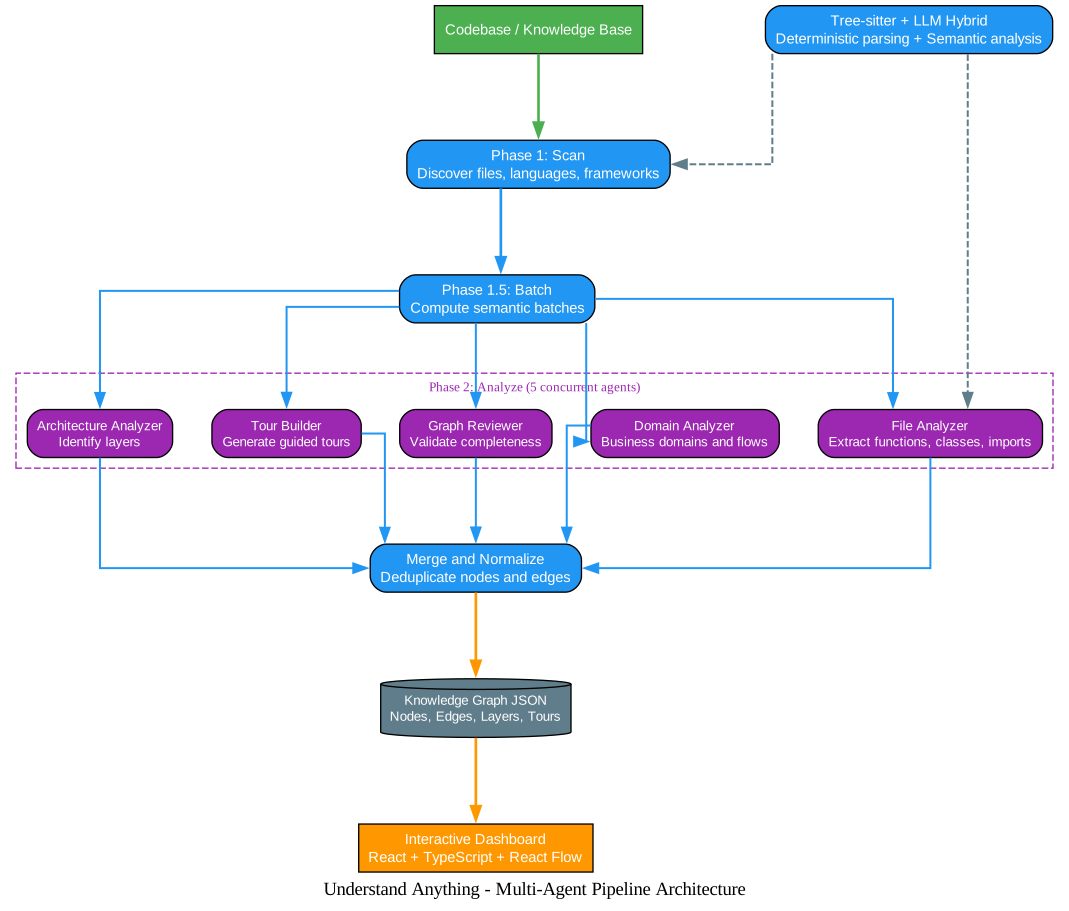
The /understand command orchestrates a 7-phase pipeline with specialized agents handling different aspects of analysis:
Understanding the Architecture
The architecture diagram above illustrates the core components and their interactions. Let’s break down each component:
Phase 1: Project Scanner The pipeline begins with the project-scanner agent, which discovers all project files, detects programming languages and frameworks, and produces a comprehensive file inventory. This agent reads the project’s README and package manifest to produce accurate project metadata, including language detection and framework identification.
Phase 1.5: Semantic Batching After scanning, the compute-batches script groups files into semantic batches based on import relationships and file proximity. This ensures that related files are analyzed together, improving the quality of cross-reference detection. The batching algorithm considers file categories (code, config, docs, infra, data, script, markup) and import map data.
Phase 2: File Analysis (5 Concurrent Agents) The heart of the pipeline runs up to 5 concurrent file-analyzer agents, each processing 20-30 files per batch. These agents extract functions, classes, imports, and produce graph nodes and edges. The concurrent execution dramatically reduces analysis time on large codebases.
Phase 4: Architecture Analysis The architecture-analyzer agent identifies architectural layers (API, Service, Data, UI, Utility) and assigns each file to its appropriate layer. This layer information powers the color-coded visualization in the dashboard.
Phase 5: Tour Builder The tour-builder agent generates guided learning tours ordered by dependency, helping new team members learn the codebase in the correct sequence. Tours start from the project entry point and follow the dependency graph.
Phase 6: Graph Review A validation step ensures graph completeness and referential integrity. The deterministic inline validator checks for dangling edges, duplicate nodes, missing required fields, and orphaned nodes.
Phase 7: Save and Fingerprint The final knowledge graph is saved as JSON, along with structural fingerprints that enable incremental updates on subsequent runs. This fingerprint-based change detection means only modified files are re-analyzed, making repeated runs nearly instantaneous.
Data Flow: The workflow begins when a user runs /understand. The scanner discovers files, the batcher groups them, analyzers extract structure in parallel, the merger combines and deduplicates results, and the final graph is validated before being saved and displayed in the dashboard.
Tree-Sitter + LLM Hybrid Analysis
Amazing: The graph is reproducible on the structural side (same code always yields the same edges) while still capturing intent on the semantic side (what a file is for, not just what it imports).
Understand Anything uses a hybrid approach that combines the strengths of deterministic parsing and semantic understanding:
| Component | Role | Output |
|---|---|---|
| Tree-sitter | Deterministic parsing of concrete syntax tree | Imports, exports, function/class definitions, call sites, inheritance |
| LLM Agents | Semantic reading of parsed structure | Plain-English summaries, tags, architectural layer assignments, business-domain mapping, guided tours |
The Tree-sitter integration uses web-tree-sitter (WASM) for cross-platform compatibility, supporting 11 languages out of the box: C, C++, C#, Go, Java, JavaScript, PHP, Python, Ruby, Rust, and TypeScript. The import map is pre-resolved during the scan phase, so file analyzers don’t need to re-derive imports from source.
Core Features
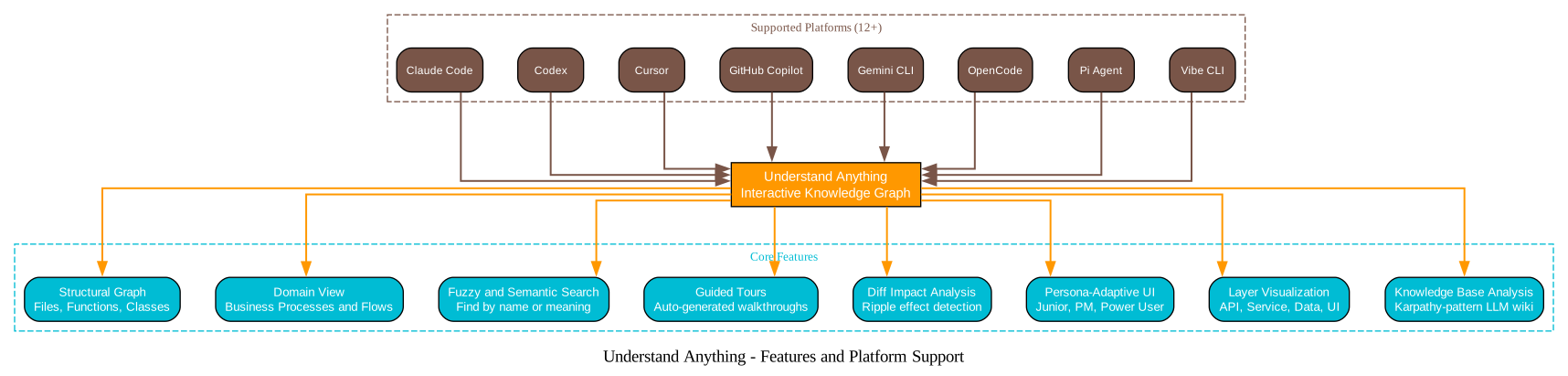
Understanding the Features
The features diagram shows the eight core capabilities and the twelve supported platforms. Let’s explore each feature:
1. Structural Graph Navigation Every file, function, and class becomes a clickable node in an interactive graph. Select any node to see its code, relationships, and a plain-English explanation. The graph is color-coded by architectural layer for immediate visual comprehension.
2. Domain View Switch to the domain view to see how your code maps to real business processes. Domains, flows, and steps are laid out as a horizontal graph, making it easy to trace how a user action propagates through the system.
3. Fuzzy and Semantic Search Find anything by name or by meaning. Search “which parts handle auth?” and get relevant results across the graph, powered by Fuse.js for fuzzy matching and LLM embeddings for semantic similarity.
4. Guided Tours Auto-generated walkthroughs of the architecture, ordered by dependency. Learn the codebase in the right order, starting from the entry point and following the natural flow of execution.
5. Diff Impact Analysis See which parts of the system your changes affect before you commit. Understand ripple effects across the codebase by analyzing which nodes depend on modified files.
6. Persona-Adaptive UI The dashboard adjusts its detail level based on who you are. Junior developers see more explanations and guided content, while power users get dense technical information. Product managers see business-domain views by default.
7. Layer Visualization Automatic grouping by architectural layer (API, Service, Data, UI, Utility) with a color-coded legend. Instantly see if your codebase follows clean architecture principles or has layer violations.
8. Knowledge Base Analysis Point /understand-knowledge at a Karpathy-pattern LLM wiki and get a force-directed knowledge graph with community clustering. The deterministic parser extracts wikilinks and categories from index.md, then LLM agents discover implicit relationships and surface claims.
Installation and Usage
Claude Code (Native Plugin)
/plugin marketplace add Lum1104/Understand-Anything
/plugin install understand-anything
One-Line Install (Other Platforms)
macOS / Linux:
curl -fsSL https://raw.githubusercontent.com/Lum1104/Understand-Anything/main/install.sh | bash
# Or specify platform:
curl -fsSL https://raw.githubusercontent.com/Lum1104/Understand-Anything/main/install.sh | bash -s codex
Windows (PowerShell):
iwr -useb https://raw.githubusercontent.com/Lum1104/Understand-Anything/main/install.ps1 | iex
Core Commands
# Analyze your codebase
/understand

# Launch the interactive dashboard
/understand-dashboard

# Ask questions about the codebase
/understand-chat How does the payment flow work?

# Analyze impact of current changes
/understand-diff

# Deep-dive into a specific file
/understand-explain src/auth/login.ts

# Generate onboarding guide
/understand-onboard

# Extract business domain knowledge
/understand-domain

# Analyze a Karpathy-pattern LLM wiki
/understand-knowledge ~/path/to/wiki

# Full rebuild (ignore existing graph)
/understand --full

# Enable auto-update on every commit
/understand --auto-update

# Generate content in Chinese
/understand --language zh
Important: The graph is just JSON. Commit it once, and teammates skip the pipeline entirely. This is excellent for onboarding, PR reviews, and docs-as-code workflows.
Technical Specifications
Knowledge Graph Schema
The tool defines 13 node types and 26 edge types for comprehensive codebase representation:
Node Types: file, function, class, module, concept, config, document, service, table, endpoint, pipeline, schema, resource
Edge Categories:
- Structural: imports, exports, contains, inherits, implements
- Behavioral: calls, subscribes, publishes, middleware
- Data flow: reads_from, writes_to, transforms, validates
- Dependencies: depends_on, tested_by, configures
- Semantic: related, similar_to
- Infrastructure: deploys, serves, provisions, triggers
Dashboard Technology Stack
The interactive dashboard is built with:
- React 19 + TypeScript
- React Flow for graph visualization
- Zustand for state management
- TailwindCSS v4 for styling
- prism-react-renderer for code viewing
- Dark luxury theme with deep blacks (#0a0a0a) and gold/amber accents (#d4a574)
Incremental Updates
Understand Anything supports incremental updates through fingerprint-based change detection:
- Baseline fingerprints are generated during the first analysis
- On subsequent runs, fingerprints are compared to detect structural changes
- Only changed files are re-analyzed
- The existing graph is patched with new results
This makes repeated analyses nearly instantaneous on large codebases.
Multi-Platform Support
| Platform | Status | Install Method |
|---|---|---|
| Claude Code | Native | Plugin marketplace |
| Codex | Supported | install.sh codex |
| Cursor | Supported | Auto-discovery |
| VS Code + Copilot | Supported | Auto-discovery |
| Copilot CLI | Supported | Plugin install |
| OpenCode | Supported | install.sh opencode |
| Gemini CLI | Supported | install.sh gemini |
| Pi Agent | Supported | install.sh pi |
| Vibe CLI | Supported | install.sh vibe |
| Hermes | Supported | install.sh hermes |
| Cline | Supported | install.sh cline |
| KIMI CLI | Supported | install.sh kimi |
Localization
The tool supports 8 languages for generated content:
- English (default)
- Chinese (Simplified and Traditional)
- Japanese
- Korean
- Russian
- Spanish
- Turkish
Use --language <lang> to generate node summaries, dashboard labels, and tour explanations in your preferred language.
Project Structure
understand-anything/
├── understand-anything-plugin/
│   ├── packages/
│   │   ├── core/          # Shared analysis engine
│   │   └── dashboard/     # React web dashboard
│   ├── src/               # Skill TypeScript source
│   ├── skills/            # Skill definitions
│   │   ├── understand/
│   │   ├── understand-chat/
│   │   ├── understand-diff/
│   │   ├── understand-explain/
│   │   ├── understand-onboard/
│   │   ├── understand-domain/
│   │   └── understand-knowledge/
│   └── agents/            # Agent definitions
│       ├── project-scanner.md
│       ├── file-analyzer.md
│       ├── architecture-analyzer.md
│       ├── tour-builder.md
│       ├── graph-reviewer.md
│       ├── domain-analyzer.md
│       └── article-analyzer.md
├── scripts/               # Utility scripts
├── tests/                  # Test suite
└── docs/                   # Implementation plans and specs
Conclusion
Understand Anything represents a significant advancement in codebase comprehension tools. By combining deterministic Tree-sitter parsing with semantic LLM analysis, it produces knowledge graphs that are both reproducible and insightful. The multi-agent pipeline scales to large codebases through concurrent processing and incremental updates, while the interactive dashboard makes complex architectures accessible to developers at all levels.
Whether you are onboarding to a new team, reviewing a pull request, or documenting an existing system, Understand Anything provides the visual context needed to move from reading code blindly to seeing the big picture.
Links:
- GitHub Repository: https://github.com/Lum1104/Understand-Anything
- Live Demo: https://understand-anything.com/demo/
- Homepage: https://understand-anything.com
- Discord Community: https://discord.gg/pydat66RY
- License: MIT

Enjoyed this post? Never miss out on future posts by following us