Qiaomu: Anything to NotebookLM - Multi-Source Content Processor
Qiaomu is a powerful multi-source content processor that transforms any content into NotebookLM-ready formats including podcasts, slide decks, mind maps, quizzes, and more. Built as a Claude Code Skill, it supports 15+ content source types and features an automatic 6-level paywall bypass cascade for 300+ paywalled news sites, making it one of the most versatile content-to-NotebookLM pipelines available.
With over 2,700 GitHub stars and growing at 438+ stars per day, Qiaomu has quickly become the go-to tool for researchers, content creators, and knowledge workers who want to convert articles, books, podcasts, and videos into digestible AI-generated formats using Google NotebookLM.
Understanding the Architecture
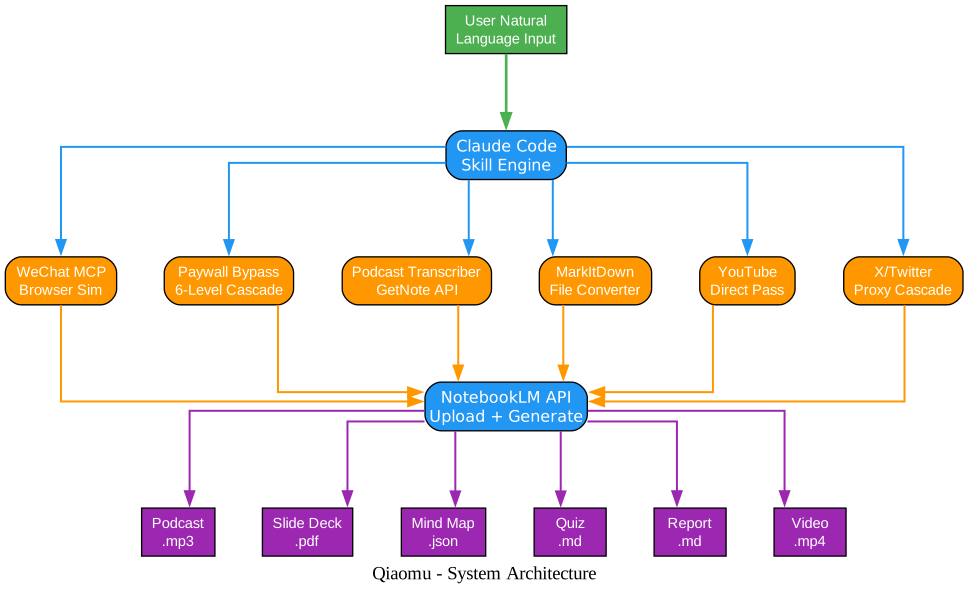
The architecture diagram above illustrates how Qiaomu orchestrates content from diverse sources through a unified processing pipeline into Google NotebookLM. Let’s break down each component:
User Input Layer The entry point is natural language input. Users simply describe what they want in plain language - for example, “turn this paywalled article into a podcast” or “make a mind map from this YouTube video.” The Claude Code Skill engine interprets the intent and routes to the appropriate content handler.
Content Source Handlers Six specialized handlers manage different content types:
- WeChat MCP Browser Sim - Uses Playwright-based browser automation via an MCP (Model Context Protocol) server to scrape WeChat Official Account articles, bypassing anti-crawler protections
- Paywall Bypass 6-Level Cascade - A sophisticated multi-strategy system that automatically detects and circumvents paywalls on 300+ news sites including NYT, WSJ, FT, and Bloomberg
- Podcast Transcriber (GetNote API) - Connects to the GetNote API to transcribe audio from Chinese podcast platforms (Xiaoyuzhou, Ximalaya) and Bilibili videos
- MarkItDown File Converter - Leverages Microsoft’s markitdown library to convert Office documents (DOCX, PPTX, XLSX), PDFs, images (with OCR), and audio files into Markdown
- YouTube Direct Pass - Passes YouTube URLs directly to NotebookLM, which natively supports YouTube content extraction - no manual subtitle downloading needed
- X/Twitter Proxy Cascade - Uses a cascading proxy approach (r.jina.ai, defuddle.md, agent-fetch) to fetch tweet content including long threads
NotebookLM API Layer All content flows into the NotebookLM API, which handles upload, processing, and AI-powered generation of the target format. NotebookLM maintains conversation context across queries, enabling progressive deep-analysis workflows.
Output Formats NotebookLM generates eight distinct output formats: podcasts (.mp3), slide decks (.pdf), mind maps (.json), quizzes (.md), videos (.mp4), reports (.md), infographics (.png), and flashcards (.md).
Key Insight: Qiaomu’s architecture separates content acquisition from content generation, allowing each source handler to specialize in its domain while the NotebookLM API handles all AI-powered generation uniformly. This design means adding a new content source only requires a new handler - no changes to the generation pipeline.
How It Works
Qiaomu operates as a Claude Code Skill, meaning it integrates directly into the Claude Code AI assistant workflow. When you give Claude a natural language instruction involving content and a desired output format, the Skill automatically:
- Detects the content source type from the URL pattern or file extension
- Fetches the content using the appropriate handler (with paywall bypass if needed)
- Converts to a compatible format (TXT or Markdown) for NotebookLM upload
- Uploads to NotebookLM via the
notebooklmCLI - Generates the target format based on your intent (podcast, PPT, mind map, etc.)
- Downloads the output to your local machine
Understanding the Content Processing Pipeline
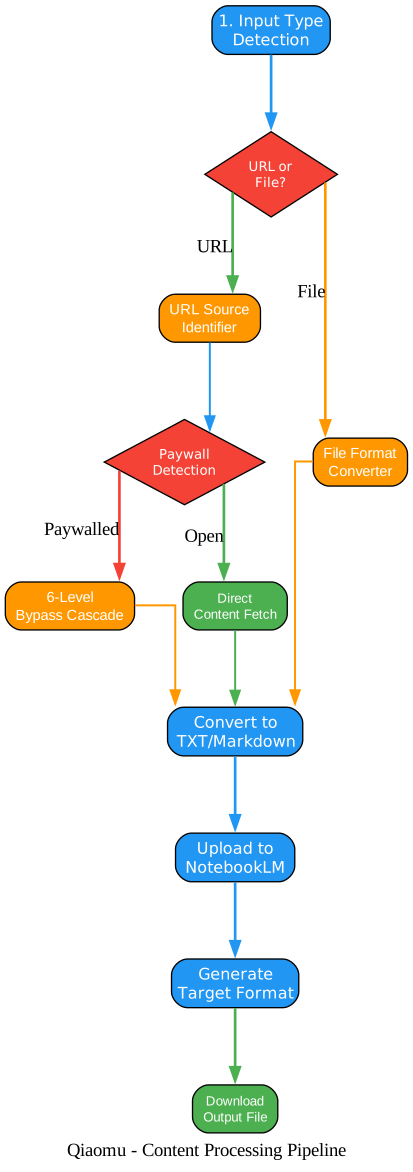
The pipeline diagram shows the step-by-step decision flow that Qiaomu follows for every input. Here is a detailed breakdown:
Step 1: Input Type Detection The detect_input_type() function in main.py examines the input to classify it. URL patterns are matched against known domains (WeChat, YouTube, Xiaoyuzhou, X/Twitter), while file extensions map to document types (EPUB, PDF, Office, image, audio, ZIP). If the input is neither a URL nor an existing file path, it is treated as a search keyword query.
Step 2: URL or File Decision The pipeline branches based on whether the input is a URL or a local file. URLs go through the URL Source Identifier, which matches against known platform patterns. Files go through the File Format Converter, which uses markitdown or ebooklib to extract text content.
Step 3: Paywall Detection (URLs only) For URLs, the system checks whether the domain is in the paywall database. If paywalled, the 6-Level Bypass Cascade is activated. If the content is openly accessible, it is fetched directly.
Step 4: 6-Level Bypass Cascade This is Qiaomu’s most sophisticated feature. The cascade tries strategies in order of reliability:
- Level 1: Proxy services (r.jina.ai, defuddle.md)
- Level 2: Site-specific bot UA (Googlebot for ~50 sites, Bingbot for ~4 sites)
- Level 3: Generic bypass (UA spoofing, Referer spoofing, AMP pages, EU IP)
- Level 4: archive.today with CAPTCHA detection
- Level 5: Google Cache
- Level 6: agent-fetch local tool
Each level checks for valid content (more than 8 lines, more than 500 characters, no paywall indicators). If a level succeeds, the content is returned immediately. If it fails, the next level is tried.
Step 5: Convert to TXT/Markdown All content, regardless of source, is normalized to plain text or Markdown format. This ensures compatibility with NotebookLM’s source upload API.
Step 6-8: Upload, Generate, Download The normalized content is uploaded to NotebookLM, the target format is generated, and the output file is downloaded locally.
Takeaway: The 6-level paywall bypass cascade is the most technically impressive component. It implements strategies from the Bypass Paywalls Clean browser extension as a server-side script, using techniques like Googlebot UA spoofing (websites whitelist search engine crawlers for SEO), JSON-LD articleBody extraction (many sites embed full article text in structured data for search engines), and AMP page redirects (AMP versions often lack paywall implementations).
Supported Content Sources (15+ Types)
Qiaomu supports an impressive range of content sources, organized into five categories:
| Category | Sources | Handling Method |
|---|---|---|
| Social Media | WeChat Official Accounts, X/Twitter | MCP browser sim / Proxy cascade |
| Video/Audio | YouTube, Bilibili, Xiaoyuzhou, Ximalaya | Direct pass / GetNote API |
| Web Pages | 300+ paywalled sites, any public URL | 6-level bypass cascade |
| Documents | PDF, EPUB, DOCX, PPTX, XLSX, MD, TXT | markitdown / ebooklib |
| Media | Images (JPEG/PNG), Audio (WAV/MP3), ZIP archives | OCR / Transcription / Batch |
Understanding Content Sources and Output Formats
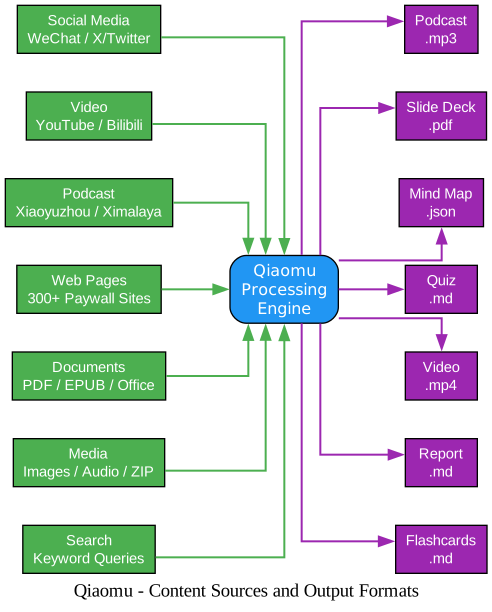
This diagram visualizes the breadth of Qiaomu’s capabilities, showing how 7 categories of content sources flow through the processing engine into 7 distinct output formats. Key observations:
Content Source Diversity The left column shows the full spectrum of supported inputs. Notable entries include:
- WeChat / X/Twitter - These platforms have aggressive anti-scraping measures, requiring specialized handlers (MCP browser simulation for WeChat, proxy cascades for Twitter)
- 300+ Paywall Sites - Covers major US, UK, German, French, Australian, and Chinese media outlets
- Podcast platforms - Chinese podcast services (Xiaoyuzhou, Ximalaya) are specifically supported through the GetNote API
- Search queries - Even plain text keywords can be used as input, with the system performing web searches and aggregating results
Output Format Range The right column shows all available output formats. Each format is triggered by natural language intent mapping:
- “Generate podcast” triggers audio generation (.mp3)
- “Make a PPT” triggers slide deck generation (.pdf)
- “Draw a mind map” triggers mind map generation (.json)
- “Generate a quiz” triggers quiz generation (.md)
- “Make a video” triggers video generation (.mp4)
- “Generate a report” triggers report generation (.md)
- “Make flashcards” triggers flashcard generation (.md)
Processing Engine The central engine handles intelligent routing, format conversion, and NotebookLM API interaction. It also supports multi-source aggregation - you can combine multiple content sources (e.g., an article + a YouTube video + a PDF) into a single NotebookLM notebook for comprehensive analysis.
Amazing: The paywall bypass supports 300+ sites across 6 countries, including NYT, WSJ, Bloomberg, FT, The Economist, Spiegel, Le Monde, and more. The 6-level cascade strategy means that even if one bypass method fails, the system automatically tries the next approach until content is retrieved.
Installation
Prerequisites
- Python 3.9+
- Git
Setup
# 1. Clone to Claude skills directory
cd ~/.claude/skills/
git clone https://github.com/joeseesun/qiaomu-anything-to-notebooklm
cd qiaomu-anything-to-notebooklm

# 2. One-click install all dependencies
./install.sh

# 3. Configure MCP, then restart Claude Code
NotebookLM Authentication
# First-time authentication (only needed once)
notebooklm login
notebooklm list  # Verify authentication succeeded
Optional: Podcast Transcription
For Chinese podcast/video platforms (Xiaoyuzhou, Ximalaya, Bilibili):
export GETNOTE_API_KEY="your_api_key"
export GETNOTE_CLIENT_ID="your_client_id"
Environment Check
python check_env.py # 13-item comprehensive check
Usage Examples
Paywalled Article to Podcast
You: Turn this The Information article into a podcast https://www.theinformation.com/articles/...

AI automatically executes:
  [OK] Detect paywall -> Googlebot UA bypass
  [OK] Fetch full article content
  [OK] Upload to NotebookLM
  [OK] Generate podcast

Result: /tmp/article_podcast.mp3
Podcast (Xiaoyuzhou) to Slide Deck
You: Make a PPT from this Xiaoyuzhou podcast https://xiaoyuzhoufm.com/episode/...

AI automatically executes:
  [OK] GetNote API transcribes audio (2-5 minutes)
  [OK] Upload transcript to NotebookLM
  [OK] Generate slide deck

Result: /tmp/podcast_slides.pdf (25 pages)
EPUB Book to Deep Analysis
You: Deeply analyze this book /Users/joe/Books/sapiens.epub

AI automatically executes:
  [OK] Extract EPUB full text
  [OK] Upload to NotebookLM
  [OK] Generate 12 questions (3 progressive rounds)
  [OK] Ask questions sequentially with context retention
  [OK] Output structured JSON

Result: /tmp/sapiens_analysis.json
X/Twitter Thread to Mind Map
You: Make a mind map from this tweet thread https://x.com/user/status/123...

AI automatically executes:
  [OK] Proxy cascade fetches tweet content (including full thread)
  [OK] Upload to NotebookLM
  [OK] Generate mind map

Result: /tmp/tweet_mindmap.json
Multi-Source to Report
You: Combine these into a report:
  1. https://example.com/article
  2. https://youtube.com/watch?v=xyz
  3. /Users/joe/Documents/research.pdf

AI automatically executes:
  [OK] Create new Notebook
  [OK] Add 3 sources sequentially
  [OK] Generate report from all sources

Result: /tmp/multi_source_report.md
Deep Analysis Mode
One of Qiaomu’s most powerful features is the progressive deep-analysis mode. When you request a “deep analysis,” the system generates questions in three progressive rounds:
| Round | Questions | Purpose | Example Focus |
|---|---|---|---|
| Round 1: Overview | 4 | Build overall understanding | Core theme, structure, key arguments, surprising content |
| Round 2: Deep Dig | 5 | Probe details and contradictions | Argument logic, evidence quality, internal contradictions, sharpest criticism |
| Round 3: Synthesis | 3 | Cognitive upgrade | Biggest takeaway, actionable advice, compelling recommendation |
Important: NotebookLM maintains conversation context within a session, meaning later rounds automatically benefit from earlier answers. This creates a genuine progressive deepening of analysis - not just independent Q&A pairs, but a coherent investigation that builds understanding layer by layer.
The deep analysis can also output to Feishu (Lark) documents automatically with the --to-feishu flag:
python main.py ./book.epub --deep-analysis --to-feishu
Paywall Bypass: Technical Deep Dive
The paywall bypass system in scripts/fetch_url.sh is a 380-line Bash script implementing 6 cascading strategies. Here is how each level works:
Level 1: Proxy Services
- r.jina.ai - A web reader proxy that returns clean Markdown. Often bypasses soft paywalls because the request comes from a different IP.
- defuddle.md - Similar proxy with YAML frontmatter output.
Level 2: Site-Specific Bot UA
- Googlebot UA - Spoofs the
Googlebot/2.1user agent withX-Forwarded-For: 66.249.66.1(a real Google IP). Websites whitelist Googlebot for SEO, serving full article content. Works for ~50 sites including WSJ, FT, Economist, and Spiegel. - Bingbot UA - Similar approach using Bing’s crawler identity. Works for ~4 sites where Bingbot is whitelisted but Googlebot is not (Haaretz, NZ Herald).
Level 3: Generic Bypass
- Referer Spoofing - Sets the
Refererheader tohttps://www.google.com/orhttps://www.facebook.com/, exploiting social referral exemptions where sites allow free access to traffic from social media. - AMP Pages - Redirects to AMP versions of articles (e.g.,
/amp,?outputType=amp), which typically have weaker or no paywall implementations. Works for ~10 sites. - EU IP Spoofing - Uses
X-Forwarded-Forwith a random European IP address, exploiting GDPR-mandated content access requirements. - JSON-LD Extraction - Extracts the
articleBodyfield from<script type="application/ld+json">tags embedded in HTML. Many sites include full article text in structured data for search engine indexing.
Level 4: archive.today
- Fetches from archive.today’s cached version of the page.
- Includes CAPTCHA detection - if a CAPTCHA is encountered, the script exits with code 75 and prompts the user to solve it manually in a browser.
Level 5: Google Cache
- Attempts to retrieve the page from Google’s web cache.
Level 6: agent-fetch
- Last resort: uses the
npx agent-fetchlocal tool for content extraction.
Output Formats
| Format | File Type | Generation Time | Best For |
|---|---|---|---|
| Podcast | .mp3 | 2-5 min | Commute learning, audio consumption |
| Slide Deck | 1-3 min | Team presentations, teaching | |
| Mind Map | .json | 1-2 min | Visual understanding, brainstorming |
| Quiz | .md | 1-2 min | Self-testing, knowledge retention |
| Video | .mp4 | 3-8 min | Visual storytelling, social sharing |
| Report | .md | 1-3 min | Deep analysis, documentation |
| Infographic | .png | 1-3 min | Data visualization, quick overview |
| Flashcards | .md | 1-2 min | Spaced repetition, memorization |
Project Structure
qiaomu-anything-to-notebooklm/
  SKILL.md              # Skill definition (YAML + instructions)
  README.md             # Documentation
  main.py               # CLI entry point with input detection
  install.sh            # One-click dependency installer
  check_env.py          # 13-item environment checker
  package.sh            # Package for sharing
  requirements.txt      # Python dependencies
  LICENSE               # MIT License
  scripts/
    fetch_url.sh         # URL fetcher + 6-level paywall bypass
    get_podcast_transcript.py  # Podcast/video transcription via GetNote API
  feishu-read-mcp/       # Feishu document MCP server
    src/
      server.py          # MCP entry point
      scraper.py         # Feishu document fetcher
      parser.py          # HTML to Markdown converter
      image_handler.py   # Image processing
Troubleshooting
| Issue | Solution |
|---|---|
| MCP tool not found | Run pip install -r requirements.txt and playwright install chromium in the wexin-read-mcp directory |
| NotebookLM auth failed | Run notebooklm login to re-authenticate, then notebooklm list to verify |
| Paywall bypass failed | Some hard paywalls (e.g., The Information) require archive.today. The script auto-detects CAPTCHA and opens browser for manual verification |
| Content too short/long | Optimal range is 1,000-10,000 characters. Minimum ~500 chars, maximum ~500,000 chars |
| Generation task stuck | Check notebooklm artifact list. Tasks pending over 10 minutes may need cancellation via the web interface |
Conclusion
Qiaomu stands out as a uniquely powerful content-to-NotebookLM pipeline that solves a real problem: the fragmentation of content sources and the manual effort required to convert diverse formats into NotebookLM-ready inputs. Its 6-level paywall bypass cascade, support for 15+ content types, and progressive deep-analysis mode make it an indispensable tool for researchers, content creators, and knowledge workers.
The project’s rapid growth (2,700+ stars, 438+ per day) reflects the strong demand for tools that bridge the gap between the vast world of online content and Google NotebookLM’s powerful AI generation capabilities. Whether you want to listen to paywalled articles during your commute, create slide decks from podcast episodes, or perform deep progressive analysis of books, Qiaomu provides an elegant, natural-language-driven solution.
Links:
- GitHub: joeseesun/qiaomu-anything-to-notebooklm
- Google NotebookLM: notebooklm.google.com

Enjoyed this post? Never miss out on future posts by following us


