Introduction
IPTV-Org is the world’s largest collection of publicly available IPTV channels, providing free access to over 10,000 television streams from 200+ countries in 200+ languages. With 121,000+ GitHub stars and 34,000+ commits, this community-driven project organizes M3U playlists by country, language, and category, complete with a REST API, EPG support, and automated daily updates via GitHub Actions. Whether you want to watch news from the UK, sports from the US, or entertainment from Japan, iptv-org free IPTV channels make it as simple as pasting a URL into VLC.
The project addresses a real problem: finding reliable, free, publicly available TV streams online is fragmented and difficult. Broadcasters around the world make their streams publicly accessible, but discovering and organizing these streams requires significant effort. IPTV-Org solves this by aggregating links to publicly available streams into well-organized M3U playlists, backed by a structured database, a REST API for developers, and an automated pipeline that validates and updates everything daily.
Key Insight: With over 121,000 GitHub stars and 34,000+ commits, iptv-org is not just a playlist repository – it is the largest community-driven effort to organize publicly available television streams from around the world, complete with a structured database, REST API, and automated daily updates via GitHub Actions.
What is IPTV and Why It Matters
IPTV stands for Internet Protocol television – the delivery of television content over IP networks rather than through traditional terrestrial, satellite, or cable broadcast formats. As internet connectivity has expanded globally, more broadcasters have chosen to make their streams publicly accessible online, enabling viewers to watch live TV from anywhere in the world.
The shift from broadcast to streaming has fundamentally changed how people access television content. Traditional broadcast methods are limited by geography and infrastructure, but IPTV streams can be accessed from anywhere with an internet connection. Many national broadcasters, news organizations, and educational institutions intentionally make their streams publicly available to reach wider audiences.
IPTV-Org plays an important role in this ecosystem by indexing only links to streams that are publicly available. No video files are stored in the repository – it contains only M3U playlist files that reference stream URLs that broadcasters have themselves made accessible. The project maintains a clear legal stance: if any links infringe on copyright, they can be removed through the project’s issue tracker.
The challenge that IPTV-Org addresses is organizational: these publicly available streams are scattered across the internet, with no central index or standardized format. By collecting, validating, and organizing them into M3U playlists grouped by country, language, and category, IPTV-Org makes it straightforward for anyone to find and watch publicly available television from around the world.
The IPTV-Org Ecosystem
The IPTV-Org project is not a single repository but an interconnected ecosystem of four specialized repositories, each with a clear responsibility. This modular architecture ensures that the system is maintainable, community-friendly, and reliable.
iptv-org/iptv is the main playlist repository with 121K+ GitHub stars. It contains the M3U playlists organized by country, language, and category, along with the GitHub Actions workflow that automates daily updates. This is the repository that most users interact with directly.
iptv-org/database stores all channel metadata in CSV format, including channel names, countries, languages, categories, and stream URLs. With 1.4K stars and 7,767+ commits, it is the structured backbone of the entire ecosystem. The CSV files are editable with any spreadsheet application, making it easy for community members to contribute corrections and additions.
iptv-org/api provides a REST API for programmatic access to the channel data. With 740 stars, it exposes endpoints for channels, streams, feeds, logos, guides, categories, languages, countries, and more. Developers can query this API to build custom applications, integrations, and tools.
iptv-org/epg offers tools for downloading Electronic Program Guide data from hundreds of sources. It supports Docker deployment, parallel downloading, custom channel lists, and scheduled execution via cron. This enables users to see what is currently airing and what is coming up next on their favorite channels.
iptv-org/awesome-iptv is a curated list of IPTV-related resources, including compatible players, tools, and related projects.
The data flows through this ecosystem in a clear pipeline: community contributions are submitted to the database repository, which feeds into the playlist generation process in the main iptv repository. The automated pipeline then validates, generates, and deploys the playlists to GitHub Pages, while also exporting stream data to the API repository. The EPG tools pull channel information from the database to download program guides.
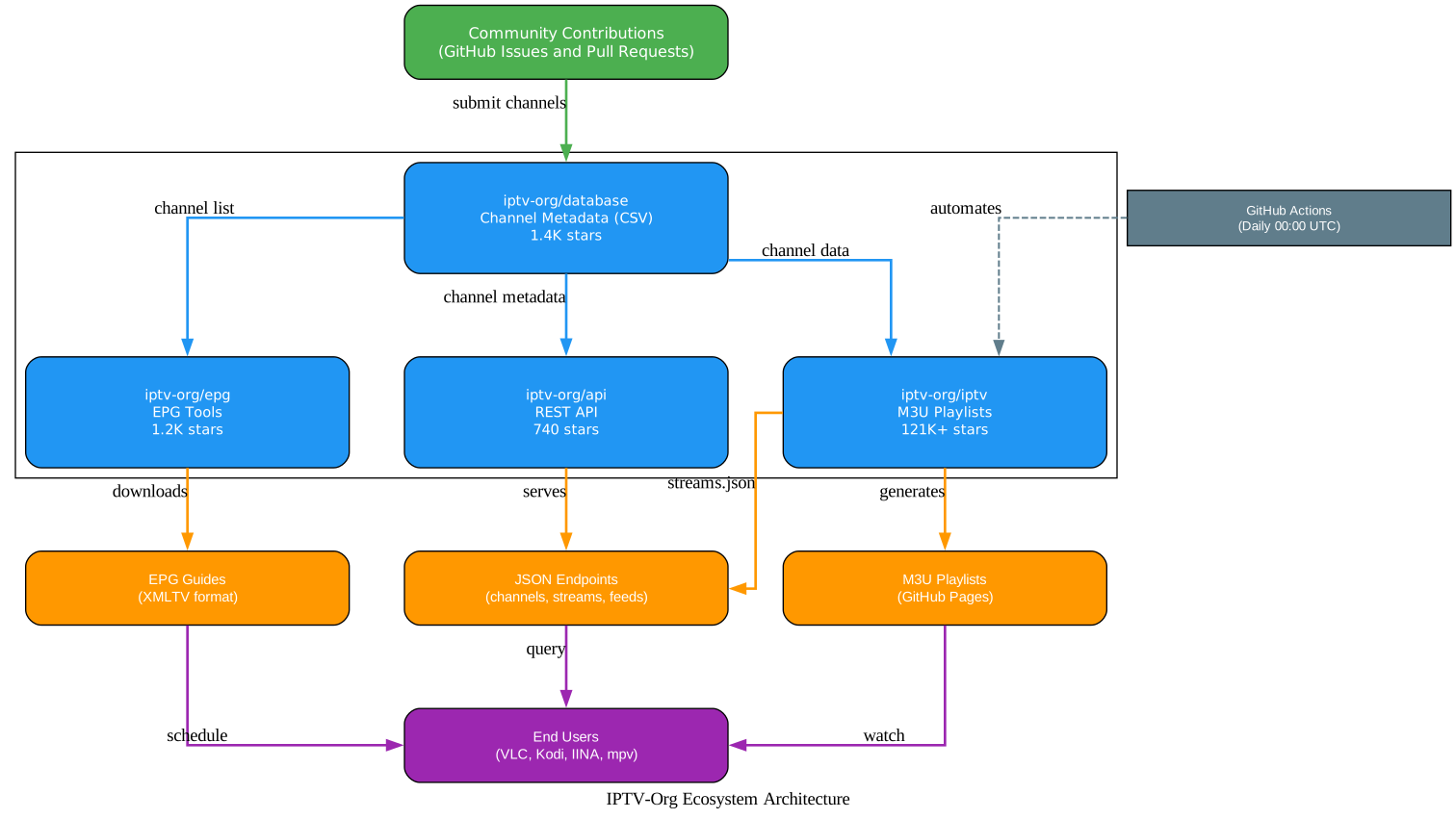
The diagram above illustrates the complete IPTV-Org ecosystem architecture. At the top, community contributions flow in through GitHub issues and pull requests into the database repository. The database then distributes channel metadata to three downstream repositories: the main iptv repository for playlist generation, the API repository for programmatic access, and the EPG repository for program guide data. GitHub Actions automates the entire pipeline in the iptv repository, generating M3U playlists that are deployed to GitHub Pages and stream data that is deployed to the API. End users access the content through multiple channels: M3U playlists via VLC, Kodi, and other players; JSON endpoints via the API; and XMLTV guides from the EPG tools.
Takeaway: The iptv-org ecosystem is a masterclass in open-source infrastructure design. By separating concerns into four specialized repositories – database, playlists, API, and EPG – the project achieves modularity, community contribution ease, and automated reliability that a monolithic approach could never match.
How to Use IPTV-Org Playlists
The simplest way to use IPTV-Org is to paste a playlist URL into any M3U-compatible video player. The playlists are hosted on GitHub Pages and are freely accessible without authentication or registration.
Compatible players include VLC Media Player, Kodi, IINA (macOS), mpv, and hundreds of other applications listed in the awesome-iptv repository. VLC is the most popular choice and provides a straightforward experience.
Watching Channels in VLC
- Open VLC Media Player
- Go to Media > Open Network Stream
- Paste the playlist URL
- Click Play
The main playlist containing all channels is available at:
https://iptv-org.github.io/iptv/index.m3u
You can also access playlists organized by category, language, or country:
# Watch all English-language channels in VLC
vlc https://iptv-org.github.io/iptv/languages/eng.m3u

# Watch all news channels
vlc https://iptv-org.github.io/iptv/categories/news.m3u

# Watch all channels from the United States
vlc https://iptv-org.github.io/iptv/countries/us.m3u
Playlist URL Patterns
| Type | URL Pattern | Example |
|---|---|---|
| All channels | https://iptv-org.github.io/iptv/index.m3u | All 10,000+ channels |
| By category | https://iptv-org.github.io/iptv/categories/{name}.m3u | categories/news.m3u |
| By language | https://iptv-org.github.io/iptv/languages/{code}.m3u | languages/eng.m3u |
| By country | https://iptv-org.github.io/iptv/countries/{code}.m3u | countries/us.m3u |
| Grouped by category | https://iptv-org.github.io/iptv/index.category.m3u | Single file, grouped |
| Grouped by language | https://iptv-org.github.io/iptv/index.language.m3u | Single file, grouped |
Playlist Categories and Organization
IPTV-Org organizes over 10,000 channels across 30 content categories, 200+ languages, and 200+ countries. Each channel in the database has metadata including its country, language, and category, which is used to generate the various playlist groupings.
Content Categories
The 30 content categories cover a wide range of programming:
| Category | Channels | Category | Channels |
|---|---|---|---|
| General | 2,427 | Education | 236 |
| News | 950 | Kids | 255 |
| Religious | 726 | Documentary | 143 |
| Music | 676 | Legislative | 180 |
| Entertainment | 634 | Lifestyle | 105 |
| Movies | 437 | Culture | 169 |
| Sports | 373 | Comedy | 74 |
| Series | 252 | Business | 72 |
| Undefined | 4,203 | Shop | 78 |
Top Languages
With 200+ language-specific playlists, the most popular languages include:
- English: 2,292 channels
- Russian: 429 channels
- French: 422 channels
- Arabic: 353 channels
- Hindi: 343 channels
- Portuguese: 320 channels
- German: 295 channels
- Italian: 288 channels
Country Playlists
Over 200 country-specific playlists are available, from major markets like the United States, United Kingdom, and Germany to smaller nations and territories. Each country playlist contains only channels that broadcast from or are available in that country.

The diagram above shows how the channel database serves as the central hub, with three branching paths for organizing content. The left branch filters by country, producing 200+ country-specific playlists such as us.m3u for the United States, uk.m3u for the United Kingdom, and de.m3u for Germany. The center branch filters by language, producing 200+ language-specific playlists with the top languages being English (2,292 channels), Russian (429), French (422), and Arabic (353). The right branch filters by category, producing 30 category-specific playlists covering News (950), Music (676), Entertainment (634), Sports (373), and more. At the bottom, three combined playlists provide access to all channels: index.m3u contains every channel, index.category.m3u groups all channels by category, and index.language.m3u groups all channels by language.
Automated Stream Validation and Daily Updates
One of the most impressive aspects of IPTV-Org is its fully automated pipeline that runs daily via GitHub Actions. This pipeline ensures that playlists are always up-to-date, invalid streams are removed, and new community contributions are processed – all without manual intervention.
The pipeline triggers every day at 00:00 UTC (and can also be triggered manually via workflow dispatch). Here is the complete 13-step process:
- Trigger: GitHub Actions cron at 00:00 UTC (or manual dispatch)
- Checkout: Clone the repository
- Setup: Install Node.js 22 and npm dependencies
- Update: Process community contributions (new channels, updates, removals) via
npm run playlist:update - Lint: Validate M3U format via
npm run playlist:lintusing the m3u-linter configuration - Validate: Check stream URLs for accessibility via
npm run playlist:validate - Generate: Create public M3U playlists organized by country, language, and category via
npm run playlist:generate - Export: Create streams.json for the API via
npm run playlist:export - Update README: Refresh statistics in the README via
npm run readme:update - Commit: Git commit changes to /streams and PLAYLISTS.md (only if there are processed issues)
- Push: Push all changes to the master branch
- Deploy GitHub Pages: Deploy playlists to the gh-pages branch for public access
- Deploy API: Deploy streams.json to the iptv-org/api repository
The M3U linter enforces strict formatting rules defined in m3u-linter.json, including requirements for headers, titles, info attributes, and stream links. This ensures that all playlists maintain a consistent, machine-readable format.
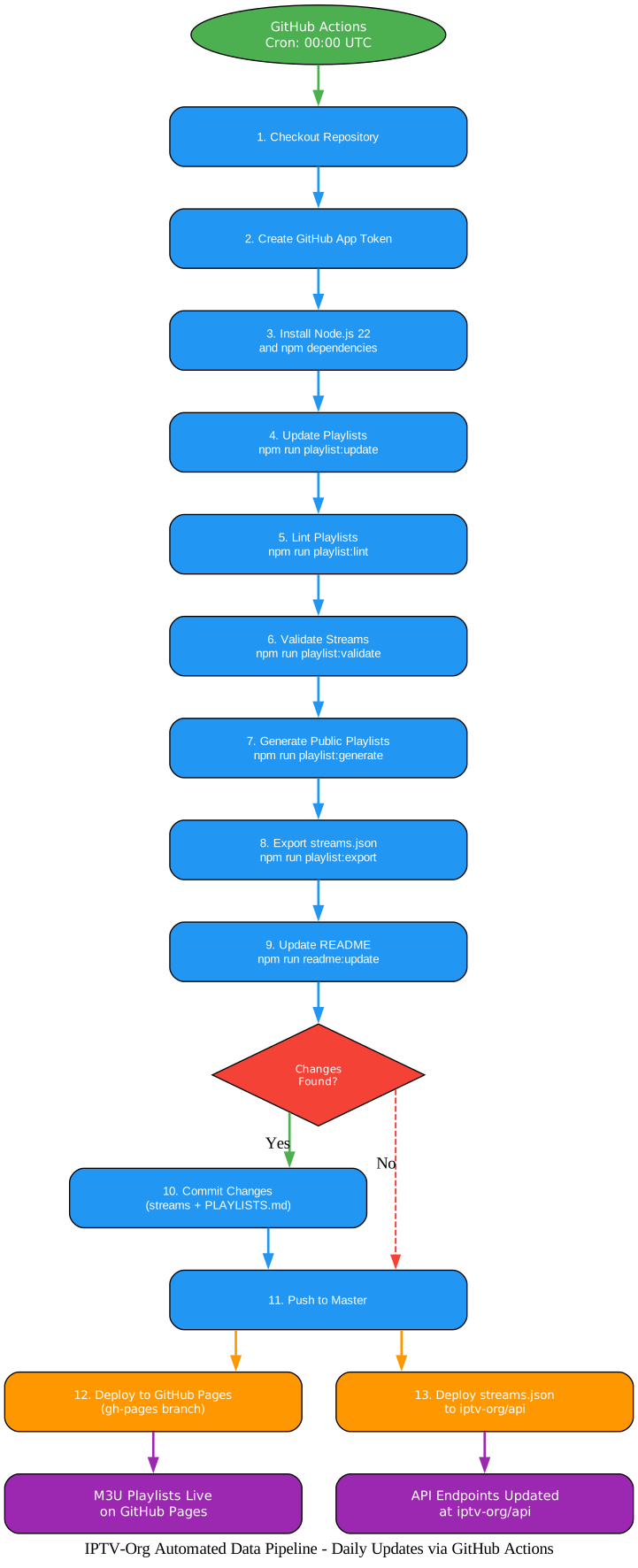
The diagram above illustrates the complete automated data pipeline. It begins with the GitHub Actions trigger at 00:00 UTC, proceeds through checkout, token creation, and Node.js setup, then executes the core playlist operations: update, lint, validate, generate, export, and README update. A decision point checks whether any issues were processed – if yes, changes are committed to the /streams directory; regardless, PLAYLISTS.md changes are always committed. After pushing to the master branch, the pipeline deploys to two destinations: GitHub Pages for M3U playlist access and the iptv-org/api repository for the streams.json data. The end results are live M3U playlists on GitHub Pages and updated API endpoints at iptv-org/api.
Amazing: The entire iptv-org pipeline – from community contributions to playlist generation, validation, deployment, and API updates – runs automatically every single day via GitHub Actions. With 34,000+ commits and counting, this is one of the most active and well-maintained community-driven open-source projects on GitHub.
API and Developer Resources
The IPTV-Org REST API at https://iptv-org.github.io/api/ provides programmatic access to the entire channel database. This is a powerful resource for developers building custom applications, integrations, or analysis tools.
Available Endpoints
| Endpoint | Description |
|---|---|
channels.json | Full channel database with id, name, alt_names, network, owners, country, categories, is_nsfw, launched, closed, replaced_by, website |
streams.json | Stream URLs with channel, feed, title, url, referrer, user_agent, quality, label |
feeds.json | Feed information with channel, id, name, alt_names, is_main, broadcast_area, timezones, languages, format |
logos.json | Channel logos with channel, feed, in_use, tags, width, height, format, url |
guides.json | EPG guide sources with channel, feed, site, site_id, site_name, lang, sources |
categories.json | Category classifications |
languages.json | Language classifications |
countries.json | Country classifications |
subdivisions.json | Geographic subdivisions |
cities.json | City data |
regions.json | Region data |
timezones.json | Timezone information |
blocklist.json | Blocked channels |
Example API Usage
# Get all channels
curl https://iptv-org.github.io/api/channels.json | jq '.[0]'

# Search for a specific channel
curl https://iptv-org.github.io/api/channels.json | jq '.[] | select(.name | test("BBC"))'

# Get all streams for a country
curl https://iptv-org.github.io/api/streams.json | jq '.[] | select(.channel | endswith(".us"))'
# Python example: Fetch all news channels
import requests

channels = requests.get('https://iptv-org.github.io/api/channels.json').json()
news_channels = [ch for ch in channels if 'news' in ch.get('categories', [])]
print(f"Found {len(news_channels)} news channels")
The database repository stores all channel data as CSV files in the /data folder. These files are editable with any spreadsheet application, including Google Sheets and LibreOffice Calc, making it straightforward for community members to contribute corrections and additions by opening issues or submitting pull requests.
EPG - Electronic Program Guide
The iptv-org/epg repository provides tools for downloading Electronic Program Guide data for thousands of TV channels from hundreds of sources. An EPG shows what is currently airing and what is coming up next, making it an essential companion to the M3U playlists.
Installation and Usage
# Clone the EPG repository
git clone https://github.com/iptv-org/epg.git
cd epg

# Install dependencies
npm install

# Download EPG for specific sites
npm run grab --- --sites=example.com

# Download with parallel connections for faster retrieval
npm run grab --- --sites=example.com --maxConnections=10
Docker Support
For containerized deployments, the EPG tools are available as a Docker image:
# Pull the Docker image
docker pull ghcr.io/iptv-org/epg:master

# Run with custom channel list and schedule
docker run -p 3000:3000 \
  -v /path/to/channels.xml:/epg/public/channels.xml \
  -e CRON_SCHEDULE="0 0,12 * * *" \
  ghcr.io/iptv-org/epg:master
The EPG tools support configurable options including site selection, channel filtering, timeout settings, proxy configuration, gzip compression, JSON output format, and parallel downloading for improved performance. Custom channel lists can be created by defining an XML file with only the channels you want, and scheduled execution is supported via cron or the chronos tool.
Community and Contributing
IPTV-Org thrives on community contributions. With 34,000+ commits from hundreds of contributors, it is one of the most active open-source projects on GitHub. The project is financially supported through Open Collective, where community backers contribute to ongoing maintenance and development.
How to Contribute
Before submitting issues or pull requests, contributors should read the Contributing Guide. The primary way to add or correct channel information is by opening an issue on the iptv-org/database repository. Community discussions are hosted at https://github.com/orgs/iptv-org/discussions.
Important Notes
- No video files are stored in the repository – only links to publicly available streams
- Not all channels are available online; only those with working stream links appear in playlists
- No VOD (Video On Demand) content is included
- Visual radio (with video) is accepted
- Xtream Codes server links are not accepted due to instability
- A DMCA process is available for copyright holders who want links removed
Getting Started Guide
Getting started with IPTV-Org takes just three steps:
- Choose a playlist URL – Select by country, language, or category from the PLAYLISTS.md file
- Open in a compatible player – Paste the URL into VLC, Kodi, IINA, or any M3U-compatible player
- Start watching – The player loads the playlist and you can browse and select channels
For developers, the REST API provides programmatic access to build custom applications, dashboards, and integrations. For contributors, fork the database repository and submit pull requests with corrections or additions. For EPG users, clone the epg repository and configure your channel list for program guide data.
Conclusion
IPTV-Org stands as the most comprehensive, community-driven collection of publicly available IPTV channels on the internet. With 121K+ GitHub stars, 34K+ commits, 200+ countries, 200+ languages, and 30+ categories, it represents an extraordinary effort to organize and make accessible the world’s publicly available television streams.
The ecosystem approach – playlists, database, API, and EPG as separate specialized repositories – demonstrates excellent open-source infrastructure design. Each component has a clear responsibility, making the system modular, maintainable, and easy to contribute to. The automated daily pipeline via GitHub Actions ensures that playlists are always current, invalid streams are removed, and new contributions are processed without manual intervention.
Whether you are a viewer looking for free access to publicly available television, a developer building applications on top of the API, or a contributor helping to maintain the database, IPTV-Org provides the tools and infrastructure to participate in this global community project.
Links
- GitHub Repository: https://github.com/iptv-org/iptv
- Database: https://github.com/iptv-org/database
- API: https://github.com/iptv-org/api
- EPG: https://github.com/iptv-org/epg
- Awesome IPTV: https://github.com/iptv-org/awesome-iptv
- Discussions: https://github.com/orgs/iptv-org/discussions

Enjoyed this post? Never miss out on future posts by following us
