Scrapling is an adaptive web scraping framework for Python that solves the three biggest pain points in modern web scraping: broken selectors when websites change, blocked requests from anti-bot systems, and slow parsing speeds. With 63.7K GitHub stars, 92% test coverage, and 784x faster parsing than BeautifulSoup, Scrapling combines intelligent element tracking, Cloudflare bypass, and a full spider framework in a single library. Whether you are building a simple scraper or a production-scale crawler, this Scrapling web scraping tutorial will show you how adaptive tracking, stealthy fetching, and MCP server integration make it the most complete Python scraping toolkit available.
Key Insight: Scrapling solves the three biggest web scraping pain points in one library: broken selectors when websites change (adaptive tracking), blocked requests from anti-bot systems (StealthyFetcher with Cloudflare bypass), and slow parsing (784x faster than BeautifulSoup with lxml-based engine). With 63.7K GitHub stars and 92% test coverage, it is production-ready out of the box.
How Adaptive Element Tracking Works
The core innovation in Scrapling is the adaptive=True flag that re-locates elements after site structure changes. Traditional web scrapers rely on CSS selectors or XPath expressions that break the moment a website redesigns. A developer changes .product-card to .product-item, and your scraper returns empty results. Scrapling solves this by storing multi-dimensional element signatures and using similarity algorithms to find the closest match when the original selector fails.
When you first scrape a page with auto_save=True, Scrapling records a signature for each element that includes the tag name, text content patterns, attribute names and values, parent-child relationships, sibling patterns, and position in the DOM tree. These signatures are persisted to local storage. On subsequent scrapes, when you use adaptive=True, Scrapling first tries the original selector. If it fails or returns fewer results than expected, it loads the saved signatures and compares them against every element on the page using a weighted similarity algorithm. The elements with the highest similarity scores are returned, even if their class names, IDs, or DOM positions have changed entirely.
from scrapling.fetchers import StealthyFetcher

# First scrape - save element signatures
StealthyFetcher.adaptive = True
page = StealthyFetcher.fetch('https://example.com/products', headless=True)
products = page.css('.product-card', auto_save=True)  # Save signatures

# Later scrape - website changed .product-card to .product-item
page = StealthyFetcher.fetch('https://example.com/products', headless=True)
products = page.css('.product-card', adaptive=True)  # Finds them anyway!
The adaptive tracking system works across all three fetcher types. Whether you use the fast Fetcher, the stealthy StealthyFetcher, or the DynamicFetcher, the same adaptive=True and auto_save=True flags are available. This means your scrapers can survive website redesigns regardless of which fetching method you use. The similarity algorithm considers multiple dimensions of each element, so even if a website changes its class naming convention, restructures its DOM hierarchy, or moves elements to different containers, Scrapling can still locate the correct data.
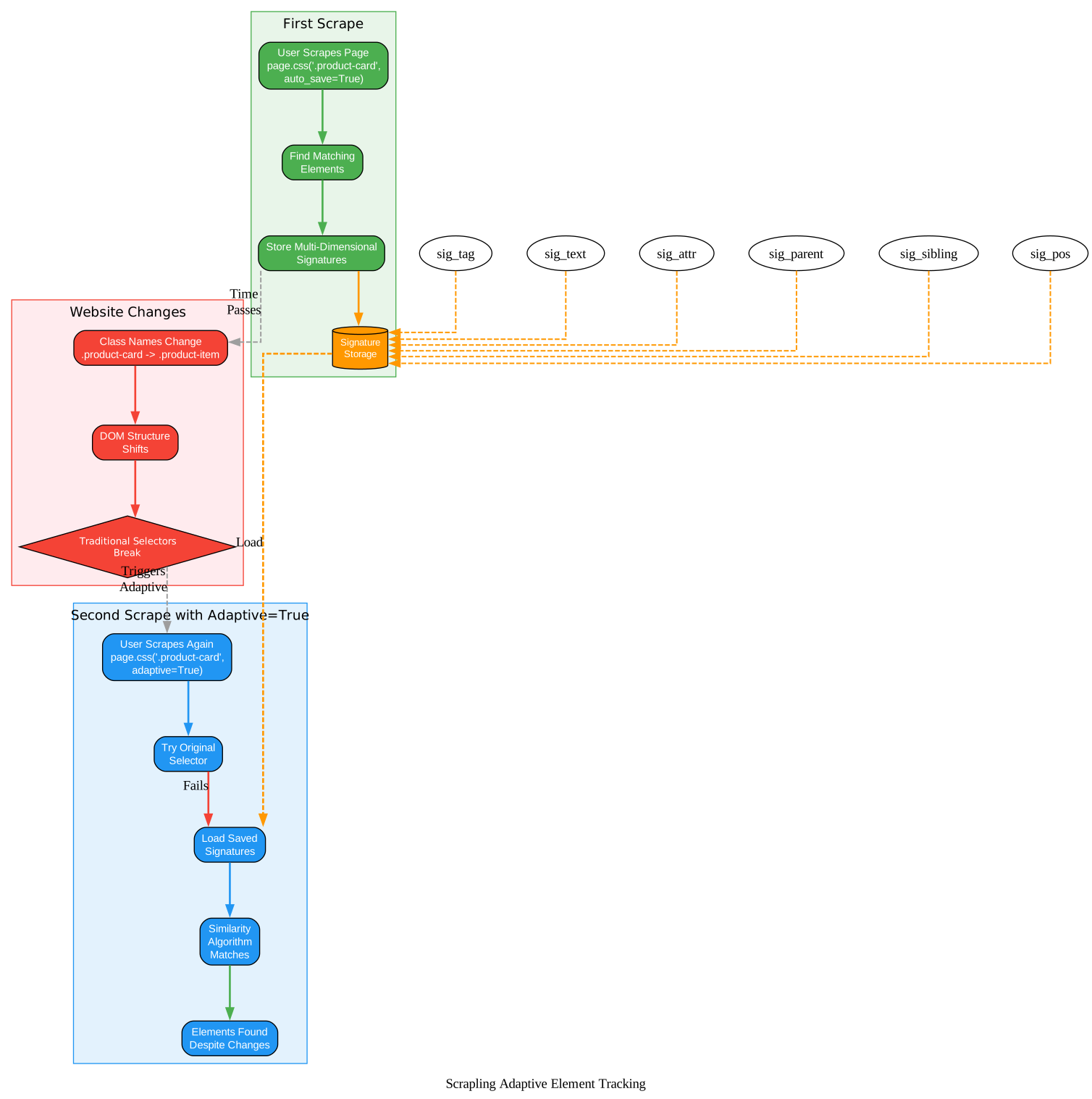
The diagram above illustrates the three-phase adaptive tracking flow. In the first phase (green), Scrapling scrapes the page and stores multi-dimensional signatures for each element. In the second phase (red), the website undergoes a redesign that changes class names, shifts DOM structure, and moves elements to new positions. Traditional CSS selectors break at this point. In the third phase (blue), Scrapling loads the saved signatures, runs the similarity algorithm against all elements on the new page, and successfully relocates the correct data despite the structural changes. The key insight is that Scrapling does not rely on any single selector attribute. Instead, it builds a holistic fingerprint of each element that captures its identity across multiple dimensions, making the tracking resilient to individual attribute changes.
Amazing: Scrapling’s adaptive element tracking means your scrapers never break when websites redesign. Instead of brittle CSS selectors that fail the moment a developer changes a class name, Scrapling stores multi-dimensional element signatures and uses similarity algorithms to relocate elements even when the entire page structure shifts. This is web scraping that actually survives production.
Architecture Overview
Scrapling is built on a four-layer architecture that separates concerns cleanly while enabling powerful cross-layer features. Each layer builds on the one below it, and the parser engine at the bottom provides the foundation that all other layers depend on.
Layer 1: Parser Engine – The foundation of Scrapling is an lxml-based parsing engine that supports CSS selectors (.class, #id, ::text, ::attr()), XPath selectors, BeautifulSoup-style find() and find_all() methods, text search, regex matching, and adaptive element tracking. It also provides a navigation API for traversing parent, sibling, and child elements, plus automatic selector generation. The parser uses orjson for JSON serialization, which is 10x faster than the standard library, and cssselect for CSS selector translation.
Layer 2: Fetcher Layer – Three fetcher types handle different scraping scenarios. Fetcher makes fast HTTP requests with browser TLS fingerprint impersonation and HTTP/3 support. StealthyFetcher bypasses anti-bot systems including Cloudflare Turnstile and Interstitial pages using Patchright, a stealthy browser automation tool. DynamicFetcher provides full browser automation through Playwright’s Chromium and Google Chrome. Each fetcher has a corresponding session class (FetcherSession, StealthySession, DynamicSession) for persistent cookies, headers, and TLS fingerprints across multiple requests.
Layer 3: Spider Framework – A Scrapy-like crawling API with start_urls, parse() callbacks, Request and Response objects. It supports concurrent requests with configurable limits, multi-session crawling (HTTP, stealth, and dynamic sessions in a single spider), pause and resume with checkpoint-based persistence, streaming mode for real-time item processing, built-in proxy rotation with ProxyRotator, robots.txt compliance, and automatic export to JSON and JSONL formats.
Layer 4: AI Integration – An MCP (Model Context Protocol) server that enables AI tools like Claude and Cursor to use Scrapling for web scraping tasks. The server pre-extracts content from web pages before feeding it to AI models, reducing token usage and cost. An agent skill is also available for Claude Code and OpenClaw, providing custom capabilities that leverage Scrapling’s parsing engine.
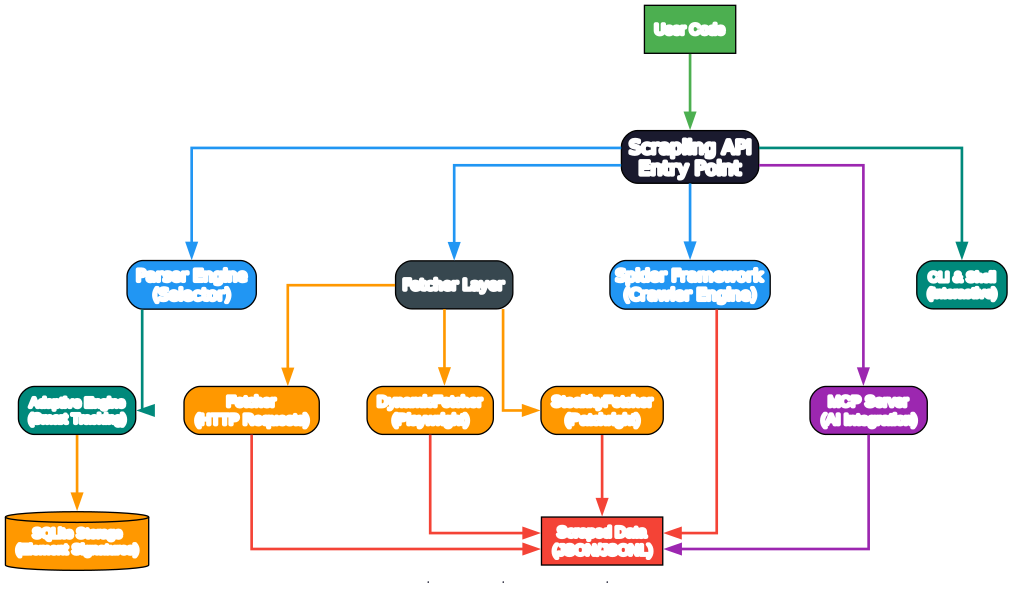
The architecture diagram shows how data flows upward through the four layers. The parser engine at the bottom provides element selection and adaptive tracking to all fetchers. The fetcher layer uses the parser to process responses and sits on top of the networking stack. The spider framework orchestrates multiple fetchers for crawling workflows. At the top, the MCP server wraps the parser for AI integration. Cross-cutting concerns including the CLI, interactive shell, Docker image, and type hints are shown in a side panel, indicating they span all layers.
Installation
Getting started with Scrapling is straightforward. The base installation gives you the parser engine, and you can add optional dependencies for fetchers, AI integration, or the interactive shell.
# Basic installation (parser only)
pip install scrapling

# With fetchers (recommended for most users)
pip install scrapling[fetchers]
playwright install chromium

# With AI/MCP support
pip install scrapling[ai]

# With interactive shell
pip install scrapling[shell]

# Everything
pip install scrapling[all]

# Docker
docker pull d4vinci/scrapling:latest
The basic pip install scrapling gives you the parser engine with CSS selectors, XPath, adaptive tracking, and all the parsing features. Adding [fetchers] brings in curl_cffi for TLS fingerprinting, Playwright for dynamic rendering, and Patchright for stealth. The [ai] extra installs the MCP server dependencies, and [shell] adds IPython integration. Python 3.10 or later is required.
Usage: Fetchers
Scrapling provides three fetcher types, each designed for a different scraping scenario. All three share the same parser API, so you can switch between them without changing your selection code.
Fetcher – Fast HTTP Requests
The Fetcher is the fastest option, making direct HTTP requests with browser TLS fingerprint impersonation. It does not launch a browser, making it ideal for pages that do not require JavaScript rendering.
from scrapling.fetchers import Fetcher, FetcherSession

# One-off request
page = Fetcher.get('https://quotes.toscrape.com/', stealthy_headers=True)
quotes = page.css('.quote .text::text').getall()

# Session-based (persistent cookies, TLS fingerprint)
with FetcherSession(impersonate='chrome') as session:
    page = session.get('https://example.com/', stealthy_headers=True)
    data = page.css('.data-element').getall()
The stealthy_headers=True flag adds realistic browser headers to avoid basic detection. The impersonate parameter in session mode configures the TLS fingerprint to match a real browser, making requests appear as if they come from Chrome, Firefox, or Safari.
StealthyFetcher – Anti-Bot Bypass
The StealthyFetcher is designed for websites protected by anti-bot systems. It uses Patchright (a stealthy fork of Playwright) to solve Cloudflare Turnstile challenges and bypass Interstitial pages automatically.
from scrapling.fetchers import StealthyFetcher, StealthySession

# Bypass Cloudflare Turnstile
page = StealthyFetcher.fetch('https://nopecha.com/demo/cloudflare', headless=True)
data = page.css('#padded_content a').getall()

# Session-based stealth
with StealthySession(headless=True, solve_cloudflare=True) as session:
    page = session.fetch('https://protected-site.com')
    data = page.css('.content').getall()
The solve_cloudflare=True flag tells StealthyFetcher to wait for and solve Cloudflare challenges before returning the page content. This works for both Turnstile captchas and Interstitial redirect pages. The headless mode runs without a visible browser window, which is essential for production scraping.
DynamicFetcher – Full Browser Automation
The DynamicFetcher provides full browser automation through Playwright, suitable for single-page applications and JavaScript-heavy websites that require rendering before content appears.
from scrapling.fetchers import DynamicFetcher, DynamicSession

# Dynamic page rendering
page = DynamicFetcher.fetch('https://spa-website.com', headless=True, network_idle=True)
data = page.css('.dynamic-content').getall()

# Session-based dynamic
with DynamicSession(headless=True, disable_resources=True) as session:
    page = session.fetch('https://spa-website.com')
    data = page.xpath('//div[@class="content"]/text()').getall()
The network_idle=True flag waits until the network is idle before returning, ensuring all AJAX requests have completed. The disable_resources=True flag blocks images, stylesheets, and fonts to speed up scraping when you only need the text content.
Usage: Spiders
For large-scale crawling, Scrapling provides a Scrapy-like spider framework with concurrent requests, pause and resume, streaming, and built-in data export.
from scrapling.spiders import Spider, Request, Response

class ProductSpider(Spider):
    name = "products"
    start_urls = ["https://store.example.com/"]
    concurrent_requests = 10

    async def parse(self, response: Response):
        for product in response.css('.product'):
            yield {
                "title": product.css('h2::text').get(),
                "price": product.css('.price::text').get(),
            }
        next_page = response.css('.next a')
        if next_page:
            yield response.follow(next_page[0].attrib['href'])

result = ProductSpider().start()
result.items.to_json("products.json")
The spider framework supports multi-session crawling, meaning you can use HTTP, stealth, and dynamic fetchers in the same spider. Checkpoint-based persistence lets you pause a crawl and resume it later without re-scraping pages you have already visited. Streaming mode processes items as they are scraped rather than waiting for the entire crawl to finish. Built-in proxy rotation with ProxyRotator handles cyclic and custom proxy strategies, and DNS-over-HTTPS prevents DNS leaks when using proxies.
Performance Comparison
Scrapling’s performance comes from its lxml-based parsing engine combined with orjson for JSON serialization. The benchmarks published in the repository show significant speed advantages over popular alternatives.
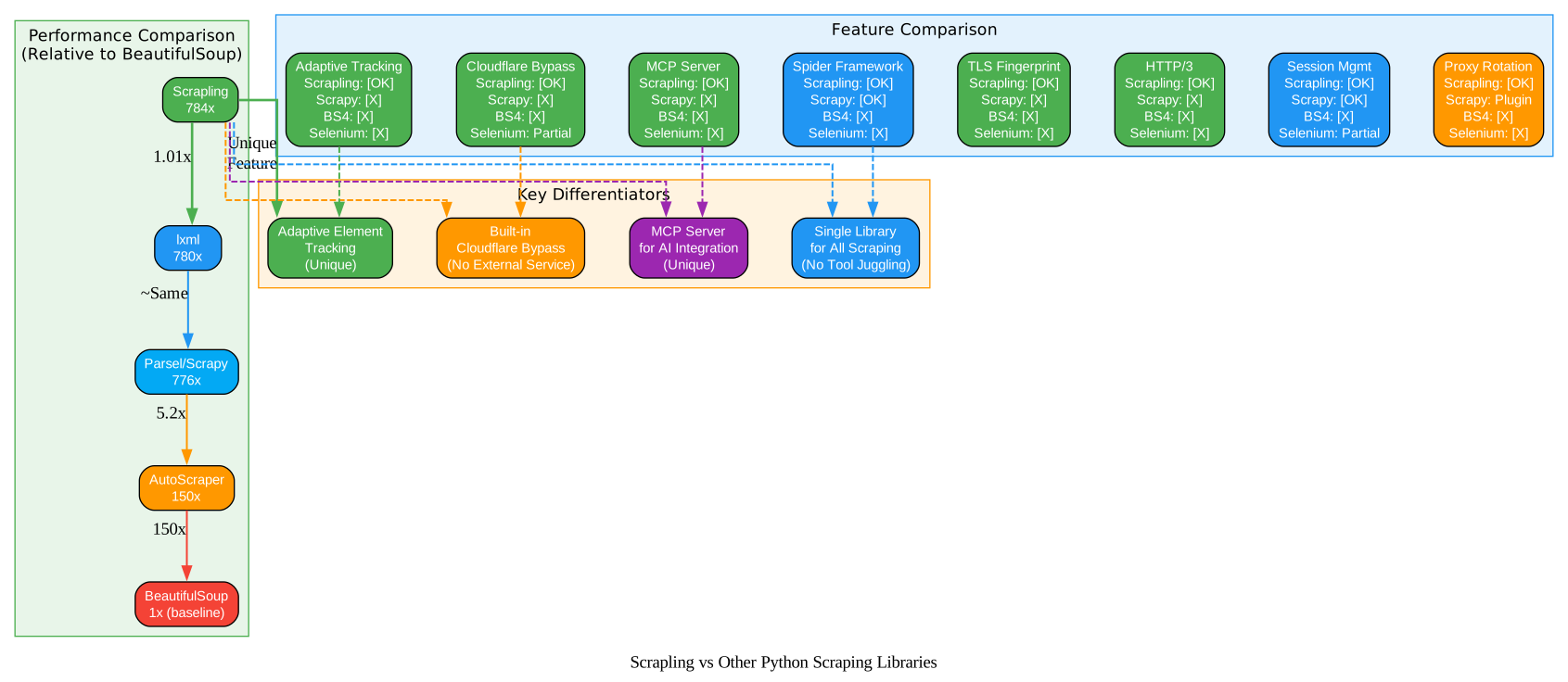
The diagram above shows two comparisons. On the left, the performance bar chart illustrates the parsing speed advantage: Scrapling parses 784x faster than BeautifulSoup, matching Parsel and Scrapy at 1.01x their speed, and outperforming AutoScraper by 5.2x. On the right, the feature comparison table shows how Scrapling compares to Scrapy, BeautifulSoup, and Selenium across 11 key features. Scrapling is the only library that offers adaptive element tracking, built-in Cloudflare bypass, an MCP server for AI integration, and HTTP/3 support, while also matching Scrapy’s spider framework and session management capabilities.
Beyond raw speed, Scrapling includes several performance-oriented features. The built-in ad blocker filters approximately 3,500 known ad and tracker domains, reducing page load times and bandwidth usage. DNS-over-HTTPS prevents DNS leaks when using proxies. The lazy loading architecture keeps memory usage low even when scraping large pages. And with 92% test coverage and full type hints verified by both PyRight and MyPy, the codebase is reliable and maintainable.
Important: Scrapling’s 784x parsing speed advantage over BeautifulSoup comes from its lxml-based engine combined with orjson for JSON serialization. But the real differentiator is not just speed – it is that Scrapling combines this performance with adaptive element tracking, anti-bot bypass, and a full spider framework in a single library. You no longer need separate tools for parsing, fetching, stealth, and crawling.
MCP Server for AI Integration
Scrapling includes a built-in MCP (Model Context Protocol) server that enables AI tools to perform web scraping tasks. This is particularly useful for AI assistants like Claude and Cursor that need to extract data from web pages as part of their workflows.
The MCP server pre-extracts content from web pages before feeding it to AI models, which reduces token usage and cost compared to sending raw HTML. It works with any MCP-compatible client, and an agent skill is available specifically for Claude Code and OpenClaw that provides custom capabilities leveraging Scrapling’s parsing engine.
# Install with AI support
pip install scrapling[ai]
The server configuration is defined in server.json within the repository, specifying the MCP server parameters and package arguments. Once installed, you can configure your MCP client (Claude Desktop, Cursor, or other compatible tools) to connect to the Scrapling server, which then provides scraping capabilities as tool calls.
CLI and Interactive Shell
Scrapling also provides a command-line interface and an interactive IPython shell for quick scraping tasks without writing a full script.
# CLI usage - fetch a page and extract data
scrapling fetch https://example.com --css ".title::text"

# Interactive shell with Scrapling pre-loaded
scrapling shell
The CLI supports fetching pages with CSS selectors or XPath expressions directly from the terminal. The interactive shell provides an IPython environment with Scrapling already imported, along with built-in shortcuts for common scraping tasks. You can also convert curl commands to Scrapling requests and view results in a browser, making it easy to prototype scrapers before writing production code.
Troubleshooting
Here are solutions to common issues when using Scrapling:
- Playwright not installed: If you get browser-related errors, run
playwright install chromiumto download the required browser binaries. For the Docker image, browsers are pre-installed. - Cloudflare bypass fails: Try adding
headless=Trueandnetwork_idle=Trueto your StealthyFetcher call. Some Cloudflare challenges require waiting for the page to fully load. - Adaptive tracking not finding elements: Ensure you used
auto_save=Trueon your first scrape. Without saved signatures, the adaptive algorithm has nothing to compare against. - High memory usage on large pages: Use
disable_resources=Truewith DynamicFetcher to block images, stylesheets, and fonts. This significantly reduces memory consumption. - Proxy rotation not working: Check your
ProxyRotatorconfiguration and ensure your proxy list contains valid, accessible proxies. Use the cyclic strategy for simple rotation or define custom strategies for more control.
Conclusion
Scrapling is the first Python web scraping framework that combines adaptive element tracking, anti-bot bypass, a full spider framework, and AI integration in a single library. Its adaptive tracking ensures your scrapers survive website redesigns without manual selector updates. The StealthyFetcher bypasses Cloudflare and other anti-bot systems out of the box. The spider framework provides Scrapy-like crawling with pause, resume, and streaming. And the MCP server enables AI tools to leverage Scrapling’s parsing engine for intelligent data extraction.
With 784x faster parsing than BeautifulSoup, 92% test coverage, full type hints, and an active community of 63.7K GitHub stars, Scrapling is production-ready for any web scraping task. Whether you are scraping a single page or building a large-scale crawler, Scrapling gives you the complete toolkit without the need to juggle multiple libraries.
Links:
- GitHub Repository: https://github.com/D4Vinci/Scrapling
- Documentation: https://scrapling.readthedocs.io
- PyPI: https://pypi.org/project/scrapling/
- Discord: https://discord.gg/EMgGbDceNQ
- X/Twitter: https://x.com/Scrapling_dev
Takeaway: Whether you are scraping a single page or building a production crawler, Scrapling gives you the complete toolkit: adaptive selectors that survive website changes, stealthy fetchers that bypass Cloudflare, a Scrapy-like spider framework for scale, and an MCP server for AI integration. One library, zero compromises.

Enjoyed this post? Never miss out on future posts by following us


