ZeroStack: Minimal Rust Coding Agent with 16MB RAM
ZeroStack is a minimal Rust coding agent that achieves dramatically lower resource usage than JavaScript-based alternatives. While tools like opencode consume hundreds of megabytes of RAM, ZeroStack runs at approximately 16MB average RAM with a 26MB binary, making it viable on resource-constrained machines, in CI pipelines, or as a long-running background assistant. Built by Giuseppe Della Vedova, ZeroStack proves that a coding agent does not need to require more resources than the code it helps you write.
The Resource Problem with Coding Agents
Most coding agents today are built in JavaScript or Python. The Node.js runtime alone consumes 30-50MB of RAM before any application code loads. Add the V8 engine’s JIT compilation overhead, garbage collection pauses, and the sprawling dependency trees typical of npm packages, and you quickly reach 300-700MB of RAM for a single coding agent session.
This limits where coding agents can run:
- Small VPS instances with 1-2GB RAM cannot run a JS coding agent alongside other services
- CI pipelines with strict memory limits cannot afford a 700MB resident process
- Older laptops with 4GB RAM struggle when a coding agent competes with the IDE and browser
- Long-running sessions accumulate memory pressure over hours of continuous use
ZeroStack asks a different question: what if a coding agent used less RAM than your text editor?
What is ZeroStack?
ZeroStack is a terminal-based coding agent written in Rust, optimized for memory footprint and performance. At approximately 17,000 lines of code and a 26MB binary, it provides the core functionality you expect from a coding agent: multi-provider LLM support, 11 built-in tools, persistent memory, a permission system, and a custom terminal UI.
Key characteristics:
| Property | Value |
|---|---|
| Language | Rust (edition 2024) |
| Lines of code | ~17k |
| Binary size | 26MB |
| RAM average | ~16MB |
| RAM peak | ~24MB |
| CPU working | ~1.5% |
| License | GPL-3.0-only |
| Version | 1.5.0-rc5 |
ZeroStack supports five LLM providers out of the box: OpenRouter (default), OpenAI, Anthropic, Gemini, and Ollama. It includes 11 core tools (bash, read, write, edit, grep, find_files, list_dir, todo, crc, normalize, task), 10 built-in prompts, and 13 color themes. Feature-gated extras like loop mode, MCP, subagents, git-worktree, and memory are compile-time opt-ins that carry zero cost when disabled.
Key Insight: ZeroStack’s 17k lines of code produce a 26MB binary that runs at 16MB RAM. By comparison, JavaScript coding agents typically require 300-700MB RAM. The difference comes from Rust’s zero-cost abstractions applied systematically across every architectural decision.
The Performance Story
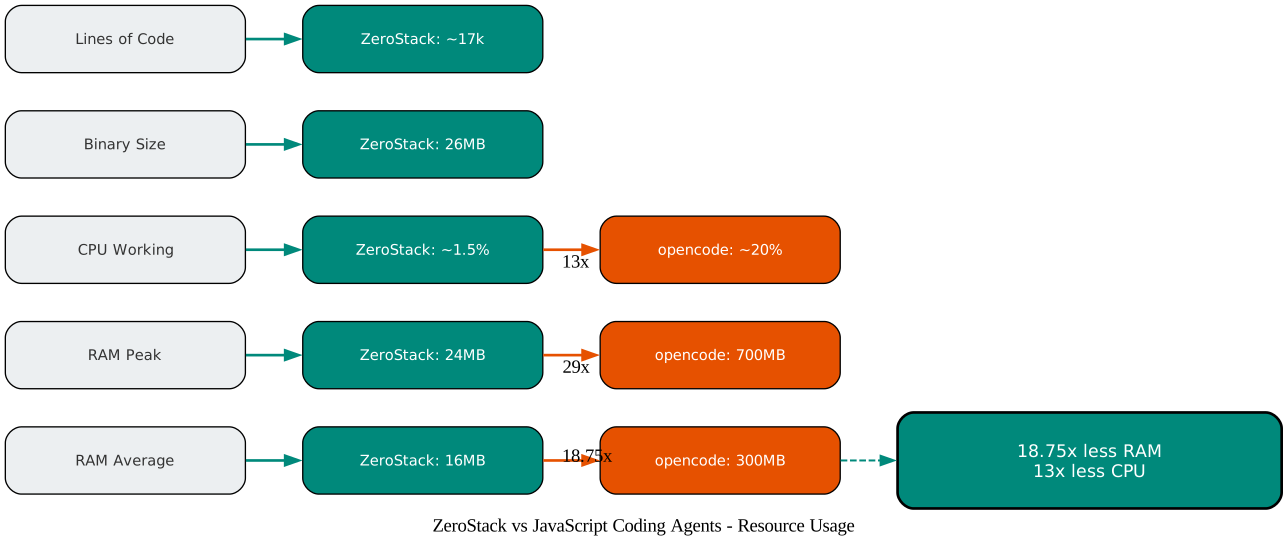
According to ZeroStack’s own benchmarks, the resource comparison with JavaScript-based coding agents is dramatic:
Understanding the Performance Comparison
The performance comparison chart above illustrates the resource usage difference between ZeroStack (Rust) and opencode (JavaScript/TypeScript). Let’s break down each metric:
RAM Average (16MB vs 300MB) ZeroStack’s 16MB average RAM includes the entire runtime: the tokio event loop, the crossterm TUI, the rig LLM client, session state, and all 11 tools. There is no separate runtime overhead because Rust compiles everything into a single native binary. The 18.75x difference means you could run roughly 18 ZeroStack instances in the memory that one JavaScript agent consumes.
RAM Peak (24MB vs 700MB) Peak memory matters for capacity planning. ZeroStack peaks at 24MB during heavy tool execution with large file reads. The 29x difference at peak is even more dramatic than average because JavaScript agents accumulate memory through garbage collection cycles and V8 heap growth that rarely shrinks back.
CPU Working (~1.5% vs ~20%) ZeroStack’s CPU usage stays low because there is no JIT compilation, no garbage collection, and no event loop overhead beyond tokio’s minimal scheduler. The 13x difference translates to longer battery life on laptops and more headroom for other processes on shared servers.
Binary Size (26MB) A single 26MB binary with no external dependencies. No Node.js runtime, no npm packages, no Python virtualenv. Copy one file to a server and it works.
Lines of Code (~17k) A smaller codebase is easier to understand, audit, and contribute to. ZeroStack achieves its feature set in approximately 17,000 lines of Rust, compared to significantly larger codebases in JavaScript alternatives.
| Metric | ZeroStack (Rust) | opencode (JS) | Ratio |
|---|---|---|---|
| RAM average | ~16MB | ~300MB | 18.75x less |
| RAM peak | ~24MB | ~700MB | 29x less |
| CPU idle | 0.0% | ~2% | - |
| CPU working | ~1.5% | ~20% | 13x less |
| Binary size | 26MB | Larger | - |
| Lines of code | ~17k | Much more | - |
Note: All performance figures are from ZeroStack’s own benchmarks and have not been independently verified. JavaScript-based agents make different design trade-offs that favor ecosystem breadth and rapid development over raw resource efficiency.
Amazing: The 18.75x RAM advantage means you could run approximately 18 ZeroStack instances in the memory that a single JavaScript coding agent consumes. On a 2GB VPS, that is the difference between “cannot run” and “runs comfortably with headroom.”
Architecture: How ZeroStack Achieves This
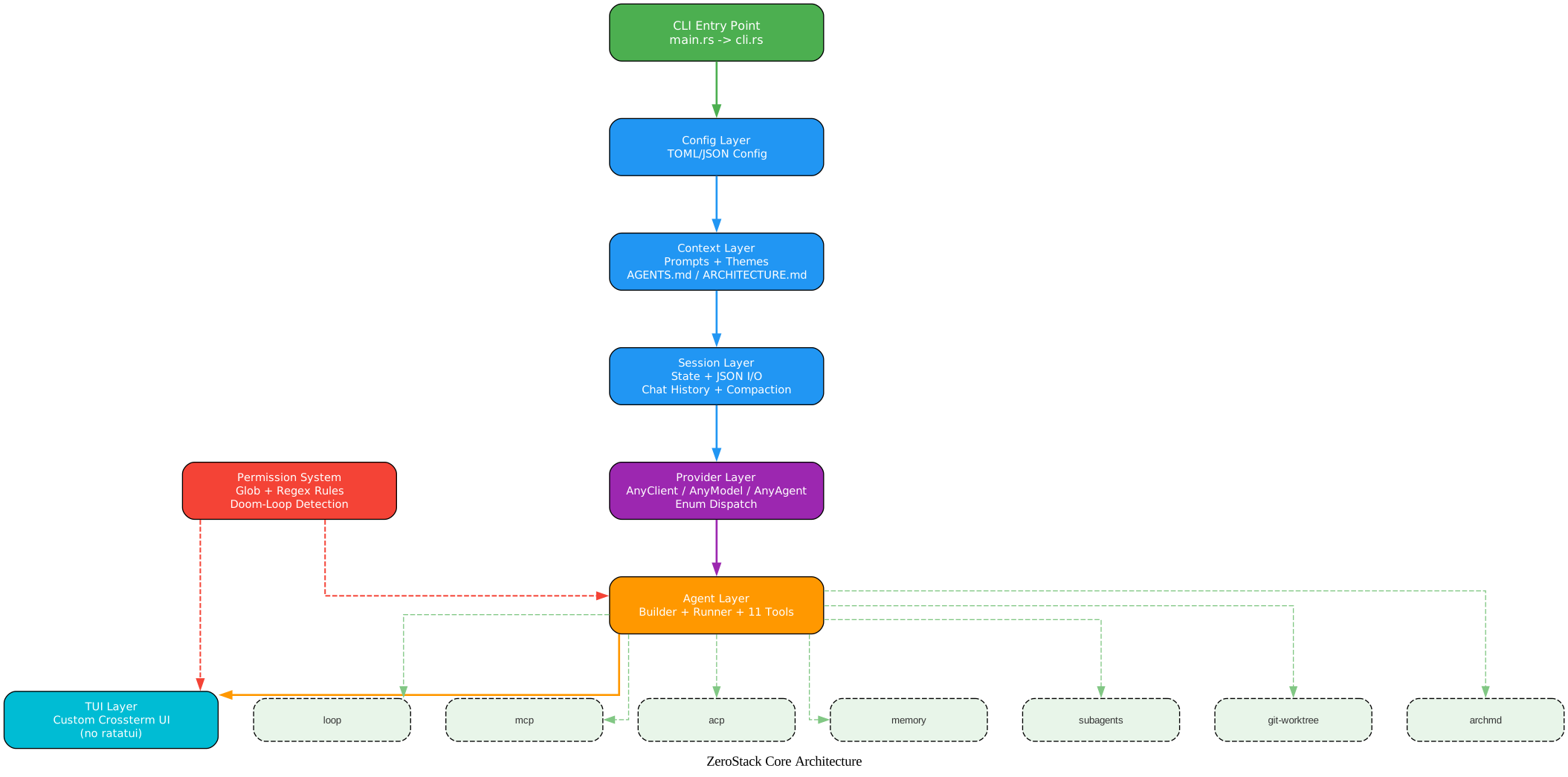
ZeroStack’s performance is not accidental. Every architectural decision serves the goal of minimal resource usage. The diagram below shows the layered architecture:
Understanding the Architecture
The architecture diagram above shows ZeroStack’s modular structure with clear directional flow from the CLI entry point down through configuration, context, session, provider, agent, and TUI layers. Let’s examine each layer and the design decisions that enable the performance profile:
CLI Entry Point (main.rs -> cli.rs) The entry point is minimal. main.rs sets the global allocator and delegates to cli.rs for argument parsing via clap. There is no framework, no plugin system, no dynamic loading. Just a function call chain from main to the agent loop.
Config Layer (TOML/JSON) Configuration is loaded once at startup from TOML or JSON files. There is no hot-reloading, no file watchers, no background config sync. This keeps the config layer’s memory footprint near zero after initialization.
Context Layer (Prompts, Themes, AGENTS.md/ARCHITECTURE.md) ZeroStack auto-loads context files like AGENTS.md, CLAUDE.md, and ARCHITECTURE.md from the project directory. These are read into memory as plain strings and injected into the system prompt. No database, no vector store, no embedding computation.
Session Layer (State, JSON I/O, Chat History, Auto-Compaction) Session state is persisted as JSON files. Chat history is kept in memory with automatic compaction when the context window fills. The compaction strategy summarizes older messages rather than keeping full text, reducing memory usage for long sessions.
Provider Layer (AnyClient/AnyModel/AnyAgent Enum Dispatch) This is the most technically interesting layer. Instead of using Rust trait objects (dyn Trait) with vtable dispatch, ZeroStack uses enum dispatch. The AnyClient, AnyModel, and AnyAgent enums wrap each provider variant directly.
Agent Layer (Builder, Runner, 11 Tools) The agent layer constructs rig Agents with tool injection, then runs them through a streaming event loop. The Builder pattern ensures all tools are registered at construction time with no runtime discovery overhead.
TUI Layer (Custom Crossterm UI) ZeroStack builds its own terminal UI on top of crossterm rather than using ratatui. This avoids the widget tree overhead and keeps the rendering path minimal.
Permission System (Cross-Cutting) The permission checker spans both the agent and TUI layers, intercepting tool calls before execution and prompting the user through the TUI when approval is needed.
Feature-Gated Extras (Dashed Border) Extras like loop, mcp, acp, memory, subagents, git-worktree, and archmd are compile-time features. If you do not enable them, they do not exist in the binary.
Type-Erased Enum Dispatch
The most impactful architectural decision is the use of enum dispatch instead of trait objects. Here is how ZeroStack defines its provider abstractions:
#[derive(Clone)]
pub enum AnyClient {
    OpenRouter(openrouter::Client),
    OpenAI(OpenAiClient),
    Anthropic(anthropic::Client),
    Gemini(gemini::Client),
    Ollama(ollama::Client),
}

pub enum AnyModel {
    OpenRouter(
        openrouter::completion::CompletionModel,
        Option<serde_json::Value>,
    ),
    OpenAI(OpenAiModel),
    Anthropic(anthropic::completion::CompletionModel),
    Gemini(gemini::completion::CompletionModel),
    Ollama(ollama::CompletionModel),
}

#[derive(Clone)]
pub enum AnyAgent {
    OpenRouter(Agent<openrouter::completion::CompletionModel>),
    OpenAI(OpenAiAgent),
    Anthropic(Agent<anthropic::completion::CompletionModel>),
    Gemini(Agent<gemini::completion::CompletionModel>),
    Ollama(Agent<ollama::CompletionModel>),
}
Why enum dispatch over dyn Trait?
- Faster dispatch – Enum dispatch compiles to a match on a tag (a simple integer comparison), avoiding the vtable indirection that
dyn Traitrequires. The CPU branch predictor handles enum matches efficiently because they are just switch statements. - No lifetime issues – Trait objects with associated types (like
CompletionModel) create complex lifetime bounds that makedyn CompletionModelnearly unusable. Enums sidestep this entirely by storing concrete types. - Zero-cost abstraction – The compiler sees all variants and can optimize across them. With
dyn Trait, the compiler can only optimize within each virtual call, not across call sites. - Clone support – Each variant implements
Cloneindependently. No need forArc<dyn Trait>wrapper overhead.
Takeaway: Enum dispatch is not just a stylistic choice. It eliminates vtable indirection, resolves lifetime complexity, and enables cross-variant optimization. For a coding agent that switches between providers at runtime, this pattern delivers measurable performance benefits.
Custom TUI Over Crossterm
ZeroStack builds its own terminal UI directly on crossterm instead of using the ratatui framework. The custom TUI includes a line buffer, markdown renderer, scroll/selection handling, and mouse support. This avoids the widget tree overhead of ratatui, where every UI element is a component in a hierarchy that must be laid out, rendered, and diffed on every frame. ZeroStack’s approach is simpler: draw what changed, skip what did not.
Single-Threaded Tokio Runtime
By default, ZeroStack uses the current_thread flavor of the tokio runtime. This means no thread pool, no work-stealing scheduler, and no cross-thread synchronization overhead. The single-threaded runtime is sufficient because a coding agent is I/O-bound (waiting for LLM API responses), not CPU-bound. The multithread feature flag is available for users who need it, but it is not enabled by default.
mimalloc Global Allocator
ZeroStack replaces the default system allocator with mimalloc:
#[global_allocator]
static GLOBAL: mimalloc::MiMalloc = mimalloc::MiMalloc;
mimalloc provides better performance and lower memory overhead than the system allocator for the allocation patterns typical of a coding agent: many small, short-lived allocations for string processing and JSON parsing.
Compact String and Small Vector Types
ZeroStack uses compact_str and smallvec for heap-efficient data structures:
compact_strstores short strings (up to 24 bytes) inline without heap allocation. Most tool names, file paths, and provider identifiers fit in this inline buffer.smallvecstores small vectors on the stack. For collections that typically contain 1-4 elements (like tool call arguments), this eliminates heap allocation entirely.
Release Profile Optimization
ZeroStack’s Cargo.toml release profile is tuned for minimal binary size:
[profile.release]
opt-level = "z"       # Optimize for size
lto = "thin"          # Link-Time Optimization
codegen-units = 1     # Single codegen unit for better optimization
strip = true          # Strip debug symbols
debug = false         # No debug info
opt-level = "z"tells the compiler to optimize for binary size rather than speed. For an I/O-bound coding agent, the difference in CPU performance is negligible, but the binary size reduction is significant.lto = "thin"enables thin Link-Time Optimization, which allows the compiler to optimize across crate boundaries. This can eliminate unused code and inline cross-crate function calls.codegen-units = 1forces the compiler to use a single code generation unit, enabling better optimization at the cost of slower compile times.strip = trueremoves debug symbols from the binary, reducing size by 30-50%.
The Permission System
ZeroStack implements a five-tier permission system that controls what tools the agent can execute without user confirmation:
| Mode | Description |
|---|---|
| Restrictive | Ask for every tool call |
| ReadOnly | Allow read operations, ask for writes and bash |
| Guarded | Allow reads and grep, ask for writes and bash |
| Standard | Allow most operations, ask for destructive bash |
| Yolo | Allow all except destructive bash commands |
The permission checker uses a dual-layer rule system:
- Glob patterns for fast path matching. Rules like
src/**/*.rsare compiled once and matched in microseconds. - Regex patterns for complex rules that globs cannot express, such as “allow bash commands matching
cargo (test|build|check)”.
A doom-loop detection mechanism tracks consecutive identical tool calls. When the agent calls the same tool with the same input three or more times in a row, ZeroStack injects a coaching message:
pub fn allowed_with_coaching(tool: &str, _input: &str, count: usize) -> Self {
    CheckResult::AllowedWithCoaching(format!(
        "Coaching: You've called {tool} on the same input {count} times in a row. \
         This looks like a loop -- try a different approach.",
    ))
}
This does not block the agent but nudges it toward a different approach, preventing infinite loops without hard limits.
A session allowlist persists approved decisions within the current session. Once you approve a specific tool call pattern, ZeroStack remembers it and does not ask again for the same pattern in that session.
Important: The doom-loop detection catches a common failure mode in LLM agents: repeating the same action expecting different results. By injecting a coaching message after 3+ identical calls, ZeroStack gently redirects the agent without breaking the session flow.
Feature-Gated Ecosystem
ZeroStack applies Rust’s zero-cost abstraction philosophy to agent features. Features that are not enabled at compile time do not exist in the binary.

Understanding the Feature Ecosystem
The feature ecosystem diagram above shows how ZeroStack organizes its capabilities into core features (always on, solid borders), gated features (compile-time opt-in, dashed borders), permission modes (gradient from restrictive to permissive), and key design decisions (badges). Let’s examine each category:
Core Features (Always On)
These features are compiled into every ZeroStack binary:
- 11 Core Tools: bash, read, write, edit, grep, find_files, list_dir, todo, crc, normalize, task. These cover the essential operations for code manipulation.
- 5 Providers: OpenRouter, OpenAI, Anthropic, Gemini, Ollama. All wrapped behind the
AnyClient/AnyModel/AnyAgentenum dispatch pattern. - 10 Prompts: code, plan, review, debug, ask, brainstorm, frontend-design, review-security, simplify, write-prompt. Each prompt is a system prompt template optimized for a specific task.
- 13 Themes: ayu-mirage, default, dracula, everforest, gruvbox, kanagawa, monokai, nord, one-dark, rose-pine, solarized-dark, tokyo-night. Themes are JSON files loaded at startup.
Gated Features (Compile-Time Opt-In)
These features are defined in Cargo.toml and only compiled when explicitly enabled:
[features]
default = ['loop', 'git-worktree', 'mcp', 'subagents', 'archmd', 'status-signals']
loop = []
git-worktree = []
mcp = ["dep:rmcp", "rmcp?/client", "rmcp?/transport-child-process"]
acp = ["dep:agent-client-protocol", "dep:blocking"]
memory = []
subagents = []
archmd = []
multithread = ["tokio/rt-multi-thread"]
multimodal = ["rig/image"]
pdf = ["multimodal", "rig/pdf"]
advisor = []
The default features include the most commonly used extras. Users who want a minimal binary can disable all defaults and selectively enable only what they need:
cargo build --release --no-default-features --features "memory,subagents"
This produces a binary with only the core tools, the specified features, and nothing else. The unused feature code is not compiled, not linked, and not present in the binary.
Permission Modes (5-Level Gradient)
The five permission modes form a gradient from most restrictive to most permissive. Users can switch modes at runtime with the /mode command, and the mode applies to all subsequent tool calls in the session.
Key Design Decisions (Badges)
The badges at the bottom of the diagram represent the architectural choices that enable ZeroStack’s performance profile: enum dispatch, custom TUI, single-thread tokio, mimalloc, compact_str, smallvec, and LTO. Each of these decisions contributes to the 16MB RAM target.
Multi-Provider Support
ZeroStack supports five LLM providers through the enum dispatch pattern described earlier. OpenRouter is the default provider, offering access to models from multiple companies through a single API key. Users can switch providers at runtime with the /provider command.
Custom providers are also supported through the configuration file. A custom provider can specify:
- Base URL for API requests
- API key environment variable name
- Custom headers for authentication
- Request timeout
- Whether to accept invalid TLS certificates
This enables integration with self-hosted LLM servers, corporate API gateways, or any OpenAI-compatible endpoint.
For subagents, ZeroStack allows configuring a different provider and model than the main agent. This means you can use a powerful model (like Claude or GPT-4) for the main agent while using a cheaper, faster model (like a local Ollama model) for subagent exploration tasks.
Persistent Memory Without a Database
ZeroStack implements persistent memory using plain Markdown files on disk. No database, no vector store, no embedding computation. Just files.
The memory system consists of:
- Global MEMORY.md – A project-wide memory file that persists across sessions. The agent reads and writes to this file to remember facts about the codebase, project conventions, and past decisions.
- Per-project daily logs – Daily log files that record what happened in each session. These are organized by date and project directory.
- Scratchpad – A temporary notes area for the current session. Cleared when the session ends.
- Notes – Named notes that the agent can create and retrieve by keyword.
Memory is auto-injected into the system prompt at the start of each session. When the context window fills and compaction occurs, memory summaries survive the compression. This ensures that important context is not lost even in long sessions.
Multi-term keyword search allows the agent to find relevant memories without exact matches. This is simpler than vector search but sufficient for the typical use case of a coding agent remembering project-specific conventions.
Advanced Features
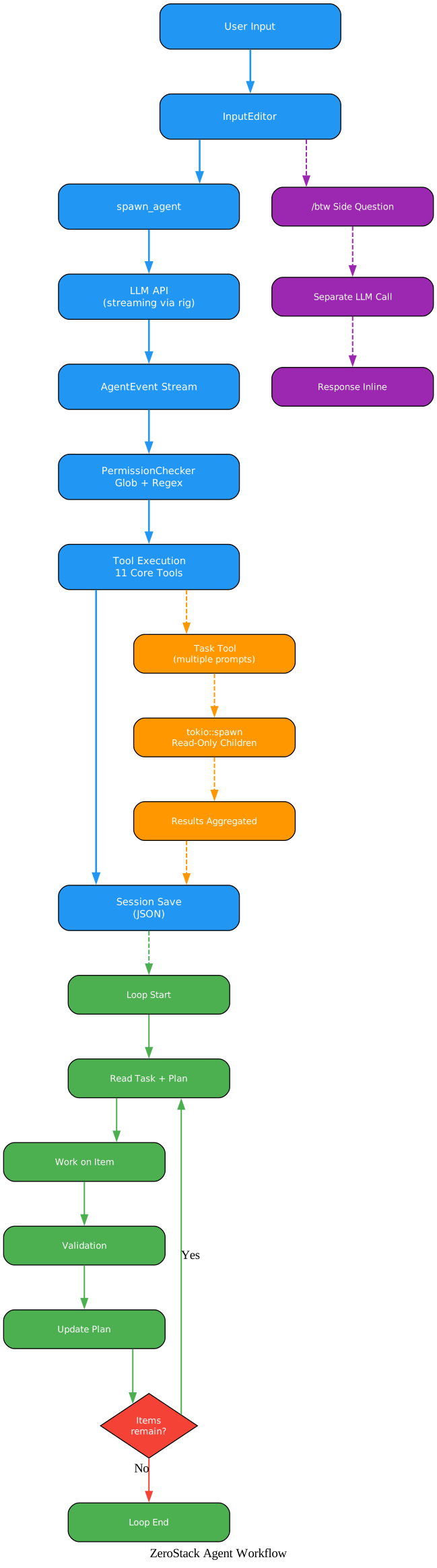
Understanding the Agent Workflow
The agent workflow diagram above shows three parallel paths through the ZeroStack system: the main agent flow, the /btw side question path, and the subagent parallel path, plus the loop system cycle. Let’s examine each:
Main Flow (Blue Path)
The main flow is the primary interaction loop. User input enters through the InputEditor, which handles multi-line editing and command parsing. The spawn_agent function creates a rig Agent with the configured provider, model, and tools. The LLM API streams responses through rig’s streaming chat interface. Each AgentEvent in the stream passes through the PermissionChecker, which applies glob and regex rules. Approved tool calls are executed, and results are saved to the session JSON file.
/btw Side Questions (Purple Path)
The /btw command allows asking a side question without interrupting the main agent. When the user types /btw <question>, ZeroStack makes a separate LLM call with the question, displays the response inline, and the main agent continues from where it left off. This is useful for quick clarifications like “what does this function do?” while the agent is working on a larger task.
Subagent Parallel Path (Orange Path)
When the main agent invokes the task tool with multiple prompts, ZeroStack uses tokio::spawn to create parallel read-only child agents. Each child agent gets its own LLM session with read-only tool access (no write, edit, or bash). Results from all children are aggregated and returned to the main agent. This enables parallel codebase exploration: the main agent can dispatch three subagents to investigate different parts of the codebase simultaneously.
Loop System Cycle (Green Path)
The loop system enables iterative coding for long-horizon tasks. When loop mode is active, the agent reads a task description, picks a plan item, works on it, runs a validation command, updates the plan, and loops back if items remain. This is particularly useful for tasks like “refactor all the error handling in this module” where the agent needs to work through multiple files systematically. Loop mode also supports headless operation for CI integration.
Git Worktree Integration
The git-worktree feature enables a branch-per-task workflow from the chat UI. Key commands:
/worktree– Create a new git worktree for the current task/wt-merge– Merge the worktree branch back/wt-exit– Exit the worktree and clean up--parallelflag – Create a temporary worktree with auto-merge
This allows the agent to work on a feature in isolation without disturbing the main working tree, then merge the changes back when ready.
MCP and ACP Support
- MCP (Model Context Protocol) – Connect external tool servers to ZeroStack. MCP servers provide additional tools that the agent can use, extending ZeroStack’s capabilities without modifying the core codebase.
- ACP (Agent Client Protocol) – Run ZeroStack as an ACP server for editor integration. This enables IDEs and other tools to communicate with ZeroStack via JSON-RPC.
10 Built-In Prompts
ZeroStack ships with 10 prompt templates, each optimized for a specific task:
| Prompt | Purpose |
|---|---|
code | General coding tasks |
plan | Create implementation plans |
review | Code review and feedback |
debug | Debug and diagnose issues |
ask | Ask questions about the codebase |
brainstorm | Generate ideas and explore approaches |
frontend-design | Frontend and UI development |
review-security | Security-focused code review |
simplify | Simplify and refactor code |
write-prompt | Create new prompt templates |
Custom prompts can be added as Markdown files in the prompts directory. ZeroStack also auto-loads AGENTS.md, CLAUDE.md, and ARCHITECTURE.md from the project root, injecting project-specific context into the system prompt. Runtime switching between prompts is available via the /prompt command.
Conclusion
ZeroStack demonstrates that coding agents do not need to be resource hogs. By applying Rust’s zero-cost abstraction philosophy systematically – enum dispatch over trait objects, feature gating over runtime configuration, custom TUI over framework widgets, single-threaded runtime over thread pools, mimalloc over system allocator, compact types over heap allocations, and LTO over separate compilation – ZeroStack achieves 16MB RAM with a 26MB binary.
The feature-gated architecture is a model for other agent projects. Every optional feature is a compile-time choice, not a runtime toggle. This means users only pay for what they use, and the binary contains only what is needed.
For developers on constrained machines, in CI pipelines, or running long sessions, ZeroStack makes AI-assisted coding viable where JavaScript agents cannot fit. For Rust developers, it provides a real-world reference architecture for building efficient, type-safe, and modular applications.
Getting Started
# Install from source
git clone https://github.com/gi-dellav/zerostack.git
cd zerostack
cargo build --release

# Set your API key
export OPENROUTER_API_KEY=your_key_here

# Run ZeroStack
./target/release/zerostack
For minimal builds without default features:
cargo build --release --no-default-features --features "memory,subagents"
Links
- GitHub Repository: https://github.com/gi-dellav/zerostack
- Architecture Documentation: Available in the repository’s
ARCHITECTURE.md - Configuration Guide: Available in the repository’s
docs/CONFIG.md

Enjoyed this post? Never miss out on future posts by following us