Sherlock: Hunt Down Social Media Accounts Across 400+ Platforms
In the realm of Open Source Intelligence (OSINT), few tools have achieved the level of recognition and adoption as Sherlock. With over 80,000 GitHub stars, this Python-based tool has become the go-to solution for security researchers, penetration testers, and digital investigators who need to track social media presence across hundreds of platforms simultaneously.
What is Sherlock?
Sherlock is an open-source OSINT tool designed to hunt down social media accounts by username across more than 400 social networks. Developed by the Sherlock Project, it automates the tedious process of manually checking each platform for a specific username, providing researchers with a comprehensive digital footprint analysis in minutes rather than hours.
The tool operates by systematically querying each supported platform’s user profile endpoint, analyzing the response to determine whether an account exists. This approach leverages publicly available information and does not require authentication on most platforms, making it an invaluable resource for legitimate security research and digital investigations.
Key Capabilities
- Multi-Platform Search: Query 400+ social networks simultaneously
- Multiple Detection Methods: Status codes, response messages, and URL redirects
- Parallel Processing: Thread pool execution with configurable worker limits
- WAF Detection: Built-in Web Application Firewall bypass capabilities
- Output Formats: Text, CSV, JSON, and Excel spreadsheet exports
- Proxy Support: Tor and HTTP/HTTPS proxy integration for anonymous searching
- Live Updates: Fetches latest site manifest from GitHub repository
How Sherlock Works
Understanding the Sherlock Architecture
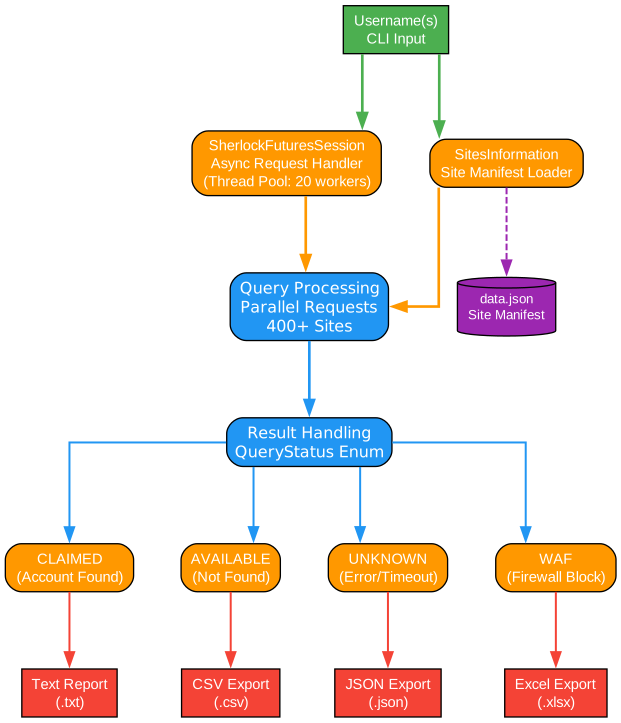
The architecture diagram above illustrates the complete workflow and component interactions within Sherlock. Let’s examine each component in detail to understand how this powerful OSINT tool operates.
Core Components:
1. Command Line Interface (CLI) The CLI serves as the primary entry point for users, accepting various command-line arguments that configure the search behavior. Users can specify target usernames, output formats, proxy settings, and timeout configurations. The CLI parser handles argument validation and provides helpful usage documentation, making the tool accessible to both novice and experienced users.
The interface supports multiple username inputs, allowing batch processing of targets. Users can provide usernames directly via command line arguments, from a file containing a list of usernames, or through standard input for pipeline integration with other tools.
2. Site Manifest Loader The site manifest, stored as data.json, contains the configuration for each supported platform. This critical component defines:
- Platform URLs and endpoint patterns
- Detection method configurations
- Error messages and status indicators
- URL validation regex patterns
- WAF (Web Application Firewall) fingerprints
The loader can fetch the latest manifest from the GitHub repository, ensuring users always have access to the most current site configurations. This live update mechanism allows the community to maintain and improve platform support without requiring tool reinstallation.
3. Username Validator Before querying platforms, Sherlock validates the username against each site’s specific requirements. Different platforms have varying username constraints:
- Character set limitations (alphanumeric only, underscores allowed, etc.)
- Length restrictions (minimum and maximum characters)
- Reserved word lists
- Pattern validation through regular expressions
This validation step prevents unnecessary network requests to platforms where the username format is invalid, improving efficiency and reducing false negatives caused by format mismatches.
4. Request Engine The request engine manages HTTP requests to each platform’s profile endpoint. It implements:
- Connection pooling for efficient resource utilization
- Timeout handling to prevent hanging on unresponsive sites
- Retry logic for transient failures
- Rate limiting to avoid triggering platform defenses
The engine supports both synchronous and asynchronous request patterns, with the default configuration using a thread pool for parallel execution. This design allows Sherlock to query hundreds of sites simultaneously while respecting system resource constraints.
5. Response Analyzer Each platform response undergoes analysis to determine account existence. The analyzer applies the configured detection method:
- Status Code Analysis: Checks HTTP response codes (200, 404, 403, etc.)
- Message Detection: Searches response content for specific error messages
- Response URL Analysis: Examines redirect URLs for profile not found patterns
The analyzer handles variations in platform responses, accounting for differences in how sites indicate missing profiles. Some platforms return 404 status codes, while others return 200 with error messages embedded in the page content.
6. WAF Detection Module Modern platforms employ Web Application Firewalls to protect against automated access. Sherlock’s WAF detection module identifies common firewall implementations:
- Cloudflare challenge pages
- Cloudfront access restrictions
- PerimeterX bot detection
- Custom rate-limiting responses
When a WAF is detected, the module can apply appropriate bypass techniques or mark the result as requiring manual verification, preventing false negatives from firewall interference.
7. Result Aggregator The result aggregator collects findings from all platform queries and organizes them for output. It categorizes results into:
- Found: Confirmed account existence
- Not Found: Confirmed account absence
- Unknown: Inconclusive results requiring manual verification
The aggregator also collects metadata about each finding, including profile URLs, response times, and detection confidence levels.
8. Output Formatter The final component transforms aggregated results into the user’s requested format. Supported formats include:
- Plain text for quick review
- CSV for spreadsheet analysis
- JSON for programmatic processing
- XLSX for detailed reporting with formatting
Data Flow:
The workflow begins when a user invokes Sherlock with one or more target usernames. The CLI parses arguments and initializes the site manifest loader, which retrieves the platform configuration either from local cache or the remote GitHub repository.
For each target username, the validator checks format compatibility with each platform’s requirements. Valid combinations proceed to the request engine, which queues HTTP requests for parallel execution. The thread pool processes requests concurrently, with each worker handling a single platform query.
As responses arrive, the analyzer applies the appropriate detection method based on each site’s configuration. WAF detection runs in parallel to identify potential interference. Results flow to the aggregator, which compiles findings across all platforms.
Finally, the output formatter generates the requested output format, writing results to files or displaying them in the terminal. The entire process completes in seconds to minutes depending on network conditions and the number of platforms queried.
Key Insights:
Sherlock’s architecture demonstrates several best practices for OSINT tools:
- Modularity: Each component handles a specific concern, enabling independent testing and maintenance
- Extensibility: New platforms can be added by updating the site manifest without code changes
- Efficiency: Parallel processing maximizes throughput while respecting system constraints
- Reliability: Multiple detection methods handle diverse platform behaviors
- Transparency: Clear result categorization helps users understand confidence levels
Practical Applications:
Security professionals use Sherlock for:
- Digital Footprint Analysis: Understanding an individual’s online presence
- Penetration Testing: Gathering intelligence on target organizations
- Identity Verification: Confirming claimed social media ownership
- Brand Protection: Monitoring for impersonation accounts
- Investigation: Supporting law enforcement and private investigations
The tool’s design prioritizes ethical use, with clear documentation about appropriate applications and legal considerations. Users should always ensure compliance with applicable laws and platform terms of service when conducting OSINT research.
Detection Methods
Understanding Detection Methods
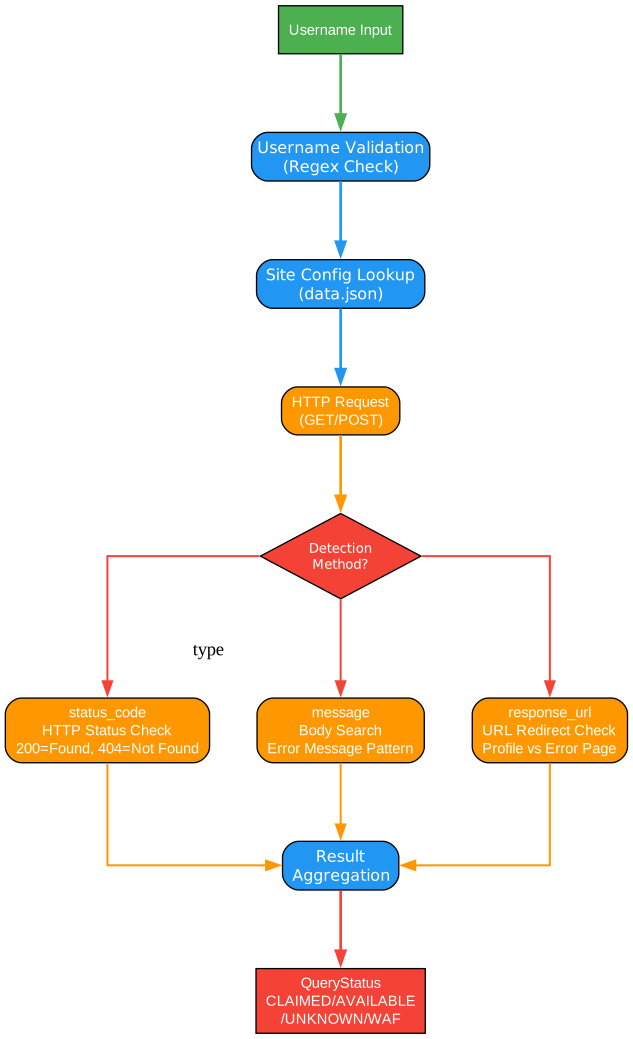
The detection flow diagram illustrates how Sherlock determines account existence across different platforms. Understanding these methods is crucial for interpreting results accurately and troubleshooting unexpected findings.
Detection Method Categories:
1. Status Code Detection
The most straightforward detection method analyzes HTTP response status codes returned by platform endpoints. This approach relies on the standard HTTP semantics where:
- 200 OK: Indicates the requested resource (user profile) exists
- 404 Not Found: Indicates the resource does not exist
- 403 Forbidden: May indicate the profile exists but is private or restricted
- 429 Too Many Requests: Rate limiting triggered, requires retry or proxy rotation
Sherlock’s configuration maps expected status codes to account existence states. For example, a platform returning 200 for existing profiles and 404 for non-existent profiles would use status code detection with these mappings.
However, status codes alone are often insufficient. Many platforms return 200 status codes even for non-existent profiles, serving custom “user not found” pages. This behavior necessitates additional detection methods.
2. Message Detection
Message detection examines the response body content for specific text patterns that indicate account status. Platforms often embed error messages in their responses:
- “User not found”
- “This page doesn’t exist”
- “The requested profile could not be found”
- “Account suspended”
Sherlock’s site manifest defines these error messages for each platform. When message detection is configured, the tool searches the response content for these patterns. A match indicates the account does not exist, while absence of error messages suggests the profile is present.
This method handles platforms that return 200 status codes for all responses, differentiating between successful profile loads and error pages through content analysis.
3. Response URL Detection
Some platforms handle missing profiles by redirecting to alternative URLs. Response URL detection tracks these redirects to determine account existence:
- Redirect to
/not-foundindicates missing profile - Redirect to
/loginmay indicate private profile - No redirect with profile URL indicates existing account
The configuration specifies patterns to match against the final response URL after any redirects. This method is particularly useful for platforms that use JavaScript-based routing where the URL changes dynamically.
Detection Flow Process:
Step 1: Request Preparation For each platform, Sherlock constructs the appropriate request URL by substituting the target username into the platform’s URL template. The template might include:
- Username in the path:
https://platform.com/{username} - Username as query parameter:
https://platform.com/user?name={username} - Username in subdomain:
https://{username}.platform.com
Step 2: HTTP Request Execution The request engine sends the HTTP request with appropriate headers to mimic legitimate browser traffic. Headers typically include:
- User-Agent strings from common browsers
- Accept headers for HTML content
- Referer headers when required by platform policies
- Cookie handling for platforms requiring session state
Step 3: Response Analysis Upon receiving the response, the analyzer applies the configured detection method:
- For status code detection: Compare response code against expected values
- For message detection: Search response body for error patterns
- For response URL detection: Compare final URL against expected patterns
Step 4: Result Determination The analyzer combines all available evidence to determine account status:
- Found: Response matches patterns for existing profiles
- Not Found: Response matches patterns for missing profiles
- Unknown: Response doesn’t match expected patterns, requires manual verification
Step 5: WAF Detection In parallel with result determination, the WAF detection module examines the response for signs of firewall interference:
- Challenge pages requiring JavaScript execution
- CAPTCHA requirements
- Rate limiting responses
- Geographic restrictions
When WAF interference is detected, the result is marked accordingly to prevent false positives/negatives.
Handling Edge Cases:
Sherlock’s detection methods handle several edge cases that complicate OSINT research:
Private Profiles: Some platforms return different responses for private vs. public profiles. The tool may report “Found” for private profiles without being able to access profile content.
Rate Limiting: Aggressive querying can trigger platform rate limits. Sherlock implements delays and supports proxy rotation to mitigate this issue.
Dynamic Content: Platforms using client-side rendering may return empty responses that require JavaScript execution. Sherlock focuses on server-rendered content for reliability.
Account Variations: Some platforms allow multiple account types (personal, business, creator). The detection configuration accounts for these variations.
Key Insights:
The multi-method detection approach provides several advantages:
- Accuracy: Combining methods reduces false positives from platform quirks
- Coverage: Different methods handle diverse platform architectures
- Reliability: Fallback methods ensure results even when primary detection fails
- Maintainability: Site-specific configurations enable community contributions
Practical Considerations:
When interpreting Sherlock results, consider:
- False Positives: Common names may appear on platforms where they don’t actually belong to your target
- False Negatives: WAF interference or private profiles may cause missed accounts
- Temporal Changes: Account status can change between query and verification
- Platform Policies: Some platforms prohibit automated access in their terms of service
Always verify Sherlock findings through manual inspection before drawing conclusions in sensitive investigations.
Site Manifest Structure
Understanding the Site Manifest
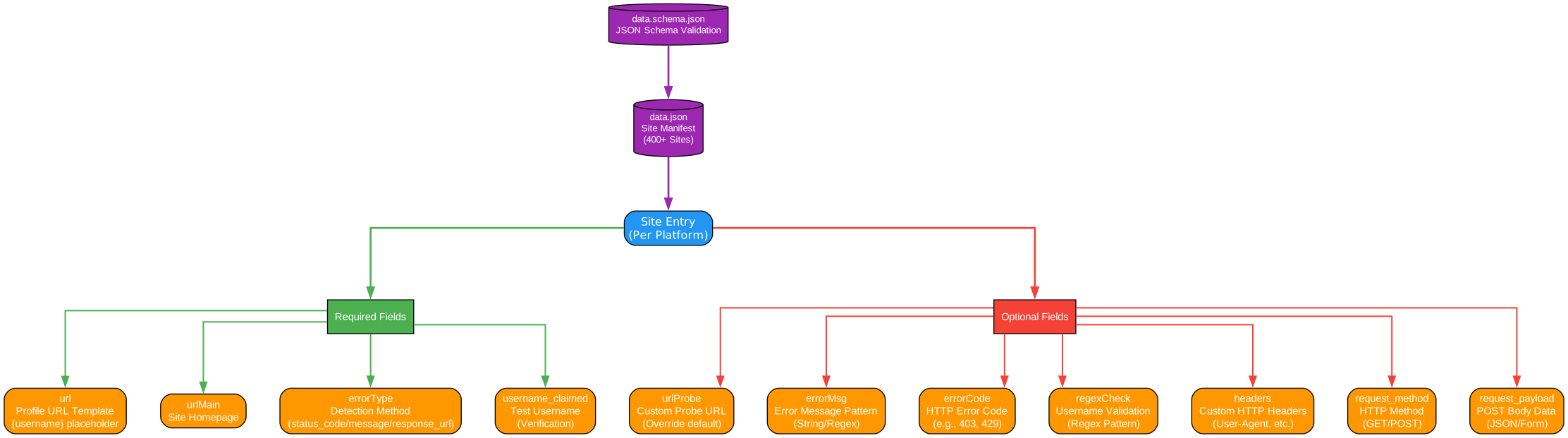
The site manifest is the heart of Sherlock’s extensibility. This JSON configuration file defines how to query and interpret responses from each supported platform. Understanding its structure enables users to contribute new platforms and troubleshoot detection issues.
Manifest Architecture:
The site manifest is stored as data.json in the Sherlock resources directory. It contains a JSON object where each key represents a platform name, and the value is a configuration object defining how to interact with that platform.
Core Configuration Fields:
1. URL Template The URL template defines the endpoint to query for each platform. It uses a simple substitution pattern where {username} is replaced with the target username:
"url": "https://twitter.com/{username}"
Some platforms require more complex URL patterns:
"url": "https://api.platform.com/v1/users/{username}/profile"
The template supports multiple substitution points for platforms that require additional parameters.
2. URL Probe (Optional) For platforms requiring initial requests before profile queries, the URL probe defines a preliminary endpoint:
"urlProbe": "https://platform.com/api/v2/initialize"
This field handles platforms that require session tokens or CSRF cookies before allowing profile access.
3. Error Messages The error messages array defines text patterns that indicate a missing profile:
"errorMsg": [
    "User not found",
    "This page doesn't exist",
    "The requested user could not be found"
]
Sherlock searches the response body for these patterns. Finding any pattern indicates the account does not exist.
4. Error Type The error type specifies the primary detection method:
"errorType": "status_code"
Valid values include:
status_code: Use HTTP status code for detectionmessage: Use error message patterns in response bodyresponse_url: Use final URL after redirects
5. Error Code (Conditional) When using status code detection, the error code defines which status indicates a missing profile:
"errorCode": 404
Some platforms use non-standard codes, requiring custom configuration.
6. Response URL (Conditional) For response URL detection, this field defines patterns to match against the final URL:
"responseUrl": "https://platform.com/not-found"
7. Username Validation The regex field defines valid username patterns for the platform:
"regex": "^[a-zA-Z0-9_]{1,15}$"
This validation prevents unnecessary requests for usernames that don’t match platform requirements.
8. WAF Detection The WAF field defines Web Application Firewall fingerprints:
"waf": {
    "cloudflare": true,
    "perimeterx": false
}
When enabled, Sherlock applies appropriate bypass techniques for detected firewalls.
9. Request Headers Custom headers can be defined for platforms requiring specific request metadata:
"headers": {
    "X-Requested-With": "XMLHttpRequest",
    "Accept": "application/json"
}
10. Request Method The HTTP method for requests (default is GET):
"method": "POST"
Example Configuration:
A complete platform configuration might look like:
"github": {
    "url": "https://github.com/{username}",
    "errorType": "status_code",
    "errorCode": 404,
    "regex": "^[a-zA-Z0-9-]{1,39}$",
    "waf": {
        "cloudflare": true
    }
}
This configuration tells Sherlock to:
- Query
https://github.com/{username} - Consider 404 status code as “account not found”
- Validate usernames match
^[a-zA-Z0-9-]{1,39}$ - Apply Cloudflare bypass if detected
Manifest Maintenance:
The Sherlock community actively maintains the site manifest through GitHub contributions. When platforms change their APIs or detection methods, contributors submit pull requests to update configurations. This distributed maintenance model ensures the tool remains functional as platforms evolve.
Live Updates:
Sherlock can fetch the latest manifest from GitHub at runtime:
sherlock --site-list https://raw.githubusercontent.com/sherlock-project/sherlock/main/sherlock_project/resources/data.json
This feature allows users to access updated platform configurations without upgrading the tool itself.
Key Insights:
The manifest-based architecture provides several benefits:
- Extensibility: New platforms require only configuration changes
- Maintainability: Platform-specific logic is centralized and documented
- Community-Driven: Anyone can contribute new platforms or fixes
- Version Control: Manifest history tracks platform changes over time
Practical Applications:
Understanding the manifest enables advanced use cases:
- Custom Platforms: Add internal or niche platforms to your local manifest
- Debugging: Analyze manifest entries to troubleshoot detection failures
- Optimization: Remove unnecessary platforms to speed up searches
- Compliance: Disable platforms where automated access violates terms of service
Installation
Sherlock offers multiple installation methods to suit different environments and use cases.
Using pipx (Recommended)
pipx provides isolated environments for Python CLI tools, preventing dependency conflicts:
pipx install sherlock-project
Using pip
For traditional Python package installation:
pip install sherlock-project
Using Docker
Docker provides containerized execution for consistent environments:
docker pull sherlock/sherlock
docker run --rm -it sherlock/sherlock target_username
Using Fedora
Fedora users can install via DNF:
sudo dnf install sherlock
From Source
For development or customization:
git clone https://github.com/sherlock-project/sherlock.git
cd sherlock
pip install -e .
Usage Examples
Basic Search
Search for a single username across all platforms:
sherlock target_username
Multiple Usernames
Search for multiple usernames simultaneously:
sherlock user1 user2 user3
Specific Sites
Limit search to specific platforms:
sherlock --site github --site twitter target_username
Output Formats
Export results in different formats:
# CSV format
sherlock --csv --output results.csv target_username

# JSON format
sherlock --json --output results.json target_username

# Excel format
sherlock --xlsx --output results.xlsx target_username
Proxy Configuration
Route requests through a proxy:
# HTTP proxy
sherlock --proxy http://127.0.0.1:8080 target_username

# Tor (requires Tor service running)
sherlock --tor target_username
Timeout Configuration
Adjust timeout for slow connections:
sherlock --timeout 30 target_username
Verbose Output
Enable detailed logging:
sherlock --verbose target_username
Browse Results
Open found profiles in a web browser:
sherlock --browse target_username
Key Features
Multi-Platform Username Search
Sherlock’s primary strength lies in its comprehensive platform coverage. With support for over 400 social networks, the tool provides unparalleled breadth in OSINT investigations. Platforms span categories including:
- Social Networks: Facebook, Twitter, Instagram, LinkedIn
- Developer Platforms: GitHub, GitLab, Bitbucket
- Media Platforms: YouTube, Twitch, SoundCloud
- Professional Networks: LinkedIn, Xing, Crunchbase
- Dating Apps: Tinder, Bumble, OkCupid
- Gaming Platforms: Steam, PlayStation Network, Xbox Live
- Forums: Reddit, Discord, Telegram
- Niche Communities: Various specialized platforms
Parallel Request Processing
Sherlock employs a thread pool architecture for concurrent platform queries. The default configuration uses up to 20 worker threads, balancing speed with resource consumption. This parallel processing enables:
- Rapid Results: Query 400+ platforms in seconds to minutes
- Efficient Resource Use: Connection pooling reduces overhead
- Configurable Concurrency: Adjust worker count for system capabilities
WAF Detection and Bypass
Modern platforms deploy Web Application Firewalls to detect and block automated access. Sherlock includes built-in WAF detection for common implementations:
Cloudflare Detection
- Identifies Cloudflare challenge pages
- Handles JavaScript challenge requirements
- Supports Cloudflare bypass through proxy rotation
Cloudfront Detection
- Recognizes AWS Cloudfront restrictions
- Handles geographic access limitations
PerimeterX Detection
- Identifies PerimeterX bot detection
- Supports session rotation for bypass
Username Validation
Each platform defines username format requirements. Sherlock validates usernames against platform-specific patterns before querying, preventing:
- Unnecessary network requests for invalid formats
- False negatives from format mismatches
- Rate limiting from invalid queries
Live Site Data Updates
The site manifest receives continuous community updates. Sherlock can fetch the latest configuration from GitHub, ensuring:
- Current platform support
- Fixed detection methods
- New platform additions
Technical Implementation
Request Engine Architecture
Sherlock’s request engine uses Python’s requests library with connection pooling:
import requests
from concurrent.futures import ThreadPoolExecutor

class RequestEngine:
    def __init__(self, max_workers=20):
        self.session = requests.Session()
        self.executor = ThreadPoolExecutor(max_workers=max_workers)

    def query_platform(self, url, headers):
        try:
            response = self.session.get(url, headers=headers, timeout=10)
            return response
        except requests.RequestException:
            return None
Detection Method Implementation
Each detection method implements a common interface:
def detect_status_code(response, config):
    """Check if status code indicates missing profile."""
    error_code = config.get('errorCode', 404)
    return response.status_code == error_code

def detect_message(response, config):
    """Check if response contains error messages."""
    error_messages = config.get('errorMsg', [])
    for message in error_messages:
        if message in response.text:
            return True
    return False

def detect_response_url(response, config):
    """Check if final URL indicates missing profile."""
    expected_url = config.get('responseUrl')
    return expected_url in response.url
WAF Detection Logic
WAF detection examines response characteristics:
def detect_cloudflare(response):
    """Detect Cloudflare challenge."""
    indicators = [
        'cf-browser-verification',
        'challenge-platform',
        '__cfduid'
    ]
    return any(indicator in response.text for indicator in indicators)

def detect_perimeterx(response):
    """Detect PerimeterX bot detection."""
    indicators = [
        '_px',
        'perimeterx',
        'pxvid'
    ]
    return any(indicator in response.text for indicator in indicators)
Parallel Processing Pattern
The thread pool processes platform queries concurrently:
def search_username(username, sites, max_workers=20):
    """Search for username across all platforms."""
    results = {}

    with ThreadPoolExecutor(max_workers=max_workers) as executor:
        futures = {
            executor.submit(query_site, site, username): site
            for site in sites
        }

        for future in as_completed(futures):
            site = futures[future]
            try:
                result = future.result()
                results[site] = result
            except Exception as e:
                results[site] = {'status': 'error', 'message': str(e)}

    return results
Supported Platforms
Sherlock supports platforms across numerous categories:
Social Media
- Twitter/X
- TikTok
- Snapchat
Professional Networks
- GitHub
- GitLab
- Stack Overflow
- Medium
Gaming
- Steam
- PlayStation Network
- Xbox Live
- Discord
- Twitch
Media Platforms
- YouTube
- Vimeo
- SoundCloud
- Spotify
- Dailymotion
Messaging
- Telegram
- Signal
- Skype
Dating
- Tinder
- Bumble
- OkCupid
- Match
Forums
- 4chan
- Hacker News
And Many More
The complete list of supported platforms continues to grow through community contributions.
Ethical Considerations
Sherlock is designed for legitimate OSINT research. Users should:
- Respect Platform Terms: Review and comply with platform terms of service
- Obtain Authorization: Ensure proper authorization for investigations
- Protect Privacy: Handle discovered information responsibly
- Report Responsibly: Use findings ethically and legally
The tool’s documentation emphasizes appropriate use cases:
- Security research and penetration testing
- Digital footprint analysis for personal brand management
- Identity verification and fraud prevention
- Law enforcement investigations with proper legal authority
Conclusion
Sherlock represents a powerful addition to any OSINT toolkit. Its comprehensive platform coverage, efficient parallel processing, and flexible output options make it invaluable for security researchers, investigators, and anyone needing to understand digital footprints across social media.
The tool’s architecture demonstrates thoughtful design choices:
- Extensibility: Manifest-based platform configuration enables community contributions
- Efficiency: Thread pool processing maximizes throughput
- Reliability: Multiple detection methods handle diverse platform behaviors
- Usability: Clear CLI interface with comprehensive options
With over 80,000 GitHub stars and active community maintenance, Sherlock continues to evolve alongside the social media landscape. Whether conducting authorized penetration tests, investigating digital identities, or researching your own online presence, Sherlock provides the capabilities needed for thorough OSINT research.
Related Posts
- AgentSkillOS: Skill Orchestration System
- MattPocock Skills: AI Agent Workflows
- DESIGN.md: AI-Powered Design Systems