What Is Supertonic?
Supertonic is a lightning-fast on-device multilingual text-to-speech system that runs entirely through ONNX Runtime, requiring no cloud connectivity, no API calls, and no privacy compromises. Developed by Supertone Inc., this open-source project delivers production-quality speech synthesis across 31 languages while maintaining a compact 99M-parameter footprint that fits comfortably on edge devices – from desktops and browsers to Raspberry Pi units and e-readers.
Key Insight: Supertonic processes all text-to-speech inference locally through ONNX Runtime, meaning zero data leaves the device. This makes it ideal for privacy-sensitive applications like medical dictation, legal document reading, and offline assistive technology where cloud-based TTS services cannot operate.
The system ships ready-to-use inference examples across 10 programming languages and platforms: Python, Node.js, Browser (WebGPU/WASM), Java, C++, C#/.NET, Go, Swift, Rust, iOS, and Flutter. Whether you are building a mobile app, a browser extension, or an embedded system, Supertonic provides a deployment path that keeps audio generation entirely on the user’s hardware.
Architecture Overview
Supertonic’s architecture follows a four-stage ONNX pipeline that transforms raw text into 16-bit WAV audio through a series of specialized neural network models. Each model is distributed as a standalone .onnx file, enabling independent loading, optimization, and replacement.
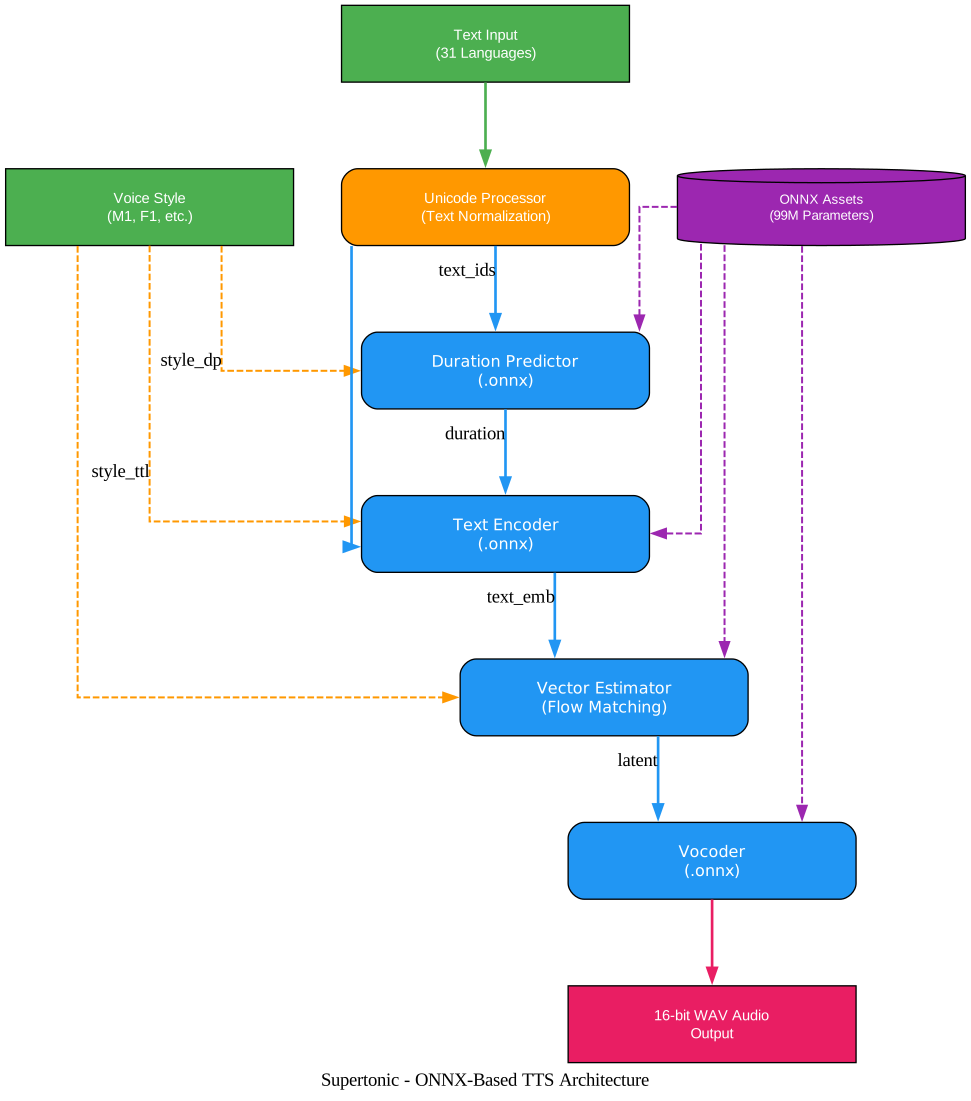
The diagram above illustrates the complete ONNX-based TTS pipeline. Text input in any of the 31 supported languages enters the system and passes through a Unicode Processor that normalizes characters, removes emojis, and applies language-specific tagging with <lang> tokens. The processed text is then encoded into integer sequences using a Unicode indexer mapping. Voice style vectors – stored as JSON files containing style_ttl (for the text-to-latent module) and style_dp (for the duration predictor) – are loaded alongside the text. The Duration Predictor model estimates how long each phoneme should sound, with a speed parameter (default 1.05) that lets developers control speech rate. The Text Encoder then transforms the text IDs and style vectors into a rich embedding that captures both linguistic content and speaker characteristics. The Vector Estimator performs iterative flow-matching denoising over a configurable number of steps (default 8), progressively refining a noisy latent representation into a clean acoustic code. Finally, the Vocoder decodes these latent codes into a 16-bit PCM waveform at 24kHz. All four ONNX models – duration_predictor.onnx, text_encoder.onnx, vector_estimator.onnx, and vocoder.onnx – are loaded from a single assets/onnx directory, and the entire pipeline configuration lives in a tts.json file that specifies sample rate, chunk sizes, and latent dimensions.
Key Features and Platform Support
Supertonic stands out in the crowded TTS landscape by combining on-device privacy, multilingual breadth, and cross-platform flexibility into a single cohesive system. The v3 release expanded language coverage from 5 to 31 languages while maintaining backward compatibility with the v2 ONNX interface.

The feature diagram above shows how Supertonic’s core capabilities branch into concrete benefits and platform targets. At the center, the On-Device TTS Engine connects to six primary features: On-Device Inference (no network required), 31 Language Support (covering English, Korean, Japanese, Arabic, and 27 European and Asian languages), Lightning-Fast CPU Inference (competitive with GPU-based baselines), Expressive Tags (supporting <laugh>, <breath>, <sigh> and other vocal expressions), Compact Model at 99M Parameters (small enough for mobile deployment), and Zero Network Dependency (complete offline operation). The On-Device Inference feature further connects to 10 platform SDKs: Python, Node.js, Browser with WebGPU, iOS via Swift, Flutter for cross-platform, C++, C#/.NET, Go, Rust, and Java. The 31 Language Support feature connects to language groups including English, Korean, Japanese, Chinese, European Languages (German, French, Spanish, Italian, Portuguese, Dutch, and more), and 16 additional languages. This architecture means developers can pick any runtime that matches their deployment target and get the same inference quality across all platforms.
Amazing: Supertonic runs on a Raspberry Pi with real-time performance, and on an Onyx Boox e-reader in airplane mode it achieves an average RTF (Real-Time Factor) of 0.3x – meaning it generates audio three times faster than real-time playback, all without any network connection.
Feature Comparison Table
| Feature | Supertonic | ElevenLabs | OpenAI TTS | Google TTS |
|---|---|---|---|---|
| On-Device Inference | Yes | No | No | No |
| Offline Operation | Yes | No | No | No |
| Languages (v3) | 31 | 32 | 7 | 50+ |
| Model Size | ~99M params | Cloud-only | Cloud-only | Cloud-only |
| Privacy | Full | Limited | Limited | Limited |
| Latency | <1s on CPU | Network-dependent | Network-dependent | Network-dependent |
| Expressive Tags | Yes (<laugh>, <breath>, <sigh>) | Limited | No | No |
| Open Source | Yes (MIT + OpenRAIL-M) | No | No | No |
| Browser Support | Yes (WebGPU/WASM) | Yes | Yes | Yes |
| Mobile SDKs | iOS, Flutter, React Native | Yes | Yes | Yes |
Text-to-Speech Synthesis Workflow
Understanding the synthesis workflow is essential for developers integrating Supertonic into their applications. The pipeline processes text through normalization, encoding, duration prediction, iterative denoising, and final waveform generation.
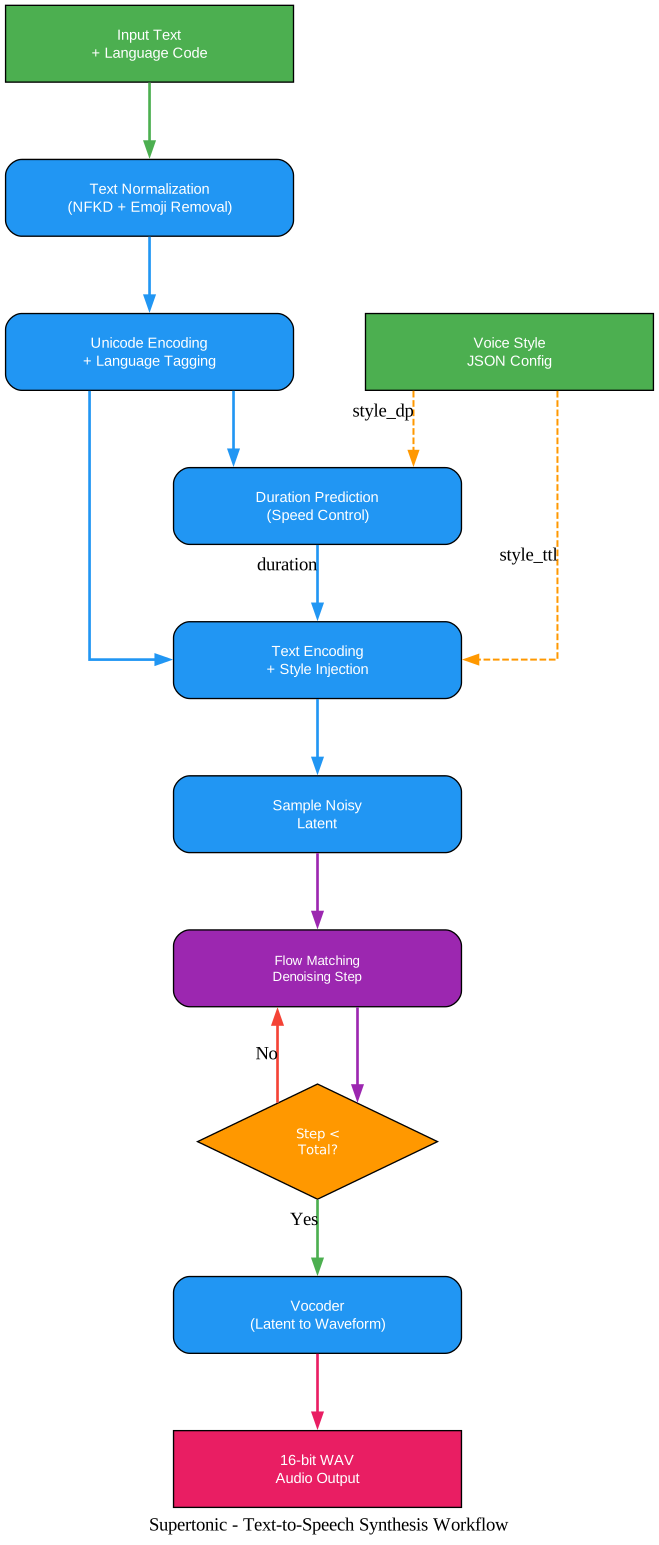
The workflow diagram above traces the complete path from raw text input to finished audio output. The process begins with two parallel inputs: the Input Text with Language Code (e.g., “Hello world” with lang="en") and the Voice Style JSON Configuration (such as M1.json for a male voice or F1.json for a female voice). The text first passes through Text Normalization, which applies NFKD Unicode normalization, strips emojis, replaces typographic characters (smart quotes, em dashes), and cleans up spacing around punctuation. If the text lacks a terminal punctuation mark, a period is appended automatically. Next, Unicode Encoding and Language Tagging wraps the normalized text with <lang>...</lang> tokens and converts each character to an integer index via the unicode_indexer.json mapping file. The Duration Predictor then estimates how long each segment should sound, with the speed parameter (default 1.05) allowing developers to make speech faster or slower. The voice style’s style_dp vector is injected at this stage. The Text Encoding stage combines the encoded text with the style_ttl voice style vector to produce a rich embedding that captures both linguistic meaning and speaker identity. A noisy latent is sampled from random noise, shaped by the predicted duration and chunk configuration. The heart of the system is the Flow Matching Denoising loop: the Vector Estimator iteratively refines the noisy latent over a configurable number of steps (default 8), with each step conditioned on the text embedding, style vectors, and a current step counter. After all denoising steps complete, the clean latent enters the Vocoder, which decodes it into a 16-bit WAV waveform at 24kHz sample rate. For long texts, Supertonic automatically chunks the input at sentence boundaries (respecting abbreviations like “Mr.” and “Dr.”) and concatenates the resulting audio segments with configurable silence padding (default 0.3 seconds).
Takeaway: The flow-matching denoising loop is what gives Supertonic its quality-speed tradeoff. Fewer steps (e.g., 4) produce faster but slightly lower-quality audio, while more steps (e.g., 16) yield higher fidelity at the cost of latency. The default of 8 steps provides an excellent balance for real-time applications.
Installation and Quick Start
Python SDK (Easiest)
The fastest way to get started with Supertonic is through the Python PyPI package:
pip install supertonic
After installation, generating speech is straightforward:
from supertonic import TTS

# First run downloads the model from Hugging Face automatically
tts = TTS(auto_download=True)

style = tts.get_voice_style(voice_name="M1")

text = "A gentle breeze moved through the open window while everyone listened to the story."
wav, duration = tts.synthesize(text, voice_style=style, lang="en")

tts.save_audio(wav, "output.wav")
print(f"Generated {duration:.2f}s of audio")
The auto_download=True flag fetches the ONNX model assets from Hugging Face on first run and caches them locally for subsequent use.
Manual Setup from Source
For developers who need more control over the model assets or want to integrate Supertonic into a custom pipeline:
# Clone the repository
git clone https://github.com/supertone-inc/supertonic.git
cd supertonic

# Download ONNX models (requires Git LFS)
git lfs install
git clone https://huggingface.co/Supertone/supertonic-3 assets

# Run the Python example
cd py
uv sync
uv run example_onnx.py
This generates outputs/output.wav using the default M1 voice style.
Platform-Specific Setup
Node.js:
cd nodejs
npm install
npm start
Browser (WebGPU/WASM):
cd web
npm install
npm run dev
Swift (macOS):
cd swift
swift build -c release
.build/release/example_onnx
iOS:
cd ios/ExampleiOSApp
xcodegen generate
open ExampleiOSApp.xcodeproj
# In Xcode: select your team and build target
C++:
cd cpp
mkdir build && cd build
cmake .. && cmake --build . --config Release
./example_onnx
C#/.NET:
cd csharp
dotnet restore
dotnet run
Go (requires ONNX Runtime C library):
# macOS: brew install onnxruntime
cd go
go mod download
go run example_onnx.go helper.go
Java (requires JDK, not JRE):
cd java
mvn clean install
mvn exec:java
Rust:
cd rust
cargo build --release
./target/release/example_onnx
Flutter:
cd flutter
flutter pub get
flutter run -d macos  # or your target platform
Important: Some language examples require native runtime dependencies. Go needs the ONNX Runtime C library installed (
brew install onnxruntimeon macOS). Java requires a full JDK (not just a JRE). C# targets .NET 9 with major-version roll-forward. Always check the README in each language directory for platform-specific prerequisites.
Voice Styles and Language Support
Supertonic v3 ships with multiple preset voice styles, each defined as a JSON file containing two tensors: style_ttl (for the text-to-latent module) and style_dp (for the duration predictor). The available preset voices include:
| Voice | Gender | Description |
|---|---|---|
| M1 | Male | Default male voice |
| M2 | Male | Alternative male voice |
| M3 | Male | Deep male voice |
| M4 | Male | Warm male voice |
| M5 | Male | Clear male voice |
| F1 | Female | Default female voice |
| F2 | Female | Alternative female voice |
| F3 | Female | Soft female voice |
| F4 | Female | Bright female voice |
| F5 | Female | Warm female voice |
For custom voice creation, Supertone offers the Voice Builder tool, which converts your voice recordings into a deployable, edge-native TTS voice style with permanent ownership.
Supported Languages (31)
Supertonic v3 supports the following languages:
| Code | Language | Code | Language | Code | Language | Code | Language |
|---|---|---|---|---|---|---|---|
en | English | ko | Korean | ja | Japanese | ar | Arabic |
bg | Bulgarian | cs | Czech | da | Danish | de | German |
el | Greek | es | Spanish | et | Estonian | fi | Finnish |
fr | French | hi | Hindi | hr | Croatian | hu | Hungarian |
id | Indonesian | it | Italian | lt | Lithuanian | lv | Latvian |
nl | Dutch | pl | Polish | pt | Portuguese | ro | Romanian |
ru | Russian | sk | Slovak | sl | Slovenian | sv | Swedish |
tr | Turkish | uk | Ukrainian | vi | Vietnamese |
Natural Text Handling
One of Supertonic’s standout capabilities is its ability to handle complex, real-world text inputs without requiring pre-processing or phonetic annotations. The built-in Unicode Processor normalizes text through several stages:
- NFKD Unicode Normalization – Converts composed characters to their decomposed forms
- Emoji Removal – Strips emoji characters across the full Unicode range
- Typographic Character Replacement – Converts smart quotes, em dashes, and other typographic characters to their ASCII equivalents
- Expression Expansion – Replaces
@with “at”,e.g.,with “for example,”,i.e.,with “that is,” - Spacing Cleanup – Removes duplicate spaces and fixes spacing around punctuation
- Terminal Punctuation – Appends a period if the text lacks terminal punctuation
This processing pipeline enables Supertonic to correctly read financial expressions like “$5.2M” as “five point two million dollars,” phone numbers like “(212) 555-0142 ext. 402,” and technical units like “2.3h” as “two point three hours” – areas where cloud-based TTS services like ElevenLabs Flash v2.5, OpenAI TTS-1, and Gemini 2.5 Flash TTS all fail according to Supertonic’s published benchmarks.
Performance and Benchmarks
Supertonic v3 is designed for practical on-device inference. Across measured languages, it stays within a competitive WER/CER (Word Error Rate / Character Error Rate) range against much larger open TTS models such as VoxCPM2, while preserving a lightweight deployment path.
Compared to Supertonic v2, the v3 release reduces repeat and skip failures, improves speaker similarity across the shared-language set, and expands language coverage from 5 to 31 languages. It maintains the v2-compatible public ONNX interface, so existing integrations can upgrade to v3 with the same inference contract.
On the runtime side, Supertonic v3 runs fast on CPU – even compared with larger baselines measured on A100 GPU – and uses substantially less memory. The open-weight fixed-voice setting does not require a GPU, making local, browser, and edge deployment straightforward.
At approximately 99M parameters across the public ONNX assets, Supertonic v3 is significantly smaller than 0.7B to 2B class open TTS systems. This smaller model size translates to practical advantages in download size, startup time, and on-device inference latency.
Built With Supertonic
Several projects already leverage Supertonic for real-world applications:
| Project | Description |
|---|---|
| TLDRL | Free, on-device TTS Chrome extension for reading any webpage |
| Read Aloud | Open-source TTS browser extension (Chrome, Edge) |
| PageEcho | E-Book reader app for iOS |
| VoiceChat | On-device voice-to-voice LLM chatbot in the browser |
| OmniAvatar | Talking avatar video generator from photo and speech |
| CopiloTTS | Kotlin Multiplatform TTS SDK via ONNX Runtime |
| Voice Mixer | PyQt5 tool for mixing and modifying voice styles |
| Supertonic MNN | Lightweight library based on MNN (fp32/fp16/int8) |
| Transformers.js | Hugging Face’s JS library with Supertonic support |
Troubleshooting
Model Download Issues
If git clone https://huggingface.co/Supertone/supertonic-3 assets fails, ensure Git LFS is installed:
# macOS
brew install git-lfs && git lfs install

# Linux
sudo apt install git-lfs && git lfs install

# Windows
# Download from https://git-lfs.com
git lfs install
ONNX Runtime Not Found
When running platform examples, if you encounter errors about missing ONNX Runtime:
- Python:
pip install onnxruntime(oronnxruntime-gpufor GPU support) - Node.js:
npm install onnxruntime-node - Browser: The
onnxruntime-webpackage is included in the web example - Go: Install the ONNX Runtime C library (
brew install onnxruntimeon macOS) - Swift: The Package.swift includes the ONNX Runtime Swift package
GPU Inference
GPU inference is available but not fully tested in the current release. To attempt GPU inference in Python:
text_to_speech = load_text_to_speech(onnx_dir, use_gpu=True)
Note: This currently raises NotImplementedError with a “GPU mode is not fully tested” message. Monitor the project’s GitHub issues for GPU support updates.
Memory Issues on Low-End Devices
If you encounter memory issues on resource-constrained devices:
- Reduce the number of denoising steps:
total_step=4instead of the default 8 - Use shorter text segments (Supertonic auto-chunks at 300 characters for most languages, 120 for Korean and Japanese)
- Ensure no other memory-intensive processes are running alongside inference
Text Encoding Errors
If you see UnicodeDecodeError when processing text with special characters, ensure your input text is properly encoded as UTF-8. Supertonic’s Unicode Processor handles most common Unicode characters, but extremely rare codepoints may not be in the indexer mapping.
License
Supertonic’s sample code is released under the MIT License. The accompanying model is released under the OpenRAIL-M License. The model was trained using PyTorch, which is licensed under the BSD 3-Clause License but is not redistributed with this project.
Conclusion
Supertonic represents a significant step forward for on-device text-to-speech, combining 31-language support, competitive audio quality, and a compact 99M-parameter footprint that runs on everything from desktops to Raspberry Pi devices. Its ONNX-based architecture ensures cross-platform compatibility across 10 programming languages and runtimes, while the flow-matching denoising approach provides a tunable quality-speed tradeoff that adapts to any deployment scenario. Whether you are building an offline e-reader, a privacy-first medical application, or a browser extension that reads web pages aloud, Supertonic provides the foundation for production-quality speech synthesis without the cloud dependency. Enjoyed this post? Never miss out on future posts by following us 


