Telegraf: The Plugin-Driven Metrics Collection Agent Built in Go
Telegraf is an open-source agent for collecting, processing, aggregating, and writing metrics and logs, built by InfluxData and maintained by a community of over 1,200 contributors. Written in Go, Telegraf compiles into a standalone static binary with no external dependencies, making it one of the most portable and deployable metrics collection agents available. Whether you are monitoring system resources, ingesting cloud service telemetry, or building an observability pipeline, Telegraf provides a plugin-driven architecture that handles the entire data lifecycle from collection to storage.
With more than 300 plugins spanning inputs, processors, aggregators, parsers, serializers, and outputs, Telegraf has become the de facto standard for metrics collection in modern infrastructure. This guide walks through its architecture, plugin ecosystem, installation, configuration, and practical use cases for DevOps teams.
Architecture Overview
Telegraf follows a pipeline architecture where data flows through distinct stages: collection, processing, aggregation, and output. The agent orchestrates this flow, reading from configured input plugins at regular intervals and flushing processed metrics to output destinations.
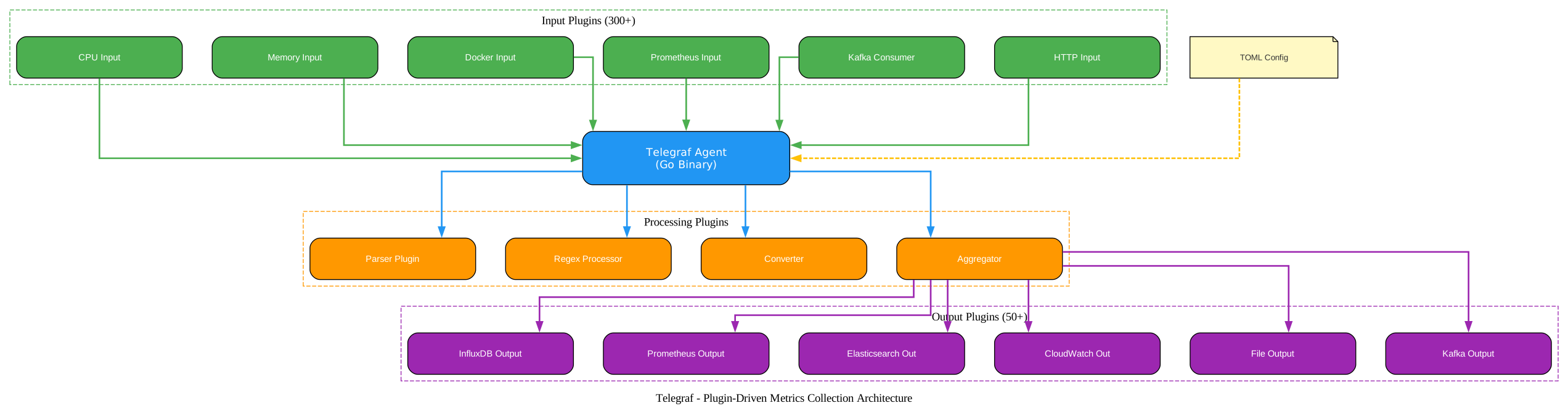
The diagram above illustrates the complete Telegraf data pipeline. Input plugins on the left collect raw metrics from diverse sources including system resources (CPU, memory, disk), container platforms (Docker, Kubernetes), cloud services (AWS, Azure, GCP), and messaging systems (Kafka, MQTT). These metrics flow into the Telegraf Agent, which is a single Go binary that orchestrates the entire pipeline. The agent reads configuration from a TOML file and coordinates data flow between plugins.
From the agent, metrics pass through processor plugins that transform, filter, and enrich the data. Processors can rename fields, apply regex transformations, convert data types, and parse structured data. After processing, aggregator plugins compute statistical summaries such as basic statistics, histograms, and min/max values over time windows. Finally, output plugins deliver the processed metrics to destinations like InfluxDB, Prometheus, Elasticsearch, CloudWatch, or simple file outputs.
Key Insight: Telegraf’s plugin architecture means you never modify the core binary. Instead, you compose a data pipeline by selecting and configuring plugins in a TOML file. This design keeps the agent stable while enabling virtually unlimited extensibility through community-contributed plugins.
Plugin Ecosystem
Telegraf’s strength lies in its comprehensive plugin ecosystem. Every piece of functionality, from collecting metrics to formatting output, is implemented as a plugin that can be independently configured and combined.
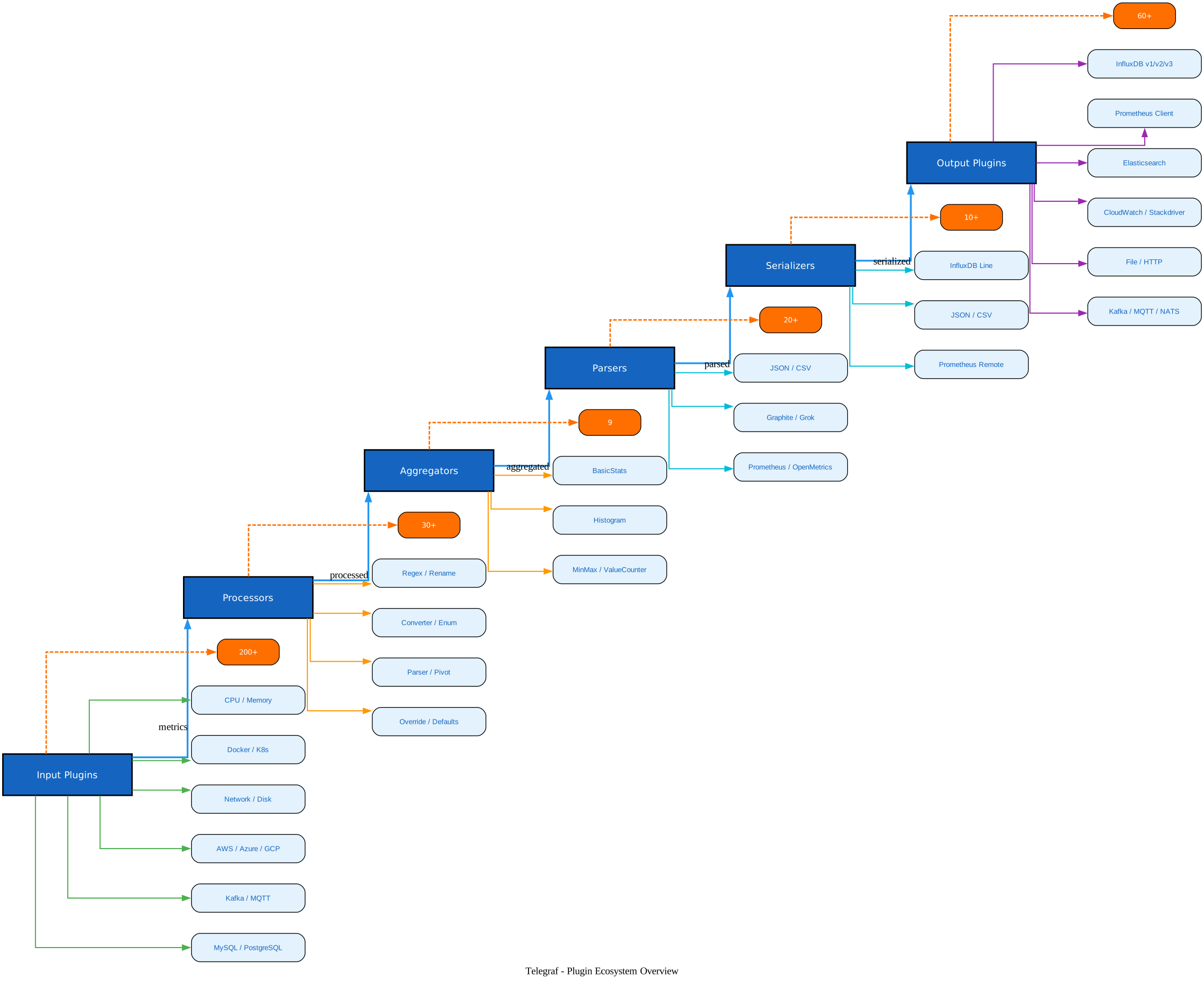
The diagram above shows the six plugin categories and how data flows through them. Input plugins (200+) are the starting point, gathering data from sources ranging from operating system metrics to cloud APIs. Processor plugins (30+) transform data in transit, applying filters, renames, and conversions. Aggregator plugins (9) compute windowed statistics. Parser plugins (20+) handle data format conversion, while serializer plugins (10+) format output data. Output plugins (60+) deliver metrics to their final destinations.
Plugin Categories
| Category | Count | Purpose | Examples |
|---|---|---|---|
| Input Plugins | 200+ | Collect metrics from sources | CPU, Memory, Docker, Kafka, MQTT, Prometheus |
| Processor Plugins | 30+ | Transform and filter metrics | Regex, Rename, Converter, Parser, Override |
| Aggregator Plugins | 9 | Compute windowed statistics | BasicStats, Histogram, MinMax, Derivative |
| Output Plugins | 60+ | Send metrics to destinations | InfluxDB, Prometheus, Elasticsearch, CloudWatch |
| Parser Plugins | 20+ | Parse data formats | JSON, CSV, Graphite, Grok, OpenMetrics |
| Serializer Plugins | 10+ | Format output data | InfluxDB Line, JSON, Prometheus Remote Write |
Amazing: With over 300 plugins maintained by 1,200+ contributors, Telegraf covers virtually every data source and destination in modern infrastructure. The plugin interface is well-documented, making it straightforward to extend Telegraf with custom plugins when needed.
Metrics Collection Workflow
Understanding how data flows through Telegraf is essential for designing effective monitoring pipelines. The workflow follows a clear sequence from collection through to output.
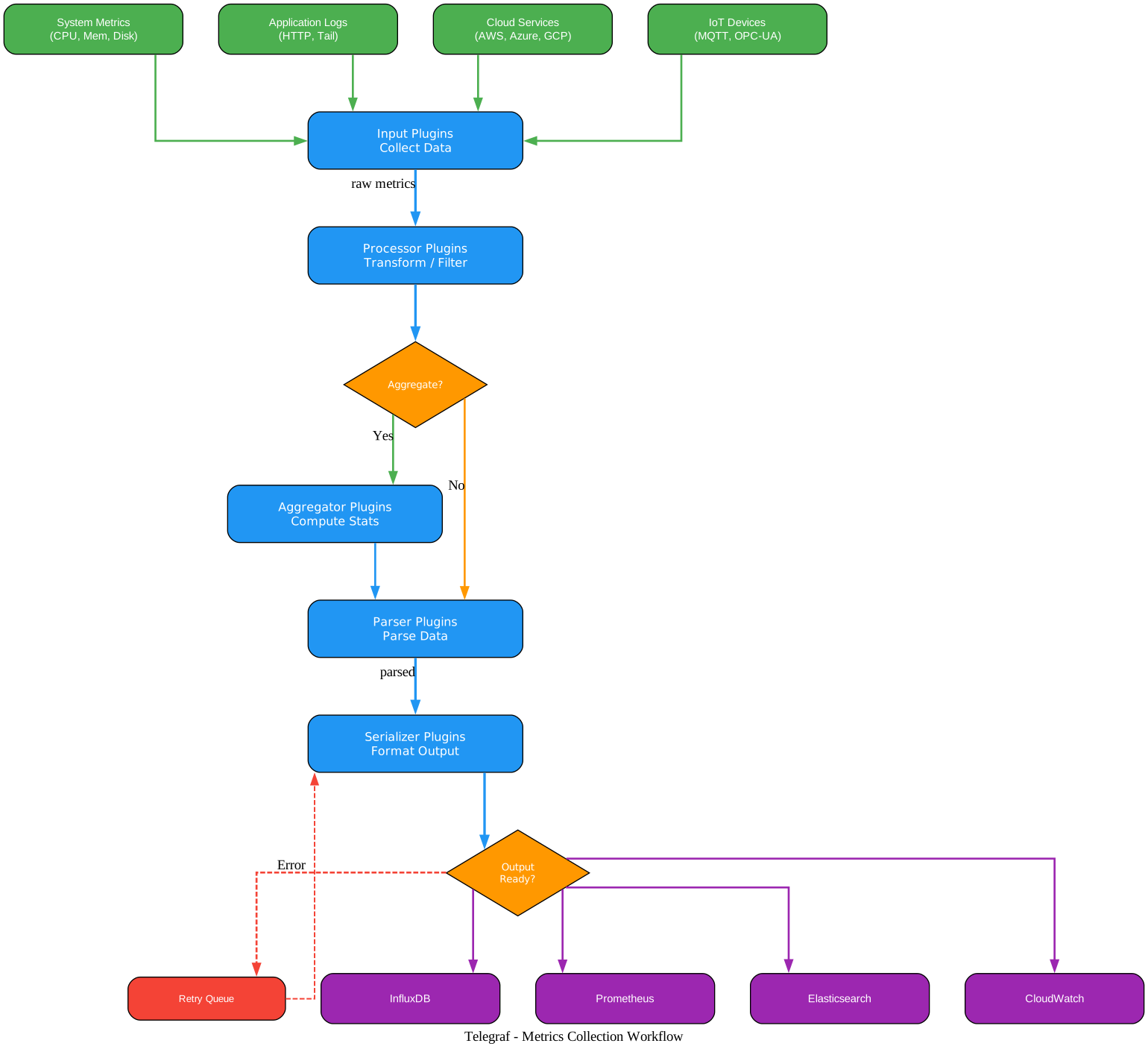
The workflow diagram above shows the complete data pipeline. Data originates from four primary source categories: system metrics (CPU, memory, disk I/O), application logs (HTTP endpoints, file tails), cloud services (AWS CloudWatch, Azure Monitor, GCP Cloud Monitoring), and IoT devices (MQTT, OPC-UA, Modbus). Input plugins collect this data at configurable intervals, typically every 10 seconds by default.
Once collected, raw metrics enter the processing stage where processor plugins transform them. Common transformations include regex-based field extraction, unit conversion, tag renaming, and data type casting. After processing, the aggregation decision point determines whether metrics should be statistically summarized over a time window. If aggregation is needed, aggregator plugins compute statistics like mean, min, max, standard deviation, and percentiles.
Parsed and serialized metrics then reach the output readiness check. If the output destination is available, metrics are written immediately. If an output fails, Telegraf queues the metrics for retry, ensuring no data loss during transient failures. This retry mechanism is critical for production reliability.
Important: Telegraf’s retry queue ensures data integrity even when output destinations experience temporary outages. Metrics are buffered in memory and retried, preventing data loss during network partitions or service degradation.
Configuration and Deployment
Telegraf uses TOML for configuration, providing a clear and unambiguous format for defining plugins and their settings. The configuration file supports environment variable substitution and secret store integration for sensitive credentials.
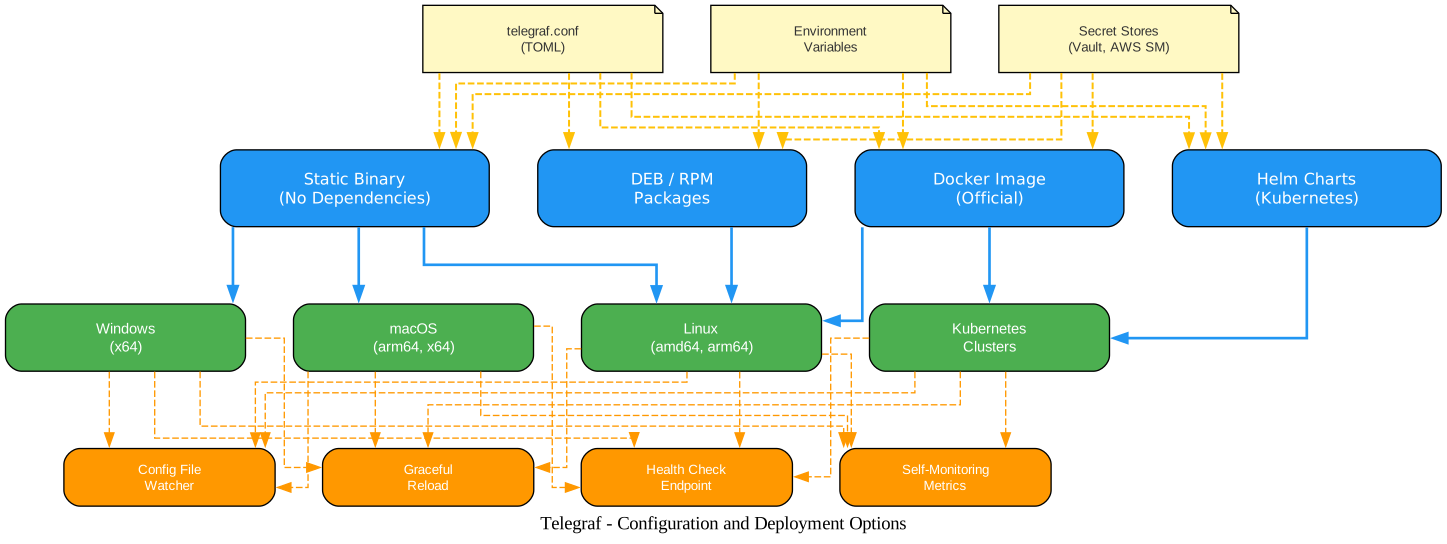
The deployment diagram above illustrates the three configuration sources and four deployment methods. Configuration can come from TOML files, environment variables, or secret stores like HashiCorp Vault and AWS Secrets Manager. Deployment options include the static binary (which has zero external dependencies), official Docker images, DEB/RPM packages for Linux distributions, and Helm charts for Kubernetes deployments.
Installation
Linux (DEB-based - Ubuntu/Debian):
# Add InfluxData repository
wget -q https://repos.influxdata.com/influxdata-archive.key
gpg --show-keys --with-fingerprint --with-colons ./influxdata-archive.key 2>&1 | grep -q '^fpr:\+24C975CBA61A024EE1B631787C3D57159FC2F927:$' && cat influxdata-archive.key | gpg --dearmor | sudo tee /etc/apt/trusted.gpg.d/influxdata-archive.gpg > /dev/null
echo 'deb [signed-by=/etc/apt/trusted.gpg.d/influxdata-archive.gpg] https://repos.influxdata.com/debian stable main' | sudo tee /etc/apt/sources.list.d/influxdata.list
sudo apt-get update && sudo apt-get install telegraf
Linux (RPM-based - RHEL/CentOS):
# Create repo file
cat <<EOF | sudo tee /etc/yum.repos.d/influxdata.repo
[influxdata]
name = InfluxData Repository - Stable
baseurl = https://repos.influxdata.com/stable/\$basearch/main
enabled=1
gpgcheck=1
gpgkey=https://repos.influxdata.com/influxdata-archive.key
EOF
sudo yum install telegraf
macOS (Homebrew):
brew update
brew install telegraf
Docker:
docker pull telegraf
Build from Source:
git clone https://github.com/influxdata/telegraf.git
cd telegraf
make
Basic Configuration
Create a minimal configuration file to start collecting system metrics:
# telegraf.conf - Minimal configuration

# Collect CPU metrics
[[inputs.cpu]]
  percpu = true
  totalcpu = true
  collect_cpu_time = false

# Collect memory metrics
[[inputs.mem]]

# Collect disk metrics
[[inputs.disk]]
  ignore_fs = ["tmpfs", "devtmpfs", "devfs", "iso9660", "overlay", "aufs"]

# Write metrics to InfluxDB
[[outputs.influxdb_v2]]
  urls = ["http://localhost:8086"]
  token = "$INFLUXDB_TOKEN"
  organization = "my-org"
  bucket = "telegraf"
Launch Telegraf with this configuration:
telegraf --config telegraf.conf
Or with Docker:
docker run --rm --volume $PWD/telegraf.conf:/etc/telegraf/telegraf.conf telegraf
Advanced Configuration Example
For a production setup with multiple inputs, processors, and outputs:
# Collect system metrics
[[inputs.cpu]]
  percpu = true
  totalcpu = true

[[inputs.mem]]

[[inputs.disk]]

[[inputs.net]]

[[inputs.docker]]
  endpoint = "unix:///var/run/docker.sock"

# Process metrics - rename tags
[[processors.rename]]
  [[processors.rename.replace]]
    tag = "host"
    dest = "hostname"

# Aggregate statistics over 30s windows
[[aggregators.basicstats]]
  period = "30s"
  stats = ["mean", "min", "max", "count"]

# Output to InfluxDB v2
[[outputs.influxdb_v2]]
  urls = ["http://influxdb:8086"]
  token = "$INFLUXDB_TOKEN"
  organization = "production"
  bucket = "metrics"

# Also output to Prometheus for scraping
[[outputs.prometheus_client]]
  listen = ":9273"
  metric_version = 2
Key Features
| Feature | Description |
|---|---|
| Plugin-Driven Architecture | All functionality implemented as composable plugins |
| Static Binary | Single binary with no external dependencies |
| TOML Configuration | Human-readable, unambiguous configuration format |
| 300+ Plugins | Comprehensive coverage of inputs, outputs, and processors |
| Secret Store Integration | Vault, AWS Secrets Manager, and environment variables |
| Config Hot Reload | Automatic reload when configuration files change |
| Health Check Endpoint | Built-in HTTP endpoint for monitoring Telegraf itself |
| Self-Monitoring | Internal metrics about Telegraf’s own performance |
| Multi-Platform | Linux, Windows, macOS, ARM, x86 architectures |
| Docker & Kubernetes | Official images and Helm charts for containerized deployment |
| Retry Queue | Buffered output with automatic retry on failures |
| Custom Plugins | Write your own plugins in Go or via external programs |
Troubleshooting
Telegraf Fails to Start
Verify your configuration file syntax:
telegraf --config telegraf.conf --test
This dry-run mode validates the configuration without starting the agent. Common issues include missing required fields, incorrect TOML syntax, and duplicate plugin definitions.
No Metrics Being Collected
Check that input plugins are properly configured and accessible:
# Enable debug logging
telegraf --config telegraf.conf --debug
Debug mode provides verbose output showing which plugins are loaded, collection intervals, and any connection errors.
Output Connection Failures
Telegraf buffers metrics in memory when output destinations are unavailable. If the buffer fills up, older metrics are dropped. Monitor the internal telegraf metrics to track buffer usage:
# Enable self-monitoring
[[inputs.internal]]
  collect_memstats = true
High Memory Usage
If Telegraf consumes excessive memory, consider:
- Reducing the collection interval (
interval = "30s"instead of"10s") - Limiting the metric batch size (
metric_batch_size = 1000) - Using processor plugins to filter unnecessary metrics before they reach outputs
Permission Errors on Linux
Telegraf may need elevated permissions to access certain system metrics:
# Add telegraf user to required groups
sudo usermod -aG docker telegraf
sudo usermod -aG systemd-journal telegraf
Docker Networking Issues
When running in Docker, ensure Telegraf can reach output destinations:
# Use host networking for full access
docker run --network host --volume $PWD/telegraf.conf:/etc/telegraf/telegraf.conf telegraf
Takeaway: Telegraf’s debug mode and internal metrics plugin are your first line of defense when troubleshooting. The
--testflag validates configuration, while--debugprovides detailed runtime logging. Always enable the internal metrics plugin in production to monitor Telegraf’s own health.
Telegraf vs. Other Agents
| Feature | Telegraf | Prometheus Node Exporter | Beats (Filebeat/Metricbeat) |
|---|---|---|---|
| Language | Go | Go | Go |
| Plugin Count | 300+ | Limited (exporter model) | Moderate |
| Push Model | Yes | No (pull only) | Yes |
| Pull Model | Yes (HTTP listener) | Yes | No |
| Aggregation | Built-in | External (Prometheus) | External (Elasticsearch) |
| Processing | Built-in | External | Limited |
| Config Format | TOML | YAML | YAML |
| Dependencies | None | None | Some |
| Output Destinations | 60+ | Prometheus only | Elasticsearch primarily |
Getting Started Checklist
- Install Telegraf using your preferred method (binary, package, Docker, or Helm)
- Create a minimal
telegraf.confwith at least one input and one output - Validate the configuration with
telegraf --config telegraf.conf --test - Start Telegraf and verify metrics are flowing
- Enable the internal metrics plugin for self-monitoring
- Add processor and aggregator plugins as needed for data transformation
- Configure secret stores for sensitive credentials
- Set up health check monitoring for the Telegraf process itself
Conclusion
Telegraf stands out as the most versatile metrics collection agent in the observability landscape. Its plugin-driven architecture, zero-dependency deployment, and extensive ecosystem of 300+ plugins make it an ideal choice for any monitoring pipeline. Whether you are collecting system metrics, ingesting cloud telemetry, or building a multi-destination observability pipeline, Telegraf provides the flexibility and reliability that production environments demand.
The combination of Go’s performance characteristics with a well-designed plugin interface means Telegraf can handle high-throughput workloads while remaining easy to extend. With active development from InfluxData and contributions from over 1,200 community members, Telegraf continues to evolve with new plugins and features in every release.
Start with the minimal configuration shown above, explore the plugin directory for your specific data sources, and gradually build out your monitoring pipeline. The official documentation at github.com/influxdata/telegraf provides detailed configuration guides for every plugin. Enjoyed this post? Never miss out on future posts by following us 


