The Cursor plugin ecosystem is not a random collection of tools. When Cursor published its official plugins repository, it shipped 13 plugins that together define how AI coding agents are extended, orchestrated, and governed. Every single plugin falls into the Developer Tools category. There are no themes, no color schemes, no vanity projects. This is infrastructure for agent-augmented development, and it reveals a coherent vision for where AI coding is heading.
Cursor is not just building an AI code editor. It is building the platform layer that determines how AI agents interact with codebases, with each other, and with developers. The plugin specification, the validation pipeline, the hook system, and the SDK are not afterthoughts – they are the architecture. The 13 plugins are the proof that this architecture works.
Key Insight: Cursor’s plugin marketplace is not a marketplace of themes and color schemes. Every single plugin is a Developer Tool – and together they define how Cursor envisions AI agents being extended, orchestrated, and governed in production development workflows.
The Plugin Specification – How Cursor Plugins Work
The Cursor plugin system uses a two-level manifest structure. At the root, .cursor-plugin/marketplace.json indexes all plugins with their name, source path, and description. Each plugin directory contains its own .cursor-plugin/plugin.json manifest, which declares up to 17 fields covering metadata and component types.
The marketplace schema requires name and plugins as mandatory fields, with each plugin entry requiring name and source. The plugin schema requires only name, but enforces strict validation: additionalProperties: false means no extra fields are allowed, and the name field must match the kebab-case pattern ^[a-z0-9]([a-z0-9.-]*[a-z0-9])?$.
The 17 fields in the plugin manifest are:
| Field | Type | Purpose |
|---|---|---|
name | string (required) | Unique kebab-case identifier |
displayName | string | Human-readable name |
description | string | Short description |
version | string | Semantic version (e.g. “1.2.3”) |
author | object | Author name and optional email |
publisher | string | Publisher or organisation name |
homepage | URI | URL to plugin homepage |
repository | URI | URL to source code repository |
license | string | SPDX license identifier |
logo | string | Path or URL to logo image |
keywords | string array | Discovery and search keywords |
category | string | Marketplace classification |
tags | string array | Filtering and discovery tags |
commands | string or array | Glob patterns to command files |
agents | string or array | Glob patterns to agent definition files |
skills | string or array | Glob patterns to skill files |
rules | string or array | Glob patterns to rule files |
hooks | string or object | Path to hooks config or inline hooks object |
mcpServers | string, object, or array | MCP server configurations |
The six component types that make up a plugin are: Skills (defined in SKILL.md files with YAML frontmatter containing name, description, and optional disable-model-invocation), Agents (markdown definitions that configure subagent behavior), Rules (.mdc files providing context-aware coding guidelines), Hooks (JSON configurations specifying shell scripts or TypeScript functions to run on events like afterAgentResponse and stop), Commands (slash-command entry points), and MCP Servers (Model Context Protocol server configurations).
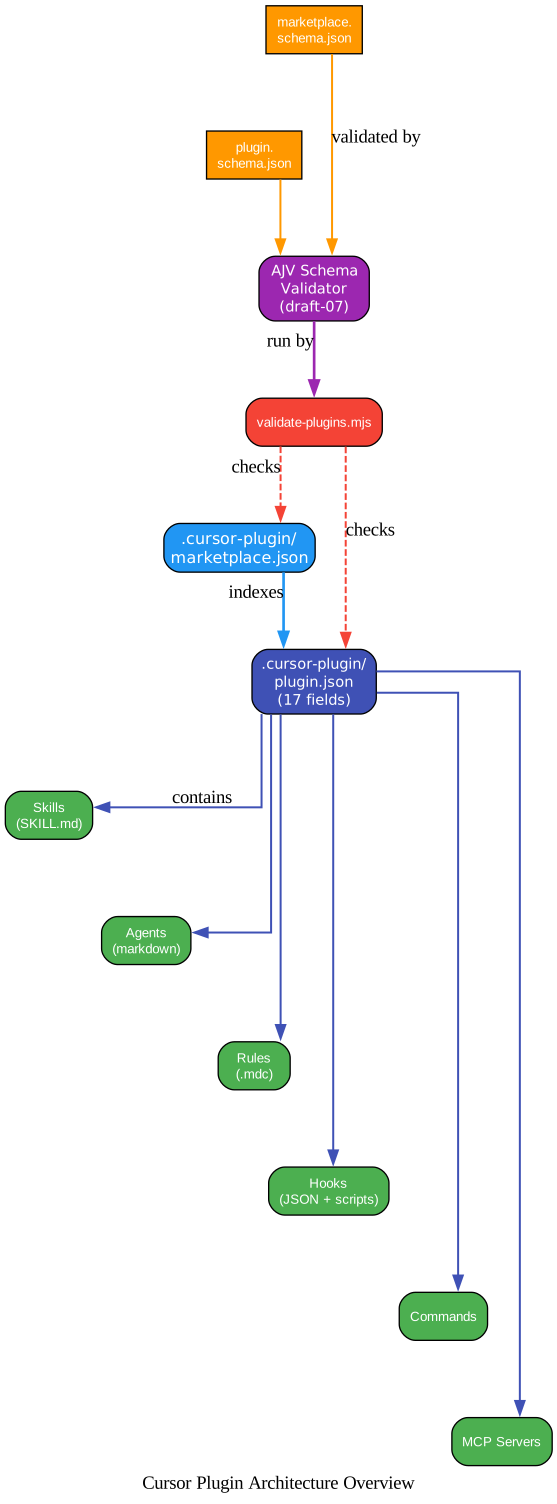
The diagram above shows the two-level manifest structure that defines the Cursor plugin ecosystem. At the top, the marketplace root contains .cursor-plugin/marketplace.json, which indexes all plugins with their name, source path, and description. Each plugin directory contains its own .cursor-plugin/plugin.json manifest, which declares up to 17 fields including the six component types: skills, agents, rules, hooks, commands, and mcpServers. Skills are defined in SKILL.md files with YAML frontmatter containing name, description, and optional flags like disable-model-invocation. Agents are markdown definitions that configure subagent behavior. Rules are .mdc files that provide Cursor with context-aware coding guidelines. Hooks are JSON configurations that specify shell scripts or TypeScript functions to run on events like afterAgentResponse and stop. Commands define slash-command entry points. MCP Servers declare Model Context Protocol server configurations. On the right side, the validation pipeline shows how validate-plugins.mjs loads both JSON Schema files (marketplace.schema.json and plugin.schema.json), compiles them with AJV, and validates every manifest in the repository. The schema enforces strict validation with additionalProperties: false, kebab-case naming patterns, and format checking for URIs and emails. This ensures that every plugin in the marketplace conforms to the specification before it can be published.
Important: The plugin schema enforces
additionalProperties: false– no extra fields are allowed. Combined with AJV draft-07 validation and format checking, this means every plugin manifest is strictly validated against the schema before it can be published. The spec is intentionally rigid; the extension points are the component types, not the manifest itself.
Orchestrate – Fan-Out Parallel Agent Workflows
The orchestrate plugin is the most ambitious plugin in the repository. It decomposes large tasks across parallel Cursor cloud agents with planners, workers, verifiers, and structured handoffs. It is explicitly invoked only: /orchestrate <goal>, and disable-model-invocation: true prevents autonomous activation.
The architecture defines five node types:
| Node | Runs the loop? | Scope | Output |
|---|---|---|---|
| Planner | yes | Entire user goal | User-facing message + optional PR |
| Subplanner | yes (recursive) | One slice of parent’s scope | Handoff to parent |
| Worker | no | One concrete task | Handoff to spawning planner |
| Verifier | no | One target’s acceptance criteria | Verdict handoff to spawning planner |
| Git | n/a | Shared medium | Branches (code) + handoffs/ (meaning) |
Six core principles govern the tree: planners own scopes and do no coding; planners don’t know who picks up their tasks; workers are isolated (one task, one clone, one handoff); subplanners are recursive; continuous motion via handoffs; and propagation, not synchronization.
The CLI (scripts/cli.ts) provides subcommands for every operation: kickoff starts the root planner, run executes the planning loop, spawn creates a new agent, respawn retries a failed agent, kill terminates one, tail streams output, comment adds a message, and andon triggers an escalation. The optional Slack integration mirrors task status to a channel and reads Andon reactions for escalation when agents get stuck.
# Kick off an orchestration
/orchestrate "Implement user authentication with OAuth2, JWT tokens, and role-based access control"

# CLI subcommands
npx ts-node scripts/cli.ts kickoff --root
npx ts-node scripts/cli.ts run
npx ts-node scripts/cli.ts spawn --task "implement-oauth"
npx ts-node scripts/cli.ts tail
npx ts-node scripts/cli.ts andon
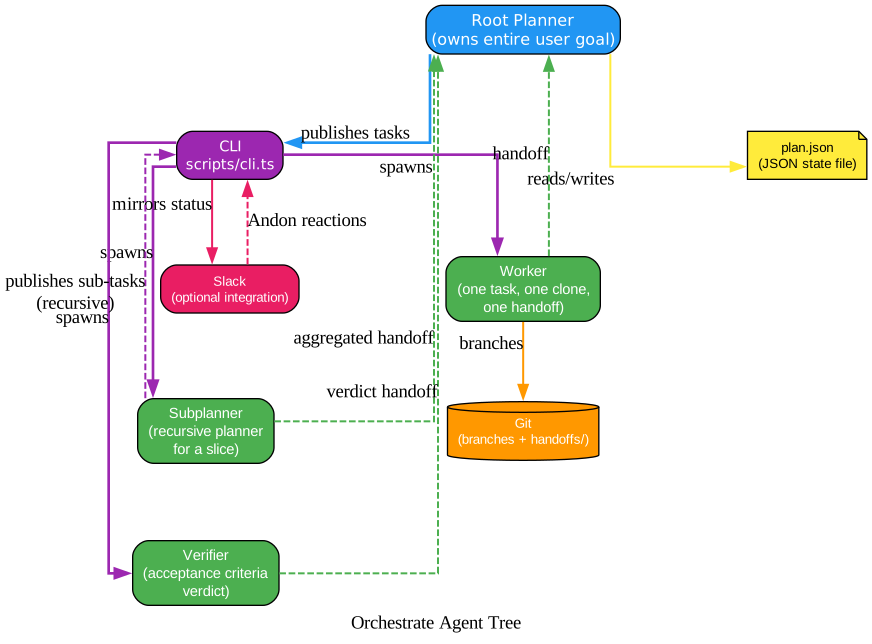
The diagram above illustrates orchestrate’s hierarchical agent tree, which decomposes large tasks across parallel Cursor cloud agents. The root planner owns the entire user goal and runs the planning loop: it publishes tasks to plan.json, the CLI script (scripts/cli.ts) reads those tasks and spawns cloud agents to execute them. Workers are the most constrained node type – they get one task, one clone of the repository, and produce one handoff when done. They have no channel to any other agent. Subplanners are recursive: a planner can publish a “subplan this slice” task, and the subplanner fully owns that slice, potentially spawning its own workers and verifiers. Verifiers evaluate acceptance criteria and return verdict handoffs. The key architectural principle is “propagation, not synchronization” – no cross-talk between siblings, no shared state between levels. Each level sees only its children’s handoffs. Git serves as the shared medium: workers create branches for code changes and write handoff files in a handoffs/ directory. The optional Slack integration mirrors task status to a channel and reads Andon reactions for escalation when agents get stuck. The CLI provides subcommands for every operation: kickoff starts the root planner, run executes the planning loop, spawn creates a new agent, respawn retries a failed agent, kill terminates one, tail streams output, comment adds a message, and andon triggers an escalation.
Amazing: Orchestrate’s core design principle is “propagation, not synchronization” – no cross-talk between sibling agents, no shared state between levels. Each level sees only its children’s handoffs. This is a deliberate architectural choice: the tree self-converges without global coordination, because each node only needs to know about its own scope.
pstack – Engineering Principles for AI Agents
pstack is authored by Lauren Tan (poteto), whose resume spans Meta, Netflix, Cursor, and the React Core Team. The philosophy is simple and contrarian: “if you want to go fast, go deep first.” Throughput without quality is not a goal.
pstack ships 19 engineering principles organized into five categories:
Core (9 principles): laziness-protocol, foundational-thinking, redesign-from-first-principles, subtract-before-you-add, minimize-reader-load, outcome-oriented-execution, experience-first, exhaust-the-design-space, build-the-lever.
Architecture (5 principles): boundary-discipline, type-system-discipline, make-operations-idempotent, migrate-callers-then-delete-legacy-apis, separate-before-serializing-shared-state.
Verification (2 principles): prove-it-works, fix-root-causes.
Delegation (2 principles): guard-the-context-window, never-block-on-the-human.
Meta (1 principle): encode-lessons-in-structure.
Alongside the principles, pstack provides 14 playbooks: investigation, bug fix, perf, runtime forensics, trace forensics, feature, refactoring, prototype, visual parity, authoring a skill, eval, autonomous run, session pickup, and multi-phase plan. The main entry point is /poteto-mode, which reads the request, matches it to a playbook, and routes to the appropriate skill. Many skills use different models for their unique strengths – a deliberate multi-model workflow strategy.
The /automate-me skill mines your recent transcripts and drafts a custom -mode skill from how you have actually worked. It then routes through pstack underneath. You keep pstack as the base and end up with your own routing skill alongside poteto-mode. The poteto-agent subagent enables spawning from parent agents.
# Using pstack
/poteto-mode "Fix the authentication bug where users can't reset passwords"
/automate-me  # Mines your transcripts and creates your own -mode skill
Takeaway: pstack’s
/automate-meskill mines your recent transcripts and drafts a custom-modeskill from how you have actually worked – then routes through pstack underneath. You keep pstack as the base and end up with your own routing skill alongsidepoteto-mode. This is plugin personalization at the workflow level.
Thermos and Ralph Loop – Agent Self-Review and Self-Iteration
Two plugins represent fundamentally different approaches to agent self-improvement: Thermos expands review capacity horizontally by spawning parallel subagents, while Ralph Loop deepens iteration vertically by re-feeding the same prompt until completion.
Thermos – Parallel Subagent Code Review
Thermos uses a parallel subagent architecture. The orchestrator spawns two subagents simultaneously: thermo-nuclear-review-subagent performs a deep correctness and security audit (bugs, breakages, security vulnerabilities, devex issues, feature-gate leaks), while thermo-nuclear-code-quality-review-subagent applies strict maintainability rubrics (code-judo, 1k-line rule, spaghetti detection, boundary violations). Both subagents receive the same git diff main...HEAD and full file contents as input. The orchestrator then synthesizes their findings into a prioritized, deduplicated list.
Thermos can run as a double review (the thermos skill invokes both subagents) or as a single skill (thermo-nuclear-review or thermo-nuclear-code-quality-review independently). The code-quality-review skill migrated from cursor-team-kit to the thermos plugin, consolidating all review capabilities in one place.
# Install and use thermos
/add-plugin thermos

# Double review (both subagents in parallel)
# Single review (one rubric at a time)
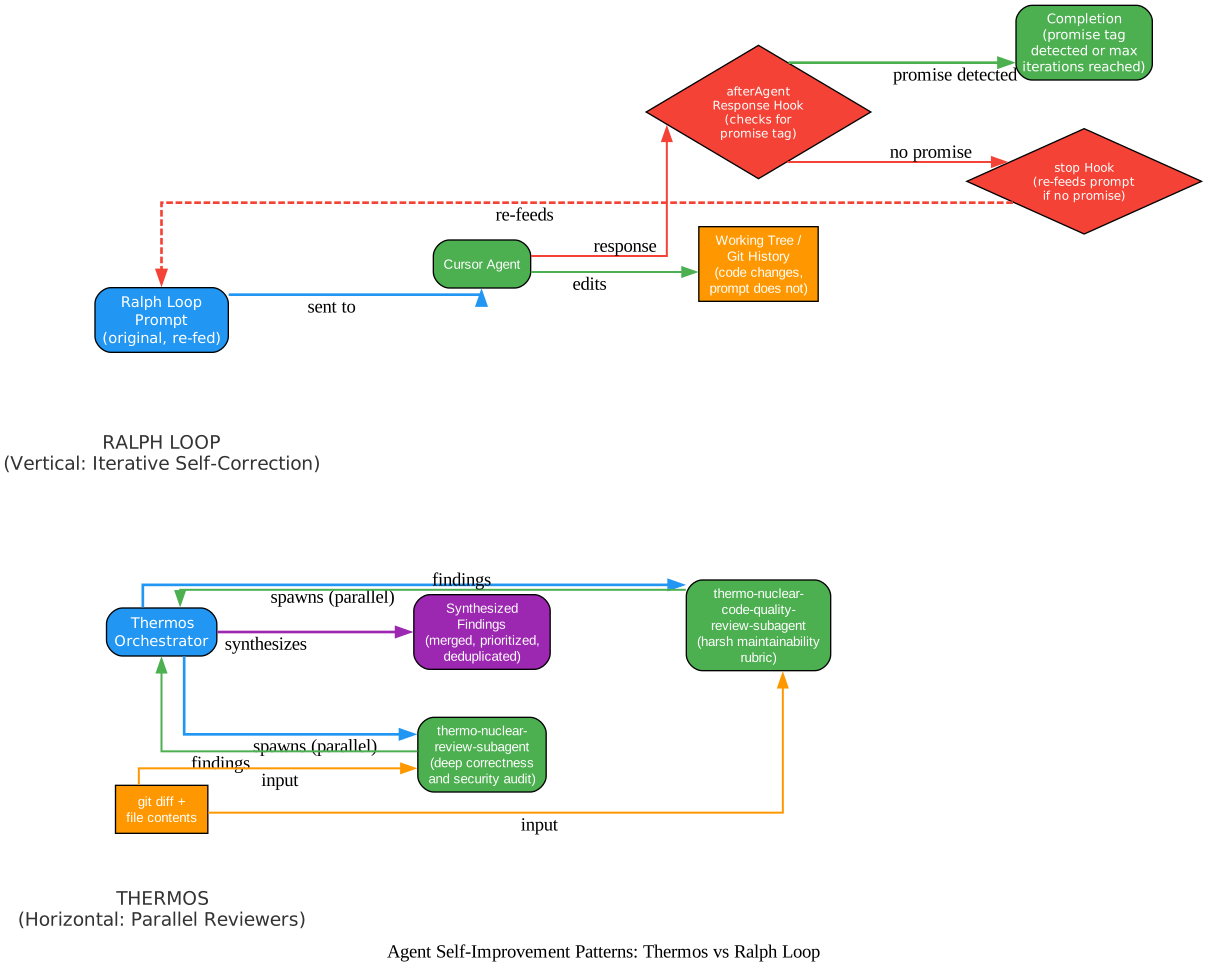
The diagram above contrasts two fundamentally different approaches to agent self-improvement found in the Cursor plugin ecosystem. On the left, Thermos represents the horizontal pattern – expanding review capacity by spawning parallel subagents with different rubrics. The orchestrator spawns two subagents simultaneously: thermo-nuclear-review-subagent performs a deep correctness and security audit (bugs, breakages, security vulnerabilities, devex issues, feature-gate leaks), while thermo-nuclear-code-quality-review-subagent applies strict maintainability rubrics (code-judo, 1k-line rule, spaghetti detection, boundary violations). Both subagents receive the same git diff main...HEAD and full file contents as input. The orchestrator then synthesizes their findings into a prioritized, deduplicated list. On the right, Ralph Loop represents the vertical pattern – deepening through iteration rather than expanding through parallelism. Two hooks drive the loop: the afterAgentResponse hook watches each agent response for a <promise> tag matching the completion phrase, and the stop hook fires when Cursor finishes a turn. If the promise hasn’t been detected and the iteration limit hasn’t been reached, the stop hook sends the original prompt back as a followup_message. The prompt never changes – but the code does. Cursor sees its own previous edits in the working tree and git history, iterates on them, and repeats until the completion criteria are met or the iteration limit is reached. Together, these two patterns represent the two axes of agent self-improvement: breadth (more perspectives) and depth (more iterations).
Ralph Loop – Self-Referential AI Iteration
Ralph Loop implements Geoffrey Huntley’s Ralph Wiggum technique – a self-referential AI loop. Two hooks drive the loop: an afterAgentResponse hook watches each response for a <promise> tag matching the completion phrase, and a stop hook fires when Cursor finishes a turn. If the promise hasn’t been detected and the iteration limit hasn’t been reached, the stop hook sends the original prompt back as a followup_message, starting the next iteration.
The prompt never changes. The code does. Cursor sees its own previous edits in the working tree and git history, iterates on them, and repeats. This makes Ralph Loop ideal for tasks with clear, verifiable success criteria: getting tests to pass, completing a migration, building a feature from a spec. It is not a good fit for tasks that need human judgment or have ambiguous goals.
# Start a ralph loop with explicit completion criteria
Start a ralph loop: "Build a REST API for todos. CRUD operations, input validation, tests. Output COMPLETE when done." --completion-promise "COMPLETE" --max-iterations 50

# Cancel a running loop
/cancel-ralph
Key Insight: Thermos and Ralph Loop represent two fundamentally different approaches to agent self-improvement. Thermos adds more reviewers – parallel subagents with different rubrics, synthesizing findings. Ralph Loop adds more iterations – the same agent, the same prompt, but the code changes each time. One expands horizontally across perspectives; the other deepens vertically through repetition.
The SDK, Hooks, and Infrastructure Plugins
Beyond the headline plugins, the Cursor plugin ecosystem includes several infrastructure and utility plugins that form the backbone of the platform.
Cursor SDK
The Cursor SDK plugin provides a single skill that helps users build on top of the Cursor TypeScript SDK (@cursor/sdk). It covers three invocation patterns: Agent.prompt (one-shot), Agent.create + agent.send (managed), and Agent.resume (resume existing). The skill keeps its main SKILL.md short and points at focused reference files only when the user’s task clearly falls into one of them: runtime choice (local vs cloud), auth, error handling, streaming, MCP, advanced features, and integration patterns.
This is the foundation that makes orchestrate possible. Orchestrate’s SKILL.md explicitly states: “Required reading: the cursor-sdk skill. Don’t reimplement what that skill already documents.”
Continual Learning
Continual Learning automatically and incrementally keeps AGENTS.md up to date from transcript changes. A stop hook decides when to trigger learning based on cadence: minimum 10 completed turns, 120 minutes since the last run, and transcript mtime must advance. Trial mode reduces these thresholds to 3 turns and 15 minutes, but expires after 24 hours.
The updater processes only new or changed transcript files, reads existing AGENTS.md first and updates matching bullets in place, and writes only plain bullet points under “Learned User Preferences” and “Learned Workspace Facts.” This avoids noisy rewrites and keeps the memory file clean and useful.
Agent Compatibility
Agent Compatibility provides scored repo compatibility: Agent Compatibility Score = round((deterministic * 0.7) + (workflow * 0.3)). It uses the published agent-compatibility npm package and four review dimensions: compatibility-scan, startup, validation, and docs-reliability.
# Run an agent compatibility scan
npx -y agent-compatibility@latest .
CLI for Agent
CLI for Agent documents patterns for designing CLIs that coding agents can run reliably: non-interactive flags first, layered help with examples, stdin/pipelines, fast actionable errors, idempotency, and dry-run.
Important: The Cursor SDK is the foundation that makes orchestrate possible. Spawning, auth, and the error taxonomy all live in the SDK skill. Orchestrate’s SKILL.md explicitly states: “Required reading: the cursor-sdk skill. Don’t reimplement what that skill already documents.” This is plugin composition – orchestrate extends the SDK, it doesn’t duplicate it.
What the Plugin Ecosystem Reveals About AI Coding’s Future
The 13 plugins in the Cursor marketplace are not random tools. They are building blocks that collectively reveal where AI coding is heading.
Agents that spawn agents. Orchestrate’s planner/worker/verifier tree is a preview of multi-agent development. The future is not one agent doing everything – it is trees of specialized agents with structured handoffs, each owning a narrow scope and communicating through well-defined interfaces.
Quality as a plugin, not a setting. pstack and thermos encode engineering rigor as installable skills. Quality is not a configuration toggle – it is a workflow you install. The /automate-me skill in pstack takes this further: it personalizes quality workflows based on how you actually work.
Self-improving agents. Ralph Loop and Continual Learning represent two axes of agent self-improvement – iteration and memory. Ralph Loop iterates on code until it meets verifiable criteria. Continual Learning remembers what the agent learned across sessions. Agents that can review their own work and remember what they learned are fundamentally more capable than agents that start from scratch every time.
The hook system as the nervous system. afterAgentResponse and stop hooks make plugins reactive. Plugins don’t just provide commands – they observe agent behavior and respond to it. Ralph Loop watches for completion tags. Continual Learning watches for learning opportunities. The hook system turns plugins from passive tools into active participants in the agent loop.
SDK-driven automation. The Cursor SDK enables agents to be spawned from scripts, CI pipelines, and webhooks. The IDE is no longer the only interface to AI coding. This is what makes orchestrate possible: the SDK provides the spawning, auth, and error handling primitives that the orchestrator builds on.
Compatibility scoring. Agent Compatibility quantifies how well a repo works with AI agents. As agent-driven development becomes standard, this metric will matter more. Repos that score low will need to adapt, or they will be left behind as the ecosystem moves toward agent-friendly patterns.
The spec is the moat. By defining a strict schema with additionalProperties: false, Cursor controls the extension surface. Plugins extend within the boundaries Cursor defines. The extension points are the component types (skills, agents, rules, hooks, commands, mcpServers), not the manifest itself. This is platform design 101: define a narrow, well-controlled interface, and let the ecosystem build within it.
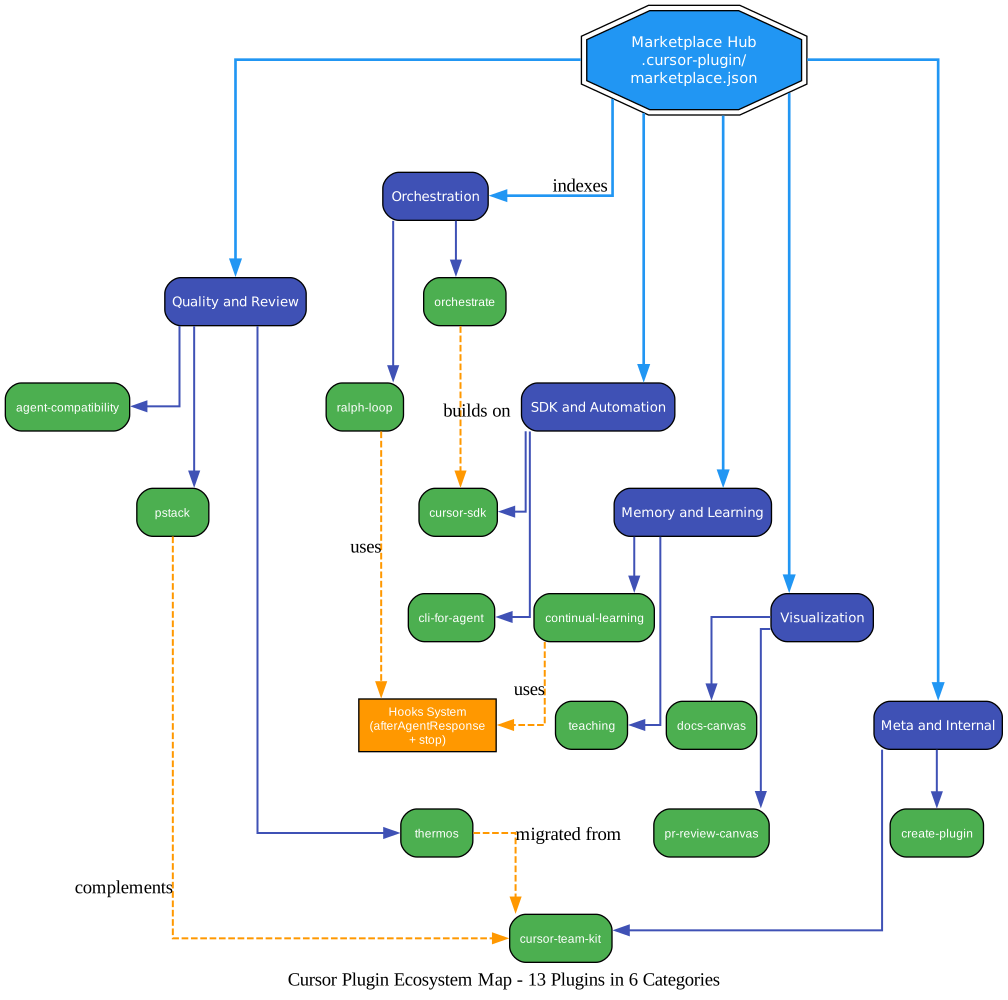
The diagram above organizes all 13 Cursor plugins into six functional categories, revealing the coherent vision behind what might appear to be a random collection of tools. At the center, the marketplace hub (.cursor-plugin/marketplace.json) indexes every plugin. The Orchestration cluster contains orchestrate and ralph-loop – both concerned with how agents execute work, whether through parallel fan-out or iterative self-correction. The Quality and Review cluster contains thermos, pstack, and agent-compatibility – three different approaches to ensuring code quality: parallel review subagents, engineering principles encoded as skills, and quantitative compatibility scoring. The SDK and Automation cluster contains cursor-sdk and cli-for-agent – the programmatic interface to Cursor agents and the design patterns for making CLIs that agents can drive reliably. The Memory and Learning cluster contains continual-learning and teaching – one for automatic incremental memory updates, the other for structured learning paths. The Visualization cluster contains docs-canvas and pr-review-canvas – both render information as interactive Cursor Canvases for better comprehension. The Meta and Internal cluster contains create-plugin and cursor-team-kit – one for scaffolding new plugins, the other for Cursor’s own internal workflows. Dashed lines show dependencies and relationships: orchestrate explicitly depends on cursor-sdk (“Required reading”), pstack complements cursor-team-kit (deslop and control skills ship in team-kit), and thermos migrated its code-quality-review skill from cursor-team-kit. Both ralph-loop and continual-learning connect to the hooks system, showing how the hook architecture enables reactive plugin behavior across the ecosystem.
Takeaway: Cursor’s plugin ecosystem reveals a clear trajectory: AI coding is moving from single-agent chat to multi-agent orchestration, from one-shot generation to self-improving loops, and from IDE-bound interaction to SDK-driven automation. The 13 plugins are not random tools – they are the building blocks of agent-augmented development.
Getting Started with Cursor Plugins
Installing and using Cursor plugins is straightforward. Each plugin can be installed with a single slash command:
# Install any plugin
/add-plugin <plugin-name>

# Install specific plugins
/add-plugin pstack
/add-plugin thermos
/add-plugin ralph-loop
/add-plugin continual-learning
/add-plugin orchestrate
Start a ralph loop by providing a prompt with completion criteria and iteration limits:
Start a ralph loop: "Refactor the cache layer to use Redis. All tests must pass. Output DONE when complete." --completion-promise "DONE" --max-iterations 20
Run an agent compatibility scan on any repository:
npx -y agent-compatibility@latest .
Create your own plugin using the create-plugin meta-plugin:
/add-plugin create-plugin
For local development, symlink your plugin directory to ~/.cursor/plugins/local/<plugin-name>.
The repository is at https://github.com/cursor/plugins. Every plugin is MIT licensed. The specification is open, the validation is strict, and the extension points are well-defined. If you are building AI coding tools, this is the platform to build on. Enjoyed this post? Never miss out on future posts by following us 


