jcode: The Next-Generation Coding Agent Harness Built for Performance and Multi-Agent Workflows
jcode is a next-generation coding agent harness built in Rust that redefines what developers should expect from AI-assisted coding tools. With a 14ms boot time, 27.8MB RAM footprint, semantic memory powered by vector embeddings, native swarm multi-agent collaboration, and support for over 30 LLM providers, jcode raises the skill ceiling for coding agents by prioritizing performance, customizability, and multi-session workflows. Whether you are working solo with a single agent or orchestrating a team of AI agents collaborating on the same codebase, jcode provides the infrastructure to make it happen efficiently.
Architecture Overview
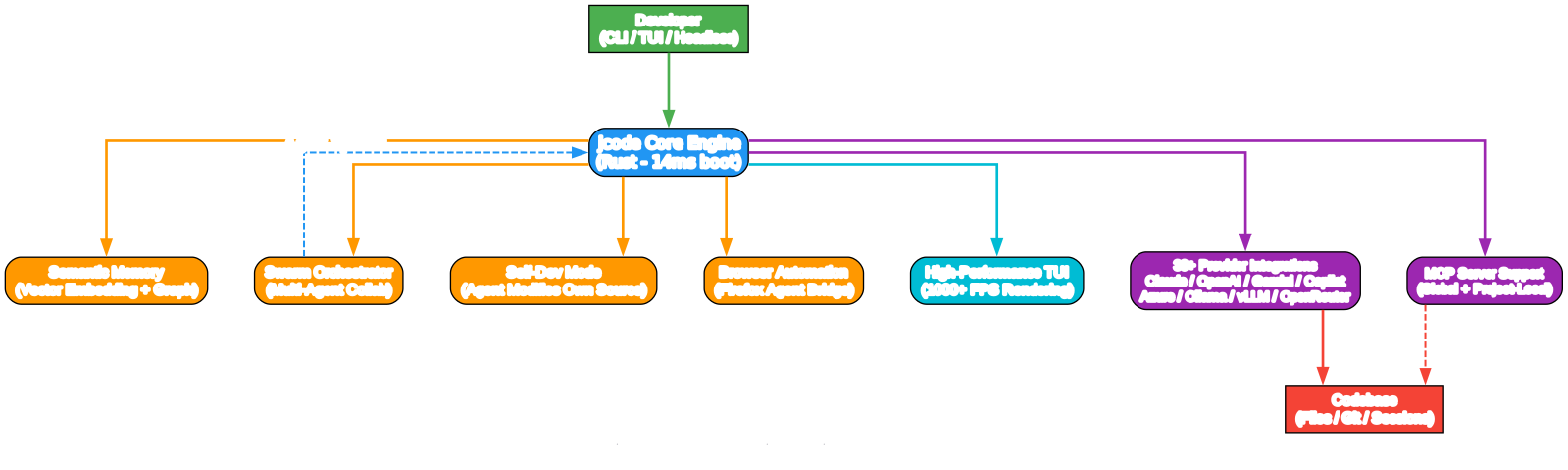
Understanding the jcode Architecture
The architecture diagram above illustrates the core components of jcode and how they interact to deliver a high-performance coding agent experience. Let us break down each component:
TUI / Client Layer
jcode features a custom-built terminal user interface (TUI) that renders at over 1000 FPS, eliminating flicker and providing instant visual feedback. The TUI supports side panels for auxiliary information, inline Mermaid diagram rendering, and info widgets that occupy only negative space on the screen. Users can switch between left-aligned and centered modes. The client connects to the jcode server, enabling multiple sessions to share state and collaborate.
Server / Session Manager
The server is the central coordinator that manages all active sessions. It handles session lifecycle, message routing between agents, file change notifications, and memory operations. When multiple agents work in the same repository, the server detects when one agent edits a file that another agent has read, and notifies the affected agent so it can check for conflicts. This server-driven architecture is what enables the swarm collaboration model.
Memory System
jcode implements a semantic memory system that embeds each conversation turn as a vector. When a new turn begins, the system queries a memory graph using cosine similarity to find relevant past memories. These memories are injected into the conversation context automatically, giving the agent human-like recall without requiring explicit memory tool calls. A memory sideagent can optionally verify relevance and perform additional retrieval before injection. Memories are periodically consolidated through an ambient mode that reorganizes, checks for staleness, and resolves conflicts.
Provider Integration Layer
jcode supports 30+ LLM providers through a unified interface. Native first-party providers include Claude, OpenAI, Gemini, GitHub Copilot, and Azure OpenAI, with OAuth-based login flows. Aggregator providers like OpenRouter and OpenAI-compatible endpoints extend coverage to virtually any model. Multi-account switching allows developers to rotate between subscriptions when token limits are hit.
Swarm Coordinator
The swarm system enables multiple agents to work on the same repository simultaneously. Agents can message each other directly (DM), broadcast to all agents, or send messages only to agents working in the same repo. The coordinator manages group formation, messaging channels, and completion status. Agents can also autonomously spawn their own sub-agents, turning the main agent into a coordinator and the spawned agents into workers.
Semantic Memory System
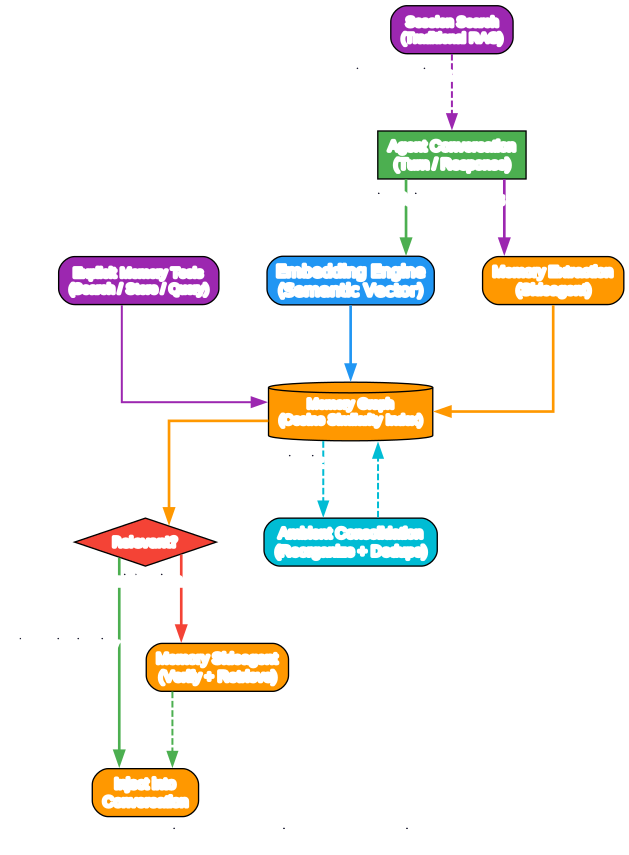
Understanding the jcode Memory System
The memory system diagram above shows how jcode implements a human-like memory architecture using semantic vector embeddings. This is one of jcode’s most distinctive features compared to other coding agents.
Memory Extraction
Every few turns (based on semantic drift or a configurable K-turn interval), and at session end, a memory sideagent extracts key information from the conversation. These extractions are stored as nodes in a memory graph, where each node contains the extracted content, its vector embedding, and metadata such as timestamps and relevance scores. The extraction process is automatic and does not require the user to explicitly save information.
Memory Retrieval
When a new conversation turn begins, the system embeds the current turn as a semantic vector and queries the memory graph to find related entries via cosine similarity. Hits that exceed a relevance threshold are injected into the conversation context. Optionally, a memory sideagent verifies the relevance of retrieved memories and can perform additional retrieval work before injection. This two-stage process ensures that only genuinely relevant memories surface, reducing noise and token waste.
Memory Consolidation
Memories are automatically consolidated through an ambient mode that runs periodically. Consolidation reorganizes the memory graph, merges duplicate or near-duplicate entries, checks for staleness, and resolves conflicts between contradictory memories. This prevents the memory store from degrading over time and keeps retrieval results accurate.
Explicit Memory Tools
In addition to the passive background process, jcode provides explicit memory tools that allow the agent to actively search or store information. Session search enables traditional RAG-style retrieval on previous sessions, giving the agent access to the full history of past work.
Key Insight: Token Efficiency
Unlike approaches that load entire conversation histories or use brute-force context window stuffing, jcode’s semantic memory system only injects relevant memories. This dramatically reduces token consumption while maintaining recall quality. The result is an agent that remembers what matters without burning through your API budget.
Swarm Multi-Agent Collaboration
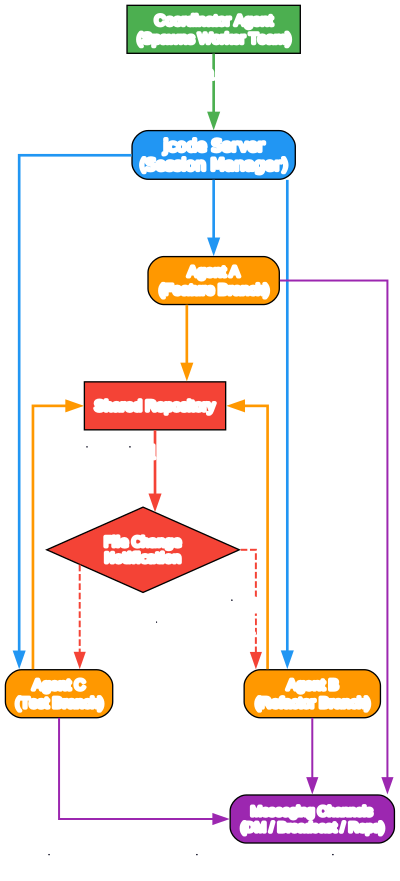
Understanding the Swarm Collaboration Model
The swarm collaboration diagram above illustrates how jcode enables multiple AI agents to work together on the same codebase. This is a fundamentally different approach from single-agent coding tools.
Automatic Conflict Detection
When two or more agents are spawned in the same repository, the jcode server automatically monitors file-level changes. If Agent A edits a file that Agent B has previously read, the server notifies Agent B about the change. Agent B can then decide whether the change is relevant to its current task, and if so, check the diff to ensure there are no conflicts. This automatic conflict detection eliminates the need for manual coordination between agents.
Messaging Channels
Agents in a swarm have three communication modes:
- Direct Message (DM): Send a message to a specific agent
- Repo Broadcast: Send a message to all agents working in the same repository
- Global Broadcast: Send a message to all agents hosted by the server
These channels enable flexible coordination patterns, from tightly-coupled pair programming to loosely-coupled parallel task execution.
Autonomous Swarm Spawning
Agents can autonomously spawn their own sub-agents using the swarm tool. When this happens, the main agent transitions to a coordinator role, and the spawned agents become workers. Groups, messaging channels, and completion statuses are all automatically managed. This can be done in headed mode (with TUI) or headlessly (for CI/CD and automation pipelines).
Practical Use Cases
- Parallel Feature Development: Spawn multiple agents to work on different features simultaneously, with automatic conflict resolution
- Code Review: One agent writes code while another reviews it in real-time
- Testing and Implementation: One agent implements while another writes tests, with both staying synchronized through file change notifications
- Large Refactoring: Break a large refactoring task into sub-tasks distributed across agents
Performance Benchmarks
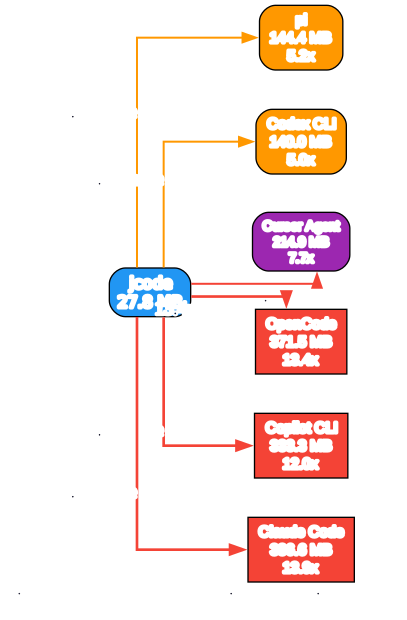
Understanding the Performance Advantage
The performance comparison diagram above visualizes jcode’s dramatic advantages in boot time, RAM usage, and session scaling compared to other popular coding agents. These benchmarks are not marginal improvements – they represent order-of-magnitude differences that fundamentally change the developer experience.
Boot Time: 14ms vs 3.4 Seconds
jcode boots in 14 milliseconds, compared to 3.4 seconds for Claude Code, 1.9 seconds for Cursor Agent, and 1.5 seconds for GitHub Copilot CLI. This 245x advantage over Claude Code means jcode is ready before you finish releasing the Enter key. For developers who frequently start and stop sessions, this eliminates a significant source of friction.
RAM Usage: 27.8MB vs 386.6MB
With local embedding disabled, jcode uses only 27.8MB of RAM for a single session. Even with local embeddings enabled, jcode uses 167.1MB – still 2.3x less than Claude Code’s 386.6MB. This efficiency becomes critical when running multiple sessions. At 10 active sessions, jcode uses 117MB (embeddings off) or 260.8MB (embeddings on), while Claude Code consumes 2.3GB and OpenCode reaches 3.2GB.
Session Scaling: ~10MB per Additional Session
Each additional jcode session adds only approximately 10MB of RAM (9.9MB with embeddings off, 10.4MB with embeddings on). Compare this to Claude Code at 212.7MB per additional session, or OpenCode at 318.4MB. This means you can run 20 jcode sessions for the cost of a single Claude Code session, making multi-agent workflows practical on standard hardware.
Why Rust Matters
These performance characteristics are a direct result of jcode being written in Rust. Rust’s zero-cost abstractions, deterministic memory management (no garbage collection pauses), and minimal runtime overhead enable jcode to achieve C-level performance while maintaining memory safety. The custom TUI rendering pipeline, built on Rust’s efficient I/O handling, delivers over 1000 FPS rendering – far beyond what any monitor can display, but ensuring zero flicker and instant responsiveness.
Key Features
| Feature | Description |
|---|---|
| 14ms Boot Time | Near-instant startup, 245x faster than Claude Code |
| 27.8MB RAM | Minimal memory footprint, scales to 10 sessions at 117MB |
| Semantic Memory | Vector-embedded memory graph with automatic extraction and consolidation |
| Swarm Collaboration | Multi-agent coordination with automatic conflict detection |
| Self-Dev Mode | Agent modifies its own source code, builds, tests, and reloads |
| 30+ Providers | Claude, OpenAI, Gemini, Copilot, Azure, and 25+ more integrations |
| Browser Automation | Built-in Firefox Agent Bridge for web interaction |
| 1000+ FPS TUI | Custom rendering pipeline with side panels and Mermaid diagrams |
| Agent Grep | Structure-aware grep with adaptive truncation for context efficiency |
| Session Resume | Resume sessions from Claude Code, Codex, OpenCode, and pi |
| Multi-Account | Switch between provider accounts instantly |
| iOS App | Native iOS client coming soon via Tailscale |
Installation
Quick Install (macOS and Linux)
curl -fsSL https://raw.githubusercontent.com/1jehuang/jcode/master/scripts/install.sh | bash
Quick Install (Windows PowerShell)
irm https://raw.githubusercontent.com/1jehuang/jcode/master/scripts/install.ps1 | iex
macOS via Homebrew
brew tap 1jehuang/jcode
brew install jcode
From Source (All Platforms)
git clone https://github.com/1jehuang/jcode.git
cd jcode
cargo build --release
scripts/install_release.sh
Prerequisites for source build: Rust toolchain (rustup), C compiler, and platform-specific build dependencies.
Provider Setup
After installation, configure your LLM provider:
# Claude (OAuth login)
jcode login --provider claude

# OpenAI (OAuth login)
jcode login --provider openai

# GitHub Copilot (device flow)
jcode login --provider copilot

# Gemini (OAuth login)
jcode login --provider gemini

# Azure OpenAI
jcode login --provider azure

# Headless/SSH sessions
jcode login --provider claude --no-browser
For API key-based providers:
# Set environment variables
export ANTHROPIC_API_KEY=your-key
export OPENAI_API_KEY=your-key
export OPENROUTER_API_KEY=your-key
Verify Installation
# Test authentication
jcode auth-test --all-configured

# Run a quick smoke test
jcode run "say hello"
Usage
Interactive TUI Mode
# Launch the interactive terminal UI
jcode

# Resume a previous session by name
jcode --resume fox
Non-Interactive Mode
# Run a single command and exit
jcode run "explain the main function in src/main.rs"
Server/Client Mode
# Start a persistent background server
jcode serve

# Connect additional clients to the server
jcode connect
Browser Automation
# Check browser automation status
jcode browser status

# Set up Firefox Agent Bridge
jcode browser setup
Voice Input
# Send voice input via configured STT command
jcode dictate
Self-Dev Mode
One of jcode’s most innovative features is self-dev mode. When activated, the jcode agent begins modifying its own source code. jcode is optimized to iterate on itself, with infrastructure that allows it to edit, build, and test its own source code, then reload its own binary and continue working across multiple sessions – fully automatically.
This enables a development workflow where you describe what you want changed, and the agent directly modifies the jcode codebase, compiles the changes, runs tests, and hot-reloads the binary. The recommended approach is to use a frontier model (such as GPT 5.5 or the latest available) for self-dev, as the jcode codebase is complex and weaker models may introduce subtle breaking changes.
Browser Automation
jcode includes a first-class built-in browser tool for browser control within agent sessions. The current backend uses Firefox via the Firefox Agent Bridge, with the following supported actions:
| Action | Description |
|---|---|
status | Check browser automation status |
setup | Initialize Firefox Agent Bridge |
open | Navigate to a URL |
snapshot | Capture accessibility snapshot |
click | Click an element |
type | Type text into a field |
fill_form | Fill a complete form |
screenshot | Take a screenshot |
scroll | Scroll the page |
eval | Execute JavaScript |
The browser tool architecture is designed to be extensible, with Chrome and remote debugging providers planned for future releases.
MCP Integration
jcode supports Model Context Protocol (MCP) servers for extending agent capabilities:
{
  "servers": {
    "filesystem": {
      "command": "/path/to/mcp-server",
      "args": ["--root", "/workspace"],
      "env": {},
      "shared": true
    }
  }
}
MCP configuration files:
- Global:
~/.jcode/mcp.json - Project-local:
.jcode/mcp.json - Compatibility:
.claude/mcp.json(imported on first run)
Troubleshooting
| Issue | Solution |
|---|---|
| Slow boot on first run | First run compiles local embeddings cache; subsequent runs are 14ms |
| OAuth login fails on SSH | Use jcode login --provider <name> --no-browser for headless auth |
| High RAM with local embeddings | Disable local embeddings to reduce RAM to 27.8MB per session |
| Cache miss warnings from Claude | jcode warns when Anthropic’s 5-minute cache expires; resume within the window |
| Build errors from source | Ensure Rust nightly toolchain is installed: rustup toolchain install nightly |
| Browser automation not working | Run jcode browser setup to configure Firefox Agent Bridge |
Conclusion
jcode represents a significant leap forward in coding agent design. By building the harness in Rust, the project achieves performance characteristics that are simply impossible with Node.js or Python-based alternatives: 14ms boot times, 27.8MB RAM usage, and near-linear session scaling. The semantic memory system gives agents human-like recall without token waste, while the swarm collaboration model enables multi-agent workflows that were previously impractical due to resource constraints.
The self-dev mode pushes the boundary of what coding agents can do, allowing the agent to modify, build, test, and reload its own binary – a capability that creates a powerful feedback loop for iterative development. With 30+ provider integrations, browser automation, MCP support, and an upcoming iOS client, jcode is positioning itself as the harness that raises the skill ceiling for what AI-assisted coding can achieve.
Links:
- GitHub Repository: https://github.com/1jehuang/jcode
- Documentation: https://github.com/1jehuang/jcode/tree/master/docs

Enjoyed this post? Never miss out on future posts by following us


