Chatwoot: Open-Source Omni-Channel Customer Support Platform
Customer support is the frontline of every business, yet most teams juggle scattered tools: one for email, another for social media, a third for live chat. Chatwoot eliminates this fragmentation with a unified, open-source omni-channel helpdesk that funnels every conversation into one powerful inbox. With over 21,500 GitHub stars and trusted by 15,000+ businesses worldwide, Chatwoot provides enterprise-grade capabilities without vendor lock-in, making it the go-to alternative to Intercom, Zendesk, and Salesforce Service Cloud.
At its core, Chatwoot centralizes conversations from WhatsApp, Facebook Messenger, Instagram, Twitter/X, Telegram, Line, TikTok, SMS via Twilio, email through IMAP, a customizable web widget, and its own REST API – all within a single agent dashboard. This convergence of channels dramatically reduces context-switching and means agents can respond faster and more personally to every customer inquiry.
Built on a battle-tested Ruby on Rails backend with a Vue.js frontend, Chatwoot is the product of 15,000+ commits across 600+ contributors. The platform stores data in PostgreSQL and uses Redis for caching and job-queue management. Sidekiq serves as the background worker for high-throughput event-driven pipelines, while Action Cable over WebSockets delivers real-time messages to frontends. Together, these components provide proven performance under peak load.
System Architecture
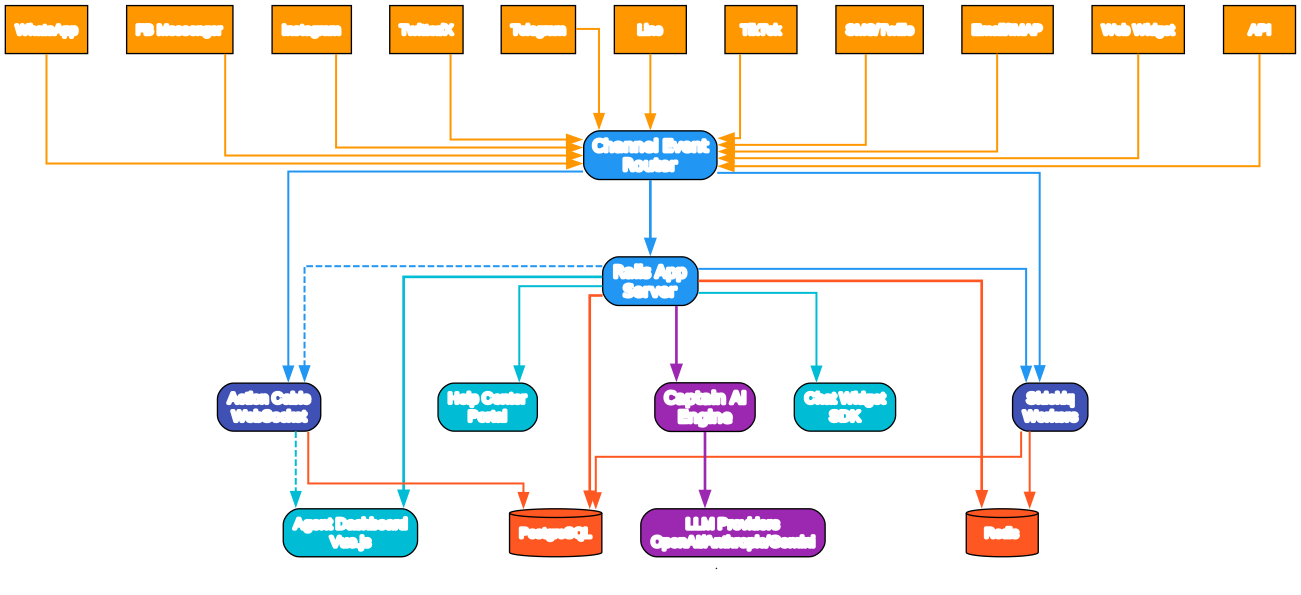
Understanding the Chatwoot Architecture
Chatwoot’s system architecture follows a layered design that separates concerns into distinct layers: channel ingestion, core application processing, background job execution, real-time WebSocket broadcasting, AI-powered features, and data persistence. Each layer scales independently, allowing organizations to allocate resources precisely where needed.
Channel Event Router
All inbound customer messages flow through a unified Channel Event Router. Whether a message originates on WhatsApp Cloud API, Facebook Graph API, Instagram Messaging API, Twitter/X webhook, Telegram Bot API, Twilio SMS webhook, IMAP email connection, or custom API invocation, each event is normalized and pushed into a common queue. High-throughput Sidekiq processors handle routing and assignment in parallel background workers. The adapter-based design means new carriers integrate cleanly without disrupting live conversation routing.
Rails Application Server and Sidekiq Workers
The central Rails monolith serves all HTTP API routes, the agent dashboard, and administrative functions. Every write-side operation is offloaded by controllers and dispatched asynchronously to Sidekiq queues for message ingestion, routing, and assignment. Meanwhile, real-time updates are broadcast synchronously to connected agent clients over WebSockets via Action Cable pub/sub channels.
Together the architecture enables consistent message delivery with channel fail-safe retries to provider APIs over time windows.
Action Cable then streams real-time message delivery to each frontend. Messages appear on Agent Dashboards via WebSocket immediately when an assigned human agent connects online.
Data Storage Layer – PostgreSQL, Redis
PostgreSQL provides reliable relational storage: conversation tables with associated messages; contacts and contact-centric attributes; inbox configurations; and per-user assignment audit trails with RBAC. Platform-wide system configuration parameters are also stored through a performant, well-indexed layer.
Meanwhile, Redis operates three concurrent functions. It keeps short-lived Action Cable subscription keys and per-agent notification caches active. It also publishes each conversation status change to pub/sub watchers, ensuring rapid notification dispatching at scale. Finally, Redis works directly as Sidekiq’s work queue manager. Sidekiq workers pop background jobs directly from this in-memory store, eliminating database-level transaction blocking that would otherwise slow down request-response threads under high message volumes.
Omni-Channel Communication
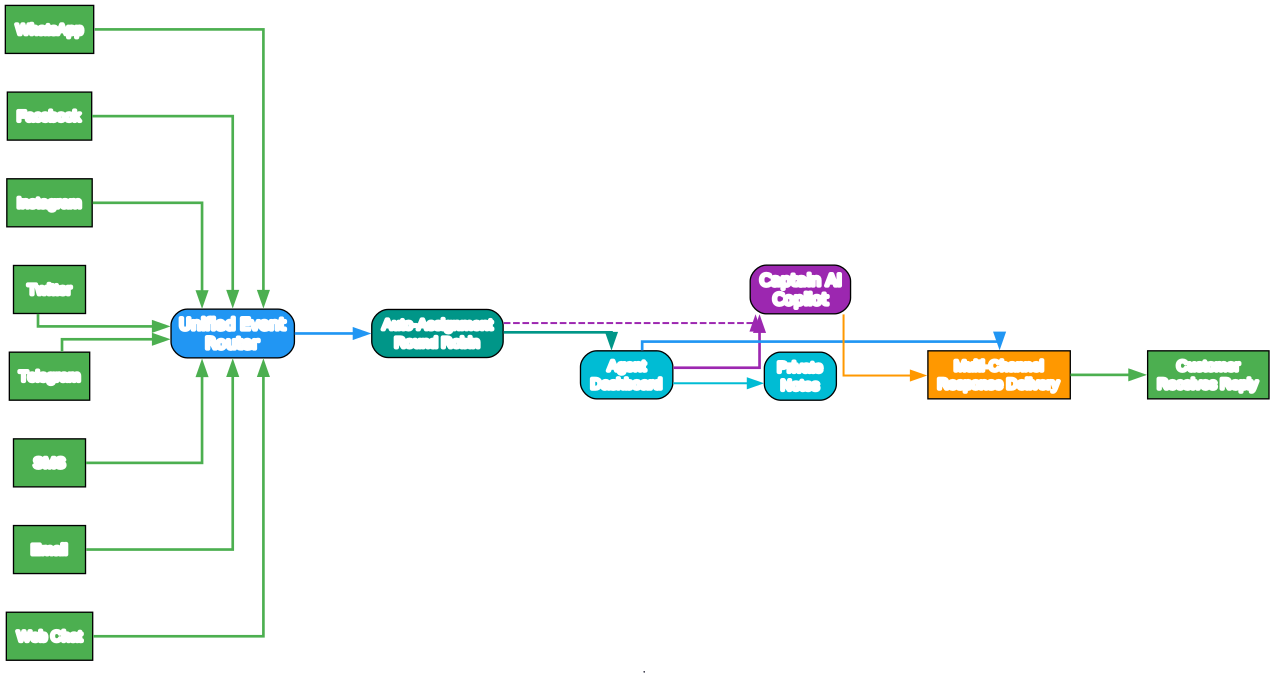
Multi-Channel Support and Unified Messaging
The promise of modern customer support is omnichannel: organizations meet customers wherever they communicate, rather than forcing them onto off-brand channels. Chatwoot translates every channel into a unified format so support agents have context-rich, full-fidelity messaging across mediums – text, images, rich link previews, and audio note transcriptions.
Customer data and historic conversation threads that span multiple channels all consolidate and persist. One conversation is built per-person per-channel over time across agent assignment changes, rather than fragmented threads requiring manual search across multiple tools. This unified modeling is what Chatwoot was designed around since its founding:
- A customer may start by email, then follow up via WhatsApp on the same case in the same Chatwoot Inbox. All message events per-person regardless of originating network arrive in a single Dashboard view. They maintain continuous flow through persistent threads within the Contact, so there is always unbroken knowledge per consumer across all active concurrent sessions.
Here are the channel-level integrations, each connecting to a normalized and unified message view:
| Channel | Connection Method | Inbound Support | Rich Content |
|---|---|---|---|
| Web Widget SDK | Client JavaScript SDK | Yes, real-time JS on-message | Images, files, cards, templates, forms |
| Facebook Messenger | Webhook via Graph API | Webhook event streaming | Images, carousel, media CTA templates |
| WhatsApp Business | WhatsApp Cloud API webhook + templates | Incoming webhook delivery | Message templates, CTAs, product catalogs, quick replies, location |
| Instagram DM | Graph API subscriptions + event hooks | Direct messages to business account | Images, stickers, media replies, CTA carousel |
| Telegram Bot | Bot API update hook | Polling / webhook update stream | Markdown, images, inline keyboard buttons |
| X (Twitter) | V2 authenticated webhooks | Mentions, thread streams, direct messages | Tweets, DMs, polls, media |
| LINE Official | LINE Messaging webhook | Push and callback DM messages | Message templates, media, buttons |
| TikTok | Direct web callback + app webhooks | DM to verified TikTok page | Media, links, images, stickers, quick actions |
| SMS (Twilio) | Twilio webhook endpoint | Twilio inbound SMS webhook routing | Text SMS, delivery tracking, voice transcriptions |
| Email (IMAP) | IMAP fetch background processor | Inbox sync + forwarded accounts | Text, images, attachments, links, thread preservation |
Auto-Assignment and Routing
On receiving new inbound conversation events, Chatwoot automatically routes them according to configurable assignment rules. There are currently three strategies: round-robin distribution across available agents, or load-balance allocation to the agent with the fewest active conversations for equity. Each agent can also configure a capacity threshold – the max parallel conversation count before auto-assignment pauses. The agent then goes “offline” for assignment until capacity frees up.
Additional routing customizations using Automations permit administrators fine-tuned control, applying per-inbox rules based on conditions like message.body matching regex, source.channel equals whatsapp, and custom attribute filters.
When all assignment-suitable agents are at capacity or no agents are online for an inbox, queued messages get a “Pending” tag, waiting on either: next-available round-robin assignment; manual assign by a team lead; or an escalation automation action triggered by rule.
Captain AI – Built-In Intelligent Assistant
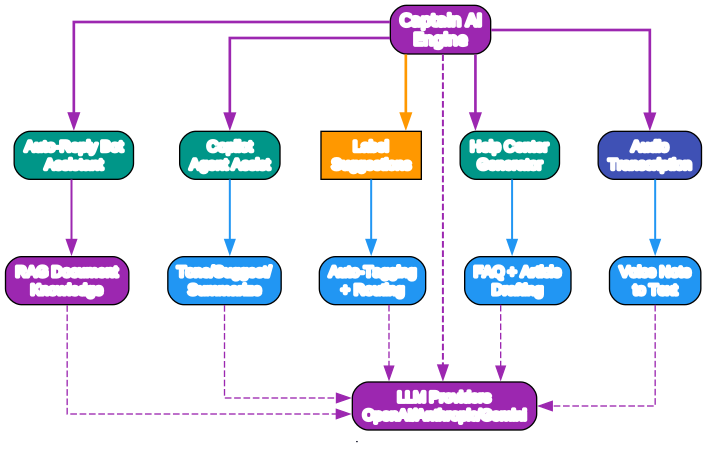
Chatwoot integrates AI through its Captain initiative, spanning every part of support from automated self-service to agent assistance and knowledge authoring. Captain uses pluggable LLMs so organizations can choose their provider – OpenAI, Anthropic, self-hosted GPT connectors, or local Llama-index deployments – configuring them via provider API settings and enabling features in the Chatwoot admin panel.
Captain offers two primary roles: a bot-first responder that directly engages customer conversations, and copilot mode that works alongside human agents in the inbox. There is also a generative tooling feature for help center document creation:
Auto-Reply Bot (bot-mode conversational AI agent)
Captain Bot handles initial contacts without agents seeing those conversations at all (optional admin filter configurable for engagement prior to handoffs). Using a configurable knowledge document corpus, the bot attempts first-pass resolution on FAQ and repeated issues by scanning ingested PDFs and synced web URLs. After admin configuration of knowledge sources, Captain builds a vector-index for similarity search on the content and formulates natural-language answers with rich markdown formatting tailored to user queries.
If a query reaches topics where response confidence falls below threshold – these “resolve-failed dialogues” – Captain seamlessly auto-transfers the live thread to an available human agent. There is no message loss. Captain steps aside so the customer does not need to repeat anything when transitioning to a real representative. All prior exchanged text remains visible for agent perusal.
Copilot and Draft Reply Suggestions
Chatwoot’s co-assistant understands that skilled agents remain essential. Rather than replacing them, Copilot is embedded directly within the conversation view. It provides instant one-click suggested draft replies drawn from past successful responses by other agents on similar issues. Additionally, each sidebar panel offers these contextual modules:
-
Summarization – Condenses extended ongoing conversations for transfer case handoffs. These summary bullets let newly-assigned representatives instantly understand customer history without reading prior messages start to end.
-
Sentence Re-writing and Translation – Takes an input reply and adjusts tone across several styles (empathetic, formal, concise). It keeps the underlying intent identical while transforming phrasing. The embedded Translate feature lets support reps answer across languages seamlessly. Agents type in their standard company language and the assistant outputs in the detected contact’s language within seconds via button-tap integration, eliminating copy-paste workflows from external translate apps.
These multi-model transformations each run via the configured AI provider.
Auto Labeling + Conversation-Level Automated Assignment
An intelligent classification system assigns organization-defined tags plus urgency categories on arrival. Labels such as “problem” and “request_type” are configured ahead of deployment. Agents see classification context at a glance via color-coded priority labels, reducing manual tagging time for reporting. When label-triggered matching Actions exist, those Automations also fire inbox-level routing so support gets smart-dispatched based on taxonomy.
Help Center Generator
This function addresses bottlenecks in knowledge authoring. Staff start new Help Center articles from sidebar-suggested draft content extracted from resolved conversations. Seed paragraphs auto-structure into H2/H3 heading sections within an Article Composer. Creating an article from a closed conversation dramatically reduces writing effort on documentation content, saving editorial team copy-writing cycles and proactively answering FAQs.
Combined, what differentiates Captain from add-on third-party AI wrappers is native LLM coupling within every core workflow. The copilot has per-customer history awareness that powers precise recommendations from natively stored data without round-trip context loss. That loop closes the distance from raw messages to quality outcome via integrated models.
Agent Workflow

End-to-End Message Lifecycle
Efficient support depends on a structured system from first contact to resolution. Behind the chat interface the processing chain flows as follows:
-
Channel Arrival and Queueing – A customer transmits text, images, or audio (including voice messages transcribed by AI via Captain) from whichever platform they use. Ingest hooks receive push webhook data from external providers, plus periodic IMAP polling refreshes matched email inboxes. After processing, de-duplicated Messages are recorded and routing evaluation rules execute.
- Round Robin assignment picks the next agent in rotation, creates the assignment row, and pushes a notification via Action Cable (plus optional email or Slack alerts if configured).
- If every available agent has reached capacity (or no agents are online), new inbounds are marked “Pending” with a Highlight badge entering the review queue until capacity frees or a manual claim arrives.
- Repeat customers are matched to existing open conversation threads via contact lookup, continuing that session inline without duplicating. A resolved-then-reopened conversation retains assignment to the same agent where possible, falling back to auto-routing rules.
-
Live Agent Dashboard with AI Copilot – The Vue front-end renders a real-time messaging layout. On the right appears the scrolling message transcript showing bidirectional text and media. A Detail Sidebar (left) displays contextual per-customer information: custom attribute fields, conversation labels, locale, and prior interaction history. At the bottom sits the Reply Composer accepting per-medium text drafts and multimedia attachment dispatch with support.
The composer offers a Macro quick-insert template feature. This allows rapid one-tap insertion of recurring canned reply phrases.
Each conversation panel includes an integrated assistant bar with: Summarize (condenses thread context to concise bullets), Rewrite Tone (adjusts response style across friendly, formal, or concise variants), and Translate (auto-detects the active contact’s target language and adjusts output accordingly in a single tap, removing the need for external language tools).
When an agent confirms a message, the outbound adapter dispatches it to the appropriate channel (WhatsApp integration adapter, Telegram, LINE, etc.) using platform-specific message formats and provider API calls where applicable. Outgoing adapters also handle voice-message tele-callbacks for channels where the integrated voice module is supported alongside text.
All confirmed dispatches generate delivery tracking metadata. Channel receipts including delivery notifications and per-message read acknowledgments are stored within the Message table record and surface in per-agent conversation dashboards for CSAT scoring via per-agent analytics.
Why Choose Chatwoot for Your Customer Support
Self-Hosted Without Vendor Lock-In
Unlike proprietary SaaS platforms charging per-seat per month, Chatwoot’s MIT licensing lets any team – from small startups to large enterprises – deploy on their own infrastructure. Whether on a single VPS (minimum 4-core, 16 GB recommended), dedicated bare-metal host, or a managed Kubernetes cluster, you retain full 100% data ownership and privacy. Every deployment stores all messaging, analytics, and transaction data within your own self-hosted PostgreSQL instance inside your private network zone, never exposing conversation content to off-site platforms via external SaaS API extraction pipelines.
You keep total control over upgrades and updates too. Roll stable Docker release containers whenever it fits your internal ops schedule, with patch timing driven strictly by your own process, not a vendor-forced timeline. Your deployment cadence aligns entirely to organizational needs at your pace, so every upgrade is reviewable by your own team before reaching production. The self-managed hosting model eliminates lock-in.
Data locality for geography-specific residency remains fully in your hands too. If you are serving an international, privacy-bound, or compliance-regulated organization and require processing within jurisdiction borders only: that data simply lives within in-region nodes at infrastructure where you spin them in a cluster at desired locations.
Whether governed by DPDPA, HIPAA sector standards – just pick the compute zone location required. Locally-deployed data stays in sovereign legal scope, meaning cross-jurisdiction or privacy-law export complications disappear from requirements. For teams with compliance obligations in each zone locality, per-region deployment keeps user-origin data on hardware that never traverses international cloud transit points; all local regional-geographic deployment control comes with the standard self-host configuration and does not demand added licenses. Regional privacy regulation just became another infrastructure configuration.
From per-agent to larger enterprises looking at the bigger budget bottom line picture on economics; self-managing eliminates per user seat, month-over-month recurring fees. Per-user subscriptions with closed platforms charge you directly for monthly seat counts as you hire, even while hardware has the margin for load capacity. Hosting internal brings per monthly cost down to core infra, as every extra head on payroll uses capacity you are actually physically adding at hardware and RAM rather than a proportional added line per head, on monthly spend you never truly control under subscription seats that never have diminishing per-cost for volume. Self hosted eliminates the head count penalty and leaves only operational expenses at your infrastructure, with fixed overhead rather than per seat that you predict over multiyear timelines.
A Cloud-hosted managed offering is also readily available direct from Chatwoot for teams who prefer quick managed-service setup, scaling out of SaaS instead: per-active-contact monthly pricing means a low startup monthly with only your active-contact volumes at scale billing for that volume. Those teams also may deploy at scale using managed on either path per needs on sizing with their existing managed instance at zero migration. However whether evaluating hosted vs on premises for teams focused most by cost, fully on-premise or via their production servers at data privacy first remains zero marginal-per-month operational-expense scaling on agent users after infrastructure overhead.
Quick Deploy via Docker for rapid local eval/test spin-up:
# Option using self-managed -- Docker-compose
git clone https://github.com/chatwoot/chatwoot.git
cd chatwoot
cp .env.example .env
# Configure: set SECRET_KEY_BASE + RAILS_ENV and more in .env  before continuing
docker-compose up -d
# Runs Rails + Sidekiq + PostgreSQL + Redis on your-host ports.
Deploying at scale in production via Kubernetes Helm is provided through the Chatwoot Helm Chart published in the project repository:
# Chatwoot Helm values - simplified example; see chart docs for full options
# Deploy at https://github.com/chatwoot/chatwoot for production Helm configuration - complete set: view Chatwoot chart docs on repository deployment.
image:
  repository: chatwoot/chatwoot
  tag: v4.15.1
  pullPolicy: IfNotPresent
rails:
  env:
    RAILS_ENV: production
    SECRET_KEY_BASE: "REPLACE-WITH-YOUR-SECRET"
    REDIS_URL: "redis:// redis-service:6379"
    POSTGRES_HOST: postgres-release
service:
  type: ClusterIP
  port: 3000
replicaCount: 2              # Scale + at high-volume times
worker:
  replicaCount: 2            # Background Sidekiq Worker Pods
resources:
  limits:
    cpu: "2"
    memory: "4Gi"
postgres:
  enabled: true              # Set this to reference the external instance
Development Mode Setup
For contributors who want to develop Chatwoot locally, the project provides a straightforward bootstrap process. The full contributing guide is available at https://www.chatwoot.com/docs/contributing/guide.
Prerequisites
- Ruby – match the version specified in the repo’s
.ruby-versionfile (use a version manager likerbenvorrvm) - PostgreSQL – installed and running locally
- Redis – installed and running locally
- Node.js v18+ – required for compiling the Vue.js frontend assets
- pnpm – package manager for frontend dependencies
Bootstrap the project
# Clone the repository
git clone https://github.com/chatwoot/chatwoot.git
cd chatwoot

# Bootstrap installs gems, node packages, migrates the database,
# loads the schema, and seeds initial data
bin/setup

# Alternatively, use the bootstrap script
./bootstrap
The bin/setup script handles the heavy lifting: it installs Ruby gems via Bundler, installs Node packages via pnpm, creates and migrates the PostgreSQL database, loads the schema, and seeds initial data. It also generates an initial .env file from the example template.
Run the development server
# Start Rails API, Sidekiq workers, and the Vue dev server together
bundle exec foreman start
foreman reads the Procfile and launches all development processes in parallel: the Rails API server on port 3000, the Sidekiq background workers, and the Vue.js frontend dev server with hot module replacement. The frontend assets compile on the fly with live reload enabled.
For detailed setup instructions per operating system, troubleshooting tips, and the full contribution workflow, refer to the official contributing guide at https://www.chatwoot.com/docs/contributing/guide.
Conclusion
Chatwoot stands out as the most complete open-source customer support platform available today. By unifying 12+ communication channels – WhatsApp, Facebook Messenger, Instagram, Telegram, LINE, TikTok, X (Twitter), SMS via Twilio, email via IMAP, a web widget, and a REST API – into a single agent dashboard, it eliminates the context-switching that plagues support teams using fragmented tools. The Captain AI initiative adds a native intelligence layer that no bolt-on third-party wrapper can match: an auto-reply bot for first-pass resolution, a copilot for draft suggestions and tone adjustment, automatic conversation labeling, and a help center article generator that turns resolved conversations into documentation.
The self-hosted deployment model gives organizations full data sovereignty and eliminates per-seat SaaS licensing costs. Under the MIT license, teams from startups to enterprises can deploy Chatwoot on their own infrastructure – a single VPS, bare-metal, or a Kubernetes cluster – and retain 100% ownership of their customer data. The battle-tested Ruby on Rails backend with Vue.js frontend, backed by PostgreSQL and Redis, has proven itself across 15,000+ businesses and 600+ contributors.
For any team evaluating customer support platforms, Chatwoot offers a rare combination: enterprise-grade features, open-source transparency, AI-native workflows, and zero vendor lock-in. The GitHub repository and comprehensive documentation make it straightforward to evaluate, deploy, and customize.
Links
- GitHub: https://github.com/chatwoot/chatwoot
- Documentation: https://www.chatwoot.com/docs
- Community: https://www.chatwoot.com/community

Enjoyed this post? Never miss out on future posts by following us


