Introduction
Apple Container is Apple’s official open-source tool for running isolated Linux containers on macOS, with over 39K GitHub stars and 12,797 this month alone.
- Repository: https://github.com/apple/container
- Containerization Swift package: https://github.com/apple/containerization
- Written in Swift; each container runs its own lightweight Linux VM
- Supports Docker-standard OCI images, plus pull/push from standard registries
- Features sub-second startup using a minimal vminit Linux userspace
- Designed for Apple silicon through the native macOS frameworks approach
- Currently pre-1.0 project, evolving with active community contributions on GitHub
Why Apple Container Matters
Most Mac containers share a single Linux VM. Apple instead gives each container its own separate VM.
- Isolated VM per container prevents one compromise reaching neighbors
- Fine-grained data access (only needed volumes per-container)
- sub-350ms VM boot-up time
- OCI format identical across runtimes for compatibility
- Built on stable macOS OS frameworks not any 3rd part-y daemon
Comparison: Shared vs Per-VM
| Concern | Shared VM model | Apple Per-VM model |
|---|---|---|
| Kernel isolation | Single shared kernel | Individual isolated kernel |
| Attack impact radius | Spreads to co-tenants | Bound to single container VM |
| Data volume | Available cluster-wide | Per-container scope only |
| Boot time typical | 1 + seconds | sub-one second |
Architecture Overview
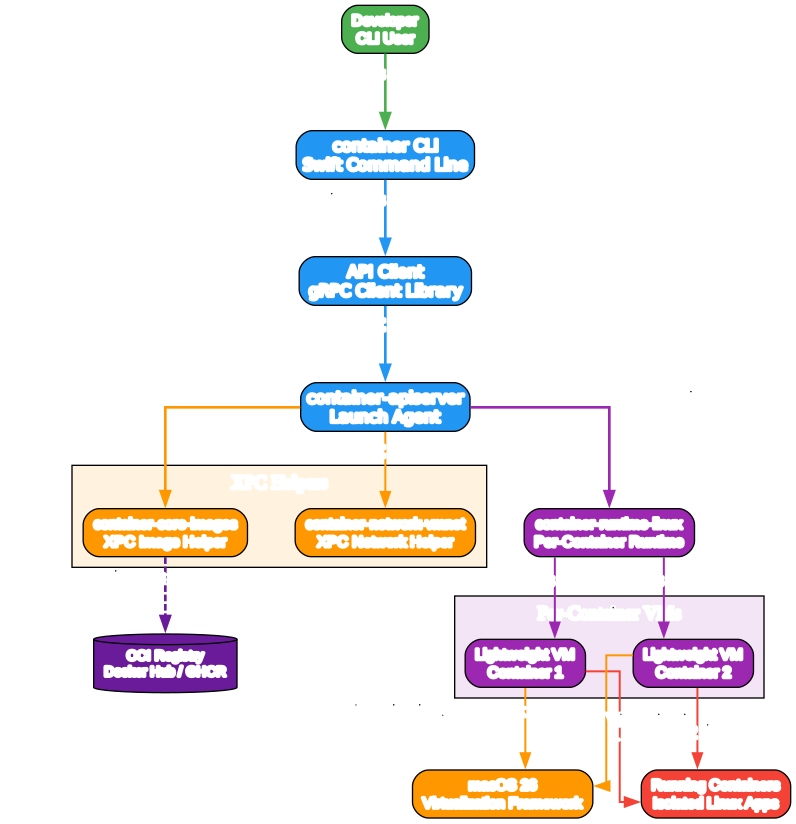
- End user runs CLI command (
containerterminal tool) Container client library -> Container APIServer (a launch agent)route: a client communicates via gRPC library client calls.- For EACH spawned Container a new unique VM instance gets
container-runtime-linuxlaunched. - container-core-images XPC helper service handles OCI-compliant image pull and push
- container-network-vmnet XPC agent provides built DNS-resolve per-container using .test hostname namespace
container system start
container system status
container image list
container network list
Build, Run, and Publish Workflow
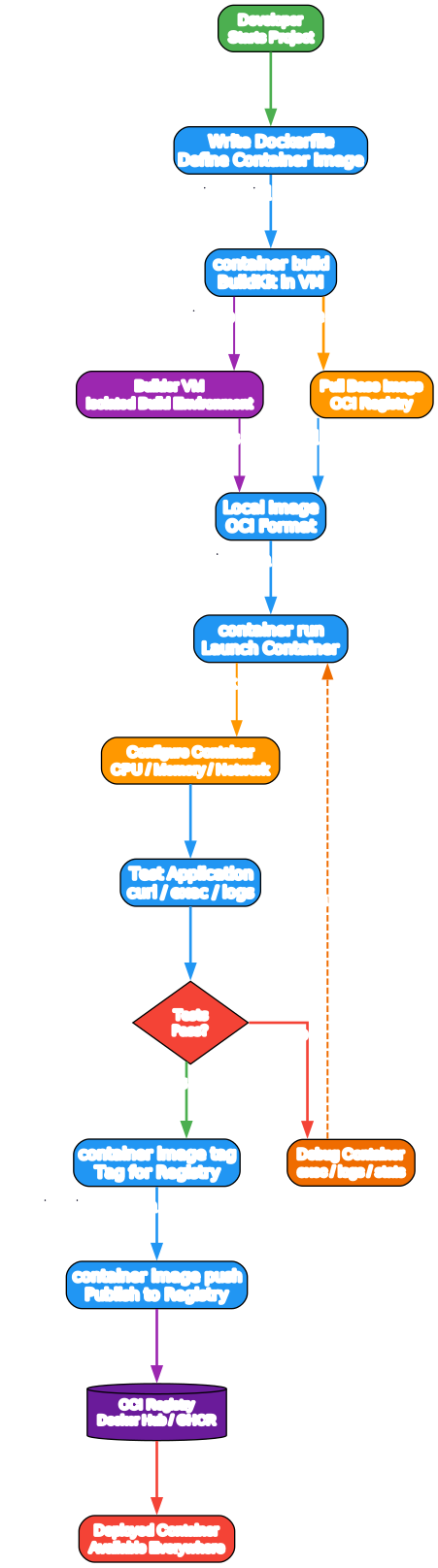
# Start system service
container system start

# Build image from Dockerfile
container build --tag myapp:1.0 .

# Configure builder resources for large builds
container builder start --cpus 8 --memory 32g

# Verify the container system
container system status

# Run image with port forwarding
container run -d --rm -p 127.0.0.1:8080:8000 myapp:1.0

# Run interactively with volume
container run -it --rm -v "${HOME}/Desktop/assets:/data" myapp:1.0 /bin/bash

# Inspect running container detail (use JSON output)
container inspect myapp
container list --format json

# View logs and VM boot output
container logs myapp
container logs --boot myapp

# Tag then push the result to an OCI-compatibility registry destination
container image tag myapp:1.0 ghcr.io/user/myapp:1.0
container image push ghcr.io/user/myapp:1.0
Networking and DNS
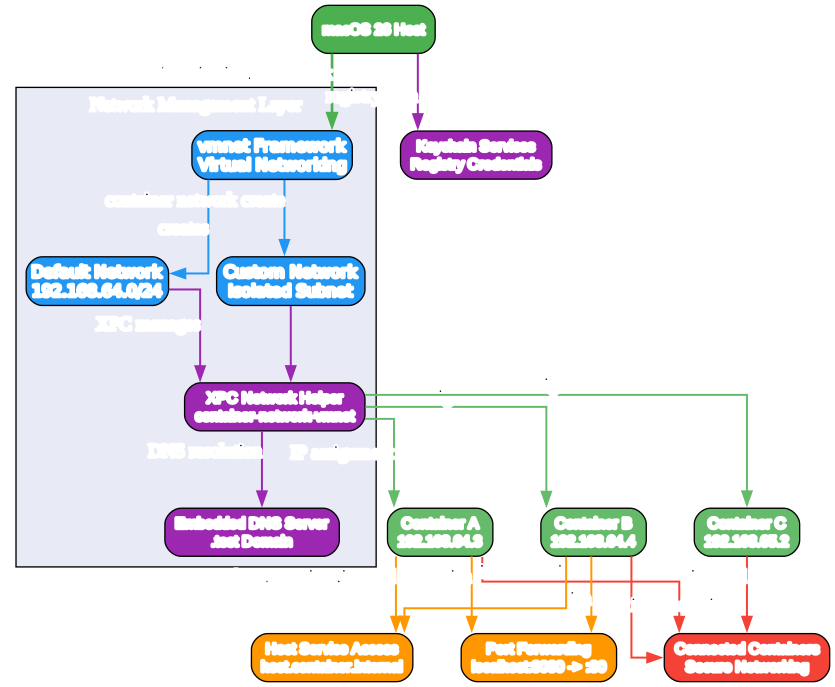
Apple Container introduces a clean networking model built around the .test hostname namespace. Each container receives a unique DNS name under .test, allowing containers to resolve each other by name without manual hostfile edits or external DNS servers.
- Per-container DNS resolution – The
container-network-vmnetXPC agent runs a dedicated DNS resolver for every container. Each VM gets its own resolver instance, so DNS queries from one container never leak into another’s namespace. - Network isolation – Every container VM gets its own virtual network interface via the
vmnetframework. Traffic between containers is isolated by default; explicit configuration is required to expose ports or share networks. .testnamespace – Container hostnames follow the pattern<container-name>.test. This avoids collisions with real domains and makes container addressing predictable and debuggable.- Port forwarding – The CLI exposes container ports to the host with
-p 127.0.0.1:HOST:CONTAINER, binding to localhost by default for security. The vmnet agent handles NAT translation between the host and the container VM’s virtual interface.
This design means developers can run multiple containers side by side, each with independent DNS and network stacks, without the shared-kernel networking complications common in traditional container runtimes.
VM Isolation
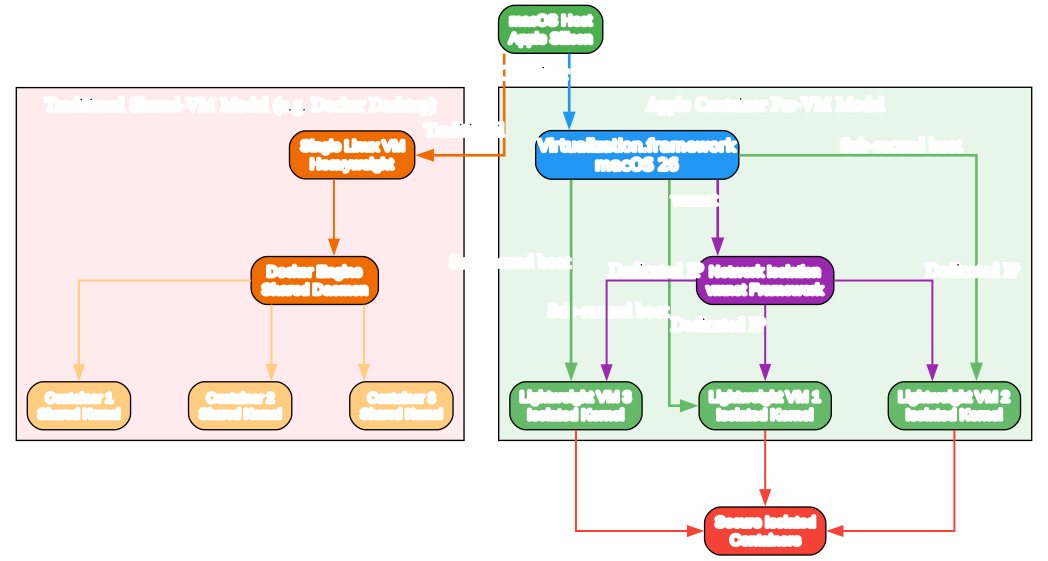
The defining architectural choice in Apple Container is giving every container its own lightweight virtual machine rather than sharing a single kernel across containers.
- Per-container VM architecture – Each
container runinvocation spawns a dedicated Linux VM using Apple’s Virtualization framework. The VM runs a minimalvminituserspace that boots directly into the container’s init process, eliminating the overhead of a full Linux distribution. - Sub-350ms boot time – The minimal vminit userspace and Apple Silicon’s virtualization acceleration combine to boot a container VM in under 350 milliseconds. This is fast enough that container startup feels instantaneous for interactive development workflows.
- Kernel isolation – Because each container has its own kernel, a kernel exploit or vulnerability in one container cannot affect any other container on the same host. This is fundamentally different from shared-kernel container runtimes where all containers share a single attack surface.
- Attack surface reduction – The minimal vminit userspace contains only what is needed to run the container process. There is no shell, package manager, or system service running by default. The kernel is configured with only the drivers and subsystems required for the container workload, shrinking the attack surface dramatically compared to a general-purpose Linux VM.
This per-VM model trades a small amount of memory overhead per container for a significant gain in isolation and security. On Apple Silicon with its efficient virtualization, the tradeoff is well worth it for most development and CI workloads.
Key Features
| Feature | Description |
|---|---|
| Per-container VM isolation | Each container runs in its own lightweight Linux VM with an isolated kernel |
| OCI compatibility | Pull, build, run, and push standard OCI images from any compliant registry |
| Sub-second boot | Container VMs boot in under 350ms using the minimal vminit userspace |
| Swift-native | Written entirely in Swift using Apple’s Virtualization framework |
| Apple Silicon optimization | Designed specifically for Apple Silicon with hardware-accelerated virtualization |
.test DNS namespace | Per-container DNS resolution via the container-network-vmnet XPC agent |
| XPC services | Modular architecture using macOS XPC services for images, networking, and runtime |
| Volume mounting | Per-container scoped volumes with fine-grained access control |
| Port forwarding | Localhost-bound port forwarding with vmnet NAT translation |
| gRPC API | Programmatic access via a gRPC client library for automation and integration |
Getting Started
Prerequisites
- macOS 26 Tahoe or later (required for the Virtualization framework features used)
- Apple Silicon Mac (M1, M2, M3, or later)
- Xcode 26 with command-line tools installed
Installation via Homebrew
# Install Apple Container from Homebrew
brew install container

# Verify installation
container version

# Start the system service
container system start
Building from Source
# Clone the repository
git clone https://github.com/apple/container.git
cd container

# Build using Swift Package Manager
swift build -c release

# The binary is at .build/release/container
# Optionally copy to a directory in your PATH
cp .build/release/container /usr/local/bin/container

# Start the system service
container system start
Once installed, you can immediately pull OCI images, build from Dockerfiles, and run containers – all with per-VM isolation and sub-second boot times.
Conclusion
Apple Container represents a fundamentally different approach to running Linux containers on macOS. By giving each container its own lightweight VM with an isolated kernel, Apple eliminates the shared-kernel attack surface that has been a persistent concern in container security. The sub-350ms boot times, made possible by the minimal vminit userspace and Apple Silicon’s virtualization acceleration, mean that this isolation comes with no perceptible performance penalty for development workflows.
The OCI compatibility ensures that existing Docker images and registries work without modification, lowering the barrier to adoption. The Swift-native implementation built on Apple’s Virtualization framework means the tool integrates cleanly with macOS rather than relying on third-party daemons or workarounds. For developers on Apple Silicon who need secure, isolated Linux containers – whether for development, testing, or CI – Apple Container is a compelling choice that is only going to improve as the project matures toward 1.0.
Links
- GitHub Repository: https://github.com/apple/container
- Containerization Swift Package: https://github.com/apple/containerization
Related Posts
- Cognee: Open-Source AI Memory Platform for Agents
- Apple Container: Lightweight VMs for Linux Containers on macOS
- FreeLLMAPI: OpenAI-Compatible Proxy with 16 Free LLM Providers

Enjoyed this post? Never miss out on future posts by following us