Learn Git in a Single Post: Complete Tutorial From Commits and Branches to Rebase and Pull Requests
Git is how the world manages source code. It is a distributed version control system: every clone is a full repository with complete history, so you can commit, branch, and merge offline, then sync when ready. Whether you are solo on a side project or one of a thousand engineers on a monorepo, Git is the substrate. This single post teaches the whole tool in five stages, with runnable snippets and five diagrams.
Learning Roadmap
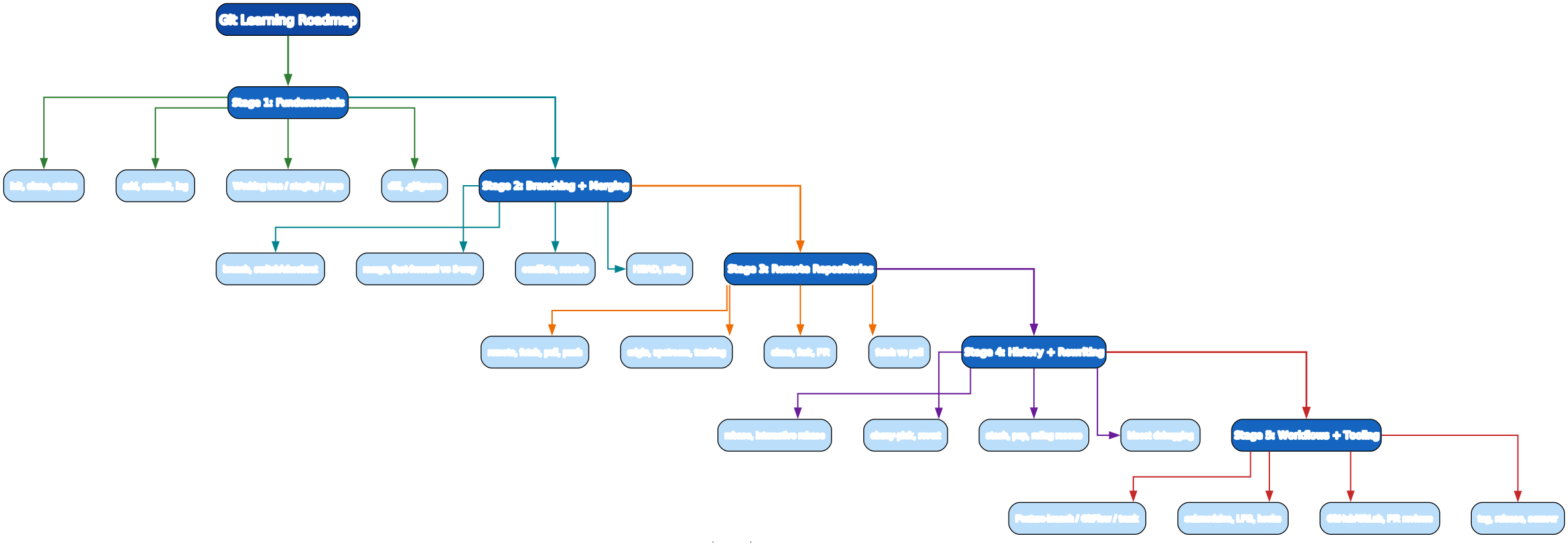
The roadmap moves from local commits (Stage 1), to branching and merging (Stage 2), to syncing with remotes (Stage 3), to reshaping history (Stage 4), to team workflows and tooling (Stage 5).
Stage 1 — Fundamentals: Commits and the Three States
The three areas
Git tracks your files across three areas, and a commit moves changes through them:

- Working tree — the files as you see them on disk (edited, untracked).
- Staging / index — the set of changes you’ve marked for the next commit (
git add). - Local repo (
.git) — the committed history (a graph of commits, branches as pointers). - Remote repo — a copy on a server (GitHub) you push to and pull from.
Create or clone a repo
git init myproject            # create a new repo
cd myproject
git clone https://github.com/user/repo.git   # clone an existing one
git clone --depth 1 <url>     # shallow clone (recent history only)
The daily loop: status, add, commit, log
git status                    # what's changed / staged
git add file.py               # stage one file
git add .                     # stage everything (be careful — see .gitignore)
git add -p                    # stage changes interactively, hunk by hunk

git commit -m "add login form"
git commit -am "fix typo"     # -a stages tracked+modified files, then commits

git log --oneline --graph --all    # compact history graph
git log -p file.py             # history of one file with diffs
git show <commit>             # show one commit's full diff
Diff
git diff                      # working tree vs staging (unstaged changes)
git diff --staged             # staging vs last commit (what will commit)
git diff main                 # working tree vs main branch
git diff HEAD~2 HEAD          # diff between two commits
.gitignore
# .gitignore
node_modules/
.env
*.log
dist/
__pycache__/
.vscode/
secrets/
Pitfall:
git add .stages everything not ignored — including files you didn’t mean to. Usegit add -pto stage hunks deliberately, and keep a strict.gitignore. Never commit secrets (API keys,.env). If you did, rotate the secret immediately —git rmdoes not erase history (see Stage 4 /git filter-repo).
Pitfall: A commit message should describe why, not just what (the diff shows the what).
"fix bug"is useless ingit logsix months later;"fix off-by-one in pagination cursor"survives.
Stage 2 — Branching + Merging
A branch is just a movable pointer to a commit. Creating one is nearly free — Git doesn’t copy files, it just writes a new pointer. This is why branching is Git’s superpower.
Branch and switch
git branch feature/login      # create
git switch feature/login      # switch to it
git switch -c feature/login   # create + switch in one step
# (older syntax, still works: git checkout -b feature/login)

git branch                    # list local branches
git branch -a                 # list all (incl. remote-tracking)
git branch -d feature/login   # delete (safe: refuses if unmerged)
git branch -D feature/login   # force delete
Merge: fast-forward vs 3-way
git switch main
git merge feature/login
- Fast-forward — if
mainhasn’t moved since the branch was created, Git just slidesmainforward to the branch’s tip. Linear history, no merge commit. - 3-way merge — if
mainhas moved, Git creates a merge commit with two parents. Preserves the branch topology.
Merge conflicts
When two branches change the same lines, Git can’t auto-merge and pauses for you to resolve:
git merge feature/login
# CONFLICT (content): Merge conflict in auth.py

# auth.py now contains:
# <<<<<<< HEAD
# your version (main)
# =======
# their version (feature)
# >>>>>>> feature/login
Edit the file to keep the correct content (removing the <<<<<<<, =======, >>>>>>> markers), then:
git add auth.py               # mark resolved
git merge --continue          # (or git commit)
# abort instead:
git merge --abort
Pitfall: Never just delete one side blindly. Read both versions, decide, and test the merged result before
git add. A conflict is a signal two intentions collided — both deserve consideration.
HEAD and reflog (your safety net)
HEAD— a special pointer to the commit your working tree is based on.reflog— a log of every placeHEADhas been, even commits you “lost”.
git reflog
# a1b2c3d HEAD@{0}: switch to main
# e4f5g6h HEAD@{1}: commit: wip
# i7j8k9l HEAD@{2}: reset: bad reset

git reset --hard HEAD@{2}     # undo the bad reset!

Pitfall: Almost nothing in Git is truly lost as long as it’s in the reflog (which persists ~90 days). Before panicking after a bad
reset/rebase/merge, rungit reflog. The one exception:git reset --hardon uncommitted work is gone for good — so commit (or stash) before you rewrite.
Stage 3 — Remote Repositories
Connect to a remote
git remote add origin https://github.com/user/repo.git
git remote -v                 # list remotes
git remote add upstream <url> # typical for forks: upstream = original repo
Fetch, pull, push
git fetch origin              # download objects + update remote-tracking refs; does NOT touch your branches
git pull                      # = git fetch + git merge (into current branch)
git pull --rebase             # = git fetch + git rebase (cleaner linear history)
git push origin main          # push local main to origin/main
git push -u origin feature    # -u sets upstream tracking for the branch
git push                      # after -u, just "git push" works
Pitfall:
git pulldoes a merge by default, creating a noisy merge commit every time the remote moved. Prefergit pull --rebase(set it globally:git config --global pull.rebase true) for a clean linear history.
Clone, fork, pull request
# clone: get your own copy of a repo you have read access to
git clone https://github.com/org/project.git

# fork (on GitHub): copy a repo to your account, then clone your fork
gh repo fork org/project --clone
# your fork = origin; the original = upstream
git remote -v
# origin    https://github.com/you/project.git  (push here)
# upstream  https://github.com/org/project.git  (pull latest from here)

# keep your fork's main up to date:
git switch main
git fetch upstream
git merge --ff-only upstream/main
git push
Tracking branches
git switch feature/login      # if origin/feature/login exists, this tracks it automatically
git branch -u origin/feature  # set tracking explicitly
git branch -vv                # show tracking info
Stage 4 — History + Rewriting
Rebase
git rebase replays your commits on top of another branch, producing a linear history (no merge commits):
git switch feature/login
git rebase main               # replay feature commits on top of current main
# resolve conflicts per commit, then:
git rebase --continue
# or abort:
git rebase --abort
The golden rule of rebase: Never rebase commits that have been pushed and shared. Rebase rewrites commit hashes; if others have based work on the old commits, you create divergent histories. Rebase only your local, unshared branches.
Interactive rebase
git rebase -i HEAD~5 # reshape the last 5 commits
Opens an editor listing the 5 commits, each with an action:
pick   a1b2c3d add login form
squash e4f5g6h fix typo           # combine into previous commit
reword i7j8k9l add tests          # edit this commit message
edit  j0k1l2m wip                 # pause to amend this commit
drop  m3n4o5p debug logging       # discard this commit
Interactive rebase is how you clean up a branch before a PR: squash WIP commits, rewrite bad messages, drop noise.
Cherry-pick and revert
# cherry-pick: apply one specific commit onto your current branch
git cherry-pick <commit-sha>

# revert: create a NEW commit that undoes a past commit (safe for shared history)
git revert <commit-sha>
Use
revert(notreset) on shared branches — it undoes a change forward with a new commit, preserving history for everyone. Useresetonly on unshared commits.
Stash
git stash                     # shelve uncommitted changes (working tree becomes clean)
git stash push -m "wip login" # with a message
git stash list                # see stashes
git stash pop                 # apply + drop the top stash
git stash apply               # apply but keep the stash
git stash drop stash@{0}      # drop one
Bisect — binary search for the bug
git bisect start
git bisect bad                 # current commit is broken
git bisect good v1.2.0         # this old tag was fine
# git checks out the midpoint; you test it:
git bisect good     # or: git bisect bad
# repeat until Git prints: "<sha> is the first bad commit"
git bisect reset
For a reproducible bug, bisect finds the exact introducing commit in log(steps) time.
Undo patterns cheat sheet
| Situation | Command |
|---|---|
| Undo last commit, keep changes staged | git reset --soft HEAD~1 |
| Undo last commit, keep changes unstaged | git reset --mixed HEAD~1 (default) |
| Undo last commit, discard changes | git reset --hard HEAD~1 |
| Undo a pushed commit (shared) | git revert <sha> |
| Amend the last commit (message or files) | git commit --amend |
| Recover a “lost” commit | git reflog then git reset --hard <sha> |
Stage 5 — Workflows + Tooling
The feature-branch workflow
The dominant team workflow: keep main always-shippable, do work on short-lived feature branches, integrate via pull request.
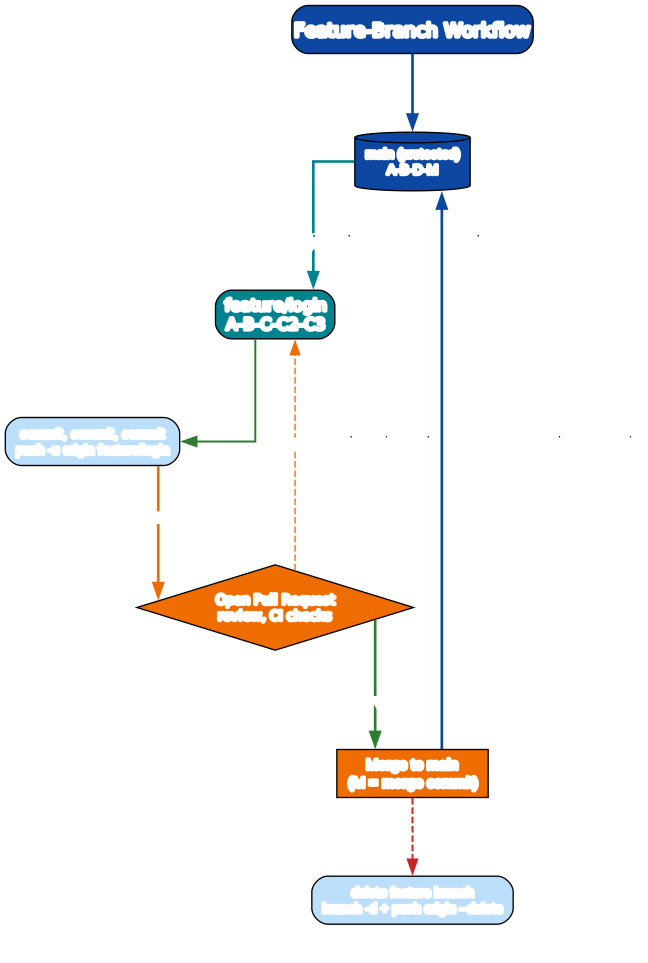
git switch -c feature/login        # 1. branch off main
# ... commit, commit, commit
git push -u origin feature/login   # 2. push the branch

gh pr create --fill                # 3. open a pull request (GitHub CLI)
# review, address comments, rebase on main if needed:
git fetch origin && git rebase origin/main
git push --force-with-lease        # 4. force-push the rebased branch (safe variant)

# 5. after merge to main:
git switch main
git pull
git branch -d feature/login
git push origin --delete feature/login
--force-with-leaseover--force:--forceblindly overwrites the remote and can clobber a teammate’s push.--force-with-leaseonly force-pushes if no one else pushed since your last fetch. Use it after rebasing a shared feature branch.
Other workflows
| Workflow | When |
|---|---|
| Trunk-based | Everyone commits to main (or very short branches, <1 day). Best for CI-mature teams; fastest integration. |
| GitFlow | main (releases), develop, feature/*, release/*, hotfix/*. Heavier; suits scheduled-release products. |
| Forking | Open-source: contributors fork, PR from their fork; maintainers review and merge. |
Tags and releases
git tag -a v1.4.0 -m "release 1.4.0"   # annotated tag (recommended)
git push origin v1.4.0                  # push the tag
gh release create v1.4.0 --notes-file CHANGELOG.md
Follow semantic versioning: MAJOR.MINOR.PATCH — bump MAJOR for breaking changes, MINOR for new features (backward-compatible), PATCH for fixes.
The toolchain
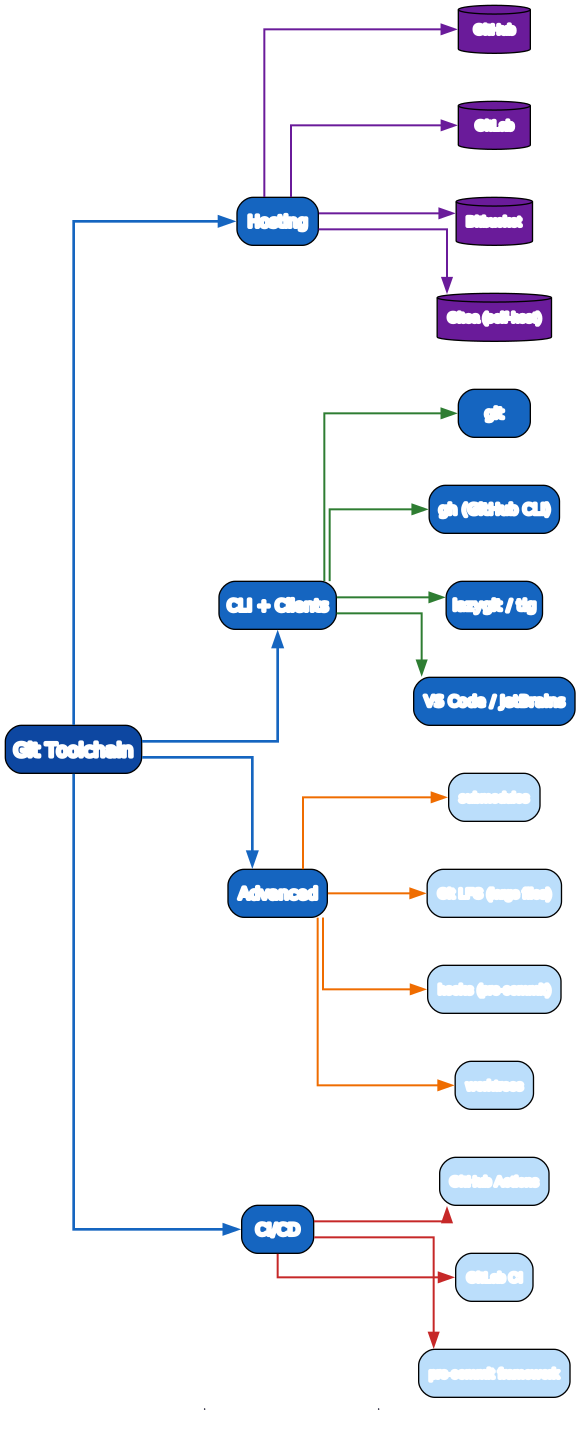
| Tool | Role |
|---|---|
git | The CLI itself |
gh | GitHub CLI — PRs, issues, releases, Actions from the terminal |
lazygit / tig | TUI clients for exploring history |
| VS Code / JetBrains | Built-in Git GUIs |
| Submodules | Embed one repo inside another (use sparingly — they’re confusing) |
| Git LFS | Store large binaries (models, video) outside the repo |
| Hooks | Scripts fired by Git events (pre-commit lints, pre-push tests) |
pre-commit framework | Manage hooks as config, share across a team |
| GitHub Actions / GitLab CI | Run CI on push/PR |
Hooks example
# .git/hooks/pre-commit (make executable: chmod +x)
#!/usr/bin/env bash
set -e
echo "Running pre-commit checks..."
shellcheck scripts/*.sh
ruff check . || exit 1
Or use the pre-commit framework for a declarative .pre-commit-config.yaml shared across the team.
Quick-Start Checklist
- Configure your identity —
git config --global user.name "Your Name"anduser.email. - Init or clone —
git inita new project orgit clonean existing one. - Commit —
status,add,commituntil it’s muscle memory. - Add a
.gitignore— keep secrets and build artifacts out. - Branch for every feature —
git switch -c feature/x. - Merge with a PR — push the branch, open a pull request, get review.
- Set
pull.rebase true— clean linear history on pulls. - Learn
reflog— it’s your undo button for almost anything. - Tag releases —
git tag -a v1.0.0 -m "..."and push the tag. - Automate with hooks — a
pre-commithook catches issues before they land.
Common Pitfalls
- Committing secrets — never commit
.env/keys. If you did, rotate the secret and usegit filter-repoto purge history (a plaingit rmleaves it in old commits). git push --forceon shared branches — clobbers teammates’ commits. Use--force-with-lease.- Rebasing pushed/shared commits — rewrites hashes, breaks others’ history. Rebase only local branches.
git pull(merge) noise — creates merge commits for every remote change. Usegit pull --rebase.git reset --hardon uncommitted work — that work is gone (not in reflog). Commit or stash first.git add .blindly — stages junk and secrets. Usegit add -pand a strict.gitignore.- Bad commit messages —
"fix"tells future you nothing. Describe the why. - Ignoring conflicts instead of resolving —
git statuswill warn you’re mid-merge; finish or--abort, don’t leave it hanging.
Further Reading
- Pro Git book — the definitive, free, full reference
- Git docs — every command, every flag
- Learn Git Branching — visual, interactive Git exercises
- Oh Shit, Git!?! — recipes for un-doing common Git disasters
- GitHub CLI docs —
ghcommands for PRs, issues, releases
Related guides
Git is the foundation of the modern dev workflow — these adjacent PyShine tutorials build on it:
- Learn Bash in One Post: Complete Tutorial — Git hooks, CI scripts, and the
gitCLI itself are all Bash; the two tools are inseparable. - Learn Docker in One Post: Complete Tutorial — pair Git (source) with Docker (build) in CI: every push builds an image.
- Learn Python in One Post: Complete Tutorial — Python projects with
pre-commithooks, ruff, and pytest in CI. - Learn Go in One Post: Complete Tutorial — Go modules + Git tags drive reproducible releases.
- Learn Rust in One Post: Complete Tutorial — cargo + Git, with
cargo-huskyhooks.
Git rewards a clear mental model: commits are a graph, branches are pointers, and almost everything is recoverable via the reflog. Spend a day per stage and you’ll move from “I can commit” to “I can rebase a PR, resolve conflicts confidently, and rescue a colleague who just ran Enjoyed this post? Never miss out on future posts by following us git reset --hard.” The single most valuable habit is to commit small and often with clear messages — a clean history is far easier to rebase, bisect, and revert than a tangled one. Run every snippet above against a throwaway repo; Git is learned by doing, not by reading. 





