Learn REST API in a Single Post: Complete Tutorial From HTTP Requests to Production API Design
REST is the architectural style behind almost every public API on the web — GitHub, Stripe, Twitter, AWS. It is a set of conventions layered on HTTP that turns the protocol’s request/response model into a predictable, cacheable, stateless interface for manipulating resources. Whether you are building a backend, integrating a third-party service, or designing a public API, REST is the default. This single post teaches the whole subject in five stages, with runnable snippets and five diagrams.
Learning Roadmap
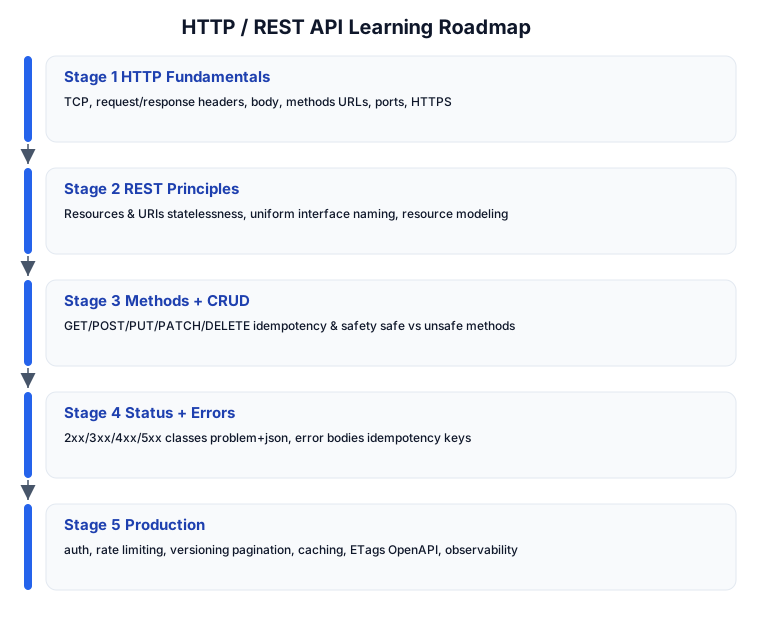
The roadmap moves from how HTTP itself works (Stage 1), to REST’s design constraints (Stage 2), to the verb vocabulary (Stage 3), to communicating outcomes (Stage 4), to the production concerns that separate a toy API from a real one (Stage 5).
Stage 1 — HTTP Fundamentals
The request/response cycle
HTTP is a client-server protocol: the client sends a request, the server returns a response. Every interaction is one round trip.
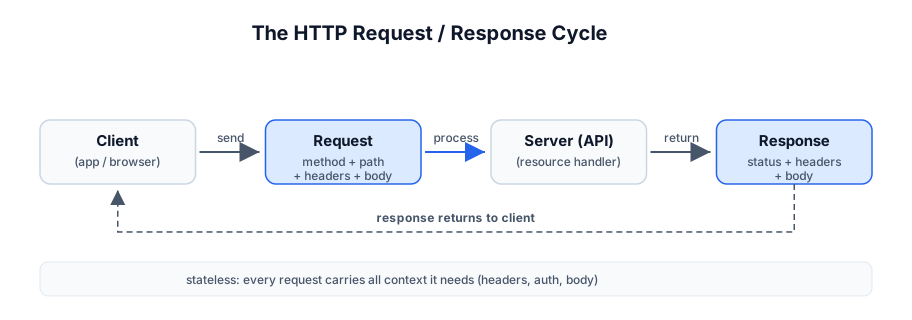
A request has four parts:
POST /users HTTP/1.1          # method + path + version
Host: api.example.com          # headers
Content-Type: application/json
Authorization: Bearer eyJhb...

{"name": "Ada", "email": "ada@example.com"}    # body
A response has three:
HTTP/1.1 201 Created            # version + status code + reason
Location: /users/42              # headers
Content-Type: application/json

{"id": 42, "name": "Ada"}        # body
Methods, headers, URLs
- Method — the verb:
GET,POST,PUT,PATCH,DELETE, plusHEAD,OPTIONS. - URL — scheme (
https), host, path (/users/42), optional query string (?page=2&limit=20). - Headers — metadata:
Content-Type(what the body is),Accept(what the client wants back),Authorization(credentials),Cache-Control, custom headers. - Body — the payload, usually JSON today (historically XML, form-encoded).
Pitfall: HTTPS is non-negotiable. Plain HTTP exposes auth tokens and request bodies to anyone on the path. Redirect HTTP→HTTPS at the edge and set
Strict-Transport-Security.
Stage 2 — REST Principles
REST (Representational State Transfer) is a set of constraints Fielding defined in his dissertation. The practical ones:
Resources and URIs
A resource is anything you want to expose — a user, an order, a collection. URIs name resources as nouns, not verbs:
GOOD (nouns):   /users          /users/42         /users/42/orders
BAD (verbs):    /getUsers       /createOrder      /deleteUser/42
The verb is the HTTP method; the URI is the noun. POST /users (create), GET /users/42 (read), DELETE /users/42 (delete) — the action lives in the method.
Resource modeling and naming
- Use plural nouns for collections:
/users,/orders. - Nest to express sub-resources:
/users/42/orders(orders belonging to user 42). - Use path parameters for identifiers (
/users/:id) and query parameters for filtering/sorting/pagination (/users?role=admin&sort=-created_at&page=2). - Keep URIs lowercase, hyphen-separated (
/order-items, not/orderItemsor/order_items— pick a convention and be consistent). - Don’t put actions in the URL. If you must deviate from CRUD (e.g. “cancel an order”), prefer a sub-resource
POST /orders/42/cancelor, cleaner, model state withPATCH /orders/42 {"status":"cancelled"}.
Statelessness
Every request must contain all the context the server needs to fulfill it — auth token, parameters, body. The server holds no session state between requests. This is what makes REST horizontally scalable: any server can handle any request, because nothing about you lives on one specific box.
Pitfall: “Stateless” means no server-side session state — it does NOT mean your API can’t have a database. The database is shared state, fine. What’s forbidden is
server.session["cart"]that only exists on the server that started your conversation. Put the cart in the database (or the client sends it each request).
Uniform interface
Every resource is manipulated the same way: the same methods, the same representation formats (JSON), and responses include enough metadata (links, content types) to act on the resource. This is the constraint that makes REST APIs learnable once and reusable everywhere.
Stage 3 — Methods + CRUD
The five core methods map onto CRUD (Create/Read/Update/Delete):
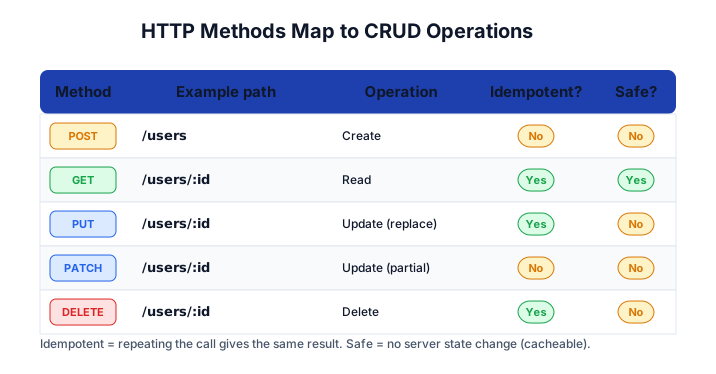
| Method | Example | Operation | Idempotent? | Safe? |
|---|---|---|---|---|
POST | POST /users | Create | No | No |
GET | GET /users/42 | Read | Yes | Yes |
PUT | PUT /users/42 | Update (full replace) | Yes | No |
PATCH | PATCH /users/42 | Update (partial) | No | No |
DELETE | DELETE /users/42 | Delete | Yes | No |
Idempotency and safety — the two concepts that matter most
- Safe — the method doesn’t modify server state.
GETandHEADare safe. Safe methods can be cached and prefetched freely. (AGETthat logs or increments a counter is technically unsafe; keepGETside-effect-free.) - Idempotent — repeating the call produces the same result as calling once.
GET,PUT,DELETEare idempotent;POSTandPATCHare not.
Why this matters: retries. If a network hiccup makes a client unsure whether its DELETE /users/42 arrived, it can safely re-send — the second delete is a no-op (idempotent). But a retried POST /orders creates a second order. That’s why payment APIs issue idempotency keys (see Stage 4).
PUT vs PATCH
PUTreplaces the entire resource with the body you send. Missing fields become their defaults (or null).PUT /users/42 {"name":"Ada"}wipes outemail,role, etc.PATCHapplies a partial update.PATCH /users/42 {"name":"Ada"}changes only the name.
Pitfall: Treating
PUTlikePATCH(sending a partial body toPUT) silently nulls out the fields you didn’t send. UsePATCHfor partial updates,PUTfor full replacements, and document which your API expects.
A worked CRUD example
# create
curl -X POST https://api.example.com/users \
  -H "Content-Type: application/json" \
  -d '{"name":"Ada","email":"ada@example.com"}'
# -> 201 Created, Location: /users/42, body: {"id":42,...}

# read
curl https://api.example.com/users/42          # -> 200 OK
curl https://api.example.com/users?role=admin   # -> 200 OK, [ ... ]

# full replace
curl -X PUT https://api.example.com/users/42 \
  -H "Content-Type: application/json" \
  -d '{"name":"Ada Lovelace","email":"ada@example.com","role":"admin"}'
# -> 200 OK

# partial update
curl -X PATCH https://api.example.com/users/42 \
  -H "Content-Type: application/json" \
  -d '{"role":"admin"}'
# -> 200 OK

# delete
curl -X DELETE https://api.example.com/users/42  # -> 204 No Content
Stage 4 — Status Codes + Errors
The status code is the server’s answer to “did it work?” Use them deliberately.
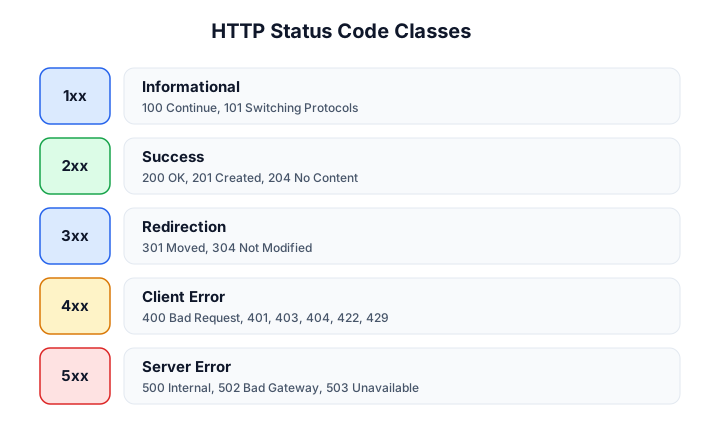
The classes
- 1xx Informational — rare in REST;
100 Continuefor large uploads. - 2xx Success —
200 OK(generic),201 Created(with aLocationheader),204 No Content(success, empty body — perfect forDELETE),202 Accepted(async job started). - 3xx Redirection —
301 Moved Permanently,304 Not Modified(used withETag/If-None-Matchcaching). - 4xx Client Error — the client did something wrong:
400 Bad Request(malformed),401 Unauthorized(no/invalid auth),403 Forbidden(authed but not allowed),404 Not Found,409 Conflict(duplicate),422 Unprocessable Entity(well-formed but semantically invalid — use this over 400 for validation failures),429 Too Many Requests(rate limited). - 5xx Server Error — the server’s fault:
500 Internal Server Error,502 Bad Gateway,503 Service Unavailable,504 Gateway Timeout.
The codes you’ll use 90% of the time
| Code | When |
|---|---|
200 OK | Successful GET, PUT, PATCH |
201 Created | Successful POST that created a resource (+ Location header) |
204 No Content | Successful DELETE, or PUT/PATCH that returns nothing |
400 Bad Request | Malformed JSON / missing required field in the structure |
401 Unauthorized | Missing or invalid auth token |
403 Forbidden | Authed, but not allowed to do this |
404 Not Found | Resource doesn’t exist |
422 Unprocessable Entity | Syntactically valid but fails validation (email format, etc.) |
429 Too Many Requests | Rate limit hit |
500 Internal Server Error | Unhandled server error |
Pitfall: Don’t return
200 OKwith{"error": "..."}in the body. That breaks every HTTP client’s error handling —response.okis false only for non-2xx. Use a 4xx/5xx status and an error body. And use422(not400) when the JSON is valid but a field fails business validation —400means “I couldn’t even parse this.”
Structured error bodies: problem+json
RFC 7807 defines a standard error format so clients can parse errors uniformly:
HTTP/1.1 422 Unprocessable Entity
Content-Type: application/problem+json

{
  "type": "https://api.example.com/errors/validation",
  "title": "Invalid request",
  "status": 422,
  "detail": "email must be a valid address",
  "instance": "/users",
  "errors": [
    { "field": "email", "code": "invalid_format" }
  ]
}
A consistent error shape (type, title, detail, field-level errors) lets clients show the right message and highlight the right form field without bespoke parsing per endpoint.
Idempotency keys for non-idempotent operations
For POST operations that must not be duplicated (payments, order creation), the client sends an Idempotency-Key header; the server records the key→response mapping and returns the cached response on a retry:
curl -X POST https://api.example.com/charges \
  -H "Idempotency-Key: 7c8d2f1a-..." \
  -H "Content-Type: application/json" \
  -d '{"amount":5000,"currency":"usd"}'
# a retry with the SAME key returns the original charge, not a new one
Stripe popularized this; it’s the correct fix for “did my payment go through?” after a network timeout.
Stage 5 — Production Design
Authentication
- Bearer tokens (JWT) —
Authorization: Bearer <token>. Stateless, self-contained; the server verifies the signature. - OAuth 2.0 — for delegated/third-party access (let an app act on a user’s behalf without seeing their password).
- API keys —
X-API-Key: <key>; simplest, fine for server-to-server. - mTLS — mutual TLS for high-assurance service-to-service.
Store tokens securely (httpOnly cookies for web apps, secure storage for mobile), use short-lived access tokens + long-lived refresh tokens, and never put secrets in URLs (they leak into logs and
Refererheaders).
Rate limiting
Protect the API from abuse and noisy neighbors. Return 429 Too Many Requests with headers telling the client when to retry:
HTTP/1.1 429 Too Many Requests
X-RateLimit-Limit: 100
X-RateLimit-Remaining: 0
X-RateLimit-Reset: 1690000000
Retry-After: 30
Common algorithms: fixed window, sliding window, token bucket (allows bursts). Use a fast store (Redis) to count per-key.
Versioning
Version from day one so you can evolve without breaking clients. The common schemes:
| Scheme | Example | Notes |
|---|---|---|
| URI path | /v1/users | most common, clearest, cache-friendly |
| Header | Accept: application/vnd.example.v1+json | clean URLs, harder to test in a browser |
| Query | /users?version=1 | discouraged — breaks caching |
Bump the major version on breaking changes (renamed fields, removed fields, changed semantics). Additive, backward-compatible changes (new optional fields, new endpoints) don’t need a new version.
Pagination
Never return an unbounded collection. Two schemes:
- Offset/limit —
?page=2&limit=20(or?offset=20&limit=20). Simple, but slow for large offsets and unstable if data changes between pages (items shift). - Cursor —
?cursor=eyJpZCI6MTAwfQ&limit=20, where the cursor encodes the last seen position. Stable under insertion, fast (indexed), but no random access.
Return pagination metadata in the response body or Link headers:
Link: <https://api.example.com/users?cursor=abc&limit=20>; rel="next"
Pitfall: Offset pagination on a growing table returns duplicates or skips items as new rows are inserted between page fetches. Use cursor pagination for anything that can change while paginating.
Caching with ETags and conditional requests
GET responses can include an ETag (a hash/version of the representation). On the next request, the client sends If-None-Match: "<etag>"; if the resource hasn’t changed, the server returns 304 Not Modified with an empty body — saving bandwidth and compute.
# first request
HTTP/1.1 200 OK
ETag: "33a64df5"
<full body>

# subsequent request
GET /users/42
If-None-Match: "33a64df5"

HTTP/1.1 304 Not Modified        # body omitted, client uses cached copy
Cache-Control headers (max-age, public, private, no-store) tell caches (CDNs, browsers) how long to hold the response. Mark auth-personalized responses private so shared caches don’t leak them.
OpenAPI / documentation
Generate a spec (openapi.yaml) so your API is discoverable, types are explicit, and clients can be auto-generated. Tools: FastAPI (generates OpenAPI automatically), swagger-codegen, openapi-generator. A /docs endpoint serving Swagger UI lets consumers try endpoints in the browser.
Observability
- Structured logs with a request ID (return it in a
X-Request-IDheader so users can quote it). - Metrics — request count, latency percentiles (p50/p95/p99), error rate per route.
- Tracing — distributed tracing (OpenTelemetry) to follow a request across services.
Layered architecture
A production REST API sits in layers — clients hit an edge (load balancer, CDN, API gateway) that fronts services, which front data stores:
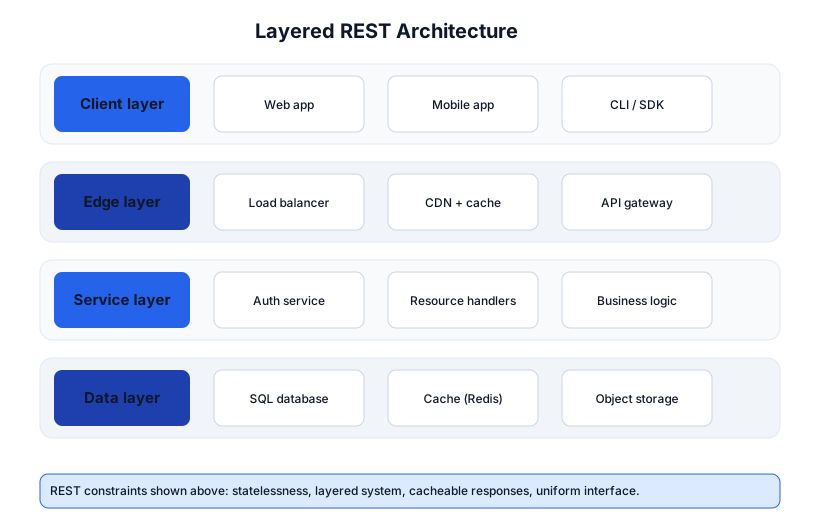
The layered constraint means a client can’t tell (and shouldn’t care) whether it’s talking to the origin server or an intermediary — caching and proxying happen transparently at the edge.
Quick-Start Checklist
- Learn the 5 methods —
GET POST PUT PATCH DELETE— and their CRUD mapping. - Memorize idempotency and safety — it determines retry behavior.
- Use nouns in URIs, verbs in methods —
POST /users, not/createUser. - Return the right status code —
201on create,204on delete,422on validation failure. - Use
problem+jsonfor structured, consistent error bodies. - Add idempotency keys to any
POSTthat must not duplicate (payments). - Version from day one —
/v1/...— so you can evolve. - Paginate every collection — cursor pagination for mutable data.
- Add ETags +
Cache-Controlto cacheableGETresponses. - Generate an OpenAPI spec so the API is self-documenting.
Common Pitfalls
- Verbs in URIs —
/getUser,/createOrderis RPC, not REST. Use methods + noun URIs. 200 OKwith an error body — breaks client error handling. Use 4xx/5xx.400for validation errors — use422 Unprocessable Entitywhen the JSON parses but fails business rules.- Treating
PUTas partial —PUTreplaces the whole resource; missing fields get nulled. UsePATCHfor partials. GETwith side effects —GETmust be safe (no mutations); crawlers, prefetch, and caches will fire it.- Retrying
POSTwithout an idempotency key — duplicates payments/orders. - Secrets in URLs —
?api_key=...leaks into logs andReferer. Use headers. - Unbounded collections — returning 100k items in one response. Always paginate.
- Offset pagination on mutable data — duplicates/skips as data changes. Use cursors.
- No versioning — a field rename breaks every client with no escape hatch.
Further Reading
- RFC 9110 — HTTP Semantics — the authoritative HTTP spec
- Fielding’s dissertation, Chapter 5 — REST defined
- REST API Tutorial (restfulapi.net) — comprehensive practical reference
- RFC 7807 — problem+json — the error format spec
- Google API Design Guide — battle-tested API design conventions
- Microsoft REST API Guidelines — enterprise-style conventions
Related guides
REST is the backbone of the backend stack — these adjacent PyShine tutorials complete it:
- Learn Python in One Post: Complete Tutorial — FastAPI/Django generate OpenAPI and implement REST endpoints idiomatically.
- Learn SQL in One Post: Complete Tutorial — the data layer your REST resources sit on; transactions wrap multi-step API writes.
- Learn Go in One Post: Complete Tutorial — Go’s
net/httpandencoding/jsonare a natural REST backend. - Learn Rust in One Post: Complete Tutorial —
axumfor high-performance, type-safe REST APIs. - Learn Docker in One Post: Complete Tutorial — containerize and deploy the API behind the edge layer shown above.
REST is small in concept — resources named by nouns, manipulated by methods, with status codes reporting outcomes — but deep in practice. The five stages here take you from “I can read an HTTP request” to “I can design a versioned, paginated, cached, idempotent API with structured errors and an OpenAPI spec.” The skill that separates a junior API designer from a senior one is not knowing more methods; it is honoring the constraints — statelessness, idempotency, the right status code, the right error format — because those constraints are what let REST APIs scale, cache, and survive clients you’ve never met. Implement one CRUD resource end-to-end against a real database, return correct status codes for every edge case, and generate its OpenAPI spec; that one exercise covers most of what matters. Enjoyed this post? Never miss out on future posts by following us