Learn Regex in a Single Post: Complete Tutorial From Anchors and Quantifiers to Lookarounds and Backtracking
Regular expressions are the universal language of text search. Every programming language, every text editor, every grep, every validation library speaks regex. A 20-character pattern can find every email in a 10 GB log file, validate a phone number, or extract every URL from an HTML page. The syntax looks cryptic at first, but it is a small grammar that composes powerfully. This single post teaches the whole subject in five stages, with runnable snippets and five diagrams.
Learning Roadmap
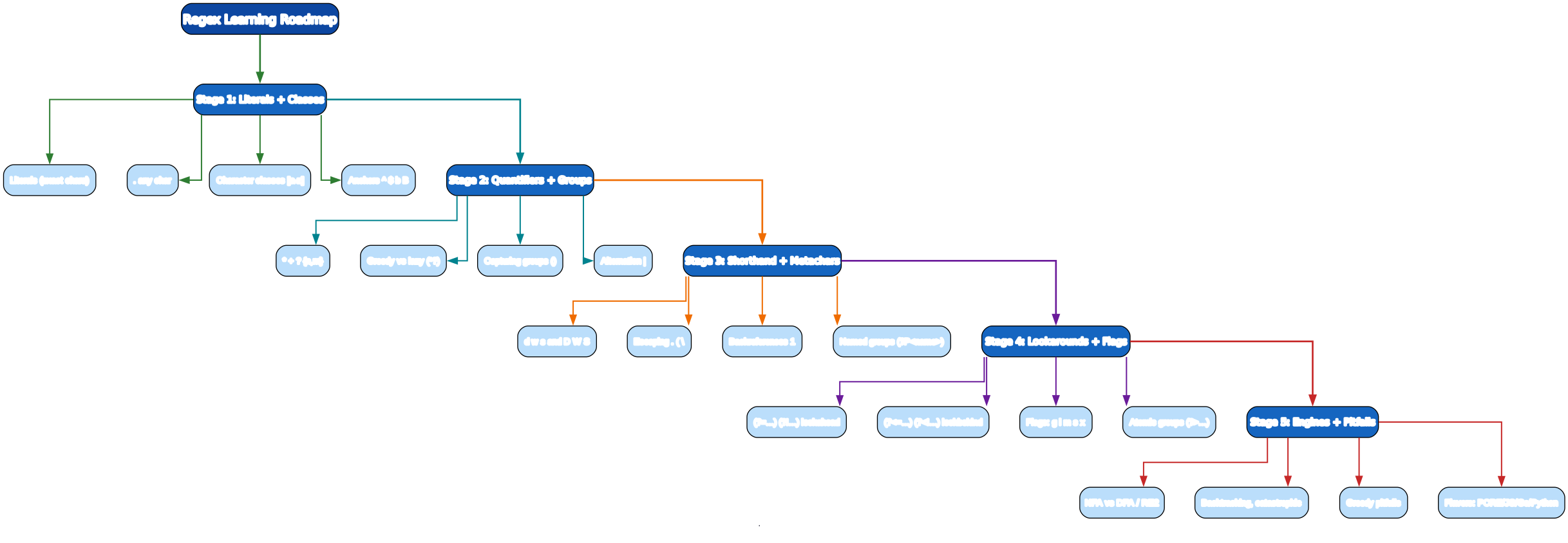
The roadmap moves from matching literal characters (Stage 1), to controlling how many and how they group (Stage 2), to the shorthand vocabulary (Stage 3), to zero-width assertions (Stage 4), to the engine itself and how it fails (Stage 5).
Stage 1 — Literals + Character Classes + Anchors
Literals
The simplest regex matches text literally:
hello        # matches "hello" anywhere in the string
cat          # matches "cat", "catalog", "concatenate" — anywhere it appears
The wildcard .
. matches any single character except a newline (unless the /s flag is on):
a.c # aac, abc, a1c, a@c — any one char between a and c
Character classes [...]
A bracketed set matches any one character inside it:
[aeiou]              # any one vowel
[a-z]                # any lowercase letter
[A-Za-z0-9]          # any letter or digit
[0-9.]               # any digit or a literal dot (inside [], . is literal)
[^0-9]               # negated: any character that is NOT a digit
Inside
[...], most metacharacters lose their special meaning —.is a literal dot,(is a literal paren. The exceptions are](closes the class),\(escape),^(negates only if first), and-(range only if between two chars).
Anchors
Anchors don’t match characters — they match positions (zero-width):
^error          # "error" only at the start of a line/string
error$          # "error" only at the end
^\d+$           # entire line is digits
\bword\b        # "word" as a whole word (not "password" or "sword")
\Bword\B        # "word" only when NOT at word boundaries (inside another word)
\b is a word boundary — the position between a word character (\w: letter, digit, underscore) and a non-word character. It’s how you match whole words without matching substrings.
Stage 1 in action
# find lines that start with "ERROR"
grep -E '^ERROR' app.log

# find whole-word "TODO"
grep -E '\bTODO\b' *.py

Stage 2 — Quantifiers + Groups
Quantifiers: how many
a*        # zero or more a's
a+        # one or more a's
a?        # zero or one a (optional)
a{3}      # exactly 3 a's
a{2,4}    # between 2 and 4 a's
a{2,}     # 2 or more a's
Greedy vs lazy
Quantifiers are greedy by default — they match as much as possible, then backtrack if the rest of the pattern fails:
".*"          # on 'say "hi" and "bye"'  matches '"hi" and "bye"' (too much!)
".*?"         # lazy: matches '"hi"' first, then '"bye"' separately
Add ? after a quantifier to make it lazy (match as little as possible): *?, +?, ??, {n,m}?.
Pitfall: Greedy
.*is the #1 regex bug. To match quoted strings, use".*?"(lazy) or — better, for performance — a negated class"[^"]*"(matches a quote, then any non-quote chars, then a quote). The negated class cannot over-match and is faster.
Capturing groups () and backreferences
(ab)+              # "ab", "abab", "ababab"
(\w+)\s\1          # \1 = backreference to group 1; matches "the the", "ha ha"
Backreferences let a pattern refer back to text it already captured — useful for detecting repeated words or matching balanced delimiters:
import re
re.search(r'(\w+)\s+\1', "this is a a test").group()   # 'a a'
Named groups
(?P<year>\d{4})-(?P<month>\d{2})-(?P<day>\d{2})    # Python
(?<year>\d{4})-(?<month>\d{2})-(?<day>\d{2})       # JS / .NET / PCRE
Named groups make complex patterns readable. In Python:
m = re.search(r'(?P<year>\d{4})-(?P<month>\d{2})', "2026-07-13")
m.group("year")    # '2026'
m.group("month")   # '07'
Non-capturing groups
(?:abc)+ # group for repetition, but no capture saved
Use (?:...) when you need grouping for a quantifier but don’t care to keep the captured text — it’s faster and avoids polluting your group numbers.
Alternation
cat|dog|bird         # cat OR dog OR bird
yes|no               # yes or no
\b(cat|dog)\b        # whole-word cat or dog (group for the alternation)
Pitfall: Alternation tries leftmost-first, not longest-match.
a|abon"ab"matches just"a". Order alternatives from most-specific to least-specific when they can overlap.
Stage 3 — Shorthand Classes + Metacharacters
Shorthand character classes
\d       # digit [0-9]
\w       # word char [A-Za-z0-9_]
\s       # whitespace [ \t\r\n\f]
\D       # non-digit        (negated \d)
\W       # non-word char    (negated \w)
\S       # non-whitespace   (negated \s)
Escaping metacharacters
These characters are special in regex: . ^ $ * + ? { } [ ] \ | ( ). To match them literally, escape with a backslash:
\.        # literal dot (e.g. in an IP or filename)
\*        # literal asterisk
\( \)     # literal parens
\\        # literal backslash
\?        # literal question mark
Pitfall: When building regex from strings in code, use the language’s escape function (
re.escapein Python,RegExp.escapein JS) to escape user input — otherwise a.in the input becomes a wildcard.
Common recipes (Stage 3 toolbox)
\d{1,3}\.\d{1,3}\.\d{1,3}\.\d{1,3}        # naive IPv4
[A-Za-z0-9._%+-]+@[A-Za-z0-9.-]+\.[A-Za-z]{2,}   # naive email
https?://[\w./%-]+                       # http or https URL
\b\d{3}[-.]?\d{3}[-.]?\d{4}\b             # US-style phone
[一-鿿]+                          # one or more CJK characters
These “naive” patterns are fine for extraction and quick validation. For rigorous email/URL validation, use a dedicated library (or the RFC 5322 email regex, which is famously huge) — regex alone can’t validate that a domain’s TLD actually exists.
Stage 4 — Lookarounds + Flags
Lookarounds are zero-width assertions: they check whether text matches a pattern without consuming it. They “look around” the current position.
(?=pattern)       # lookahead:  asserts pattern follows (positive)
(?!pattern)       # lookahead:  asserts pattern does NOT follow (negative)
(?<=pattern)      # lookbehind: asserts pattern precedes (positive)
(?<!pattern)      # lookbehind: asserts pattern does NOT precede (negative)
Lookahead examples
\d+(?=px)         # digits only if followed by "px" — "px" not consumed
\b\w+(?!ing\b)\b  # words NOT ending in "ing"
Lookbehind examples
(?<=\$)\d+        # digits preceded by "$" — "$" not consumed
(?<![\w.])@       # "@" not preceded by a word char or dot (avoid emails-in-urls)
Pitfall: Many engines (JavaScript until 2018, Go’s RE2) support only fixed-width lookbehind —
(?<=foo)is fine,(?<=\w+)is not. Python’srerequires fixed-width lookbehind; the third-partyregexmodule allows variable width.
Flags
Flags modify the whole pattern’s behavior (written after the closing / in JS, or as constants in other languages):
| Flag | Meaning |
|---|---|
i | case-insensitive |
g | global — find all matches, not just the first |
m | multiline — ^ and $ match line boundaries, not just string boundaries |
s | dotall — . matches newline too |
x | extended — ignore whitespace and allow # comments in the pattern |
// JS: match all case-insensitive "todo" as whole words
const re = /\btodo\b/gi;
// Python: same
re.findall(r'\btodo\b', text, flags=re.IGNORECASE)
/x (verbose) lets you document a complex pattern:
date = re.compile(r"""
    \b
    (?P<year>\d{4}) - (?P<month>\d{2}) - (?P<day>\d{2})   # YYYY-MM-DD
    \b
""", re.VERBOSE)
Atomic groups
(?>pattern) # atomic group: once it matches, it won't backtrack
Atomic groups (and possessive quantifiers *+, ++, ?+ in PCRE) prevent backtracking into the group — a performance tool and a correctness tool for avoiding runaway matches.
Stage 5 — Engines + Pitfalls
How a regex engine works
Most real-world regex engines are NFA-based (nondeterministic finite automaton): they compile the pattern into a graph of states, then walk the input, trying paths and backtracking when one fails.

A DFA (deterministic finite automaton) engine (like lex) precomputes all paths, giving guaranteed linear time but no backreferences or lookarounds. Google’s RE2 engine (used in Go’s regexp, Rust’s regex, and rg --pcre2 is a separate path) takes a hybrid approach: it runs in linear time by avoiding backtracking, at the cost of dropping backreferences and some lookarounds.
Catastrophic backtracking
Nested quantifiers can blow up exponentially — the classic ReDoS (regular expression denial of service):
(a+)+b # on input "aaaaaaaaaaaaaaaaaaaaaaaa!" -> 2^n paths before failing
The engine tries every partition of the as between the two + quantifiers before giving up. A 30-character input takes ~1 billion steps.
Defenses:
- Use RE2 (
re2in Python, Go’sregexp) for patterns on untrusted input — linear time, no backtracking. - Use atomic groups
(?>...)or possessive quantifiers to lock in matches. - Avoid nested overlapping quantifiers; rewrite
a+a+asaa+,(a|a)+asa+. - Always test a regex against near-miss inputs (long strings of valid chars with no final match).
Pitfall: A regex that “works on my test cases” can hang in production if an attacker sends a crafted string. Treat regex on untrusted input like any other parser: bound it (RE2) or fuzz it.
Flavors (engines differ)
| Flavor | Where | Notes |
|---|---|---|
| PCRE | PHP, Apache, grep -P | richest features (backrefs, lookaround, atomic) |
| JavaScript | browsers, Node | no lookbehind until ES2018; no atomic groups |
Python re | CPython stdlib | fixed-width lookbehind; use regex module for variable width |
Go regexp | Go | RE2 — no backrefs, linear time |
| Java | java.util.regex | backrefs, lookaround |
Rust regex | Rust | RE2-like, linear time, no backrefs |
| POSIX BRE/ERE | grep, sed | limited; ERE = grep -E |
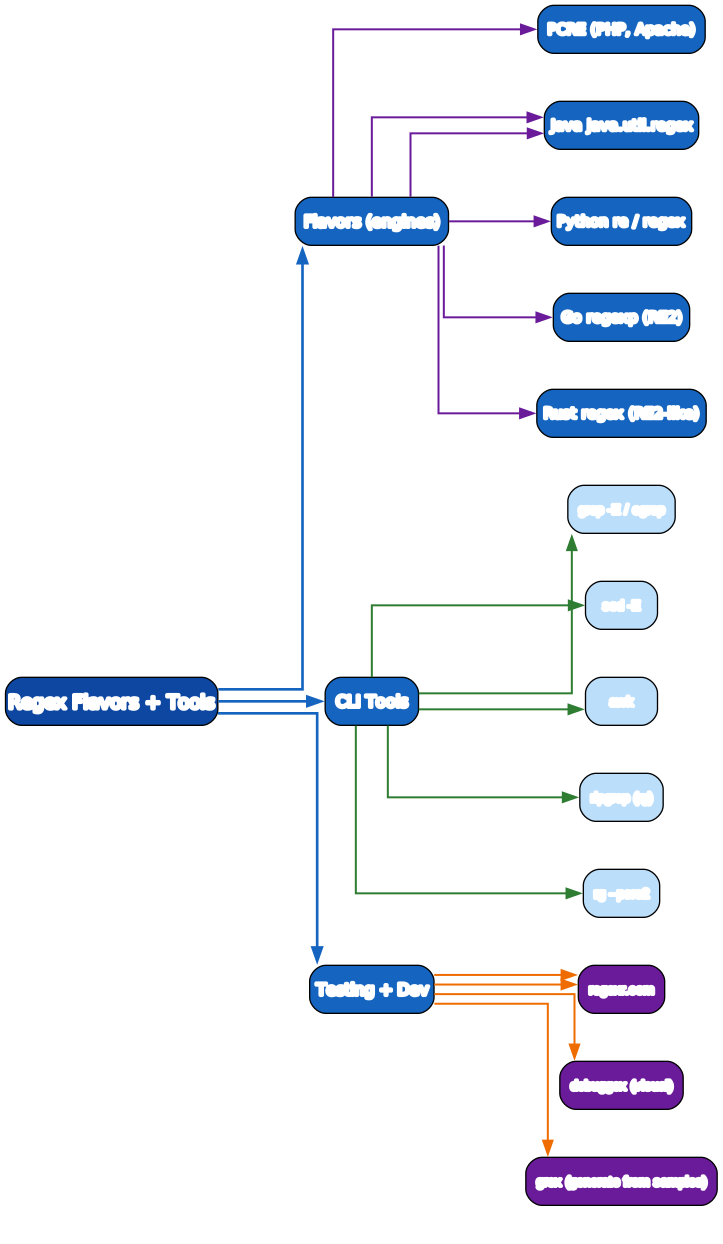
Pitfall: A pattern that works in your test tool (regex101, often PCRE) may not work in your target language. Always test in the actual engine you’ll run. Use the “flavor” selector on regex101 to match.
CLI tools that speak regex
grep -E 'pattern' file         # ERE (extended)
grep -P 'pattern' file         # PCRE (GNU grep)
sed -E 's/pat/repl/g' file     # extended regex substitution
awk '/pattern/' file           # awk uses ERE
rg 'pattern'                    # ripgrep — fast, ERE by default
rg 'pat' --pcre2               # use PCRE2 (lookarounds, backrefs)
Testing + dev tools
- regex101.com — interactive tester; pick your engine flavor, see an explanation of each token, share patterns.
- regexr.com — similar, with a cheat sheet sidebar.
- debuggex.com — renders the regex as a visual railroad diagram.
- grex — generates a regex from a list of sample strings (great for building extraction patterns).
Quick-Start Checklist
- Learn the 6 metacharacters that matter most:
. * + ? [ ] \. The rest build on these. - Master anchors
^ $ \b— they turn “matches anywhere” into “matches exactly here”. - Use character classes
[a-z0-9_]instead of chains of|alternatives. - Beware greedy
.*— prefer[^"]*or lazy.*?for delimited matches. - Name your groups
(?P<year>\d{4})— readable and self-documenting. - Add the
/xflag to document any pattern longer than one line. - Test on regex101 with the right engine flavor before deploying.
- Bound untrusted input — use RE2 (
re2/Go/Rust) or atomic groups to avoid ReDoS. - Escape user input with
re.escape/RegExp.escapewhen building patterns from strings. - Write recipes once (email, phone, URL, date, IP) and reuse them — don’t reinvent.
Common Pitfalls
- Greedy
.*over-matching — use"[^"]*"or".*?"for quoted strings. - Forgetting
\b—\bword\bmatches whole words;wordmatches substrings too. .doesn’t match newline — use the/s(dotall) flag if you need it to.- Leftmost alternation —
a|abmatchesafirst; order by specificity. - Unescaped metacharacters in input — use
re.escape. - Catastrophic backtracking from nested quantifiers like
(a+)+— use RE2 or atomic groups. - Fixed-width lookbehind only in JS/Python
re— use theregexmodule for variable width. - Wrong flavor — testing in PCRE then running in Go (RE2) breaks on backreferences.
Further Reading
- regex101.com — interactive tester with explanations
- Regular-Expressions.info — thorough reference by flavor
- PCRE manual — the C library docs
- Rust regex docs — RE2-style, fast, safe
- RexEgg — advanced tutorials and recipes
Related guides
Regex is the universal text-processing tool — these adjacent PyShine tutorials use it everywhere:
- Learn Bash in One Post: Complete Tutorial —
grep,sed,awk, andripgrepall speak regex; the two are inseparable for log and text wrangling. - Learn Python in One Post: Complete Tutorial — the
remodule,re.escape,re.findall, named groups, and theregexlibrary. - Learn SQL in One Post: Complete Tutorial — Postgres
~regex operator andregexp_match/regexp_replacefor pattern queries. - Learn Go in One Post: Complete Tutorial — Go’s RE2
regexppackage, linear time, no backreferences. - Learn Rust in One Post: Complete Tutorial — the
regexcrate, the fastest safe regex engine.
Regex is a small grammar with a long tail. The five stages here — literals and classes, quantifiers and groups, shorthand and escapes, lookarounds and flags, engines and backtracking — cover ~95% of what you will ever write, and the remaining 5% is well-documented on regex101 and RexEgg. The skill that separates a regex amateur from a professional is not knowing more syntax; it is knowing the pitfalls — greedy matching, leftmost alternation, catastrophic backtracking, and the engine-flavor differences. Write a pattern a day, test it on regex101 with near-miss inputs, and within two weeks you’ll read regex like prose. Enjoyed this post? Never miss out on future posts by following us