Learn Bash in a Single Post: Complete Tutorial From Variables and Pipelines to Robust Scripts
Bash is the duct tape of computing. It glues together every program on a Unix system — git, curl, docker, ssh, find, grep, awk — and lets you chain them into pipelines that solve problems in a line or two that would take dozens of lines in another language. Whether you are writing a CI script, a deployment hook, a data-wrangling one-liner, or a build tool, Bash is the universal interface. This single post teaches the whole language in five stages, with runnable snippets and five diagrams.
Learning Roadmap
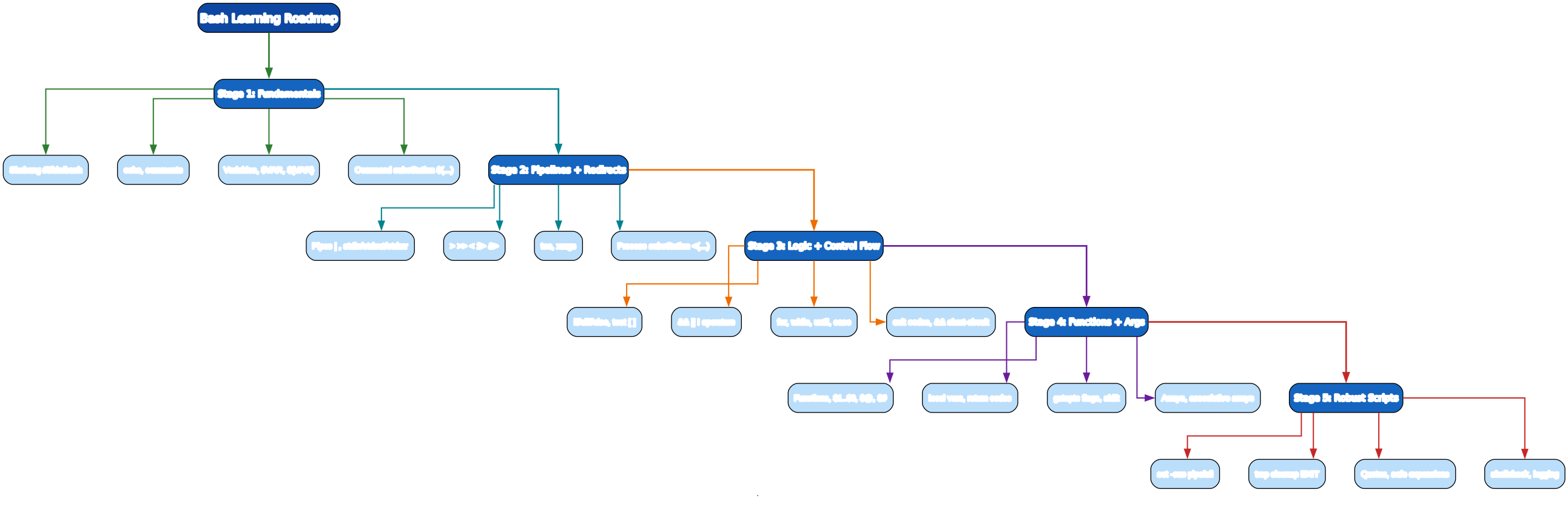
The roadmap moves from the basics (variables, output), through the defining feature (pipelines), to control flow, then reusable functions, and finally the discipline that turns a script that works into one that is robust.
Stage 1 — Fundamentals: Shebang, Variables, Output
The shebang
A script’s first line tells the OS which interpreter to run:
#!/usr/bin/env bash        # portable: finds bash on PATH
#!/bin/bash                # common, but assumes a fixed path
#!/usr/bin/env bash is preferred because it finds bash via PATH (works on macOS, Linux, WSL).
Output and comments
#!/usr/bin/env bash
# This is a comment.
echo "Hello, $USER!"       # $USER is an environment variable
echo -n "no newline "      # -n suppresses trailing newline
printf "%-10s %5d\n" "item" 42    # formatted output
Variables
NAME="Ada"                 # NO spaces around =  (this trips up every beginner)
echo "$NAME"               # quote variable expansions
echo "${NAME}_suffix"      # braces disambiguate

# command substitution: capture a command's stdout
NOW=$(date +%Y-%m-%d)
FILES=$(ls *.py | wc -l)
echo "Today is $NOW; found $FILES Python files"

# arithmetic
COUNT=5
echo $((COUNT + 1))        # 6
echo $((COUNT * 3))        # 15
Pitfall:
NAME = "Ada"(with spaces) does not assign — it tries to run a command calledNAME. Assignment needs no spaces around=.
Pitfall: Always quote expansions:
"$VAR". Unquoted"$VAR"breaks when a value contains spaces —rm $FILEwhereFILE="my file.txt"runsrm my file.txt(two arguments) and deletes the wrong things.
Stage 2 — Pipelines + Redirection (the heart of Bash)
Pipelines chain programs by feeding one command’s stdout into the next command’s stdin. This is the single most powerful idea in Unix.
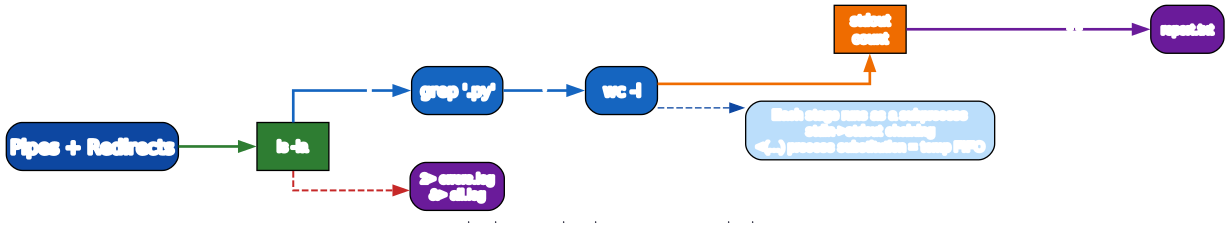
Pipes
# count Python files modified this week
find . -name '*.py' -mtime -7 | wc -l

# find the 5 largest files
du -ah . | sort -rh | head -5

# unique IPs from a log, sorted by frequency
grep -oE '^\d+\.\d+\.\d+\.\d+' access.log | sort | uniq -c | sort -rn | head
Redirection
Every process has three standard streams: stdin (0), stdout (1), stderr (2).
cmd > out.log              # stdout to file (overwrite)
cmd >> out.log             # stdout to file (append)
cmd < input.txt            # stdin from file
cmd 2> errors.log          # stderr to file
cmd > all.log 2>&1         # stdout + stderr to one file (order matters!)
cmd &> all.log             # bash shortcut for > all.log 2>&1
cmd > /dev/null 2>&1       # discard all output
Pitfall:
cmd 2>&1 > all.logis wrong — it redirects stderr to stdout’s current target (the terminal) before stdout is redirected to the file. The correct order is> all.log 2>&1or&> all.log.
tee, xargs, process substitution
# tee: see output AND save it
make build 2>&1 | tee build.log

# xargs: turn stdin lines into command arguments
find . -name '*.bak' -print0 | xargs -0 rm -f      # -0 handles spaces safely

# process substitution: feed a command's output as a file argument
diff <(ls dirA) <(ls dirB)        # compare two directories' listings
comm <(sort a.txt) <(sort b.txt)  # lines unique to each + common
<(cmd) creates a temporary named pipe that behaves like a file containing cmd’s output — invaluable for commands that take file arguments.
Stage 3 — Logic + Control Flow
Conditionals: if and test
if [ -f "/etc/hosts" ]; then
    echo "hosts file exists"
elif [ -d "/etc/hosts" ]; then
    echo "it's a directory?!"
else
    echo "neither"
fi
[ ... ] is the POSIX test command. Bash adds [[ ... ]], which is safer (no word-splitting, supports pattern matching):
# string tests
[[ "$str" == "yes" ]]      # equality
[[ "$str" =~ ^[0-9]+$ ]]   # regex match (only in [[ ]])
[[ -z "$str" ]]            # empty string
[[ -n "$str" ]]            # non-empty

# file tests
[[ -f file ]]    # exists and is a regular file
[[ -d dir ]]     # exists and is a directory
[[ -r file ]]    # readable
[[ -x file ]]    # executable
[[ -e path ]]    # exists (any type)
&&, ||, exit codes
Every command returns an exit code: 0 = success, non-zero = failure. $? holds the last command’s exit code.
mkdir -p build && cd build && cmake ..       # run next only if prev succeeds
cd /nonexistent || echo "cd failed"          # run next only if prev fails
cd /nonexistent || { echo "failed"; exit 1; }  # group: brace block

# short-circuit conditional (no if needed)
[[ -f config.yml ]] && echo "config found" || echo "missing config"
Loops
# for over a list
for f in *.py; do
    echo "processing $f"
    python "$f"
done

# for over a range
for i in {1..5}; do echo "run $i"; done
for i in $(seq 1 5); do echo "$i"; done

# C-style for
for ((i=0; i<3; i++)); do echo "$i"; done

# while: run while condition true
while read -r line; do
    echo "line: $line"
done < input.txt

# until: run until condition true
until ping -c1 example.com >/dev/null 2>&1; do
    sleep 2
done
echo "host is up"

# case: pattern matching
case "$1" in
    start)  systemctl start app ;;
    stop)   systemctl stop app ;;
    restart)systemctl restart app ;;
    *)      echo "usage: $0 {start|stop|restart}"; exit 1 ;;
esac
Pitfall:
for f in $(ls)breaks on filenames with spaces. Usefor f in *.py(glob) orfind ... -print0 | while IFS= read -r -d '' f; do ...; done.
Stage 4 — Functions + Arguments + Arrays
Functions
# two equivalent syntaxes
greet() {
    echo "Hello, $1!"
}

function greet2() {
    echo "Hi, $1!"
}

greet "Ada"                # Hello, Ada!
Arguments
Inside a function or script, positional parameters are available:
echo "$0"     # script/function name
echo "$1"     # first arg
echo "$2"     # second arg
echo "$#"     # number of args
echo "$@"     # all args, each quoted ("$1" "$2" ...)
echo "$*"     # all args as one string ("$1 $2 ...")
Pitfall: Use
"$@"(quoted), not$@(unquoted) — the quoted form preserves arguments containing spaces.
local, return, getopts
log() {
    local level="$1"; shift
    echo "[$level] $*" >> /var/log/app.log
}
log INFO "started server" "on port 8080"

is_root() { [[ $EUID -eq 0 ]]; }      # function as a condition
if is_root; then echo "running as root"; fi

# return sets exit code (0-255), not a value
validate() {
    [[ -n "$1" ]] || return 1
    return 0
}

# getopts: parse flags
while getopts ":u:p:h" opt; do
    case "$opt" in
        u) USER="$OPTARG" ;;
        p) PASS="$OPTARG" ;;
        h) echo "usage: $0 -u user -p pass"; exit 0 ;;
        \?) echo "invalid option: -$OPTARG"; exit 1 ;;
    esac
done
shift $((OPTIND - 1))     # drop parsed flags, leave positional args
Arrays
# indexed array
fruits=(apple banana cherry)
echo "${fruits[1]}"       # banana
fruits+=(date)            # append
echo "${fruits[@]}"       # all elements
echo "${#fruits[@]}"      # element count: 4
for f in "${fruits[@]}"; do echo "$f"; done

# associative array (bash 4+)
declare -A ages
ages[alice]=30
ages[bob]=25
for name in "${!ages[@]}"; do echo "$name is ${ages[$name]}"; done   # ${!arr[@]} = keys
String operations
s="hello world.txt"
echo "${#s}"              # length: 14
echo "${s:0:5}"           # slice: hello
echo "${s/world/WORLD}"   # replace first: hello WORLD.txt
echo "${s//l/L}"          # replace all: heLLo WorLd.txt
echo "${s%.txt}"          # strip suffix: hello world
echo "${s#hello }"        # strip prefix: world.txt
echo "${s:-default}"      # use 'default' if s is unset/empty
echo "${s:+set}"          # 'set' if s is non-empty

Stage 5 — Robust Scripts
The difference between a script that works and one that fails safely in production is a handful of settings.
set -euo pipefail
#!/usr/bin/env bash
set -euo pipefail
-e— exit immediately if any command fails (non-zero exit)-u— treat unset variables as an error (catch typos like$FOOwhen you meant$FOO_BAR)-o pipefail— a pipeline fails if any command in it fails (by default only the last command’s exit code matters, sofalse | truesucceeds)
Pitfall:
set -ehas subtle interactions (it doesn’t trigger insideif,||,&&). For critical sections, check exit codes explicitly.
trap for cleanup
cleanup() {
    rm -f "$TMPFILE"
    echo "cleaned up"
}
trap cleanup EXIT INT TERM        # run cleanup on normal exit, Ctrl-C, kill

TMPFILE=$(mktemp)
echo "working in $TMPFILE"
# ... if the script crashes or is killed, cleanup() still runs
Anatomy of a robust script
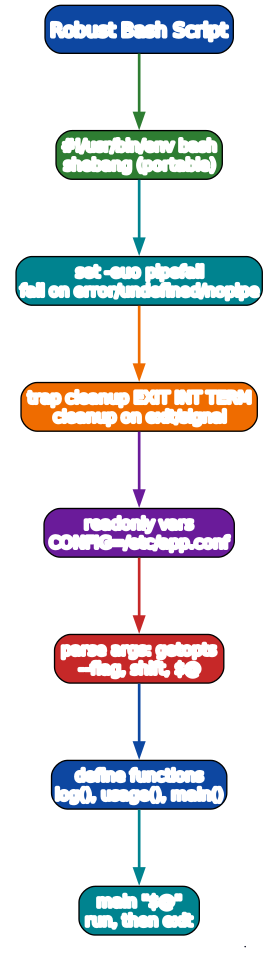
A production-grade script template:
#!/usr/bin/env bash
set -euo pipefail

readonly SCRIPT_DIR="$(cd "$(dirname "${BASH_SOURCE[0]}")" && pwd)"
readonly CONFIG="${SCRIPT_DIR}/config.conf"

usage() {
    cat <<EOF
Usage: $(basename "$0") [--env NAME] [--dry-run] <command>
Commands:
  build    Build the project
  deploy   Deploy to production
EOF
}

log()  { printf '[%s] %s\n' "$(date -Iseconds)" "$*" >&2; }
die()  { log "ERROR: $*"; exit 1; }

cleanup() { log "cleanup"; }
trap cleanup EXIT INT TERM

parse_args() {
    DRY_RUN=0; ENV="dev"
    while [[ $# -gt 0 ]]; do
        case "$1" in
            --env)    ENV="$2"; shift 2 ;;
            --dry-run) DRY_RUN=1; shift ;;
            -h|--help) usage; exit 0 ;;
            *) COMMAND="$1"; shift ;;
        esac
    done
    [[ -n "${COMMAND:-}" ]] || { usage; exit 1; }
}

build()  { log "building ($ENV)"; [[ $DRY_RUN -eq 0 ]] && echo "built"; }
deploy() { log "deploying ($ENV)"; [[ $DRY_RUN -eq 0 ]] && echo "deployed"; }

main() {
    parse_args "$@"
    case "$COMMAND" in
        build)  build ;;
        deploy) deploy ;;
        *) usage; exit 1 ;;
    esac
}

main "$@"
Quoting rules
- Double quotes
"..."— expand variables and command substitution, but protect spaces and glob characters. Use this almost always:"$VAR","$(cmd)". - Single quotes
'...'— literal, no expansion. Use for fixed strings:'pattern','$5.00'. - No quotes — word-splitting and globbing happen. Almost never what you want with variable values.
file="my report.txt"
ls $file         # WRONG: ls my report.txt  (two args)
ls "$file"       # RIGHT: ls "my report.txt"
shellcheck — your linter
# install: apt install shellcheck / brew install shellcheck
shellcheck myscript.sh
shellcheck catches the entire class of quoting, word-splitting, and set -e bugs before they bite. Run it on every script. IDE plugins exist for VS Code and JetBrains.
Debugging
bash -n script.sh        # syntax check only (don't run)
bash -x script.sh        # print each command before running (trace)
bash -v script.sh        # print lines as read
# in-script: toggle tracing
set -x; some_misbehaving_cmd; set +x
The Toolchain: Unix Core Utilities
Bash rarely works alone — it orchestrates the classic Unix toolkit.

| Category | Tools | Example |
|---|---|---|
| File ops | ls, cp, mv, rm, mkdir, ln, chmod, tar | tar czf backup.tar.gz dir/ |
| Find + filter | find, grep, ripgrep | find . -name '*.py' -mtime -7 |
| Text processing | sed, awk, cut, sort, uniq, tr | awk -F, '{print $2}' data.csv \| sort \| uniq -c |
| Network + data | curl, wget, jq, ssh, rsync, xargs | curl -s api.example.com \| jq '.data\[\].id' |
| Safety + debug | shellcheck, bash -x, bash -n | shellcheck deploy.sh |
One-liners you will use constantly
# find and delete all .pyc files safely
find . -name '*.pyc' -print0 | xargs -0 rm -f

# replace text across files
grep -rl 'oldname' . --include='*.py' | xargs sed -i 's/oldname/newname/g'

# top 10 largest directories
du -sh */ | sort -rh | head

# watch a file (live tail with filtering)
tail -f /var/log/app.log | grep ERROR

# HTTP request with JSON, parse a field
curl -s -X POST https://api.example.com/users -d '{"name":"ada"}' -H 'Content-Type: application/json' | jq '.id'

# parallel processing with xargs
ls *.png | xargs -I{} -P8 convert {} {}.jpg     # 8 concurrent conversions
Quick-Start Checklist
- Write a 5-line script —
#!/usr/bin/env bash,set -euo pipefail, anecho, run it withbash script.sh. - Make it executable —
chmod +x script.sh, run as./script.sh. - Learn the pipeline — chain
find | grep | sort | headuntil it’s muscle memory. - Master redirection —
> >> 2> &> <(...)andtee. - Use
[[ ]]for tests — always prefer[[ ]]over[ ]in Bash scripts. - Write functions with
localvariables andreturncodes. - Add
trap cleanup EXITto any script that creates temp files. - Always quote expansions:
"$VAR","$(cmd)","$@". - Run
shellcheckon every script before you commit it. - Debug with
bash -xwhen something behaves unexpectedly.
Common Pitfalls
- Spaces around
=in assignment —NAME = "x"fails; useNAME="x". - Unquoted expansions —
rm $FILEwithFILE="my file.txt"deletes the wrong files. Always"$FILE". for f in $(ls)— breaks on spaces; use globs (for f in *.py) orfind -print0 | while read -r.cdin a script without returning — run riskycdin a subshell(cd dir && make)so the parent shell is unaffected.- Missing
set -euo pipefail— a script that “works” but silently continues after a failure is a production hazard. 2>&1 > fileorder — wrong; use> file 2>&1or&> file.- Using
$*instead of"$@"—$*glues args into one string;"$@"keeps them separate. - No
shellcheck— most Bash bugs are the patterns it catches automatically.
Further Reading
- The Bash Manual (gnu.org) — the authoritative reference
- ShellCheck (shellcheck.net) — paste a script, get instant feedback; install the CLI
- Pure Bash Bible (github.com/dylanaraps) — accomplish tasks without external tools
- BashFAQ (mywiki.wooledge.org) — the canonical “don’t do that, do this”
- Explain Shell (explainshell.com) — paste a command, see what each flag does
Related guides
Bash pairs naturally with the rest of the systems and backend stack:
- Learn Python in One Post: Complete Tutorial — call Python from Bash for anything beyond text wrangling; the two complement each other.
- Learn SQL in One Post: Complete Tutorial — pipe
curlintojq, then load data into SQLite/Postgres with Bash. - Learn Go in One Post: Complete Tutorial — replace slow Bash scripts with Go when performance matters.
- Learn Rust in One Post: Complete Tutorial — for CPU-bound CLI tools where Bash is too slow.
Bash is small but deep. The five stages here — variables, pipelines, control flow, functions, and robustness — cover ~95% of what you will ever write. The remaining 5% is corner cases (arrays of filenames with newlines, signal handling, portability to POSIX sh), and those are exactly what Enjoyed this post? Never miss out on future posts by following us shellcheck and the BashFAQ exist for. Write a script a day for two weeks, run shellcheck on each, and you will never fear the terminal again. 



