AI agents have a fundamental problem: they forget everything between conversations. Every session starts from scratch, forcing users to repeat context, re-explain preferences, and re-state project details. Supermemory solves this by providing a persistent memory and context layer that works across every major AI framework and client.
Supermemory is the number one ranked system on all three major AI memory benchmarks – LongMemEval at 81.6%, LoCoMo, and ConvoMem. It is not just a vector database or a simple key-value store. It is a full context engine that extracts facts from conversations, tracks temporal changes, resolves contradictions, auto-forgets expired information, and delivers the right context at the right time.
Architecture Overview
The Supermemory architecture follows a layered design that separates client interaction, API processing, core memory operations, and persistent storage.
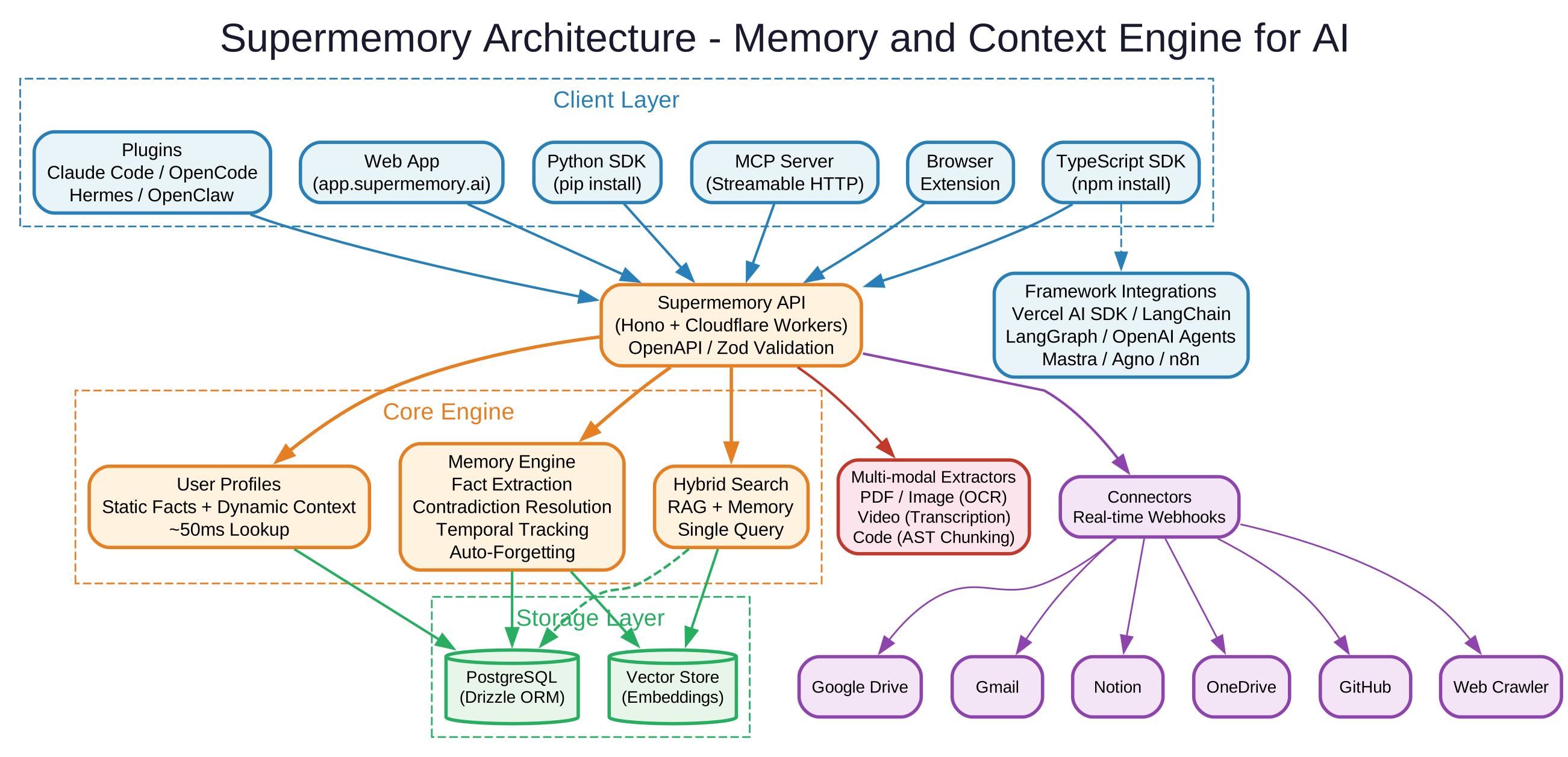
The diagram above illustrates the four primary layers of the Supermemory system. At the top, the Client Layer accepts requests from web applications, browser extensions, MCP clients, and direct API consumers. These requests flow into the API Layer, built on Hono and deployed to Cloudflare Workers for edge-level performance. The Core Engine sits beneath the API and houses three critical subsystems: the Memory Engine for fact extraction and contradiction resolution, User Profiles for maintaining static and dynamic user context, and Hybrid Search for combining RAG document retrieval with personalized memory recall. The Storage Layer uses PostgreSQL via Drizzle ORM for relational data and a Vector Store for embedding-based similarity search. Flanking the core are Connectors for real-time data synchronization from external services and File Processing for multi-modal content extraction.
Key Insight: Supermemory is not just RAG. RAG retrieves document chunks – stateless, same results for everyone. Memory extracts and tracks facts about users over time. It understands that “I just moved to SF” supersedes “I live in NYC.” Supermemory runs both together by default, so you get knowledge base retrieval and personalized context in every query.
Core Features
Supermemory provides five major capability areas that together form a complete context stack for AI applications.
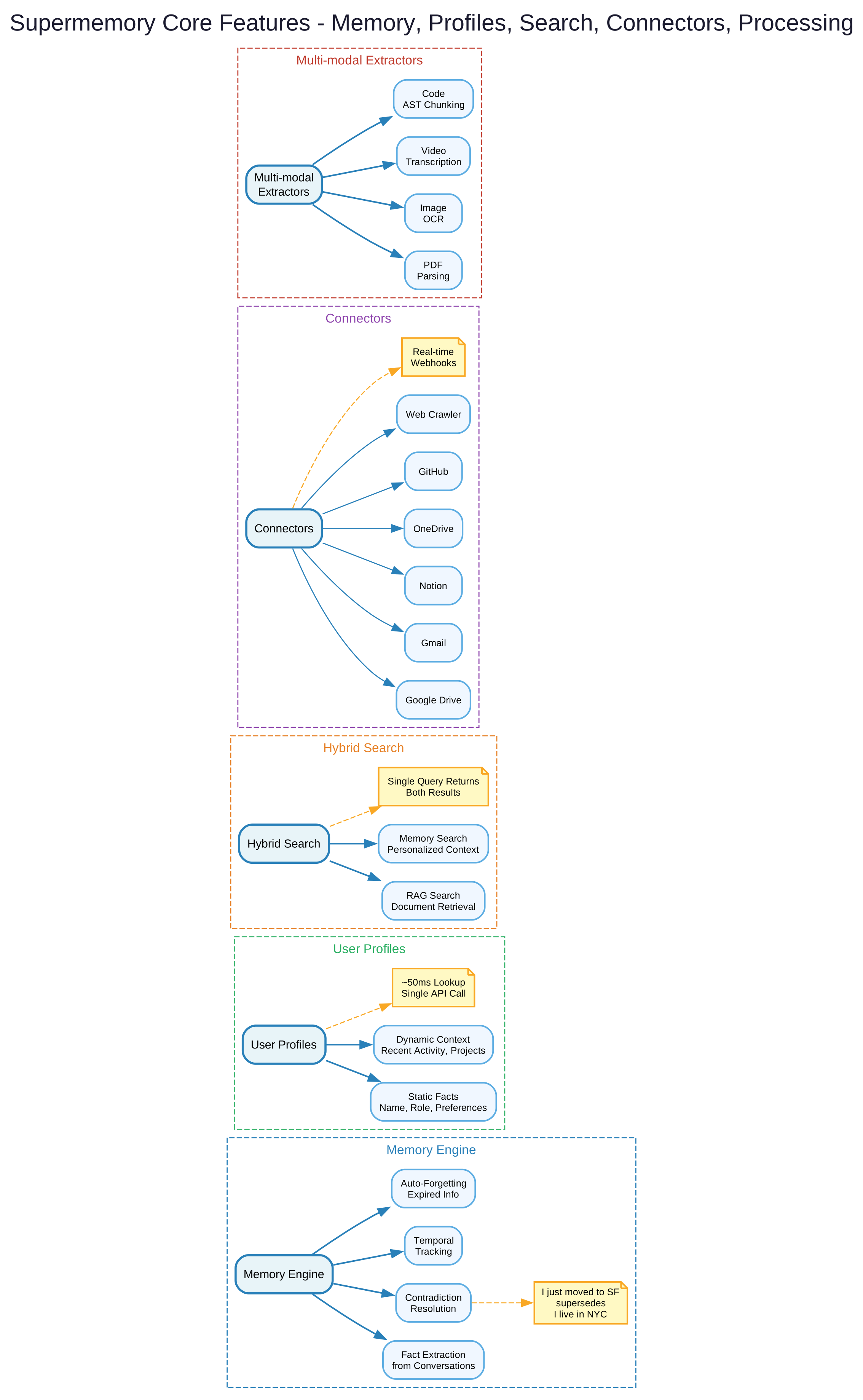
The features diagram shows the five pillars of the Supermemory platform. The Memory Engine cluster handles fact extraction from conversations, temporal tracking of information changes, contradiction resolution when new facts conflict with existing ones, and automatic forgetting of expired information. User Profiles maintain two types of context: static facts like job title and preferences that rarely change, and dynamic context like current tasks and recent activity that updates frequently. Hybrid Search unifies RAG document retrieval with memory recall in a single query, returning both relevant documents and personalized memories ranked by similarity. Connectors provide real-time synchronization from Google Drive, Gmail, Notion, OneDrive, and GitHub through webhook-based auto-sync. Multi-modal Extractors process PDFs, images with OCR, videos through transcription, and code with AST-aware chunking, making any uploaded content immediately searchable.
Memory Engine
The Memory Engine is the heart of Supermemory. When a conversation flows through the system, the engine automatically identifies and extracts factual statements worth remembering. It tracks when facts were established, detects when newer information contradicts older memories, and resolves those conflicts by promoting the more recent fact. Temporary facts – such as “I have an exam tomorrow” – are tagged with expiration signals and automatically pruned once they become irrelevant.
This is fundamentally different from simply storing conversation history. The engine performs semantic extraction, keeping only the signal and discarding the noise. A 30-minute conversation might yield just 5-10 memorable facts, but those facts are precisely the ones that matter for future interactions.
User Profiles
Traditional memory systems rely on search – you need to know what to ask for. Supermemory automatically maintains a profile for every user with two categories:
- Static facts: Long-term attributes like job title, preferred programming language, editor choice, and communication style. These change rarely and provide baseline context.
- Dynamic context: Recent activity like current projects, active debugging sessions, and recent decisions. These update frequently and provide situational awareness.
A single API call retrieves the full profile in approximately 50 milliseconds. Inject this into your system prompt and your agent instantly knows who it is talking to without any search required.
Takeaway: User profiles eliminate the cold-start problem for AI agents. Instead of beginning every conversation from zero context, agents with Supermemory profiles start with a rich understanding of the user’s identity, preferences, and current work.
Hybrid Search
Supermemory’s hybrid search mode combines two retrieval strategies in a single query:
- RAG (Retrieval-Augmented Generation): Searches your knowledge base documents – uploaded PDFs, synced Google Drive files, crawled web pages. Returns document chunks ranked by semantic similarity to the query.
- Memory recall: Searches the user’s personal memory graph. Returns facts, preferences, and contextual information specific to the user who made the query.
This dual retrieval means a query like “how do I deploy?” returns both the deployment documentation from your knowledge base and the user’s specific deployment preferences from their memory. No other system provides this combination out of the box.
Ecosystem and Integrations
Supermemory provides SDKs, framework integrations, an MCP server, and plugins that cover the entire AI development landscape.

The ecosystem diagram shows the Supermemory API at the center, connecting to four categories of integrations. On the left, SDKs provide native libraries for TypeScript via npm and Python via pip, offering identical API surfaces for both languages. At the top, Framework Integrations provide drop-in wrappers for Vercel AI SDK, LangChain, LangGraph, OpenAI Agents SDK, Mastra, Agno, and n8n, allowing developers to add memory to existing agent implementations with minimal code changes. On the right, the MCP Server implements the Model Context Protocol with streamable HTTP transport, supporting Claude Desktop, Cursor, Windsurf, VS Code, and other MCP-compatible clients. At the bottom, Plugins provide deep integrations for Claude Code, OpenCode, Hermes, and OpenClaw, embedding Supermemory directly into the development workflow. The MemoryBench framework provides standardized benchmarking for comparing memory providers.
SDK Quickstart
Installing Supermemory takes one command:
npm install supermemory # or: pip install supermemory
Storing a memory and retrieving a user profile requires just a few lines:
import Supermemory from "supermemory";

const client = new Supermemory();

// Store a memory
await client.add({
  content: "User loves TypeScript and prefers functional patterns",
  containerTag: "user_123",
});

// Get user profile + relevant memories in one call
const { profile, searchResults } = await client.profile({
  containerTag: "user_123",
  q: "What programming style does the user prefer?",
});

// profile.static  -> ["Loves TypeScript", "Prefers functional patterns"]
// profile.dynamic  -> ["Working on API integration"]
// searchResults   -> Relevant memories ranked by similarity
The Python SDK mirrors the same API:
from supermemory import Supermemory

client = Supermemory()

client.add(
    content="User loves TypeScript and prefers functional patterns",
    container_tag="user_123"
)

result = client.profile(container_tag="user_123", q="programming style")

print(result.profile.static)   # Long-term facts
print(result.profile.dynamic)  # Recent context
Framework Integrations
Supermemory provides drop-in wrappers for every major AI framework. Adding memory to a Vercel AI SDK model requires a single import:
import { withSupermemory } from "@supermemory/tools/ai-sdk";
const model = withSupermemory(openai("gpt-4o"), {
  containerTag: "user_123",
  customId: "conv-1"
});
For Mastra agents:
import { withSupermemory } from "@supermemory/tools/mastra";
const agent = new Agent(withSupermemory(config, "user-123", { mode: "full" }));
The full list of supported frameworks includes Vercel AI SDK, LangChain, LangGraph, OpenAI Agents SDK, Mastra, Agno, Claude Memory Tool, and n8n.
MCP Server
The Model Context Protocol server lets any MCP-compatible AI client access Supermemory with a single install command:
npx -y install-mcp@latest https://mcp.supermemory.ai/mcp --client claude --oauth=yes
Replace claude with cursor, windsurf, vscode, or any other supported client. The MCP server exposes three tools:
| Tool | Purpose |
|---|---|
memory | Save or forget information. The AI calls this automatically when you share something worth remembering. |
recall | Search memories by query. Returns relevant memories plus the user profile summary. |
context | Injects the full user profile into the conversation. In Cursor and Claude Code, type /context. |
For manual configuration, add the server URL to your MCP client config:
{
  "mcpServers": {
    "supermemory": {
      "url": "https://mcp.supermemory.ai/mcp"
    }
  }
}
Amazing: With a single MCP install command, any compatible AI client gains persistent memory across all conversations. Your AI remembers your preferences, projects, and past discussions – and gets smarter over time without any code changes.
Connectors
Supermemory provides real-time data synchronization from six external services:
- Google Drive: Auto-syncs documents and files from your Drive folders
- Gmail: Processes email content and makes it searchable
- Notion: Syncs pages, databases, and wiki content
- OneDrive: Synchronizes files from Microsoft’s cloud storage
- GitHub: Indexes repositories, issues, and pull requests
- Web Crawler: Crawls and indexes any website with real-time webhook updates
All connectors use real-time webhooks, so documents are automatically processed, chunked, and made searchable as soon as they change.
Multi-Modal Extractors
Upload any file type and Supermemory handles the extraction:
- PDFs: Full text extraction with layout preservation
- Images: OCR processing for text within images
- Videos: Automatic transcription of audio content
- Code: AST-aware chunking that respects code structure rather than naively splitting on character counts
Benchmarks
Supermemory holds the top position across all three major AI memory benchmarks:
| Benchmark | What It Measures | Result |
|---|---|---|
| LongMemEval | Long-term memory across sessions with knowledge updates | 81.6% – Number 1 |
| LoCoMo | Fact recall across extended conversations (single-hop, multi-hop, temporal, adversarial) | Number 1 |
| ConvoMem | Personalization and preference learning | Number 1 |
The team also built MemoryBench, an open-source framework for standardized, reproducible benchmarks of memory providers. You can compare Supermemory, Mem0, Zep, and others head-to-head:
bun run src/index.ts run -p supermemory -b longmemeval -j gpt-4o -r my-run
Important: MemoryBench enables apples-to-apples comparison between memory providers using standardized benchmarks. This transparency is critical for evaluating which memory solution actually delivers the best results for your specific use case, rather than relying on marketing claims.
Monorepo Structure
Supermemory is organized as a Turborepo monorepo with Bun as the package manager. The workspace structure includes:
- apps/web: The consumer-facing web application at app.supermemory.ai
- apps/mcp: The MCP server implementation with streamable HTTP transport
- apps/browser-extension: Browser extension for in-browser memory capture
- packages/supermemory: The core SDK package published to npm and PyPI
- packages/shared: Shared internal utilities and types
- Backend API: Built on Hono with Cloudflare Workers deployment, using Drizzle ORM with PostgreSQL for storage and a Vector Store for embeddings
The technology stack includes TypeScript 5.8.3, Hono for the API layer, Drizzle ORM for database operations, Better Auth for authentication, and Biome for linting and formatting. The system requires Node.js 20 or later and Bun 1.3.6.
Getting Started
For end users who just want their AI to remember them, visit app.supermemory.ai and create a free account. Install the MCP server for your preferred AI client and your conversations will automatically build a persistent memory graph.
For developers building AI products, install the SDK and start with the quickstart examples above. The entire context stack – memory, RAG, user profiles, connectors, and file processing – is available through a single API. No vector database configuration, no embedding pipelines, no chunking strategies to manage.
The repository is available at github.com/supermemoryai/supermemory with full documentation at supermemory.ai/docs. Enjoyed this post? Never miss out on future posts by following us 


