Cognee: The Open-Source AI Memory Platform That Gives Agents Persistent Long-Term Memory
Introduction
AI agents today share a fundamental limitation: they are stateless. Every new session starts from scratch, with no recollection of past interactions, learned preferences, or accumulated knowledge. Cognee solves this problem by providing an open-source AI memory platform that gives agents persistent long-term memory across sessions.
With over 21,000 GitHub stars and 5 million SDK runs per month, Cognee has rapidly become the go-to solution for developers who need their AI agents to remember, learn, and improve over time. Part of the UC Berkeley Xcelerator and trusted by engineers from Apple, AWS, Cloudflare, Microsoft, and Google, Cognee lets you ingest data in any format, build a self-hosted knowledge graph, and let every agent recall, connect, and act with full context.
In this post, we will explore how Cognee’s unique three-store architecture works, how its four core operations mirror human memory, and how you can integrate it into your own AI agent workflows.
The Problem: Why AI Agents Need Memory
Current AI agents are fundamentally stateless. They forget everything between sessions. Without persistent memory, agents cannot learn from past interactions, cannot build on accumulated knowledge, and cannot provide personalized experiences.
Context windows are limited and expensive. Stuffing everything into a prompt is not a scalable solution. Existing memory solutions tend to be one-dimensional: vector databases like Mem0 handle similarity search but miss relationships, while graph-only solutions like Graphiti capture connections but lack semantic retrieval.
Cognee takes a different approach by combining relational, vector, and graph storage into a unified three-store architecture that provides complete memory coverage.
Architecture Overview
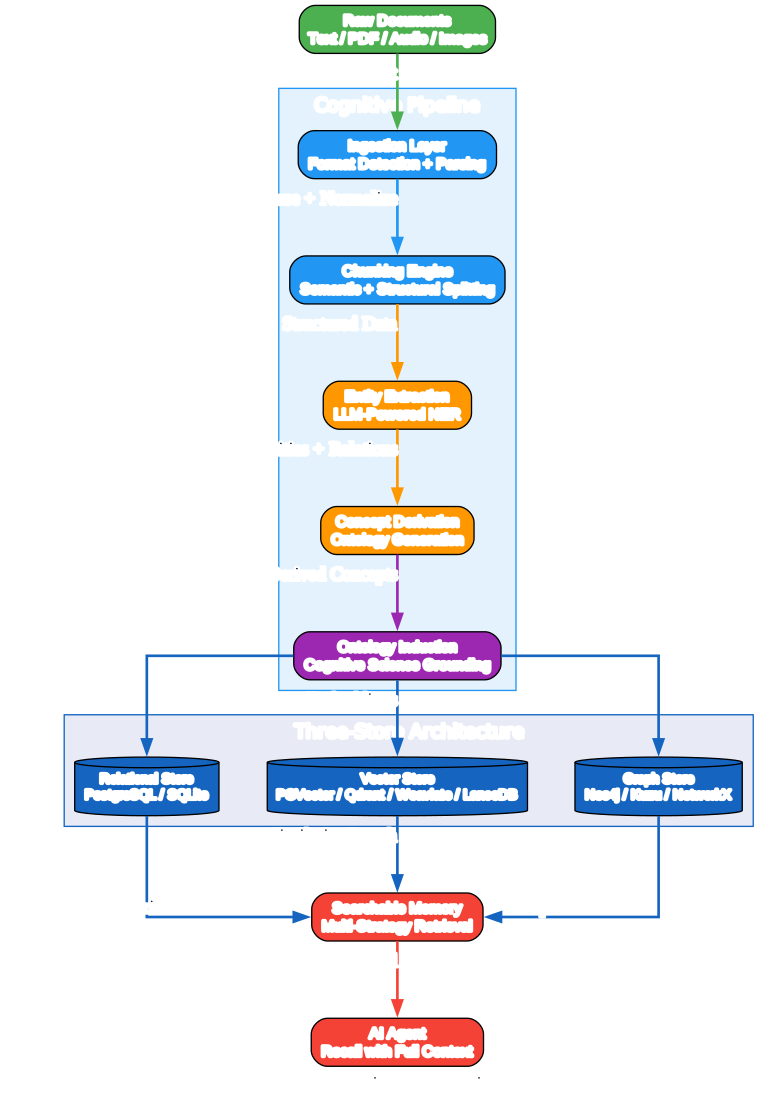
Understanding the Three-Store Architecture
Cognee uses a unique three-store architecture that separates concerns across specialized storage layers. Each store handles a different aspect of memory, and together they provide comprehensive retrieval capabilities that no single store could achieve alone.
Relational Store (PostgreSQL / SQLite)
The relational store tracks documents, chunks, and provenance metadata. It provides structured queries for exact lookups and serves as the backbone for tracking what data exists and where it came from. SQLite ships as the lightweight default for local development, while PostgreSQL is recommended for production deployments that need concurrent access and robust transaction support.
Vector Store (PGVector / Qdrant / Weaviate / LanceDB)
The vector store holds embeddings for semantic similarity search. When you need to “find similar” content across ingested documents, the vector store enables fast nearest-neighbor queries. LanceDB ships as the lightweight default that requires no external services, while Qdrant and Weaviate are available for production-scale deployments that need distributed vector search.
Graph Store (Neo4j / Kuzu / NetworkX)
The graph store captures entities and their relationships in a knowledge graph. This enables graph traversal queries like “find all entities connected to X” and relationship-aware retrieval that goes beyond simple similarity. Kuzu ships as the lightweight default for local development, while Neo4j is recommended for enterprise graph workloads that need advanced graph algorithms.
The Cognitive Pipeline
Data flows through a multi-stage pipeline that transforms raw documents into structured, searchable memory:
- Ingestion: Raw documents are ingested in any supported format (text, PDF, audio, images)
- Chunking: The chunking engine splits content into semantic units while preserving structure
- Entity Extraction: LLM-powered named entity recognition identifies key entities and relationships
- Concept Derivation: Derived concepts enrich the entity graph with higher-level abstractions
- Ontology Induction: Cognitive-science-grounded rules build the knowledge graph structure
- Distribution: Results are distributed across all three stores for comprehensive retrieval
This pipeline ensures that every piece of information is stored in the optimal format for each type of query, enabling retrieval that combines exact matches, semantic similarity, and relationship traversal.
Core Memory Operations
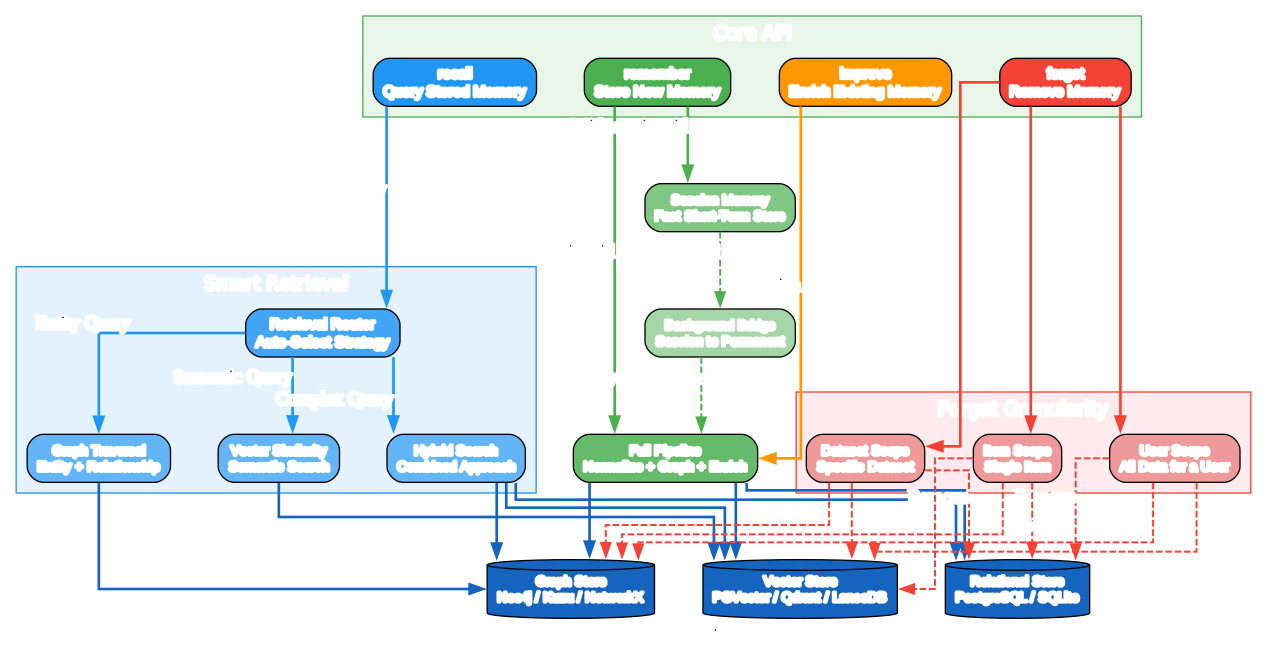
Understanding the Four Core Operations
Cognee provides four intuitive operations that mirror how human memory works. Each operation interacts with all three storage layers to provide consistent, reliable memory management.
1. remember - Store New Memory
The remember operation supports two modes that balance speed and permanence:
-
Permanent memory (no session_id): Runs the full ingestion pipeline – normalize, build graph, enrich. Data persists across all sessions and becomes part of the agent’s long-term knowledge. This is the default mode for important information that should never be forgotten.
-
Session memory (with session_id): Fast short-term storage for the current conversation. A background bridge can optionally promote session data to the permanent graph asynchronously. This mode is ideal for ephemeral context that may or may not be worth keeping permanently.
import cognee
import asyncio

async def main():
    # Permanent memory - full pipeline
    await cognee.remember("Cognee turns documents into AI memory.")

    # Session memory - fast short-term
    await cognee.remember(
        "User prefers dark mode",
        session_id="user-123-session-1"
    )

if __name__ == '__main__':
    asyncio.run(main())
2. recall - Query Stored Memory
The recall operation auto-routes to the best retrieval strategy based on the query type. This intelligent routing ensures that every query gets the most relevant results without requiring the developer to specify which store to search:
- Graph traversal for entity and relationship queries (e.g., “Who is the CEO of Acme Corp?”)
- Vector similarity for semantic “find similar” queries (e.g., “Find documents about machine learning”)
- Hybrid search combining both approaches for complex queries that need both semantic understanding and relationship context
- Session-aware retrieval that considers conversation context for more relevant results
results = await cognee.recall(query_text="What does Cognee do?")
for result in results:
    print(result.text)
3. improve - Enrich Existing Memory
The improve operation enriches existing memory by bridging session data into the permanent graph, adding new relationships between existing entities, refining the knowledge graph with additional context, and running enrichment pipelines on previously ingested data. This is how agents learn and get smarter over time.
4. forget - Remove Memory
The forget operation supports three granularity levels, giving you precise control over what gets removed:
- Item scope: Remove a single specific memory entry
- Dataset scope: Remove all memories from a specific dataset
- User scope: Remove all memories for a user (important for GDPR compliance)
# Forget everything (clean slate)
await cognee.forget(everything=True)

# Forget specific dataset
await cognee.forget(dataset_name="project-docs")

# Forget at user scope
await cognee.forget(user_id="user-123")
Integration Ecosystem
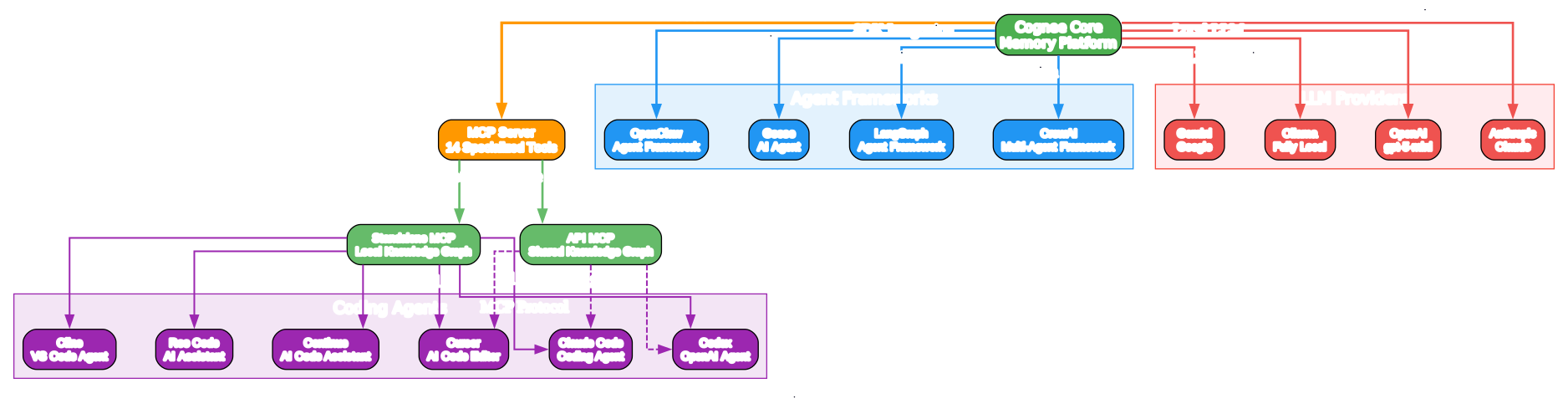
Understanding the Integration Landscape
Cognee integrates with the AI development ecosystem through two primary channels, making it accessible whether you are building coding agents, multi-agent frameworks, or standalone applications.
MCP Server Integration
The Model Context Protocol (MCP) server exposes 14 specialized tools that coding agents can use directly. This is the primary integration path for IDE-based agents:
-
Standalone mode: Runs locally with a private knowledge graph. Each developer has their own memory store. Ideal for personal projects and privacy-sensitive workflows where data should never leave the machine.
-
API mode: Connects to a shared knowledge graph. Teams can build collective memory that all agents access. Ideal for team collaboration and shared knowledge bases where institutional knowledge should be preserved and shared.
Supported coding agents include Claude Code, Codex, Cursor, Cline, Continue, and Roo Code. Any MCP-compatible agent can connect to Cognee’s memory server.
SDK Integration
For agent frameworks, Cognee provides a Python SDK that can be embedded directly into your application:
- LangGraph: Add persistent memory to LangGraph agent workflows, enabling agents to recall past interactions and build knowledge over time
- CrewAI: Give multi-agent crews shared long-term memory, so all agents in a crew can access the same knowledge base
- OpenClaw: Integrate memory into OpenClaw agent pipelines for persistent context across tasks
- Goose: Add recall capabilities to Goose agents for context-aware decision making
LLM Provider Support
Cognee supports multiple LLM backends, giving you flexibility in choosing your AI provider:
- OpenAI (default: gpt-5-mini for LLM, text-embedding-3-large for embeddings)
- Anthropic (Claude models for high-quality reasoning)
- Gemini (Google models for multimodal tasks)
- Ollama (fully local, no API keys needed for complete privacy)
Deployment Options
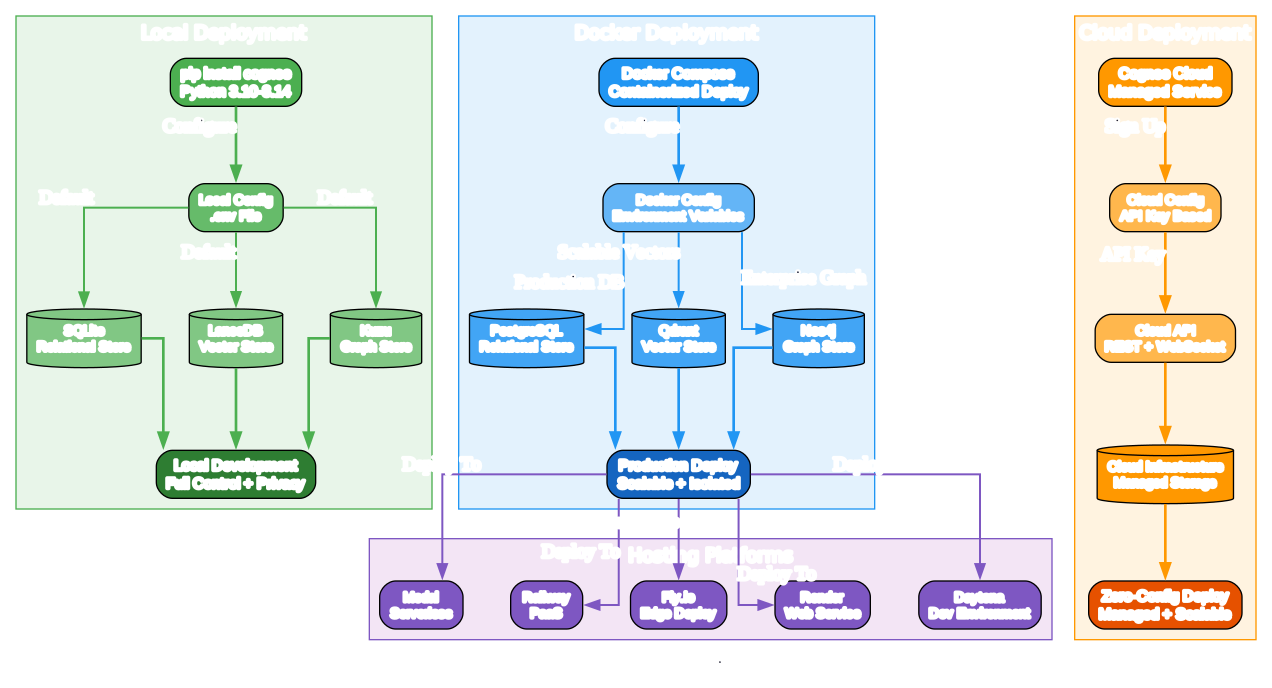
Understanding Deployment Paths
Cognee offers three deployment paths to match different needs, from local development to enterprise production.
Local Development (Simplest)
pip install cognee
Requires Python 3.10-3.14. Ships with lightweight defaults: SQLite for relational storage, LanceDB for vector search, and Kuzu for graph operations. No external services needed. Just set your LLM API key and start building.
import os
os.environ["LLM_API_KEY"] = "YOUR_OPENAI_API_KEY"

import cognee
import asyncio

async def main():
    await cognee.remember("Cognee turns documents into AI memory.")
    results = await cognee.recall("What does Cognee do?")
    for result in results:
        print(result)

asyncio.run(main())
Docker Compose (Production)
For production deployments with scalable storage backends:
cp .env.template .env   # Edit and set LLM_API_KEY

# Start the API server (http://localhost:8000)
docker compose up

# Optional profiles:
docker compose --profile ui up        # + frontend on :3000
docker compose --profile mcp up       # + MCP server on :8001
docker compose --profile postgres up  # + Postgres/PGVector
docker compose --profile neo4j up     # + Neo4j
Cloud (Zero Config)
For a fully managed experience with no infrastructure to maintain:
import cognee

await cognee.serve(url="https://your-instance.cognee.ai", api_key="ck_...")
await cognee.remember("important context")
results = await cognee.recall("what happened?")
await cognee.disconnect()
One-click deployment is also available on Modal, Railway, Fly.io, Render, and Daytona.
Use Cases
Customer Support Agent
Cognee tracks past interactions, failed actions, resolved cases, and product history. When a customer reports an issue, the agent can retrieve similar resolved cases and map to the best resolution strategy, then update memory so the agent never repeats the same mistake.
Expert Knowledge Distillation (SQL Copilot)
Cognee extracts and stores patterns from expert SQL queries and workflows. When a junior analyst asks how to calculate customer retention, Cognee matches the current schema to a known structure and adapts the expert’s logic to fit the dataset. Over time, junior analysts perform at near-expert level because the knowledge graph accumulates best practices.
CLI Usage
Cognee also provides a command-line interface for quick operations:
# Store a memory
cognee-cli remember "Cognee turns documents into AI memory."

# Query stored memory
cognee-cli recall "What does Cognee do?"

# Remove all memories
cognee-cli forget --all

# Launch the local UI (requires Docker)
cognee-cli -ui
Key Features Summary
| Feature | Description |
|---|---|
| Three-Store Architecture | Relational + Vector + Graph for complete memory |
| Four Core Operations | remember, recall, improve, forget |
| Session Memory | Fast short-term storage with async promotion |
| Smart Retrieval | Auto-routing to best search strategy |
| MCP Server | 14 specialized tools for coding agents |
| Multi-LLM Support | OpenAI, Anthropic, Gemini, Ollama |
| Self-Hosted | Full control over your data and infrastructure |
| Docker Ready | Production deployment with Docker Compose |
| Cloud Option | Managed service for zero-config deployment |
| Python 3.10-3.14 | Wide Python version support |
Troubleshooting
Issue: “No module named ‘cognee’“
Make sure you have installed cognee correctly:
pip install cognee
Or with uv:
uv pip install cognee
Issue: “LLM_API_KEY not set”
Set your OpenAI API key as an environment variable:
export LLM_API_KEY="your-openai-api-key"
Or create a .env file using the template from the repository.
Issue: “Docker not found” when running cognee-cli -ui
The MCP server requires Docker Desktop, Colima, or any OCI-compatible runtime. Install Docker and ensure the docker command is available in your terminal.
Conclusion
Cognee represents a significant step forward in AI agent memory. By combining relational, vector, and graph storage into a unified platform with intuitive operations (remember, recall, improve, forget), it gives agents the persistent, learning memory they need to be truly useful over time.
The three-store architecture ensures that no query type is left behind – exact lookups, semantic similarity, and relationship traversal all work together seamlessly. The MCP server integration means you can add memory to your existing coding agents without changing your workflow. And the flexible deployment options (local, Docker, cloud) mean you can start small and scale as needed.
Whether you are building customer support agents, knowledge management systems, or multi-agent frameworks, Cognee provides the memory infrastructure that makes AI agents genuinely intelligent over time.
Links
- GitHub Repository: https://github.com/topoteretes/cognee
- Documentation: https://docs.cognee.ai/
- Website: https://cognee.ai
- PyPI Package: https://pypi.org/project/cognee/
- Discord Community: https://discord.gg/NQPKmU5CCg
- Research Paper: Optimizing the Interface Between Knowledge Graphs and LLMs for Complex Reasoning
Related Posts
- AgentMemory: Persistent Memory for AI Coding Agents
- Claude-Mem: AI Memory System
- TencentDB Agent Memory: Local Long-Term Memory for AI Agents

Enjoyed this post? Never miss out on future posts by following us


