Learn Ansible in a Single Post: Complete Tutorial From Inventory and Playbooks to Roles, Vault, and Production
Ansible is an agentless configuration-management tool — you write YAML “playbooks” that describe the desired state of your servers, and Ansible uses SSH to make them match. No agent installed on the managed hosts; no master server; idempotent (running the same playbook twice produces the same result). It’s the tool for provisioning servers, deploying apps, and managing configuration at scale, alongside Terraform (which provisions the infrastructure itself). This single post covers the whole tool in five stages, with hand-drawn diagrams and runnable YAML.
Learning Roadmap
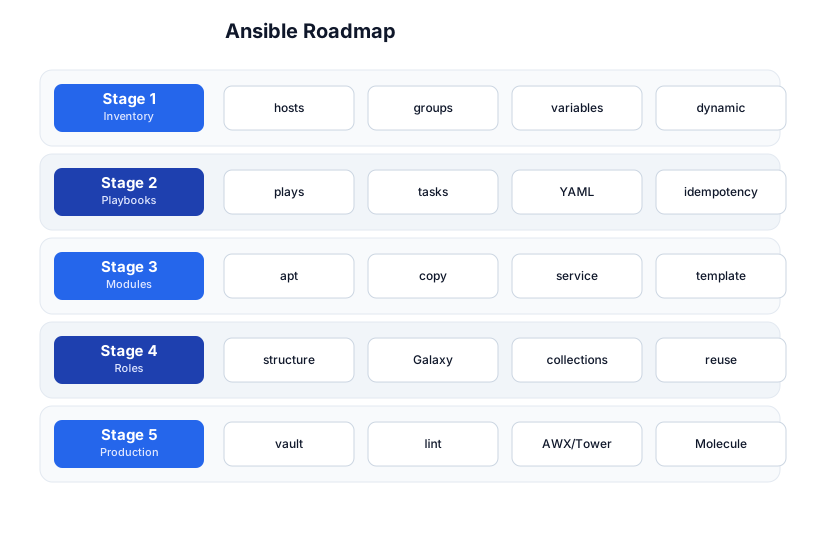
The roadmap moves from inventory (Stage 1), through playbooks (Stage 2), modules (Stage 3), roles (Stage 4), and production (Stage 5). The Linux CLI tutorial is a prerequisite — Ansible runs Linux commands.
Stage 1 — Inventory
The control node and the managed hosts
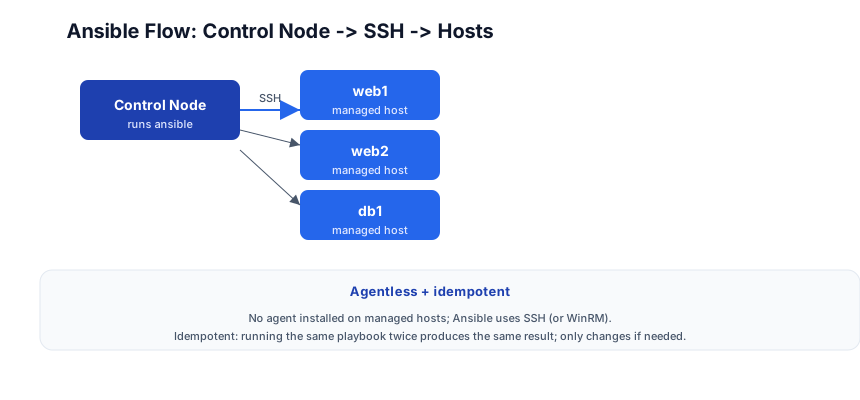
Ansible runs on a control node (your laptop or a CI server). It connects to managed hosts over SSH (or WinRM for Windows). No agent is installed on the managed hosts — Ansible pushes Python modules over SSH, runs them, and removes them. This is the key difference from Chef/Puppet/Salt (which install an agent).
The inventory file
The inventory lists the hosts Ansible manages, organized into groups:
# inventory.ini
[webservers]
web1.example.com
web2.example.com ansible_user=ubuntu

[databases]
db1.example.com ansible_port=2222

[production:children]
webservers
databases

[all:vars]
ansible_user=admin
ansible_ssh_private_key_file=~/.ssh/id_rsa
- Groups (
[webservers],[databases]) — organize hosts by role. - Group of groups (
[production:children]) — nest groups. - Group variables (
[all:vars]) — variables applied to all hosts in the group. - Host-specific variables (
ansible_user=ubuntuon a host line) — override per host.
Dynamic inventory
For cloud environments, hosts come and go. Dynamic inventory queries the cloud API (AWS, GCP, Azure) at runtime to get the current host list:
# AWS dynamic inventory plugin
ansible-inventory --list -i aws_ec2.yaml
# aws_ec2.yaml
plugin: aws_ec2
regions:
  - us-east-1
keyed_groups:
  - key: tags.Environment   # group hosts by their Environment tag
Stage 2 — Playbooks
A playbook = plays → tasks → modules
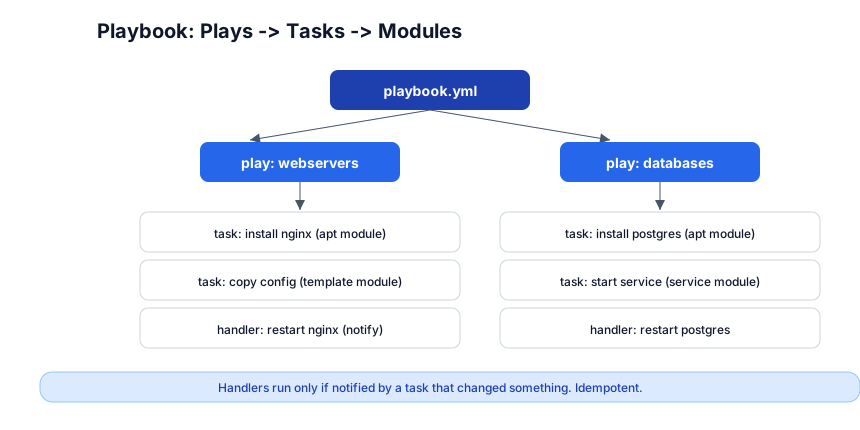
A playbook is a list of plays. A play targets a set of hosts and runs a list of tasks. Each task calls a module (a unit of work: install a package, copy a file, start a service).
# playbook.yml
- name: Configure webservers
  hosts: webservers
  become: yes              # run as root (sudo)
  tasks:
    - name: Install nginx
      apt:
        name: nginx
        state: present
        update_cache: yes

    - name: Copy nginx config
      template:
        src: nginx.conf.j2
        dest: /etc/nginx/nginx.conf
      notify: restart nginx

    - name: Ensure nginx is running
      service:
        name: nginx
        state: started
        enabled: yes

  handlers:
    - name: restart nginx
      service:
        name: nginx
        state: restarted
ansible-playbook -i inventory.ini playbook.yml
Idempotency — the core idea
Running this playbook once installs nginx, copies the config, and starts the service. Running it again does nothing — apt: state: present sees nginx is already installed and skips; service: state: started sees it’s running and skips. Only the template task runs every time (it checks if the file content differs), and only if the config changed does it notify the handler to restart nginx.
This is idempotency: the playbook describes the desired state, and Ansible only makes changes needed to reach it. You can run it 100 times and the system ends up in the same state as running it once.
Handlers — run only on change
A handler is a task that runs only when notified by another task that changed something. notify: restart nginx queues the handler; it runs at the end of the play, and only if at least one task notified it. This avoids restarting nginx when nothing changed (idempotency), and batches multiple notifications into one restart.
Pitfall: A task without
state:or with the wrong state isn’t idempotent.apt: name=nginx(nostate) defaults topresent(idempotent), butshell: echo hello > /tmp/fileruns every time (the shell module doesn’t check state). Use modules (copy,template,file) overshell/commandwhenever possible — modules are idempotent; raw shell is not.
Stage 3 — Modules
Common modules
| Module | What it does |
|---|---|
apt / yum / package | install/remove packages |
copy | copy a file to the host |
template | render a Jinja2 template and copy it |
service / systemd | start/stop/enable a service |
file | manage files/dirs/symlinks/permissions |
user / group | manage users and groups |
git | clone/pull a git repo |
lineinfile | edit a single line in a file (idempotent) |
blockinfile | edit a block of lines (idempotent) |
shell / command | run a shell command (NOT idempotent by default) |
debug | print a message (for debugging) |
stat | check if a file exists |
Templates (Jinja2)
{# nginx.conf.j2 #}
server {
    listen 80;
    server_name ;
    root ;
}
# in the playbook
- template:
    src: nginx.conf.j2
    dest: /etc/nginx/nginx.conf
  vars:
    nginx_server_name: example.com
    nginx_root: /var/www/site
The template module renders the Jinja2 template (substituting ``) and copies the result to the host — idempotently (only re-copies if the rendered content differs).
Pitfall:
shellandcommandmodules are not idempotent — they run every time. If you must use them, guard withcreates:/removes:(only run if a file exists/doesn’t) orchanged_when:(explicitly control the “changed” status). Prefer the dedicated modules (file,lineinfile,copy) which handle idempotency for you.
Stage 4 — Roles
The role directory structure
A role is a reusable, self-contained unit of configuration — the Ansible equivalent of a function or a library. Roles have a fixed directory structure:
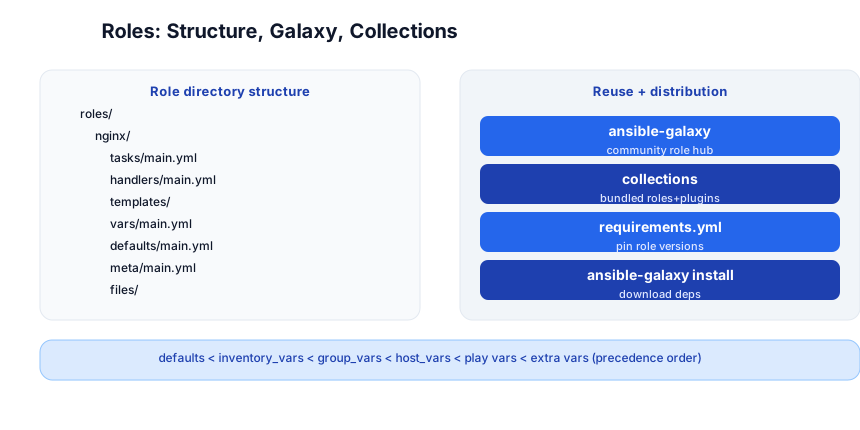
roles/
  nginx/
    tasks/main.yml        # the tasks to run
    handlers/main.yml     # handlers (notified by tasks)
    templates/            # Jinja2 templates
    files/                # static files to copy
    vars/main.yml         # role variables (high precedence)
    defaults/main.yml     # default variable values (lowest precedence)
    meta/main.yml         # role metadata + dependencies
# playbook using a role
- hosts: webservers
  roles:
    - nginx
    - { role: postgres, when: "'databases' in group_names" }
ansible-galaxy + collections
ansible-galaxy is the hub for community roles. Install a role:
ansible-galaxy install geerlingguy.nginx
Collections bundle multiple roles + plugins + modules (the modern distribution unit):
ansible-galaxy collection install community.general
Pin versions in requirements.yml:
# requirements.yml
roles:
  - name: geerlingguy.nginx
    version: 3.1.0
collections:
  - name: community.general
    version: 4.8.0
ansible-galaxy install -r requirements.yml
Variable precedence (highest to lowest)
extra vars (ansible-playbook -e)         ← highest
task vars
block vars
role + include vars
play vars
host vars
group vars
inventory vars
role defaults                            ← lowest
This is the source of most Ansible confusion — a variable set in multiple places resolves by precedence. role defaults are meant to be overridable; extra vars (-e) always win. When a variable “isn’t taking,” trace it through this list.
Pitfall: Setting a variable in
group_vars/all.ymland also inhost_vars/web1.yml— the host var wins (higher precedence). If you expected the group var to apply to web1, you’ve shadowed it. Know the precedence order; userole defaultsfor overridable defaults.
Stage 5 — Production
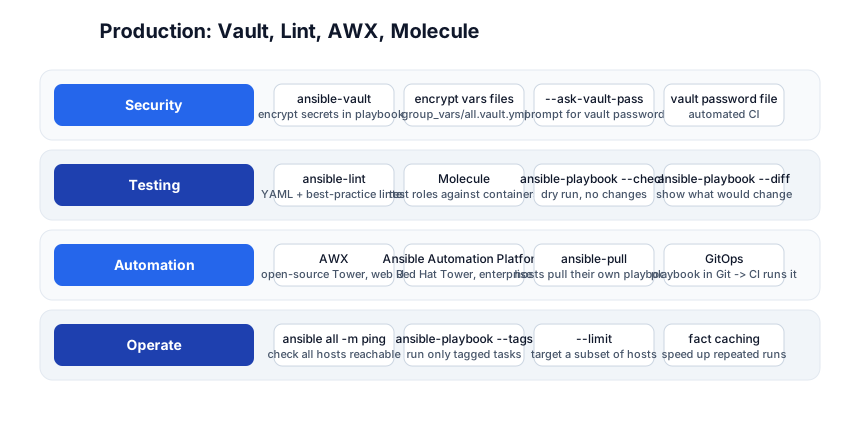
ansible-vault — encrypt secrets
# create an encrypted vars file
ansible-vault create group_vars/all/vault.yml
# edit it
ansible-vault edit group_vars/all/vault.yml
# run a playbook that uses the encrypted vars
ansible-playbook playbook.yml --ask-vault-pass
ansible-vault encrypts files with AES-256 — store secrets (DB passwords, API keys) in encrypted vault.yml files, commit them to Git (safe because encrypted), and decrypt at runtime with a password. Use a vault password file (or a password manager lookup) for CI.
ansible-lint + Molecule
ansible-lint playbook.yml        # lint YAML + best practices
molecule test                    # test a role against a container (Testinfra)
- ansible-lint — catches common mistakes (unquoted YAML, missing
name:on tasks, non-idempotent patterns). - Molecule — spins up a container (Docker), runs the role, runs tests (Testinfra), destroys the container. The unit-test framework for Ansible roles.
Dry-run + diff
ansible-playbook playbook.yml --check    # dry run: report what WOULD change, don't change
ansible-playbook playbook.yml --diff     # show the diff of every file change
ansible-playbook playbook.yml --check --diff   # both: see exactly what would change, safely
Always --check --diff before running against production — see what would change before you change it.
AWX / Ansible Automation Platform
AWX is the open-source web UI for Ansible (the upstream of Red Hat’s paid Ansible Automation Platform / “Tower”). It schedules playbook runs, manages inventories, provides RBAC, and surfaces run logs in a dashboard. For team use, AWX replaces “everyone runs ansible from their laptop.”
ansible-pull — hosts pull their own config
Normally Ansible pushes from the control node. ansible-pull reverses it — each host pulls its playbook from a Git repo and runs it locally (via cron). This is the “agentless agent” pattern for fleets where push is impractical (laptops, ephemeral autoscaled instances behind a NAT).
Fact caching
Ansible facts (host details: OS, IP, disk) are gathered on every run, which is slow. Fact caching (in Redis, a file, or a DB) stores facts between runs, skipping re-gathering:
# ansible.cfg
[defaults]
fact_caching = redis
fact_caching_connection = localhost:6379
Ansible vs Terraform
| Ansible | Terraform | |
|---|---|---|
| What it provisions | config inside a server (packages, files, services) | the server itself (VMs, networks, load balancers) |
| State | stateless (checks current state each run) | stateful (state file tracks resources) |
| Idempotent | ✅ | ✅ |
| Style | imperative (you say how) | declarative (you say what) |
Common pattern: Terraform creates the VMs + networking; Ansible configures the software on them. Terraform for infra, Ansible for config.
Quick-Start Checklist
- Install Ansible —
pip install ansible(orapt install ansible). - Add hosts to
inventory.ini—web1 ansible_host=1.2.3.4 ansible_user=ubuntu. - Test connectivity —
ansible all -i inventory.ini -m ping. - Write a playbook — one play, one task (
apt: name=nginx state=present). - Run it —
ansible-playbook -i inventory.ini playbook.yml. - Run it again — see “changed=0” (idempotency in action).
- Add a
templatetask + ahandler— copy + restart on change. - Create a role —
ansible-galaxy init nginx(the directory structure). - Encrypt secrets —
ansible-vault create group_vars/all/vault.yml. - Lint + dry-run —
ansible-lint playbook.yml+--check --diffbefore prod.
Common Pitfalls
- Non-idempotent
shell/commandtasks — they run every time. Use modules or guard withcreates:/changed_when:. - Missing
become: yes— tasks that need root fail with permission errors; addbecomeat the play level. - No
--check --diffbefore prod — you didn’t see what would change. Always dry-run. - Variable precedence confusion — a var set in multiple places resolves by precedence; trace it.
- Not pinning role versions —
ansible-galaxy installwithout a version gets the latest (could break). Pin inrequirements.yml. - Secrets in plaintext — commit
group_vars/all/vault.ymlunencrypted to Git. Useansible-vault. - Forgetting
notifyonly triggers on change — a handler without a notifying task never runs. - Re-gathering facts every run — slow; enable fact caching.
Further Reading
- Ansible Docs — the official reference
- Ansible Galaxy — community roles + collections
- Ansible for DevOps by Jeff Geerling — the canonical book
- Molecule Docs — role testing
- ansible-lint — the linter
Related guides
Ansible is the config-management layer of the DevOps stack — these PyShine tutorials connect to it:
- Learn Terraform in One Post — the comparison; Terraform provisions infra, Ansible configures inside it.
- Learn Docker in One Post — Docker replaces a lot of config-management (the image IS the config); Ansible still provisions the host.
- Learn Kubernetes in One Post — K8s replaces config-management for containerized apps; Ansible for the K8s nodes.
- Learn Linux CLI in One Post — Ansible runs Linux commands; know the CLI first.
- Learn Git in One Post — playbooks + roles live in Git;
requirements.ymlpins versions.
Ansible’s value is agentless, idempotent, YAML-driven configuration management — describe the desired state, let Ansible converge to it, run it 100 times safely. The five stages here — inventory, playbooks, modules, roles, production — cover everything from a one-host Enjoyed this post? Never miss out on future posts by following us ping to a vault-encrypted, Molecule-tested, AWX-scheduled, GitOps-driven production fleet with fact caching and dynamic cloud inventory. The two habits that pay off: prefer modules over shell/command (modules are idempotent; raw shell is not), and always --check --diff before prod (see what would change before you change it). Install Ansible, write a 10-line playbook that installs nginx, run it twice, and watch the second run report changed=0 — once you’ve seen idempotency, the model clicks. 



