Learn WebSocket in a Single Post: Complete Tutorial From Handshake and Frames to Rooms, Scaling, and Production
WebSocket is the protocol that turns HTTP’s request/response model into a persistent, full-duplex channel — the server can push data to the client at any time, and the client can send to the server, all over one TCP connection. It’s what powers chat apps, live dashboards, multiplayer games, collaborative editors, and real-time notifications. This single post covers the whole protocol in five stages, with hand-drawn diagrams and runnable code.
Learning Roadmap
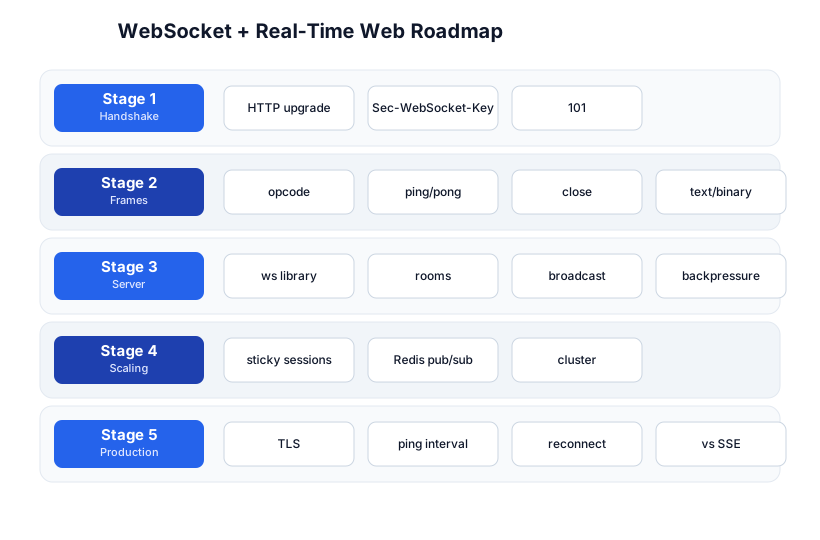
The roadmap moves from the handshake (Stage 1), through the frame format (Stage 2), server architecture (Stage 3), scaling (Stage 4), and production concerns (Stage 5). The REST API tutorial and Nginx tutorial are companions — WebSocket is the real-time layer on top of the same HTTP infrastructure.
Stage 1 — The Handshake: HTTP Upgrade → WebSocket
How it starts as HTTP
A WebSocket connection begins as an HTTP request. The client sends a normal HTTP GET with special upgrade headers; if the server agrees, it responds with 101 Switching Protocols and the connection becomes a WebSocket.
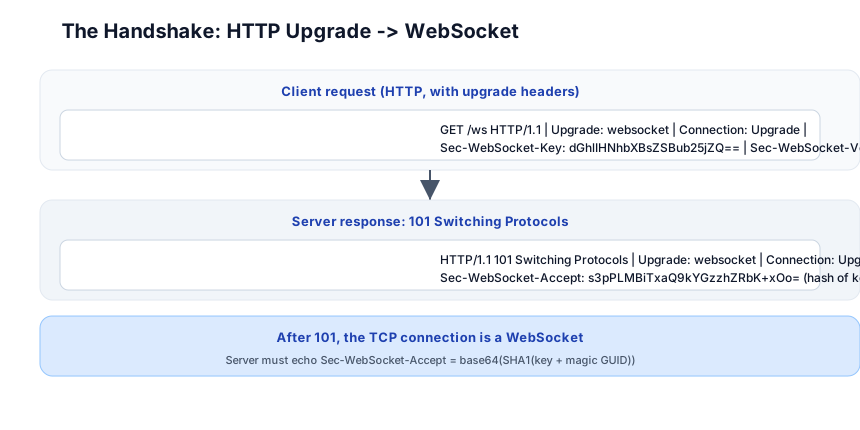
Client → Server (HTTP request):
  GET /ws HTTP/1.1
  Upgrade: websocket
  Connection: Upgrade
  Sec-WebSocket-Key: dGhlIHNhbXBsZSBub25jZQ==
  Sec-WebSocket-Version: 13

Server → Client (HTTP response):
  HTTP/1.1 101 Switching Protocols
  Upgrade: websocket
  Connection: Upgrade
  Sec-WebSocket-Accept: s3pPLMBiTxaQ9kYGzzhZRbK+xOo=
After the 101, the TCP connection is no longer HTTP — it’s a WebSocket. Both sides can send frames at any time.
The Sec-WebSocket-Accept calculation
The server must echo back a Sec-WebSocket-Accept header = base64(SHA1(client_key + "258EAFA5-E914-47DA-95CA-C5AB0DC85B11")). The magic GUID is a constant defined in the RFC — it exists to confirm the server actually speaks WebSocket (not just echoing the key). This prevents a non-WebSocket HTTP server from accidentally “upgrading”.
// Node.js ws library handles this automatically
const { WebSocketServer } = require("ws");
const wss = new WebSocketServer({ port: 8080 });
wss.on("connection", (ws) => {
  ws.on("message", (data) => console.log("received:", data.toString()));
  ws.send("welcome");
});
Pitfall: Nginx (and other reverse proxies) must be configured for WebSocket — without
proxy_set_header Upgrade $http_upgrade;+proxy_set_header Connection "upgrade";, the upgrade handshake is stripped and the connection fails. See the Nginx tutorial for the full config.
Stage 2 — Frames: Opcodes, Ping/Pong, Close
The frame format
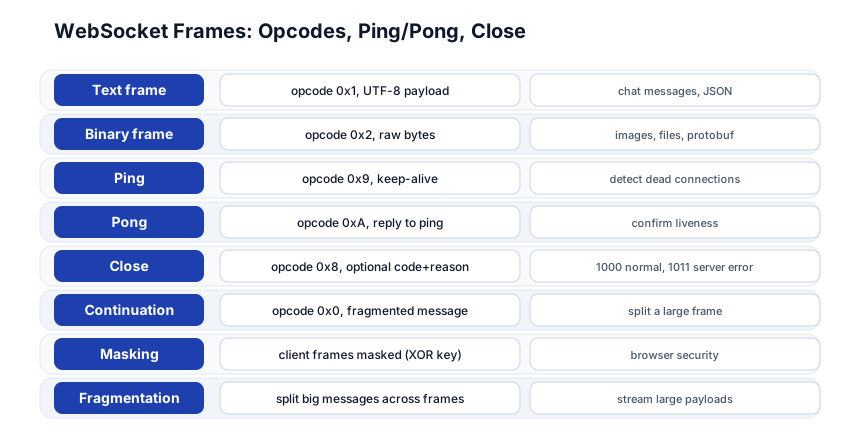
After the handshake, all communication is in frames — binary packets with a small header:
| Field | What it means |
|---|---|
| opcode (4 bits) | frame type (text, binary, ping, pong, close, continuation) |
| FIN (1 bit) | is this the last fragment? |
| mask (1 bit) | is the payload XOR-masked? (client→server must be masked; server→client must not) |
| payload length | 7/16/64 bits (variable-length encoding) |
| masking key | 4 bytes (if masked) |
| payload | the actual data |
Opcodes
| Opcode | Type | Use |
|---|---|---|
0x1 | Text | UTF-8 text (chat, JSON) |
0x2 | Binary | raw bytes (images, protobuf, files) |
0x8 | Close | close the connection (with optional code + reason) |
0x9 | Ping | keep-alive probe (“are you there?”) |
0xA | Pong | reply to ping (“yes”) |
0x0 | Continuation | fragment of a multi-frame message |
Ping/pong — liveness
The server (or client) sends a ping frame; the other side must respond with a pong. If no pong arrives within a timeout, the connection is considered dead and closed. This detects half-open connections (the TCP connection is alive but the peer is unresponsive — e.g. a laptop that went to sleep behind a NAT that dropped the mapping).
Close codes
| Code | Meaning |
|---|---|
1000 | normal closure |
1001 | endpoint going away (page unload) |
1011 | server encountered an error |
4000-4999 | application-defined (your app’s custom codes) |
Masking
Client-to-server frames are masked (XOR’d with a 4-byte key in the frame). This is a browser security measure — it prevents a malicious script from sending crafted bytes that look like a different protocol to a non-WebSocket server (cache poisoning). The ws library handles this automatically; you never see it in application code.
Pitfall: A slow client that doesn’t read from the socket fills the server’s send buffer. Without backpressure handling (checking
ws.bufferedAmountand pausing sends), one slow client can OOM the server. Always check the buffer before sending, or use a library that handles backpressure (Socket.IO does).
Stage 3 — Server Architecture: Rooms, Broadcast, Backpressure
The room model
The most common WebSocket server pattern is rooms: clients join named rooms; the server broadcasts to a room; everyone in the room receives it.
const rooms = new Map();  // room_name -> Set<WebSocket>

function join(ws, room) {
  if (!rooms.has(room)) rooms.set(room, new Set());
  rooms.get(room).add(ws);
  ws.room = room;
}

function broadcast(room, message) {
  const members = rooms.get(room);
  if (!members) return;
  for (const ws of members) {
    if (ws.readyState === ws.OPEN) ws.send(message);
  }
}

wss.on("connection", (ws) => {
  ws.on("message", (data) => {
    const msg = JSON.parse(data);
    if (msg.type === "join") join(ws, msg.room);
    if (msg.type === "chat") broadcast(ws.room, msg.text);
  });
  ws.on("close", () => rooms.get(ws.room)?.delete(ws));
});
Backpressure
A slow client fills the server’s send buffer. Backpressure = detect this and stop sending to that client:
function safeSend(ws, message) {
  if (ws.bufferedAmount > 1024 * 1024) {  // 1 MB backed up
    ws.close(1011, "slow consumer");       // disconnect the slow client
    return;
  }
  ws.send(message);
}
Or use a message queue per client with a drain mechanism. Socket.IO handles this automatically; raw ws requires manual care.
Pitfall: Without backpressure, a single slow client can exhaust server memory (every
sendqueues data in the kernel buffer). Monitorws.bufferedAmountand close slow consumers.
Stage 4 — Scaling: Sticky Sessions + Redis Pub/Sub
The cross-server problem
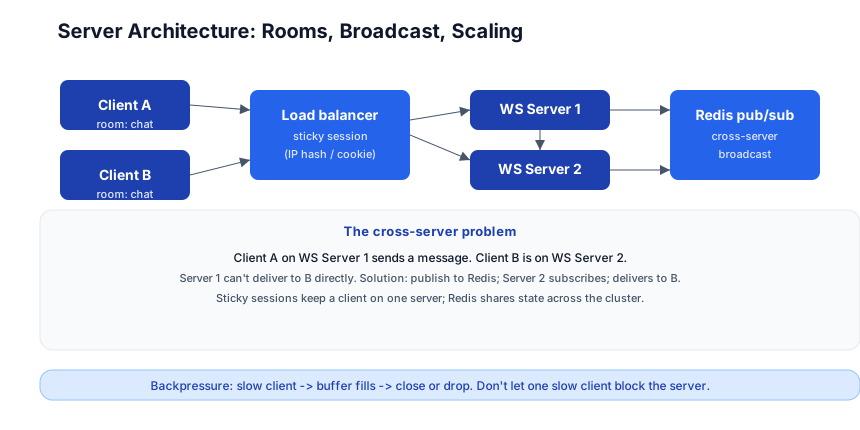
If you have 2 WebSocket servers (behind a load balancer) and Client A is on Server 1, Client B is on Server 2, Server 1 can’t deliver a message to Client B — it doesn’t have B’s connection. The solution: Redis pub/sub as a shared message bus.
Client A (Server 1) sends "hello" to room "chat"
  → Server 1 broadcasts to its local "chat" members
  → Server 1 also PUBLISHES "chat:hello" to Redis
  → Server 2 SUBSCRIBES to "chat" → receives "hello" → delivers to Client B
const redis = require("redis");
const pub = redis.createClient(); const sub = redis.createClient();
await sub.subscribe("chat");
sub.on("message", (channel, msg) => broadcast("chat", msg));  // deliver to local clients

// when a client sends:
ws.on("message", (data) => {
  broadcast(ws.room, data);          // local
  pub.publish(ws.room, data);        // cross-server via Redis
});
Sticky sessions
The load balancer must use sticky sessions (IP hash or a cookie) so a client always reaches the same server — otherwise the connection resets on each reconnect. Nginx: ip_hash;. An ALB: use a cookie-based stickiness policy.
Socket.IO — the batteries-included library
Socket.IO (Node.js) and its equivalents handle rooms, broadcast, reconnection, ping/pong, and Redis-based scaling automatically:
const io = require("socket.io")(3000);
io.adapter(require("@socket.io/redis-adapter")({ pubClient, subClient }));

io.on("connection", (socket) => {
  socket.join("chat");
  io.to("chat").emit("message", "hello");  // broadcasts to all servers' "chat" rooms
});
Stage 5 — Production: TLS, Reconnect, vs Alternatives
wss:// — WebSocket over TLS
ws://  = plain WebSocket (insecure, port 80)
wss:// = WebSocket over TLS (port 443)
Always use wss:// in production (same as HTTPS vs HTTP). The TLS handshake happens before the WebSocket upgrade.
Ping interval + reconnect
The server should send periodic pings (e.g. every 30s); if no pong, close the connection. The client should auto-reconnect with exponential backoff (Socket.IO does this; raw ws requires manual handling):
function connect() {
  const ws = new WebSocket("wss://example.com/ws");
  ws.onopen = () => console.log("connected");
  ws.onclose = () => setTimeout(connect, Math.random() * 5000 + 1000);  // backoff
  ws.onmessage = (e) => console.log(e.data);
}
connect();
WebSocket vs SSE vs Long-Polling vs HTTP/2 Streams
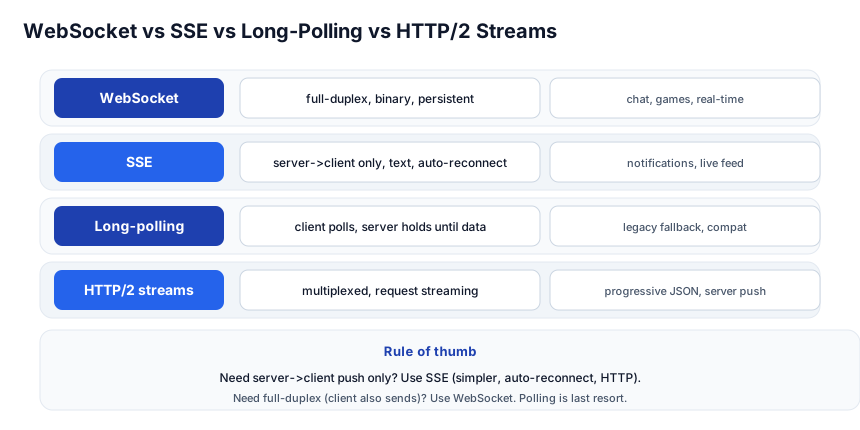
| Direction | Binary | Auto-reconnect | Use | |
|---|---|---|---|---|
| WebSocket | full-duplex | ✅ | manual | chat, games, real-time |
| SSE (Server-Sent Events) | server→client only | text | ✅ built-in | notifications, live feed |
| Long-polling | request/response | no | manual | legacy fallback |
| HTTP/2 streams | request + response streaming | ✅ | no | progressive JSON |
Rule of thumb:
- Need server→client only (push notifications, live feed)? SSE is simpler — it’s just HTTP, auto-reconnects, and works through any proxy.
- Need full-duplex (client also sends)? WebSocket.
- Long-polling is the legacy fallback when nothing else works (old browsers, restrictive proxies).
- HTTP/2 streaming is an option for one-way streaming within HTTP/2 (progressive JSON, server push).
Pitfall: Many developers reach for WebSocket when SSE would be simpler and better. If your use case is one-directional (server pushes to client — notifications, stock prices, logs), SSE is the right choice: one HTTP endpoint, auto-reconnect, works through every proxy, no handshake complexity.
Quick-Start Checklist
- Install
ws(Node.js) —npm install ws. - Create a WebSocket server —
new WebSocketServer({ port: 8080 }). - Connect from a browser —
new WebSocket("ws://localhost:8080"). - Send a message —
ws.send("hello")on both sides. - Add rooms —
Map<room_name, Set<WebSocket>>+ join/broadcast. - Handle close — remove the client from its room.
- Add backpressure — check
ws.bufferedAmountbefore sending. - Configure Nginx —
proxy_set_header Upgrade/Connectionfor the upgrade. - Scale with Redis — pub/sub for cross-server broadcast.
- Use
wss://in production — TLS before upgrade.
Common Pitfalls
- Nginx without upgrade headers —
Upgrade+Connection: upgraderequired, else the handshake fails. - No backpressure — a slow client fills the server buffer → OOM. Check
bufferedAmount. - No ping/pong — half-open connections accumulate (client went to sleep). Ping every 30s; close on timeout.
- No reconnect on client — a dropped connection is silent. Implement exponential-backoff reconnect.
- Using WebSocket for one-directional data — SSE is simpler for push-only. Don’t over-engineer.
- No sticky sessions behind a load balancer — client connects to a different server each time → lost state. Use IP hash or cookie.
- Memory leak on close — always remove the client from its room on
close/error. - Broadcasting to everyone — broadcasting to all connections on every message doesn’t scale; use rooms/channels.
Further Reading
- WebSocket Protocol (RFC 6455) — the spec
- ws (Node.js) Docs — the most-used Node WebSocket library
- Socket.IO Docs — rooms, scaling, reconnection, Redis adapter
- SSE (MDN) — the simpler alternative
- WebSocket Browser API (MDN) — client side
Related guides
WebSocket is the real-time layer on the web stack — these PyShine tutorials connect to it:
- Learn REST API in One Post — HTTP is the request/response layer; WebSocket is the real-time layer.
- Learn Nginx in One Post — Nginx must be configured for the upgrade; sticky sessions for scaling.
- Learn Node.js + Express in One Post —
wsand Socket.IO run on Node’s event loop; know the runtime. - Learn Redis in One Post — Redis pub/sub is the cross-server broadcast bus.
- Learn Computer Networking in One Post — WebSocket is over TCP; the handshake is HTTP; understand the layers.
WebSocket’s value is the persistent, full-duplex channel — once the handshake is done, the server pushes whenever it wants, the client sends whenever it wants, all over one TCP connection with no per-message HTTP overhead. The five stages here — handshake, frames, server architecture, scaling, production — cover everything from a one-room chat to a multi-server, Redis-backed, backpressure-aware, Enjoyed this post? Never miss out on future posts by following us wss:// production real-time system. The two habits that pay off: check for backpressure before every send (one slow client can OOM the server), and choose SSE for one-directional push (don’t reach for WebSocket when Server-Sent Events is simpler). Open a browser console, new WebSocket("ws://localhost:8080"), send a message, and watch the server receive it instantly — once you’ve felt the full-duplex channel, the model clicks.