Introduction
Insomnia is an open-source, cross-platform API client developed by Kong that has become a staple tool for API developers worldwide. With 39,512 GitHub stars and a sustained growth rate of 1,006 stars per week, it has earned the trust of a massive developer community. The application supports GraphQL, REST, WebSockets, SSE (Server-Sent Events), and gRPC in a single desktop application, eliminating the need to juggle multiple specialized tools for different API protocols.
Built with TypeScript, Electron, React, and Tailwind CSS, Insomnia delivers a native desktop experience on macOS, Windows, and Linux. The project is licensed under Apache-2.0, ensuring it remains fully open-source with an active community of contributors. Enterprises including Netflix, Nasdaq, Red Bull, Zillow, Tesla, and PayPal rely on Insomnia for their API development workflows.
The key capabilities of Insomnia span the entire API development lifecycle. Developers can debug APIs by inspecting requests and responses in detail, design APIs using the native OpenAPI editor, test APIs with the collection runner and pre/post scripts, mock APIs using cloud or self-hosted mock servers, build CI/CD pipelines with the Inso CLI, and collaborate with team members through shared workspaces. Three storage options are available: Local Vault for 100% local storage with no cloud dependency, Git Sync for Git-based storage via a third-party repository, and Cloud Sync for team collaboration with optional end-to-end encryption.
What makes Insomnia particularly valuable is how it unifies API development workflows into a single application. Instead of switching between a REST client, a GraphQL playground, a WebSocket testing tool, and a gRPC debugger, developers can handle all of these protocols in one consistent interface. This reduces context switching, speeds up development, and makes it easier to maintain a comprehensive API testing strategy across an entire organization.
How It Works
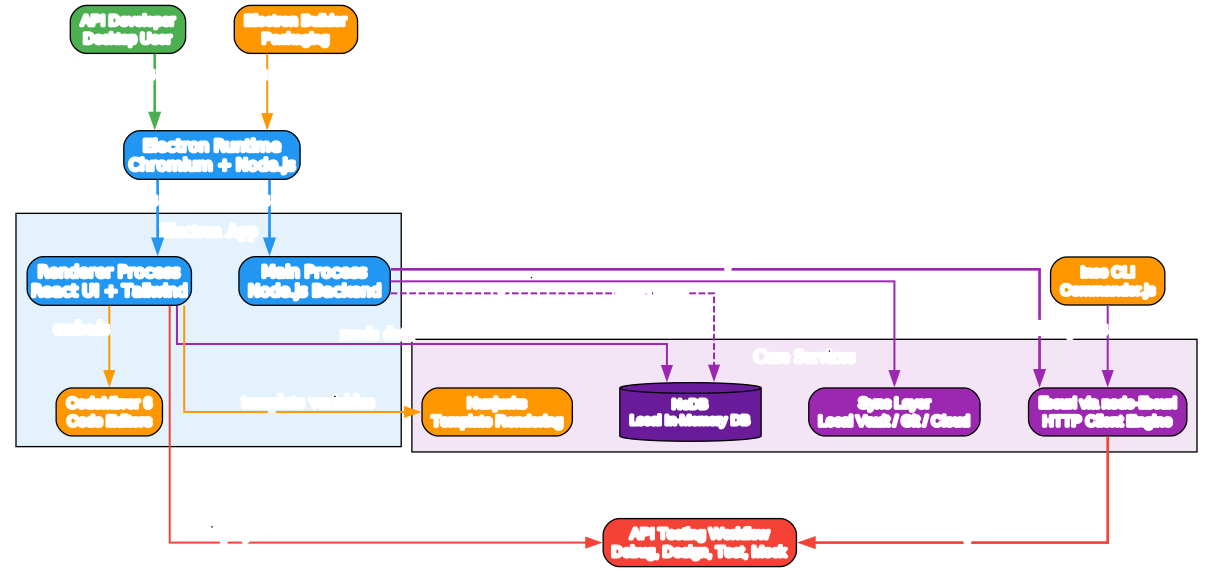
Understanding the Electron Application Architecture
The architecture diagram above illustrates the core components of Insomnia’s Electron-based desktop application and their interactions. Let us break down each component:
Component 1: Electron Runtime (Chromium + Node.js)
- Purpose: The application shell that bundles Chromium for rendering and Node.js for system-level operations
- Cross-platform: runs identically on macOS, Windows, and Linux
- Entry point: entry.main.js initializes the main process
- Electron Builder handles packaging into platform-specific installers
- The dual-process model (main + renderer) provides both system access and web UI capabilities
Component 2: Main Process (src/main)
- Purpose: The Node.js backend process handling system-level operations
- Manages window lifecycle, file system access, and native integrations
- Hosts the libcurl HTTP client engine via node-libcurl for high-performance request execution
- Handles data persistence through NeDB, a local in-memory database
- Manages the sync layer for Local Vault, Git Sync, and Cloud Sync storage options
Component 3: Renderer Process (src/ui)
- Purpose: The React-based user interface with Tailwind CSS styling
- Renders the API request builder, response viewer, and collection management interface
- Embeds CodeMirror 6 editors for writing request bodies, test scripts, and OpenAPI specs
- Communicates with the main process via Electron IPC for network operations and data access
Component 4: Network Layer (src/network)
- Purpose: The request sending and authentication engine
- Uses libcurl (via node-libcurl) as the underlying HTTP client for all protocols
- Supports OAuth 2, API keys, basic auth, bearer tokens, and other authentication methods
- Handles request construction, header management, and response parsing
Component 5: Templating Engine (src/templating)
- Purpose: Nunjucks-based template rendering for dynamic request values
- Enables environment variables, computed values, and custom template tags
- Allows reusable request definitions with variable substitution
- Plugin-extensible: custom template tags can be registered by third-party plugins
Component 6: Inso CLI (insomnia-inso package)
- Purpose: Command-line interface for CI/CD pipeline integration
- Built with Commander.js for argument parsing and command routing
- Enables linting OpenAPI specs, running test suites, and automating API validation
- Integrates with Git workflows for automated API testing in pipelines
Data Flow:
- The API developer launches Insomnia, starting the Electron runtime
- The main process initializes NeDB, the sync layer, and the libcurl engine
- The renderer process loads the React UI with Tailwind styling and CodeMirror editors
- When a request is sent, the renderer passes it to the main process via IPC
- The main process renders Nunjucks templates, applies authentication, and sends via libcurl
- The response is parsed and displayed in the React UI
- The request and response are persisted to NeDB for history and replay
Key Insights:
- The Electron architecture provides native system access while maintaining a web-based UI
- libcurl was chosen for its battle-tested HTTP implementation and broad protocol support
- NeDB provides fast local storage without requiring an external database server
- The npm workspaces monorepo enables shared code between the desktop app and the Inso CLI
- The separation of main and renderer processes follows Electron security best practices
Practical Applications:
- Developers can extend the UI with React components without touching the network layer
- The Inso CLI enables the same API tests to run in both interactive and CI/CD contexts
- The sync layer allows teams to choose their preferred collaboration model
- Plugin developers can hook into both the request and response lifecycle
Request Lifecycle

Understanding the Request Lifecycle
The request lifecycle diagram illustrates how an API request flows through Insomnia from creation to display. Let us trace the journey:
Stage 1: Request Creation in React UI
- The developer creates or selects a request in the React-based interface
- Request details include URL, method, headers, body, and query parameters
- CodeMirror 6 editors provide syntax highlighting and autocompletion for request bodies
- Environment variables and template tags can be embedded using Nunjucks syntax
Stage 2: Nunjucks Template Rendering
- Before sending, all template variables in the request are rendered by the Nunjucks engine
- Environment variables are substituted from the active environment configuration
- Custom template tags registered by plugins are evaluated and expanded
- This step ensures the final request contains concrete values, not placeholders
Stage 3: Authentication Layer
- The authentication layer applies the configured auth mechanism to the request
- OAuth 2 flows handle token acquisition, refresh, and injection into headers
- API keys, basic auth, and bearer tokens are applied as needed
- The authenticated request is then passed to the request builder
Stage 4: Request Building and Sending
- The request builder assembles the final HTTP message with headers, body, and query params
- libcurl (via node-libcurl) executes the actual network request
- libcurl handles connection pooling, TLS/SSL, redirects, and timeout management
- The network layer supports all 5 protocols through the same libcurl engine
Stage 5: Response Reception and Parsing
- The raw response is received by libcurl and passed back to the network layer
- The response parser identifies the content type and parses accordingly
- JSON responses are pretty-printed and syntax-highlighted
- XML, binary, and other formats are handled with appropriate viewers
Stage 6: Display and Persistence
- The parsed response is rendered in the React UI with appropriate formatting
- Response time, status code, and headers are displayed prominently
- The request and response are saved to NeDB for history and replay
- The developer can inspect, compare, and export the response as needed
Key Insights:
- The Nunjucks templating step enables powerful dynamic request construction without scripting
- The authentication layer abstracts complex OAuth 2 flows into a declarative configuration
- libcurl provides a single, reliable HTTP engine across all supported protocols
- The persistence step ensures full request history is always available for debugging
- Plugin hooks can intercept and modify the request at both pre-request and post-response stages
Practical Applications:
- Developers can create parameterized requests that adapt to different environments
- The request history enables comparison of responses across API versions
- The Inso CLI can replay the same requests in CI/CD pipelines
- Plugin developers can add custom processing at any stage of the lifecycle
Protocol Support
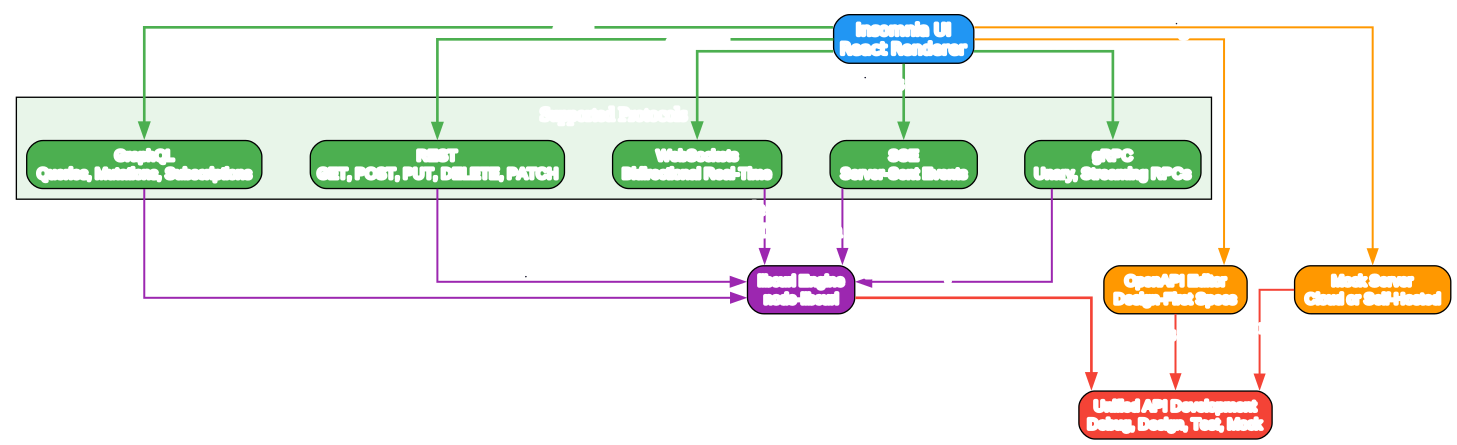
Understanding Multi-Protocol Support
The protocol support diagram shows how Insomnia unifies 5 different API protocols through a single libcurl engine and React UI. Let us examine each protocol:
Protocol 1: GraphQL
- Full support for GraphQL queries, mutations, and subscriptions
- Schema introspection and autocompletion based on the GraphQL schema
- Variable editor for defining query variables with type checking
- Response viewer with nested JSON navigation and error highlighting
- Supports both single and batch GraphQL operations
Protocol 2: REST
- Complete HTTP method support: GET, POST, PUT, DELETE, PATCH, HEAD, OPTIONS
- URL path parameters with automatic encoding
- Query parameter editor with bulk edit mode
- Multiple body formats: JSON, form-data, multipart, raw text, binary files
- Response viewer with JSON/XML/HTML/image rendering
Protocol 3: WebSockets
- Bidirectional real-time communication over WebSocket protocol
- Send and receive messages with text and binary frame support
- Connection persistence with automatic reconnection options
- Message history with timestamp tracking
- Useful for chat applications, live feeds, and real-time dashboards
Protocol 4: SSE (Server-Sent Events)
- Server-Sent Events for one-way real-time streaming from server to client
- Automatic event parsing and display with event type labels
- Reconnection support with Last-Event-ID header
- Useful for live updates, notifications, and streaming data feeds
- Event filtering and display customization
Protocol 5: gRPC
- Unary RPC calls and streaming RPCs (server-streaming, client-streaming, bidi)
- Protobuf message construction with .proto file import support
- Reflection-based service discovery for gRPC servers with reflection enabled
- Metadata header management for authentication and tracing
- Response display with decoded protobuf messages
Additional Capabilities:
- OpenAPI Editor: native design-first OpenAPI spec editor with visual preview
- Mock Server: generate API mocks from collections, specs, or descriptions
- All protocols share the same libcurl engine for consistent behavior
- The React UI adapts its layout based on the selected protocol
Key Insights:
- The unified libcurl engine ensures consistent TLS, proxy, and certificate handling across protocols
- The protocol-agnostic UI design reduces the learning curve when switching between API types
- The OpenAPI editor bridges the gap between API design and API testing
- The mock server enables frontend development before the backend is ready
- Supporting 5 protocols in one tool eliminates the need for multiple specialized clients
Practical Applications:
- Teams can test REST APIs, GraphQL APIs, and gRPC services without switching tools
- The OpenAPI design workflow enables spec-first API development
- WebSocket and SSE support covers real-time communication testing needs
- The mock server accelerates parallel frontend and backend development
Installation
Insomnia uses an npm workspaces monorepo structure. To set up a local development environment, you need Node.js version 24 or higher, npm version 11 or higher, and Git installed on your system.
Prerequisites
- Node.js >= 24
- npm >= 11
- Git
Setup Commands
# Clone the repository
git clone https://github.com/Kong/insomnia.git
cd insomnia

# Install and link all workspace dependencies
npm i

# Run linting across all workspaces
npm run lint

# Run type checking across all workspaces
npm run type-check

# Run tests across all workspaces
npm test

# Start the app with live reload
npm run dev

# Start with renderer live reload + main auto restart
npm run dev:autoRestart
The npm run dev command maps to npm start -w insomnia and launches the Electron application with live reload for the renderer process. The npm run dev:autoRestart variant adds automatic restart for main process changes, which is useful when modifying backend logic. For CLI development, npm run inso-start maps to npm start -w insomnia-inso and launches the Inso CLI in development mode.
The monorepo is organized into several workspace packages. The packages/insomnia directory contains the main desktop application with the Electron main process, React renderer, network layer, and templating engine. The packages/insomnia-inso directory contains the Inso CLI built with Commander.js. The packages/insomnia-data directory contains shared data models and database adapters. The packages/insomnia-smoke-test directory contains Playwright-based smoke tests.
Usage
Creating a Workspace and Collection
When you first open Insomnia, you create a workspace to organize your API projects. Within a workspace, you can create collections to group related requests. Each collection can contain requests for any of the supported protocols, allowing you to mix REST, GraphQL, and gRPC calls in the same project.
Sending a REST API Request
To send a REST request, create a new HTTP request in your collection, enter the URL, select the HTTP method (GET, POST, PUT, DELETE, PATCH), add headers and query parameters as needed, and configure the request body format (JSON, form-data, multipart, raw text, or binary file). Click Send to execute the request and view the response with status code, headers, body, and timing information.
Creating GraphQL Queries
For GraphQL requests, select the GraphQL request type, enter the GraphQL endpoint URL, write your query in the CodeMirror editor with schema-aware autocompletion, define query variables in the variables panel, and send the request. The response viewer displays the GraphQL data and errors with nested JSON navigation.
Environment Variables and Nunjucks Templating
Insomnia uses Nunjucks template syntax for dynamic values. You can define environment variables for different deployment stages (development, staging, production) and reference them in any request field using the Nunjucks variable syntax with the underscore prefix (for example, _.variable_name wrapped in double curly braces). Custom template tags registered by plugins can also be used, such as the uuid template tag with the v4 parameter to generate a UUID at runtime.
Configuring OAuth 2 Authentication
Insomnia supports OAuth 2 authentication with full flow handling. You configure the authorization URL, access token URL, client ID, client secret, and scopes. Insomnia handles the token acquisition flow, stores the access token, and automatically injects it into request headers. Token refresh is handled automatically when the access token expires.
Running Test Suites
The collection runner executes multiple requests in sequence with pre-request and post-response test scripts. You can write JavaScript test assertions to validate response status codes, body content, and response times. The Inso CLI can run these same test suites in CI/CD pipelines using the inso run test command.
Designing APIs with the OpenAPI Editor
The native OpenAPI editor lets you design API specifications using a visual interface with live preview. You define paths, operations, parameters, request bodies, and response schemas. The editor validates the spec in real time and can generate mock servers from the specification.
Setting Up a Mock Server
Insomnia can generate mock servers from collections, OpenAPI specs, or API descriptions. The mock server returns predefined responses for matching requests, enabling frontend development before the backend is implemented. Mock servers can be self-hosted or run in the Insomnia cloud.
Collaborating with Team Sync
Three storage options serve different collaboration needs. Local Vault stores everything on your machine with no cloud dependency. Git Sync uses a Git repository for version-controlled storage. Cloud Sync provides team collaboration through the Insomnia cloud with optional end-to-end encryption for sensitive data.
Installing Third-Party Plugins
Plugins are npm packages that extend Insomnia’s functionality. You can install plugins from the plugin directory or directly from npm. Plugins can add custom authentication schemes, template tags, request hooks, and response processors. They are loaded at application startup and receive a context object for interacting with the application.
Key Features
| Feature | Description |
|---|---|
| Multi-Protocol API Client | GraphQL, REST, WebSockets, SSE, and gRPC in one app |
| Electron Desktop App | Cross-platform: macOS, Windows, Linux via Chromium runtime |
| React UI with Tailwind | Modern, responsive interface with CodeMirror 6 editors |
| libcurl HTTP Engine | Battle-tested HTTP client via node-libcurl for all protocols |
| NeDB Local Storage | Fast in-memory database for request history and collections |
| Nunjucks Templating | Dynamic request values with environment variables and custom tags |
| OAuth 2 Authentication | Full OAuth 2 flow support including token refresh |
| OpenAPI Design Editor | Native OpenAPI spec editor with visual preview |
| API Mocking | Cloud or self-hosted mock server from specs or collections |
| Inso CLI | Command-line tool for CI/CD linting and testing via Commander.js |
| Collection Runner | Run test suites across multiple requests with pre/post scripts |
| Local Vault Storage | 100% local storage with no cloud dependency |
| Git Sync | Git-based storage via third-party repository |
| Cloud Sync | Cloud collaboration with optional end-to-end encryption |
| Plugin System | Third-party plugin support with request/response hooks |
| Team Collaboration | Shared workspaces, collections, and environments |
| npm Workspaces Monorepo | Shared code between desktop app and CLI packages |
| Vitest Unit Testing | Fast unit test execution for component-level testing |
| Playwright E2E Testing | Comprehensive smoke and end-to-end test coverage |
| Apache-2.0 License | Fully open-source with active community contributions |
Plugin System
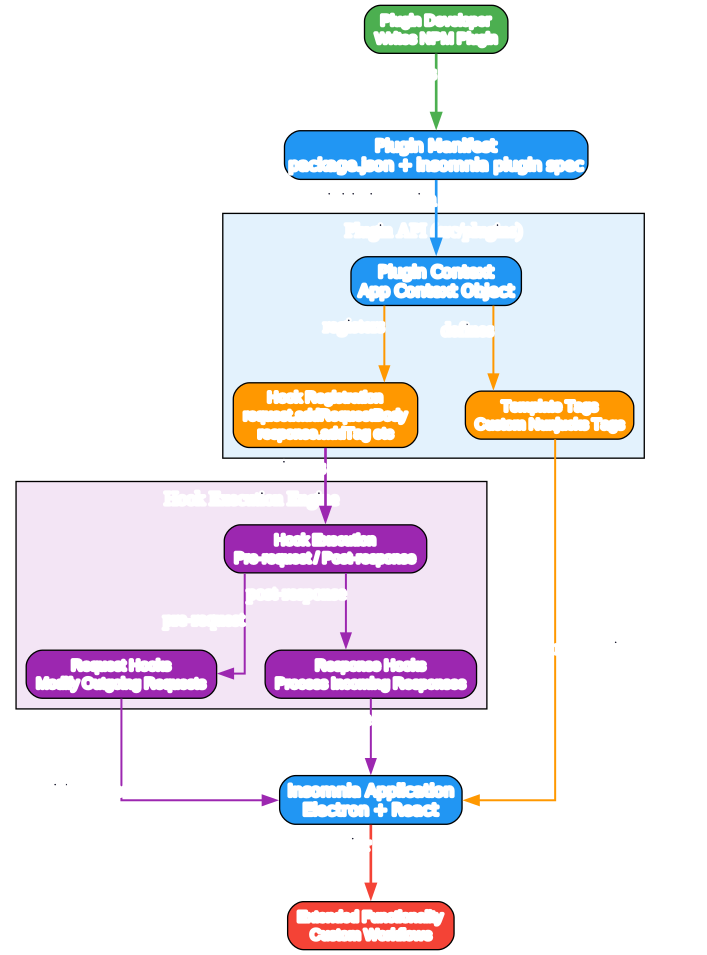
Understanding the Plugin System Architecture
The plugin system diagram illustrates how third-party plugins extend Insomnia’s functionality through hooks, template tags, and context objects. Let us examine each component:
Component 1: Plugin Manifest
- Every plugin is an npm package with a package.json file
- The manifest declares the plugin’s hooks, template tags, and metadata
- Insomnia discovers plugins through npm and loads them at application startup
- The manifest specifies which lifecycle hooks the plugin wants to intercept
Component 2: Plugin Context
- The context object provides plugins with access to the Insomnia application
- Includes methods for reading and modifying requests, responses, and environments
- Provides access to the app store, settings, and workspace data
- The context is initialized when the plugin loads and persists throughout the session
- Plugins receive the context as the first argument to all hook callbacks
Component 3: Hook Registration
- Plugins register hooks for specific lifecycle events
- Request hooks (e.g., request.addRequestBody) modify outgoing requests
- Response hooks (e.g., response.addTag) process incoming responses
- Template tag hooks define custom Nunjucks tags for dynamic value generation
- Multiple plugins can register for the same hook, executing in registration order
Component 4: Hook Execution Engine
- The execution engine manages the lifecycle of hook invocations
- Pre-request hooks fire before the request is sent to libcurl
- Post-response hooks fire after the response is received and parsed
- The engine handles errors gracefully, ensuring one plugin failure does not crash the app
- Hook execution is asynchronous, supporting promises and async/await
Component 5: Template Tags
- Custom template tags extend Nunjucks with plugin-specific functionality
- Tags can generate dynamic values, fetch external data, or compute results
- Available in any request field that supports Nunjucks templating
- Tags are namespaced by plugin to avoid conflicts
- The tag execution has access to the plugin context for app-level data
Data Flow:
- The plugin developer creates an npm package with a plugin manifest
- Insomnia loads the plugin and initializes it with a context object
- The plugin registers hooks and template tags through the context
- When a request is sent, pre-request hooks fire and can modify the request
- After the response is received, post-response hooks process the response
- Template tags are evaluated during Nunjucks rendering with access to the context
- The extended functionality is available throughout the application
Key Insights:
- The plugin system follows a hook-based architecture similar to Webpack and ESLint plugins
- The context object pattern provides controlled access without exposing internal APIs
- The asynchronous hook execution enables plugins to perform network requests and I/O
- Template tags bridge the gap between static configuration and dynamic computation
- The error isolation ensures plugin failures do not destabilize the application
Practical Applications:
- Plugins can add custom authentication schemes not built into Insomnia
- Plugins can integrate with external services for request signing or token management
- Template tags can fetch secrets from vaults like HashiCorp Vault or AWS Secrets Manager
- Response hooks can transform or validate responses against custom schemas
- Teams can share internal plugins via npm for organization-specific workflows
Troubleshooting
Issue 1: Node.js Version Mismatch
Symptom: npm install fails with engine version errors.
Cause: Node.js version is below 24, which is required by Insomnia.
Solution: Install Node.js 24 or use nvm to switch versions:
nvm use 24
Issue 2: npm Version Too Old
Symptom: Workspace linking fails or npm i produces warnings about workspace features.
Cause: npm version is below 11, which is required for full workspace support.
Solution: Update npm to the latest version:
npm install -g npm@latest
Issue 3: libcurl Build Errors
Symptom: npm i fails during node-libcurl compilation with native build errors.
Cause: Missing build tools or libcurl development headers on your system.
Solution: Install the required build tools. On Windows, install Visual Studio Build Tools with the C++ workload. On macOS, install Xcode Command Line Tools:
xcode-select --install
Issue 4: Electron App Does Not Start
Symptom: npm run dev exits immediately or shows a blank window.
Cause: The renderer process failed to compile or there is a port conflict on the development server.
Solution: Check the terminal output for compilation errors. Kill any processes using port 55555 and restart:
# Find and kill processes on port 55555
npx kill-port 55555
npm run dev
Issue 5: Tests Fail Locally
Symptom: npm test fails with timeout or connection errors.
Cause: The Vitest or Playwright testing environment is not properly configured.
Solution: Ensure all dependencies are installed and Playwright browsers are downloaded:
npm i
npx playwright install
Issue 6: Type Check Errors
Symptom: npm run type-check reports TypeScript errors across workspaces.
Cause: Stale type definitions or incompatible dependency versions after a partial install.
Solution: Clear node_modules and reinstall to relink all workspaces:
rm -rf node_modules
npm i
npm run type-check
Issue 7: Inso CLI Not Found
Symptom: npm run inso-start fails with a module not found error.
Cause: The insomnia-inso workspace was not properly linked after installation.
Solution: Run npm i to relink workspaces and verify the package exists:
npm i
ls packages/insomnia-inso
npm run inso-start
Issue 8: Git Sync Authentication Failed
Symptom: Cloud Sync or Git Sync fails with an authentication error when pushing or pulling.
Cause: Invalid credentials or token for the configured Git repository.
Solution: Reconfigure Git credentials in Insomnia settings. Verify that your personal access token has the correct repository permissions (read and write access). Remove and re-add the Git Sync configuration to refresh the stored credentials.
Conclusion
Insomnia represents a comprehensive, open-source API development platform that has earned the trust of over 39,000 GitHub stars and a developer community spanning enterprises like Netflix, Nasdaq, Tesla, and PayPal. The Electron + React + libcurl architecture provides a robust, cross-platform foundation that runs identically on macOS, Windows, and Linux.
The multi-protocol support for GraphQL, REST, WebSockets, SSE, and gRPC eliminates the need to switch between multiple specialized tools. The npm workspaces monorepo structure enables shared code between the desktop application and the Inso CLI, bridging interactive API testing and CI/CD pipeline automation. The plugin system provides extensibility through hooks and template tags without requiring modifications to the core application.
Three storage options – Local Vault, Git Sync, and Cloud Sync – serve different collaboration needs from solo developers to large teams. The Apache-2.0 license ensures the tool remains open and community-driven, with active contributions from developers worldwide. For any team working with APIs across multiple protocols, Insomnia provides a unified, powerful, and extensible platform that scales from individual development to enterprise CI/CD workflows.
Links
- GitHub Repository: https://github.com/Kong/insomnia
- Official Website: https://insomnia.rest/
- Download Page: https://insomnia.rest/download
- Documentation: https://insomnia.rest/docs
- Plugin Directory: https://insomnia.rest/plugins
- Kong Inc.: https://konghq.com/
- GitHub Releases: https://github.com/Kong/insomnia/releases
Related Posts
- FreeCodeCamp Learn Programming Math Computer Science Free
- AI Engineering from Scratch 428 Lessons 20 Phases Curriculum
- LLMs From Scratch Build GPT Models in PyTorch
- Dive Into LLMs Hands-On Tutorial Series
- Easy Vibe Vibe Coding Course Beginners

Enjoyed this post? Never miss out on future posts by following us


