Introduction
freeCodeCamp is a nonprofit organization that provides free programming education to anyone, anywhere. Its mission is simple but ambitious: help people learn math, programming, and computer science for free. The platform has grown into one of the most popular open-source projects on GitHub, with over 450,070 stars and a sustained growth rate of approximately 3,294 stars per week.
The entire codebase and curriculum are open source and fully transparent. The project is written in TypeScript and organized as a pnpm monorepo, which gives contributors a clear and maintainable structure to work within. Learners can study at their own pace with no cost, no ads, and no paywalls. Everything is community-driven, with thousands of contributors worldwide submitting improvements to both the platform code and the curriculum content.
The curriculum covers beginner to advanced full-stack development. It starts with responsive web design and HTML, progresses through JavaScript algorithms and front-end libraries, then moves into Python, relational databases, and back-end APIs. Each certification includes interactive lessons, guided workshops, independent labs, quizzes, five required projects, and a final exam. This structure ensures that learners build genuine, practical competence rather than just passively consuming content.
How It Works
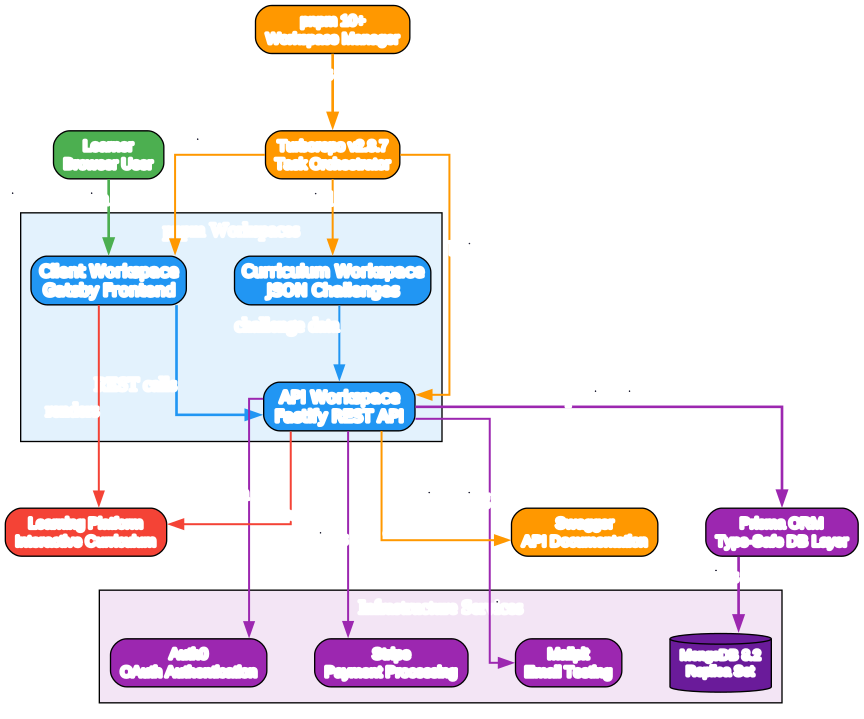
Understanding the Monorepo Architecture
The architecture diagram above illustrates the core components of freeCodeCamp’s pnpm monorepo and their interactions. Let us break down each component:
Component 1: Client Workspace (Gatsby Frontend)
- Purpose: The learner-facing web application built with Gatsby
- TypeScript for type safety, Tailwind CSS for styling, PostCSS for processing
- Renders interactive coding challenges, progress dashboards, and certification pages
- Communicates with the API workspace via REST calls
- Serves as the primary interface for all learners worldwide
Component 2: API Workspace (Fastify REST API)
- Purpose: Backend server handling authentication, progress tracking, and challenge submission
- Built on Fastify for high-performance HTTP handling
- Prisma ORM provides type-safe database access to MongoDB
- Auth0 integration for OAuth-based authentication
- Stripe integration for donation processing
- Swagger auto-generates API documentation for contributors
Component 3: Curriculum Workspace
- Purpose: JSON-based challenge definitions and curriculum structure
- Contains all interactive lessons, workshops, labs, and project specifications
- Internationalization (i18n) support for multiple languages
- Consumed by both the API and client workspaces
- Enables community contributions to curriculum content
Data Flow:
- The learner interacts with the Gatsby client in their browser
- The client makes REST API calls to the Fastify backend
- The API queries MongoDB via Prisma ORM for user progress and challenge data
- The curriculum workspace provides challenge definitions to both client and API
- Turborepo orchestrates builds across all workspaces in the correct dependency order
- pnpm manages shared dependencies and workspace linking
Key Insights:
- The monorepo structure with Turborepo enables efficient incremental builds
- MongoDB replica set configuration supports transactional data integrity
- Auth0 provides enterprise-grade authentication without custom security code
- The separation of curriculum content from application code allows non-developer contributors to improve learning materials
- Docker Compose with MongoDB 8.2 and Mailpit provides a complete local development environment
Practical Applications:
- Contributors can work on frontend, backend, or curriculum independently
- The Swagger docs make API exploration straightforward for new contributors
- Feature flags via GrowthBook enable safe rollout of new curriculum features
- Algolia search integration helps learners discover relevant challenges quickly
Curriculum Overview
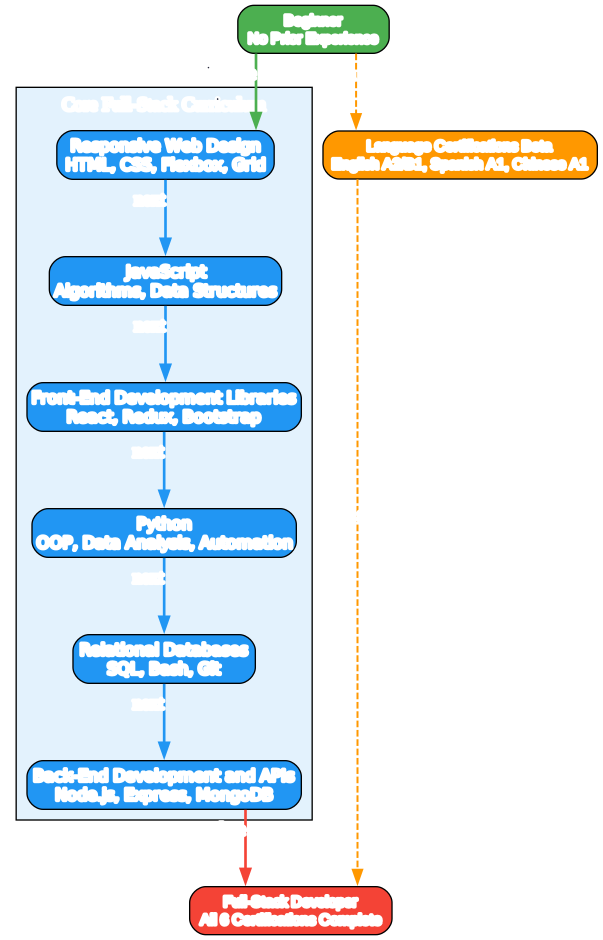
Understanding the Certification Paths
The certification paths diagram shows the six core certifications that comprise the full-stack developer curriculum, along with the beta language certifications. Let us examine each path:
Certification 1: Responsive Web Design
- Foundation certification covering HTML, CSS, Flexbox, CSS Grid
- Teaches responsive layout principles and mobile-first design
- Includes interactive lessons on accessibility and visual design
- Five required projects: survey form, tribute page, technical documentation, product landing, portfolio
Certification 2: JavaScript
- Core programming concepts: variables, functions, loops, conditionals
- Algorithms and data structures: arrays, objects, recursion
- Regular expressions and debugging techniques
- Five required projects: palindrome checker, Roman numeral converter, telephone validator, cash register, Pokemon search
Certification 3: Front-End Development Libraries
- React fundamentals: components, props, state, hooks
- Redux for state management
- Bootstrap and jQuery for rapid UI development
- Sass for advanced CSS preprocessing
- Five required projects: random quote machine, markdown previewer, drum machine, calculator, 25+5 clock
Certification 4: Python
- Object-oriented programming in Python
- Data analysis with libraries
- Automation and scripting
- Five required projects: arithmetic formatter, time calculator, budget app, polygon area, probability calculator
Certification 5: Relational Databases
- SQL fundamentals and advanced queries
- Bash scripting and command-line proficiency
- Git version control workflows
- Five required projects: database creation, world database, salon scheduler, celestial bodies, number guessing
Certification 6: Back-End Development and APIs
- Node.js and Express server development
- MongoDB integration with Mongoose
- RESTful API design and implementation
- Five required projects: timestamp microservice, request header parser, URL shortener, exercise tracker, file metadata
Language Certifications (Beta):
- A2 English for Developers: professional communication skills
- B1 English for Developers: intermediate technical English
- A1 Professional Spanish: introductory Spanish for workplace
- A1 Professional Chinese: introductory Chinese for workplace
Key Insights:
- The certifications are designed to be taken sequentially, building on prior knowledge
- Each certification requires five projects built from scratch, demonstrating practical competence
- The final exam for each certification ensures comprehensive understanding
- Language certifications run in parallel and supplement the technical curriculum
- Completing all six certifications earns the full-stack developer designation
Certification Learning Path Flow
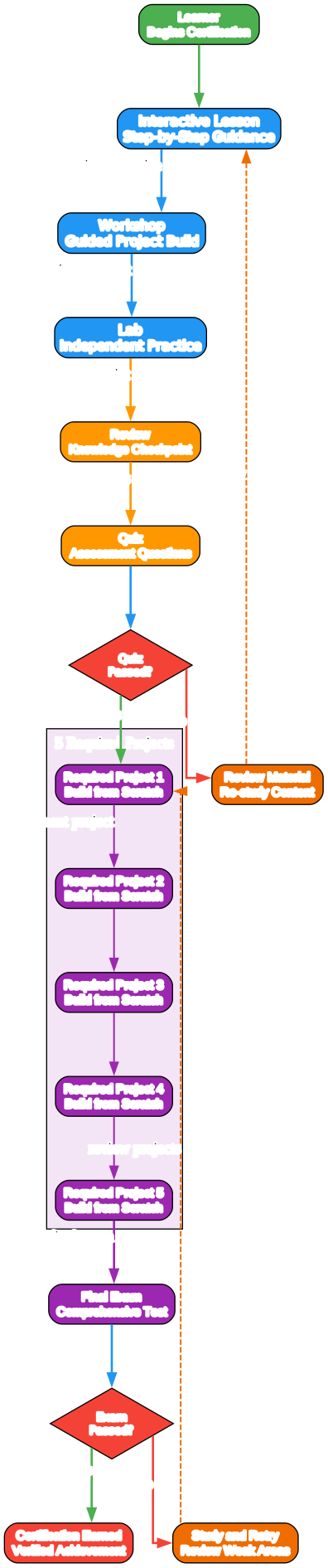
Understanding the Learning Path Flow
The learning path flow diagram illustrates how a learner progresses through a single certification from start to completion. Let us trace the journey:
Stage 1: Interactive Lessons
- Step-by-step guided instruction with live code execution
- Browser-based editor with instant feedback
- Concepts introduced incrementally with practical exercises
- Each lesson builds on the previous one, creating a scaffolded learning experience
Stage 2: Workshops
- Guided project builds where learners follow along with detailed instructions
- Bridge the gap between individual concepts and real-world application
- Provide a safety net before independent practice
- Include explanatory text alongside code requirements
Stage 3: Labs
- Independent practice with minimal guidance
- Learners apply concepts without step-by-step instructions
- Encourages problem-solving and self-directed learning
- Prepares learners for the autonomy required in projects
Stage 4: Reviews and Quizzes
- Knowledge checkpoints that assess understanding of key concepts
- Quizzes provide immediate feedback on correctness
- Failed quizzes route learners back to review material
- Ensures foundational knowledge before attempting projects
Stage 5: Five Required Projects
- Each project must be built from scratch with user stories as requirements
- Projects are submitted and automatically validated against test suites
- All five projects must pass to proceed to the final exam
- Projects simulate real-world development: requirements, constraints, testing
Stage 6: Final Exam
- Comprehensive assessment covering all certification topics
- Must be passed to earn the certification
- Failed exams route learners back to review weak areas
- Ensures the certification represents genuine competence
Key Insights:
- The flow ensures learners cannot skip ahead without demonstrating mastery
- The retry loops prevent learners from advancing with knowledge gaps
- The progression from guided to independent work mirrors real skill development
- The five-project requirement ensures breadth of practical application
- The final exam validates holistic understanding, not just individual topics
Installation
To set up freeCodeCamp locally for development or contribution, you need Node.js 24 (as specified in the .nvmrc file), pnpm 10+, and Docker. The following steps walk through cloning the repository, starting infrastructure services, configuring environment variables, installing dependencies, running the development servers, and seeding the database with demo data.
Installation Commands
# Clone the repository
git clone https://github.com/freeCodeCamp/freeCodeCamp.git
cd freeCodeCamp

# Start MongoDB and Mailpit via Docker Compose
docker compose -f docker/docker-compose.yml up -d

# Copy environment configuration
copy sample.env .env

# Install dependencies
pnpm install

# Start development servers
# API runs on port 3000, client runs on port 8000
pnpm develop

# Seed the database with demo data
pnpm seed
After running pnpm develop, the API server starts on port 3000 and the Gatsby client starts on port 8000. You can open http://localhost:8000 in your browser to access the learning platform locally. The pnpm seed command populates MongoDB with demo curriculum data so that challenges and certifications appear correctly in the local environment.
Usage
The freeCodeCamp learning platform is available at freecodecamp.org/learn and requires no installation for learners. You can create a free account using email or GitHub via Auth0 authentication. Once signed in, the curriculum map shows all six certifications and their progress states. Selecting a certification opens the first module, which begins with interactive lessons in the browser-based editor.
Interactive challenges let you write HTML, CSS, JavaScript, or Python directly in the browser. The editor provides instant feedback: each challenge has a test suite that validates your code against the requirements. When all tests pass, the challenge is marked complete and your progress is saved to your account. Workshops and labs follow the same pattern but with increasing autonomy.
Projects are submitted as standalone web pages or code files. Each project has a set of user stories and a test suite that validates the implementation. After submitting all five required projects and passing the final exam, the certification is awarded and can be downloaded or shared on LinkedIn. The dashboard tracks all completed challenges, projects, and certifications in one view.
Contributors can fork the repository, make changes to the curriculum or platform code, and submit pull requests. The contributor guide at contribute.freecodecamp.org explains the workflow in detail. Issues can be reported on GitHub, and the community forum and Discord provide support for both learners and contributors.
Key Features
| Feature | Description |
|---|---|
| Interactive Coding Environment | Browser-based editor with live code execution and instant feedback |
| 6 Full-Stack Certifications | Comprehensive curriculum from responsive web design to back-end APIs |
| 5 Required Projects per Certification | Practical project-based assessment built from scratch |
| Final Exams | Comprehensive certification exams validating holistic understanding |
| Progress Tracking | Dashboard showing completed challenges, projects, and certifications |
| Auth0 Authentication | Enterprise-grade OAuth-based user authentication |
| MongoDB with Prisma ORM | Type-safe database access with replica set for data integrity |
| Stripe Donations | Integrated payment processing for supporting the nonprofit |
| Internationalization (i18n) | Multi-language curriculum support for global accessibility |
| Algolia Search | Fast curriculum discovery and challenge search |
| GrowthBook Feature Flags | A/B testing and safe feature rollout |
| Socrates AI | AI-powered learning assistance |
| Playwright E2E Testing | Comprehensive end-to-end test coverage |
| Vitest Unit Testing | Fast unit test execution for component-level testing |
| Docker Compose Local Dev | MongoDB 8.2 and Mailpit for complete local environment |
| Turborepo Build Orchestration | Efficient incremental builds across monorepo workspaces |
| Community Forum and Discord | Active community support and discussion |
| Open Source Contribution | Transparent codebase welcoming community contributions |
| Language Certifications Beta | English A2/B1, Spanish A1, Chinese A1 professional courses |
Platform Features Overview

Understanding the Platform Features
The platform features diagram maps the key capabilities that freeCodeCamp provides to learners and contributors. Let us examine each feature area:
Interactive Coding Environment
- The browser-based editor allows learners to write and execute code without installing anything
- Instant feedback loops reinforce learning through immediate validation
- Supports HTML, CSS, JavaScript, and Python directly in the browser
- Eliminates the barrier of environment setup for beginners
Progress Tracking and Certifications
- Every completed challenge, workshop, lab, and project is tracked
- Certifications are awarded upon completing all requirements including the final exam
- Progress is tied to the learner’s Auth0 account and persists across sessions
- Certifications can be shared on LinkedIn and resumes
Community and Internationalization
- The community forum at forum.freecodecamp.org hosts thousands of discussions
- Discord chat provides real-time help and peer support
- Internationalization support enables curriculum translation into multiple languages
- The platform serves learners globally with language-specific content
Infrastructure and Quality
- Stripe integration enables donations that fund the nonprofit mission
- GrowthBook feature flags allow safe experimentation with new features
- Algolia search provides fast, relevant curriculum discovery
- Socrates AI offers AI-powered assistance for stuck learners
- Playwright and Vitest ensure code quality through comprehensive testing
Contributor Tools
- The open-source codebase welcomes contributions from developers worldwide
- Swagger API documentation makes backend exploration straightforward
- Docker Compose provides a complete local development environment
- Turborepo and pnpm enable efficient development across workspaces
Key Insights:
- The platform is designed to remove all barriers to learning programming
- The combination of interactive coding, progress tracking, and certifications creates a complete learning loop
- The infrastructure choices (Auth0, Stripe, Algolia, GrowthBook) reflect production-grade engineering
- The testing strategy with Playwright and Vitest ensures reliability at scale
- The open-source model enables community-driven curriculum improvement
Practical Applications:
- Learners can start immediately without any installation
- Contributors can focus on their area of expertise: frontend, backend, curriculum, or testing
- The feature flag system allows gradual rollout of new certifications
- The i18n infrastructure supports expanding to new language markets
Troubleshooting
Issue 1: MongoDB Connection Failed
- Symptom: API fails to start with MongoDB connection error
- Cause: Docker Compose services not running or replica set not initialized
- Solution: Run
docker compose -f docker/docker-compose.yml up -dand verify MongoDB is healthy
Issue 2: Port Already in Use
- Symptom:
pnpm developfails with EADDRINUSE on port 3000 or 8000 - Cause: Another process is using the required port
- Solution: Kill the process on the port or change the port in
.env
Issue 3: pnpm Install Fails
- Symptom: Dependency installation fails with version mismatch errors
- Cause: Incorrect Node.js version (not Node 24) or pnpm version (not 10+)
- Solution: Use
nvm useto switch to Node 24, install pnpm 10+ globally
Issue 4: Environment Variables Missing
- Symptom: API starts but authentication or database features fail
- Cause:
.envfile not created fromsample.envor required variables missing - Solution: Copy
sample.envto.envand fill in required Auth0 and Stripe keys
Issue 5: Turborepo Build Cache Issues
- Symptom: Builds fail or produce stale output after switching branches
- Cause: Turborepo cache is stale or corrupted
- Solution: Run
pnpm turbo run cleanor delete.turbocache directories
Issue 6: Curriculum Challenges Not Loading
- Symptom: Client loads but challenges show as empty or missing
- Cause: Database not seeded with curriculum data
- Solution: Run
pnpm seedto populate the database with demo data
Issue 7: Docker Compose Version Incompatibility
- Symptom:
docker composecommand not recognized or fails - Cause: Older Docker version without Compose V2
- Solution: Update Docker Desktop to latest version or use
docker-compose(V1)
Issue 8: Mailpit Not Receiving Emails
- Symptom: Email-related features fail silently
- Cause: Mailpit service not running or SMTP port misconfigured
- Solution: Verify Mailpit container is running and check SMTP port in
.env
Conclusion
freeCodeCamp represents the gold standard for open-source programming education. With over 450,000 GitHub stars, the project reflects the global community’s trust and engagement. The pnpm monorepo with Turborepo demonstrates production-grade engineering practices that scale across hundreds of contributors and millions of learners.
The six comprehensive certifications provide a complete path from beginner to full-stack developer. Each certification includes interactive lessons, workshops, labs, quizzes, five required projects, and a final exam. This structure ensures that learners build genuine, practical competence rather than just passively consuming content. The interactive learning model with projects and exams ensures real skill development.
The open-source model enables anyone to contribute to the curriculum or platform code. Free education with no ads, no paywalls, and no hidden costs makes programming accessible to everyone regardless of background or location. The platform continues to evolve with AI assistance via Socrates, language certifications in beta, and new curriculum content added regularly by the community.
Links
- GitHub Repository: https://github.com/freeCodeCamp/freeCodeCamp
- Main Website: https://www.freecodecamp.org/
- Learning Platform: https://www.freecodecamp.org/learn
- Community Forum: https://forum.freecodecamp.org
- Contributor Guide: https://contribute.freecodecamp.org
- Discord Community: https://chat.freecodecamp.org
- YouTube Channel: https://www.youtube.com/@freecodecamp
Related Posts
- Free Programming Books Ultimate Resource Guide
- AI Engineering from Scratch 428 Lessons 20 Phases Curriculum
- LLMs From Scratch Build GPT Models in PyTorch
- Dive Into LLMs Hands-On Tutorial Series
- Easy Vibe Vibe Coding Course Beginners

Enjoyed this post? Never miss out on future posts by following us


