Archify: An Agent Skill That Turns Plain English into Shareable Technical Diagrams
Technical diagrams are one of the highest-leverage artifacts in software, and one of the most tedious to produce. Archify is an agent skill that takes a plain-English description of a system and produces a polished, self-contained HTML diagram you can open in any browser and share by simply sending the file. With 3,600 stars on GitHub and an MIT license, it works as a skill across Claude Code, the Codex CLI, and opencode.
The project describes itself as a fork and rewrite of Cocoon-AI/architecture-diagram-generator, now at v2.10.0. Let us look at how it works.
How Archify Works
The flow is deliberately simple: a prompt goes in, a single HTML file comes out, and you iterate via chat from there.
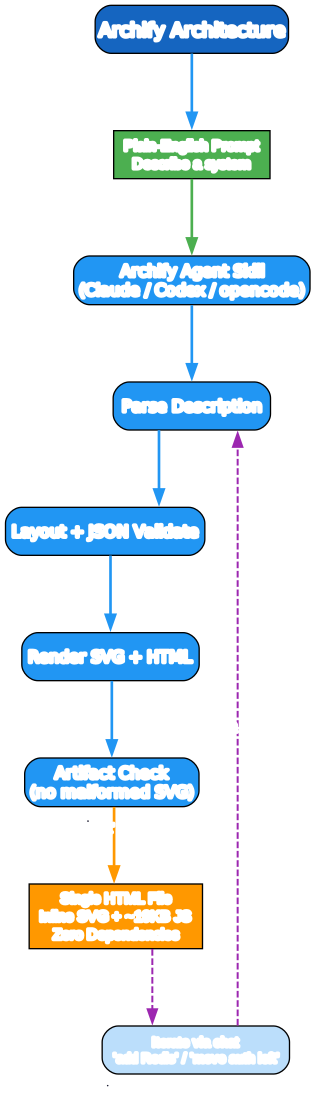
The pipeline runs inside the agent skill:
- Parse the plain-English description of the system or process
- Layout + JSON validate — the description is turned into a structured intermediate form and validated against a JSON schema
- Render the SVG and wrap it in a single HTML file with roughly 19 KB of inline JavaScript
- Artifact check — a post-render checker catches malformed SVG, non-finite coordinates, accidental diagonal arrows, and legend-crossing routes before delivery
- Deliver a single HTML file with zero dependencies
Once you have the file, you iterate by chatting with the agent — “add Redis,” “move auth to the left,” “show the retry path” — and the skill re-runs the pipeline. That iteration loop is where the agent-skill form factor pays off compared to a one-shot generator.
Key Features
The four pillars are a single-file output, a theme toggle, multi-format export, and keyboard accessibility.

- Single HTML File — inline SVG plus roughly 19 KB of JavaScript, no build step, no framework, no server. You share it by sending one file, and it opens in any browser.
- Dark/Light Toggle — one-click switch persisted via
localStorage, defaulting to the reader’sprefers-color-scheme. There is also a T keyboard shortcut. - Multi-Format Export — PNG, JPEG, WebP, and SVG, with raster exports rendered natively at up to 4× the source resolution with no upsampling blur (stepping down to 3×/2× automatically if browser canvas limits are hit). PNG copies straight to the clipboard for pasting into Slack, Notion, GitHub, or Figma.
- Keyboard Accessible — ARIA semantics, focus-visible styling, full menu navigation via arrow keys, Home/End, Enter/Space, and Esc. A
prefers-reduced-motioncheck disables the optional trace animation.
A nice touch: exported SVGs ship with both dark and light CSS variable sets plus a @media (prefers-color-scheme) rule, so a single SVG embedded in a GitHub README follows the reader’s color preference automatically.
Five Diagram Types
Archify is not a single-diagram generator. It produces five distinct diagram types, each with its own conventions.

- Architecture — system components, cloud resources, databases, services, boundaries, and security groups
- Workflow — request lifecycles, approval flows, CI/CD pipelines, runbooks, and incident response, with swimlanes, phase headers, and exception lanes
- Sequence — API call chains, request lifecycles, cache fallback patterns, auth checks, and service interactions over time
- Data Flow — data pipelines, ETL/ELT, analytics events, PII isolation, warehouse sync, and lineage
- Lifecycle — state machines, order/task/deployment lifecycles, retry paths, and terminal states
Components are described with semantic tech labels — aws.lambda, postgres, redis, github-actions, openai — which map to a coordinated color palette (frontend cyan, backend emerald, database violet, cloud amber, security rose, message bus orange, external slate) without requiring a full icon library. Each color has dark and light variants that switch together via the theme toggle.
Installation and Workflow
Archify installs as an agent skill via the skills CLI, with a choice of target agent.
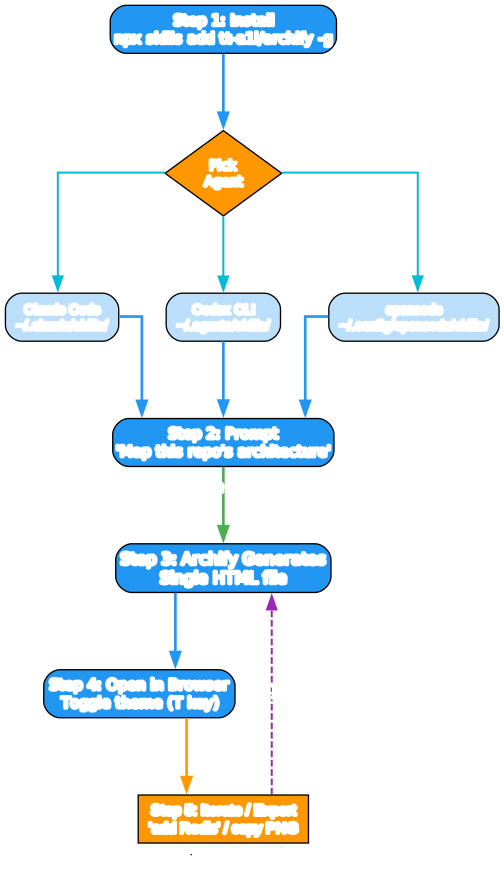
The steps:
- Install:
npx skills add tt-a1i/archify -g(or try without permanent install vianpx skills use tt-a1i/archify@archify --agent codex) - Pick an agent — Claude Code (
~/.claude/skills/), Codex CLI (~/.agents/skills/), or opencode (~/.config/opencode/skills/). Manual zip-based install is also supported for Claude.ai under Settings → Capabilities → Skills. - Prompt the agent, for example: “Use archify to map this repository’s runtime architecture.”
- Open the generated HTML file in a browser and toggle the theme with the T key
- Iterate and export — refine via chat (“add Redis,” “move auth left”) and then copy a PNG to the clipboard or export to SVG
URL parameters let you force a starting theme (?theme=light or ?theme=dark) and auto-open the export menu (?openExport=1), which is handy for embedded or pre-configured views.
Why It Matters
Archify is interesting for three reasons beyond diagram generation itself.
First, the single-file, zero-dependency output is a genuinely good deployment target. No build step, no framework, no server, no CDN — just an HTML file you can email, drop in a repo, or attach to a ticket. In a world of increasingly heavy tooling, that minimalism is a feature.
Second, the agent-skill form factor turns diagramming into a conversation. You do not drag boxes in a GUI; you describe and refine in language, and the skill re-runs a validated pipeline each time. That is a good fit for the way engineers actually think about systems — in terms of components and relationships, not pixel coordinates.
Third, the roadmap points at a real problem. The next milestone, v3.0, is a “JSON IR stabilization” — a minimal diagram.json intermediate format that enables local coordinate edits without drifting unrelated components, with git diff-friendly output. That is exactly the kind of intermediate representation that turns a generator into a maintainable artifact you can version-control and diff.
If you document systems, or if you build agent skills yourself, Archify is worth a careful read — both as a tool to use and as a template for what a well-built agent skill looks like.
Links:
- GitHub: https://github.com/tt-a1i/archify
- Install:
npx skills add tt-a1i/archify -g - Try without install:
npx skills use tt-a1i/archify@archify --agent codex - License: MIT

Enjoyed this post? Never miss out on future posts by following us


