Learn Lua in a Single Post: A Complete Lua Tutorial from Tables and Metatables to Coroutines and LÖVE
Lua is a small, fast, embeddable scripting language — designed to be dropped into C/C++ applications as an extension language. It’s the scripting layer behind Redis (EVAL), Nginx, Wireshark, World of Warcraft, Adobe Lightroom, and the LÖVE game engine, and it’s the configuration and plugin language of NeoVim. Lua’s secret is its simplicity: only 8 types, one universal data structure (the table), and metatables that let you build OOP, operators, and DSLs without changing the language.
This post teaches the whole language in five stages with runnable snippets. By the end you’ll understand tables as the universal data structure, closures and lexical scope, metatables (and the OOP they enable), and coroutines.
We target Lua 5.4 (with notes on LuaJIT, the trace-compiling JIT used by games and high-performance embeds).
The Roadmap
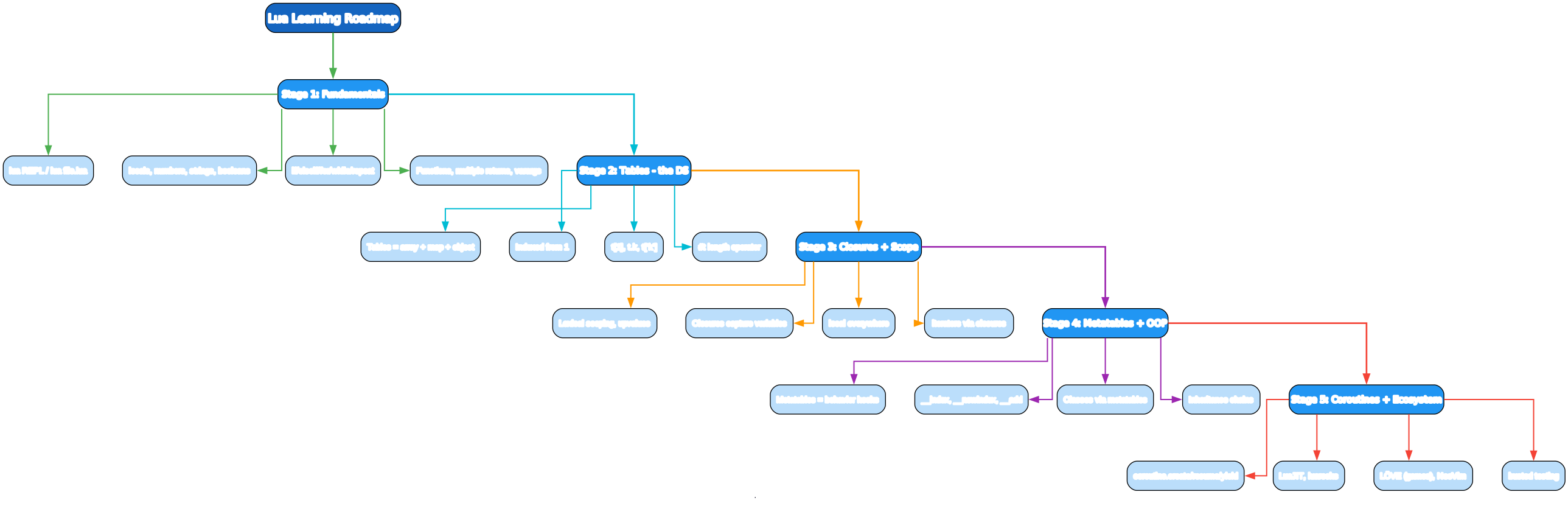
- Fundamentals —
luaREPL, locals, numbers/strings/booleans, control flow, functions - Tables — arrays + maps + objects, 1-indexed,
#tlength operator - Closures + Scope — lexical scoping, upvalues, iterators
- Metatables + OOP —
__index/__newindex/operators, classes & inheritance via metatables - Coroutines + Ecosystem —
coroutine.create/resume/yield, LuaJIT, luarocks, LÖVE, NeoVim
Stage 1 — Fundamentals
A program
print("Hello, Lua!")
Save as hello.lua and run with lua hello.lua. There’s also a REPL:
$ lua
> x = 5
> print(x * 2)
10
> = 1 + 2          -- = is shorthand for print in the REPL
3
Locals, numbers, strings, booleans
local n = 10          -- local = scoped to the current block (USE THIS)
x = 5                 -- global (assigned to _G) — avoid

local d = 3.14        -- all numbers are floats (Lua 5.3+ has integers too)
local s = "hello"     -- strings are immutable, byte-oriented
local t = true
local nothing = nil   -- nil = absence (the only non-value)

-- Everything is local unless declared with `local`. Always use `local`.
-- Globals are slow (a table lookup) and pollute _G.
Use local everywhere. Variables without local are global (stored in _G). Globals are slower (table lookup), pollute the global namespace, and cause hard-to-track bugs. Make local a reflex.
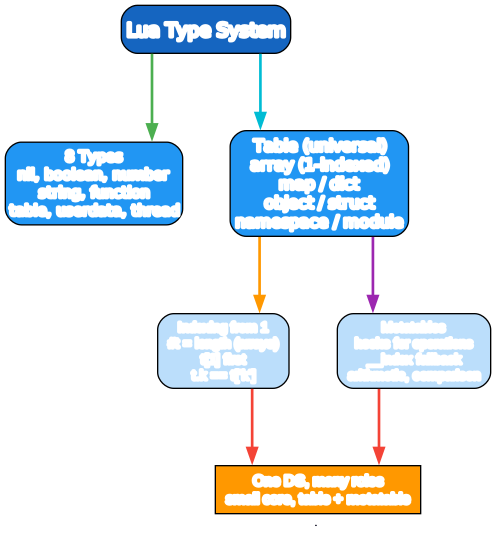
Lua has 8 types: nil, boolean, number, string, function, table, userdata, and thread (coroutine). Everything important is built on table.
Strings
local s = "hello"
local s2 = 'world'           -- single or double quotes
local multi = [[
multi-line
string with no escaping
]]

-- Concatenation with ..
local greeting = "Hello, " .. "Ada"

-- String library (string.X)
s:len(); s:upper(); s:lower(); s:sub(1, 3); s:rep(3)
string.format("%s is %d", "Ada", 30)

-- Lua patterns (not regex) — lighter-weight
("hello world"):gsub("o", "0")      -- "hell0 w0rld", 2
for word in ("a,b,c"):gmatch("[^,]+") do print(word) end  -- a, b, c
Strings are immutable and byte-oriented. Lua patterns (used by string.find/gsub/gmatch) are not regex — they’re a simpler pattern syntax (%d for digit, %a for letter, [^,] for “not comma”). Lightweight and fast, they cover most string-matching needs without a regex engine.
Control flow
if x > 0 then
    print("pos")
elseif x == 0 then
    print("zero")
else
    print("neg")
end

-- Numeric for
for i = 1, 5 do print(i) end       -- 1, 2, 3, 4, 5
for i = 1, 10, 2 do print(i) end    -- 1, 3, 5, 7, 9 (step 2)
for i = 5, 1, -1 do print(i) end    -- 5, 4, 3, 2, 1 (countdown)

-- Generic for (iterator function)
for k, v in pairs(map) do print(k, v) end    -- all key-value pairs
for i, v in ipairs(arr) do print(i, v) end   -- 1..n of a sequence

-- While and repeat
while cond do ... end
repeat ... until cond          -- do-while equivalent: body runs before check
for has two forms: numeric (for i = 1, 5) and generic (for k, v in pairs(t)). Ranges are inclusive on both ends (for i = 1, 5 goes 1..5). ipairs iterates the array part (1, 2, 3, … until a nil); pairs iterates everything.
Functions — multiple returns and varargs
local function add(a, b) return a + b end
local sum = function(a, b) return a + b end   -- anonymous form

-- Multiple returns
local function minmax(nums)
    -- return multiple values at once
    return math.min(table.unpack(nums)), math.max(table.unpack(nums))
end
local lo, hi = minmax({3, 1, 2})   -- lo=1, hi=3

-- Multiple assignment by position (extra values dropped, missing filled with nil)
local a, b, c = 1, 2                -- a=1, b=2, c=nil
local x, y = y, x                   -- swap (a Lua idiom)

-- Varargs: ... = all extra args
local function sum(...)
    local total = 0
    for _, v in ipairs({...}) do total = total + v end  -- {...} packs varargs
    return total
end
sum(1, 2, 3)                        -- 6

-- select('#', ...) = count; select(n, ...) = args from n onward
local function log(fmt, ...)
    print(string.format(fmt, ...))
end
Functions can return multiple values and be assigned to multiple variables — a very common idiom (local x, y = y, x swap; local ok, err = pcall(f)). ... is varargs (any number of args), {...} packs them into a table. This is one of Lua’s most ergonomic features.
Stage 2 — Tables: The Universal Data Structure
Tables are everything
-- Array (sequence, 1-indexed)
local nums = {10, 20, 30}    -- nums[1]=10, nums[2]=20, nums[3]=30
nums[4] = 40                  -- append-ish
print(nums[1])                -- 10

-- Map / dictionary
local p = { name = "Ada", age = 30 }   -- p.name == p["name"] == "Ada"
p.email = "a@b.com"
print(p["name"], p.age)

-- Mixed
local m = { "first", "second", count = 2, ["nested key"] = true }
The table is the only data-structure type in Lua — it serves as array, map, object, struct, and namespace. As an array it’s a sequence indexed from 1 (not 0!). t.name and t["name"] are the same thing — syntactic sugar for table access.
1-indexed arrays and the # length operator
local arr = { "a", "b", "c" }
print(#arr)          -- 3 — length of a sequence (defined as the boundary index where it becomes nil)
print(arr[1])        -- "a" — first element

for i = 1, #arr do
    print(arr[i])
end
for i, v in ipairs(arr) do
    print(i, v)      -- 1 a / 2 b / 3 c
end

table.insert(arr, "d")          -- append
table.insert(arr, 1, "z")       -- insert at position 1
table.remove(arr, 2)             -- remove index 2
table.sort(arr)                  -- in-place sort
table.concat({"a","b","c"}, "-") -- "a-b-c"
Lua arrays are 1-indexed — arr[1] is the first element. This trips newcomers from C/Python/JS. The # operator gives the length of a sequence (a table with no nil holes from 1 to n); it’s undefined for sparse/nil-holey tables. The table library (table.insert/remove/sort/concat) provides array operations.
Tables as maps
local m = {}
m["one"] = 1
m.two = 2
m[3] = "three"          -- numeric key, distinct from string keys

-- Iteration (pairs gives all; order unspecified)
for k, v in pairs(m) do print(k, v) end

-- nil removes a key
m["one"] = nil
Tables are hash maps (for non-integer keys) with an array part optimized for small positive integers. nil-ing a key deletes it. pairs iterates all key-value pairs (order unspecified); ipairs iterates the sequence part (1, 2, 3, …).
Tables as modules
-- A "module" is just a table of functions
local M = {}
function M.add(a, b) return a + b end
function M.mul(a, b) return a * b end
return M

-- Use:
-- local Math = require("math_extras")
-- Math.add(1, 2)
Modules are tables. require("name") loads and caches a module (returns the table the module file returns). This is the entire module system — there’s no special module syntax, just tables and require.
Stage 3 — Closures and Scope

Lexical scoping and closures
-- Functions capture variables from their enclosing scope (upvalues)
local function make_counter()
    local count = 0
    return function()
        count = count + 1
        return count
    end
end

local c = make_counter()
print(c())    -- 1
print(c())    -- 2
print(c())    -- 3
Lua has lexical scoping with proper closures. An inner function captures the outer local as an upvalue — even after make_counter returns, the upvalue lives as long as the closure does. This is the foundation of iterators, callbacks, and OOP patterns (below).
Blocks and scoping
-- do...end creates a block with its own locals
do
    local temp = compute()
    use(temp)
end
-- temp is gone here

-- local is scoped to the enclosing block (function, if/for, do-end)
local function f()
    local x = 1
    for i = 1, 5 do
        local y = i * 2      -- y is scoped to the for-body
        x = x + y
    end
    -- y is out of scope here
    return x
end
do ... end introduces a scope block, useful for limiting local lifetime. Locals are scoped to their enclosing block; globals (_G) are visible everywhere.
Iterators via closures
-- A stateless iterator for a generic for loop
local function range(n)
    local i = 0
    return function()
        i = i + 1
        if i <= n then return i end
    end
end

for i in range(5) do print(i) end    -- 1, 2, 3, 4, 5

-- State iterator: function + invariant state + control variable
-- (more efficient form)
local function ipairs_alt(t)
    return function(t, i)
        i = i + 1
        local v = t[i]
        if v ~= nil then return i, v end
    end, t, 0
end
A generic for (for v in iter() do ... end) calls the iterator function repeatedly until it returns nil. Closures make stateful iterators easy (range above). The low-level form returns (f, state, control) and the for calls f(state, control) each iteration — more efficient but less ergonomic.
Stage 4 — Metatables and OOP
Metatables are the magic that lets one type of table behave differently — they hook into operations like indexing, arithmetic, and comparison. All of Lua’s OOP and operator overloading is built on metatables.
Metatable basics
local t = setmetatable({}, {
    __index = function(table, key)
        return "default for " .. tostring(key)
    end
})

print(t.foo)   -- "default for foo"   — __index is called when key is missing
A metatable is a table attached to another table that defines behavior via metamethods (keys starting with __). The most common:
__index— called (or consulted as a table) when a key is not found in the table. This is how inheritance and classes work.__newindex— called when assigning a new key (lets you intercept writes).__add/__sub/__mul/__div/__mod— arithmetic operators.__eq/__lt/__le— comparison.__concat—..operator.__call— calling a table like a function.__tostring—tostring(t)/print(t).
Operator overloading
local Vector = {}
Vector.__index = Vector          -- methods lookup falls back to Vector

function Vector.new(x, y)
    return setmetatable({x = x, y = y}, Vector)
end

function Vector.__add(a, b)       -- overload +
    return Vector.new(a.x + b.x, a.y + b.y)
end

function Vector.__tostring(v)
    return string.format("(%d, %d)", v.x, v.y)
end

local a = Vector.new(1, 2)
local b = Vector.new(3, 4)
print(a + b)                       -- (4, 6)
__add overloads +, __tostring makes print show something useful. Vector.__index = Vector means “when a vector instance doesn’t have a key, fall back to the Vector table” — that’s how method dispatch works (below).
Classes via metatables
local Account = {}
Account.__index = Account         -- key: instances fall back to Account

function Account.new(balance)
    local self = setmetatable({}, Account)
    self.balance = balance or 0
    return self
end

function Account:deposit(amount)   -- : defines a method; self is the first arg
    self.balance = self.balance + amount
end

function Account:withdraw(amount)
    self.balance = self.balance - amount
end

local a = Account.new(100)
a:deposit(50)                      -- sugar for Account.deposit(a, 50)
print(a.balance)                   -- 150
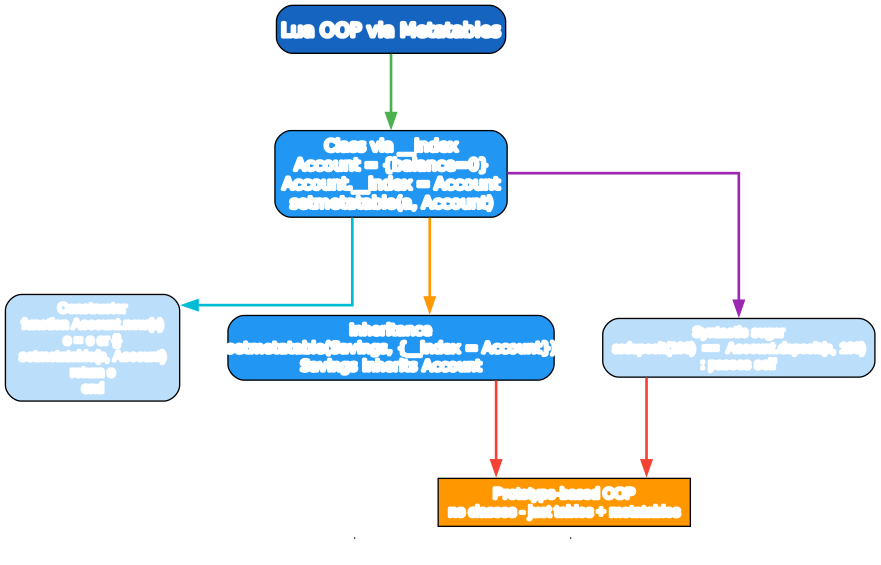
The : sugar defines a method that receives self as the first parameter — a:deposit(50) is Account.deposit(a, 50). Combined with Account.__index = Account, this gives you class-based OOP: instances look up missing keys (their methods) in the Account table.
Inheritance
local Savings = setmetatable({}, { __index = Account })   -- Savings inherits Account
Savings.__index = Savings

function Savings.new(balance, rate)
    local self = Account.new(balance)
    setmetatable(self, Savings)
    self.rate = rate
    return self
end

function Savings:apply_interest()
    self.balance = self.balance + self.balance * self.rate
end

local s = Savings.new(100, 0.05)
s:deposit(50)            -- inherited from Account
s:apply_interest()       -- Savings-specific
Inheritance is a chain of __index lookups: an instance’s metatable is Savings, whose __index is Account. Missing keys chain upward. This is prototype-based OOP — tables and metatables, no classes-as-a-language-feature.
Stage 5 — Coroutines and the Ecosystem
Coroutines — cooperative concurrency
-- coroutine.create returns a thread; resume runs until yield; yield suspends
local co = coroutine.create(function(a, b)
    print("step 1", a)
    local c = coroutine.yield(a + b)    -- suspend, return a+b to resume
    print("step 2", c)
    return "done"
end)

print(coroutine.resume(co, 1, 2))    -- step 1 1 / 3 (yield returned a+b=3)
print(coroutine.resume(co, 10))      -- step 2 10 / done
Coroutines are cooperative (not preemptive) — a coroutine runs until it yields, then the caller resumes it. They’re single-threaded (no parallelism) but great for generators, iterators, and async-style code. The resume/yield pair exchanges values in both directions.
-- Generator pattern
local function gen(n)
    return coroutine.wrap(function()
        for i = 1, n do coroutine.yield(i * i) end
    end)
end

for v in gen(5) do print(v) end    -- 1, 4, 9, 16, 25
coroutine.wrap returns a function that resumes the coroutine — clean for use in for loops.
The toolchain
lua script.lua                  # PUC-Rio reference interpreter
luajit script.lua               # LuaJIT (trace compiler, much faster, with FFI)

luarocks install busted          # install a package
luarocks make mything-1.0-1.rockspec   # build/install local
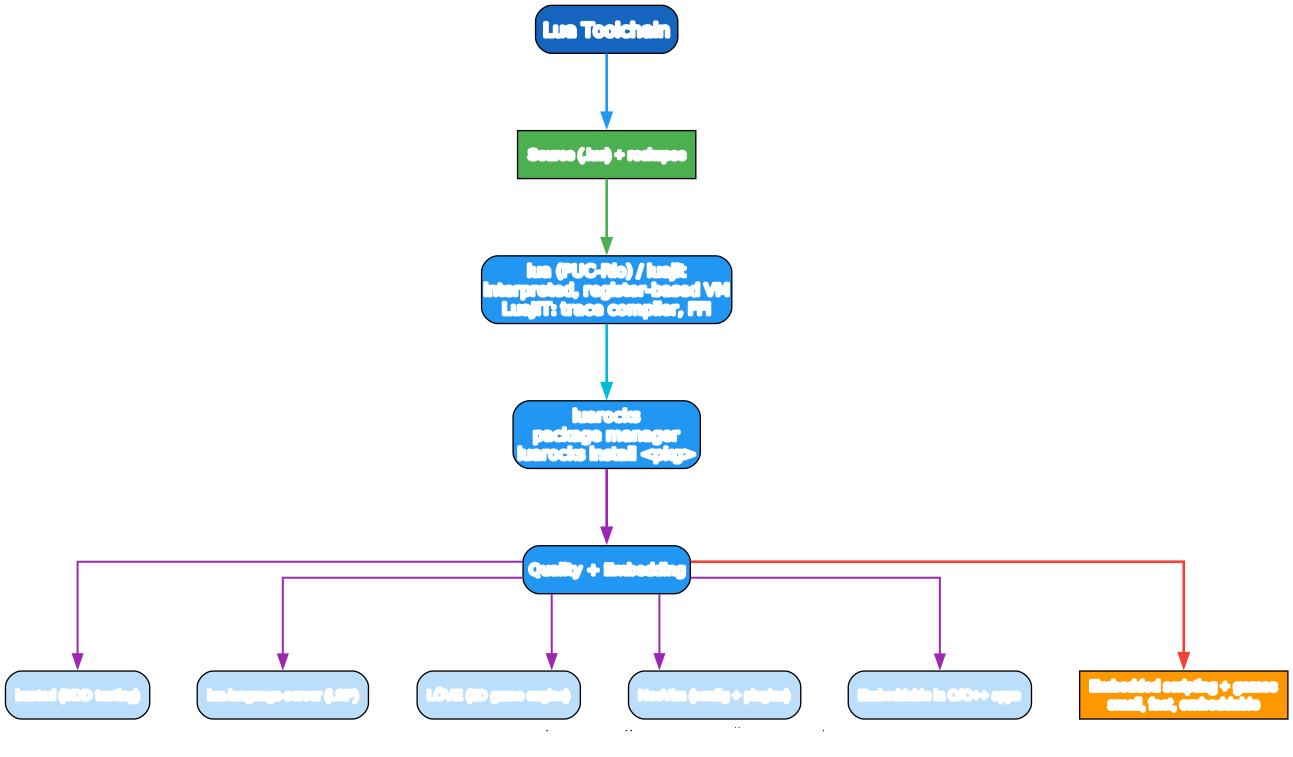
lua— PUC-Rio reference interpreter, the standard.- LuaJIT — a trace-compiling JIT, much faster than
lua, with an FFI for calling C directly. Used by games (LÖVE) and high-performance embeds. Targets Lua 5.1 language (with some 5.2/5.3 compat). luarocks— the package manager;luarocks install <name>.- lua-language-server — the LSP for editor support (VS Code’s “Lua” extension).
- busted — BDD-style testing framework.
- luacheck / selene — static analysis / linting.
Where Lua lives — embedding and games
/* Embedding Lua in C: the canonical pattern */
#include "lua.h"
#include "lauxlib.h"

int main(void) {
    lua_State *L = luaL_newstate();
    luaL_openlibs(L);
    luaL_dostring(L, "print('Hello from Lua!')");
    lua_close(L);
    return 0;
}
Lua’s design goal is embedding — it’s small (~200KB), ANSI C, with a clean C API. Apps embed it for scripting, config, plugins. The C host exposes functions to Lua via the stack; Lua calls back into C the same way.
Notable Lua-based ecosystems
- LÖVE (
love2d.org) — a 2D game framework; the most popular Lua game engine. - NeoVim — config and plugins are Lua (Lua 5.1 / LuaJIT). The whole editor is scriptable in Lua.
- Roblox — uses Luau, a Lua 5.1 derivative, for game scripting (sandboxed, type-checked, JIT).
- Redis —
EVALruns Lua scripts atomically server-side. - Nginx / OpenResty — Lua scripting for request handling.
- World of Warcraft — UI addons are Lua.
A Quick-Start Checklist
- Always
local— globals are slow, error-prone, and pollute_G. - Tables are 1-indexed —
arr[1]is the first element. Adjust your loops. - Tables are the universal DS — array, map, object, module, all in one.
pairsfor maps,ipairsfor arrays — and#for sequence length.- Multiple returns are a core idiom —
local ok, err = pcall(f),local x, y = y, x. - Metatables = behavior —
__indexfor inheritance,__addfor+, etc. :for methods (obj:method()passesself);.for plain fields/functions.- Coroutines for generators and cooperative async — not parallelism.
luarocksfor packages, busted for tests, lua-language-server for your editor.- Embed when needed — Lua’s design goal is to be called from C/C++.
Common Pitfalls
- Forgetting
local— silent globals; they leak across modules and are slower. Alwayslocal. - 0 vs 1 indexing —
arr[0]isnilin a 1-indexed sequence; off-by-ones are common if you’re switching from JS/Python. #on sparse tables — the length operator is undefined for tables with nil holes; only use it on dense sequences.ipairsstops at firstnil— if your array has a nil in the middle,ipairsstops;pairsdoesn’t but is unordered.- Float numbers — pre-5.3, all numbers were doubles; 5.3+ has integers but they convert on division (
//for integer division). - Tables are reference types —
local b = aaliases the same table;b.x = 1affectsa. Copy explicitly if needed. - Metatable set per-instance —
setmetatable({}, MT); if you forget, methods/operators won’t apply. :vs.—obj:method()passesself;obj.method()does not. Mixing them up is a common bug.==with tables — compares by reference, not value, unless__eqis set. Two distinct empty tables are not equal.- LuaJIT vs PUC-Rio version gaps — LuaJIT targets Lua 5.1 (with some 5.2 backports); code written for 5.4 may not run on LuaJIT. Check your target.
What to Learn Next
- Programming in Lua by Roberto Ierusalimschy (Lua’s creator) — lua.org/pil the canonical book (free older edition online).
- Lua reference manual — lua.org/manual/5.4 the precise spec.
- Lua Users Wiki — lua-users.org/wiki tutorials, patterns, and pitfalls (“Lua Pitfalls” page is gold).
- LuaJIT docs — luajit.org for the JIT and FFI.
- LÖVE docs — love2d.org/wiki for game development.
- NeoVim Lua guide — neovim.io/doc/user/lua-guide for editor scripting.
- luarocks — luarocks.org the package registry.
- busted — lunarmodules.github.io/busted the testing framework.
Lua’s strength is its smallness: 8 types, one data structure, metatables, and a clean embedding API. The whole language is learnable in an afternoon, yet it powers Redis, NeoVim, and game engines. Get tables + closures + metatables straight, and you’ve got Lua.
Good luck — and local everything.
Resources:
- Lua: https://www.lua.org/
- Manual: https://www.lua.org/manual/5.4/
- LuaJIT: http://luajit.org/
- luarocks: https://luarocks.org/
- LÖVE: https://love2d.org/

Enjoyed this post? Never miss out on future posts by following us