Learn Kotlin in a Single Post: A Complete Kotlin Tutorial from Null Safety and Coroutines to Compose and KMP
Kotlin is JetBrains’ pragmatic answer to Java: 100% interoperable (runs on the JVM, calls Java and is called by Java), but with null safety baked into the type system, concise syntax, data classes, extension functions, and a first-class coroutine model that makes async code readable. It’s the official Android language, a growing server-side choice, and via Kotlin Multiplatform (KMP), a way to share code across iOS, Android, JS, and native.
This post teaches the whole language in five stages with runnable snippets. By the end you’ll understand null safety, data classes, sealed types, extension functions, coroutines, and the Compose/Gradle/KMP ecosystem.
We target Kotlin 2.0+. Everything here compiles on a current toolchain.
The Roadmap
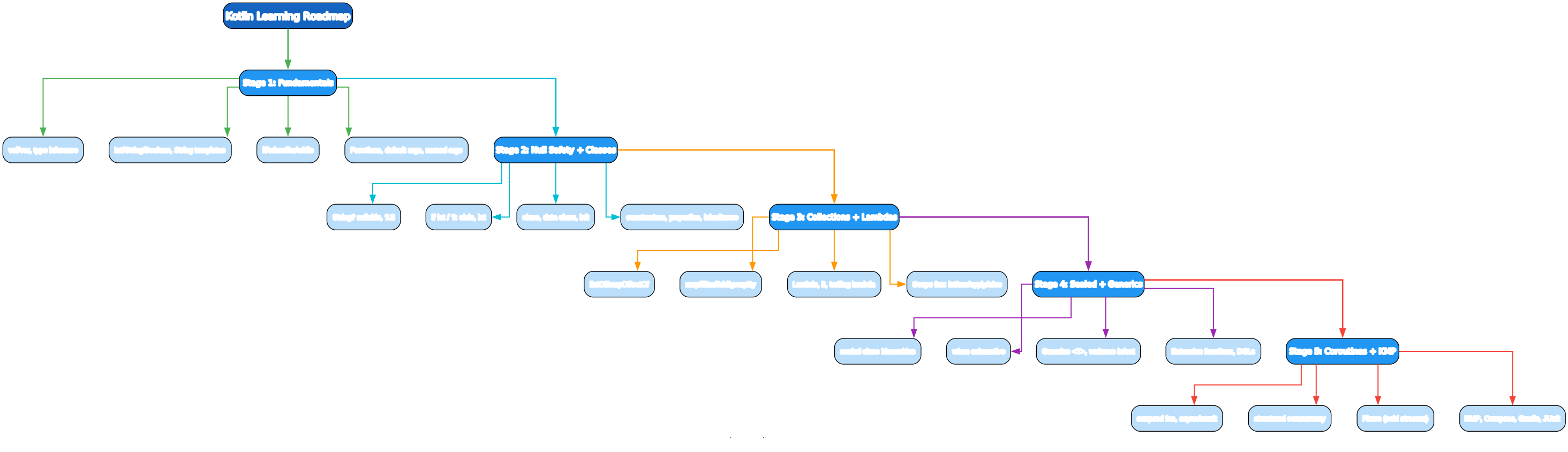
- Fundamentals —
val/var, type inference, control flow, functions, default/named args - Null Safety + Classes —
String?,?./!!, elvis,let,class,data class, inheritance - Collections + Lambdas —
map/filter/fold, scope functions (let/run/apply/also) - Sealed + Generics + Extensions — sealed hierarchies, exhaustive
when, variance, DSLs - Coroutines + KMP —
suspend, structured concurrency,Flow, Compose, Gradle, JUnit
Stage 1 — Fundamentals
A program
fun main() {
    println("Hello, Kotlin!")
}
main is the entry point — no class, no static. Run with:
kotlinc hello.kt -include-runtime -o hello && ./hello    # compile + run
gradle run                                                 # via Gradle
kotlin hello.kt                                            # script mode (kotlin 2.0+)
val vs var and type inference
val n = 10          // val = read-only (immutable reference) — DEFAULT
var x = 5           // var = mutable
// n = 20          // error — val is immutable

val pi: Double = 3.14      // explicit type annotation
val name = "Ada"           // inferred as String
val items: List<Int> = listOf(1, 2)

// Type is inferred at compile time — no runtime cost
val by default, var only when you must reassign. Like Swift’s let/var — immutability-by-default catches bugs.
Basic types and strings
val n: Int = 10
val d: Double = 3.14
val b: Boolean = true
val c: Char = 'A'
val s: String = "Hello"

val greeting = "Hi, $name! ${1 + 2}"   // string templates — $var, ${expr}
val multi = """
    multi-line
    string
""".trimIndent()                        // raw string (triple-quoted)

// Strings are immutable
s.length; s.uppercase(); s.startsWith("H")
s.split(",")                            // List<String>
"hello".replace("l", "L")
$name and ${expr} interpolation is built-in; triple-quoted strings are raw (no escapes) and multi-line. String is immutable.
Control flow
if (x > 0) { } else if (x == 0) { } else { }    // if is an expression
val label = if (x > 0) "pos" else "neg"          // returns a value

when (day) {                                     // when = super switch
    "MON", "TUE" -> "weekday"
    "SAT", "SUN" -> "weekend"
    else -> "other"
}
val label2 = when (x) {
    is Int -> "int"                              // type check (smart-casts!)
    in 1..10 -> "small"
    else -> "?"
}

for (i in 0 until 5) { }      // 0..4 exclusive
for (i in 0..5) { }           // 0..5 inclusive
for (item in list) { }
for ((k, v) in map) { }       // destructure in loop
while (cond) { }
if and when are expressions — they return values. when is the powerful replacement for switch: it supports type checks (is), ranges (in 1..10), and arbitrary conditions. No fallthrough.
Functions
fun add(a: Int, b: Int): Int = a + b           // expression body, type inferred for `=`
fun add2(a: Int, b: Int): Int { return a + b } // block body, explicit type

// Default and named arguments — a major win over Java
fun greet(name: String, greeting: String = "Hi") = "$greeting, $name!"
greet("Ada")                          // Hi, Ada!
greet("Ada", greeting = "Hey")        // named arg
greet(name = "Ada", greeting = "Yo")  // all named — order-independent

// Vararg + spread
fun sum(vararg nums: Int): Int = nums.sum()
sum(1, 2, 3)                          // 6
val xs = intArrayOf(1, 2, 3)
sum(*xs)                              // spread

// Top-level functions — no class needed (unlike Java)
fun topLevelHelper() { }
Default and named arguments are a big ergonomic win — they replace the “telescoping constructors” problem in Java. Top-level functions mean you don’t have to stuff everything into a class.
Stage 2 — Null Safety and Classes
Null safety
val s: String = "hi"        // non-null — cannot hold null
// val bad: String = null    // compile error
val maybe: String? = null     // String? = nullable

maybe.length                   // compile error — may be null
maybe?.length                  // safe call — Int? (null if maybe is null)
maybe!!.length                 // force — CRASHES if null

// elvis operator — default if null
val len: Int = maybe?.length ?: 0

// let — execute block only if non-null
maybe?.let { println("length ${it.length}") }

// if-null check
if (maybe != null) {
    maybe.length              // smart-cast to String (non-null) — no !! needed
}
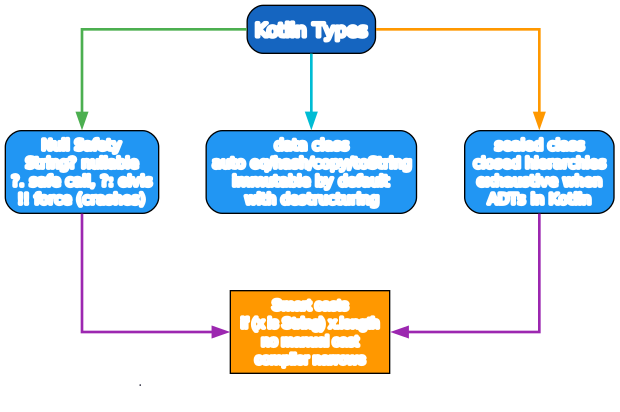
Null safety is the signature Kotlin feature. String and String? are different types — the compiler forces you to handle nil before using a nullable. ?. (safe call), ?: (elvis default), let (execute-if-non-null), and smart casts (if (x != null) x.foo() — the compiler narrows) are the tools. Avoid !! — it crashes on null and defeats the safety.
Classes and properties
class Person(val name: String, var age: Int)   // primary constructor + properties
// val name: read-only property, var age: mutable property — both auto-generated

val p = Person("Ada", 30)
p.name                          // "Ada" (property, no getter syntax)
p.age = 31

class Greeter(val greeting: String = "Hi") {   // default in constructor
    init { println("init runs after primary ctor") }   // init block
    fun greet(name: String) = "$greeting, $name!"
}
Kotlin’s primary constructor lives in the class header; val/var parameters become properties automatically. This is the kind of conciseness Java lacks — a Kotlin class is often one line where Java would be ten.
Data classes
data class User(val name: String, val age: Int)

val u = User("Ada", 30)
val u2 = u.copy(age = 31)          // non-destructive copy
u == User("Ada", 30)               // true — value equality (auto eq/hash)
val (name, age) = u                 // destructuring
println(u)                           // "User(name=Ada, age=30)" — auto toString
data class auto-generates equals/hashCode/toString/copy/componentN (for destructuring). This is the Kotlin answer to Java’s records, predating them by years. Use it for value/data carriers — almost never write a plain class for data.
Inheritance and interfaces
open class Animal(val name: String) {       // open = can be inherited (final by default!)
    open fun sound() = "..."                // open = overridable
}

class Dog(name: String) : Animal(name) {
    override fun sound() = "woof"
}

interface Swimmer { fun swim() }              // interfaces
class Duck(name: String) : Animal(name), Swimmer {
    override fun sound() = "quack"
    override fun swim() { }
}
Classes are final by default — you must explicitly mark them open to allow inheritance (the opposite of Java). This is deliberate: it prevents accidental inheritance and enables better compiler optimization. Single class inheritance, multiple interface implementation (like Java).
Sealed classes
sealed class Result {
    data class Ok(val value: Int) : Result()
    data class Error(val msg: String) : Result()
    object Loading : Result()
}

fun describe(r: Result) = when (r) {        // when is EXHAUSTIVE on sealed
    is Result.Ok -> "ok: ${r.value}"          // smart-cast: r.value accessible
    is Result.Error -> "err: ${r.msg}"
    Result.Loading -> "loading"
}                                            // no else needed — compiler knows all cases
sealed class creates a closed hierarchy — the compiler knows every subtype, so when is exhaustive without an else. This is Kotlin’s algebraic data types, and combined with smart casting (is Result.Ok narrows so r.value works without a cast), it makes state handling bulletproof.
Stage 3 — Collections and Lambdas

Collections
val list = listOf(1, 2, 3)              // List<Int> (read-only view)
val mutable = mutableListOf(1, 2, 3)   // MutableList<Int>
val map = mapOf("a" to 1, "b" to 2)    // Map<String, Int>
val set = setOf(1, 2, 3)

list[0]; list.size; list.isEmpty()
list + 4                               // new list [1, 2, 3, 4]
map["c"] = 3                            // only on MutableMap
map["a"]                                // Int? — null if missing
map.getValue("a")                       // Int — throws if missing

// Iteration
for (n in list) { }
for ((k, v) in map) { }
list.forEach { println(it) }            // 'it' = the single param
Kotlin distinguishes read-only (List, Map) from mutable (MutableList, MutableMap) collection interfaces — a read-only List is a view that might be backed by a mutable list, but you can’t mutate through it. Prefer read-only — it expresses intent and prevents accidental mutation.
Collection operations
val nums = listOf(1, 2, 3, 4, 5)

nums.map { it * 2 }                       // [2, 4, 6, 8, 10]
nums.filter { it > 2 }                    // [3, 4, 5]
nums.filter { it > 2 }.map { it * 2 }    // chained pipelines
nums.reduce { acc, n -> acc + n }         // 15
nums.fold(0) { acc, n -> acc + n }         // 15 (with initial)
nums.groupBy { if (it % 2 == 0) "even" else "odd" }  // {odd=[1,3,5], even=[2,4]}
nums.sortedByDescending { it }
nums.associateBy { it }                   // {1=1, 2=2, ...}
nums.partition { it > 2 }                 // ([3,4,5], [1,2]) pair
nums.chunked(2)                           // [[1,2],[3,4],[5]]
nums.distinctBy { it % 3 }
nums.sumOf { it }; nums.average()
Lambdas
val sq: (Int) -> Int = { x -> x * x }     // full lambda
val sq2: (Int) -> Int = { it * it }       // 'it' = implicit single param
sq(5); sq2(5)                              // 25

// Higher-order functions
fun applyTwice(f: (Int) -> Int, x: Int) = f(f(x))
applyTwice({ it + 1 }, 5)                  // 7

// Trailing lambda — last arg is a lambda, move it outside parens
list.map { it * 2 }                        // == list.map({ it * 2 })
list.fold(0) { acc, n -> acc + n }         // last-arg lambda outside
it is the implicit name for a single lambda parameter — extremely common and readable. Trailing lambda syntax (last arg is a lambda → move outside ()) makes Kotlin read like a DSL: list.map { it * 2 } instead of list.map({ it * 2 }).
Scope functions: let / run / apply / also / with
val p: Person? = getPerson()
p?.let { println(it.name) }               // let: 'it' = the object, returns block result

val result = p.run { "$name is $age" }     // run: 'this' = the object, returns block result

val builder = StringBuilder().apply {     // apply: 'this' = the object, returns the object
    append("a"); append("b")              // great for builders/config
}

val also = p.also { log(it) }              // also: 'it' = the object, returns the object (side effects)

with(p) { println("$name $age") }          // with: 'this' = the object, returns block result
These five scope functions differ in whether they use it or this and whether they return the object or the block result. The mnemonic: apply/also return the object (good for builders/chains); let/run/with return the block result (good for transforms). They’re conveniences — you can always write the equivalent without them.
Sequences (lazy)
nums.asSequence()
    .filter { it > 1 }
    .map { it * 2 }
    .toList()                              // lazy like Java Stream, no intermediate collections
Use Sequence for large pipelines where intermediate collections would be wasteful — it processes element-by-element through the whole chain, like a lazy stream.
Stage 4 — Sealed, Generics, Extensions, DSLs
Extension functions
fun String.shout() = uppercase() + "!"    // adds a method to String
"hello".shout()                           // "HELLO!"

fun List<Int>.sumEven() = filter { it % 2 == 0 }.sum()
listOf(1, 2, 3, 4).sumEven()               // 6
Extension functions add methods to any type (including library/SDK types) without modifying them or inheriting. This is how Kotlin builds DSLs and adds ergonomic helpers to String, List, etc. They resolve statically (based on the declared type, not dynamic dispatch) — keep that in mind.
Generics and variance
class Box<T>(val value: T)
fun <T> first(xs: List<T>): T = xs[0]

// Constraints
fun <T : Comparable<T>> max(a: T, b: T) = if (a > b) a else b

// Variance
class Producer<out T> { fun produce(): T = ... }     // out = covariant (producer)
class Consumer<in T> { fun consume(x: T) = ... }     // in = contravariant (consumer)

// reified — type available at runtime (only in inline functions)
inline fun <reified T> isA(x: Any) = x is T          // T's type is accessible
isA<String>("hi")                                    // true
inline fun <reified T> listOf() = ...                 // enables type-based overloading
Kotlin generics are reified only for inline functions with reified — otherwise erased like Java. Variance is explicit (out/in) rather than use-site wildcards (Java’s ? extends/? super), which most people find clearer.
DSLs — type-safe builders
fun html(block: Html.() -> Unit): Html = Html().apply(block)

class Html {
    var body: String = ""
    fun body(block: () -> String) { body = block() }
}

html {
    body = "content"
}

// @DslMarker prevents accidental nesting leaks
@DslMarker annotation class HtmlDsl
Kotlin’s trailing-lambda + receiver-lambda syntax (Html.() -> Unit — a lambda where this is an Html) makes type-safe builders clean. This is how Gradle Kotlin DSL, kotlinx.html, and Compose all work. @DslMarker stops a child builder from accidentally calling a parent’s methods.
Stage 5 — Coroutines and KMP
suspend functions
suspend fun fetch(url: String): String {
    delay(100)                              // non-blocking sleep
    return "data from $url"
}

// runBlocking bridges sync into async (main / tests, NOT production)
fun main() = runBlocking {
    val data = fetch("http://x")            // suspends, doesn't block
    println(data)
}
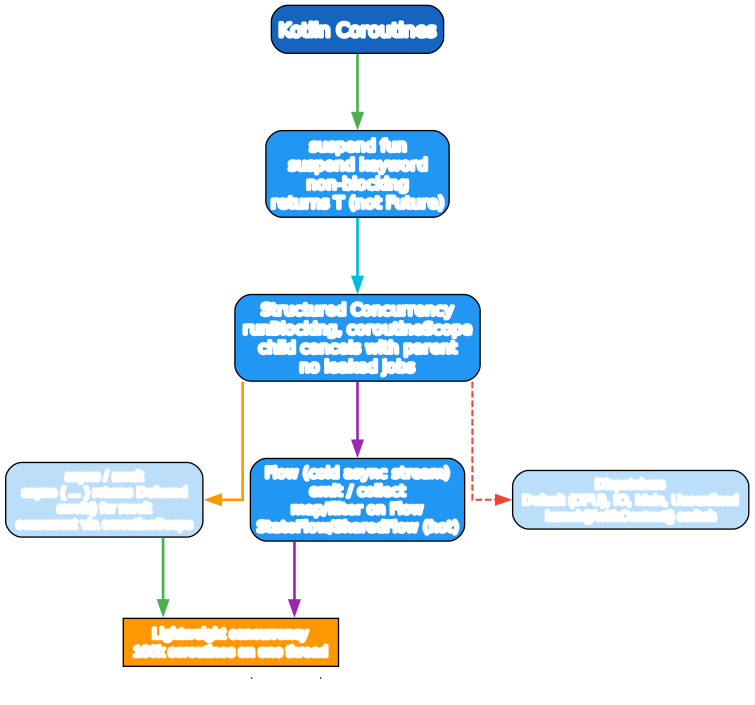
A suspend function can suspend (yield the thread) and resume later. It returns T directly, not a Future<T> — the suspend/resume is transparent in the type signature. Coroutines are lightweight (~KB stack, not an OS thread) — you can have 100k on one thread.
Structured concurrency
suspend fun loadAll(): List<String> = coroutineScope {
    val a = async { fetch("url1") }        // launch concurrent child
    val b = async { fetch("url2") }
    listOf(a.await(), b.await())            // await both — concurrent
    // if the parent cancels, children cancel automatically — no leaks
}

// launch — fire-and-forget within a scope
val job = launch { repeat(10) { delay(100); println(it) } }
job.cancel()                                // cooperative cancel
Structured concurrency is the key idea: every coroutine has a parent scope; if the parent cancels, children cancel; if a child throws, it propagates to the parent. No leaked coroutines. coroutineScope { } creates a scope; async { } returns a Deferred you await; launch { } is fire-and-forget.
Dispatchers
withContext(Dispatchers.IO) { fileWrite() }     // switch to IO pool for blocking I/O
launch(Dispatchers.Default) { cpuWork() }       // CPU pool
launch(Dispatchers.Main) { updateUI() }         // UI thread (Android)
Flow — cold async streams
fun numbers(): Flow<Int> = flow {
    for (i in 0..5) { emit(i); delay(100) }
}

// Cold — nothing runs until you collect
numbers().filter { it > 1 }.map { it * 2 }.collect { println(it) }

// Hot flows — StateFlow (state), SharedFlow (events)
val state = MutableStateFlow(0)
state.value = 1                              // collectors receive
Flow is the cold async stream (like a lazy async iterator). StateFlow/SharedFlow are hot flows for reactive state/events — the backbone of modern Android state management.
Compose — declarative UI
@Composable
fun Counter() {
    var count by remember { mutableStateOf(0) }   // state
    Column {
        Text("Count: $count")
        Button(onClick = { count++ }) { Text("Inc") }
    }
}
Jetpack Compose is Android’s declarative UI — you describe the UI as a function of state (@Composable), and the framework recomposes when state changes. remember + mutableStateOf holds state across recompositions. This is the modern Android UI toolkit (and now multiplatform via Compose Multiplatform).
The Toolchain
Gradle (Kotlin DSL)
// build.gradle.kts
plugins {
    kotlin("jvm") version "2.0.0"
    application
}
application { mainClass.set("MainKt") }
dependencies {
    implementation("org.jetbrains.kotlinx:kotlinx-coroutines-core:1.8.0")
    testImplementation(kotlin("test"))
}
gradle run
gradle build
gradle test
Kotlin Multiplatform (KMP)
// build.gradle.kts
kotlin {
    androidTarget()
    iosArm64(); iosSimulatorArm64()
    jvm()
    js { browser() }
    sourceSets {
        val commonMain by getting { dependencies { /* shared */ } }
        val androidMain by getting { /* Android-specific */ }
    }
}
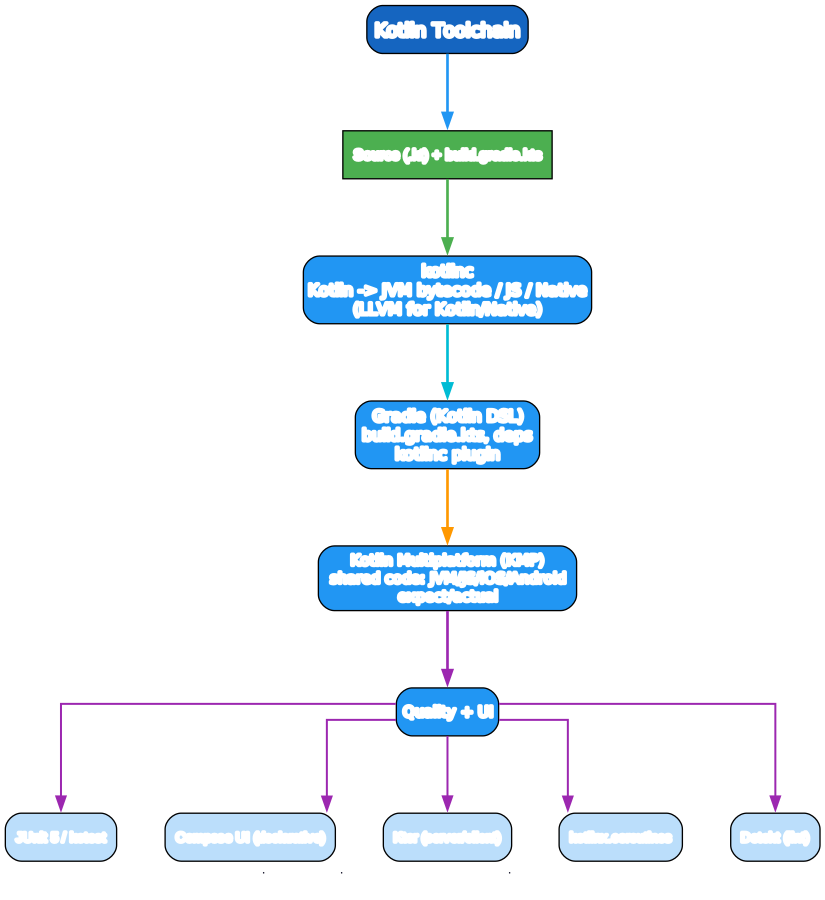
KMP lets you write shared business logic in commonMain, with expect/actual declarations for platform-specific implementations. iOS gets a native framework (compiled to LLVM); Android gets JVM; web gets JS. UI stays platform-specific (Compose Multiplatform is changing that).
Testing
import kotlin.test.Test
import kotlin.test.assertEquals

class CounterTest {
    @Test fun increments() {
        val c = Counter(); c.inc()
        assertEquals(1, c.count)
    }
}
gradle test # JUnit 5 via kotlin-test
Tooling
- Gradle (Kotlin DSL) — the build system;
build.gradle.kts. - IntelliJ IDEA / Android Studio — first-class Kotlin support (JetBrains makes both).
kotlinc— the compiler;kotlinREPL.- Ktor — async server/client framework (JetBrains).
- Compose / Compose Multiplatform — declarative UI (Android + iOS/desktop/web).
- kotlinx.coroutines / kotlinx.serialization — official libraries.
- Detekt / ktlint — static analysis and formatting.
- JUnit 5 / Kotest — testing.
A Quick-Start Checklist
valby default,varonly when mutating.- Embrace null safety —
?./?:/let; avoid!!unless you’ve proven non-null. data classfor data,classonly when you need identity or inheritance.- Sealed classes +
whenfor state; let the compiler enforce exhaustiveness. - Collection pipelines (
map/filter/fold) + trailing lambdas +it. - Extension functions to add ergonomics to library types.
- Coroutines for async —
suspend+ structured concurrency;Flowfor streams. - Gradle Kotlin DSL for builds; IntelliJ/Android Studio for IDE.
- Test with
kotlin-test/ JUnit 5; rungradle testin CI. - KMP to share logic across platforms; keep UI platform-native (or use Compose Multiplatform).
Common Pitfalls
!!crashes — the whole point of null safety is to avoid it. Use?:/let/smart casts.varfor collections —MutableListis a footgun; prefer read-onlyListand copy.- Forgetting
open— classes are final by default; subclasses won’t compile withoutopen. - Smart cast limits — the compiler can’t smart-cast a
var(it might change between the check and use); use avallocal. - Extension dispatch is static —
fun Any.foo()called on aStringdeclared asAnyruns theAnyversion, not aString.foo()if one exists. - Blocking calls in coroutines —
Thread.sleep, blocking I/O onDispatchers.Mainfreezes the UI. UseDispatchers.IOor suspending APIs. - Coroutine leak —
GlobalScope.launchis unstructured and outlives the caller. PrefercoroutineScope/ aviewModelScope/lifecycleScope(Android). ascast —(x as String)throws on a wrong type; useas? String?(returns null on mismatch).- Java interop nullability — platform types (
String!from Java) aren’t null-checked; handle explicitly. data classwithvar— defeats immutability. Usevalproperties;copyfor changes.
What to Learn Next
- Kotlin docs — kotlinlang.org/docs the official, comprehensive guide.
- Kotlin in Action by Dmitry Jemerov & Svetlana Isakova — the canonical book.
- Effective Kotlin by Marcin Moskala — best practices and idioms.
- Kotlin Coroutines deep dive — kotlinlang.org/docs/coroutines-guide and Roman Elizarov’s talks.
- Android docs — developer.android.com/kotlin for Android + Compose.
- Compose docs — developer.android.com/jetpack/compose and Compose Multiplatform.
- KMP docs — kotlinlang.org/docs/multiplatform.
- Kotlin by Example — play.kotlinlang.org runnable examples.
Kotlin’s pitch is simple: a modern, concise, null-safe language that runs everywhere the JVM runs (and iOS, and JS), with a coroutine model that makes async readable. The null-safety + data classes + coroutines trio is the core — once those are reflexes, the rest of the language follows.
Good luck — and default to val.
Resources:
- Kotlin: https://kotlinlang.org/
- Coroutines: https://github.com/Kotlin/kotlinx.coroutines
- Compose: https://developer.android.com/jetpack/compose
- KMP: https://kotlinlang.org/docs/multiplatform.html
- Ktor: https://ktor.io/

Enjoyed this post? Never miss out on future posts by following us