Learn C++ in a Single Post: A Complete Modern C++ Tutorial and Quick-Start Roadmap
C++ has a reputation for being large and complicated. It is large, but it is not complicated if you learn it in the right order. This post teaches the whole language in one go — from variables through move semantics, templates, the STL, and C++20 modules and coroutines — with runnable snippets and a roadmap you can follow in five focused stages. The goal: by the end of this post, you understand every major part of modern C++ and know what to learn next.
We target C++20, the version every modern compiler supports well today. Anything older is historical; anything newer (C++23/26) is incremental on top.
The Roadmap
Before the details, here is the five-stage path through the language. Each stage builds on the previous one, and the rest of this post walks through them in order.
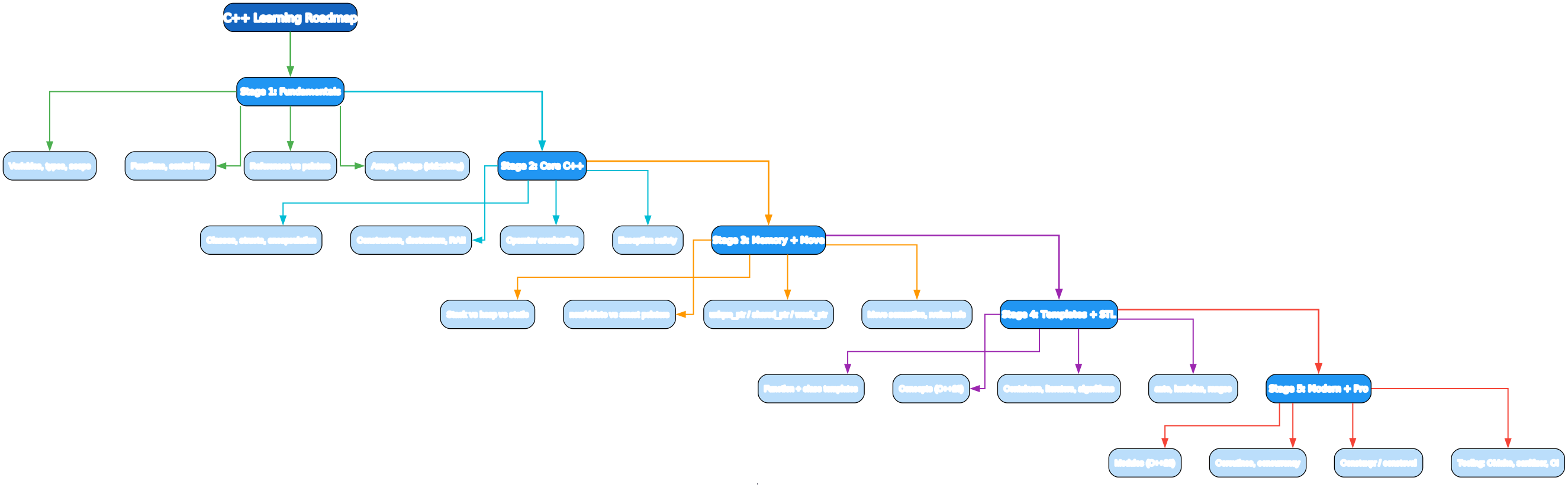
- Fundamentals — variables, types, control flow, functions, references vs pointers
- Core C++ — classes, constructors, RAII, operator overloading, exceptions
- Memory + Move — stack vs heap, smart pointers, move semantics
- Templates + STL — generic code, concepts, containers, algorithms, ranges
- Modern + Pro — modules, coroutines, concurrency, constexpr, and the toolchain
If you read in order, each section assumes only the ones before it.
Stage 1 — Fundamentals
A program
#include <iostream>

int main() {
    std::cout << "Hello, C++!\n";
    return 0;
}
std::cout is the standard output stream. #include <iostream> brings it in. main returns an int to the operating system — 0 means success. That is a complete program.
Variables, types, scope
int      x = 10;       // 32-bit signed integer
long long big = 9'000'000'000LL;  // 64-bit; ' as digit separator
double   pi = 3.14159; // 64-bit float
bool     ok = true;
char     c = 'A';
auto     y = 3.14;     // auto deduces type -> double

const int kMax = 100;  // immutable
constexpr int kSq = kMax * kMax;  // computed at compile time
auto lets the compiler deduce the type — use it when the type is obvious from the right-hand side or long to write. constexpr means “evaluate this at compile time,” which moves work out of runtime.
A variable’s scope is the region where it exists. A variable declared inside {} exists from its declaration to the closing brace, then is destroyed.
{
    int a = 1;   // a lives here
}                // a is destroyed here
// a is out of scope now
Control flow
if (x > 0) { /* ... */ }
else if (x == 0) { /* ... */ }
else { /* ... */ }

for (int i = 0; i < 10; ++i) { std::cout << i; }

while (cond) { /* ... */ }

switch (x) {
    case 1: break;
    case 2: [[fallthrough]];   // explicit fallthrough
    default: break;
}
Functions
int add(int a, int b) { return a + b; }   // by value

void bump(int& out) { out++; }            // by reference (mutates caller)

int square(int n) { return n * n; }

// Default arguments
int greet(const std::string& name = "world");

// Overloading: same name, different params
void f(int);
void f(double);
References vs pointers
This is the first thing that trips people up. A reference is an alias for an existing object — it cannot be null, cannot be re-seated, must be initialized. A pointer is a separate object that holds an address — it can be null, can be reassigned, requires dereferencing.
int x = 5;
int&  r = x;   // reference: alias for x
int*  p = &x;  // pointer: holds address of x

r = 7;         // x is now 7
*p = 9;        // x is now 9

// Prefer references for parameters you read.
// Use const references to avoid copies:
void print(const std::string& s);   // no copy, read-only
Rule of thumb: pass by const T& for read-only, by T& for mutation, by value when you’re going to copy anyway. Use pointers only when “may be null” or “may be re-seated” is meaningful.
Arrays and strings
Prefer std::array over C arrays and std::string over C strings:
#include <array>
#include <string>

std::array<int, 4> arr = {1, 2, 3, 4};  // bounds-checked .size()
std::string s = "hello";
s += " world";
std::cout << s.size();  // 11
That concludes fundamentals. You can already write real programs.
Stage 2 — Core C++: Classes, RAII, Exceptions
Classes and encapsulation
class Counter {
public:
    Counter() : count_(0) {}        // constructor
    ~Counter() {}                   // destructor
    void inc() { ++count_; }
    int  get() const { return count_; }   // const = does not mutate
private:
    int count_;   // trailing underscore = member convention
};

Counter c;
c.inc();
std::cout << c.get();
public members are the interface; private members are the implementation. A const member function promises not to mutate the object.
Constructors, destructors, and RAII
C++ controls object lifetimes precisely. RAII — Resource Acquisition Is Initialization — is the central idea: every resource (memory, file, lock, socket) is tied to an object’s lifetime. Acquire in the constructor, release in the destructor, and you never leak, because the language guarantees destructors run when objects go out of scope.
class File {
public:
    explicit File(const std::string& path) : f_(std::fopen(path.c_str(), "r")) {
        if (!f_) throw std::runtime_error("open failed");
    }
    ~File() { if (f_) std::fclose(f_); }    // always runs
    File(const File&) = delete;             // no copy (two owners = double-free)
    File& operator=(const File&) = delete;
    File(File&& o) noexcept : f_(o.f_) { o.f_ = nullptr; }  // move
    std::FILE* get() const { return f_; }
private:
    std::FILE* f_;
};
The explicit keyword prevents implicit conversions from std::string to File. The deleted copy constructor says “you cannot copy a File” — which is right, because two owners of the same FILE* would double-free it. The move constructor instead steals the handle and nulls the source.
Rule of zero, three, five
- Rule of zero: if your class only holds RAII types (smart pointers, containers,
std::string), declare no destructor/copy/move and the compiler generates correct ones. - Rule of three: if you write a destructor, copy constructor, or copy assignment, write all three.
- Rule of five (C++11+): add move constructor and move assignment.
Prefer the Rule of Zero. Most classes should not manage resources directly — they should hold members that do.
Operator overloading
struct Vec2 {
    double x, y;
    Vec2 operator+(const Vec2& o) const { return {x + o.x, y + o.y}; }
    bool  operator==(const Vec2& o) const { return x == o.x && y == o.y; }
};

Vec2 a{1,2}, b{3,4};
Vec2 c = a + b;
Overload operators to make types feel built-in — but only when the meaning is obvious. + should add, == should compare. Avoid cute overloads.
Exceptions
#include <stdexcept>

double safe_sqrt(double x) {
    if (x < 0) throw std::invalid_argument("negative input");
    return std::sqrt(x);
}

try {
    double r = safe_sqrt(-1);
} catch (const std::invalid_argument& e) {
    std::cerr << e.what() << '\n';
}
Exception safety guarantees (in increasing strength): basic (no leak, object in valid state), strong (commit-or-rollback), no-throw. Destructors and move constructors should be noexcept — if they throw during stack unwinding, the program calls std::terminate.
Stage 3 — Memory and Ownership
C++ gives you direct control over memory, which is its power and its danger. Modern C++ makes this safe by making ownership explicit.
Where objects live
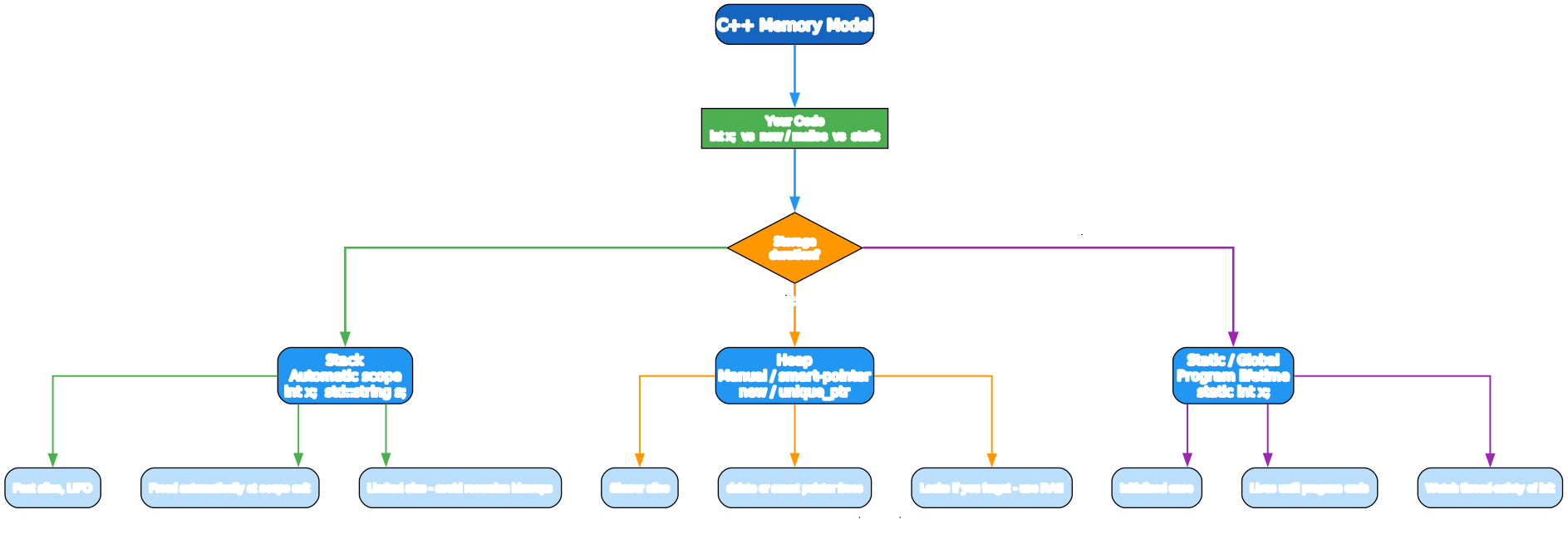
void demo() {
    int local = 42;                 // Stack: automatic, freed at scope exit
    static int persist = 7;          // Static: lives until program ends
    int* p = new int(99);            // Heap: lives until you delete it
    delete p;                       // you must free heap memory yourself
}
- Stack — fast, automatic, LIFO. Use it whenever you can.
- Heap — slower, manual lifetime. Use it when size is unknown at compile time or lifetime must outlive scope.
- Static / global — lives for the whole program. Beware of init-order and thread-safety pitfalls.
Smart pointers
Raw new/delete is a footgun. The standard library provides smart pointers that own heap memory and free it automatically:
#include <memory>

// Sole owner. Frees on destruction. Move-only.
std::unique_ptr<int> u = std::make_unique<int>(42);

// Shared ownership. Reference-counted.
std::shared_ptr<int> s = std::make_shared<int>(7);
std::shared_ptr<int> s2 = s;        // count is now 2

// Non-owning observer. Does not keep the object alive.
std::weak_ptr<int> w = s;
if (auto locked = w.lock()) {      // promote to shared if alive
    std::cout << *locked;
}
Ownership model
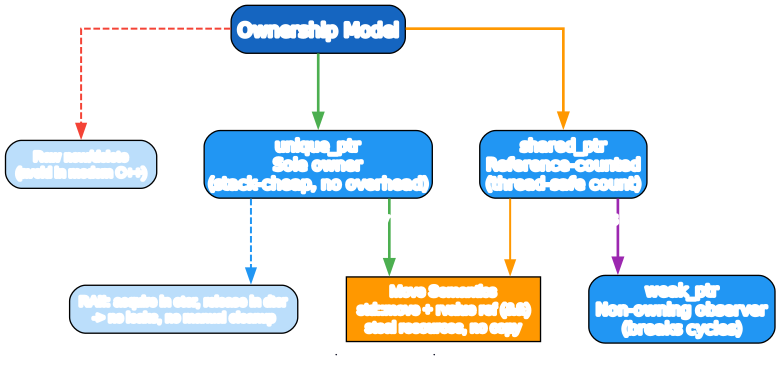
unique_ptr— default choice. Zero overhead, sole owner, move-only. When it goes out of scope, it deletes.shared_ptr— when ownership is genuinely shared. Thread-safe reference count; the object is freed when the count hits zero.weak_ptr— a non-owning observer of ashared_ptr. Use it to break cycles (twoshared_ptrs pointing at each other would never free).- Move semantics (
std::move, rvalue references&&) let you steal resources instead of copying them — no deep copy, no double-allocation.
std::string big = make_huge_string();          // returned by value
std::string moved = std::move(big);             // steal the buffer; big is now empty
std::move does not move anything — it casts to an rvalue so the move constructor is selected. The source is left in a valid-but-unspecified state.
The guiding rule: make ownership explicit and let RAII do the cleanup. Never call delete by hand in application code.
Stage 4 — Templates and the STL
Templates: generic code
template <typename T>
T max_of(T a, T b) { return a < b ? b : a; }

max_of(3, 5);            // T = int
max_of(2.0, 1.0);        // T = double
max_of<std::string>(a,b);
Class templates:
template <typename T, std::size_t N>
struct FixedStack {
    T data[N];
    std::size_t top = 0;
    void push(const T& v) { data[top++] = v; }
};
Templates are compile-time — there is no runtime cost, and no boxing. This is how std::vector, std::map, and the whole STL work.
Concepts (C++20): constraining templates
Before C++20, template errors were pages of incomprehensible substitution failures. Concepts fix this with named, checkable constraints:
template <typename T>
concept Numeric = std::integral<T> || std::floating_point<T>;

template <Numeric T>
T half(T x) { return x / 2; }     // clear error if you pass a string
Concepts turn SFINAE soup into readable type requirements. Always prefer concepts over bare typename T when you mean something specific.
The STL
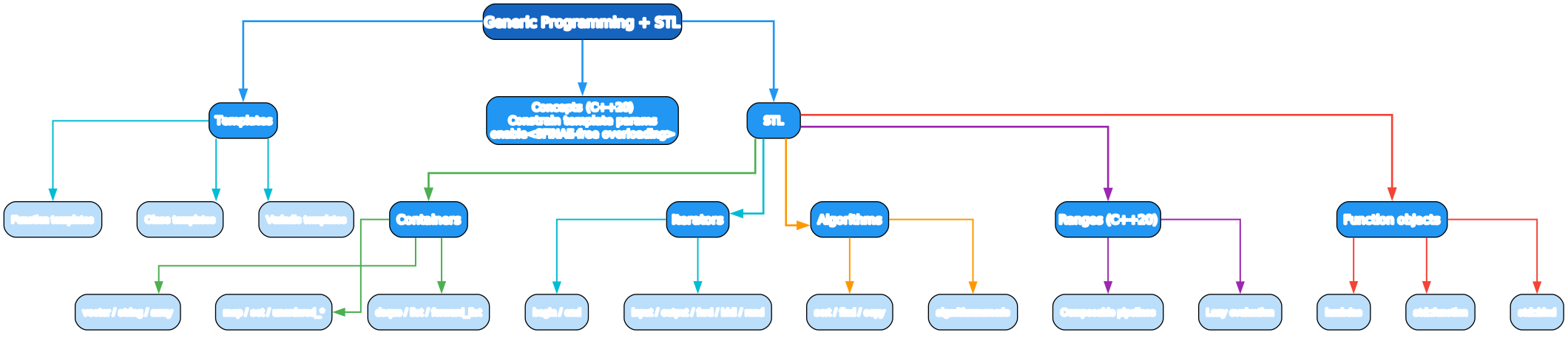
Containers own and organize data:
#include <vector>
#include <string>
#include <unordered_map>
#include <set>

std::vector<int> v = {3, 1, 4, 1, 5};
v.push_back(9);
std::unordered_map<std::string, int> counts;
counts["apple"] = 3;
std::set<int> uniq(v.begin(), v.end());
vector— dynamic array, the default container. O(1) random access, amortized O(1) push_back.string— avector<char>with text helpers.unordered_map/unordered_set— hash tables, O(1) average lookup.map/set— balanced trees, O(log n), ordered iteration.array,deque,list,forward_list— when you need their specific properties.
Iterators are the glue between containers and algorithms:
for (auto it = v.begin(); it != v.end(); ++it) { /* *it */ }
// range-for is simpler:
for (int x : v) { std::cout << x; }
Algorithms (<algorithm>, <numeric>) operate on iterator ranges:
std::sort(v.begin(), v.end());
auto it = std::find(v.begin(), v.end(), 4);
int sum = std::accumulate(v.begin(), v.end(), 0);
std::sort(v.begin(), v.end(), std::greater<>());  // descending
Lambdas create function objects inline:
auto sq = [](int x) { return x * x; };
std::sort(v.begin(), v.end(), [](int a, int b) { return a > b; });
int bias = 10;
auto add_bias = [bias](int x) { return x + bias; };  // capture by value
Ranges (C++20) compose algorithms into pipelines — lazy, readable, no begin/end repetition:
#include <ranges>
#include <algorithm>

namespace rv = std::ranges::views;
auto evens = v | rv::filter([](int x){ return x % 2 == 0; })
               | rv::transform([](int x){ return x * x; });
for (int x : evens) std::cout << x << ' ';  // 4 16 ...
std::function type-erases any callable when you need to store one:
std::function<int(int)> f = [](int x){ return x + 1; };
Stage 5 — Modern C++ and the Toolchain
Modules (C++20)
Headers duplicate parsing on every include. Modules replace #include with a faster, cleaner mechanism:
// math_utils.cppm (module interface)
export module math_utils;
export int square(int x) { return x * x; }

// main.cpp
import math_utils;
int main() { return square(3); }
Modules compile once, export an interface, and eliminate macro leakage across translation units. Adopt them as your toolchain supports them.
Coroutines (C++20)
Coroutines are functions that can suspend and resume — the basis for async generators and awaitables:
#include <coroutine>

generator<int> count_up() {
    for (int i = 0;; ++i) co_yield i;   // suspend, yield i, resume
}
The language provides the suspension machinery (co_await, co_yield, co_return); you (or a library) provide the promise type that drives it. Coroutines are low-level building blocks — most users will get them via a library like ASIO or cppcoro rather than writing promise types by hand.
Concurrency
#include <thread>
#include <mutex>
#include <atomic>

std::atomic<int> counter{0};

void worker() {
    for (int i = 0; i < 1000; ++i) counter.fetch_add(1);
}

std::thread t1(worker), t2(worker);
t1.join(); t2.join();
std::cout << counter;   // 2000
std::thread— spawn threads.std::mutex+std::lock_guard— protect shared state (RAII locking).std::atomic<T>— lock-free primitives for simple shared values.std::async/ futures — higher-level async return values.
constexpr / consteval — compile-time computation
constexpr int factorial(int n) {
    return n <= 1 ? 1 : n * factorial(n - 1);
}
static_assert(factorial(5) == 120);   // computed at compile time

consteval int must_be_compile_time(int x) { return x * 2; }  // only at compile time
Move computation to compile time wherever you can — it costs nothing at runtime and catches bugs early.
The toolchain
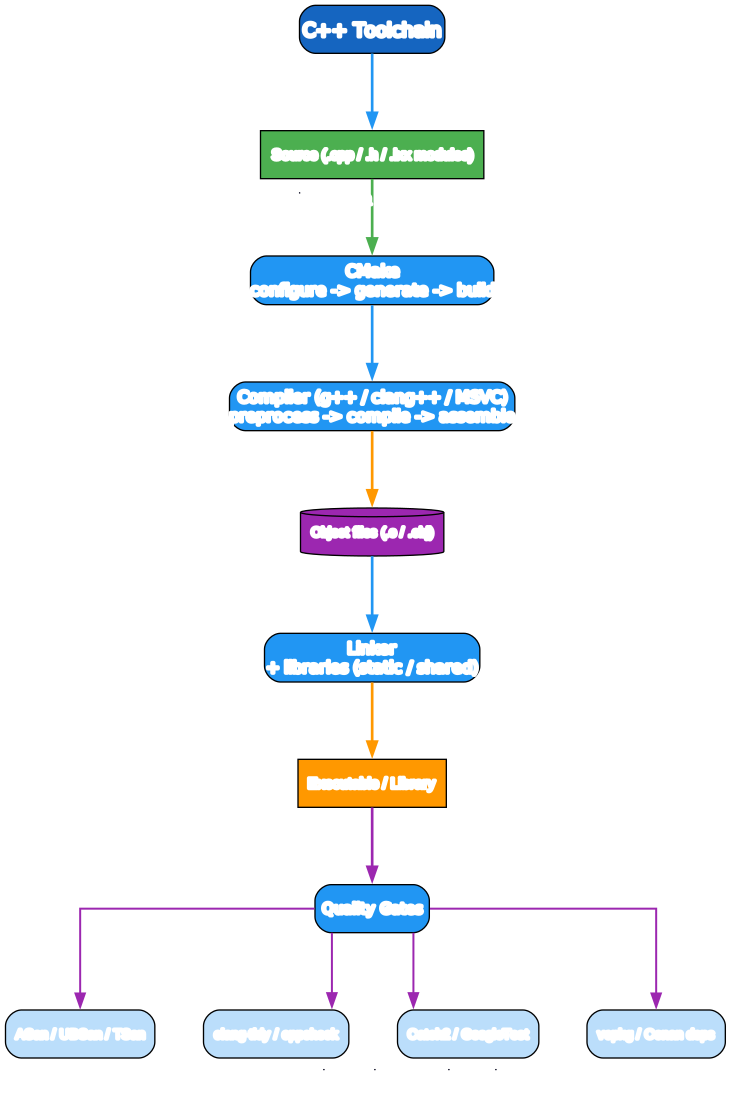
A typical modern build:
- CMake — the de facto build system:
configure→generate→build. - Compiler —
g++,clang++, or MSVC. Preprocess → compile → assemble. - Linker — combines object files with libraries (static or shared).
- Quality gates — sanitizers and tests.
# Compile a single file
g++ -std=c++20 -O2 -Wall -Wextra main.cpp -o app

# With AddressSanitizer + UndefinedBehaviorSanitizer (always in debug)
g++ -std=c++20 -g -fsanitize=address,undefined main.cpp -o app

# CMake project
cmake -S . -B build -DCMAKE_BUILD_TYPE=Debug
cmake --build build
ctest --test-dir build
Essential tooling:
- Sanitizers — AddressSanitizer (memory errors), UndefinedBehaviorSanitizer, ThreadSanitizer. Run them in debug; they catch the bugs that crash production.
clang-tidy/cppcheck— static analysis and lint.- Catch2 / GoogleTest — test frameworks.
- vcpkg / Conan — package managers for dependencies.
A minimal CMakeLists.txt:
cmake_minimum_required(VERSION 3.20)
project(app CXX)
set(CMAKE_CXX_STANDARD 20)
set(CMAKE_CXX_STANDARD_REQUIRED ON)
add_executable(app main.cpp)
target_compile_options(app PRIVATE -Wall -Wextra -Wpedantic)
A Quick-Start Checklist
If you want to go from zero to shipping C++ as fast as possible:
- Install a compiler —
g++(GCC 13+),clang++(16+), or MSVC, and CMake 3.20+. - Write stage-1 programs — variables, control flow, functions,
std::string,std::vector. - Learn RAII and smart pointers — never write
new/deletein application code. - Use the STL — reach for
vector,map,unordered_map, algorithms, and ranges before writing your own. - Adopt concepts and modules as your toolchain supports them.
- Build with sanitizers in debug — ASan + UBSan catch most memory bugs for free.
- Write tests with Catch2 and drive them through CMake + CTest.
- Read errors top-down — the first error is usually the real one; templates can produce a cascade.
Common Pitfalls
- Dangling references — returning a reference to a local. The local is gone; the reference dangles. Return by value.
- Iterator invalidation —
push_backon avectorcan reallocate and invalidate iterators. Don’t hold iterators across mutations. - Undefined behavior — signed overflow, out-of-bounds access, use-after-free. Sanitizers find these; shipping code without them is malpractice.
shared_ptrcycles — twoshared_ptrs pointing at each other never free. Use aweak_ptrto break the cycle.- Move-from objects — after
std::move(x),xis valid but unspecified. Don’t read it expecting a value; reassign or leave it.
What to Learn Next
This post covers the whole language at a tour level. To go deeper:
- Reference — cppreference.com is the canonical standard-library reference. Bookmark it.
- Concurrency — C++ Concurrency in Action by Anthony Williams.
- Templates — C++ Templates: The Complete Guide by Vandevoorde, Josuttis, Gregor.
- Effective Modern C++ by Scott Meyers — the C++11/14 habits that still apply.
- Practice — Compiler Explorer (godbolt.org) to see what the compiler generates, LeetCode for STL fluency.
C++ is large because it gives you control over everything — memory, lifetime, generics, performance, the hardware. That control is the point. Once RAII and the STL are reflexes, the language gets out of your way and you spend your time on the problem, not the plumbing.
Good luck — and compile with warnings on.
Resources:
- Reference: https://en.cppreference.com/
- Compiler Explorer: https://godbolt.org/
- CMake: https://cmake.org/
- vcpkg: https://vcpkg.io/
- ISO C++: https://isocpp.org/

Enjoyed this post? Never miss out on future posts by following us


