Learn C# in a Single Post: A Complete C# Tutorial from LINQ and Async to the .NET Runtime
C# is Microsoft’s flagship language — strongly typed, garbage-collected, running on the cross-platform .NET runtime. It borrows the best of Java (runtime, GC, OOP), adds the best of functional languages (LINQ, pattern matching), and ships features at a rapid cadence: records, nullable reference types, source generators, and pattern matching have all landed in the last few years.
This post teaches the whole language in five stages with runnable snippets. By the end you’ll understand the class/struct/interface/record divide, generics and variance, LINQ, async/await and the Task model, and what the CLR actually does when you run your code.
We target C# 12 / .NET 8 (LTS) with notes on newer features. Everything here compiles on a current .NET SDK.
The Roadmap
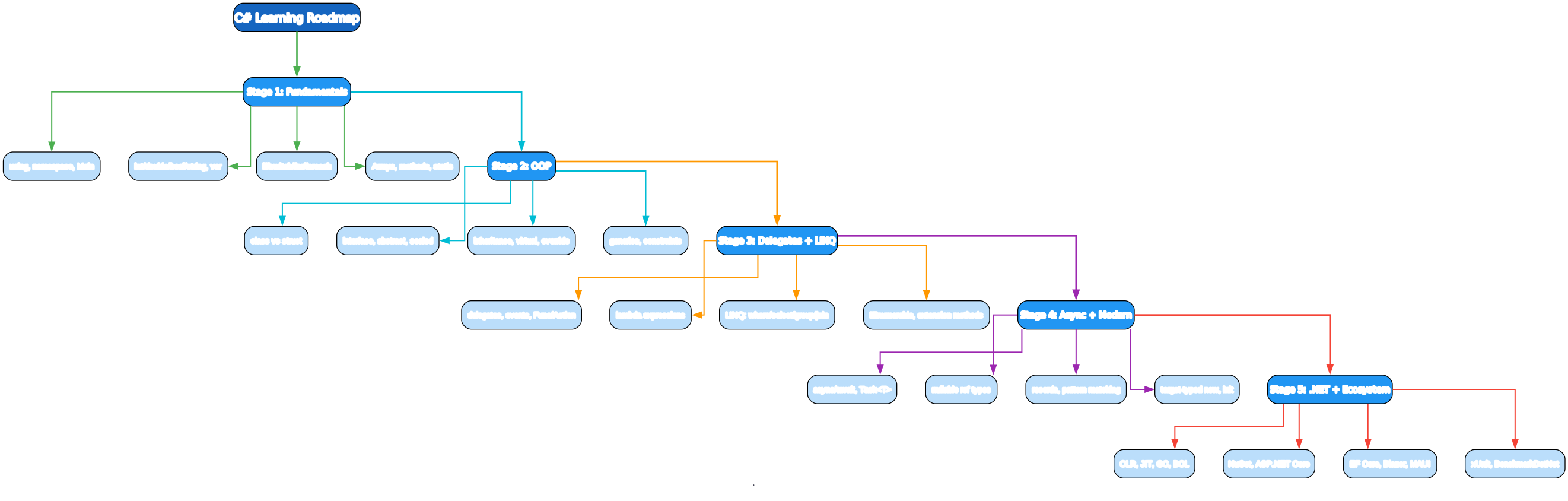
- Fundamentals —
using, namespaces, types,var, control flow, arrays, methods - OOP — class vs struct, interfaces, abstract/sealed, generics + constraints
- Delegates + LINQ —
Func/Action, events, lambdas, LINQ query syntax - Async + Modern —
async/await,Task<T>, nullable refs, records, pattern matching - .NET + Ecosystem — CLR, JIT, GC, BCL, NuGet, ASP.NET Core, EF Core, testing
Stage 1 — Fundamentals
A program
using System;

namespace MyApp;

class Program
{
    static void Main(string[] args)
    {
        Console.WriteLine("Hello, C#!");
    }
}
C# 10+ supports file-scoped namespaces (namespace MyApp;) and top-level statements — a Program.Main is generated implicitly:
// Program.cs — entire file, no boilerplate
using System;
Console.WriteLine("Hello, C#!");
Run it:
dotnet new console -o MyApp
cd MyApp
dotnet run
dotnet build        # produces MyApp.dll (IL)
dotnet publish -c Release
Types and var
int n = 10;
double x = 3.14;
bool ok = true;
char c = 'A';
string s = "hello";       // reference type (immutable)
decimal price = 9.99m;    // high-precision decimal (financial)
var name = "Ada";          // var infers type (compile-time), not dynamic
const int Max = 100;

// Value types: int, double, bool, char, struct, enum, decimal
// Reference types: string, class, interface, delegate, array, object
C# has value types (stack, copied on assign) and reference types (heap, reference copied). int/double/bool/struct are value types; string/class/array are reference types. var is compile-time type inference — the type is fixed at compile time, it’s not “dynamic”.
Strings
string name = "Ada";
string greeting = $"Hello, {name}! {1 + 2}";   // string interpolation
string verbatim = @"C:\Users\ada\not_escape";   // verbatim — no escapes, multi-line
string raw = """raw "string" """;               // raw string literals (11+)

// Immutable — methods return new strings
s.Length; s[0]; s.Substring(1, 3); s.ToUpper(); s.Trim();
string.Join(", ", items); s.Split(',');

// StringBuilder for building
var sb = new StringBuilder();
for (int i = 0; i < 1000; i++) sb.Append("x");
sb.ToString();
string is immutable reference type; use StringBuilder for repeated concatenation in loops (the + operator in a loop creates a new string each iteration).
Control flow
if (x > 0) { } else if (x == 0) { } else { }
switch (day) { case "MON": ...; break; default: ...; break; }

for (int i = 0; i < 10; i++) { }
foreach (var item in collection) { }   // for-each over IEnumerable
while (cond) { }

// switch expression (8+) — expression form, pattern-based
string label = day switch {
    "MON" or "TUE" => "weekday",
    "SAT" or "SUN" => "weekend",
    _ => "other",
};
Arrays and methods
int[] nums = { 1, 2, 3 };
int[] arr = new int[5];              // zero-filled
nums[0] = 10;
int len = nums.Length;
int[,] matrix = new int[3, 3];       // 2D

// Methods
static int Add(int a, int b) => a + b;            // expression-bodied (6+)
static string Greet(string name) => $"Hi {name}";

// Optional params + params (varargs)
static int Sum(params int[] nums) { int s = 0; foreach (var n in nums) s += n; return s; }
Sum(1, 2, 3);                       // 6
Stage 2 — OOP
Class vs struct
// Class — reference type (heap, null default)
public class Counter {
    private int count;
    public Counter() { count = 0; }
    public void Inc() => count++;
    public int Get() => count;
    public override string ToString() => $"Counter({count})";
}
var c = new Counter();
c.Inc();
// Struct — value type (stack/copied on assign, non-null default)
public struct Point {
    public double X { get; set; }
    public double Y { get; set; }
    public Point(double x, double y) { X = x; Y = y; }
}
var p = new Point(1, 2);
var q = p;           // COPIES (value semantics), q.X = 9 doesn't affect p
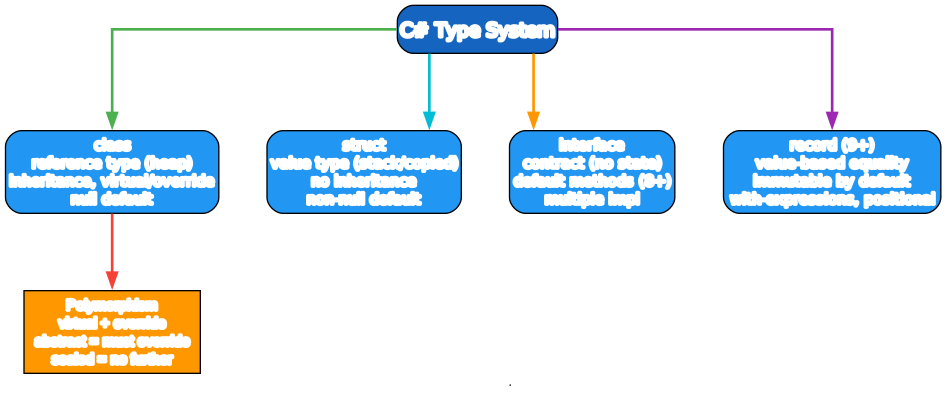
Use class for most things (inheritance, polymorphism, heap lifetime). Use struct for small, immutable value types (Point, DateTime, money) where copy semantics are desired and allocation overhead matters. Don’t make mutable structs — the copying surprise is a classic bug.
Properties
public class Person {
    public string Name { get; set; }            // auto-property
    public int Age { get; private set; } = 0;   // private setter, default
    public string Display => $"{Name} ({Age})"; // computed, get-only
    public string Email { get; init; } = "";    // init-only (9+) - settable only at construction
    public required string Id { get; set; }     // required (11+) - must be set on construction
}

var p = new Person { Name = "Ada", Id = "X1" };  // object initializer
Properties are C#’s answer to getters/setters — they look like fields but are methods. Init-only setters (init) make immutable construction ergonomic; required forces callers to set a property at construction.
Inheritance, virtual, abstract, sealed
public class Animal {
    public virtual string Sound() => "...";    // overridable
}
public class Dog : Animal {                      // single inheritance (like Java)
    public override string Sound() => "woof";
}
public sealed class Cat : Animal { }             // sealed = no further inheritance

public abstract class Shape {
    public abstract double Area();              // must override
    public string Describe() => $"Area = {Area()}";
}
public class Circle : Shape {
    public double R { get; init; }
    public override double Area() => Math.PI * R * R;
}

Animal a = new Dog();
a.Sound();   // "woof" — virtual dispatch
Interfaces
public interface IComparable<T> {
    int CompareTo(T other);
}
public interface IDisposable : IDisposable { }   // can have default methods (8+)

public class Duck : IComparable<Duck>, ISwim {
    public int CompareTo(Duck other) => 0;
    public void Swim() { }
}

// Multiple interface implementation
Duck d = new Duck();
IComparable<Duck> c = d;
Like Java: single class inheritance, multiple interface implementation. Use interfaces for capabilities, abstract classes for shared implementation. Interface default methods (8+) allow adding methods to published interfaces without breaking implementers.
Generics and constraints
public class Box<T> { public T Value { get; init; } }
public static T First<T>(IList<T> xs) => xs[0];

// Constraints
public static T Max<T>(T a, T b) where T : IComparable<T> => a.CompareTo(b) >= 0 ? a : b;
public static T New<T>() where T : new() => new T();
public static void UseT<T>() where T : class, IDisposable { /* T is ref type + disposable */ }

// Variance
IEnumerable<out T>   // covariant: IEnumerable<Dog> is IEnumerable<Animal>
Action<in T>          // contravariant: Action<Animal> is Action<Dog>
C# generics are reified (unlike Java’s erasure) — List<int> and List<string> are genuinely different types at runtime, and you can do typeof(T), new T() (with constraint), inspect generic args via reflection. Variance (in/out) marks type parameters as contravariant/covariant for safe assignment.
Records (9+)
public record Point(double X, double Y);     // immutable, value-based equality
var p = new Point(1, 2);
var q = p with { X = 5 };                       // non-destructive mutation: { X=5, Y=2 }
p.Equals(q);                                    // false — value equality
p == new Point(1, 2);                           // true — records override ==

public record User(string Name, int Age) {
    public string Display => $"{Name} ({Age})";
}
Records are the modern way to write immutable data carriers with value-based equality. with expressions create modified copies; ==/Equals compare by value, not reference. Records can be reference types (record) or value types (record struct, 10+).
Stage 3 — Delegates, Events, and LINQ

Delegates and Func/Action
// Built-in delegate types
Func<int, int> sq = x => x * x;                  // takes int, returns int
Action<string> log = s => Console.WriteLine(s); // takes, returns void
Func<int, int, int> add = (a, b) => a + b;
Predicate<int> isEven = n => n % 2 == 0;

// Custom delegate type
delegate void Handler(string msg);
event Handler OnMessage;                        // event (see below)

// Method groups
Func<int, int> parse = int.Parse;               // method reference
list.ForEach(Console.WriteLine);                // method group as arg
Func<...> and Action<...> cover most delegate needs — you rarely declare custom delegate types. Lambdas are concise delegate instances.
Events
public class Button {
    public event EventHandler? Clicked;          // publish/subscribe pattern
    public void Click() => Clicked?.Invoke(this, EventArgs.Empty);
}

var btn = new Button();
btn.Clicked += (sender, e) => Console.WriteLine("clicked");   // subscribe
btn.Click();                                                   // fires
btn.Clicked -= handler;                                         // unsubscribe (keep a ref)
Events are a restricted multicast delegate — only the declaring class can raise (Invoke) them; external code can only +=/-=. This is the language-level observer pattern.
LINQ
using System.Linq;

// Extension methods (query is method syntax)
var evens = nums.Where(n => n % 2 == 0).Select(n => n * n).ToList();
var sum = nums.Sum();
var grouped = users.GroupBy(u => u.City).Select(g => new { City = g.Key, Count = g.Count() });
var joined = users.Join(orders, u => u.Id, o => o.UserId, (u, o) => new { u.Name, o.Total });

// Query syntax (compiles to same calls)
var evens2 = from n in nums
             where n % 2 == 0
             select n * n;

// Aggregates
nums.Aggregate((a, b) => a + b);             // reduce
users.OrderBy(u => u.Age).ThenBy(u => u.Name);
users.Distinct(); users.Chunk(10);            // 8+ paging

// IQueryable vs IEnumerable
db.Users.Where(u => u.Age > 18)              // IQueryable -> translates to SQL (EF Core)
   .Select(u => u.Name).ToList();
LINQ (Language Integrated Query) gives uniform query syntax over any IEnumerable — collections, XML, databases (EF Core translates IQueryable to SQL). It’s the single most distinctive C# feature. Prefer method syntax (Where/Select); query syntax is nicer for joins and complex queries.
Extension methods
public static class StringExt {
    public static int WordCount(this string s) => s.Split(' ', StringSplitOptions.RemoveEmptyEntries).Length;
}
"hello world".WordCount();     // 2 — looks like a method on string
Extension methods add methods to existing types without modifying them. LINQ itself is built on extension methods on IEnumerable<T>.
Stage 4 — Async and Modern C#
async/await and Task
// Task<T> is the awaitable unit (like a Promise)
public async Task<string> FetchAsync(string url) {
    using var client = new HttpClient();
    string body = await client.GetStringAsync(url);   // await suspends, releases thread
    return body;
}

// Compose
public async Task<int> GetDataAsync() {
    var a = await FetchAsync("a");     // sequential awaits
    var b = await FetchAsync("b");
    return a.Length + b.Length;
}

// Parallel
var (a, b) = await (
    FetchAsync("a"),
    FetchAsync("b")
);                                       // ValueTask tuple await (13+)

// or
var results = await Task.WhenAll(FetchAsync("a"), FetchAsync("b"));

// Fire-and-forget (rare) — Task.Run
_ = Task.Run(() => DoBackground());
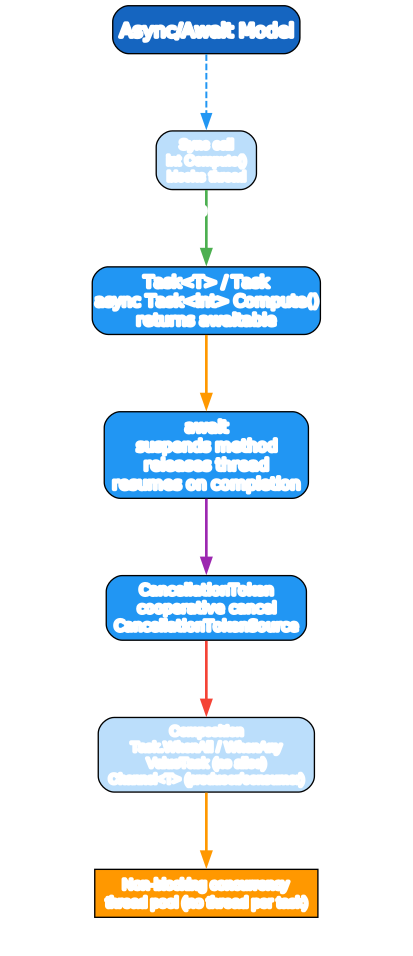
async methods return Task/Task<T>/ValueTask<T>. await suspends the method and releases the thread back to the pool (doesn’t block) — the runtime resumes on completion. This is the Task-based Asynchronous Pattern (TAP), and it scales: one thread pool handles thousands of in-flight Tasks, no thread per operation.
ValueTask<T> (7+) avoids allocation for the common “already-completed” case (e.g., cached result). Use it when a method frequently returns synchronously and you want to skip the Task allocation.
Cancellation
public async Task<string> FetchAsync(string url, CancellationToken ct) {
    using var client = new HttpClient();
    return await client.GetStringAsync(url, ct);   // ct propagates
}

using var cts = new CancellationTokenSource(TimeSpan.FromSeconds(5));
string r = await FetchAsync("url", cts.Token);
cts.Cancel();                                       // cooperative cancel
Always thread CancellationToken through async APIs for cancellation and timeouts. The CancellationTokenSource is the producer; CancellationToken is the consumer side that you check or pass to downstream awaits.
Channels
using System.Threading.Channels;
var channel = Channel.CreateBounded<int>(100);

// Producer
_ = Task.Run(async () => {
    for (int i = 0; ; i++) await channel.Writer.WriteAsync(i);
    channel.Writer.Complete();
});

// Consumer
await foreach (var item in channel.Reader.ReadAllAsync(ct)) {
    process(item);
}
Channel<T> is the modern producer/consumer queue for cross-thread async pipelines.
Nullable reference types (8+)
string s = "a";       // non-null reference (compiler enforces)
string? maybe = null; // explicitly nullable

string Greet(string name) => $"Hi {name}";   // name cannot be null (compiler warns on null arg)
string? Find(int id) => null;                // may return null

string name = Find(1) ?? "default";          // ?? coalesces null
Find(1)?.ToUpper();                            // null-conditional
if (Find(1) is string found) { found.ToUpper(); }  // pattern match

// Enable in .csproj: <Nullable>enable</Nullable>
Nullable reference types add compile-time null-safety to reference types (value types already had int? via Nullable<T>). Enable <Nullable>enable</Nullable> from day one — it’s the modern C# default and catches real null bugs.
Pattern matching (modern switch)
// Type patterns + deconstruction
string Describe(Shape s) => s switch {
    Circle { R: var r } => $"circle r={r}",     // property pattern + var
    Square { Side: > 10 } => "big square",       // relational pattern
    Triangle t => $"triangle",
    null => "null",
    _ => "unknown",
};

// Positional records deconstruct
var (x, y) = point;                               // deconstruct
if (point is ( > 0, > 0)) { /* both positive */ } // positional pattern
C# pattern matching has grown steadily: type patterns, property patterns, relational patterns (>, <), and/or/not, list patterns. Combined with records, it makes algebraic-data-type-style code clean.
Other modern features
var nums = new List<int> { 1, 2, 3 };   // target-typed new (9+) — no <int> on right
Dictionary<string, int> m = new() { ["a"] = 1 };   // target-typed new

// Records + with (above)
// Init-only setters + required (above)
// File-scoped namespace
namespace MyApp;

// Global usings
global using System.Linq;

// Primary constructors (12+)
public class Service(ILogger logger) {          // logger is a param + field
    public void Run() => logger.Log("run");
}
Stage 5 — The .NET Runtime and Ecosystem
dotnet new console -o MyApp         # scaffolds
dotnet build                        # C# -> IL (Roslyn) -> MyApp.dll
dotnet run                          # build + run
dotnet test                          # run tests
dotnet publish -c Release -o out    # publish deployable
dotnet add package Newtonsoft.Json # add NuGet dep
The pipeline
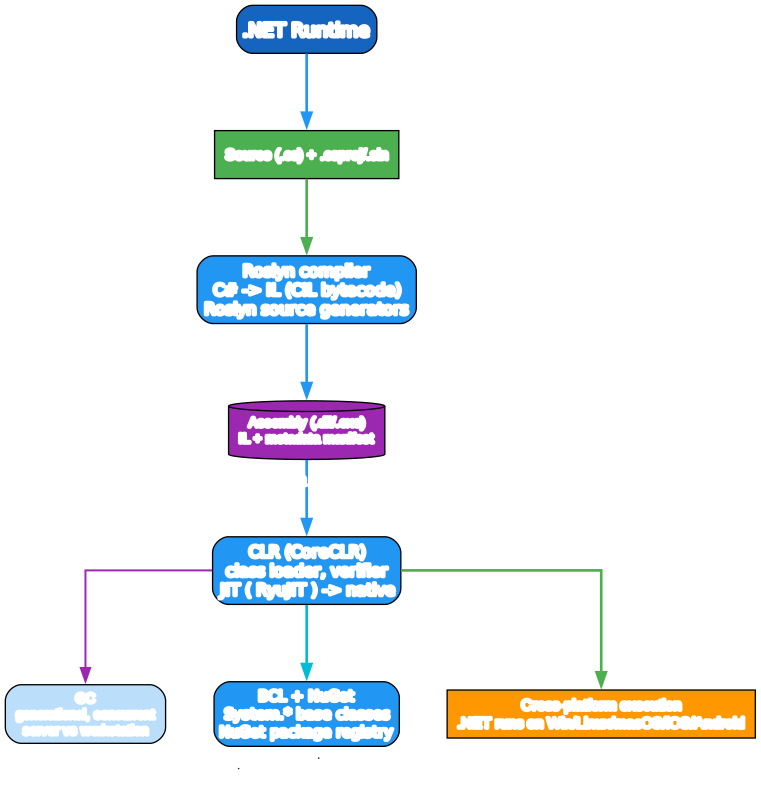
- Roslyn compiler compiles C# to IL (Intermediate Language) + metadata, packed in an assembly (
.dll/.exe). - Source generators (Roslyn) run at compile time to generate code (e.g., serialization, logging) — zero runtime reflection cost.
- CoreCLR loads the assembly, verifies, then the JIT (RyuJIT) compiles IL to native code at runtime (tiered compilation: quick first, optimized later).
- GC manages memory: generational, concurrent, server vs workstation modes. Reclaimed automatically; no manual
free. - BCL (Base Class Library):
System.*— collections, IO, net, threading, JSON. Cross-platform on Windows/Linux/macOS, mobile (iOS/Android via MAUI), and WebAssembly.
The ecosystem
- NuGet — package manager (
dotnet add package); nuget.org registry. - ASP.NET Core — web framework: MVC, minimal APIs, SignalR (real-time), gRPC.
- EF Core — object-relational mapper; LINQ-to-SQL; migrations.
- Blazor — C# in the browser (WebAssembly) — full-stack C# web apps.
- MAUI — cross-platform native UI (iOS/Android/macOS/Windows).
- xUnit / NUnit / MSTest — test frameworks.
- BenchmarkDotNet — the canonical micro-benchmark harness.
- Polly — resilience (retries, circuit breakers).
- MediatR — CQRS/in-process messaging.
A minimal .csproj
<Project Sdk="Microsoft.NET.Sdk">
  <PropertyGroup>
    <OutputType>Exe</OutputType>
    <TargetFramework>net8.0</TargetFramework>
    <Nullable>enable</Nullable>
    <ImplicitUsings>enable</ImplicitUsings>
    <LangVersion>latest</LangVersion>
  </PropertyGroup>
  <ItemGroup>
    <PackageReference Include="Microsoft.Extensions.Logging" Version="8.0.0" />
  </ItemGroup>
</Project>
Essential tooling:
dotnetCLI — build, run, test, add packages, publish — one tool.- Visual Studio / VS Code / Rider — IDEs; VS Code + C# Dev Kit is cross-platform.
dotnet watch— hot-reload during dev.- xUnit + FluentAssertions — testing.
dotnet format— format + style enforcement.- BenchmarkDotNet — performance measurement (never guess; benchmark).
- Serilog /
Microsoft.Extensions.Logging— structured logging.
A Quick-Start Checklist
- Install .NET 8 SDK (LTS) — one SDK covers all platforms.
dotnet new consoleto start; use top-level statements + file-scoped namespaces.- Enable
<Nullable>enable</Nullable>from day one. - Use
classby default;structonly for small immutable values;recordfor data. - Use
init/required/record+withfor immutability; avoid mutable structs. - LINQ is your friend — learn
Where/Select/GroupBy/Joincold. async/awaitwithTask<T>; threadCancellationTokeneverywhere.- Prefer
ValueTask<T>for hot paths that often complete synchronously. dotnet test+ xUnit + BenchmarkDotNet in CI;dotnet formatfor style.- Profile, don’t guess — BenchmarkDotNet +
dotnet-counters/dotnet-trace.
Common Pitfalls
.Result/.Wait()on async — blocks the thread and can deadlock (especially in ASP.NET classic sync context). Alwaysawait.async void— fire-and-forget with no awaitable handle and unhandled exceptions crash the process. Useasync Task(orasync voidonly for event handlers).- Forgetting
await—Task<T>not awaited returns immediately; the work runs detached. Enable warning CS4014. - Mutable structs — assignment copies; mutating a struct returned from a property does nothing to the original. Use immutable structs or classes.
==on strings — actually works in C# (string overloads==for value comparison), unlike Java. Good news, but still useString.EqualswithStringComparisonfor culture-aware comparison.- Captured loop variable — pre-C# 5,
foreachcaptured the variable by reference; fixed in 5+. Still be careful in older codebases. nullvsDBNullvs default — different “absent” values; use nullable refs to make absence explicit.- EF Core N+1 queries —
.Include()/ThenIncludeeager-load, or projection; watch SQL logs. - Boxing value types in LINQ —
IEnumerable<int>boxes in some old APIs; prefer genericList<T>.
What to Learn Next
- C# docs — learn.microsoft.com/dotnet/csharp the official, comprehensive guide.
- C# in Depth by Jon Skeet — the canonical deep dive on language evolution.
- Pro C# by Andrew Troelsen — comprehensive reference.
- .NET docs — learn.microsoft.com/dotnet runtime, ASP.NET, EF, MAUI.
- ASP.NET Core tutorials — learn.microsoft.com/aspnet/core for web.
- Jon Skeet’s blog / Stack Overflow answers — the source of many C# clarifications.
- BenchmarkDotNet docs — benchmarkdotnet.org for performance work.
- C# language design — github.com/dotnet/csharplang the proposals and discussions.
C#’s rapid evolution — records, pattern matching, nullable refs, source generators, primary constructors — has made it one of the most pleasant modern OOP languages. The .NET runtime’s cross-platform maturity (GC, JIT, the BCL, ASP.NET Core performance) is the real strength: write once, run on servers, desktop, mobile, and browser.
Good luck — and enable <Nullable>enable</Nullable>.
Resources:
- .NET docs: https://learn.microsoft.com/dotnet/
- C# guide: https://learn.microsoft.com/dotnet/csharp/
- NuGet: https://www.nuget.org/
- ASP.NET Core: https://learn.microsoft.com/aspnet/core/
- EF Core: https://learn.microsoft.com/ef/core/

Enjoyed this post? Never miss out on future posts by following us