Learn Dart in a Single Post: A Complete Dart Tutorial from Null Safety and Futures to Flutter Widgets and Async Streams
Dart is Google’s UI-focused language — designed specifically to power Flutter, the cross-platform UI toolkit that compiles one codebase to iOS, Android, web, and desktop. Dart’s pitch is a fast developer cycle (JIT + hot reload during dev), AOT compilation to native for shipping, sound null safety baked into the type system, and an async model (Future/Stream) that’s ergonomic. If you’ve used Kotlin or Swift, Dart will feel familiar.
This post teaches the whole language in five stages with runnable snippets. By the end you’ll understand null safety, classes and mixins, async/await and Streams, and how Flutter’s declarative widget tree fits on top of Dart.
We target Dart 3.x (sound null safety is the default; records, patterns, sealed classes, and enums are in). Everything here compiles on a current toolchain.
The Roadmap
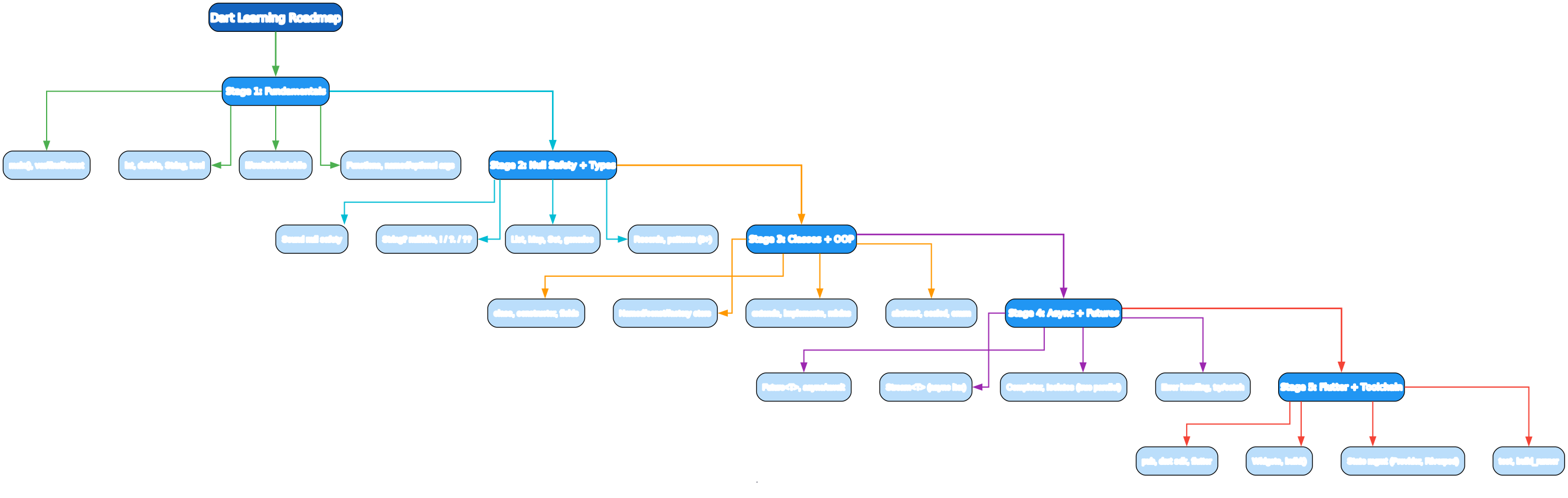
- Fundamentals —
main(),var/final/const, types, control flow, named/optional args - Null Safety + Types — sound null safety,
String?,?./??/!, generics, records, patterns - Classes + OOP — constructors, named/const/factory,
extends/implements, mixins, sealed, enum - Async + Futures —
Future,async/await,Stream,await for, Isolates - Flutter + Toolchain — widgets,
build(),StatefulWidget/setState, Provider/Riverpod, pub, flutter
Stage 1 — Fundamentals
A program
void main() {
  print('Hello, Dart!');
}
main() is the entry point. Run a script:
dart run hello.dart         # run
dart hello.dart              # run a file
dart compile exe hello.dart  # compile to a native executable
var, final, const
var n = 10;           // type inferred, mutable
int x = 5;             // explicit type, mutable
final pi = 3.14;       // final = assigned once (runtime)
const greeting = 'Hi'; // const = compile-time constant

// const is stricter: the VALUE must be known at compile time
const list = [1, 2, 3];        // const list (deep)
final now = DateTime.now();    // ok — runtime value
// const now = DateTime.now(); // error — not compile-time constant

// final for fields that won't change; const for true constants
Dart distinguishes final (assign once, at runtime) from const (compile-time constant, deep). var infers the type. Prefer final for things that won’t be reassigned; const for genuine constants.
Basic types and strings
int n = 10;
double d = 3.14;
bool b = true;
String s = 'Hello';          // single or double quotes
String name = 'Ada';

String greeting = 'Hi, $name! ${1 + 2}';    // interpolation $var, ${expr}
String multi = '''
multi-line
string
''';

s.length; s.toUpperCase(); s.startsWith('H');
'hello'.replaceAll('l', 'L');                // HelloL
'hello'.split('l');
Dart strings use $var and ${expr} for interpolation (like Kotlin/Swift). Strings are immutable; methods return new strings.
Control flow
if (x > 0) { } else if (x == 0) { } else { }

switch (day) {
  case 'MON':
  case 'TUE':
    print('weekday');
    break;
  case 'SAT':
  case 'SUN':
    print('weekend');
    break;
  default:
    print('?');
}

for (int i = 0; i < 5; i++) { }     // C-style for
for (var item in list) { }           // for-in
list.forEach((x) => print(x));        // method
while (cond) { }

// 3.0+ switch expressions (exhaustive on sealed/enum)
var label = switch (x) {
  > 0 => 'pos',
  0 => 'zero',
  _ => 'neg',
};
Dart has both classic switch (with break) and the 3.0+ switch expression (pattern-matched, returns a value, exhaustive on sealed types — below). The _ is the wildcard.
Functions — named, optional, default args
int add(int a, int b) => a + b;          // arrow body for one-liners
int add2(int a, int b) { return a + b; }  // block body

// Named parameters (in curly braces) — optionally required
String greet({required String name, String greeting = 'Hi'}) => '$greeting, $name!';
greet(name: 'Ada');                        // Hi, Ada!
greet(name: 'Ada', greeting: 'Hey');        // Hey, Ada!

// Optional positional (in square brackets)
String greet2(String name, [String? greeting]) =>
    '${greeting ?? 'Hi'}, $name!';
greet2('Ada');                              // Hi, Ada!
greet2('Ada', 'Hey');                       // Hey, Ada!
Dart distinguishes named parameters ({...} — call with name: value) from optional positional ([...] — call positionally). Named params can be required or have defaults. This is how Dart APIs get their readable call sites (mirroring Flutter’s named-arg-heavy constructors).
Collections
var list = [1, 2, 3];                       // List<int>
list.add(4); list.length; list[0];
list.map((x) => x * 2).toList();             // [2, 4, 6, 8]
list.where((x) => x > 1).toList();           // filter
list.fold(0, (acc, x) => acc + x);           // reduce -> 10

var map = {'a': 1, 'b': 2};                 // Map<String, int>
map['c'] = 3;
map['a'];                                     // 1
map.forEach((k, v) => print('$k=$v'));

var set = {1, 2, 3};                         // Set<int>

// Spread (3.0+) and collection-if/for
var xs = [1, 2, 3];
var ys = [0, ...xs, 4];                       // [0, 1, 2, 3, 4]
var evens = [for (var x in xs) if (x.isEven) x];  // [2]
Dart’s collections support collection if/for and the spread (...) — you can build lists/maps declaratively inside the literal. This is how Flutter builds widget lists conditionally.
Stage 2 — Null Safety and the Type System
Sound null safety
String s = 'hi';          // non-null — cannot be null
// String bad = null;     // compile error
String? maybe = null;      // String? — nullable

maybe.length;             // compile error — may be null
maybe?.length;            // safe call — int? (null if maybe is null)
maybe!.length;            // force — crashes if null
int len = maybe?.length ?? 0;   // ?? — default if null

if (maybe != null) {
  print(maybe.length);    // smart-cast to String (non-null) — no ! needed
}
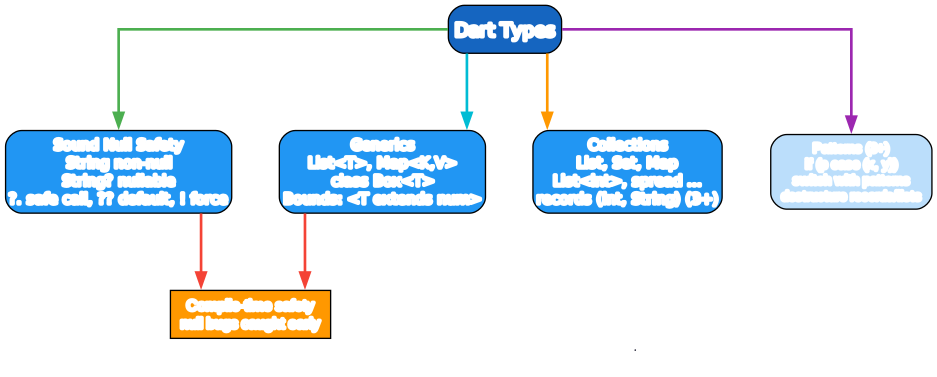
Dart has sound null safety (since 2.12): String and String? are different types, and the compiler forces you to handle null before using a nullable. ?. (safe call), ?? (default if null), ! (force, crashes on null), and smart-cast after != null checks. Avoid ! — it’s the escape hatch, like Swift’s.
Generics
class Box<T> { final T value; Box(this.value); }
Box<int> b = Box(42);

// Generic methods
T first<T>(List<T> xs) => xs[0];

// Bounds
class SortedList<T extends Comparable<T>> { ... }

// Collections are generic
List<int> nums = [1, 2, 3];
Map<String, int> counts = {};
Dart generics are reified (available at runtime, unlike Java’s erased ones). Bounds use extends (T extends Comparable<T>). All collection types are generic.
Records and patterns (Dart 3+)
// Records — anonymous aggregate types
var point = (3, 4);                     // (int, int)
var named = (x: 3, y: 4);               // ({int x, int y})
print(point.$1);                        // 3 (positional accessor)
print(named.x);                         // 3 (named accessor)

// Pattern matching
switch (point) {
  case (0, 0): print('origin');
  case (var x, 0): print('x-axis $x');
  case (0, var y): print('y-axis $y');
  case (var x, var y) when x == y: print('diagonal');
  default: print('other');
}

// if-case and destructuring
if (point case (var x, var y)) print('$x, $y');

// List/Map patterns
switch (list) {
  case [1, 2, ...]: print('starts with 1, 2');
  case [var first, ...]: print('first is $first');
}
Records (Dart 3) are anonymous aggregate types — (int, String) or ({int x, int y}). Pattern matching destructures records, lists, and maps in switch and if-case, with when guards. Combined with sealed types (below), this brings Swift-like exhaustive matching to Dart.
Stage 3 — Classes and OOP

Classes and constructors
class Person {
  final String name;
  int age;

  // Canonical constructor — `this.name` auto-assigns the field
  Person(this.name, this.age);

  // Named constructor
  Person.baby(String name) : name = name, age = 0;

  // Const constructor — for compile-time constant instances
  const Person.constant(this.name, this.age);

  // Factory — returns an instance (can return a subtype or cached)
  factory Person.fromJson(Map<String, dynamic> j) =>
      Person(j['name'] as String, j['age'] as int);

  String get label => '$name ($age)';
  set setAge(int a) => age = a;
}

var p = Person('Ada', 30);
print(p.label);                          // Ada (30)
var baby = Person.baby('Sam');
const c = Person.constant('X', 1);       // compile-time const
Dart classes have a canonical constructor (the class name) plus named constructors (Person.baby) for alternates. this.name in the parameter list auto-assigns the field — a clean shorthand. const constructors enable compile-time constant instances (used heavily in Flutter’s const widgets). factory constructors can return subtypes or cached instances.
Inheritance, interfaces, mixins
class Animal {
  String name;
  Animal(this.name);
  String sound() => '...';
}

class Dog extends Animal {                // single inheritance
  Dog(String name) : super(name);
  @override
  String sound() => 'woof';
}

abstract class Swimmer {                  // abstract class (interface + impl)
  void swim();
}

// Dart classes are implicit interfaces — any class can be 'implemented'
class Duck implements Animal, Swimmer {
  @override String get name => 'duck';
  @override String sound() => 'quack';
  @override void swim() {}
}

// Mixin — reuse without inheritance
mixin Logger {
  void log(String msg) => print('[LOG] $msg');
}
class Service with Logger {              // apply mixin
  void run() => log('running');
}
extends— single class inheritance (withsuperand@override).implements— every Dart class implicitly defines an interface;implementsmeans “I provide these methods” (no inherited implementation).mixin+with— horizontal reuse without inheritance. Mixins are how you share behavior (Logger, Comparable, etc.).
Sealed classes and enums (Dart 3+)
sealed class Result<T> { }                  // closed hierarchy — exhaustive switch
class Ok<T> extends Result<T> { final T value; Ok(this.value); }
class Err<T> extends Result<T> { final String msg; Err(this.msg); }

String describe(Result r) => switch (r) {
  Ok(:var value) => 'ok: $value',           // pattern + destructure
  Err(:var msg) => 'err: $msg',             // exhaustive — no default needed
};

// Enhanced enums (Dart 2.17+)
enum HttpStatus {
  ok(200, 'OK'),
  notFound(404, 'Not Found'),
  serverError(500, 'Server Error');

  final int code;
  final String label;
  const HttpStatus(this.code, this.label);
}
print(HttpStatus.ok.code);                // 200
sealed class creates a closed hierarchy — the compiler knows all subtypes (must be in the same library), so switch is exhaustive. Enhanced enums can have fields, methods, and constructors — they’re real classes that happen to enumerate values. Both are Dart 3 mainstays for modeling domains.
Stage 4 — Async and Futures
Future and async/await
Future<String> fetch(String url) async {
  await Future.delayed(Duration(milliseconds: 100));   // simulate I/O
  return 'data from $url';
}

// await in an async function
Future<void> main() async {
  var a = await fetch('url1');           // suspends, doesn't block
  var b = await fetch('url2');
  print([a, b]);
}

// Parallel with Future.wait
Future<void> main2() async {
  var results = await Future.wait([
    fetch('url1'),
    fetch('url2'),
  ]);
  print(results);
}
Future<T> is Dart’s async primitive (like a Promise). async marks a function that can await; await suspends until the future completes (doesn’t block the thread — Dart is single-threaded with an event loop). Future.wait([...]) runs futures in parallel.
Streams — async iterables
Stream<int> counter(int to) async* {       // async* = generator
  for (var i = 0; i < to; i++) {
    await Future.delayed(Duration(milliseconds: 100));
    yield i;
  }
}

// Consume with await for
Future<void> main() async {
  await for (var n in counter(5)) {
    print(n);                              // 0, 1, 2, 3, 4
  }
}

// Or listen (subscribe)
counter(3).listen((n) => print(n));

// Stream transformers
counter(10).where((n) => n.isEven).map((n) => n * 10).listen(print);
Stream<T> is an async iterable — a sequence of values over time. async* + yield define a stream generator. Consume with await for (drains the stream) or .listen (subscribe). Streams power event sources: WebSocket data, UI events, file reads, Firestore snapshots.
Error handling
Future<int> parseInt(String s) async {
  try {
    return int.parse(s);
  } on FormatException catch (e) {
    print('bad: $e');
    return 0;
  } catch (e) {
    print('other: $e');
    rethrow;
  } finally {
    print('done');
  }
}
Async errors are caught with try/catch — same as sync, around an await. Catch specific types (on FormatException) or everything (catch (e)). rethrow propagates.
Isolates — true parallelism
import 'dart:isolate';

Future<int> heavy(int n) async {
  final receive = ReceivePort();
  await Isolate.spawn((SendPort send) {
    final result = expensive(n);
    send.send(result);
  }, receive.sendPort);
  return await receive.first;
}
Dart is single-threaded with an event loop — async code doesn’t run in parallel. For CPU-bound work, use Isolates: separate heaps communicating by message passing (no shared memory, like Erlang processes). Heavier than threads but safe. Packages like package:isolate and package:flutter_rust_bridge ease the ergonomics.
Stage 5 — Flutter and the Toolchain
Widgets — the building block
import 'package:flutter/material.dart';

class CounterScreen extends StatefulWidget {
  const CounterScreen({super.key});
  @override State<CounterScreen> createState() => _CounterScreenState();
}

class _CounterScreenState extends State<CounterScreen> {
  int count = 0;

  @override
  Widget build(BuildContext context) {
    return Scaffold(
      appBar: AppBar(title: const Text('Counter')),
      body: Center(child: Text('Count: $count', style: const TextStyle(fontSize: 24))),
      floatingActionButton: FloatingActionButton(
        onPressed: () => setState(() => count++),    // setState rebuilds
        child: const Icon(Icons.add),
      ),
    );
  }
}
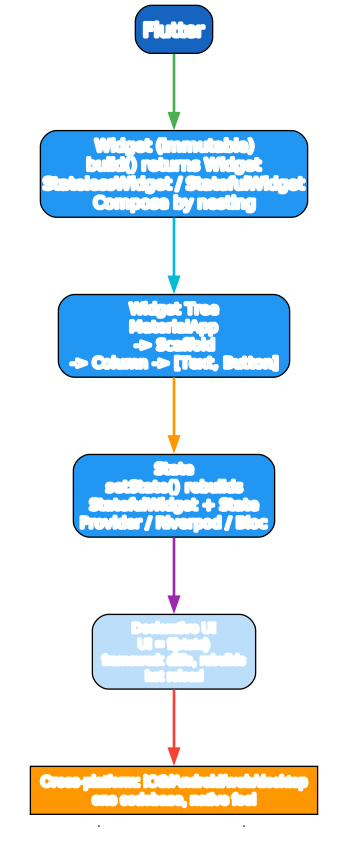
Everything in Flutter is a Widget — an immutable description of UI. build(context) returns a widget tree; Flutter diffs and renders. StatelessWidget has no mutable state; StatefulWidget + a State object holds state, and setState(() { ... }) triggers a rebuild. The tree is declarative: UI = f(state).
Widget composition
Column(
  children: [
    const Text('Title', style: TextStyle(fontWeight: FontWeight.bold)),
    if (isLoading) const CircularProgressIndicator() else const Text('Done'),
    ...items.map((x) => Text(x)).toList(),     // spread a list of widgets
  ],
)
Widgets compose by nesting. Dart’s collection-if/for and spread (above) let you build widget lists conditionally — if (isLoading) CircularProgressIndicator() else Text('Done') inside a list literal.
State management
// Provider (simplest popular option)
class CounterModel extends ChangeNotifier {
  int _count = 0;
  int get count => _count;
  void inc() { _count++; notifyListeners(); }
}

// Wrap the app
ChangeNotifierProvider(
  create: (_) => CounterModel(),
  child: MaterialApp(home: Consumer<CounterModel>(
    builder: (_, model, __) => Text('${model.count}'),
  )),
);
For anything beyond setState, you use a state management library: Provider (simplest, official-ish), Riverpod (modern, compile-safe), Bloc/Cubit (event-based), GetX, etc. The model notifies listeners; the UI rebuilds on change.
The toolchain
# Dart SDK
dart create myapp                  # scaffold a Dart project
dart run                           # run
dart test                          # run unit tests
dart compile exe bin/main.dart -o myapp   # compile to native executable
dart pub get                       # fetch deps
dart pub publish                   # publish to pub.dev

# Flutter
flutter create myapp               # scaffold a Flutter project
flutter run                        # run on device/emulator (hot reload: 'r')
flutter test                       # widget tests
flutter build apk / ios / web      # build for platform
flutter pub run build_runner build   # code generation (json_serializable, freezed)
A pubspec.yaml:
name: myapp
environment:
  sdk: ^3.4.0
dependencies:
  http: ^1.2.0
  provider: ^6.1.0
dev_dependencies:
  test: ^1.25.0
  build_runner: ^2.4.0
  json_serializable: ^6.8.0
Testing
import 'package:test/test.dart';

void main() {
  test('addition', () {
    expect(1 + 1, equals(2));
  });

  group('Counter', () {
    test('increments', () {
      final c = Counter();
      c.inc();
      expect(c.count, 1);
    });
  });
}
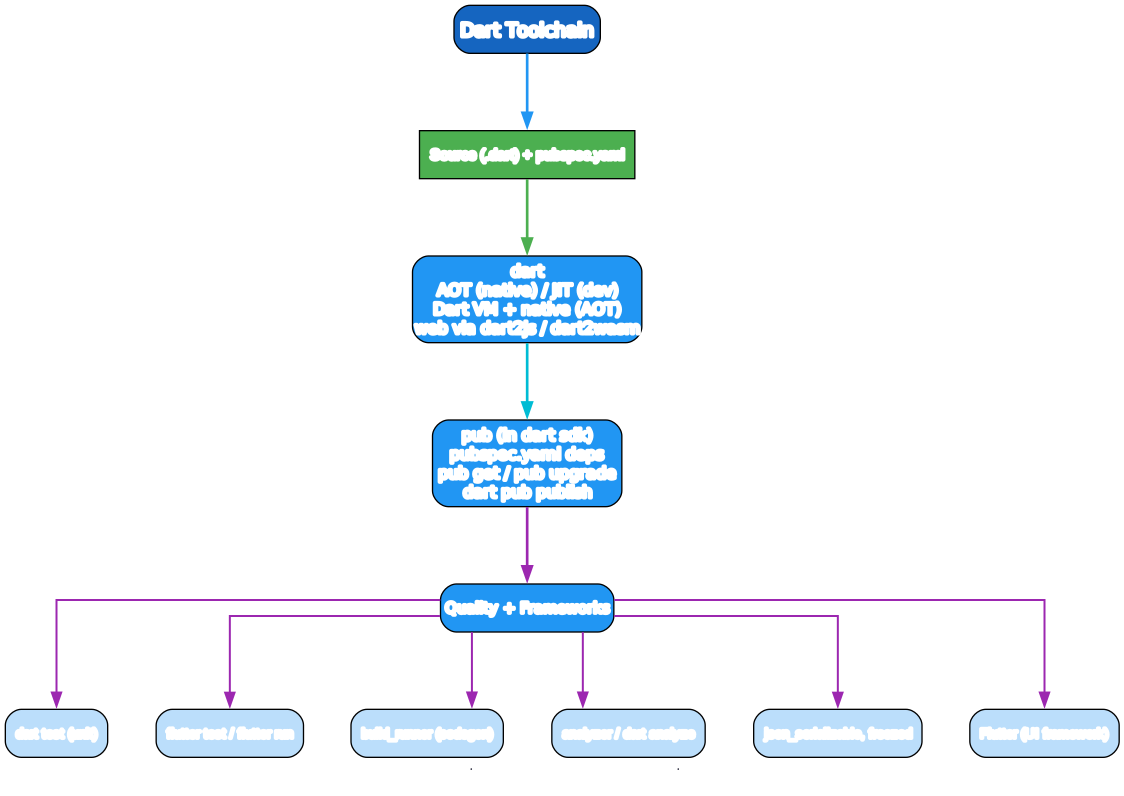
dart test runs unit tests with the test package (test/group/expect/matcher). flutter test runs widget tests that build widgets and pump the frame loop.
Code generation
// json_serializable + freezed generate boilerplate (equals, hashCode, fromJson)
@freezed
class User with _$User {
  factory User({required String name, required int age}) = _User;
  factory User.fromJson(Map<String, dynamic> j) => _$UserFromJson(j);
}
Dart lacks some compile-time features (deep equals for classes, JSON mapping), so the ecosystem uses build_runner code generators: json_serializable (JSON), freezed (data classes/sealed unions), riverpod_generator, etc. This is a bigger part of Dart than most languages.
Tooling
dart— the SDK;dart run/test/compile.flutter— the UI framework CLI;flutter run/test/build.pub/dart pub— package manager; deps inpubspec.yaml.dart analyze— static analysis (linter + type checker).dart format— formatter (opinionated, likegofmt).- DevTools — the browser-based profiler/debugger for Flutter.
- pub.dev — the package registry.
build_runner— codegen runner.
A Quick-Start Checklist
- Install the Flutter SDK (includes Dart) — easiest path;
flutter doctorchecks setup. finalby default;constfor compile-time constants;varonly when mutating.- Embrace null safety —
?./??/smart-cast after!= null; avoid!. - Named args for readability (Flutter’s idiom);
requiredfor mandatory named params. class+ named constructors +factoryfor data;constconstructors for Flutter widgets.- Sealed classes + switch expressions (Dart 3) for state modeling.
async/await/Futurefor async;Stream+async*/yieldfor sequences over time.- Isolates for CPU-bound parallelism (Dart is single-threaded otherwise).
- Flutter widgets —
build()returns a tree;setStaterebuilds; pick a state mgmt lib (Provider/Riverpod/Bloc). dart test+flutter testin CI;dart analyze+dart formatfor lint/format.
Common Pitfalls
!on null — crashes. Prefer?./??/smart-cast; reserve!for when you’ve proven non-null.varvsfinal—varallows reassignment and infers the type;finalis one assignment. Usefinalfor non-reassigned.constis deep —const [a, b]requiresaandbto be const too. Aconstwidget tree is faster (Flutter caches it).- Async without
await— calling anasyncfunction returns aFutureimmediately; if you don’t await (or.then), it runs “fire and forget” and errors are silent. - Single-threaded — async is not parallel. CPU-heavy work blocks the UI; move it to an Isolate.
setStateafter dispose — callingsetStateon a disposedStatethrows. Guard withmounted.- Widget rebuilds — Flutter rebuilds whole subtrees; put
constwidgets andconstconstructors everywhere you can to minimize rebuild cost. - List vs
Iterable—map/wherereturn lazyIterable; call.toList()if you need a list. dynamicvsObject—dynamicdisables type checking (likeany);Objectis the safe top type. Avoiddynamicexcept for JSON.- Codegen rebuild — after changing annotated classes, run
dart run build_runner build(orwatch) or you’ll get stale code.
What to Learn Next
- Dart docs — dart.dev/guides the official language tour and tutorials.
- Effective Dart — dart.dev/effective-dart style and best practices.
- Flutter docs — docs.flutter.dev the widget catalog, cookbook, and architecture guide.
- Dart Apprentice / Flutter Apprentice by raywenderlich.com — structured books.
- Programming Flutter by Frank Zammetti — comprehensive Flutter reference.
- ResoCoder / Marcus Ng / Andrea Bizzotto YouTube channels — practical Flutter.
- pub.dev — pub.dev the package registry; check
flutter_riverpod,freezed,json_serializable. - Dart Pad — dartpad.dev the in-browser playground for trying snippets.
Dart’s purpose is clear: be the best language for building UIs, and the engine for Flutter. Sound null safety + the async model + a fast dev cycle (JIT + hot reload) make it pleasant for app development; AOT compilation makes the result native-fast. Learn null safety and async first, then the widget tree, and you have Flutter.
Good luck — and final by default.
Resources:
- Dart: https://dart.dev/
- Flutter: https://flutter.dev/
- pub.dev: https://pub.dev/
- Dart Pad: https://dartpad.dev/
- Effective Dart: https://dart.dev/effective-dart

Enjoyed this post? Never miss out on future posts by following us