Learn Kubernetes in a Single Post: Complete Tutorial From Pods and Deployments to Services and Production
Kubernetes is the operating system of the cloud. It takes the container idea from Docker and adds orchestration at scale: it schedules containers across a cluster of machines, restarts them when they fail, scales them on demand, load-balances traffic, and rolls out new versions without downtime. This single post teaches the whole platform in five stages, with hand-drawn diagrams and runnable manifests.
Learning Roadmap
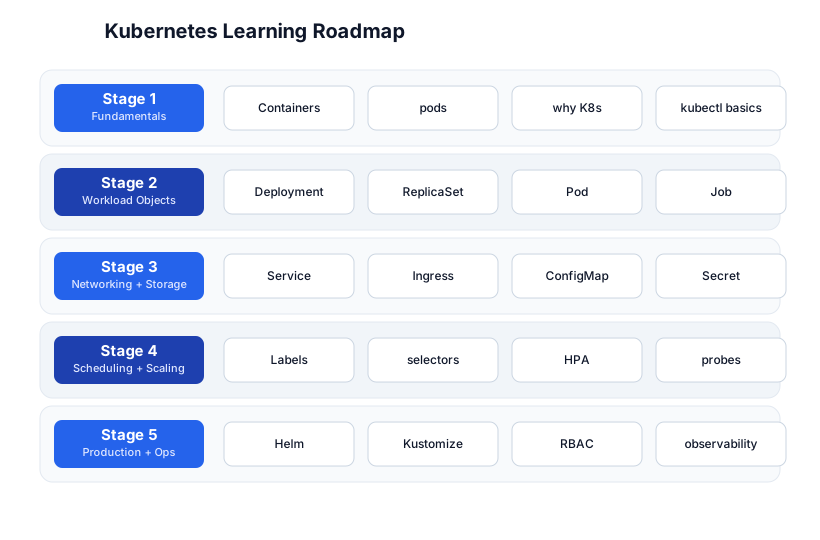
The roadmap moves from understanding why Kubernetes exists (Stage 1), through the core workload objects (Stage 2), networking and storage (Stage 3), scheduling and scaling (Stage 4), to production operations (Stage 5).
Stage 1 — Fundamentals: Why Kubernetes, Pods, kubectl
Why Kubernetes?
Docker runs containers on one machine. The moment you have more than one machine — or you need your containers to survive crashes, scale with load, or update without downtime — you need an orchestrator. Kubernetes (K8s) is the standard: it runs your containers across a cluster, keeps the desired state reconciled against reality, and exposes a single API.
Pods: the atom of Kubernetes
A Pod is the smallest deployable unit — one or more containers that share a network namespace (same IP, same port space) and storage volumes. You almost never create a Pod directly; you create a Deployment, which creates a ReplicaSet, which creates Pods.
# a single Pod (rarely written by hand)
apiVersion: v1
kind: Pod
metadata:
  name: nginx
spec:
  containers:
    - name: nginx
      image: nginx:1.27-alpine
      ports:
        - containerPort: 80
Cluster architecture
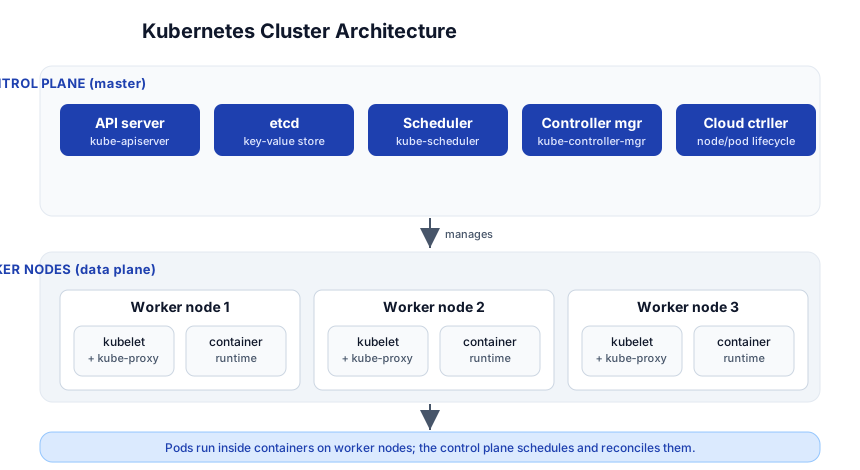
A cluster has two planes:
- Control plane (master) — the brain:
kube-apiserver(the API you talk to),etcd(the cluster’s key-value store of record),kube-scheduler(decides which node runs which Pod),kube-controller-manager(reconciles state), and thecloud-controller-manager(talks to your cloud). - Worker nodes (data plane) — where your Pods run: each has
kubelet(talks to the control plane),kube-proxy(networking), and a container runtime (containerd).
kubectl basics
kubectl get pods                    # list pods in the default namespace
kubectl get pods -A                # all namespaces
kubectl get pods -o wide           # more detail (node, IP)
kubectl describe pod nginx         # deep inspect (events, state)
kubectl logs nginx                 # stdout of the pod's container
kubectl logs -f nginx              # follow (tail)
kubectl exec -it nginx -- sh       # shell into the container
kubectl apply -f manifest.yaml      # create/update from a file
kubectl delete -f manifest.yaml     # delete
kubectl delete pod nginx           # delete one pod (a Deployment will recreate it)
kubectl get all                    # everything in the namespace
Pitfall:
kubectl delete pod <name>when the Pod is owned by a Deployment just kills that Pod — the ReplicaSet immediately creates a replacement. To actually scale down, change the Deployment’sreplicas.
Stage 2 — Workload Objects: Deployment, ReplicaSet, Job
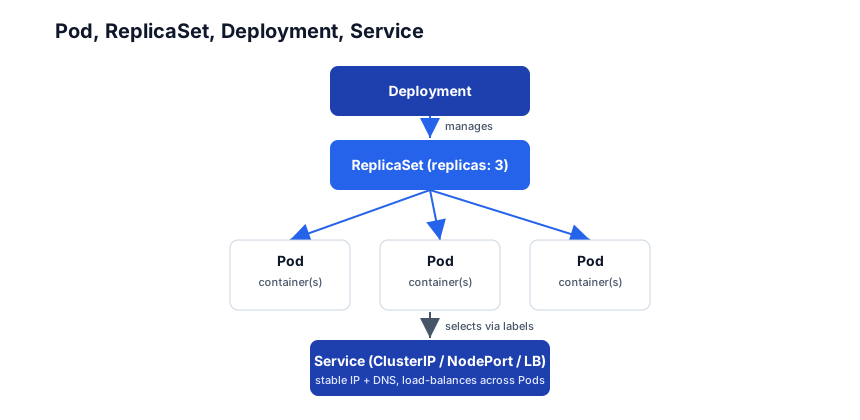
The Pod-ReplicaSet-Deployment-Service hierarchy is the core mental model.
Deployment
A Deployment declares the desired state (image, replicas, ports) and the controller reconciles reality to it. Updating the image triggers a rolling update; the old ReplicaSet is scaled down as the new one scales up, with automatic rollback if the rollout fails.
apiVersion: apps/v1
kind: Deployment
metadata:
  name: api
spec:
  replicas: 3
  selector:
    matchLabels:
      app: api
  template:           # the Pod template every replica uses
    metadata:
      labels:
        app: api
    spec:
      containers:
        - name: api
          image: myapi:1.0
          ports:
            - containerPort: 8000
          resources:
            requests: { cpu: "100m", memory: "128Mi" }
            limits:   { cpu: "500m", memory: "512Mi" }
kubectl apply -f deployment.yaml
kubectl rollout status deployment/api
kubectl set image deployment/api api=myapi:1.1    # rolling update
kubectl rollout undo deployment/api               # rollback
kubectl scale deployment/api --replicas=5          # manual scale
ReplicaSet
The Deployment creates a ReplicaSet to guarantee replicas copies are running. You rarely touch ReplicaSets directly — the Deployment owns them. Each rollout creates a new ReplicaSet; old ones are kept (scaled to 0) for rollback history.
Job and CronJob
For work that runs to completion (batch, migrations, backups), use a Job; for scheduled work, a CronJob:
apiVersion: batch/v1
kind: Job
metadata: { name: db-migrate }
spec:
  backoffLimit: 3            # retries on failure
  template:
    spec:
      restartPolicy: OnFailure
      containers:
        - name: migrate
          image: myapi:1.0
          command: ["./migrate.sh"]
Stage 3 — Networking + Storage
Service
Pods are ephemeral (they die and get recreated with new IPs). A Service gives them a stable IP + DNS name and load-balances across the matching Pods:
apiVersion: v1
kind: Service
metadata: { name: api }
spec:
  selector:
    app: api          # routes to pods with this label
  ports:
    - port: 80
      targetPort: 8000
Three Service types:
- ClusterIP (default) — reachable only inside the cluster.
- NodePort — exposes on each node’s IP at a port (30000–32767).
- LoadBalancer — provisions a cloud load balancer (AWS ELB, GCLB).
Ingress
For HTTP(S) routing by host/path, use an Ingress (needs an Ingress controller like nginx-ingress or Traefik):
apiVersion: networking.k8s.io/v1
kind: Ingress
metadata: { name: api }
spec:
  rules:
    - host: api.example.com
      http:
        paths:
          - path: /
            pathType: Prefix
            backend:
              service: { name: api, port: { number: 80 } }
ConfigMap and Secret
Decouple config from images. A ConfigMap holds non-sensitive config; a Secret holds sensitive data (base64 — not encryption by default).
apiVersion: v1
kind: ConfigMap
metadata: { name: api-config }
data:
  LOG_LEVEL: "info"
  DB_HOST: "db.default.svc"
---
apiVersion: v1
kind: Secret
metadata: { name: api-secret }
type: Opaque
stringData:
  API_KEY: "super-secret"      # stringData avoids manual base64
Mount them as env vars or as files in a volume:
spec:
  containers:
    - name: api
      envFrom:
        - configMapRef: { name: api-config }
        - secretRef:    { name: api-secret }
Volumes, PersistentVolume, PersistentVolumeClaim
Pod filesystems are ephemeral. For persistent data, a PersistentVolumeClaim (PVC) requests storage; Kubernetes binds it to a PersistentVolume (PV) provisioned by a CSI driver:
apiVersion: v1
kind: PersistentVolumeClaim
metadata: { name: data }
spec:
  accessModes: ["ReadWriteOnce"]
  resources:
    requests: { storage: 10Gi }
spec:
  containers:
    - name: db
      volumeMounts:
        - name: data
          mountPath: /var/lib/postgresql/data
  volumes:
    - name: data
      persistentVolumeClaim: { claimName: data }
Stage 4 — Scheduling + Scaling
Labels and selectors
Labels are key/value pairs on objects; selectors query them. This is how Services find their Pods and how Deployments manage their ReplicaSets.
metadata:
  labels:
    app: api
    tier: backend
    env: prod
kubectl get pods -l app=api,env=prod
Probes: liveness and readiness
Probes tell Kubernetes whether a container is healthy and whether it’s ready to receive traffic:
livenessProbe:
  httpGet: { path: /health, port: 8000 }
  initialDelaySeconds: 10
  periodSeconds: 10
readinessProbe:
  httpGet: { path: /ready, port: 8000 }
  initialDelaySeconds: 5
  periodSeconds: 5
- Liveness — fails → restart the container (recovers from deadlock).
- Readiness — fails → remove the Pod from the Service’s endpoints (stops routing to it, but doesn’t restart).
Horizontal Pod Autoscaler (HPA)
The HPA scales a Deployment based on CPU/memory (or custom metrics):
apiVersion: autoscaling/v2
kind: HorizontalPodAutoscaler
metadata: { name: api }
spec:
  scaleTargetRef: { apiVersion: apps/v1, kind: Deployment, name: api }
  minReplicas: 2
  maxReplicas: 10
  metrics:
    - type: Resource
      resource: { name: cpu, target: { type: Utilization, averageUtilization: 70 } }
Resources, affinity, and node affinity
Always set resources.requests and resources.limits — without them the scheduler can’t place your Pod sanely and a runaway container can starve a node. Node affinity/anti-affinity controls which nodes a Pod can land on; pod anti-affinity spreads replicas across nodes.
Stage 5 — Production + Operations
Core objects overview
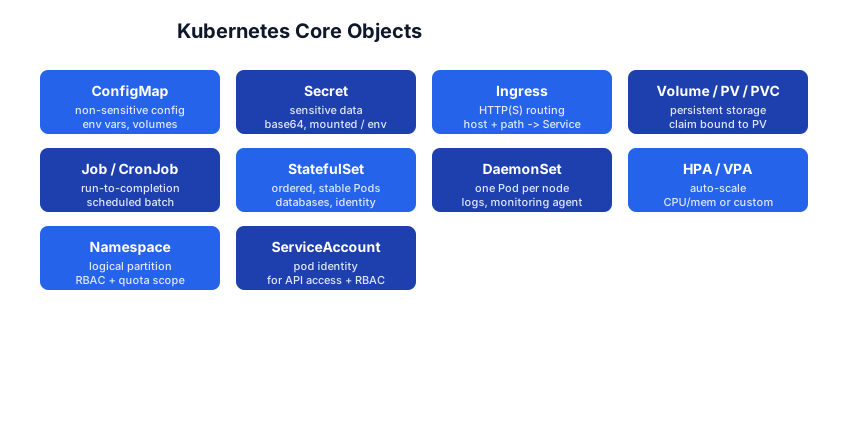
Beyond Deployments, learn these as needed: StatefulSet (databases — ordered, stable identity), DaemonSet (one Pod per node — logging agents), Namespace (logical partition + RBAC scope), ServiceAccount (Pod identity for API access), HPA/VPA (horizontal/vertical autoscaling).
Helm: the package manager
Helm packages manifests into reusable charts with templated values:
helm repo add bitnami https://charts.bitnami.com/bitnami
helm install my-db bitnami/postgresql --set auth.postgresPassword=secret
helm upgrade my-db bitnami/postgresql --set replicaCount=3
helm uninstall my-db
Kustomize: overlay patches
Kustomize composes overlays (dev/staging/prod) over a base without templating:
kubectl apply -k overlays/prod
RBAC
Role-Based Access Control scopes what a user or ServiceAccount can do:
apiVersion: rbac.authorization.k8s.io/v1
kind: Role
metadata: { name: pod-reader, namespace: dev }
rules:
  - apiGroups: [""]
    resources: ["pods"]
    verbs: ["get", "list"]
Bind it to a ServiceAccount with a RoleBinding.
Observability + GitOps
- Metrics: Prometheus (scrapes kubelet/cAdvisor) + Grafana.
- Logs: Loki or ELK aggregating container stdout.
- Tracing: OpenTelemetry / Jaeger.
- GitOps: ArgoCD or Flux watches a Git repo and applies changes to the cluster — the repo is the source of truth, not
kubectl applyfrom a laptop.
The toolchain
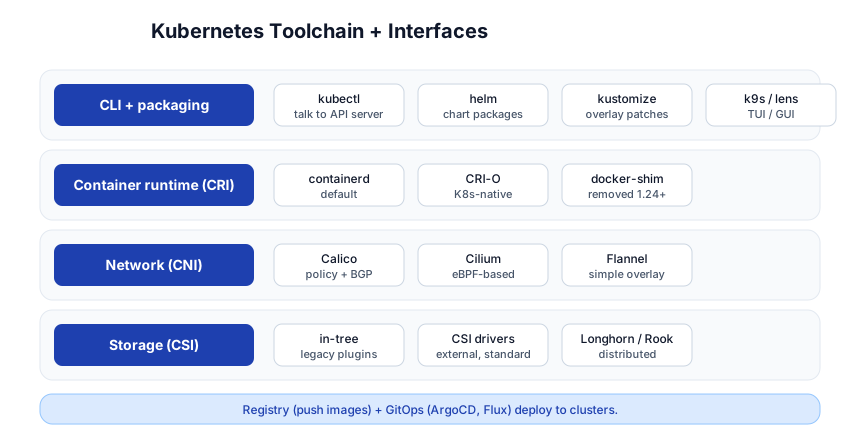
| Interface | What it standardizes | Examples |
|---|---|---|
| CRI (Container Runtime Interface) | how K8s runs containers | containerd, CRI-O |
| CNI (Container Network Interface) | pod networking | Calico, Cilium, Flannel |
| CSI (Container Storage Interface) | persistent volumes | Longhorn, Rook, cloud CSI |
| CLI / packaging | how you drive K8s | kubectl, helm, kustomize, k9s |
Quick-Start Checklist
- Get a cluster —
kind(Kubernetes-in-Docker) orminikubefor local; a managed cluster (GKE/EKS/AKS) for real. - Run kubectl —
kubectl get nodes,kubectl get pods -A. Understand the cluster is up. - Apply a Deployment — the nginx example above, then
kubectl get pods. - Expose a Service —
kubectl expose deployment api --port=80 --type=LoadBalancer. - Add a liveness/readiness probe so unhealthy Pods self-heal.
- Set resource requests/limits on every container.
- Add a ConfigMap + Secret and mount them as env/volume.
- Attach a PVC for persistent data.
- Install something with Helm (e.g. bitnami/postgresql) to see packaging.
- Roll out an update and
kubectl rollout undoit — see rolling updates work.
Common Pitfalls
- No resource requests/limits — the scheduler can’t place Pods sanely; one container can starve a node. Always set them.
- Missing readiness probe — traffic routes to a Pod before it’s ready, or stays pointed at a dead Pod. Both probes matter.
- Deleting a Pod owned by a Deployment — the ReplicaSet just recreates it. Change the Deployment, not the Pod.
- Secrets aren’t encrypted by default — base64 only. Enable etcd encryption at rest and use a secrets manager (External Secrets, Vault) for production.
- Forgetting namespaces — objects in different namespaces can’t reach each other by short DNS name; use
svc.namespace.svc.cluster.local. - NodePort in production — use Ingress or LoadBalancer; NodePort exposes random high ports on every node.
:latestimage tag — K8s won’t pull a new image onapplyif the tag is unchanged andimagePullPolicydefaults. Pin versions or setimagePullPolicy: Always.- No PodDisruptionBudget — voluntary disruptions (drains) can take down all replicas at once. Add a PDB for HA workloads.
Further Reading
- Kubernetes Docs — the official reference
- Kubernetes Patterns (book) — reusable design patterns
- Kubernetes the Hard Way — build a cluster by hand to understand every piece
- kubectl cheatsheet
- Helm Docs
Related guides
Kubernetes is the capstone of the container + DevOps stack — these PyShine tutorials lead into it:
- Learn Docker in One Post: Complete Tutorial — K8s runs containers; Docker is the prerequisite. A Pod is one or more containers.
- Learn Git in One Post: Complete Tutorial — GitOps (ArgoCD/Flux) drives clusters from a Git repo.
- Learn Bash in One Post: Complete Tutorial —
kubectlpipelines, deploy scripts, andk9sare all shell-driven. - Learn YAML / REST API in One Post — every K8s manifest is YAML; the control plane is a REST API.
- Learn Go in One Post: Complete Tutorial — Kubernetes itself is written in Go; operators are too.
Kubernetes has a reputation for complexity, but its core is a small set of ideas: desired state in manifests, controllers that reconcile reality to it, and labels that wire objects together. Spend a day per stage and you’ll move from “I can run Enjoyed this post? Never miss out on future posts by following us kubectl get pods” to “I can write a Deployment with probes, expose it via a Service and Ingress, persist its data with a PVC, and roll out a new version with a rollback ready.” From there, Helm, Kustomize, and GitOps are the production layer. Run every manifest above against a kind or minikube cluster; K8s is learned by applying, not by reading. 





