Learn Traefik in a Single Post: Complete Tutorial From Dynamic Routing and Middleware to ACME TLS
Traefik is the cloud-native reverse proxy — a modern alternative to Nginx designed for containerized environments. Its defining feature: dynamic configuration — it reads routing rules from Docker labels, Kubernetes Ingress, or config files at runtime, and updates routes instantly as containers start and stop, with no config-file edit and no reload. It also has built-in Let’s Encrypt ACME for automatic TLS certificates. This single post covers the whole proxy in five stages, with hand-drawn diagrams and runnable config.
Learning Roadmap
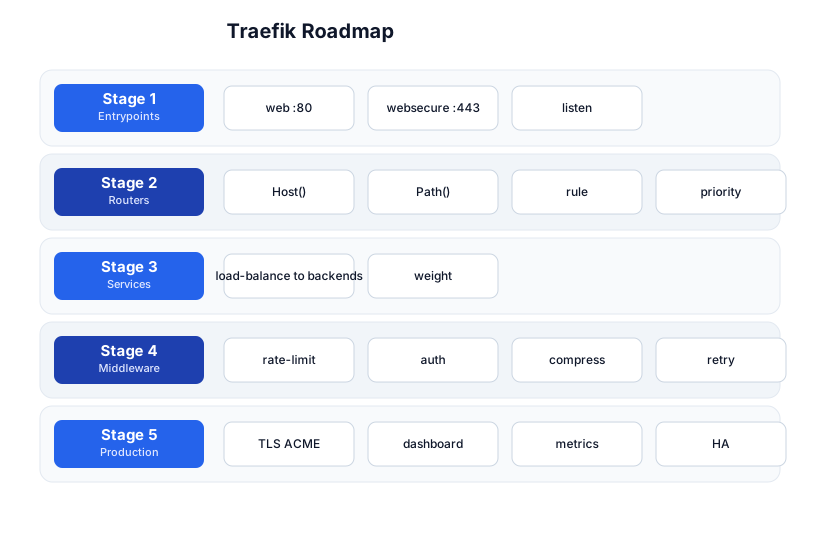
The roadmap moves from entrypoints (Stage 1), through routers (Stage 2), services (Stage 3), middleware (Stage 4), and production (Stage 5). The Nginx tutorial and Docker tutorial are companions.
Stage 1 — Entrypoints
Listening on ports
An entrypoint is a port Traefik listens on. The defaults are:
# traefik.yml (static config)
entryPoints:
  web:
    address: ":80"
  websecure:
    address: ":443"
web(:80) — HTTP (usually redirected to HTTPS).websecure(:443) — HTTPS (TLS terminated here).
Entrypoints are defined in the static config (traefik.yml / CLI flags) — they change rarely (a restart is needed to add/remove them). Everything else (routers, services, middleware) is dynamic — updated at runtime without restart.
Stage 2 — Routers
Routing rules
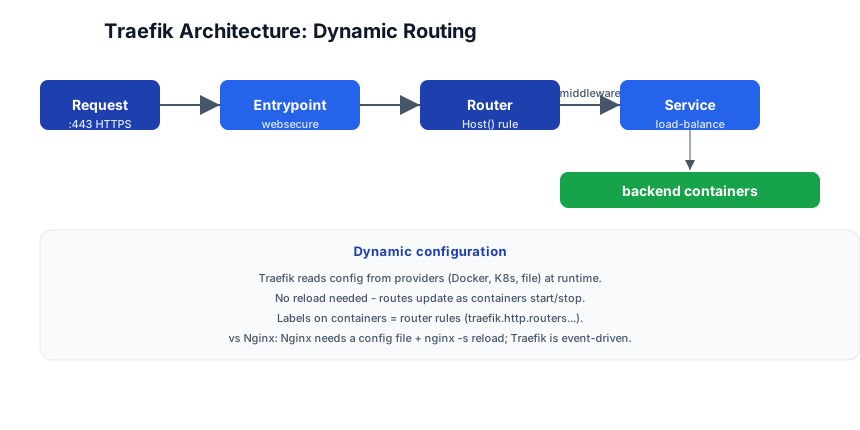
A router matches incoming requests by rule and routes them to a service:
# dynamic config (file provider)
http:
  routers:
    api-router:
      rule: "Host(`api.example.com`) && PathPrefix(`/v1`)"
      entryPoints:
        - websecure
      service: api-service
      tls: certResolver: letsencrypt
      middlewares:
        - rate-limit
        - auth
Rule syntax
| Rule | Matches |
|---|---|
Host(\example.com`)` | requests to this domain |
PathPrefix(\/api`)` | requests starting with /api |
Path(\/exact/path`)` | exact path match |
HostRegexp(\{subdomain:[a-z]+}.example.com`)` | regex host match |
Method(\POST`)` | HTTP method |
Headers(\X-Custom`, `value`)` | header match |
Rules can be combined with && (AND) and \|\| (OR), and grouped with (). Priority can be set explicitly (priority: 100) — by default, longer/more-specific rules win.
Dynamic config from Docker labels
# docker-compose.yml
services:
  api:
    image: my-api
    labels:
      - "traefik.enable=true"
      - "traefik.http.routers.api.rule=Host(`api.example.com`)"
      - "traefik.http.routers.api.entrypoints=websecure"
      - "traefik.http.routers.api.tls.certresolver=letsencrypt"
      - "traefik.http.services.api.loadbalancer.server.port=8080"
When this container starts, Traefik automatically creates a router for api.example.com → the container’s port 8080. When the container stops, the router is removed. No config file edit, no reload — this is Traefik’s core advantage over Nginx.
Stage 3 — Services
Load balancing to backends
http:
  services:
    api-service:
      loadBalancer:
        healthCheck:
          path: /health
          interval: 10s
        servers:
          - url: http://api1:8080
          - url: http://api2:8080
          - url: http://api3:8080
A service defines where traffic goes — a pool of backend servers with load balancing. Traefik supports:
- Round-robin (default) — distribute evenly.
- Weighted —
weight: 3on one server (canary deployments). - Sticky sessions —
sticky.cookiefor session affinity. - Health checks — periodically check
/health; remove unhealthy servers.
With the Docker provider, Traefik auto-discovers backend containers (it reads their IP + port from Docker’s API) — you don’t manually list server URLs. The service is created from the container’s labels.
Stage 4 — Middleware
Chain of processing before the service
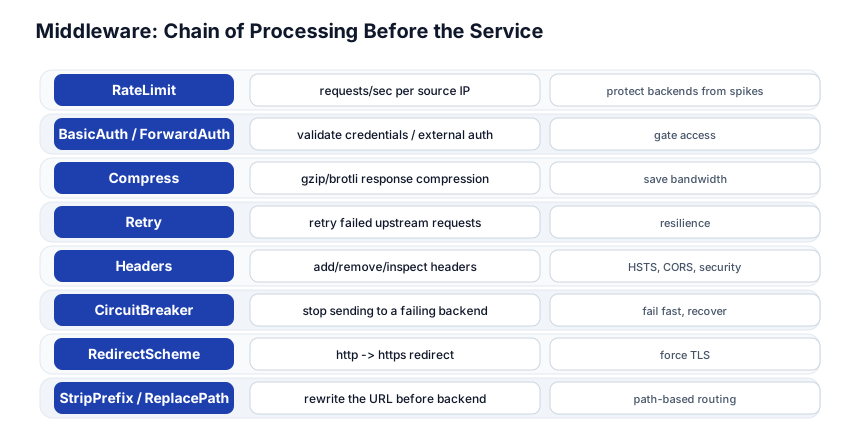
Middleware processes requests before they reach the service — and responses on the way back. Multiple middleware can be chained on a router:
http:
  routers:
    api-router:
      rule: "Host(`api.example.com`)"
      service: api-service
      middlewares:
        - redirect-to-https
        - rate-limit
        - auth
        - compress
Common middleware
| Middleware | What it does |
|---|---|
| RateLimit | requests/sec per source IP — protect backends from spikes |
| BasicAuth / ForwardAuth | validate credentials / delegate to an external auth service |
| Compress | gzip/brotli response compression |
| Retry | retry failed upstream requests (resilience) |
| Headers | add/remove headers (HSTS, CORS, security headers) |
| CircuitBreaker | stop sending to a failing backend (fail fast, let it recover) |
| RedirectScheme | redirect HTTP → HTTPS |
| StripPrefix / ReplacePath | rewrite the URL before it reaches the backend |
| IPAllowList | only allow specific IPs |
ForwardAuth — delegate to an external auth service
http:
  middlewares:
    auth:
      forwardAuth:
        address: http://auth-service:8080/check
        authResponseHeaders:
          - X-Auth-User
ForwardAuth sends each request to an auth service first; if the auth service returns 2xx, the request proceeds to the backend; if it returns 401/403, the request is rejected. This is how you integrate OIDC/OAuth (OAuth tutorial) — the auth service validates the token, and Traefik forwards the authenticated request.
Stage 5 — Production
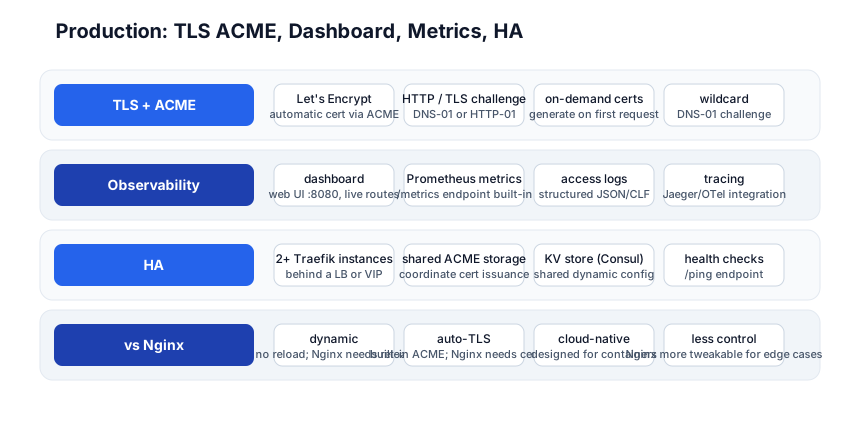
ACME — automatic Let’s Encrypt TLS
# traefik.yml
certificatesResolvers:
  letsencrypt:
    acme:
      email: admin@example.com
      storage: /acme.json
      httpChallenge:
        entryPoint: web
Traefik automatically obtains and renews Let’s Encrypt TLS certificates. When a router with tls.certresolver=letsencrypt receives a request for a new domain, Traefik initiates the ACME challenge, gets the certificate, and serves HTTPS — all without manual certbot runs. Certificates are stored in acme.json (shared across instances for HA).
Challenge types:
- HTTP-01 — Traefik serves the challenge on port 80 (simplest, works through most firewalls).
- TLS-01 — challenge via TLS ALPN.
- DNS-01 — challenge via DNS TXT record (required for wildcard certs
*.example.com).
Dashboard
# traefik.yml
api:
  dashboard: true
  insecure: false    # serve via a router, not on a public port

# router for the dashboard
http:
  routers:
    dashboard:
      rule: "Host(`traefik.example.com`)"
      service: api@internal
      middlewares:
        - dashboard-auth
Traefik has a built-in web dashboard at /dashboard/ showing live routers, services, middleware, and entrypoints. Secure it with BasicAuth or ForwardAuth — never expose it publicly without auth.
Metrics
metrics:
  prometheus:
    addEntryPointsLabels: true
    addServicesLabels: true
    addRoutersLabels: true
Traefik exposes a Prometheus /metrics endpoint — request count, latency, status codes per router/service/entrypoint. This integrates directly with the Prometheus + Grafana stack.
High availability
Run 2+ Traefik instances behind a load balancer (or with a VIP). Share the ACME storage (acme.json on a shared volume or in a KV store like Consul) so instances don’t duplicate cert issuance. Use a KV store (Consul, Redis, etcd) for shared dynamic config — all instances read the same routing rules.
Traefik vs Nginx
| Traefik | Nginx | |
|---|---|---|
| Config | dynamic (Docker/K8s labels, no reload) | static file + nginx -s reload |
| TLS | built-in ACME (Let’s Encrypt auto) | needs certbot externally |
| Service discovery | auto (reads Docker/K8s API) | manual (edit upstream list) |
| Cloud-native | designed for containers | general-purpose (works everywhere) |
| Fine control | less tweakable (opinionated) | more control over edge cases |
| Performance | fast (Go, built for it) | fast (C, battle-tested) |
| Best for | containerized/Docker/K8s | traditional apps, custom edge cases |
Use Traefik when you’re in a containerized world (Docker/K8s) and want auto-discovery + auto-TLS with zero manual config. Use Nginx when you need maximum control, have non-container backends, or have complex edge requirements Traefik’s abstraction can’t express.
Pitfall: Traefik’s dynamic config is powerful but can be hard to debug — when a route doesn’t work, you need to check the dashboard to see if the router was created, what rule it has, and which middleware is attached. Nginx’s config file is right there to read. For complex setups, Traefik’s abstraction can hide what’s happening.
Quick-Start Checklist
- Run Traefik in Docker —
docker run -p 80:80 -p 443:443 -v /var/run/docker.sock:/var/run/docker.sock traefik:v3. - Open the dashboard —
http://localhost:8080/dashboard/(or route it via a router). - Label a container —
traefik.http.routers.app.rule=Host(\localhost`)+traefik.http.services.app.loadbalancer.server.port=8080`. - Watch it appear in the dashboard — the router is created automatically.
- Add middleware — rate-limit, compress, or auth on the router.
- Enable ACME —
certificatesResolvers.letsencrypt.acme...+tls.certresolver=letsencrypt. - Add health checks —
loadBalancer.healthCheck.path=/health. - Connect Prometheus — enable
metrics.prometheusand scrape/metrics. - Run 2 instances for HA with shared ACME storage.
- Compare with Nginx — if you’re container-native, Traefik’s auto-discovery saves you from config-file + reload cycles.
Common Pitfalls
- Dashboard exposed without auth — the dashboard shows your entire routing config; secure it with BasicAuth or ForwardAuth.
- No ACME storage persistence —
acme.jsonmust be on a persistent volume; otherwise certs are re-requested on every restart (rate limits). - Forgetting
traefik.enable=true— without this label, Traefik ignores the container (security: only explicitly-enabled containers are routed). - Rule not matching — check the dashboard; common issues: wrong backtick escaping in YAML, missing
&&between conditions, port in the Host rule. - No health check — unhealthy backends keep receiving traffic; add
healthCheck.path. - Single instance in prod — no HA; run 2+ with shared ACME storage.
- Port not exposed — the container’s port must be exposed (Docker
portsorexpose) for Traefik to route to it. - Middleware order matters — they run in the listed order; auth before rate-limit is different from rate-limit before auth.
Further Reading
- Traefik Docs — the official reference
- Traefik v3 Migration — what’s new in v3
- Traefik Helm Chart — Kubernetes deployment
- Traefik + Docker Compose — the quick-start guide
- Let’s Encrypt + Traefik — ACME configuration
Related guides
Traefik is the cloud-native edge layer — these PyShine tutorials connect to it:
- Learn Nginx in One Post — the comparison; Nginx (static, general-purpose) vs Traefik (dynamic, cloud-native).
- Learn Docker in One Post — Traefik reads Docker labels; run it as a container with the Docker socket.
- Learn Kubernetes in One Post — the Traefik Helm chart deploys as an IngressController.
- Learn Prometheus in One Post — Traefik’s
/metricsendpoint feeds Prometheus. - Learn OAuth 2.0 + OIDC in One Post — ForwardAuth middleware delegates to an OIDC auth service.
Traefik’s value is dynamic, auto-discovering, auto-TLS configuration for containerized environments — label a container, and it’s routed; stop it, and the route is gone. No config file, no reload, no Enjoyed this post? Never miss out on future posts by following us certbot. The five stages here — entrypoints, routers, services, middleware, production — cover everything from a single Docker-labeled container to a multi-instance, ACME-secured, ForwardAuth-gated, Prometheus-monitored, HA production edge. The two habits that pay off: always secure the dashboard (it exposes your whole routing config), and persist acme.json (without it, every restart re-requests certs and hits Let’s Encrypt rate limits). Run Traefik with the Docker socket, label a container traefik.http.routers.app.rule=Host(\localhost`)`, and watch the route appear in the dashboard — once you’ve seen dynamic config work, the Nginx reload cycle feels archaic.