Learn PostgreSQL in a Single Post: Complete Tutorial From Tables and Indexes to MVCC and Operations
PostgreSQL (Postgres) is the database most engineers reach for when they need a real relational database: ACID, rich types, JSON, full-text search, geospatial, and an extension system that lets it do things no other database can. It’s free, fast, and battle-tested at scale. This single post teaches the whole database in five stages, with hand-drawn diagrams and runnable SQL.
Learning Roadmap
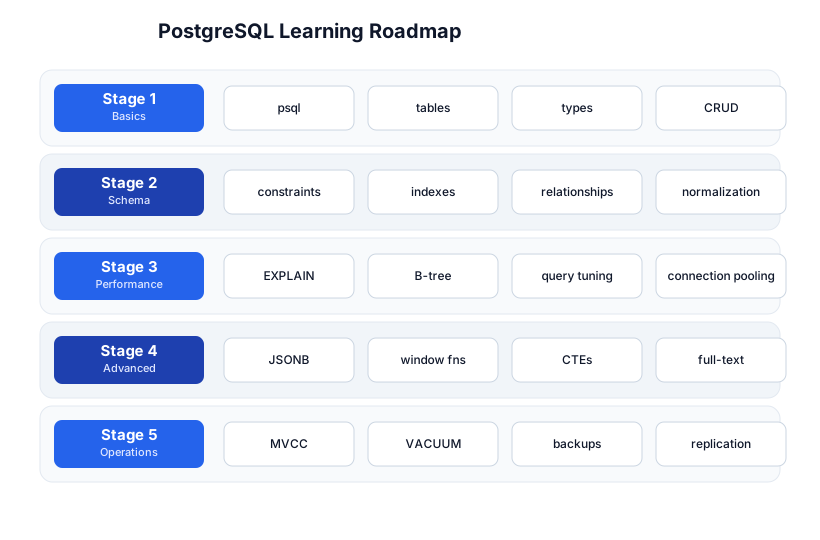
The roadmap moves from the basics (Stage 1), through schema design (Stage 2), performance (Stage 3), advanced features (Stage 4), and operations (Stage 5). The SQL tutorial is the prerequisite — this post goes Postgres-specific.
Stage 1 — Basics
Connect
psql -h localhost -U postgres -d mydb
# inside psql:
\dt              # list tables
\d users         # describe a table (columns, types, indexes)
\q               # quit
psql is the CLI; learn its backslash commands (\d, \dt, \dx for extensions, \l for databases). It’s faster than any GUI for day-to-day work.
Types
Postgres has a richer type system than most databases:
| Category | Types |
|---|---|
| Numeric | int, bigint, numeric (exact decimal), serial/identity (auto-increment) |
| Text | text (unbounded), varchar(n), char(n) |
| Time | date, time, timestamp, timestamptz (UTC-aware — prefer this) |
| Boolean | boolean |
| JSON | jsonb (binary, indexable — always prefer over json) |
| Arrays | int[], text[] |
| UUID | uuid (with gen_random_uuid()) |
| Network | inet, cidr (IP addresses) |
CRUD + joins (the standard SQL you know)
CREATE TABLE users (
  id          bigint GENERATED ALWAYS AS IDENTITY PRIMARY KEY,
  email       text NOT NULL UNIQUE,
  created_at  timestamptz NOT NULL DEFAULT now()
);

INSERT INTO users (email) VALUES ('ada@example.com') RETURNING id, created_at;

SELECT u.email, count(o.id) AS orders
FROM users u LEFT JOIN orders o ON o.user_id = u.id
GROUP BY u.email
ORDER BY orders DESC;
Postgres SQL is standard; see the SQL tutorial for joins, grouping, and window functions in depth. The rest of this post is what’s distinctive about Postgres.
Stage 2 — Schema
Constraints
CREATE TABLE orders (
  id        bigint GENERATED ALWAYS AS IDENTITY PRIMARY KEY,
  user_id   bigint NOT NULL REFERENCES users(id) ON DELETE CASCADE,
  total     numeric(10,2) NOT NULL CHECK (total >= 0),
  status    text NOT NULL DEFAULT 'pending'
             CHECK (status IN ('pending','paid','shipped','cancelled')),
  created_at timestamptz NOT NULL DEFAULT now()
);
PRIMARY KEY, FOREIGN KEY (with ON DELETE CASCADE / SET NULL), UNIQUE, NOT NULL, CHECK, DEFAULT — use them all. Constraints are the database enforcing your invariants; the more you push into the schema, the less application code you write.
Relationships and normalization
Normalize to 3NF (each non-key column depends on the whole key and nothing but the key) by default; denormalize deliberately (with a measured reason — usually read performance) when you need to. Foreign keys are cheap in Postgres — don’t skip them for “performance” without measuring.
Indexes (intro)
CREATE INDEX idx_orders_user_id ON orders(user_id);
CREATE INDEX idx_orders_user_status ON orders(user_id, status);  -- composite
Index the columns you WHERE/JOIN/ORDER BY on. Every FOREIGN KEY column usually wants an index (joins and ON DELETE CASCADE get slow otherwise). More on index types in Stage 3.
Pitfall: Indexes speed reads but slow writes (every
INSERT/UPDATEupdates them). Don’t index everything; index what you query, and verify withEXPLAIN.
Stage 3 — Performance
EXPLAIN ANALYZE
The single most important tool. It shows the query plan the planner chose, plus actual timings:
EXPLAIN ANALYZE
SELECT * FROM orders WHERE user_id = 7 AND status = 'paid';
Seq Scanon a big table where you filter = missing index.Index Scan/Index Only Scan= the index is working.Hash Join/Nested Loop= join strategy; the planner picks based on row estimates.rowsestimates vs actual = if wildly off,ANALYZE(update stats).
Index types — pick the right one
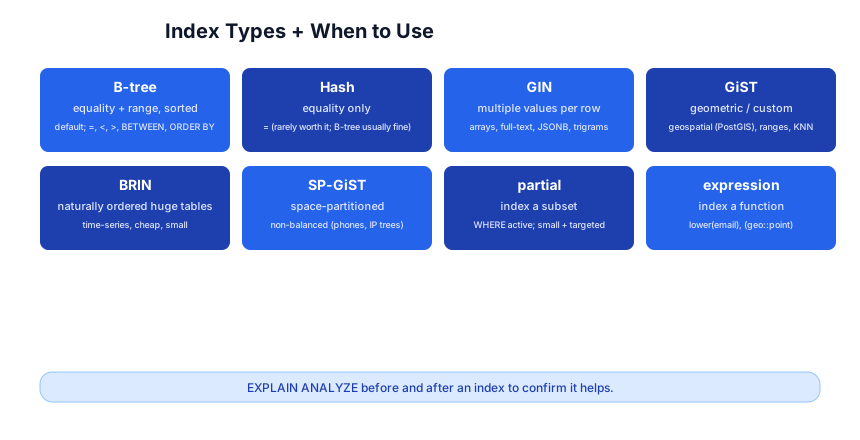
| Index | When |
|---|---|
| B-tree (default) | equality + range (=, <, >, BETWEEN, ORDER BY) |
| GIN | multiple values per row: arrays, jsonb, full-text (tsvector), trigrams |
| GiST | geometric / custom: PostGIS, ranges, KNN nearest-neighbor |
| BRIN | huge, naturally-ordered tables (time-series) — tiny, cheap, block-range |
| Hash | equality only (rarely worth it; B-tree usually fine) |
| Partial | CREATE INDEX ... WHERE active — index a subset, small + targeted |
| Expression | CREATE INDEX ON users (lower(email)) — index a function result |
-- JSONB GIN index for fast key lookups
CREATE INDEX ON events USING gin (data);

-- partial index: only active users
CREATE INDEX ON orders (created_at) WHERE status = 'paid';

-- expression index for case-insensitive email lookup
CREATE INDEX ON users (lower(email));
SELECT * FROM users WHERE lower(email) = 'ada@example.com';
Pitfall:
LIKE '%term%'(leading wildcard) can’t use a B-tree. Use apg_trgmGIN index (CREATE INDEX USING gin (name gin_trgm_ops)) for substring search, or use full-text search for words.
Connection pooling
Postgres forks a backend process per connection (Stage 5) — thousands of idle connections waste memory and a max_connections ceiling. Use PgBouncer (or Pgcat) to multiplex many app connections onto a small pool of real DB connections. Typical setup: app → PgBouncer (1000 connections) → Postgres (50 connections).
Query tuning checklist
EXPLAIN ANALYZEthe slow query.- A
Seq Scanon a big filtered table → add an index. - Row estimates way off →
VACUUM ANALYZE(update stats). ORDER BY ... LIMITslow → an index on the sort column.- N+1 from the ORM → eager-load or join.
Stage 4 — Advanced Features
JSONB
jsonb is binary JSON, indexable with GIN, queryable with operators:
CREATE TABLE events (id bigint PRIMARY KEY, data jsonb NOT NULL);
CREATE INDEX ON events USING gin (data);

INSERT INTO events (data) VALUES ('{"type":"click","user":42,"url":"/home"}');

-- find events with type = click
SELECT * FROM events WHERE data @> '{"type":"click"}';
-- extract a key
SELECT data->>'url' FROM events WHERE data->>'user' = '42';
@> (contains), -> (json), ->> (text), #> (path). Postgres’s JSONB is the reason many apps don’t need a separate NoSQL database.
Window functions
SELECT user_id, created_at, total,
       sum(total) OVER (PARTITION BY user_id ORDER BY created_at) AS running_total,
       rank()      OVER (PARTITION BY user_id ORDER BY total DESC) AS rnk
FROM orders;
Windows compute across a set of rows without collapsing them (unlike GROUP BY). See the SQL tutorial for the full set (row_number, lag, lead, first_value).
CTEs and recursive CTEs
WITH active AS (SELECT * FROM users WHERE active),
     top AS (SELECT user_id, sum(total) AS spend FROM orders GROUP BY user_id)
SELECT a.email, t.spend FROM active a JOIN top t ON t.user_id = a.id;

-- recursive: org chart
WITH RECURSIVE tree AS (
  SELECT id, name, manager_id, 1 AS depth FROM employees WHERE manager_id IS NULL
  UNION ALL
  SELECT e.id, e.name, e.manager_id, t.depth+1 FROM employees e JOIN tree t ON e.manager_id = t.id
)
SELECT name, depth FROM tree;
Full-text search
CREATE INDEX ON posts USING gin (to_tsvector('english', body));

SELECT title FROM posts
WHERE to_tsvector('english', body) @@ to_tsquery('english', 'postgres & index');
tsvector (normalized words), tsquery (search terms), @@ (match), with ranking (ts_rank). For serious search, the pg_trgm extension adds fuzzy matching; for scale, branch to OpenSearch/Elasticsearch.
Extensions
CREATE EXTENSION pg_trgm;       -- trigram fuzzy search
CREATE EXTENSION pgcrypto;       -- encryption functions
CREATE EXTENSION "uuid-ossp";    -- UUID generation
CREATE EXTENSION postgis;        -- geospatial (a whole database on its own)
CREATE EXTENSION pgvector;       -- vector similarity for ML/embeddings
Postgres’s extension system is its superpower — PostGIS (geospatial), pgvector (vector search for LLM embeddings), TimescaleDB (time-series) all turn Postgres into a specialized database without leaving it.
Stage 5 — Operations
Architecture: process-per-connection
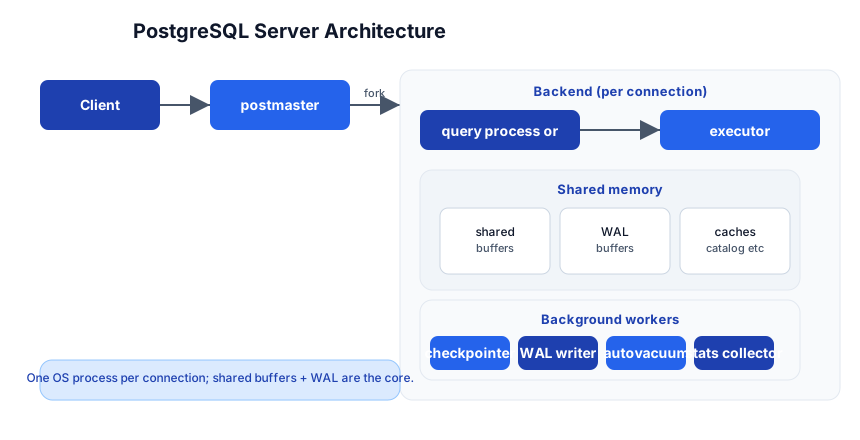
Each client connection gets its own backend process (forked by the postmaster). All backends share shared buffers (the page cache in RAM), WAL buffers (the write-ahead log), and catalog caches. Background workers (checkpointer, WAL writer, autovacuum, stats collector) run alongside. This is why connection pooling matters — every connection is an OS process.
MVCC and isolation
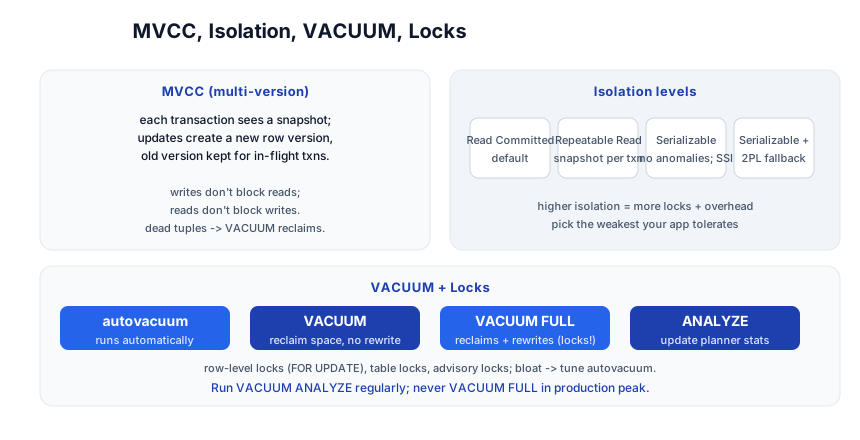
Postgres uses MVCC (multi-version concurrency control): each transaction sees a consistent snapshot of the data. An UPDATE creates a new row version and marks the old one dead; readers in flight still see the old version. The payoff: writes don’t block reads, reads don’t block writes — high concurrency without locks for most operations.
The cost: dead tuples accumulate until VACUUM reclaims them. autovacuum runs this automatically; tune it for write-heavy tables.
Isolation levels
| Level | Prevents |
|---|---|
| Read Committed (default) | dirty reads |
| Repeatable Read | dirty + non-repeatable reads (snapshot isolation) |
| Serializable | all anomalies (via SSI — serializable snapshot isolation) |
Pick the weakest your app tolerates — higher isolation costs performance. Most apps use Read Committed; financial code often needs Serializable.
VACUUM and bloat
VACUUM— mark dead tuples’ space reusable (doesn’t shrink the file).VACUUM FULL— rewrites the table to reclaim space (takes an exclusive lock — avoid in production).ANALYZE— update the planner’s statistics (so it picks good plans).VACUUM ANALYZE— both.autovacuum— does this automatically; tuneautovacuum_vacuum_scale_factorfor hot tables.
Pitfall: “Table bloat” (lots of dead tuples not vacuumed) slows every scan. Watch
pg_stat_user_tablesforn_dead_tup; if autovacuum can’t keep up with a write-heavy table, lower its threshold or schedule manualVACUUMoff-peak.
WAL, backups, replication
- WAL (write-ahead log) — every change is logged before it’s applied; enables crash recovery and replication.
pg_dump/pg_restore— logical backups (SQL or custom format). Good for small/medium.pgBackRest/pg_basebackup— physical backups + PITR (point-in-time recovery). For production.- Streaming replication — a replica applies WAL in real time; use for read scaling and HA. Logical replication for selective table sync or cross-version.
Monitoring
pg_stat_activity— what queries are running (and what’s waiting).pg_stat_statements— aggregate query stats (slowest queries, most calls). Enable it.pg_stat_user_tables— dead tuples, seq vs index scans.- External: Prometheus +
postgres_exporter+ Grafana.
The toolchain
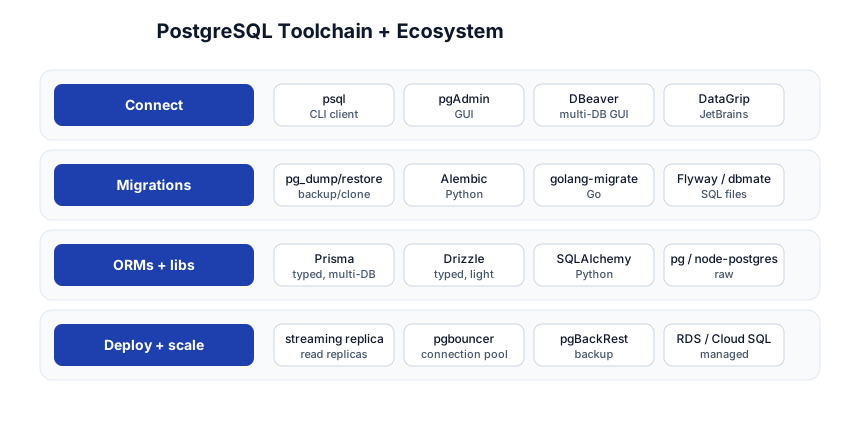
| Concern | Tool |
|---|---|
| Connect | psql, pgAdmin, DBeaver, DataGrip |
| Migrations | pg_dump/restore, Alembic, golang-migrate, Flyway, dbmate |
| ORMs | Prisma, Drizzle, SQLAlchemy, raw pg/node-postgres |
| Deploy + scale | streaming replica, PgBouncer, pgBackRest, RDS/Cloud SQL/Aurora |
Quick-Start Checklist
- Run Postgres —
docker run -e POSTGRES_PASSWORD=secret -p 5432:5432 postgresor a managed instance. - Connect with
psqland learn\d,\dt,\dx. - Create a table with
PRIMARY KEY,FOREIGN KEY,CHECK,timestamptz DEFAULT now(). - Use
jsonbfor flexible fields, with a GIN index. - Add indexes on filter/join/sort columns; verify with
EXPLAIN ANALYZE. - Enable
pg_stat_statementsto find slow queries. - Put PgBouncer in front for any app with many connections.
- Let autovacuum run; monitor
n_dead_tupon hot tables. - Set up backups (
pg_dumpfor dev,pgBackRest+ PITR for prod) and test a restore. - Add a streaming replica for read scaling + HA.
Common Pitfalls
varcharovertext—textis unbounded and equally fast;varchar(n)only when you need a length cap.- Missing FK indexes — joins and
ON DELETE CASCADEget slow; index your foreign keys. LIKE '%term%'— can’t use B-tree; usepg_trgmGIN or full-text.- Thousands of connections — process-per-connection; use PgBouncer.
- Table bloat — dead tuples from MVCC; watch and tune autovacuum.
VACUUM FULLin production — exclusive lock; usepg_repackinstead to reclaim without blocking.- No backups / untested restore — a backup you’ve never restored is not a backup. Test restores regularly.
SERIALvsIDENTITY— preferGENERATED ALWAYS AS IDENTITY(SQL-standard, can’t be accidentally overwritten).timestamptzovertimestamp— always store UTC-aware; avoid the timezone-conversion bugs.
Further Reading
- PostgreSQL Docs — the authoritative reference
- Use The Index, Luke! — indexes, explained
- PostgreSQL Tutorial — hands-on lessons
- The Art of PostgreSQL by Dimitri Fontaine — query writing for devs
- Postgres Weekly — the newsletter
Related guides
Postgres is the database at the center of the modern stack — these PyShine tutorials connect to it:
- Learn SQL in One Post — the prerequisite; standard SQL that Postgres implements.
- Learn Node.js + Express in One Post — query Postgres from
pg/Prisma in your handlers. - Learn Python in One Post — SQLAlchemy / asyncpg from Python.
- Learn Go in One Post —
database/sql+pgxwith connection pooling. - Learn Docker in One Post — run Postgres in a container with a named volume for data.
- Learn System Design in One Post — sharding, replication, and CAP choices apply directly here.
Postgres is the database that grows with you: it’s a perfectly good key-value store ( Enjoyed this post? Never miss out on future posts by following us jsonb), a relational database, a full-text search engine, a geospatial database (PostGIS), and a vector database (pgvector) — without leaving one engine. The five stages here — basics, schema, performance, advanced features, operations — cover everything from a single-table app to a replicated, pooled, backed-up production system. The two habits that pay off forever: EXPLAIN ANALYZE before you guess, and let the constraints + MVCC do the work the database was designed to do. Start a container, run the SQL above, and watch a plan change when you add an index — that’s the moment it clicks.