Learn Node.js and Express in a Single Post: Complete Tutorial From the Event Loop to Middleware and Production
Node.js is JavaScript on the server: it takes the V8 engine from Chrome, adds non-blocking I/O via an event loop, and lets you write networked backends in the same language as the frontend. Express is the minimal web framework most Node servers are built on. Together they’re the default entry point to backend JavaScript. This single post teaches both in five stages, with hand-drawn diagrams and runnable snippets.
Learning Roadmap
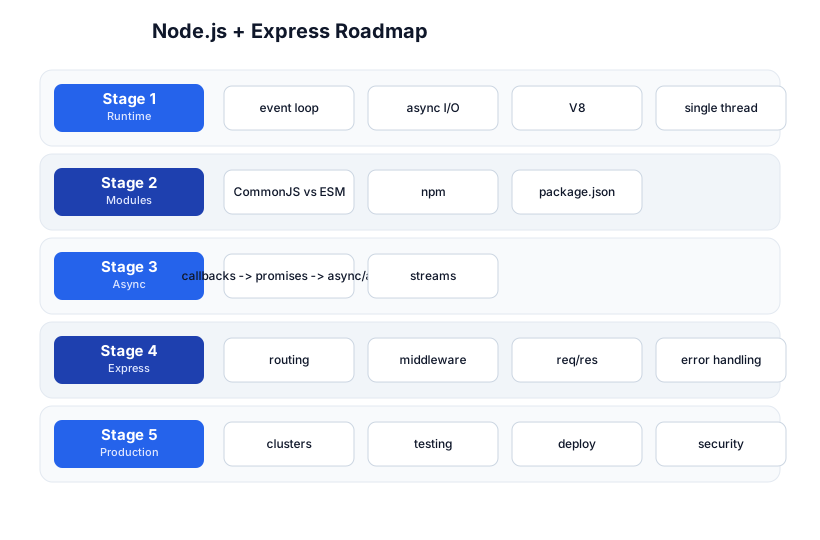
The roadmap moves from the runtime model (Stage 1), through modules (Stage 2), async (Stage 3), Express (Stage 4), and production (Stage 5). You’ll want solid JavaScript first — Node is JS.
Stage 1 — The Runtime
What Node is
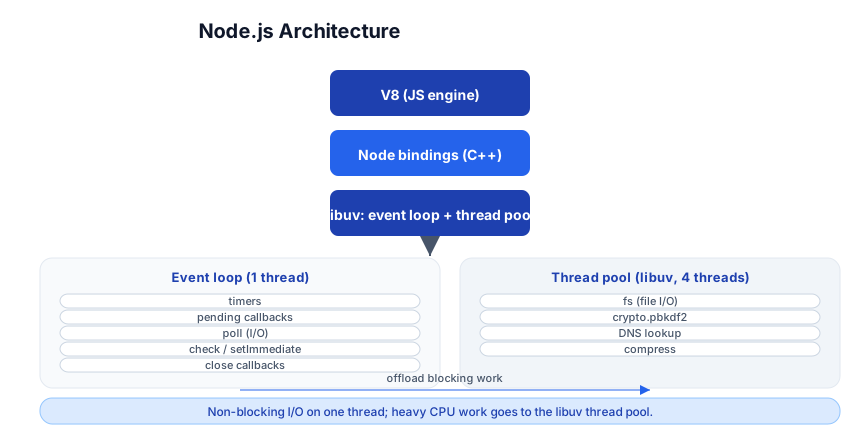
Node is a runtime, not a language: it runs JavaScript using the V8 engine (the same one in Chrome), plus a set of C++ bindings for I/O (files, network, crypto) and libuv, the library that provides the event loop and a thread pool.
The event loop and the single thread
Your JavaScript runs on one thread. The event loop keeps that thread busy with I/O callbacks: when a network request arrives, or a file read completes, libuv notifies the loop, which runs your callback. Because the loop never blocks on I/O, a single thread can handle thousands of concurrent connections.
The hard rule: never block the event loop. A CPU-bound loop (while(true){}), a synchronous file read (fs.readFileSync of a big file), or a heavy computation freezes every connection, not just the one doing the work.
The libuv thread pool
Some operations can’t be made non-blocking at the OS level (file I/O on some platforms, crypto.pbkdf2, DNS lookups). Node offloads these to a thread pool (default 4 threads, configurable via UV_THREADPOOL_SIZE) so the event loop keeps running. Your callback still runs on the single main thread when the work completes.
Pitfall: The thread pool is not parallelism for your JS — it’s for the C++ I/O work. If you need real parallel CPU work in JS, use worker threads (
worker_threads) or a child process; the thread pool won’t help you.
Stage 2 — Modules
CommonJS vs ES Modules
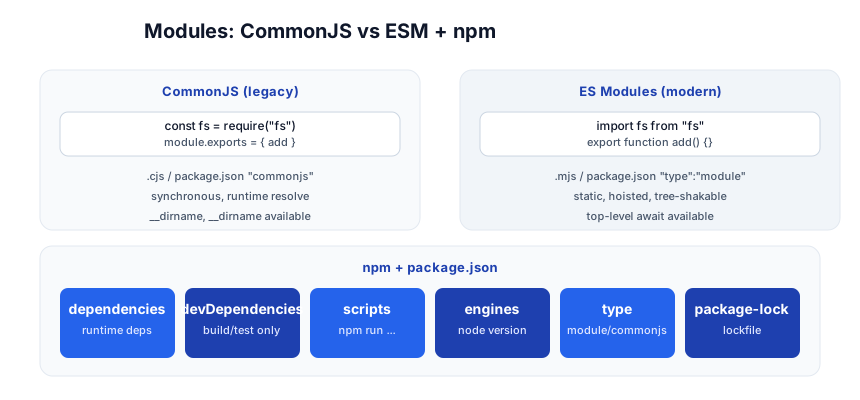
Node historically used CommonJS (require/module.exports); modern Node also supports ES Modules (import/export). Use ESM for new code; CommonJS still works for legacy.
// CommonJS (legacy)
const fs = require('fs');
function add(a, b) { return a + b; }
module.exports = { add };
// const { add } = require('./math');

// ES Modules (modern) — package.json: "type": "module"
import fs from 'fs';
export function add(a, b) { return a + b; }
// import { add } from './math';
| CommonJS | ESM | |
|---|---|---|
| Syntax | require / module.exports | import / export |
| Resolution | runtime, synchronous | static, hoisted |
| Extension | .cjs or default | .mjs or "type":"module" |
| Top-level await | no | yes |
| Tree-shaking | no | yes |
npm and package.json
{
  "name": "my-api",
  "version": "1.0.0",
  "type": "module",
  "scripts": { "start": "node index.js", "dev": "nodemon index.js", "test": "vitest" },
  "dependencies": { "express": "^4.19.0", "pg": "^8.11.0" },
  "devDependencies": { "nodemon": "^3.1.0", "vitest": "^2.0.0" },
  "engines": { "node": ">=20" }
}
npm install express            # add a runtime dep
npm install --save-dev nodemon # add a dev dep
npm install                    # install everything from package.json + lockfile
npm run dev                    # run the "dev" script
node_modules/ holds installed packages; package-lock.json pins exact versions for reproducibility (commit the lockfile). For speed, use pnpm (dedupes via symlinks) or Bun.
Pitfall:
npm install <pkg>without-Dputs a build tool intodependencies, shipping it to production. Use--save-dev/-Dfor anything only needed at build/test time.
Stage 3 — Async
Callbacks -> promises -> async/await
Node’s async story evolved: callbacks (error-first) -> promises -> async/await. Use async/await; it reads top-to-bottom like sync code but never blocks.
// callback (legacy, error-first)
fs.readFile('f.txt', (err, data) => { if (err) return handle(err); use(data); });

// promise + async/await (modern)
import { readFile } from 'node:fs/promises';
async function load() {
  try {
    const data = await readFile('f.txt', 'utf8');  // suspends, doesn't block
    return JSON.parse(data);
  } catch (err) { handle(err); }
}
Always handle errors — an unhandled promise rejection crashes the process (since Node 15). Wrap await in try/catch or attach .catch().
Streams
Streams process data in chunks as it arrives, instead of buffering it all in memory — essential for large files, uploads, or piping:
import { createReadStream } from 'node:fs';
import { pipeline } from 'node:stream/promises';

// pipe a file through a transform to stdout
await pipeline(createReadStream('big.log'), process.stdout);

// HTTP response is a writable stream
res.write('chunk 1\n'); res.write('chunk 2\n'); res.end('done\n');
Use stream.pipeline (not .pipe()) so errors propagate and resources clean up.
Pitfall:
.pipe()doesn’t forward errors — one stream can fail silently while the other keeps going. Usepipeline()fromstream/promises.
Stage 4 — Express
Express is a minimal web framework: it routes HTTP requests to handler functions, with a middleware pipeline in between.
A minimal server
import express from 'express';
const app = express();

app.use(express.json());                  // body parser middleware

app.get('/', (req, res) => res.json({ ok: true }));

app.post('/users', (req, res) => {
  const { name } = req.body;
  res.status(201).json({ id: 1, name });
});

app.listen(3000, () => console.log('http://localhost:3000'));
The middleware pipeline
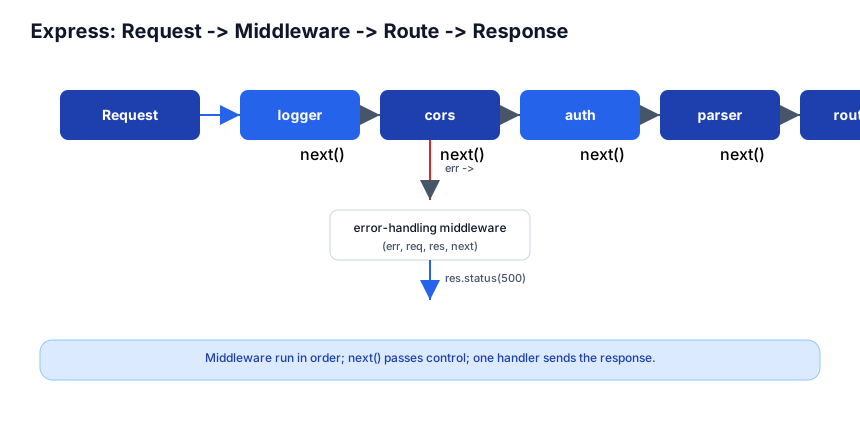
Every request flows through a chain of middleware functions, each getting (req, res, next) and calling next() to pass control onward. One handler eventually sends the response.
// a logging middleware
app.use((req, res, next) => {
  console.log(`${req.method} ${req.url}`);
  next();                          // pass control to the next middleware/route
});

// order matters: this runs before routes defined after it
app.get('/users', authMiddleware, getUsers);   // route-specific middleware
Request and response objects
req.method,req.url,req.path,req.query,req.paramsreq.headers,req.get('Authorization')req.body(afterexpress.json())res.json(obj),res.send(str),res.status(404).send(...),res.redirect(url)
Error handling
A middleware with four arguments (err, req, res, next) is an error handler. Define it last, after all routes:
app.use((err, req, res, next) => {
  console.error(err.stack);
  res.status(err.status || 500).json({ error: err.message });
});
Pass errors to it with next(err) or by throwing in an async handler (wrap async routes in a helper — an unhandled rejection from a route handler won’t reach Express automatically):
// wrap async handlers so rejections reach the error middleware
const wrap = (fn) => (req, res, next) => Promise.resolve(fn(req, res, next)).catch(next);
app.get('/users/:id', wrap(async (req, res) => {
  const user = await db.findUser(req.params.id);
  if (!user) { const e = new Error('not found'); e.status = 404; throw e; }
  res.json(user);
}));
Pitfall: A thrown error in an
asyncroute handler, unhandled, becomes an unhandled rejection — not an Express error. Useexpress-async-errorsor thewraphelper so it reaches your error middleware.
Routers
For larger apps, split routes into Router modules and mount them:
import { Router } from 'express';
const users = Router();
users.get('/', listUsers);
users.get('/:id', getUser);
app.use('/users', users);   // mount at /users
Stage 5 — Production
Clustering
A single Node process uses one CPU core. The cluster module (or PM2) forks one worker per core, all sharing a port — this is how you use a multi-core machine:
import cluster from 'node:cluster';
import os from 'node:os';
if (cluster.isPrimary) {
  for (let i = 0; i < os.cpus().length; i++) cluster.fork();
} else {
  // each worker runs the server
  app.listen(3000);
}
In practice, use PM2 (pm2 start app.js -i max) or run behind a container orchestrator with one process per container — don’t hand-roll clustering in production.
Testing
import { test, expect } from 'vitest';
import request from 'supertest';
import app from './app.js';

test('GET / returns ok', async () => {
  const res = await request(app).get('/');
  expect(res.status).toBe(200);
  expect(res.body).toEqual({ ok: true });
});
Vitest (unit/integration) + supertest (HTTP) is the standard combo. For e2e, Playwright drives a real browser.
Deploy and security
- PM2 for process management on a VM; Docker + your orchestrator for containerized deploys.
- Security headers: use
helmet. CORS: usecors. Rate limiting:express-rate-limit. Input validation:zodorjoi. - Never trust
req.bodywithout validation; never interpolate user input into SQL/shell (injection). - Set
NODE_ENV=production(faster V8 optimizations, less verbose errors).
Databases
- SQL:
pg(raw), Prisma (typed ORM), Drizzle (typed, lightweight). - MongoDB: Mongoose.
- Cache: ioredis /
node-redis.
The ecosystem
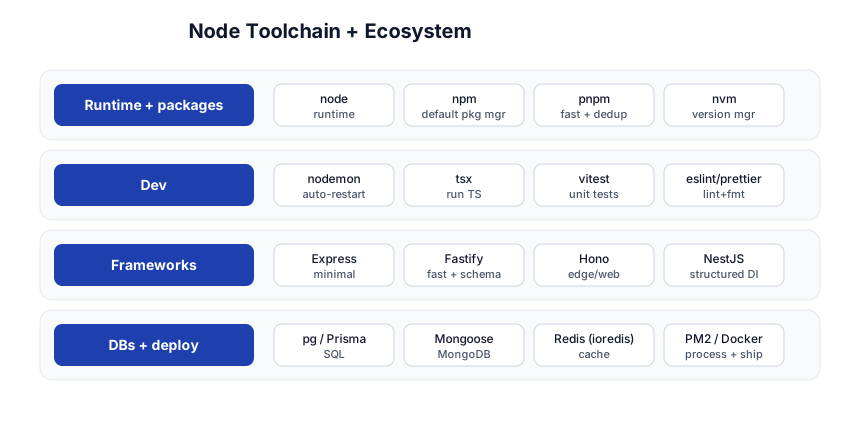
| Concern | Tool |
|---|---|
| Runtime + packages | node, npm, pnpm, nvm |
| Dev | nodemon, tsx, vitest, eslint/prettier |
| Frameworks | Express (minimal), Fastify (fast + schema), Hono (edge), NestJS (structured DI) |
| DBs + deploy | pg/Prisma, Mongoose, Redis, PM2/Docker |
Quick-Start Checklist
- Install Node (LTS) via nvm or the installer; verify with
node -v. - Init a project:
npm init, install Express, add a"type": "module"+ adevscript. - Write a 10-line server with one
GETroute;node index.jsand hit it withcurl. - Add
express.json()and aPOSTroute; test withcurl -d. - Add a logging middleware + an error-handling middleware (four-arg).
- Use async/await with
try/catch(or wrap async routes) for DB calls. - Validate input with Zod before it touches your DB.
- Add helmet, cors, express-rate-limit for baseline security.
- Test with Vitest + supertest in CI.
- Run behind PM2 or in Docker with
NODE_ENV=production.
Common Pitfalls
- Blocking the event loop — a sync loop or
readFileSyncfreezes all connections. Keep the loop free. - Unhandled promise rejections — crash the process.
try/catcheveryawait, or attach.catch(). asyncroute handlers that throw — don’t reach Express’s error middleware without wrapping. Usewrap()orexpress-async-errors..pipe()without error handling — usestream/pipelineso errors propagate.- Dev deps in
dependencies— bloats production. Use-D/--save-dev. - Not committing the lockfile — non-reproducible installs. Commit
package-lock.json. - Trusting
req.body— always validate with Zod/joi; never build SQL/shell from it. - Single process on multi-core — use clustering (PM2
-i max) or one process per container. NODE_ENVunset in production — slower V8, verbose errors. SetNODE_ENV=production.
Further Reading
- Node.js Docs — the standard library is large and well-documented
- Node.js Best Practices — the community mega-list
- Express Docs — routing, middleware, API
- 12 Factor App — config, logs, process model for production
- Node.js Design Patterns by Mario Casciaro — the deep book
Related guides
Node + Express is the backend JS stack — these PyShine tutorials are its prerequisites and companions:
- Learn JavaScript + TypeScript in One Post — Node is JS; async/await and the event loop are JS concepts first.
- Learn REST API in One Post — Express implements REST; know methods, status codes, idempotency.
- Learn SQL in One Post — what your Express handlers query (via
pg/Prisma). - Learn Docker in One Post — containerize and ship the Node server.
- Learn React + Next.js in One Post — the frontend that calls this backend.
Node’s power is its simplicity: one language front-to-back, one thread, an event loop, and a tiny core you can hold in your head. The five stages here — runtime, modules, async, Express, production — cover everything from a “hello world” server to a clustered, tested, containerized API. The single most important habit is never block the loop: once that’s a reflex, the rest is standard web-backend work. Run every snippet above, write one endpoint, hit it with Enjoyed this post? Never miss out on future posts by following us curl, wrap it in Docker, and you’ve built your first production Node service. 


