Learn Operating Systems in a Single Post: Complete Tutorial From Processes and Scheduling to Virtual Memory and Concurrency
An operating system is the program that makes a computer usable: it manages the CPU, memory, disks, and devices so that dozens of programs can run at once without colliding, and so that a crash in one doesn’t take down the rest. Whether you’re debugging a hang, reasoning about a data race, or sizing a server, the OS concepts are the substrate under everything. This single post teaches the whole subject in five stages, with hand-drawn diagrams and runnable commands.
Learning Roadmap
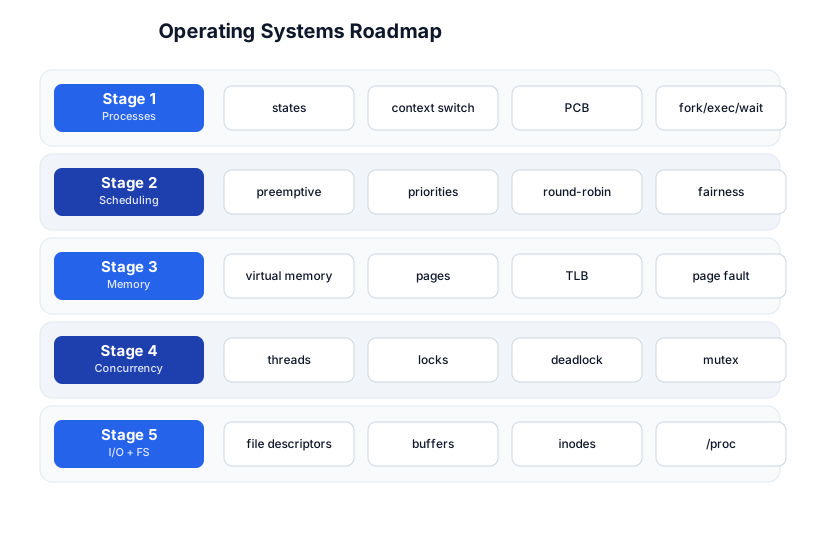
The roadmap moves from processes (Stage 1), to how the CPU is shared (Stage 2), to how memory is shared and faked (Stage 3), to the hardest part — concurrency (Stage 4), and finally I/O and filesystems (Stage 5).
Stage 1 — Processes
A process is a running program: an instance of an executable plus its address space, open files, registers, and scheduling state. The OS keeps each process’s metadata in a Process Control Block (PCB) — the PID, registers, program counter, stack pointer, open file table, memory map, and scheduling info.
Process states
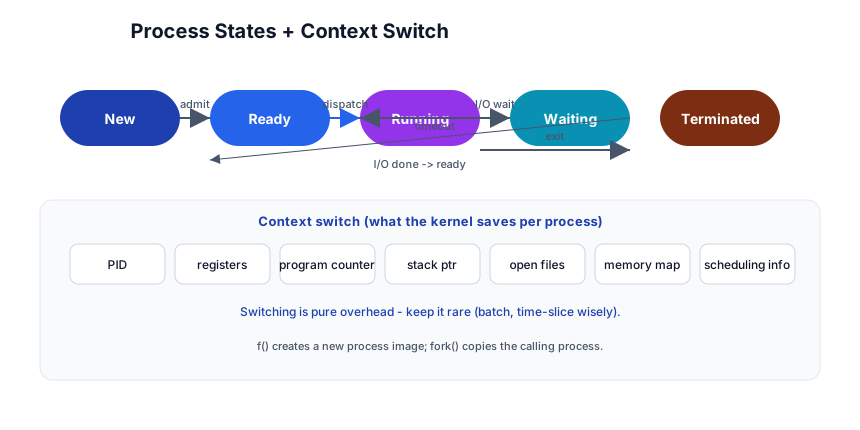
A process moves among states:
- New → Ready (admitted)
- Ready → Running (dispatched by the scheduler)
- Running → Ready (time-slice expires, preempted)
- Running → Waiting/Blocked (asks for I/O, or waits on a lock)
- Waiting → Ready (I/O completes, lock released)
- Running → Terminated (exit)
The context switch
Switching the CPU from process A to process B means saving A’s full state (registers, PC, memory map) into A’s PCB and loading B’s state from B’s PCB. This is pure overhead — the CPU does no useful user work during a switch — so the scheduler balances “don’t switch too often” against “don’t let one process hog the CPU.”
fork, exec, wait
On Unix, creating a process is two steps:
fork()— duplicates the calling process; the child gets a copy of the parent’s memory (copy-on-write, so it’s cheap until either writes).exec(path)— replaces the current process image with a new program (the child now runs a different binary).wait()— a parent blocks until a child exits (and reaps its exit status, preventing a zombie).
ps -ef                # see processes (PID, PPID, state, command)
top / htop            # live process view, sorted by CPU/mem
strace -p <pid>       # trace the syscalls a process makes
Pitfall: A child that exits but whose parent never
wait()s becomes a zombie (it’s done, but its entry stays until reaped). A parent that dies leaves children as orphans, re-parented toinit(PID 1). The classic leak in long-running servers is not reaping children.
Stage 2 — Scheduling
The scheduler decides which ready process runs next. Goals: fairness (no starvation), responsiveness (low latency for interactive work), throughput (high overall work/sec), and honoring priorities.
Preemptive vs cooperative
- Cooperative — a process runs until it voluntarily yields (calls a blocking syscall). A buggy/infinite-loop process freezes the machine. (Early Windows, old Mac.)
- Preemptive — the OS sets a timer interrupt and forcibly takes the CPU back after a time slice (quantum, ~1–10 ms). Every modern general-purpose OS is preemptive.
Algorithms
| Algorithm | Idea | Tradeoff |
|---|---|---|
| FCFS | first-come, first-served | simple, but short jobs wait behind long ones (convoy effect) |
| Round-robin | each ready process gets a quantum, then rotates | fair, responsive; context-switch overhead |
| Priority | highest priority first | starvation of low priority (fix: aging) |
| SJF / SRTF | shortest job first | optimal throughput, but you can’t know job length |
| Multilevel feedback | queues by priority; demote CPU hogs, promote I/O-bound | what real OSes approximate (Linux CFS) |
Pitfall: Priority inversion — a low-priority process holds a lock a high-priority process needs, and medium-priority processes keep running so the high one waits indefinitely. Fix with priority inheritance (the lock holder temporarily inherits the waiter’s priority). This bit the Mars Pathfinder rover in 1997.
Stage 3 — Memory
Virtual memory
Every process sees its own virtual address space (e.g. 0 to 2⁴⁸), as if it had the whole machine to itself. The OS + MMU translate virtual addresses to physical frames via a page table. This gives isolation (a process can’t touch another’s memory) and the illusion of more RAM than exists (via demand paging + swap).
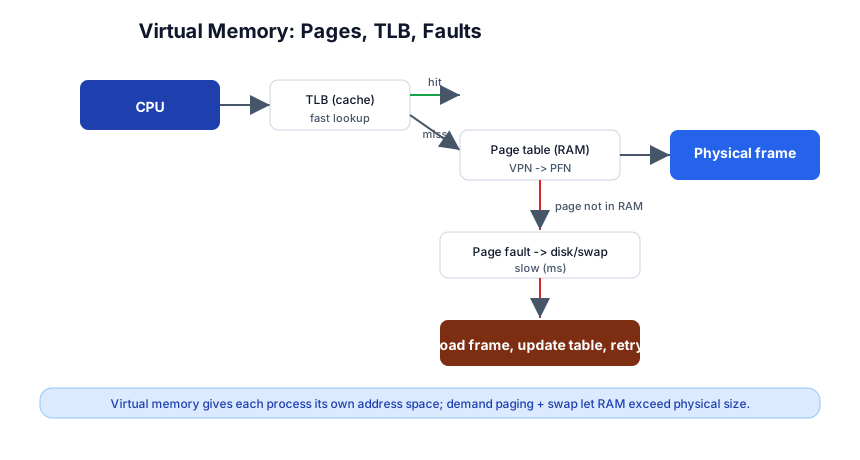
Pages, TLB, page faults
Memory is divided into fixed-size pages (typically 4 KB); physical RAM into frames of the same size. The page table maps virtual page number → physical frame number.
- TLB (translation lookaside buffer) — a hardware cache of recent translations. A TLB hit makes translation free; a miss walks the page table in RAM (slow). This is why page size and locality matter.
- Page fault — the CPU accesses a virtual page not currently in RAM (it’s on disk/swap). The OS pauses the process, fetches the frame from disk, updates the table, and retries. This is demand paging — pages are loaded only when touched.
- Swap — when RAM is full, the OS evicts pages to disk (swap space). A system that’s swapping is catastrophically slow (disk is ~10,000× slower than RAM).
Pitfall: Thrashing — if the working set (pages in active use) exceeds RAM, every access faults, the OS swaps in a page that immediately gets evicted, and the system spends all its time swapping instead of computing. The fix is more RAM or a smaller working set, not a faster CPU.
Replacement policies
When a frame must be evicted, which one? LRU (least recently used) is good but expensive to track exactly; OSes approximate it (clock algorithm, second-chance). FIFO is simple but can evict a page that’s about to be used. Belady’s (optimal, evict the one not used for longest) is unimplementable (you can’t see the future) but is the benchmark.
Stage 4 — Concurrency
Threads vs processes
A thread is a unit of execution within a process. Threads in the same process share memory (code, heap, open files); each has its own stack and registers. Creating a thread is cheaper than a process (no address-space copy), but shared memory is the source of most concurrency bugs.
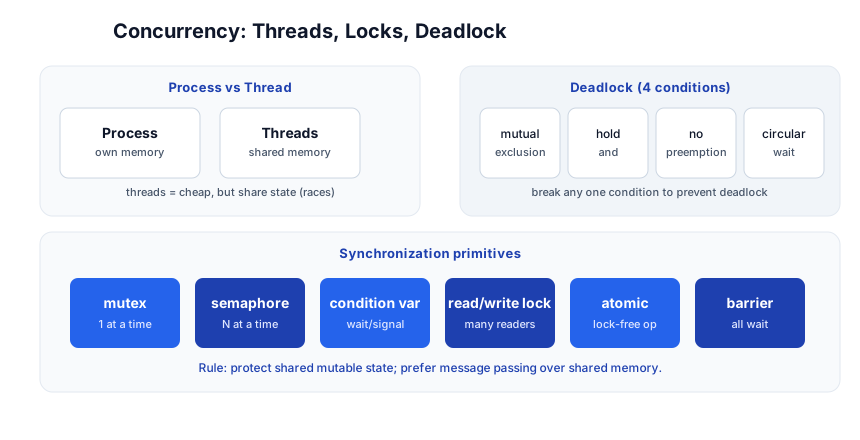
Race conditions and locks
When two threads read-modify-write a shared variable without synchronization, the result depends on timing — a race condition. count++ is not atomic: it’s load → add → store, and a thread can be preempted between any two steps. The fix is a mutex (mutual exclusion lock): only one thread holds it at a time, so the critical section runs atomically.
import threading
lock = threading.Lock()
with lock:          # acquire; auto-release on exit
    count += 1
Synchronization primitives
| Primitive | Use |
|---|---|
| Mutex | one thread at a time in a critical section |
| Semaphore | N threads at a time (counting) |
| Condition variable | a thread waits for a condition; another signals when it’s met |
| Read/write lock | many readers OR one writer |
| Atomic | lock-free single-word read-modify-write (atomic_int, compare_and_swap) |
| Barrier | all threads wait until everyone reaches a point |
Pitfall: Hold a lock for the shortest time possible. Long critical sections kill concurrency and scalability. If you must do slow work, copy the data out under the lock and do the work unlocked.
Deadlock
Deadlock is when threads are stuck waiting on each other forever. The four Coffman conditions that together cause it:
- Mutual exclusion — a resource is held by one thread.
- Hold and wait — a thread holds one resource while waiting for another.
- No preemption — you can’t force-release a held resource.
- Circular wait — A waits on B, B waits on C, C waits on A.
Break any one condition to prevent deadlock. The common technique: acquire locks in a consistent global order (so a circular wait can’t form), or use lock timeouts / try-lock with backoff.
Pitfall: The single most common deadlock cause is acquiring two locks in opposite orders in two code paths (
lock A then Bvslock B then A). Pick a project-wide lock ordering and never violate it.
Livelock and starvation
- Livelock — threads aren’t blocked but keep reacting to each other and make no progress (two people in a hallway both stepping aside in sync forever).
- Starvation — a thread never gets scheduled (e.g. a low-priority thread behind high-priority ones). Fix with aging (raise priority the longer a thread waits).
Stage 5 — I/O + Filesystems
File descriptors
On Unix, everything is a file — regular files, pipes, sockets, devices — all accessed via an integer file descriptor (fd). A process has an fd table; read/write/close work on fds. fds 0/1/2 are stdin/stdout/stderr.
ls /proc/$$/fd        # your process's open file descriptors
lsof -p <pid>          # what files/sockets a process has open
Buffers and the page cache
The OS caches disk reads in the page cache (RAM). A read() may return from the cache (fast) or trigger a disk I/O (slow). Writes are buffered and flushed later — fsync() forces a flush so the data survives a crash. This is why databases call fsync on commit: otherwise a power loss could lose acknowledged writes.
Pitfall: A
write()returning success means “in the OS buffer,” not “on disk.” For durability you needfsync()(or open withO_SYNC). Losing acknowledged data on a power fault is a classic data-loss bug.
Inodes and filesystems
A file’s metadata (size, permissions, timestamps, block pointers) lives in an inode; the directory is just a map from name → inode number. The filesystem (ext4, APFS, NTFS, XFS) manages how inodes and data blocks are laid out on disk. Hard links (same inode, multiple names) vs symlinks (a file containing another path).
/proc and introspection
Linux exposes per-process and kernel state as virtual files under /proc:
/proc/<pid>/status— memory, state, threads./proc/<pid>/maps— virtual memory layout./proc/meminfo,/proc/cpuinfo,/proc/loadavg— system-wide.
Syscalls
The user/kernel boundary is crossed by syscalls: read, write, open, close, fork, exec, mmap, socket, brk, ioctl. Each is a (relatively expensive) context switch into kernel mode. Tools like strace show every syscall a process makes — invaluable for debugging “what is my program actually doing?”
The Toolchain
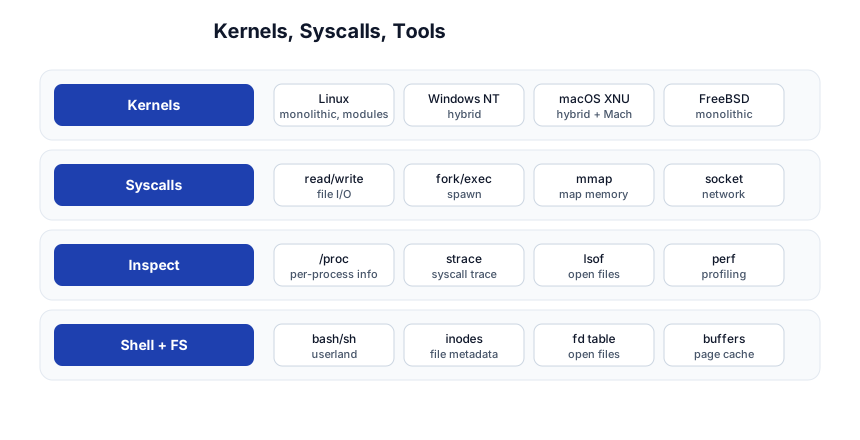
- Kernels: Linux (monolithic + loadable modules), Windows NT (hybrid), macOS XNU (hybrid + Mach microkernel core), FreeBSD.
- Syscalls: the user/kernel API.
strace/dtrace/fracetrace them. - Inspect:
/proc,strace,lsof,perf,vmstat,iostat. - Shell + FS: bash/sh (userland), inodes, fd tables, page cache.
Quick-Start Checklist
- Learn process states and the context switch — every perf conversation starts here.
- Understand fork/exec/wait — how Unix spawns, and the zombie/orphan pitfalls.
- Know preemptive scheduling and why round-robin + priorities approximate real OSes.
- Master virtual memory: pages, TLB, page faults, swap, and why thrashing kills.
- Know threads vs processes — cheap vs isolated, and why shared memory causes races.
- Protect shared state with locks, and acquire locks in a consistent global order.
- Name the four deadlock conditions and how breaking one prevents it.
- Remember
write()≠ on-disk —fsync()for durability. - Use
strace,lsof,/procwhen “what is my program doing?” isn’t obvious. - Reason about the page cache — most “slow disk” problems are actually cache misses.
Common Pitfalls
- Zombies / orphans — not reaping children with
wait(). Fix with a SIGCHLD handler or explicit reaping. - Priority inversion — a low-priority holder blocks a high-priority waiter. Fix with priority inheritance.
- Thrashing — working set > RAM; adding CPU doesn’t help, adding RAM does.
- Holding locks across I/O — serializes all threads on a slow operation; copy-and-release instead.
- Lock-ordering deadlocks — acquire locks in a consistent order across all code paths.
- Trusting
write()durability — buffer ≠ disk;fsync()to be sure. - Spinlocks on single-core — a spinlock holding the only CPU starves everyone; use a blocking lock.
- Assuming atomicity —
x++is not atomic; use an atomic primitive or a lock.
Further Reading
- Operating Systems: Three Easy Pieces by Arpaci-Dusseau — free, the modern standard textbook
- The Linux Programming Interface by Michael Kerrisk — the syscall bible
- Beej’s Guide to Network Programming — sockets and IPC
- man pages —
man 2 fork,man 2 mmap, etc. - Linux Kernel docs — when you want the source of truth
Related guides
OS concepts underpin every systems topic — these PyShine tutorials apply them directly:
- Learn Linux CLI in One Post — processes, file descriptors, permissions are the userland surface of the OS.
- Learn Computer Networking in One Post — sockets are file descriptors; the network stack is kernel-side OS.
- Learn Bash in One Post — pipes, redirects, signals, and background jobs are OS primitives driven from the shell.
- Learn Rust in One Post — Rust’s ownership model is a compile-time answer to the data races this stage is about.
- Learn Go in One Post — goroutines (M:N scheduled) are the language-level take on OS threads.
- Learn Docker in One Post — containers are OS namespaces + cgroups; this is the underlying mechanism.
Operating systems is the subject where “it works on my machine” stops being an acceptable answer. The five stages here — processes, scheduling, memory, concurrency, I/O — are the mental model a senior engineer uses every time a server is slow, a program hangs, or a deploy misbehaves. Spend a day per stage, run Enjoyed this post? Never miss out on future posts by following us strace on a real process, watch a page fault, and write a program that deadlocks then fix it. The concepts only stick once you’ve felt the bugs they prevent.