Learn React and Next.js in a Single Post: Complete Tutorial From Components and Hooks to Server Components and Deployment
React is the dominant library for building user interfaces: you describe the UI as a function of state, and React figures out how to update the DOM. Next.js is the framework on top of React that adds routing, server rendering, and a deployment story — the default way most new React apps are built today. This single post teaches both in five stages, with hand-drawn diagrams and runnable snippets.
Learning Roadmap
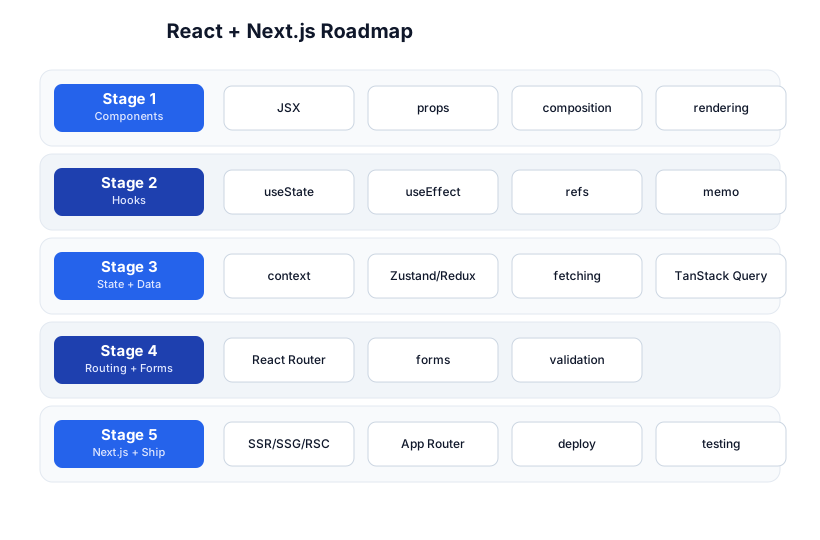
The roadmap moves from components (Stage 1), through hooks (Stage 2), to state and data (Stage 3), routing and forms (Stage 4), and Next.js + shipping (Stage 5). You need solid JavaScript and HTML/CSS first.
Stage 1 — Components
JSX: HTML in JavaScript
JSX is a syntax extension that lets you write markup inside JavaScript. It compiles to React.createElement(...) calls:
function Greeting({ name }) {
  return <h1>Hello, {name}!</h1>;   // {name} interpolates a JS expression
}
JSX looks like HTML but is JavaScript: class becomes className, for becomes htmlFor, styles are objects (style=), and you can embed any JS expression in {}.
Props: data flows down
A component receives data from its parent via props (read-only):
function Avatar({ user, size }) {
  return <img src={user.src} alt={user.name} width={size} />;
}

<Avatar user={currentUser} size={80} />
The component tree and one-way data flow
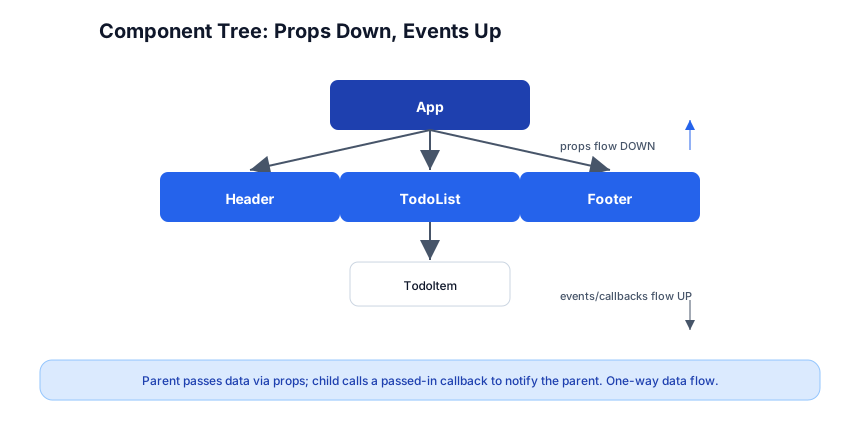
React apps are a tree of components. Data flows down via props; a child notifies its parent by calling a callback prop the parent passed down. This one-way flow is what makes React predictable — state lives in one place and trickles down.
Composition over inheritance
React has no inheritance. Reuse behavior by composing components (passing components as children or rendering slots) and by extracting custom hooks (Stage 2). “Components are the unit of reuse.”
function Card({ title, children }) {
  return <section><h2>{title}</h2>{children}</section>;
}
<Card title="Profile"><Avatar user={u} /></Card>
Stage 2 — Hooks
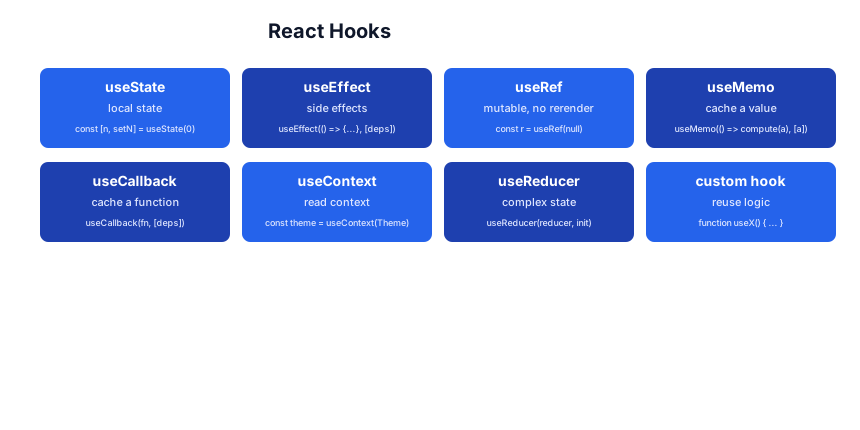
Hooks are functions that let function components “remember” things and do things. They’re the core of modern React (class components are legacy).
useState — local state
function Counter() {
  const [count, setCount] = useState(0);
  return <button onClick={() => setCount(count + 1)}>{count}</button>;
}
useState(initial) returns [value, setter]. Calling the setter schedules a re-render with the new value. State is per-component-instance.
Pitfall:
setCount(count + 1)twice in a row doesn’t add 2 — React batches, and both see the samecount. Use the updater formsetCount(c => c + 1)when the next state depends on the previous.
useEffect — side effects
useEffect(() => {
  document.title = `Count: ${count}`;
  return () => { /* cleanup, runs before next effect + on unmount */ };
}, [count]);   // re-run only when count changes; [] = run once
useEffect runs after render. The dependency array controls when: [] once on mount, [a, b] when a or b change, no array = every render (usually a bug). Return a cleanup function to undo the effect (unsubscribe, clear a timer).
Pitfall: A missing dependency is the most common React bug — the effect closes over a stale value. The
eslint-plugin-react-hooksexhaustive-deps rule catches this; enable it. The other classic: putting a subscription/fetch with no cleanup, leaking on unmount.
useRef — mutable value that doesn’t trigger re-render
const inputRef = useRef(null);
<input ref={inputRef} />
<button onClick={() => inputRef.current.focus()}>Focus</button>
Use for DOM access, or for a value you want to mutate without causing a render (a timer id, a “has mounted” flag).
useMemo / useCallback — memoize expensive values/functions
const sorted = useMemo(() => expensiveSort(items), [items]);
const handleClick = useCallback(() => doThing(id), [id]);
These cache a value (useMemo) or a function (useCallback) across renders, so children that take it as a prop don’t re-render needlessly. Don’t memoize everything — memoization has its own cost; use it for genuinely expensive work or to stabilize referential equality for child memoization.
useContext — read shared state without prop drilling
const ThemeContext = createContext('light');
function App() { return <ThemeContext.Provider value="dark"><Page /></ThemeContext.Provider>; }
function Page() { const theme = useContext(ThemeContext); return <div className={theme} />; }
Context lets a value be read by any descendant without threading it through every component’s props. Use for themes, locale, auth user. For app-wide mutable state, a state library (below) is often better than context (context re-renders all consumers on any change).
Custom hooks — reuse logic
Extract stateful logic into a function whose name starts with use:
function useWindowWidth() {
  const [w, setW] = useState(window.innerWidth);
  useEffect(() => {
    const onResize = () => setW(window.innerWidth);
    window.addEventListener('resize', onResize);
    return () => window.removeEventListener('resize', onResize);
  }, []);
  return w;
}
function Navbar() { const w = useWindowWidth(); return w < 600 ? <MobileNav /> : <FullNav />; }
Custom hooks are how you share stateful logic across components without render props or higher-order components.
Stage 3 — State + Data
Local vs shared vs server state
Three different problems, three different tools:
- Local UI state (a toggle, an input) →
useState. Keep it in the component. - Shared client state (cart, theme, auth) → a state library. Don’t shove everything in context.
- Server state (data from an API) → a data-fetching library, not a state library. Server state is cache, and cache invalidation is its own problem.
Client state libraries
- Zustand — tiny, no boilerplate, the modern default for small/medium apps.
- Redux Toolkit — structured, with a strict unidirectional flow and great devtools; for large apps with complex state interactions.
- Context — built-in, fine for low-frequency updates (theme, locale); causes broad re-renders for frequent changes.
// Zustand
import { create } from 'zustand';
const useStore = create((set) => ({
  count: 0,
  inc: () => set((s) => ({ count: s.count + 1 })),
}));
function Counter() { const inc = useStore((s) => s.inc); return <button onClick={inc}>+1</button>; }
Server state — TanStack Query
Fetching data in useEffect + useState is reinventing cache invalidation poorly. TanStack Query handles caching, deduplication, background refetching, and stale-while-revalidate:
import { useQuery } from '@tanstack/react-query';
function User({ id }) {
  const { data, isLoading, error } = useQuery({
    queryKey: ['user', id],
    queryFn: () => fetch(`/api/users/${id}`).then((r) => r.json()),
  });
  if (isLoading) return <Spinner />;
  if (error) return <Error />;
  return <div>{data.name}</div>;
}
Pitfall: Treat server data as a cache, not as state you own. The canonical bugs — “it refetches too much / too little,” “stale data after a mutation” — are what TanStack Query (or SWR) exists to solve. Don’t hand-roll them.
Stage 4 — Routing + Forms
React Router (SPA)
<BrowserRouter>
  <Routes>
    <Route path="/" element={<Home />} />
    <Route path="/users/:id" element={<User />} />
    <Route path="*" element={<NotFound />} />
  </Routes>
</BrowserRouter>

function User() {
  const { id } = useParams();
  return <h1>User {id}</h1>;
}
<Link to="/users/42">View user 42</Link>
React Router maps the URL to components, with nested routes, params, and a <Link> that updates the URL without a full page reload. For a real app though, Next.js’s file-based router (below) is the modern default.
Forms
function ContactForm() {
  const [email, setEmail] = useState('');
  const submit = (e) => { e.preventDefault(); /* send */ };
  return (
    <form onSubmit={submit}>
      <input value={email} onChange={(e) => setEmail(e.target.value)} type="email" required />
      <button>Send</button>
    </form>
  );
}
For anything beyond a field or two, use a form library (TanStack Form, React Hook Form) + a schema validator (Zod):
const schema = z.object({ email: z.string().email(), age: z.number().min(18) });
Zod schemas can also generate TypeScript types — one source of truth for validation and types.
Stage 5 — Next.js + Shipping
Why Next.js?
A plain React app (Vite SPA) renders everything in the browser — slow first paint, poor SEO, no data until JS loads. Next.js adds:
- File-based routing —
app/users/[id]/page.js→/users/42. - Server rendering — pre-render pages on the server for fast first paint and SEO.
- Server Components (RSC) — components that run on the server, can query the DB directly, ship zero JS.
- API routes — backend endpoints in the same app.
- Image/font optimization and a one-click deploy story (Vercel).
The render cycle (what React does under the hood)
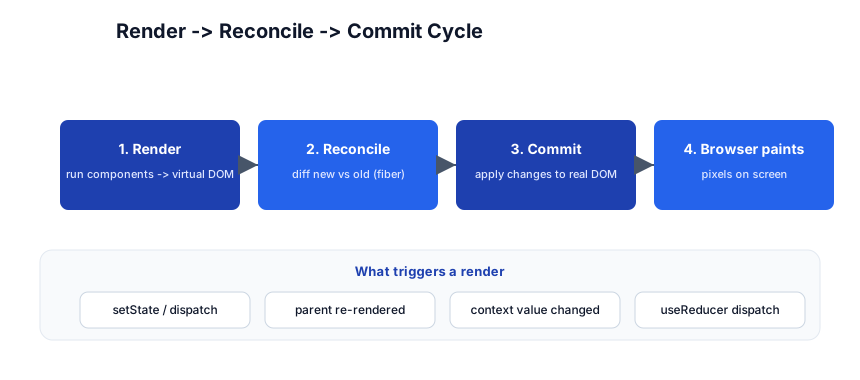
A state change → React renders (re-runs components to produce a virtual DOM) → reconciles (diffs new vs old via the fiber algorithm) → commits (applies the minimal set of DOM mutations) → the browser paints. The key performance idea: React does the least DOM work possible.
App Router and Server Components
app/
  layout.tsx       # wraps every page (server component by default)
  page.tsx         # the route's UI
  users/
    [id]/page.tsx  # dynamic route /users/:id
  api/route.ts     # backend endpoint
// app/users/[id]/page.tsx — a Server Component (runs on server, ships no JS)
export default async function UserPage({ params }: { params: { id: string } }) {
  const user = await db.user.findUnique({ where: { id: params.id } });
  return <h1>{user.name}</h1>;
}
Server Components can be async, fetch data directly, and don’t bloat the client bundle. Mark a component "use client" only when it needs interactivity (hooks, event handlers).
Pitfall: The biggest Next.js mistake is making everything a client component out of habit. Keep components on the server by default; reach for
"use client"only at the leaf where interactivity lives. Smaller bundles, better SEO, faster first paint.
Testing
- Vitest — unit tests (a function, a hook).
- React Testing Library — component tests that query the DOM like a user (
getByRole,getByText), not by implementation detail. The philosophy: “the more your tests resemble the way your software is used, the more confidence they give you.” - Playwright — end-to-end tests that drive a real browser.
Deploy
npx create-next-app@latest my-app
npm run dev          # http://localhost:3000
npm run build
# deploy: push to GitHub, import on Vercel, done. Or: dockerize + any host.
The ecosystem
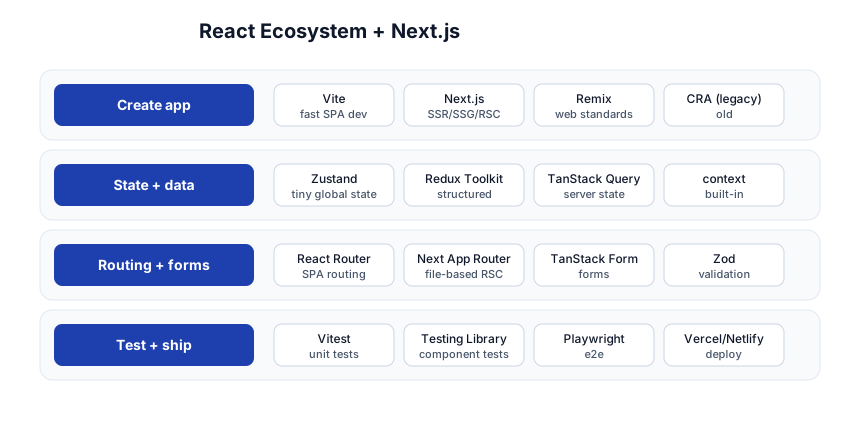
| Concern | Tool |
|---|---|
| Create app | Vite (SPA), Next.js (full), Remix |
| Client state | Zustand (small), Redux Toolkit (large), context (simple) |
| Server state | TanStack Query, SWR |
| Routing | Next.js App Router (default), React Router (SPA) |
| Forms | TanStack Form / React Hook Form + Zod |
| Test | Vitest, Testing Library, Playwright |
| Deploy | Vercel, Netlify, or any Node/static host |
Quick-Start Checklist
- Know JS + HTML/CSS first — React is JS; you can’t learn React on shaky JS.
- Start with
create-next-app— it gives you routing, RSC, and a deploy path out of the box. - Learn the 5 core hooks cold:
useState,useEffect,useRef,useMemo,useContext. - Enable
eslint-plugin-react-hooks— it catches the stale-closure and missing-dep bugs automatically. - Keep state local until you have a reason to lift it; prefer
useStateover a global store. - Use TanStack Query for server data — don’t hand-roll fetching in
useEffect. - Extract custom hooks to reuse stateful logic; composition to reuse UI.
- Default to Server Components in Next.js; mark
"use client"only where interactivity needs it. - Test with React Testing Library — query by role/text, not by class names.
- Deploy on Vercel for the zero-config path; learn what
npm run buildproduces.
Common Pitfalls
setX(x + 1)twice — batches to one update; use the updatersetX(prev => prev + 1).- Missing effect dependency — stale closure; enable the hooks lint rule.
- Fetching in
useEffect— reinvents cache poorly; use TanStack Query. - Over-using context for frequent state — re-renders all consumers; use a state library.
- Memoizing everything —
useMemo/useCallbackhave a cost; use for expensive work or referential stability. - Putting state in the wrong place — local vs shared vs server; each has its tool.
- Making everything
"use client"— bloats the bundle and loses RSC benefits; keep components server-side by default. - Testing implementation details (a class name, a state value) — tests break on refactor; test behavior with Testing Library.
- Keying list items by array index — breaks when the list reorders; use a stable unique id.
Further Reading
- React Docs — the new docs, excellent, hooks-first
- Next.js Docs — App Router, RSC, deployment
- TanStack Query Docs — server state
- Epic React by Kent C. Dodds — the deep course
- Testing Library — the testing philosophy
Related guides
React sits on top of the web fundamentals — these PyShine tutorials are its prerequisites and companions:
- Learn JavaScript + TypeScript in One Post — React is JS; the type system is TS. This is the #1 prerequisite.
- Learn HTML + CSS in One Post — JSX is HTML; the styling is CSS. Know the box model and flex/grid.
- Learn REST API in One Post — what your React app fetches from.
- Learn SQL in One Post — the data behind the API behind the UI.
- Learn Docker in One Post — containerize and ship the Next.js app.
React’s core idea is small and durable: UI is a function of state, and data flows one way. The churn is in the ecosystem (state libraries, frameworks, RSC), but the mental model hasn’t changed in a decade. The five stages here — components, hooks, state+data, routing+forms, Next.js+shipping — cover everything from a button to a production server-rendered app. Spend a day per stage, build a real thing (a blog, a dashboard) in Next.js, write one test with Testing Library, and deploy it to Vercel. The concepts only stick once you’ve shipped a page that loads fast, fetches its own data, and survives a refactor. Enjoyed this post? Never miss out on future posts by following us 



