Learn GitHub Actions in a Single Post: Complete Tutorial From Workflows and Jobs to Runners, Secrets, and Reusable Pipelines
GitHub Actions is GitHub’s built-in CI/CD: you write a YAML file, push it to your repo, and GitHub runs your build, test, deploy — on every push, every pull request, on a schedule, or on demand. It’s the CI/CD most open-source and many private projects use, because it’s free for public repos, integrated into the platform you already use, and has a marketplace of thousands of pre-built actions. This single post teaches the whole system in five stages, with hand-drawn diagrams and runnable YAML.
Learning Roadmap
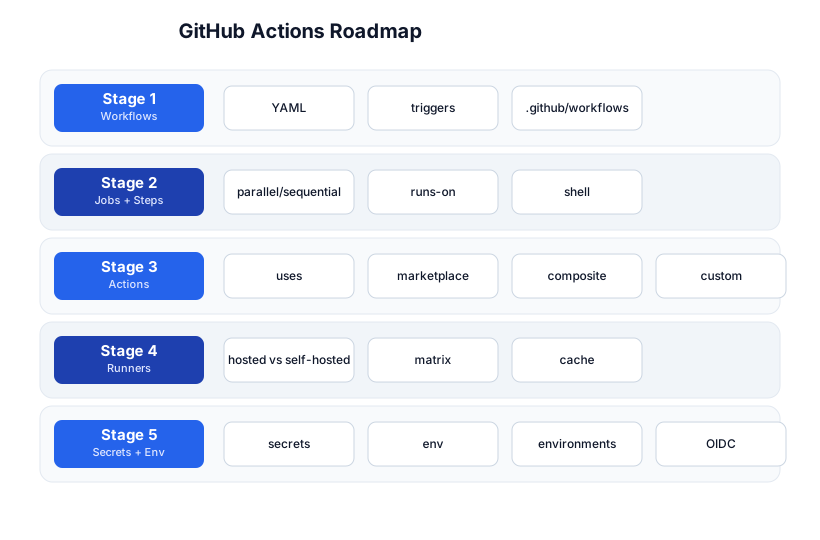
The roadmap moves from the workflow file (Stage 1), through jobs and steps (Stage 2), the reusable action ecosystem (Stage 3), where it runs (Stage 4), and the security + reuse layer (Stage 5). You’ll want the Git tutorial and basic YAML as prerequisites.
Stage 1 — Workflows
What a workflow is
A workflow is a YAML file in .github/workflows/ that describes an automated process. GitHub reads it and runs it when its trigger (on:) fires.
# .github/workflows/ci.yml
name: CI
on: [push, pull_request]        # trigger: run on push and PR

jobs:
  test:
    runs-on: ubuntu-latest
    steps:
      - uses: actions/checkout@v4
      - run: npm ci
      - run: npm test
That’s a complete CI pipeline: on every push or PR, GitHub checks out your code, installs deps, and runs tests — on a fresh Ubuntu VM, for free (public repos). Push the file and it runs.
Triggers — the on: field
on:
  push:
    branches: [main, 'release/*']     # only these branches
  pull_request:
    types: [opened, synchronize]        # on PR open + update
  schedule:
    - cron: '0 2 * * *'                 # nightly at 2am UTC
  workflow_dispatch:                    # manual "Run workflow" button
    inputs:
      env: { type: choice, options: [staging, prod] }
  release:
    types: [published]                  # on release publish
  paths:
    - 'src/**'                          # only if src/ changed (skip docs)
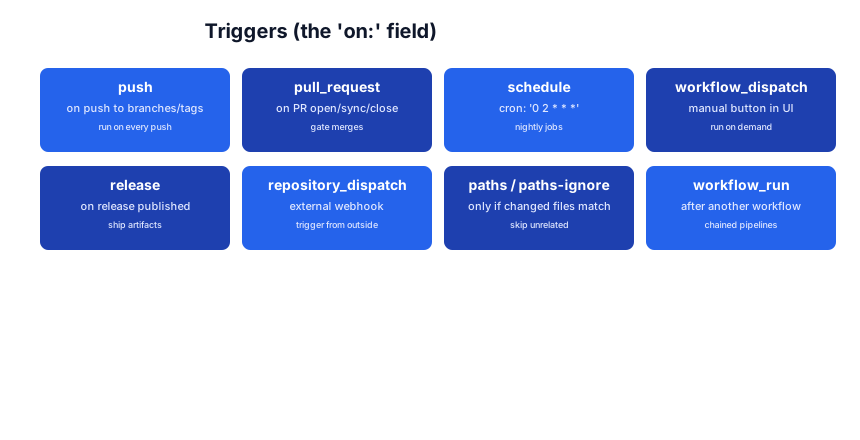
The trigger is the entry point. workflow_dispatch adds a manual button in the Actions tab (great for deploys). schedule uses standard cron. paths filters to only run when relevant files change.
Pitfall:
on: [push]runs on every push to every branch. Usually you wanton: push: branches: [main]to avoid running CI on every feature branch push (or you might want it — be deliberate).
Stage 2 — Jobs + Steps
The hierarchy: workflow → job → step
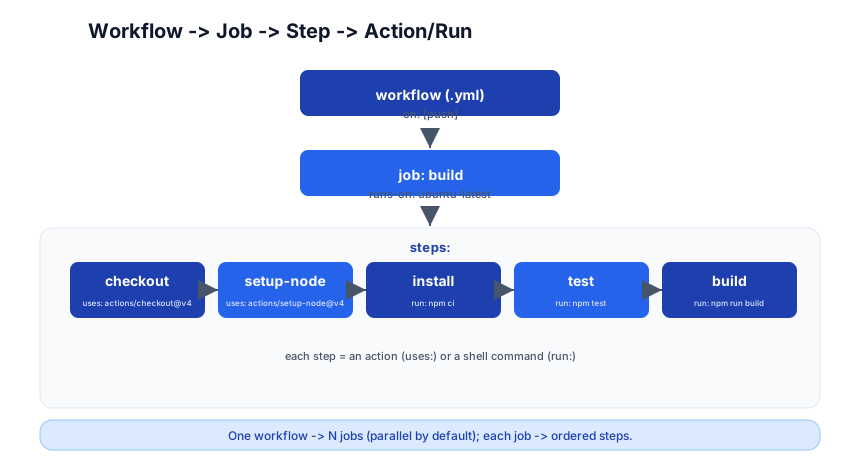
- Workflow — the YAML file; defines triggers and contains jobs.
- Job — a set of steps that run on the same runner (VM). Jobs run in parallel by default; use
needs:to serialize them into a DAG. - Step — one task: either an action (
uses:) or a shell command (run:). Steps run sequentially within a job.
Jobs: parallel and sequential
jobs:
  test:
    runs-on: ubuntu-latest
    steps:
      - uses: actions/checkout@v4
      - run: npm test

  build:
    needs: test                      # wait for test to pass
    runs-on: ubuntu-latest
    steps:
      - uses: actions/checkout@v4
      - run: npm run build

  deploy:
    needs: build
    if: github.ref == 'refs/heads/main'   # only on main
    runs-on: ubuntu-latest
    steps:
      - run: echo "deploying"
Without needs:, jobs run in parallel. With needs:, they form a DAG — test → build → deploy. If test fails, build and deploy don’t run.
Steps: uses (actions) and run (shell)
steps:
  - uses: actions/checkout@v4       # an action (from the marketplace)
  - name: Install deps
    run: npm ci                       # a shell command
  - name: Test
    run: npm test
    env:
      CI: true                        # env var for this step
  - uses: actions/upload-artifact@v4
    with:
      name: coverage
      path: coverage/
uses: runs a pre-built action (from the marketplace or a repo). run: executes a shell command (bash on Linux/macOS, PowerShell on Windows). Each step gets name, with: (inputs), env: (env vars).
Pitfall:
actions/checkout@v4is the first step of almost every job — without it, your runner has an empty workspace. Forget it and everyrun: npm ...fails with “package.json not found.”
Stage 3 — Actions
What an action is
An action is a reusable unit: a step you uses: instead of writing run:. The GitHub Marketplace has thousands — checkout, cache, upload-artifact, setup-node, docker build, slack notify, deploy to AWS/Vercel/Cloudflare…
steps:
  - uses: actions/checkout@v4
  - uses: actions/setup-node@v4
    with:
      node-version: 20
  - uses: actions/cache@v4
    with:
      path: ~/.npm
      key: $-node-$
  - run: npm ci
Pin to a version
- uses: actions/checkout@v4           # major version (recommended for public)
- uses: actions/checkout@v4.1.0       # exact version (most reproducible)
- uses: actions/checkout@<commit-sha>  # SHA pin (most secure, supply-chain safe)
Pitfall:
@mainor@masteron a third-party action means it can change silently — a supply-chain risk. Pin to a major version (@v4) at minimum; for sensitive workflows, pin to a SHA. GitHub’s Dependabot can keep your action versions up to date.
Composite actions — bundle steps
A composite action packages multiple steps into one reusable action:
# .github/actions/setup-and-test/action.yml
name: Setup and Test
inputs:
  node-version: { required: true }
runs:
  using: composite
  steps:
    - uses: actions/checkout@v4
    - uses: actions/setup-node@v4
      with: { node-version: $ }
    - run: npm ci && npm test
      shell: bash
# in a workflow
- uses: ./.github/actions/setup-and-test
  with: { node-version: 20 }
Custom actions (Docker / JS)
You can write actions in JavaScript (fast, cross-platform) or as a Docker container (any language, any tool). For most teams, the marketplace + composite covers it; custom is for when you need a tool the marketplace doesn’t have.
Stage 4 — Runners
Where it runs
runs-on: ubuntu-latest      # GitHub-hosted: ephemeral Ubuntu VM
# or:
runs-on: [self-hosted, linux, x64]   # your own machine
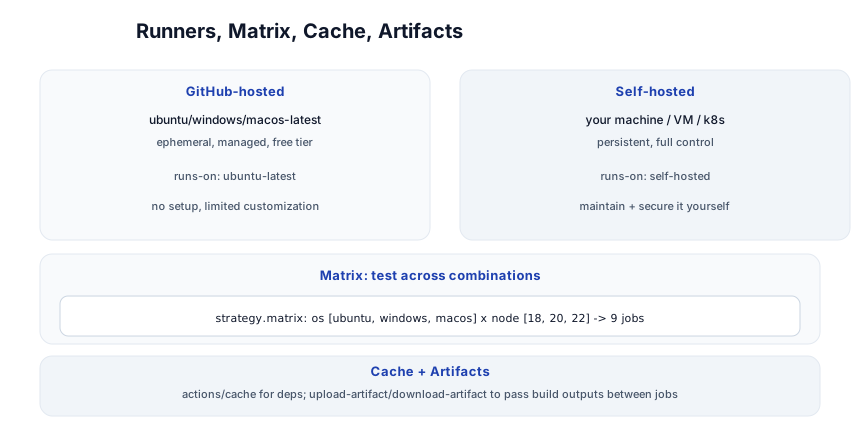
GitHub-hosted runners are ephemeral VMs GitHub manages — ubuntu-latest, windows-latest, macos-latest. Free for public repos (2,000 min/month free for private). No setup; limited customization.
Self-hosted runners are your own machines (a VM, a k8s pod, a physical box). Full control, can run on your network, no per-minute cost — but you maintain and secure them (apply OS updates, rotate tokens, isolate workloads). Never use self-hosted on public repos with untrusted PRs without sandboxing — a PR can run arbitrary code on your runner.
Matrix — test across combinations
strategy:
  matrix:
    os: [ubuntu-latest, windows-latest, macos-latest]
    node: [18, 20, 22]
runs-on: $
steps:
  - uses: actions/setup-node@v4
    with: { node-version: $ }
This creates 9 jobs (3 OS × 3 Node versions) — each runs your tests in one combination. Use fail-fast: false to see all failures, not just the first.
Caching and artifacts
# cache npm deps across runs
- uses: actions/cache@v4
  with:
    path: ~/.npm
    key: $-npm-$
    restore-keys: $-npm-

# pass build output to another job
- uses: actions/upload-artifact@v4
  with: { name: build, path: dist/ }
# in the deploy job:
- uses: actions/download-artifact@v4
  with: { name: build, path: dist/ }
Caching cuts install time dramatically (skip re-downloading node_modules on every run). Artifacts pass build outputs between jobs (build → upload → download → deploy) and are stored for 90 days.
Pitfall: The cache key must include something that changes when deps change (
hashFiles('**/package-lock.json')). A static key serves a stale cache forever; a too-dynamic key never hits.
Stage 5 — Secrets + Environments
Secrets
# set in repo Settings -> Secrets and variables -> Actions
steps:
  - run: docker push $/app:latest
    env:
      DOCKER_PASSWORD: $
Secrets are encrypted in the repo/org settings, masked in logs, and available to workflows via $. Never commit secrets to code; never echo them (they’ll be masked, but don’t risk it). For org-wide secrets, use Organization secrets with selected-repo access.
Environment variables
env:
  CI: true
  NODE_ENV: test
jobs:
  deploy:
    env:
      ENVIRONMENT: production
    steps:
      - run: echo $
env: at the top level applies to all jobs; at the job level to all steps in that job; at the step level to that step.
Environments (gates + protection)
jobs:
  deploy-prod:
    environment: production     # protected environment
    runs-on: ubuntu-latest
    steps:
      - run: ./deploy.sh
An environment (Settings → Environments) can require manual approval, restrict to specific branches, and hold its own secrets. Use environment: production on a deploy job so a human must approve before it runs — a deployment gate.
OIDC — cloud auth without stored keys
permissions:
  id-token: write        # request an OIDC token
  contents: read
jobs:
  deploy:
    steps:
      - uses: aws-actions/configure-aws-credentials@v4
        with:
          role-to-assume: arn:aws:iam::123:role/github-actions
          aws-region: us-east-1
      - run: aws s3 cp build/ s3://my-bucket/
OIDC lets GitHub Actions authenticate to your cloud (AWS, GCP, Azure) without storing long-lived keys. GitHub mints a short-lived token; your cloud trusts GitHub’s OIDC provider. No key to leak, no rotation — this is the modern, secure way to deploy from CI.
Reusable workflows
# .github/workflows/ci-lib.yml
name: CI Library
on:
  workflow_call:          # callable from other workflows
    inputs:
      node-version: { type: string, required: true }
jobs:
  test:
    runs-on: ubuntu-latest
    steps:
      - uses: actions/checkout@v4
      - uses: actions/setup-node@v4
        with: { node-version: $ }
      - run: npm ci && npm test
# .github/workflows/ci.yml — calls the reusable workflow
jobs:
  call-ci:
    uses: ./.github/workflows/ci-lib.yml
    with: { node-version: 20 }
Reusable workflows (workflow_call) let you DRY your CI across many repos or many jobs — define once, call everywhere.
The ecosystem
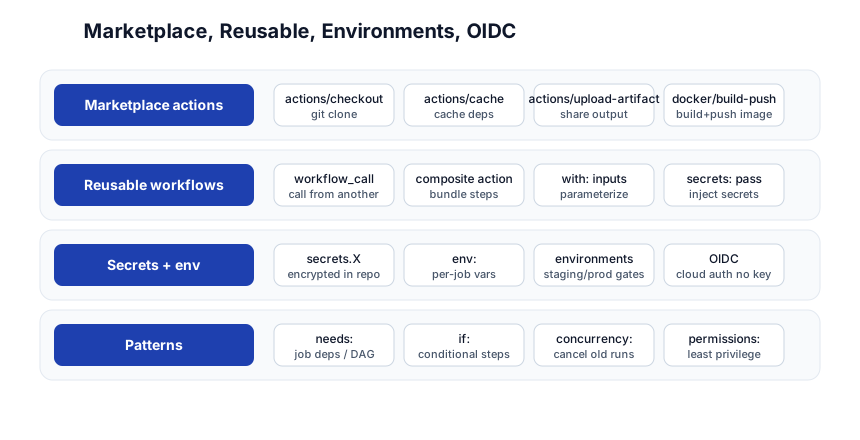
| Concern | Tool/Pattern |
|---|---|
| Marketplace | checkout, cache, upload-artifact, docker/build-push, slack notify |
| Reuse | workflow_call (reusable workflows), composite actions |
| Security | secrets, environments (approval gates), OIDC (no stored keys), permissions: (least privilege) |
| Patterns | needs: (DAG), if: (conditional), concurrency: (cancel old runs), matrix (combinatorial) |
Pitfall: Set
permissions:to least-privilege in every workflow. The default token has write access to your repo; a compromised action or a typosquatted dependency could push to your branches.permissions: { contents: read }is the safe default.
Quick-Start Checklist
- Create
.github/workflows/ci.yml—on: [push], one job,checkout+npm test. Push it. - Watch it run in the Actions tab. Green? You have CI.
- Add
pull_requesttrigger so PRs are gated. - Use
needs:to build a DAG: test → build → deploy. - Pin action versions (
@v4or SHA), never@mainon third-party. - Cache deps with
actions/cachekeyed on the lockfile hash. - Upload artifacts to pass build outputs to the deploy job.
- Store secrets in repo settings, reference via
$. - Add an environment with required approval for production deploys.
- Use OIDC for cloud deploys — no stored keys.
Common Pitfalls
- Forgetting
actions/checkout— the runner starts with an empty workspace; every step that needs your code fails without it. on: [push]on every branch — usually wantbranches: [main]to limit runs.- Unpinned third-party actions (
@main) — supply-chain risk; pin to a version or SHA. - No cache key or a static key — stale cache or never hits; key on the lockfile hash.
- Secrets in logs — they’re masked, but don’t
echothem; don’t put them in env var names. - Over-broad
permissions:— default token can write to the repo; setcontents: readunless you need write. - Self-hosted runners on public repos — a PR can run arbitrary code on your machine; isolate or sandbox.
- No
concurrency:— pushing rapidly runs redundant workflows;concurrency: { group: $, cancel-in-progress: true }cancels old runs. - Long-lived cloud keys — use OIDC instead; no key to leak or rotate.
Further Reading
- GitHub Actions Docs — the official reference
- Awesome Actions — curated action list
- Actions Marketplace — search thousands of actions
- GitHub Actions Workflow Syntax — every YAML field
- Security Hardening for GitHub Actions — the official security guide
Related guides
GitHub Actions is the CI/CD layer that ties the DevOps stack together — these PyShine tutorials connect to it:
- Learn Git in One Post — Actions runs on Git events (push, PR, tag); know Git first.
- Learn Docker in One Post — CI builds and pushes Docker images; the
docker/build-push-actionis standard. - Learn Kubernetes in One Post — CI deploys to K8s;
kubectl applyfrom a workflow. - Learn Bash in One Post — every
run:step is a shell script; know Bash. - Learn Node.js + Express in One Post —
npm ci,npm testare the steps in most JS CI.
GitHub Actions is the CI/CD that’s already where your code is — no separate server, no extra account, just a YAML file in your repo. The five stages here — workflows, jobs + steps, actions, runners, secrets + environments — cover everything from a 5-line test job to a matrix-tested, OIDC-authenticated, environment-gated deploy pipeline with reusable workflows. The two habits that pay off: pin your actions (supply-chain safety) and set Enjoyed this post? Never miss out on future posts by following us permissions: to least privilege (the default token is too powerful). Write a ci.yml, push it, watch the green checkmark, and you’ve got CI — then layer in caching, artifacts, and a gated deploy as you grow. 



