Introduction
Flue is a TypeScript framework for building autonomous AI agents, and it is not just another SDK. The core distinction is that Flue implements a harness-driven architecture, the same design philosophy that powers production-grade agent systems like Claude Code and Codex. Instead of wrapping raw LLM API calls in a thin convenience layer, Flue provides a programmable TypeScript harness that gives agents context, an execution environment, and durable autonomy.
Astro, the company behind the Astro web framework, created Flue to solve a fundamental problem in the AI agent space. The first generation of agents were essentially raw LLM API calls that only worked for simple chatbots. Real autonomous agents need persistent context, a sandboxed environment to execute code and modify files, and durable execution that survives failures and restarts. Flue unlocks this architecture for any developer, with any model, and with any deployment target.
The repository has gained significant traction in the open-source community. At the time of writing, Flue has accumulated 6,297 stars on GitHub, growing at approximately 1,272 stars per week. The project is licensed under Apache-2.0 and is written entirely in TypeScript. Flue is powered by Pi, an open agent harness engine, and uses Durable Streams for persistent session recording.
Here is a minimal agent definition in Flue:
import { defineAgent } from '@flue/runtime';

export default defineAgent(() => ({
  model: 'anthropic/claude-sonnet-4-6',
  instructions: 'Tell a funny "hello world" engineering joke.',
}));
This single file defines a complete agent. The defineAgent() function is the entry point for every Flue agent. It accepts a configuration object that specifies the model, instructions, and optionally tools, skills, sandbox configuration, and subagents. The agent is then ready to run via the CLI, an HTTP route, or an async dispatch call.
How It Works: Architecture
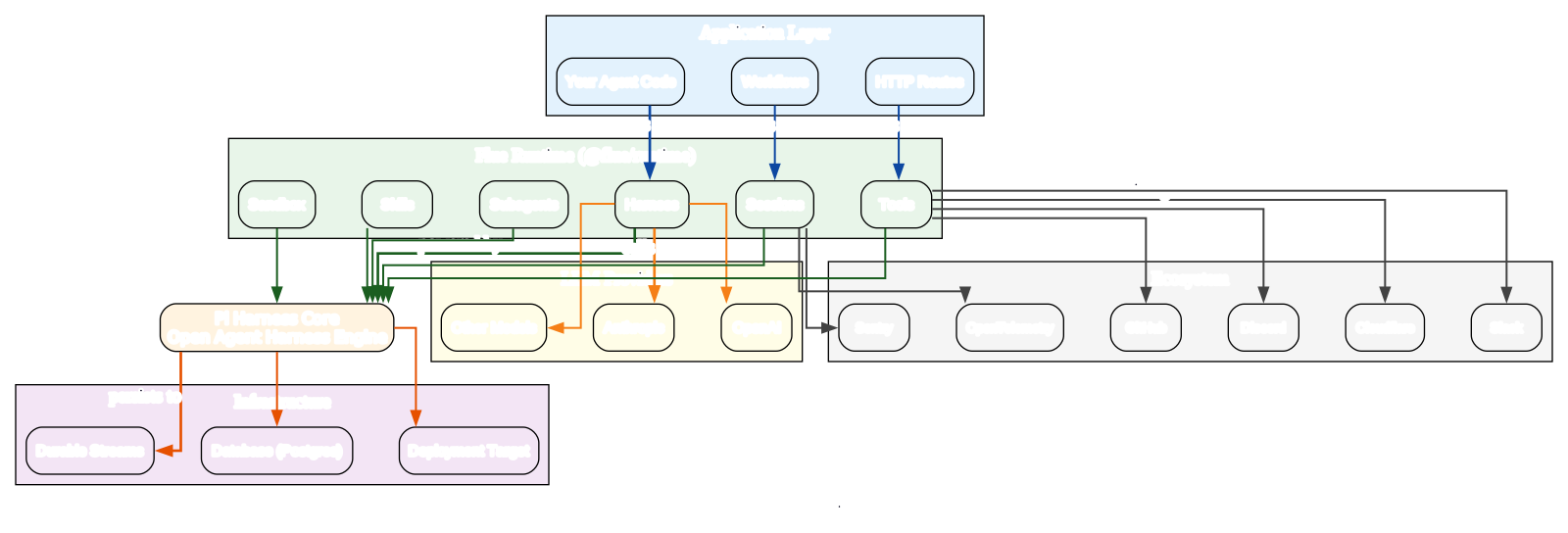
The architecture diagram above illustrates the layered design that makes Flue distinctive among agent frameworks. The diagram is organized into four horizontal layers, each with a distinct responsibility, plus two side clusters for external integrations. Reading from top to bottom, the layers are the Application Layer, the Flue Runtime, the Pi Harness Core, and the Infrastructure layer.
At the top sits the Application Layer, which contains your agent code, workflows, and HTTP routes. This is where developers interact with Flue directly, writing declarative agent definitions and composing them into larger systems. The Application Layer is intentionally thin because the real power lives in the layers below it. Developers never write imperative orchestration code here; they declare what the agent should do and let the lower layers handle execution.
The Flue Runtime, provided by the @flue/runtime package, is the heart of the framework. It contains six core subsystems, each with a specific role:
- Harness - The programmable TypeScript harness that orchestrates agent execution. Instead of wrapping LLM calls in an SDK, the Harness gives agents context, environment, and autonomy.
- Sessions - Each agent instance receives a unique
idthat identifies a continuing instance, enabling durable context across conversations and events. - Tools - Typed actions that agents can call to interact with APIs, query data, and make controlled changes.
- Sandbox - Provides secure execution environments ranging from in-memory virtual sandboxes to container-backed remote sandboxes.
- Skills - Reusable expertise packages that agents load when a task needs specialized guidance, using the SKILL.md format.
- Subagents - Allow specialized role delegation, so an agent can delegate research to one subagent and writing to another.
Below the runtime sits the Pi Harness Core, the open agent harness engine that powers Flue. Pi is the foundational layer that implements the harness pattern, the same architecture behind Claude Code and Codex.
The Pi Core persists to the Infrastructure layer, which includes three components:
- Durable Streams for session recording, preserving agent progress across failures and restarts.
- Postgres database for persistence of session state, agent configuration, and execution history.
- Deployment target where agents run, whether that is Node.js, Cloudflare Workers, or a CI runner.
This separation means the harness logic is reusable across different persistence backends and deployment environments.
On the sides of the diagram, two integration clusters connect to the runtime. The LLM Providers cluster includes Anthropic, OpenAI, and other models. Flue is model-agnostic, so you can switch providers by changing a single configuration string.
The Ecosystem cluster includes Cloudflare, Slack, GitHub, Discord, Sentry, and OpenTelemetry. These integrations allow agents to receive events from external systems, export telemetry, and deploy to various platforms without writing integration code.
The key packages in the Flue ecosystem are @flue/runtime for the core harness, sessions, tools, and sandbox; @flue/cli for the flue binary and build/dev tooling; @flue/sdk for the client SDK that consumes deployed agents; @flue/opentelemetry for tracing; and @flue/postgres for Postgres persistence.
This modular design means you only install what you need, keeping agent bundles small and deployment fast.
The “write once, deploy anywhere” philosophy is central to Flue. The same agent code runs on Node.js, Cloudflare Workers, GitHub Actions, GitLab CI/CD, Daytona, and Render. You define your agent once, and the deployment target is a configuration choice, not a code change.
This is possible because the Harness abstracts away the execution environment, and the Sandbox API adapts to whatever isolation level the target provides.
The layered architecture also enables a clear separation of concerns. Developers focus on agent logic in the Application Layer, the Runtime handles orchestration and state management, Pi provides the harness engine, and the Infrastructure layer handles persistence.
This separation makes Flue agents testable, composable, and portable across environments.
Agent Lifecycle
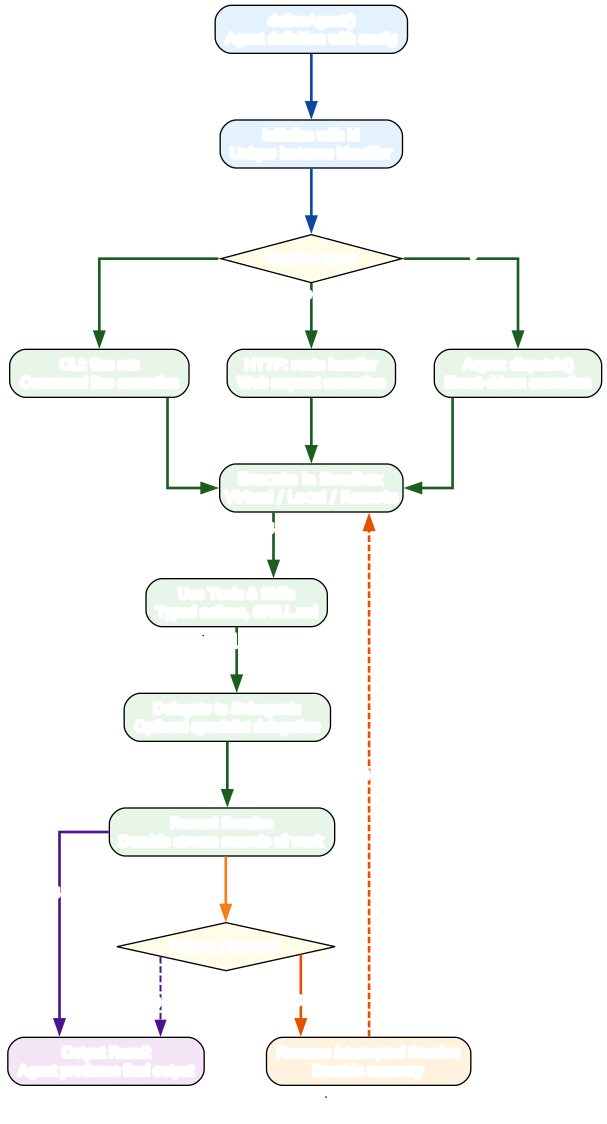
The agent lifecycle diagram traces the complete journey of a Flue agent from definition to output, including the durable recovery loop that sets Flue apart from stateless agent frameworks. The lifecycle begins with defineAgent(), where the developer declares the agent configuration including model, instructions, tools, skills, sandbox, and subagents. This declarative approach means the agent definition is data, not imperative code, which makes agents composable and testable.
The second step is initialization with an id. The developer decides what the id means in their application context. It could be a user ID, a ticket ID, a GitHub issue number, or any identifier that maps to a continuing agent instance. This id is what enables durable execution: every session for a given id is recorded and can be resumed.
The third step is receiving input. The diagram shows three branches: CLI execution via flue run, HTTP execution via a route handler, and async execution via dispatch(). All three paths converge into the same execution pipeline, which means the agent behaves identically regardless of how it was invoked. This is a significant advantage for testing and deployment.
The fourth step is execution within a sandbox. The agent operates in a virtual, local, or remote sandbox depending on the configuration and deployment target. The fifth step is using tools and skills. Tools are typed actions that the agent calls to interact with external systems. Skills are SKILL.md files that package reusable expertise and workflows. The sixth step, delegation to subagents, is optional and allows the agent to delegate specialized work to expert agents.
The seventh step is recording the session. Durable Streams record every session, preserving progress through failures and restarts. The eighth step is producing output. If a failure or restart occurs, the durable recovery mechanism resumes the interrupted session automatically, looping back to the execution step. This is what “durable execution” means in practice: agents do not lose work when infrastructure fails.
Here is a more complex agent definition that uses tools, skills, and a local sandbox:
import { defineAgent } from '@flue/runtime';
import { local } from '@flue/runtime/node';
import triage from '../skills/triage/SKILL.md' with { type: 'skill' };
import { replyToIssue } from '../tools/github.ts';

export default defineAgent(() => ({
  model: 'anthropic/claude-sonnet-4-6',
  tools: [replyToIssue],
  skills: [triage],
  sandbox: local(),
  instructions: 'Triage a bug report end-to-end...',
}));
This agent has a tool for replying to GitHub issues, a skill for triage procedures, and a local sandbox for direct filesystem and shell access. The with { type: 'skill' } import syntax tells Flue to load the SKILL.md file as a skill package. The local() function from @flue/runtime/node configures the sandbox to operate directly on the host.
Sandbox Execution
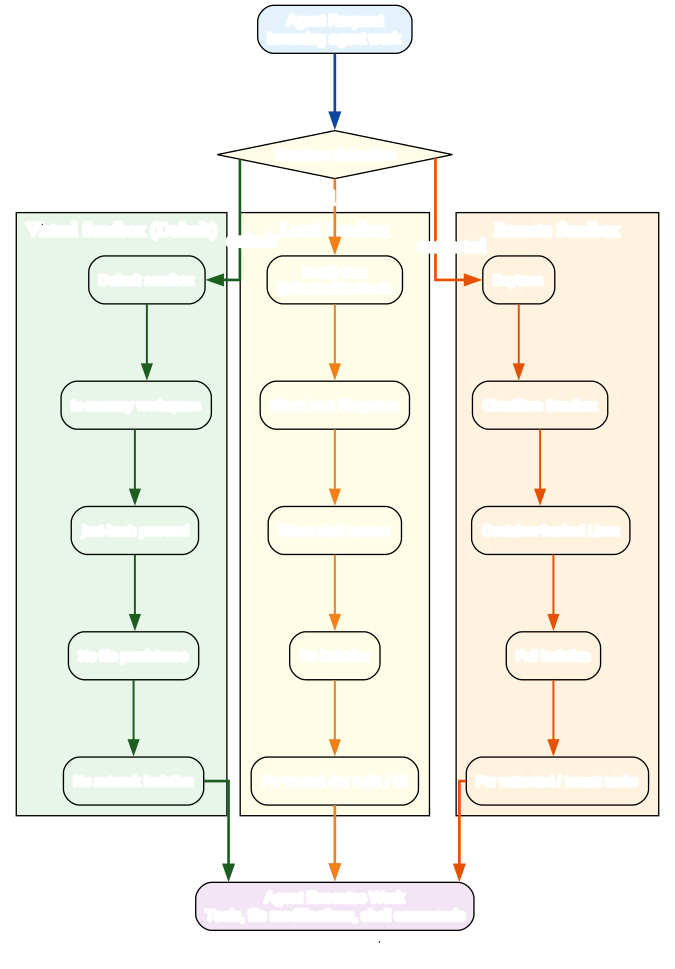
The sandbox execution model is one of the most important architectural decisions in Flue. The diagram shows how an agent request flows through sandbox selection into one of three sandbox types, each with distinct isolation characteristics and use cases. Understanding when to use each sandbox type is critical for building secure and reliable agents.
The three sandbox types form a spectrum of isolation, from none at all to full container isolation. The choice of sandbox determines what the agent can touch, how much damage a misbehaving agent can cause, and which deployment targets are available. The diagram illustrates this flow: an agent request enters at the top, the sandbox selector examines the agent configuration, and the request is routed to the appropriate sandbox type.
Virtual Sandbox is the default. It is a lightweight, in-memory workspace powered by just-bash. Files do not persist beyond the in-memory lifetime of the sandbox, and it does not provide network isolation. This makes it suitable for testing, prototyping, and simple agents that do not need to modify the host filesystem or access the network. Because it is in-memory, the virtual sandbox works on every deployment target, including serverless platforms like Cloudflare Workers where filesystem access is limited.
- Isolation level: None (in-memory only)
- Persistence: None (files lost when sandbox ends)
- Network access: Not isolated
- Best for: Testing, prototyping, simple read-only agents
- Deployment targets: All targets, including serverless
Local Sandbox is configured via local() from @flue/runtime/node. The agent operates directly on the host filesystem and shell. There is no isolation between model-directed work and the host machine. This sandbox is appropriate for trusted development tools or disposable CI runners where the agent is operating in a controlled environment. For example, if you are building an agent that refactors code in a local repository, the local sandbox gives the agent direct access to the files it needs to modify. The trade-off is that the agent can do anything the host user can do, so you should only use the local sandbox when you trust the agent’s instructions and tools.
- Isolation level: None (direct host access)
- Persistence: Full (changes persist on host filesystem)
- Network access: Full (same as host)
- Best for: Trusted dev tools, CI runners, local code refactoring
- Deployment targets: Node.js only (requires host filesystem)
Remote Sandbox is for untrusted or tenant-specific tasks. Flue integrates with Daytona and Cloudflare Sandbox, both of which provide container-backed Linux environments with full isolation. The agent runs inside a container, so even if it executes malicious code, it cannot escape to the host. This sandbox type is essential for multi-tenant SaaS applications where agents process requests from different users, or for any scenario where the agent handles untrusted input. The trade-off is that remote sandboxes require provider credentials and add latency for container startup.
- Isolation level: Full (container-backed)
- Persistence: Configurable per container lifecycle
- Network access: Isolated within container
- Best for: Untrusted input, multi-tenant SaaS, production workloads
- Deployment targets: Requires provider credentials and network access
The security implications of each sandbox type are significant. The virtual sandbox provides no filesystem or network isolation, so it should never be used for agents that process untrusted input. The local sandbox provides no isolation at all, so it should only be used in trusted environments. The remote sandbox provides full container isolation, making it the only safe choice for untrusted workloads. The sandbox choice also affects deployment: virtual works everywhere, local requires Node.js, and remote requires provider credentials and network access.
The sandbox API is flexible and extensible. Developers can implement custom sandboxes by conforming to the sandbox interface, allowing integration with proprietary isolation systems or specialized execution environments. This extensibility means Flue is not limited to the three built-in sandbox types; organizations with existing isolation infrastructure can integrate it directly.
Installation
Installing Flue requires Node.js version 22.19.0 or later and an API key from an LLM provider. The installation process is straightforward and verified against the official quickstart documentation.
Prerequisites
- Node.js >= 22.19.0
- An LLM provider API key (Anthropic, OpenAI, or other supported provider)
Step-by-Step Installation
First, install the runtime and CLI packages:
npm install @flue/runtime
npm install --save-dev @flue/cli
Next, set up your environment variables with your LLM provider API key:
echo 'ANTHROPIC_API_KEY="your-api-key"' > .env
Finally, initialize your Flue project. The --target flag specifies the deployment target:
npx flue init --target node
For Cloudflare Workers deployment, use:
npx flue init --target cloudflare
Flue supports multiple deployment targets including Node.js, Cloudflare Workers, GitHub Actions, GitLab CI/CD, Daytona, and Render. The target you choose during initialization configures the build system and sandbox defaults, but you can change targets later without rewriting your agent code.
Usage
Creating a Simple Agent
The simplest Flue agent is a single file that exports a defineAgent() call:
import { defineAgent } from '@flue/runtime';

export default defineAgent(() => ({
  model: 'anthropic/claude-sonnet-4-6',
  instructions: 'Tell a funny "hello world" engineering joke.',
}));
Running an Agent via CLI
Once your agent is defined, you can run it from the command line:
npx flue run hello-world --input '{"message":"Tell me a joke."}'
The flue run command takes the agent name (matching the filename) and an optional JSON input. The agent processes the input according to its instructions and produces output.
Creating a Complex Agent with Tools, Skills, and Sandbox
import { defineAgent } from '@flue/runtime';
import { local } from '@flue/runtime/node';
import triage from '../skills/triage/SKILL.md' with { type: 'skill' };
import { replyToIssue, labelIssue } from '../tools/github.ts';

export default defineAgent(() => ({
  model: 'anthropic/claude-sonnet-4-6',
  tools: [replyToIssue, labelIssue],
  skills: [triage],
  sandbox: local(),
  instructions: 'Triage a bug report end-to-end. Read the issue, classify it, apply labels, and reply with next steps.',
}));
Using Subagents for Delegation
Subagents allow an agent to delegate specialized work to expert agents:
import { defineAgent } from '@flue/runtime';
import { researcher, writer } from './subagents';

export default defineAgent(() => ({
  model: 'anthropic/claude-sonnet-4-6',
  subagents: [researcher, writer],
  instructions: 'Research the topic using the researcher subagent, then draft a report using the writer subagent.',
}));
Exposing Agents as HTTP Routes
The route function exposes agents as HTTP handlers for web access:
import { route } from '@flue/runtime';
import helloWorld from './agents/hello-world';

export const GET = route(helloWorld);
Using dispatch() for Async Events
The dispatch() function is for asynchronous events like webhooks, queue messages, and chat events. The application chooses which agent instance to dispatch to before calling dispatch:
import { dispatch } from '@flue/runtime';
import triageAgent from './agents/triage';

await dispatch(triageAgent, {
  id: `issue-${issueNumber}`,
  input: { issue: issueBody },
});
Deploying to Different Targets
The same agent code deploys to multiple targets. For Node.js, the agent runs as a standard Node application. For Cloudflare Workers, Flue generates a Worker-compatible bundle. For GitHub Actions, the agent runs as a step in your workflow. The deployment target is a configuration choice, not a code change.
Key Features
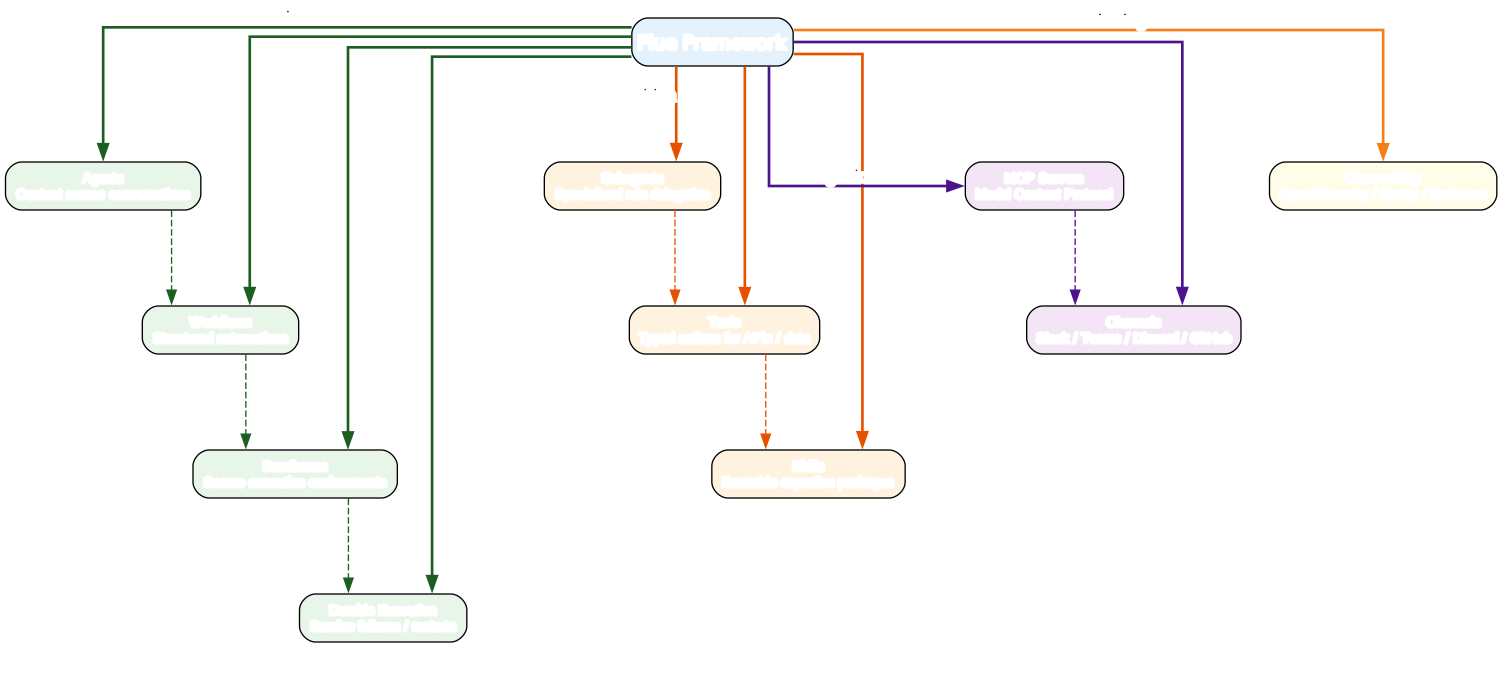
The feature ecosystem diagram above shows how Flue’s ten core features relate to the central framework, organized into four categories: Execution, Composition, Integration, and Monitoring. The hub-and-spoke layout illustrates that every feature connects through the Flue Framework core, with subtle grouping lines showing how related features cluster together.
The Execution group, shown in green, contains the four features that handle agent runtime behavior. Agents provide persistent context across conversations and events, allowing autonomous work toward a goal. Workflows run structured automations where code guides agent reasoning from input to finished result. Sandboxes give agents secure execution environments ranging from in-memory virtual sandboxes to container-backed remote sandboxes. Durable Execution ensures agents preserve progress through failures and restarts, the feature that distinguishes Flue from stateless agent frameworks.
The Composition group, shown in orange, contains the three features that define what an agent can do. Subagents allow specialized role delegation, so an agent can delegate research to a researcher subagent and writing to a writer subagent. Tools give agents typed actions for calling APIs, querying data, and making controlled changes. Skills package reusable expertise and workflows that agents load when a task needs specialized guidance, using the SKILL.md format.
The Integration group, shown in purple, contains the two features that connect agents to external systems. MCP Servers connect agents to authenticated tools and services through the Model Context Protocol, enabling access to databases, APIs, and other resources. Channels receive verified events from Slack, Teams, Discord, GitHub, and more, allowing agents to respond to real-world triggers.
The Monitoring group, shown in yellow, contains Observability, which lets developers monitor agents and export telemetry with OpenTelemetry, Braintrust, Sentry, or custom observers. This is critical for production deployments where you need to understand what your agents are doing and diagnose failures.
Flue provides ten core features organized into four categories: Execution, Composition, Integration, and Monitoring.
| Feature | Description |
|---|---|
| Agents | Build agents that keep context across conversations and events as they autonomously work toward a goal |
| Workflows | Run structured automations where code guides agent reasoning from input to finished result |
| Sandboxes | Give agents a secure environment (virtual, local, or remote container) to use tools, modify files, and complete real work |
| Durable Execution | Agents preserve progress through failures and restarts with durable recovery |
| Subagents | Define specialized roles for different tasks, let agents delegate work to the right expert |
| Tools | Give agents typed actions for calling APIs, querying data, making controlled changes |
| Skills | Package reusable expertise and workflows that agents can load when a task needs specialized guidance |
| MCP Servers | Connect agents to authenticated tools and services through Model Context Protocol |
| Observability | Monitor agents and export telemetry with OpenTelemetry, Braintrust, Sentry, or custom observers |
| Channels | Receive verified events from Slack, Teams, Discord, GitHub, and more |
The Flue ecosystem is distributed across five npm packages:
| Package | Description |
|---|---|
| @flue/runtime | Runtime: harness, sessions, tools, sandbox |
| @flue/cli | CLI and build/dev tooling (flue binary) |
| @flue/sdk | Client SDK for consuming deployed agents and workflows |
| @flue/opentelemetry | OpenTelemetry tracing adapter |
| @flue/postgres | Postgres persistence adapter |
Troubleshooting
1. Node.js Version Too Old
Flue requires Node.js version 22.19.0 or later. If you see errors related to missing APIs or syntax, check your Node version:
node --version
If your version is older than 22.19.0, update Node.js using your preferred version manager (nvm, fnm, or the official installer).
2. API Key Not Set or Invalid
If the agent fails with an authentication error, verify that your API key is set in the .env file and that the key is valid for the provider you specified in the model field. The environment variable name must match the provider: ANTHROPIC_API_KEY for Anthropic models, OPENAI_API_KEY for OpenAI models.
3. Sandbox Permission Errors with local()
When using local() from @flue/runtime/node, the agent operates directly on the host filesystem. If the agent fails with permission errors, ensure the process has the necessary filesystem and shell permissions. On CI systems, verify that the runner has write access to the working directory.
4. Cloudflare Workers Deployment Size Limits
Cloudflare Workers has a maximum bundle size. If your Flue agent exceeds this limit, reduce the number of tools and skills bundled into the agent, or move heavy dependencies to a remote sandbox. You can also check the bundle size during build:
npx flue build --target cloudflare
5. Durable Execution Not Persisting
If sessions are not persisting across restarts, check your database adapter configuration. Flue uses Durable Streams for session recording, and the @flue/postgres adapter requires a valid Postgres connection string. Verify that the database is accessible and that the schema has been initialized.
6. MCP Server Connection Failures
If the agent cannot connect to an MCP server, verify that the server URL is correct, that the server is running, and that any required authentication tokens are configured. MCP servers must be accessible from the deployment target, so if you are running on Cloudflare Workers, ensure the MCP server is reachable over the public internet.
7. Skills Not Loading
Skills use a special import syntax: with { type: 'skill' }. If skills are not loading, verify that the import path is correct and that the with { type: 'skill' } attribute is present. This syntax tells the Flue build system to load the SKILL.md file as a skill package rather than a regular module.
import triage from '../skills/triage/SKILL.md' with { type: 'skill' };
Conclusion
Flue brings the harness-driven architecture behind Claude Code and Codex to any developer, with any model, and any deployment target. Its value proposition rests on four pillars: harness-driven architecture that gives agents context, environment, and autonomy; durable execution that preserves progress through failures and restarts; sandbox isolation that provides secure execution environments from in-memory virtual sandboxes to container-backed remote sandboxes; and multi-deploy support that lets the same agent code run on Node.js, Cloudflare Workers, GitHub Actions, and more.
The ecosystem around Flue includes the Pi harness engine, Durable Streams for session recording, Vite for build tooling, and a flexible Sandbox API that integrates with Daytona and Cloudflare Sandbox. The framework is model-agnostic, supporting Anthropic, OpenAI, and other providers through a single configuration change.
The community growth trajectory is significant. With 6,297 stars and approximately 1,272 stars per week, Flue is one of the fastest-growing agent frameworks in the open-source ecosystem. The Apache-2.0 license and TypeScript foundation make it accessible to a wide range of developers and organizations.
When choosing Flue over other frameworks, consider whether you need durable execution, sandbox isolation, and multi-deploy support. If your agents need to survive infrastructure failures, execute code in isolated environments, or run on multiple platforms without code changes, Flue is a strong choice. If you only need simple LLM API wrappers, a lighter-weight solution may suffice.
Links
- GitHub repository: https://github.com/withastro/flue
- Documentation site: https://flueframework.com
- Quickstart guide: https://flueframework.com/docs/getting-started/quickstart/
- Building agents guide: https://flueframework.com/docs/guide/building-agents/
- Sandboxes guide: https://flueframework.com/docs/guide/sandboxes/
Related Posts
- DeerFlow: ByteDance’s Open-Source SuperAgent Harness
- Everything Claude Code: AI Agent Harness
- AgentSkillOS: Skill Orchestration System
- MattPocock Skills: AI Agent Workflows
- Top AI Coding Assistant Frameworks
- Claudian: Claude Code as AI Collaborator
- Dive into Claude Code: Systematic AI Coding Analysis

Enjoyed this post? Never miss out on future posts by following us


