Introduction
Daily Stock Analysis (DSA) is an AI-powered multi-market stock analysis system that automatically analyzes watchlist stocks and pushes a Decision Dashboard to multiple notification channels. With 44,419 GitHub stars and a growth rate of 568 stars per day, it ranks among the fastest-growing Python repositories on the platform. The project was featured as the number one Python Repository of the Day on Trendshift and has been recommended by HelloGitHub, reflecting strong adoption across the global trading community.
The system supports six markets: A-shares (China), Hong Kong, United States, Japan, Korea, and Taiwan. It is MIT-licensed with a Python 3.10+ backend and a TypeScript and React frontend. DSA uses LiteLLM as a unified LLM client supporting 12+ providers, ships with 15 built-in YAML-based trading strategies, and delivers results through 13+ notification channels with routing, deduplication, and cooldown mechanisms. A multi-source data fallback chain with a circuit breaker pattern ensures production-grade resilience, and GitHub Actions enables zero-cost automated deployment without any server infrastructure.
This article explores the architecture, data flow pipeline, LLM integration model, and multi-market notification delivery of Daily Stock Analysis, with four detailed diagrams and practical guidance for installation and usage.
How It Works
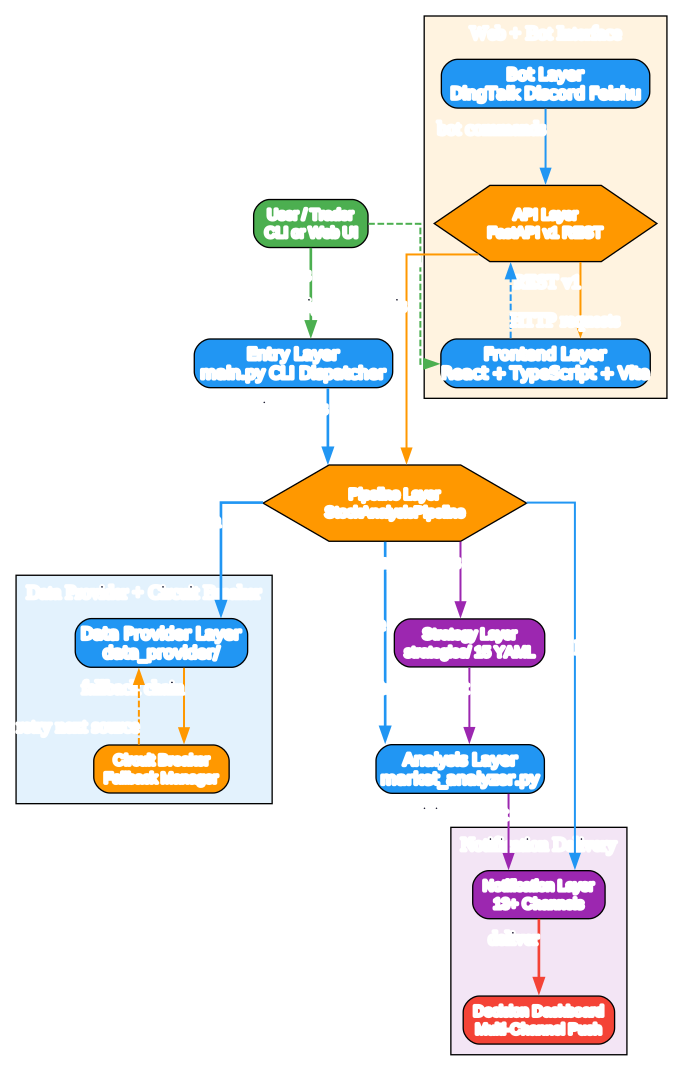
Understanding the System Architecture
The architecture diagram above illustrates the 9-layer modular architecture of Daily Stock Analysis and how each layer interacts. Let us break down each layer:
Layer 1: Entry Layer (main.py)
- Purpose: CLI dispatcher that parses arguments and routes to the pipeline
- Supports flags: –debug, –dry-run, –stocks, –market-review, –schedule, –webui, –backtest, –check-notify
- Single entry point for all operations: analysis, scheduling, web UI, backtesting
- Validates environment configuration before dispatching
Layer 2: Pipeline Layer (StockAnalysisPipeline)
- Purpose: Orchestrates the full analysis flow from data fetch to notification
- Coordinates between data providers, analysis engine, strategy engine, and notification layer
- Manages the lifecycle of each analysis run including error handling and retries
- Acts as the central conductor ensuring all layers execute in the correct order
Layer 3: Data Provider Layer (data_provider/)
- Purpose: Multi-source data fetching with priority-based fallback chains
- Each market has a configured priority chain of data sources
- Circuit breaker pattern monitors source health and triggers fallback automatically
- Normalizes data from different sources into a unified format for analysis
Layer 4: Analysis Layer (src/market_analyzer.py)
- Purpose: LLM-based analysis engine using LiteLLM as unified client
- Sends structured market data, news context, and social sentiment to the LLM
- Receives structured analysis output with buy/sell/hold decisions and reasoning
- Supports three-tier configuration from beginner single-model to expert YAML router
Layer 5: API Layer (api/app.py)
- Purpose: FastAPI backend with v1 REST endpoints
- Serves the frontend SPA and handles web-based analysis requests
- Provides programmatic access for bot integrations and external tools
- Auto-generated OpenAPI and Swagger documentation
Layer 6: Frontend Layer (apps/dsa-web/)
- Purpose: React + TypeScript + Vite single-page application
- Provides a visual interface for watchlist management and analysis results
- Communicates with the API layer via REST calls
- Displays the Decision Dashboard with charts and analysis details
Layer 7: Bot Layer (bot/)
- Purpose: Chat bot integrations for DingTalk, Discord, and Feishu
- Allows users to trigger analysis and receive results via chat platforms
- Translates bot commands into API calls and formats responses for chat
- Extends the system reach to messaging platforms where traders already work
Layer 8: Notification Layer
- Purpose: 13+ notification channels with routing, dedup, and cooldown
- Routes decisions to user-configured channels: WeChat Work, Feishu, Telegram, Email, Discord, Slack, and more
- Deduplication prevents duplicate alerts for the same stock
- Cooldown mechanism prevents notification spam during volatile periods
Layer 9: Strategy Layer (strategies/)
- Purpose: 15 built-in YAML-based trading strategies
- Each strategy defines rules for entry, exit, and risk management
- Strategies provide context to the LLM analysis for more targeted decisions
- YAML format allows users to customize and create their own strategies
Data Flow:
- The user invokes main.py with CLI arguments or interacts via the Web UI
- The pipeline layer dispatches data fetching to the data provider layer
- The circuit breaker monitors source health and falls back to alternative sources
- Normalized data, news, and social sentiment are sent to the LLM analysis engine
- The strategy engine applies YAML-based trading rules to the analysis
- The decision dashboard is routed through the notification layer
- Dedup and cooldown mechanisms filter and throttle notifications
- The final decision is delivered to the user via 13+ notification channels
Key Insights:
- The modular layered architecture enables independent development and testing of each layer
- The circuit breaker pattern ensures data availability even when primary sources fail
- The three-tier LLM configuration scales from beginner to expert without code changes
- The separation of strategy definitions as YAML files enables non-developer customization
- The notification layer with dedup and cooldown prevents alert fatigue
Practical Applications:
- Traders can configure their preferred markets and notification channels
- Developers can extend individual layers without affecting others
- Strategy designers can create and test YAML strategies without Python knowledge
- Teams can deploy via GitHub Actions with zero infrastructure cost
Data Flow Pipeline

Understanding the Data Flow Pipeline
The data flow pipeline diagram shows how raw market data transforms into actionable trading decisions. Let us trace the complete flow:
Stage 1: Watchlist and Data Sources
- The user defines a watchlist of stock tickers across supported markets
- Each market has a priority chain of data sources configured for fallback
- A-shares sources include Efinance, Tencent, AkShare, Tushare, Pytdx, Baostock, and YFinance
- Hong Kong sources include Longbridge, YFinance, AkShare, Tushare, Finnhub, AlphaVantage, and Stooq
- US sources include Longbridge, YFinance, Finnhub, AlphaVantage, and Stooq
- Japan, Korea, and Taiwan use YFinance with suffix-based ticker mapping
Stage 2: Data Fetching with Circuit Breaker
- The data fetcher attempts to retrieve data from the highest-priority source
- The circuit breaker monitors each source for failures and latency
- When a source fails, the circuit breaker triggers fallback to the next source in the chain
- This multi-source fallback ensures data availability even during provider outages
- The circuit breaker also tracks source health over time to proactively avoid unreliable sources
Stage 3: Data Normalization
- Data from different sources arrives in varying formats and schemas
- The normalizer converts all data into a unified internal format
- This enables the analysis engine to process data consistently regardless of source
- Normalization handles timezone conversion, currency formatting, and field mapping
Stage 4: Context Aggregation
- The news aggregator fetches relevant news from 7 search services
- Supported search services include Anspire AI Search, SerpAPI, Tavily, Bocha, Brave Search, MiniMax, and SearXNG
- Social sentiment is gathered from Reddit, X (Twitter), and Polymarket
- This context enriches the LLM analysis with real-world market sentiment and events
Stage 5: LLM Analysis Engine
- LiteLLM serves as the unified client supporting 12+ LLM providers
- The engine sends structured market data, news context, and social sentiment to the LLM
- The LLM produces structured analysis with buy/sell/hold decisions and detailed reasoning
- The three-tier configuration allows users to choose their complexity level
Stage 6: Strategy Engine
- 15 built-in YAML-based trading strategies provide rule-based analysis context
- Each strategy defines entry conditions, exit conditions, and risk management rules
- The strategy engine applies these rules to the LLM analysis output
- Users can customize strategies via YAML without writing Python code
Stage 7: Decision Dashboard and Notification
- The final decision dashboard includes the recommendation, reasoning, and supporting data
- The notification router applies deduplication to prevent duplicate alerts
- Cooldown mechanisms prevent notification spam during volatile market periods
- The dashboard is delivered to the user via 13+ configured notification channels
Key Insights:
- The circuit breaker pattern is essential for production-grade financial data systems
- Multi-source fallback ensures the system remains operational during provider outages
- Context aggregation from news and social sentiment provides a holistic market view
- The separation of LLM analysis and strategy rules enables flexible decision-making
- Dedup and cooldown mechanisms are critical for user experience in alert-heavy systems
Practical Applications:
- Traders can rely on the system for daily decision support across 6 markets
- The fallback chain ensures data availability even during market data provider outages
- Strategy customization allows adapting to different trading styles
- The notification routing enables delivery to the trader’s preferred communication channel
LLM Integration and Multi-Provider Support
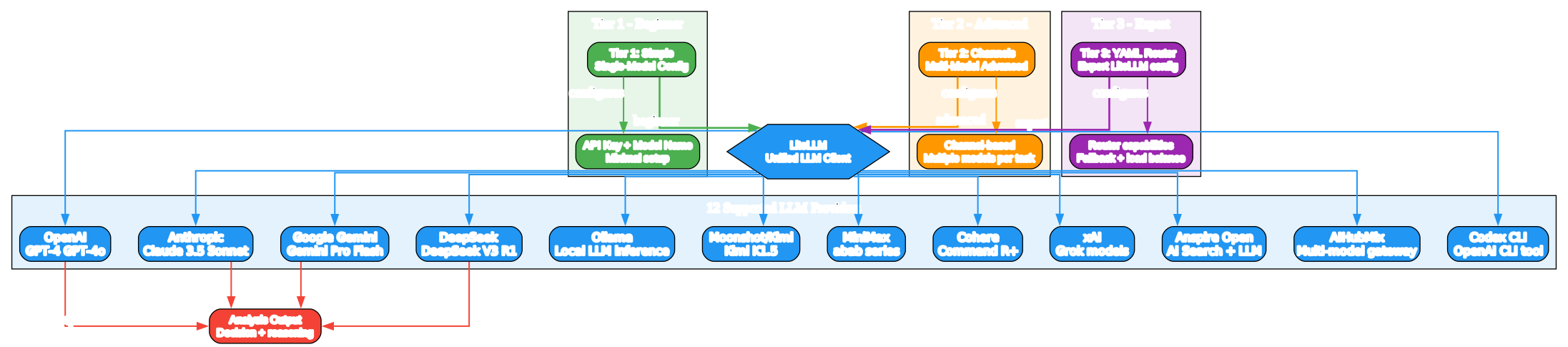
Understanding the LLM Integration Architecture
The LLM integration diagram illustrates the three-tier configuration hierarchy and the 12+ supported providers. Let us examine each tier:
Tier 1: Simple Single-Model Configuration (Beginner)
- The simplest setup requires only an API key and a model name
- Ideal for users getting started with a single LLM provider
- Minimal configuration in the .env file
- Supports any single provider: OpenAI, Anthropic, Google Gemini, DeepSeek, Ollama, and others
- The system handles all LiteLLM complexity internally
- Best for individual traders who want quick setup without advanced configuration
Tier 2: Channels Mode (Advanced and Multi-Model)
- Allows configuring multiple models for different analysis tasks
- Channel-based configuration maps specific tasks to specific models
- For example, use a fast model for data summarization and a powerful model for deep analysis
- Enables cost optimization by routing simple tasks to cheaper models
- Supports task-specific model selection for nuanced analysis
- Best for power users who want to optimize cost and quality across tasks
Tier 3: YAML Advanced (Expert)
- Full LiteLLM router capabilities with YAML configuration
- Supports model fallback chains for maximum reliability
- Load balancing across multiple model instances
- Rate limit management and retry policies
- Custom routing rules based on task type, cost, or latency
- Best for teams and organizations requiring production-grade reliability
Supported LLM Providers (12+):
- OpenAI: GPT-4, GPT-4o, and other OpenAI models
- Anthropic: Claude 3.5 Sonnet and Claude family
- Google Gemini: Gemini Pro and Flash variants
- DeepSeek: DeepSeek V3 and R1 models
- Ollama: Local LLM inference for privacy and zero-cost operation
- Moonshot and Kimi: Kimi K1.5 for Chinese market analysis
- MiniMax: abab series models
- Cohere: Command R+ for enterprise use
- xAI: Grok models for real-time analysis
- Anspire Open: AI Search combined with LLM capabilities
- AIHubMix: Multi-model gateway for simplified access
- Codex CLI: OpenAI CLI tool integration
Data Flow:
- The user configures LLM access via one of three tiers
- LiteLLM receives the configuration and initializes the appropriate client
- The analysis engine sends structured prompts to LiteLLM
- LiteLLM routes the request to the configured provider or providers
- The provider returns the analysis response
- LiteLLM normalizes the response format across all providers
- The analysis output is passed to the strategy engine for rule application
Key Insights:
- LiteLLM as a unified client eliminates provider lock-in
- The three-tier configuration scales from 5-minute setup to enterprise-grade reliability
- Ollama support enables fully local, private, and zero-cost LLM analysis
- The multi-provider approach ensures analysis continuity even if one provider has an outage
- The YAML router tier provides production-grade reliability with fallback and load balancing
Practical Applications:
- Beginners can start with a single OpenAI or DeepSeek API key
- Power users can mix providers for cost optimization across task types
- Privacy-conscious users can run Ollama locally for fully offline analysis
- Teams can configure fallback chains for maximum uptime
- The unified interface means switching providers requires only configuration changes
Multi-Market Data Sources and Notification Channels
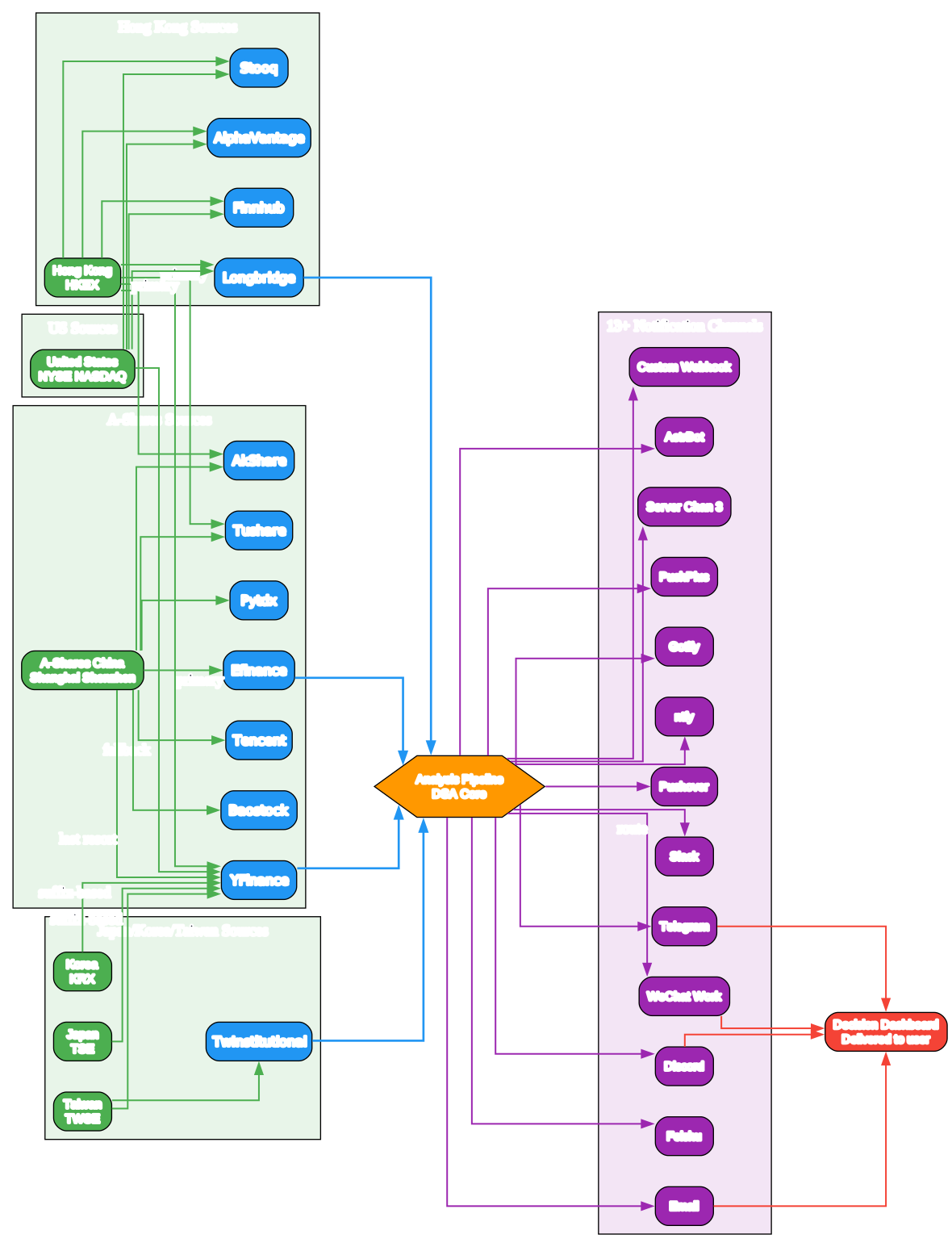
Understanding Multi-Market Coverage and Notification Delivery
The multi-market diagram maps the 6 supported markets with their data source fallback chains and the 13+ notification channels. Let us examine each market and channel:
Market 1: A-Shares (China)
- Covers Shanghai and Shenzhen stock exchanges
- 7 data sources with priority fallback: Efinance, Tencent, AkShare, Tushare, Pytdx, Baostock, YFinance
- Efinance and Tencent serve as primary sources for real-time data
- Tushare and Baostock provide historical data and fundamental analysis
- Pytdx offers direct protocol access for low-latency data
- YFinance serves as the last-resort international fallback
Market 2: Hong Kong
- Covers HKEX-listed stocks
- 7 data sources: Longbridge, YFinance, AkShare, Tushare, Finnhub, AlphaVantage, Stooq
- Longbridge provides professional-grade Hong Kong market data
- Finnhub and AlphaVantage offer international API access
- Stooq provides free historical data access
Market 3: United States
- Covers NYSE and NASDAQ listed stocks
- 5 data sources: Longbridge, YFinance, Finnhub, AlphaVantage, Stooq
- Longbridge and YFinance serve as primary sources
- Finnhub provides real-time US market data with generous free tier
- AlphaVantage offers both free and premium API tiers
Market 4: Japan
- Covers Tokyo Stock Exchange (TSE) listed stocks
- Uses YFinance with suffix-based ticker mapping (for example .T suffix)
- Lightweight configuration with reliable international data access
Market 5: Korea
- Covers Korea Exchange (KRX) listed stocks
- Uses YFinance with suffix-based ticker mapping (for example .KS suffix)
- Consistent approach with Japan for simplified multi-market support
Market 6: Taiwan
- Covers Taiwan Stock Exchange (TWSE) listed stocks
- Uses YFinance with suffix-based mapping plus TwInstitutionalFetcher
- TwInstitutionalFetcher provides Taiwan-specific institutional data
Notification Channels (13+):
- WeChat Work: Enterprise messaging for Chinese corporate environments
- Feishu: Lark and Feishu integration for team collaboration
- Telegram: Cross-platform messaging with bot API support
- Email: SMTP-based delivery for formal notification records
- Discord: Community-oriented delivery for trading groups
- Slack: Enterprise team notification for trading desks
- Pushover: Mobile push notifications for iOS and Android
- ntfy: Self-hosted push notification service
- Gotify: Self-hosted push notification alternative
- PushPlus: Chinese push notification service
- Server Chan 3: WeChat-based push for Chinese users
- AstrBot: AI-powered bot platform integration
- Custom Webhook: Generic webhook for custom integrations
Data Flow:
- Each market routes to its configured priority chain of data sources
- The circuit breaker monitors source health and triggers fallback as needed
- Data from the successful source flows into the central analysis pipeline
- The pipeline produces the decision dashboard with analysis results
- The notification router sends the dashboard to all configured channels
- Each channel delivers the notification in its native format
- The user receives the decision dashboard on their preferred platform
Key Insights:
- The 6-market coverage makes DSA one of the most comprehensive multi-market analysis tools
- The priority-based fallback chain ensures data availability across all markets
- YFinance serves as a universal fallback for international markets
- The 13+ notification channels cover enterprise, consumer, and self-hosted delivery
- The custom webhook channel enables integration with any system that accepts HTTP POST
Practical Applications:
- Traders operating across multiple markets can use a single tool for all analysis
- Enterprise teams can receive notifications via WeChat Work, Feishu, or Slack
- Individual traders can use Telegram, Discord, or Pushover for mobile alerts
- Self-hosted users can use ntfy or Gotify for privacy-conscious delivery
- The custom webhook enables integration with trading execution systems
Installation
Prerequisites
- Python 3.10 or higher
- pip package manager
- Git
Step-by-Step Installation
# Clone the repository
git clone https://github.com/ZhuLinsen/daily_stock_analysis.git
cd daily_stock_analysis

# Install Python dependencies
pip install -r requirements.txt

# Copy environment configuration
copy .env.example .env

# Edit .env with your LLM API key and notification settings
# For Tier 1 beginners: add API key and model name
# For Tier 2 and Tier 3 advanced: configure channels or YAML router

# Run the first analysis
python main.py

# Or run in dry-run mode to test data fetching only
python main.py --dry-run
The cd daily_stock_analysis command matches the repository URL’s last segment. After cloning, the .env.example file should be copied to .env and edited with your LLM provider API key and notification channel tokens. For Tier 1 beginners, only an API key and model name are required. For Tier 2 and Tier 3 advanced configurations, channel-based or YAML router settings provide multi-model and fallback capabilities.
Usage
Daily Stock Analysis provides a comprehensive CLI with multiple modes of operation:
# Normal run - analyze all watchlist stocks
python main.py

# Debug mode with verbose logging
python main.py --debug

# Dry-run mode - fetch data only without LLM analysis
python main.py --dry-run

# Analyze specific stocks across markets
python main.py --stocks 600519,hk00700,AAPL

# Market review only - no individual stock analysis
python main.py --market-review

# Scheduled task mode
python main.py --schedule

# Start the Web UI
python main.py --webui

# Run strategy backtesting
python main.py --backtest

# Check notification configuration
python main.py --check-notify
The --dry-run flag is useful for verifying data source connectivity without consuming LLM API credits. The --stocks flag accepts comma-separated tickers across multiple markets in a single run. The --webui flag starts the React frontend and FastAPI backend for a visual interface. The --backtest flag runs strategy backtesting against historical data. The --check-notify flag validates notification channel configuration before running a full analysis.
Key Features
| Feature | Description |
|---|---|
| 6 Market Support | A-shares, Hong Kong, US, Japan, Korea, Taiwan with market-specific data sources |
| 13+ Notification Channels | WeChat Work, Feishu, Telegram, Email, Discord, Slack, Pushover, ntfy, Gotify, PushPlus, Server Chan 3, AstrBot, Custom Webhook |
| Three-Tier LLM Config | Beginner single-model, advanced multi-model channels, expert YAML router |
| 12+ LLM Providers | OpenAI, Anthropic, Google Gemini, DeepSeek, Ollama, Moonshot, MiniMax, Cohere, xAI, Anspire, AIHubMix, Codex CLI |
| 15 Built-in Strategies | YAML-based trading strategies with customizable rules |
| Multi-Source Fallback | Priority-based data source chains with automatic failover |
| Circuit Breaker | Health monitoring and automatic source switching for resilience |
| 7 News Search Services | Anspire AI, SerpAPI, Tavily, Bocha, Brave Search, MiniMax, SearXNG |
| Social Sentiment | Reddit, X (Twitter), Polymarket sentiment aggregation |
| Notification Dedup | Prevents duplicate alerts for the same stock |
| Notification Cooldown | Prevents alert spam during volatile market periods |
| FastAPI Backend | REST API with v1 endpoints and auto-generated documentation |
| React Web UI | TypeScript and Vite SPA for visual watchlist management |
| Bot Integrations | DingTalk, Discord, Feishu chat bot support |
| GitHub Actions Deploy | Zero-cost CI/CD deployment via GitHub Actions |
| Backtesting | Strategy backtesting with historical data |
| Dry-Run Mode | Data fetching without LLM analysis for testing |
| Debug Mode | Verbose logging for troubleshooting |
| Scheduled Tasks | Cron-like scheduling for automated daily analysis |
| 44,419 Stars | One of the fastest-growing Python repos at 568 stars per day |
GitHub Actions Zero-Cost Deployment
Daily Stock Analysis supports deployment via GitHub Actions at zero infrastructure cost. GitHub Actions runners execute the analysis on a schedule, eliminating the need for a dedicated server. The analysis runs entirely in the GitHub CI/CD environment, and results are pushed to notification channels directly from the Actions runner.
Configuration is handled through repository secrets for API keys and notification tokens. The workflow YAML file defines the schedule and the analysis command to execute. This approach is ideal for individual traders who want automated daily analysis without server costs. The free GitHub Actions minutes are sufficient for daily scheduled runs, and the system handles the full pipeline from data fetching through notification delivery within a single workflow run.
To set up GitHub Actions deployment, fork the repository, configure the required secrets (LLM API key, notification tokens), and enable the scheduled workflow. The analysis will run automatically at the configured time and deliver the Decision Dashboard to all enabled notification channels.
Troubleshooting
Issue 1: Data Source Connection Failed
- Symptom: Analysis fails with data fetch error for a specific market
- Cause: Primary data source is down or API key expired
- Solution: The circuit breaker should auto-fallback. Check .env for API key validity. Verify network connectivity.
Issue 2: LLM API Key Invalid
- Symptom: Analysis completes data fetch but fails at LLM analysis step
- Cause: Invalid or expired LLM API key in .env
- Solution: Verify API key in .env. For Tier 1, check the single key. For Tier 2 and Tier 3, check channel or router config.
Issue 3: Notification Channel Not Receiving
- Symptom: Analysis completes but no notification arrives
- Cause: Notification channel misconfigured or token expired
- Solution: Run
python main.py --check-notifyto verify notification configuration
Issue 4: Python Version Incompatibility
- Symptom: Import errors or syntax errors on startup
- Cause: Python version below 3.10
- Solution: Upgrade to Python 3.10 or higher. Check with
python --version
Issue 5: Web UI Not Starting
- Symptom:
python main.py --webuifails or frontend does not load - Cause: Frontend dependencies not installed or port conflict
- Solution: Install frontend dependencies in apps/dsa-web/. Check for port conflicts.
Issue 6: Ollama Local LLM Connection Failed
- Symptom: Analysis fails when using Ollama as LLM provider
- Cause: Ollama service not running or model not pulled
- Solution: Start Ollama service with
ollama serve. Pull required model withollama pullfollowed by the model name.
Issue 7: Rate Limit from Data Source
- Symptom: Intermittent data fetch failures with rate limit errors
- Cause: Exceeding API rate limits for free-tier data sources
- Solution: Configure multiple data sources for fallback. Consider paid API tiers for high-frequency use.
Issue 8: GitHub Actions Deployment Failed
- Symptom: Scheduled GitHub Actions run fails
- Cause: Repository secrets not configured or workflow file misconfigured
- Solution: Verify all required secrets are set. Check workflow YAML syntax. Review Actions logs.
Conclusion
Daily Stock Analysis represents a comprehensive AI-powered multi-market stock analysis system. Its 44,419 GitHub stars and 568 stars per day growth reflect the global trading community’s adoption. The 6-market support with multi-source fallback and circuit breaker ensures reliable data access across A-shares, Hong Kong, US, Japan, Korea, and Taiwan markets.
The three-tier LLM configuration scales from beginner to enterprise without code changes, and the 12+ LLM providers including local Ollama enable privacy and zero-cost analysis. The 15 built-in YAML strategies enable customization without Python knowledge, while the 13+ notification channels with dedup and cooldown provide flexible delivery options.
GitHub Actions deployment enables zero-cost automated daily analysis, and the modular layered architecture enables independent extension of each component. The MIT license allows commercial use and customization, making DSA suitable for individual traders, teams, and organizations alike.
Links
- GitHub Repository: https://github.com/ZhuLinsen/daily_stock_analysis
Related Posts

Enjoyed this post? Never miss out on future posts by following us


