Learn Redis in a Single Post: Complete Tutorial From Data Structures to Caching, Persistence, and Clustering
Redis is an in-memory data store that’s fast (sub-millisecond), rich (more than a key-value cache), and the default “second database” behind almost every web service — used as a cache, a session store, a rate limiter, a queue, a leaderboard, and a pub/sub broker. It’s the layer that sits in front of PostgreSQL to make reads fast and to hold ephemeral state. This single post teaches the whole system in five stages, with hand-drawn diagrams and runnable commands.
Learning Roadmap
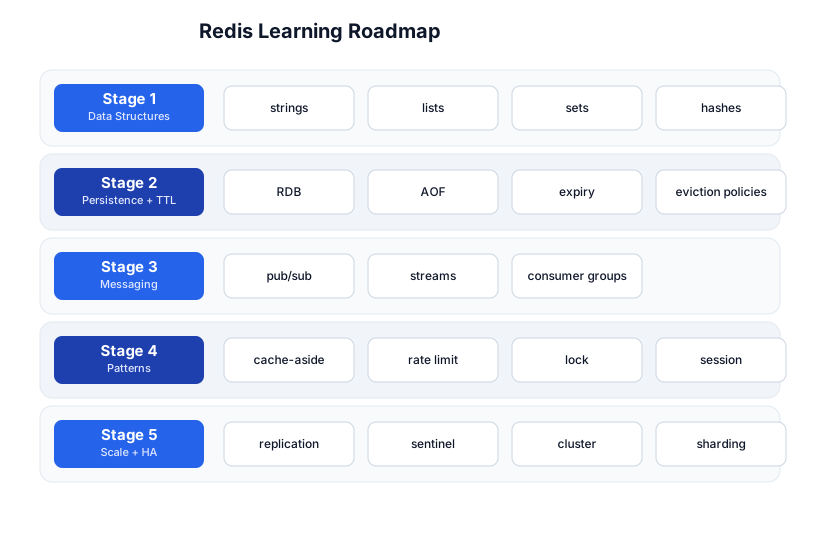
The roadmap moves from the data structures (Stage 1), through persistence and expiry (Stage 2), messaging (Stage 3), the patterns you build with it (Stage 4), and scaling + high availability (Stage 5).
Stage 1 — Data Structures
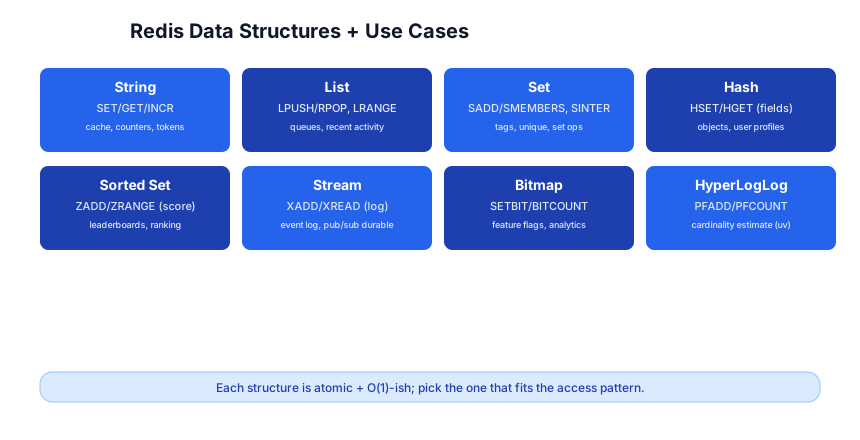
Redis is not a plain key-value store. The value at a key can be one of several structures, each with its own atomic command set.
Strings
SET user:1:name "Ada"      # set
GET user:1:name            # "Ada"
INCR counter               # 1 (atomic increment)
INCRBY views 5             # 5
SETEX session:abc 3600 data   # set with 3600s TTL
Strings hold text, numbers (atomically incrementable), or blobs (up to 512 MB). Use for caches, counters, tokens.
Lists (linked lists)
LPUSH queue "job1"         # push to head
RPOP queue                 # pop from tail (FIFO queue)
LRANGE queue 0 -1          # view all
Use for queues, recent-activity feeds, bounded lists (LTRIM to keep the last N).
Sets
SADD tags:post1 redis db
SADD tags:post2 db caching
SINTER tags:post1 tags:post2   # intersection -> {db}
SMEMBERS tags:post1
Use for tags, unique collections, set operations (union, intersect, diff), “who’s online.”
Hashes
HSET user:1 name "Ada" age 30 email "a@b.com"
HGET user:1 name           # "Ada"
HGETALL user:1
HINCRBY user:1 age 1
A hash is a map of fields — the natural fit for an object/record. Use for user profiles, config, anything you’d store as a row.
Sorted sets (the killer structure)
ZADD leaderboard 100 "alice" 250 "bob" 180 "carol"
ZREVRANGE leaderboard 0 2 WITHSCORES   # top 3 by score
ZINCRBY leaderboard 50 "alice"          # alice now 150
A sorted set maps members to scores and keeps them ordered. O(log n) inserts, O(1)-ish rank lookups. Use for leaderboards, ranking, priority queues, sliding-window rate limits.
Streams (the durable log)
XADD events '*' type click user 42     # '*' = auto ID (timestamp)
XREAD COUNT 10 STREAMS events 0        # read from start
XRANGE events - +                      # all entries
A stream is an append-only log with consumer groups (like Kafka, in Redis). Use for event logs, durable pub/sub, reliable queues.
Pitfall: Pick the structure that fits the access pattern, not the data shape. A leaderboard needs a sorted set (rank queries), not a list (O(n) to find a position). The structure is the index.
Stage 2 — Persistence + TTL
Redis is in-memory, but it can persist to disk so data survives a restart. Two mechanisms, plus a hybrid:
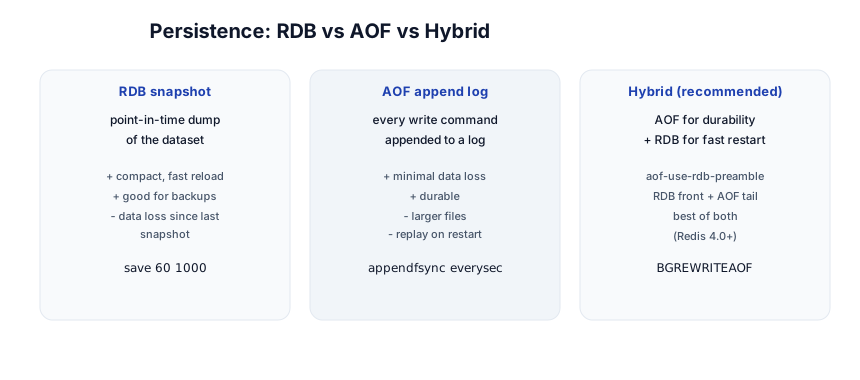
- RDB — periodic point-in-time snapshots. Compact, fast to reload, good for backups. Risk: data written since the last snapshot is lost on crash.
- AOF (Append-Only File) — every write command appended to a log.
appendfsync everysec(default) loses at most 1 second on crash. More durable, larger files, replayed on restart. - Hybrid (Redis 4.0+) — AOF with an RDB preamble: RDB for fast restart + AOF tail for durability. This is the recommended production setting.
# redis.conf
save 60 1000              # RDB: snapshot if 1000 keys changed in 60s
appendonly yes            # enable AOF
appendfsync everysec      # durability vs performance
aof-use-rdb-preamble yes  # hybrid format
Expiry and eviction
SET token:xyz "data" EX 3600   # expires in 3600s
EXPIRE key 60                   # set TTL on existing key
TTL key                          # seconds to live (-1 = none, -2 = gone)
PERSIST key                      # remove TTL
When memory is full, Redis evicts keys by a maxmemory-policy:
noeviction— reject writes (default; use if Redis holds non-cache data).allkeys-lru/volatile-lru— evict least-recently-used (the cache choice).allkeys-lfu/volatile-lfu— evict least-frequently-used.allkeys-random/volatile-random— random.
Pitfall:
volatile-*policies only evict keys with a TTL set. If you set TTLs inconsistently, avolatile-lrupolicy may have nothing to evict and start erroring. For a pure cache, useallkeys-lru.
Stage 3 — Messaging
Pub/Sub
# terminal 1
SUBSCRIBE news
# terminal 2
PUBLISH news "hello"     # delivered to all subscribers
Pub/sub is fire-and-forget: messages go to currently-connected subscribers; if no one’s listening, the message is gone. Use for real-time notifications, chat presence — not for reliable delivery.
Streams with consumer groups (reliable)
For reliable delivery, use streams with consumer groups:
XGROUP CREATE events grp1 0
# consumer reads:
XREADGROUP GROUP grp1 consumer1 COUNT 10 STREAMS events '>'
# after processing:
XACK events grp1 <id>          # acknowledge; unacked can be reclaimed
XPENDING events grp1            # see pending (unacked) messages
XCLAIM events grp1 consumer2 0 <id>   # reclaim a stuck message
A consumer group guarantees each message is delivered to one consumer in the group, tracks acknowledgments, and lets you reclaim messages from a crashed consumer. This is the Redis equivalent of a Kafka consumer group — durable, reliable, at-least-once.
Pitfall: Pub/sub has no persistence and no acknowledgment — a subscriber that disconnects misses every message published while it’s gone. Use streams + consumer groups when delivery must be reliable.
Stage 4 — Patterns
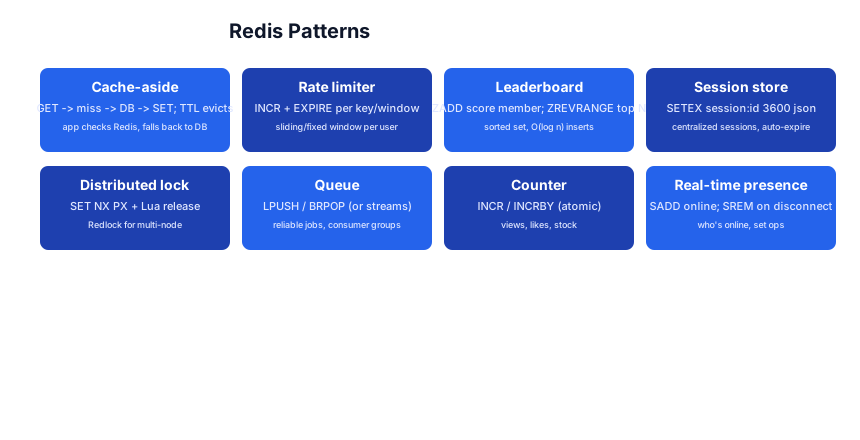
These are the canonical things Redis is for — the reason it’s in every stack.
Cache-aside
def get_user(id):
    cached = redis.get(f"user:{id}")
    if cached: return json.loads(cached)
    user = db.find(id)                       # cache miss -> DB
    redis.setex(f"user:{id}", 3600, json.dumps(user))  # fill, 1h TTL
    return user
The app checks Redis first, falls back to the DB on a miss, and fills the cache. The TTL eventually evicts stale data. Invalidate on write (delete the key when you update the DB) to keep it fresh.
Pitfall: A cold cache or a mass expiry causes a cache stampede — every request misses and hits the DB. Mitigate with jittered TTLs, “stale-while-revalidate,” or probabilistic early expiry.
Rate limiting (fixed window)
key = f"rate:{user_id}:{minute}"
count = redis.incr(key)
if count == 1: redis.expire(key, 60)   # first request, set 60s TTL
if count > 100: return "rate limited"
INCR is atomic, so this is correct across many servers. For a sliding window, use a sorted set (ZADD the timestamp, ZREMRANGEBYSCORE old entries, ZCARD).
Leaderboard
ZINCRBY leaderboard 1 "user:42"        # add 1 to user's score
ZREVRANGE leaderboard 0 9 WITHSCORES   # top 10
ZREVRANK leaderboard "user:42"          # user's rank
The sorted set makes this O(log n) — a leaderboard over millions of users returns in microseconds.
Session store
SETEX session:<sid> 3600 <json>     # central session, 1h expiry
GET session:<sid>
Centralizing sessions in Redis lets any server serve any user (no sticky sessions) and auto-expires idle sessions.
Distributed lock
SET lock:resource <token> NX PX 10000   # acquire: set-if-not-exists, 10s TTL
# ... do work ...
# release with a Lua script that checks token == ours (atomic compare-and-delete)
SET NX PX acquires; the TTL prevents a crashed holder from locking forever; a Lua script releases only if you still own it (so you don’t release someone else’s lock). For multi-node, Redlock is the contested-but-standard algorithm.
Queue
LPUSH jobs "task1"     # producer
BRPOP jobs 30          # consumer blocks up to 30s for a job
For reliability, use streams with consumer groups (above) instead — BRPOP loses a job if the consumer crashes after popping.
Counter / real-time presence
INCR views:post:1               # atomic view count
SADD online user:42             # mark online
SREM online user:42             # mark offline
SCARD online                     # how many online
Pitfall: A cache is a performance optimization, not a source of truth. Always design for the cache miss (the app must work correctly without the cache, just slower). A cache that must be present is a single point of failure.
Stage 5 — Scale + HA
The single-threaded model
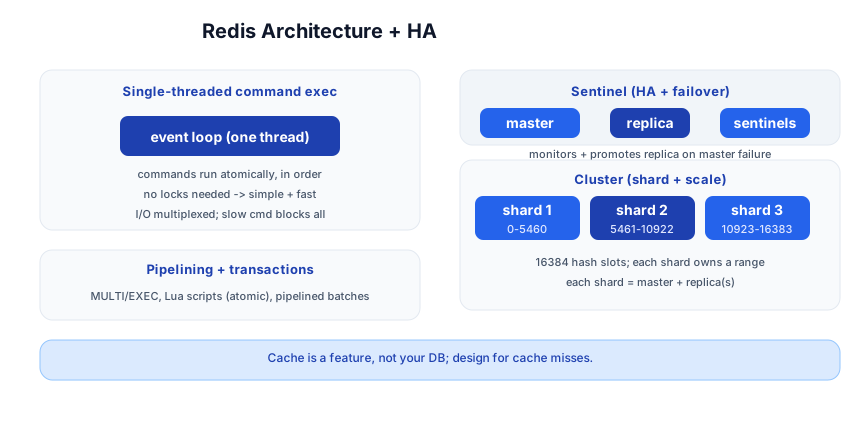
Redis runs command execution on a single thread with an event loop. The payoff: every command is atomic and there are no locks — simple, deterministic, fast. I/O is multiplexed. The cost: a single slow command (KEYS * on millions of keys, a big SMEMBERS) blocks everything. Use SCAN instead of KEYS, and keep commands O(1)/O(log n).
Pitfall:
KEYS *in production blocks the whole server. UseSCAN(non-blocking, cursor-based) for key discovery. This is the #1 Redis footgun.
Pipelining and transactions
- Pipelining — send many commands at once, read all replies — cuts round-trips dramatically.
MULTI/EXEC— a transaction: commands queued and run atomically (no other command interleaves).- Lua scripts — run multiple commands atomically as one (the script runs as a single atomic unit). Use for compare-and-set logic like lock release.
Replication
# replica.conf
replicaof master.host 6379
A replica asynchronously copies the master. Use for read scaling (send reads to replicas) and as a hot standby for failover. Writes go to the master only.
Sentinel (high availability)
Sentinel is a set of monitoring processes that watch the master + replicas, and automatically promote a replica if the master dies, redirecting clients. Use Sentinel when you need HA but not sharding — one master, one or more replicas, 3 sentinels for quorum.
Cluster (sharding + HA)
Redis Cluster shards data across multiple nodes by hash slots (16,384 slots, divided across shards). Each shard is a master + replica. The client computes CRC16(key) % 16384 to find the owning shard. Use Cluster when one machine’s memory isn’t enough or you need both sharding and HA.
Pitfall: In Cluster mode, multi-key commands (
MGET, transactions) only work if all keys are in the same slot — use hash tags ({user1}:profile,{user1}:orders) to force related keys to the same slot.
Quick-Start Checklist
- Run Redis —
docker run -p 6379:6379 redisorredis-server. - Connect with
redis-cliand runSET/GET,INCR,HSET/HGET. - Pick the structure for the access pattern — sorted set for rankings, hash for objects, list for queues.
- Set TTLs on cache keys; choose
allkeys-lrufor a pure cache. - Enable AOF + RDB hybrid for production persistence.
- Use
SCAN, neverKEYSin production. - Add a replica for read scaling + a hot standby.
- Use Sentinel for single-master HA, Cluster when you need to shard.
- Pipeline bulk operations to cut round-trips.
- Design for the cache miss — the app must work without Redis, just slower.
Common Pitfalls
KEYS *in production — blocks the server; useSCAN.- Wrong structure for the pattern — a list for a leaderboard (O(n) rank) instead of a sorted set (O(log n)).
- No TTL on cache keys — memory grows forever; set TTLs and pick an eviction policy.
volatile-*policy with no TTLs set — nothing to evict, writes start failing; useallkeys-lrufor caches.- Pub/sub for reliable delivery — messages to disconnected subscribers are lost; use streams + consumer groups.
- Treating cache as source of truth — design for the miss; the DB is the truth.
- Cache stampede — mass expiry overloads the DB; jitter TTLs or use stale-while-revalidate.
- Multi-key commands in Cluster — only work within one hash slot; use hash tags
{tag}:key. - Blocking commands on a shared connection — use a dedicated connection or a separate thread.
Further Reading
- Redis Docs — the official reference + command list
- Redis Commands — every command with complexity
- Redis Best Practices — patterns + recipes
- Redis in Action by Josiah Carlson — the deep book
- Redis Weekly — the newsletter
Related guides
Redis pairs with the rest of the data + backend stack — these PyShine tutorials connect to it:
- Learn PostgreSQL in One Post — the canonical pairing: Postgres for truth, Redis for cache/sessions/rate limits.
- Learn Node.js + Express in One Post —
ioredis/node-redisfor sessions and rate limiting in your handlers. - Learn System Design in One Post — cache-aside, rate limiting, and distributed locks are system-design staples.
- Learn Python in One Post —
redis-py/aioredisfor async cache access. - Learn Docker in One Post — run Redis in a container (note: in-memory data needs a volume for persistence).
Redis’s power is that it’s a toolbox, not a single tool: a cache, a database, a queue, a rate limiter, a lock, a leaderboard — all from one fast, in-memory server with a small, composable command set. The five stages here — data structures, persistence, messaging, patterns, scale — cover everything from a single Enjoyed this post? Never miss out on future posts by following us SET to a sharded, replicated cluster. The two habits that pay off: pick the structure for the access pattern, and always design for the cache miss. Run redis-cli, try each structure’s commands, and build a cache-aside layer in front of a real query — once you’ve felt a 50ms DB read become a 0.5ms cache hit, the pattern is yours.