Learn WebAssembly in a Single Post: Complete Tutorial From Modules and Memory to WASI and the Component Model
WebAssembly (wasm) is a portable, sandboxed binary instruction format — a “virtual ISA” that runs at near-native speed in a secure sandbox. Born in browsers to run C++ games, it’s now a universal compile target: Rust, C++, Go, AssemblyScript, and more compile to wasm and run in browsers, servers, the edge, and embedded devices. This single post teaches the whole platform in five stages, with hand-drawn diagrams and runnable code.
Learning Roadmap
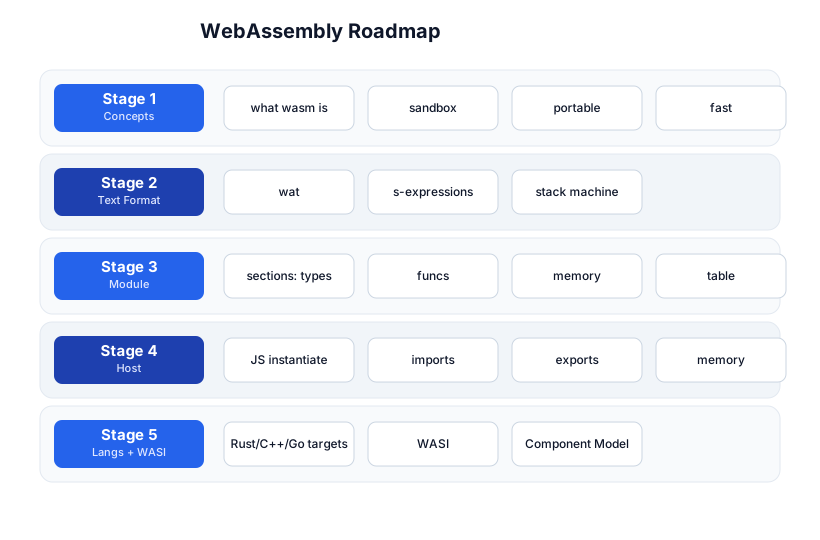
The roadmap moves from concepts (Stage 1), through the text format (Stage 2), the module structure (Stage 3), the JS host embedding (Stage 4), and the broader ecosystem of languages + WASI + the Component Model (Stage 5). The Compilers tutorial is the natural prerequisite — wasm is a compilation target.
Stage 1 — Concepts
What WebAssembly is
- Portable — one
.wasmbinary runs on any OS/architecture that has a wasm runtime (browsers, Wasmtime, Wasmer, WasmEdge, Node.js). - Sandboxed — wasm runs in a security sandbox with no access to the host’s filesystem, network, or memory by default. It only sees what the host explicitly passes (imports + shared linear memory).
- Fast — compiled ahead-of-time to machine code (JIT or AOT) by the runtime; near-native speed, far faster than an interpreter.
- Compact — the binary format is dense (smaller than equivalent native code); loads fast.
- Specified — a W3C standard with a formal semantics; every runtime implements the same behavior.
The pipeline
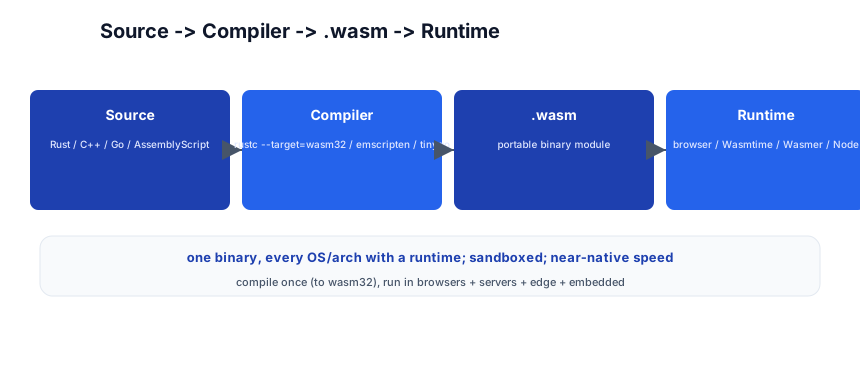
Rust/C++/Go source -> compiler (rustc/emscripten/tinygo) -> .wasm -> runtime
You write in a source language, compile to the wasm32 target, and the resulting .wasm runs anywhere there’s a wasm runtime. Compile once, run everywhere — the promise JVM made, delivered with a smaller, faster, sandboxed format.
Pitfall: wasm is not a garbage collector — it doesn’t manage memory for you. The language’s runtime (Rust’s allocator, Go’s GC, a C++ smart pointer) is compiled into the wasm module. This is why wasm modules are self-contained but can be larger than you’d expect — the language runtime ships with the code.
Stage 2 — The Text Format (WAT)
WAT — WebAssembly Text Format
The binary .wasm is what runs, but humans read WAT (.wat), an S-expression text format that mirrors the binary:
(module
  (func $add (export "add") (param $a i32) (param $b i32) (result i32)
    local.get $a
    local.get $b
    i32.add
  )
)
This exports a function add(a: i32, b: i32) -> i32. Note there are no registers — wasm is a stack machine: you push values onto an implicit operand stack (local.get pushes), and instructions consume from it (i32.add pops two, pushes the sum). The final stack value is the result.
Value types
wasm has only four basic types (the MVP): i32, i64, f32, f64. (Later proposals add v128 SIMD, funcref, externref.) There’s no string, no struct, no array — those are built from linear memory (Stage 3). This minimalism is what makes the spec small and the validation fast.
# install wabt (WebAssembly Binary Toolkit)
wat2wasm add.wat -o add.wasm      # text -> binary
wasm2wat add.wasm -o add.wat      # binary -> text
wasm-objdump -d add.wasm          # disassemble
Stage 3 — Module Structure
A .wasm module is a set of sections, each holding one kind of data:
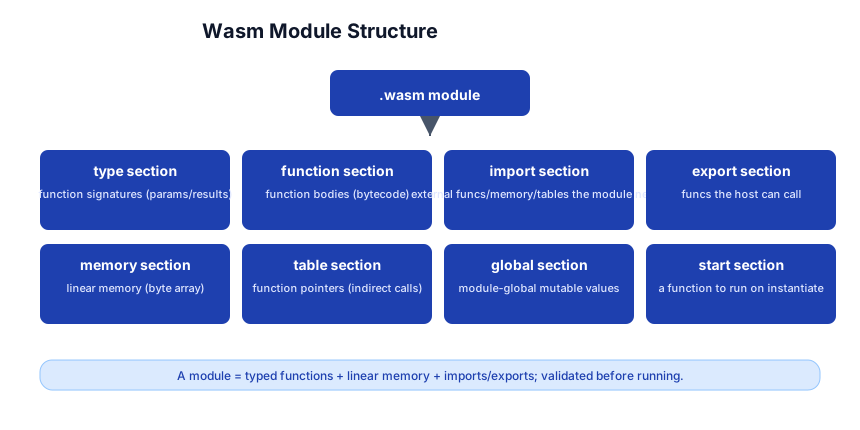
| Section | Holds |
|---|---|
| type | function signatures (params + results) |
| function | function bodies (the bytecode) |
| import | external functions/memory/tables the module needs from the host |
| export | functions the host can call |
| memory | linear memory (a byte array the module reads/writes) |
| table | function pointers (for indirect calls / dynamic dispatch) |
| global | module-global mutable values |
| start | a function to run on instantiation |
Linear memory — the data
wasm has no heap objects in the GC sense — data lives in linear memory: a contiguous, growable byte array (memory). Strings are byte sequences in memory; arrays are regions of memory; structs are laid out at offsets. The module reads/writes with i32.load/i32.store against an address.
(module
  (memory (export "mem") 1)                 ;; 1 page = 64KB
  (func (export "store_at") (param $addr i32) (param $val i32)
    local.get $addr
    local.get $val
    i32.store                               ;; mem[addr] = val
  )
)
Why no heap objects?
The minimal type system (i32/i64/f32/f64) + linear memory means the runtime doesn’t need a GC or complex object model — it’s just a CPU with memory. Richer types (strings, structs, GC objects) are a language-level concern, compiled into memory layout by the source language. This keeps the wasm spec tiny (~100 pages) and the runtime simple and fast.
Pitfall: Because data is bytes in linear memory, passing a “string” from JS to wasm means agreeing on an encoding (UTF-8), a length, and an address — there’s no
stringtype at the wasm boundary. This is why language toolchains (like Rust’swasm-bindgen) generate glue: they handle the encode/copy/free dance for you.
Stage 4 — The JS Host
Instantiating and calling
// fetch the .wasm bytes
const bytes = await fetch('add.wasm').then(r => r.arrayBuffer());

// imports: functions the wasm module can call (host -> wasm direction)
const imports = {
  env: {
    log: (msgPtr) => console.log('wasm says:', readString(memory, msgPtr)),
    random: () => Math.random(),
  }
};

// instantiate
const { instance } = await WebAssembly.instantiate(bytes, imports);

// call an exported function
const result = instance.exports.add(2, 3);   // 5
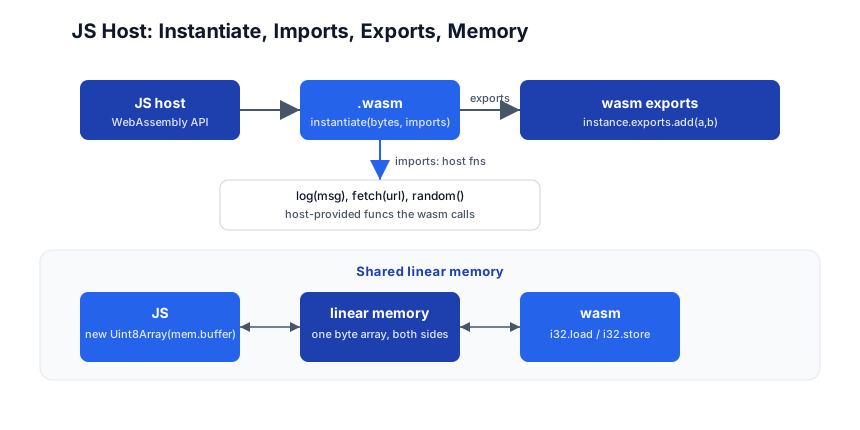
The flow:
- Host (JS) instantiates the
.wasmbytes with an imports object (functions/memory the module needs). - The module’s exports become callable from JS (
instance.exports.add). - Shared linear memory: the module exports its
memory; JS wraps it in aUint8Arrayto read/write the same bytes wasm sees.
Memory sharing
const memory = instance.exports.mem;
const view = new Uint8Array(memory.buffer);
// write from JS:
view[0] = 42;
// read from wasm (which sees the same bytes):
console.log(instance.exports.read_at(0));   // 42
Both sides share one byte array. JS writes a string into memory at an offset; wasm reads it from that offset. This is the boundary — there’s no automatic marshaling; you pass addresses and lengths.
Imports — the host provides capabilities
The wasm module is sandboxed; it can’t console.log, fetch, or read the clock. The host imports those functions:
(import "env" "log" (func $log (param i32)))
The host passes env.log in the imports object. This is capability-based security: the module only gets the abilities the host explicitly hands it. A module with no fs import can’t touch the filesystem, period.
Pitfall: Forgetting to provide an import the module declares causes instantiation to fail with a clear error. The import names (
"env","log") must match exactly between the.wat/.wasmand the imports object.
Stage 5 — Languages + WASI + Component Model
Compiling languages to wasm
| Language | Toolchain | Notes |
|---|---|---|
| Rust | rustc --target=wasm32-unknown-unknown / wasm-bindgen | the primary wasm language; wasm-pack for the browser |
| C/C++ | emscripten | the original; full libc, SDL, OpenGL stubs |
| Go | tinygo -target=wasm | tinygo (not main Go, which produces large modules) |
| AssemblyScript | a TypeScript-like language for wasm | compiles directly; no runtime to bundle |
| Zig | zig build -Dtarget=wasm32 | first-class wasm target |
# Rust -> wasm (for the browser)
cargo new hello --lib
# src/lib.rs:
#   #[wasm_bindgen] pub fn add(a: i32, b: i32) -> i32 { a + b }
wasm-pack build --target web    # produces a pkg/ with .wasm + JS glue
WASI — the WebAssembly System Interface
WASI (pronounced “WAZ-ee”) is the standard OS interface for wasm outside the browser: filesystem, networking, clocks, random, environment variables. A wasm module built for WASI can run on any WASI-compliant runtime (Wasmtime, Wasmer, WasmEdge) without a browser.
# Rust -> wasm + WASI
cargo build --target wasm32-wasi
wasmtime target/wasm32-wasi/debug/myapp.wasm   # runs like a native binary
WASI extends the capability model: instead of “log” and “random” hand-imported, the runtime provides a standard set of host functions (file open/read, socket, clock), gated by capability-based permissions — you grant the module access to specific directories, not the whole filesystem.
The Component Model
The Component Model is the next layer: a way for wasm modules (in different languages) to compose and communicate with typed interfaces, not just shared memory. You describe interfaces in WIT (WebAssembly Interface Types), and wasm-tools generates the glue:
// example.wit
package example:greet;
interface greet {
  greet: func(name: string) -> string;
}
Components talk via typed calls (strings, records, variants — not raw bytes), enabling a polyglot, composable ecosystem: a Rust component calls a Go component through a WIT interface. This is where wasm is heading — from “run one module in a browser” to “compose services in any language, portably.”
The ecosystem
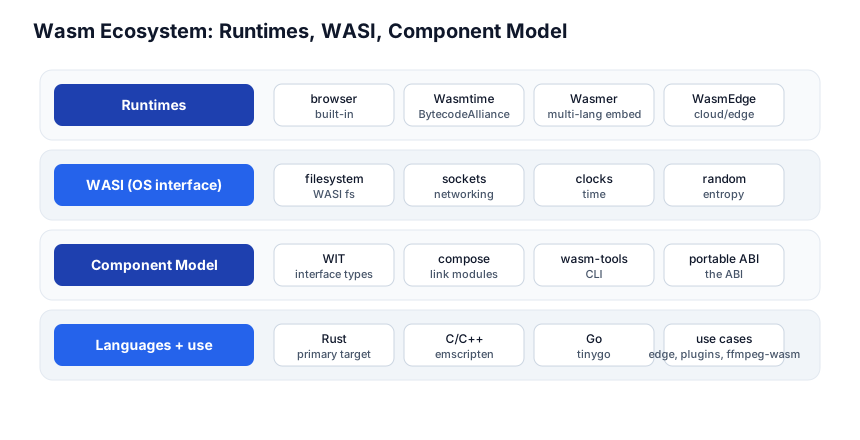
| Concern | Tools |
|---|---|
| Runtimes | browser, Wasmtime, Wasmer, WasmEdge |
| WASI | filesystem, sockets, clocks, random (capability-gated) |
| Component Model | WIT (interface types), compose (link modules), wasm-tools CLI |
| Languages | Rust (primary), C/C++ (emscripten), Go (tinygo), AssemblyScript |
Use cases
- Browser: run heavy computation (image processing, video codecs like ffmpeg.wasm, games) at native speed.
- Edge / serverless: Cloudflare Workers, Fastly Compute, AWS Lambda run wasm — fast cold start, portable, sandboxed.
- Plugins: wasm is a sandboxed plugin format — load untrusted code safely (Extism, Fermyon Spin).
- Embedded / IoT: small, portable, no OS assumptions beyond WASI.
Quick-Start Checklist
- Install
wabt(wat2wasm/wasm2wat) and write a 5-lineadd.wat; compile and disassemble. - Run wasm in Node —
WebAssembly.instantiatethe bytes; callexports.add(2,3). - Share memory — export a
memory, write from JS, read from wasm. - Add an import —
logfrom JS; call it from wasm. - Compile Rust to wasm —
wasm-pack build --target web; load it in an HTML page. - Target WASI —
cargo build --target wasm32-wasi; run withwasmtime. - Read a WIT file and understand the Component Model direction.
- Try an edge runtime — Cloudflare Workers or Fermyon Spin run wasm.
- Use
wasm-objdump/wasm2watto read a real.wasm(e.g. ffmpeg.wasm). - Compare cold start — a wasm function vs an equivalent container; feel the speed.
Common Pitfalls
- No GC in wasm — the language runtime (allocator/GC) is compiled into the module; modules can be larger than expected.
- No string type — strings are bytes in linear memory; agree on encoding + length + address. Use toolchain glue (
wasm-bindgen) for safety. - Missing imports — instantiation fails if the imports object doesn’t match the module’s declared imports exactly.
- Sandbox escape is by design impossible — wasm can only do what the host imports. A module with no
fsimport cannot read files. This is a feature, not a limitation. wasm32-unknown-unknownvswasm32-wasi— the former has no OS (browser); the latter has WASI (server/edge). Pick the right target.- Large modules from GC languages — Go (with its runtime + GC) produces big wasm;
tinygois the practical Go target. - Memory growth —
memory.growis a reallocation; any JSUint8Arrayview over the old buffer detaches. Re-create views after growth.
Further Reading
- WebAssembly Docs — the spec + standard
- WABT —
wat2wasm/wasm2wattoolkit - Rust + WebAssembly — the wasm-pack guide
- WASI — the system interface
- Component Model — WIT + composition
- Wasmtime — the leading server-side runtime
Related guides
WebAssembly sits at the intersection of compilers, the web, and systems — these PyShine tutorials connect to it:
- Learn Compilers in One Post — wasm is a compilation target; understanding IR + codegen is the prerequisite.
- Learn Rust in One Post — Rust is the primary wasm language;
wasm-packis the toolchain. - Learn JavaScript + TypeScript in One Post — the host that embeds wasm in the browser.
- Learn C++ in One Post — emscripten compiles C++ to wasm.
- Learn Docker in One Post — wasm is the “lighter container” alternative for edge/serverless; the two complement.
WebAssembly is the “compile once, run anywhere” that works: a small, fast, sandboxed, portable binary that every major language can target and every major platform can run. The five stages here — concepts, the text format, the module, the JS host, languages + WASI + components — cover everything from a hand-written Enjoyed this post? Never miss out on future posts by following us add.wat to a Rust+WASI serverless function on Cloudflare. The two habits that pay off: think in linear memory (data is bytes at an address, not objects), and embrace the sandbox (capabilities are explicit imports — the safety is the design, not a constraint). Write a .wat, compile it, call it from Node, and watch a stack-machine function run — once you’ve seen bytes flow through the boundary, the model clicks. 


