Learn FastAPI in a Single Post: Complete Tutorial From Path Operations and Pydantic to Async Databases and Production
FastAPI is the modern Python web framework: it takes Python type hints, turns them into automatic request validation, serialization, and interactive API docs, and runs on an async (ASGI) runtime for high concurrency. It’s become the default for new Python APIs — replacing Flask for anything that wants async, validation, or OpenAPI for free. This single post teaches the whole framework in five stages, with hand-drawn diagrams and runnable Python.
Learning Roadmap
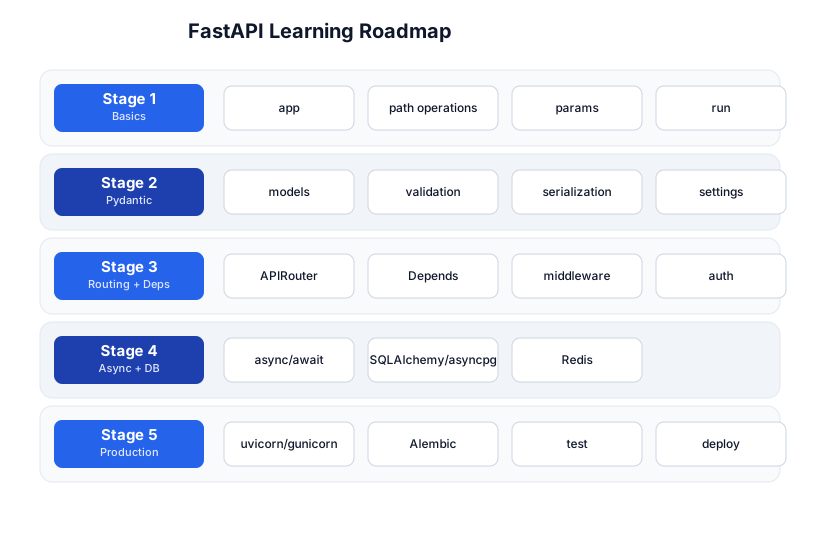
The roadmap moves from basics (Stage 1), through the Pydantic models that make FastAPI work (Stage 2), routing + dependencies (Stage 3), async + databases (Stage 4), and production (Stage 5). You’ll want solid Python and REST API fundamentals first.
Stage 1 — Basics
A first app
from fastapi import FastAPI

app = FastAPI()

@app.get("/")
def read_root():
    return {"hello": "world"}

@app.get("/users/{user_id}")
def read_user(user_id: int, q: str | None = None):
    return {"user_id": user_id, "q": q}
Run it:
pip install "fastapi[standard]"
fastapi dev main.py        # hot-reload dev server at http://localhost:8000
# then open http://localhost:8000/docs  <- automatic interactive docs!
Path operations
A path operation is a route: a decorator (@app.get, @app.post, …) on a function.
@app.post("/items")
def create_item(item: Item):           # body validated via Pydantic (Stage 2)
    return item

@app.put("/items/{item_id}")
def update(item_id: int, item: Item):    # path param + body
    return {"id": item_id, **item.model_dump()}

@app.delete("/items/{item_id}", status_code=204)
def delete(item_id: int):
    return
Parameters — types do the work
FastAPI reads your type hints and converts them:
- Path params (
user_id: int) — parsed from the URL, validated asint(a string here returns 422). - Query params (
q: str | None = None) — optional query string. - Request body (
item: Item, a Pydantic model) — parsed + validated JSON. - Headers/cookies — via
Header/Cookiedefaults.
from fastapi import Query
@app.get("/search")
def search(q: str = Query(min_length=1, max_length=50), limit: int = 10):
    return {"q": q, "limit": limit}
The request/response flow + auto docs
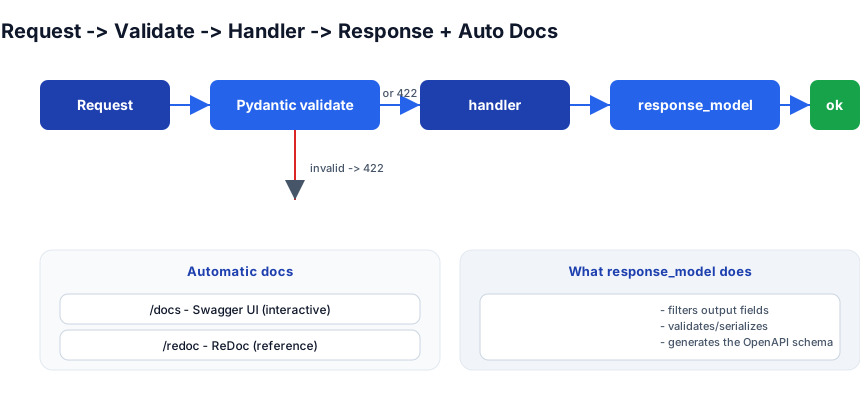
Every request is validated by Pydantic before your handler runs (invalid → 422 with a precise error), the handler runs, and the response_model serializes and filters the output. Swagger UI at /docs and ReDoc at /redoc are generated automatically from your types — no separate spec to maintain.
Pitfall: Because validation is from type hints, a missing annotation (
def f(x):with no type) means FastAPI treatsxas a query param with no validation — silently. Always annotate. Runmypy/pyrightin CI to catch missing hints.
Stage 2 — Pydantic
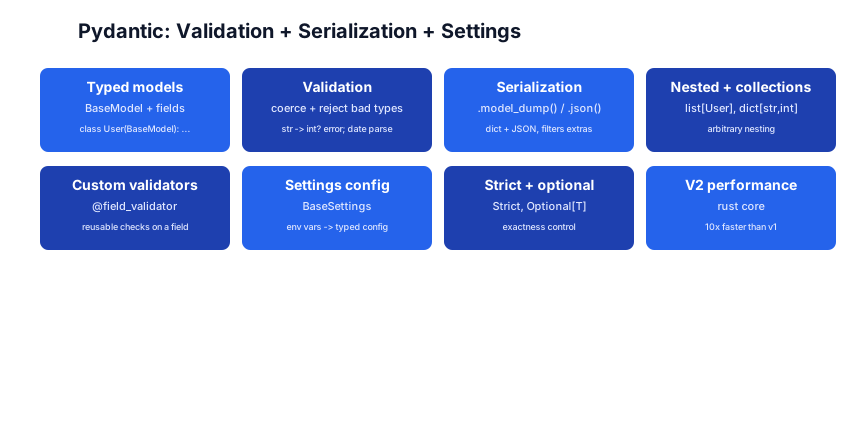
Pydantic is the engine under FastAPI: typed data models that validate, coerce, and serialize. Your request bodies and responses are Pydantic models.
A model
from pydantic import BaseModel, Field, EmailStr

class UserCreate(BaseModel):
    name: str = Field(min_length=1, max_length=100)
    email: EmailStr
    age: int = Field(ge=0, le=150)
    tags: list[str] = []           # default empty list (safe - not mutable-shared)

# validation happens on construction:
UserCreate(name="Ada", email="a@b.com", age=30)       # ok
UserCreate(name="", email="bad", age=999)             # ValidationError (precise)
Validation, coercion, serialization
- Coercion —
UserCreate(age="30")coerces the string"30"toint30 (controlled; useStrictto disable). - Validation —
Field(min_length=1, ge=0)constraints; type mismatches raiseValidationErrorwith the exact failing field/loc. - Serialization —
.model_dump()(dict) and.model_dump_json()(JSON);response_modelfilters to only the declared fields.
u = UserCreate(name="Ada", email="a@b.com", age=30)
u.model_dump()          # {'name': 'Ada', 'email': 'a@b.com', 'age': 30, 'tags': []}

class UserOut(BaseModel):
    id: int
    name: str
    email: EmailStr       # no 'age' or 'tags' -> response_model filters them out

@app.post("/users", response_model=UserOut)
def create(u: UserCreate):
    return UserOut(id=1, name=u.name, email=u.email)   # age/tags never leak
Custom validators
from pydantic import field_validator
class Item(BaseModel):
    price: float
    @field_validator("price")
    @classmethod
    def positive(cls, v):
        if v < 0: raise ValueError("price must be positive")
        return v
Settings (config from env vars)
from pydantic_settings import BaseSettings
class Settings(BaseSettings):
    db_url: str = "postgresql://localhost/app"
    debug: bool = False
    model_config = SettingsConfigDict(env_prefix="APP_")   # APP_DB_URL, APP_DEBUG
settings = Settings()    # reads env vars, typed
Pitfall: A mutable default (
tags: list[str] = []) is safe in Pydantic (it copies per instance), unlike plain Python class attributes where it’d be shared. Still, preferField(default_factory=list)for clarity in older code.
Stage 3 — Routing + Dependencies
APIRouter — split routes into modules
from fastapi import APIRouter
router = APIRouter(prefix="/users", tags=["users"])

@router.get("/{user_id}")
def get_user(user_id: int): ...

# main.py
from users import router as users_router
app.include_router(users_router)
Dependency injection via Depends
Depends is how FastAPI shares logic — a function whose return value is injected into your handler. It’s composable and cached per-request by default.
from fastapi import Depends

def get_db():           # yields a DB session, closes it after the request
    db = SessionLocal()
    try: yield db
    finally: db.close()

@app.get("/users/{id}")
def read_user(id: int, db = Depends(get_db)):
    return db.query(User).get(id)
Use Depends for: DB sessions, auth (get current user), settings, pagination params, rate limiting. It’s cleaner than globals and testable (override in tests).
Middleware
@app.middleware("http")
async def add_timing(request: Request, call_next):
    start = time.perf_counter()
    response = await call_next(request)
    response.headers["X-Process-Time"] = str(time.perf_counter() - start)
    return response
Auth
from fastapi.security import OAuth2PasswordBearer
oauth2 = OAuth2PasswordBearer(tokenUrl="token")

async def current_user(token: str = Depends(oauth2)):
    user = decode_jwt(token)
    if not user: raise HTTPException(401, "invalid token")
    return user

@app.get("/me")
def me(user = Depends(current_user)):
    return user
fastapi.security provides OAuth2, JWT, API keys, HTTP basic — wired into the auto-docs so the “Authorize” button works.
Stage 4 — Async + Databases
Why async
The DB call is the bottleneck in most APIs. With async + await, the worker thread is released while waiting on I/O, so one event loop serves many in-flight requests. This is FastAPI’s main advantage over Flask.
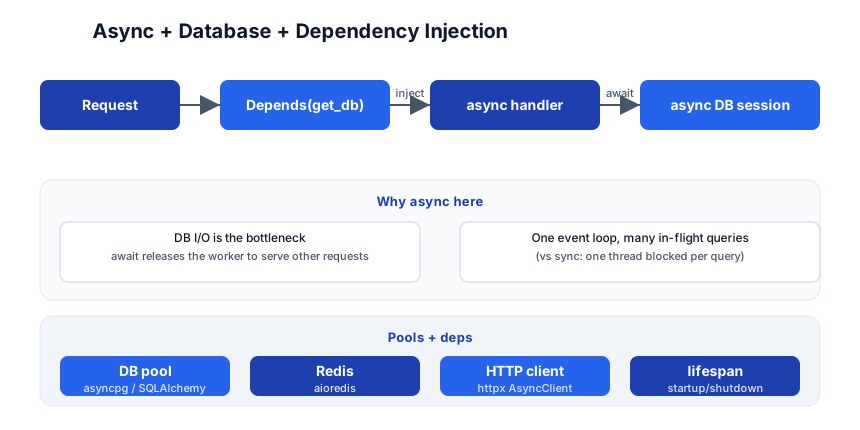
An async handler with an async DB session
from sqlalchemy.ext.asyncio import AsyncSession

async def get_db():
    async with AsyncSessionLocal() as db:
        yield db

@app.get("/users/{id}")
async def read_user(id: int, db: AsyncSession = Depends(get_db)):
    user = await db.get(User, id)
    if not user: raise HTTPException(404)
    return user
Async DB options
| Tool | When |
|---|---|
| SQLAlchemy 2.0 async | the default ORM; async sessions |
| asyncpg | raw, fast async Postgres driver |
| SQLModel | SQLAlchemy + Pydantic fused (by the FastAPI author) |
| aioredis / redis-py async | async Redis for cache/sessions |
HTTP clients + background work
import httpx
async def fetch(url):
    async with httpx.AsyncClient() as c:
        return (await c.get(url)).json()

# fire-and-forget background job (for simple cases; use a queue for real)
from fastapi import BackgroundTasks
@app.post("/send")
async def send(email: str, tasks: BackgroundTasks):
    tasks.add_task(send_email, email)   # runs after the response
    return {"queued": True}
Pitfall: A blocking call in an
asynchandler (requests.get,time.sleep, sync DB) freezes the whole event loop, not just one request — exactly like Node. Use async libraries (httpx,asyncpg), or offload withrun_in_threadpool/ a real queue (Celery, RQ, Dramatiq) for heavy work.
Stage 5 — Production
Run: uvicorn + gunicorn
# dev
fastapi dev main.py
# production (Linux): gunicorn managing uvicorn workers, one per core
gunicorn main:app -w 4 -k uvicorn.workers.UvicornWorker -b 0.0.0.0:8000
Each uvicorn worker is an async event loop; gunicorn manages worker processes (restart on crash, graceful reload). Use 2-4× CPU cores for I/O-bound; tune for your load.
Migrations: Alembic
pip install alembic
alembic init alembic
alembic revision --autogenerate -m "create users"
alembic upgrade head
Never create_all in production; use Alembic to version and migrate the schema. See the PostgreSQL tutorial for the migration mindset.
Testing
import pytest
from httpx import AsyncClient, ASGITransport
from app import app

@pytest.fixture
async def client():
    async with AsyncClient(transport=ASGITransport(app=app), base_url="http://test") as c:
        yield c

@pytest.mark.anyio
async def test_root(client):
    r = await client.get("/")
    assert r.status_code == 200
    assert r.json() == {"hello": "world"}
Use httpx.AsyncClient with ASGITransport (no network needed). Override Depends in tests to swap the DB for a test DB or mocks.
The toolchain
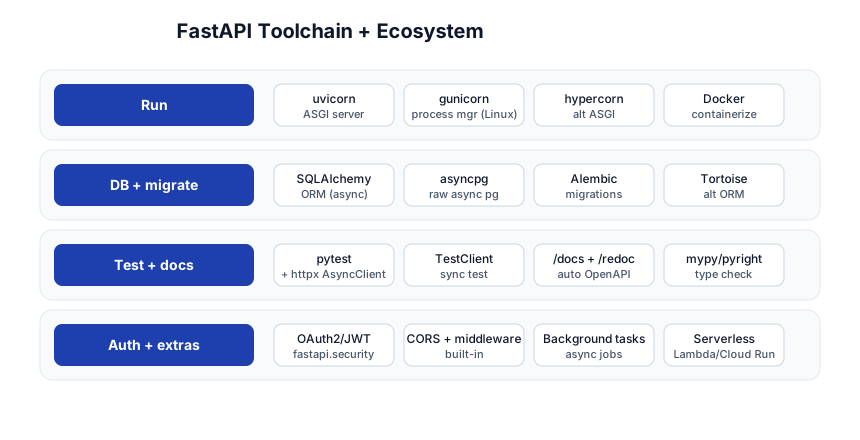
| Concern | Tool |
|---|---|
| Run | uvicorn, gunicorn, hypercorn, Docker |
| DB + migrate | SQLAlchemy (async), asyncpg, Alembic, Tortoise |
| Test + docs | pytest + httpx, TestClient, /docs + /redoc, mypy/pyright |
| Auth + extras | OAuth2/JWT, CORS + middleware, background tasks, serverless (Lambda, Cloud Run) |
Deploy
FROM python:3.12-slim
WORKDIR /app
COPY requirements.txt .
RUN pip install --no-cache-dir -r requirements.txt
COPY . .
CMD ["gunicorn", "main:app", "-w", "4", "-k", "uvicorn.workers.UvicornWorker", "-b", "0.0.0.0:8000"]
Or go serverless: FastAPI on AWS Lambda (via Mangum), Google Cloud Run, or Vercel — the ASGI design makes it portable.
Quick-Start Checklist
- Install
pip install "fastapi[standard]"and runfastapi dev main.py. - Open
/docs— your types already generated Swagger UI. That’s the FastAPI wow moment. - Define Pydantic models for request bodies and
response_model. - Annotate every param — path, query, body; types do the validation.
- Split routes into
APIRouters;app.include_router(...). - Use
Dependsfor the DB session, auth, settings — not globals. - Go async for DB/HTTP; use asyncpg/SQLAlchemy async/httpx.
- Never block the loop — no sync I/O in async handlers.
- Set up Alembic for schema migrations; never
create_allin prod. - Test with httpx AsyncClient; run uvicorn via gunicorn in production.
Common Pitfalls
- Missing type hints — no annotation = no validation, treated as a plain query param. Annotate everything; run mypy.
- Blocking calls in async handlers —
requests,time.sleep, sync DB freeze the event loop. Use async libs or offload. response_modelomitted — without it, extra fields leak and the OpenAPI schema is wrong. Always set it.- Mutable default shared — rare in Pydantic, but watch
Field(default_factory=...)in older code. create_allin production — no migrations; use Alembic.- One uvicorn worker — underuses multi-core; let gunicorn manage N workers.
- Not overriding
Dependsin tests — test against a real/seeded DB or a mock, viaapp.dependency_overrides. - Trusting client input — Pydantic validates shape, not business rules; add
@field_validatorand auth.
Further Reading
- FastAPI Docs — official, thorough, with a full tutorial
- Pydantic Docs — models, validation, v2
- SQLAlchemy 2.0 async docs
- TestDriven.io FastAPI — practical deep dives
- Real World FastAPI — community best-practices list
Related guides
FastAPI is the Python backend layer — these PyShine tutorials are its stack:
- Learn Python in One Post — the language; type hints and async are FastAPI’s foundation.
- Learn REST API in One Post — methods, status codes, idempotency; FastAPI implements REST.
- Learn PostgreSQL in One Post — what SQLAlchemy/asyncpg talks to; Alembic migrates it.
- Learn Redis in One Post — cache, sessions, rate limiting behind FastAPI.
- Learn Docker in One Post — containerize and ship the app (the Dockerfile above).
FastAPI’s pitch is simple: type hints in, production API with docs and validation out. The five stages here — basics, Pydantic, routing + deps, async + DB, production — cover everything from a “hello world” to a containerized, migrated, tested, async API backed by Postgres + Redis. The two habits that pay off: annotate everything (it’s where the magic comes from), and never block the event loop (use async libs or offload). Run Enjoyed this post? Never miss out on future posts by following us fastapi dev main.py, open /docs, and watch your types become an interactive API — that’s the moment the framework clicks. 


