Introduction
Hallmark is an anti-AI-slop design skill for Claude Code, Cursor, and Codex that prevents AI coding agents from producing the generic, template-looking interfaces that have become the hallmark (pun intended) of AI-generated code. With over 3,000 stars on GitHub, this open-source CSS design skill injects professional design rules directly into AI agent prompts, ensuring that every generated interface looks intentional rather than automated. The Hallmark anti-AI-slop design skill operates at the behavioral level, teaching AI agents what patterns to avoid and what design decisions to make instead, resulting in UI that looks handcrafted rather than machine-produced.
Key Insight: Hallmark tackles the number-one visual complaint about AI-generated code: every output looks like the same generic template. By injecting a comprehensive anti-slop design system directly into AI agent prompts, Hallmark ensures that Claude Code, Cursor, and Codex produce interfaces with intentional typography, professional color palettes, and deliberate layout decisions.
What is Hallmark?
Hallmark is an open-source design skill in SKILL.md format that prevents AI coding agents from producing generic, template-looking output. Unlike traditional design systems that provide CSS classes or component libraries, Hallmark provides a structured set of behavioral rules, anti-patterns, and quality checks that get injected into the AI agent’s system prompt. When an AI agent reads the Hallmark skill, it gains a comprehensive understanding of what makes AI-generated UI look generic and how to avoid those patterns.
The skill format follows the SKILL.md convention with YAML frontmatter and a Markdown body. The frontmatter specifies the skill name, description, and version, while the body contains the complete rule set organized into disciplines, anti-patterns, and a 58-gate slop test. Hallmark ships with 20 named themes (Specimen, Atelier, Brutal, Newsprint, Studio, Manifesto, Terminal, Midnight, Almanac, Garden, Riso, Sport, Bloom, Coral, Cobalt, Aurora, Editorial, Carnival, Lumen, and Hum), four genres (editorial, modern-minimal, atmospheric, playful), and 21 macrostructures that ensure structural variety across different pages.
The key differentiator is that Hallmark insists on structural variety, not just visual variety. Two pages built by Hallmark for two different briefs should feel like different sites, not color-swaps of the same template. This is enforced through a diversification rule that tracks previous outputs and requires each new page to use a different macrostructure, theme, and nav/footer archetype.
| Approach | What It Does | AI Agent Impact |
|---|---|---|
| Hallmark | Injects anti-slop rules into AI prompts | Prevents generic output at generation time |
| CSS Framework (Tailwind) | Provides utility classes | AI agents overuse default classes |
| Design Tokens | Defines color/spacing variables | AI agents ignore token intent |
| Component Library | Pre-built UI components | AI agents compose generic layouts |
| DESIGN.md | Brand specification file | AI agents follow brand but still produce slop |
Takeaway: Unlike traditional design systems that provide components or tokens, Hallmark operates at the behavioral level – teaching AI agents what NOT to do, which is far more effective than giving them a library of what TO use.
The Problem: AI Design Slop
“AI slop” is the term for the visual patterns that make AI-generated UI instantly recognizable as machine-produced. These patterns emerge because AI coding agents optimize for “works” rather than “looks intentional.” The result is a homogenous landscape of interfaces that all share the same visual fingerprints.
The most common AI slop patterns include:
- Generic gradient backgrounds – The ubiquitous purple-to-blue or blue-to-cyan gradient hero section. Every LLM defaults to these because they are visually safe and widely used in training data.
- Default Tailwind colors – Blue-500 for primary buttons, gray-100 for backgrounds, gray-900 for text. The result is a homogenous look across all AI-generated projects.
- Template hero sections – A centered heading, subtitle, and CTA button stacked vertically. The most overused layout pattern in AI-generated UI.
- Identical card grids – Three equal columns with icon-above-heading tiles, uniform spacing, and rounded corners. Every LLM emits this pattern.
- No typography hierarchy – Two or three font sizes with no clear visual distinction between heading levels, body text, and captions.
- Cookie-cutter responsive breakpoints – Elements that simply stack vertically on mobile without considering the mobile context or redesigning the layout purposefully.
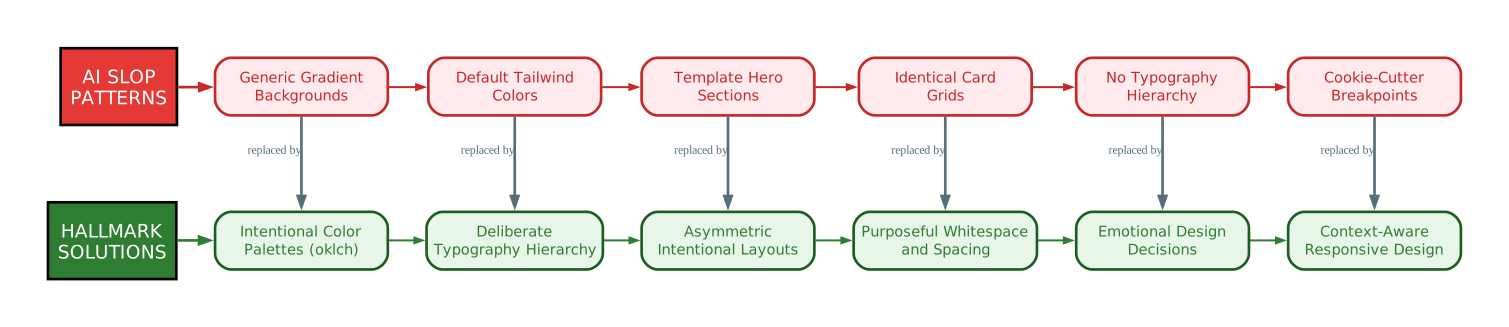
The diagram above illustrates the direct mapping between each AI slop pattern and its Hallmark solution. On the left, the red boxes represent the patterns that make AI-generated interfaces instantly recognizable as machine-produced. On the right, the green boxes show how Hallmark addresses each pattern with a specific, actionable alternative.
Generic Gradient Backgrounds are replaced with intentional color palette selection using the oklch color system, where every color choice is tied to an emotional design decision rather than a default. Hallmark’s color rules explicitly ban purple-to-blue gradients and require a single anchor hue with tinted neutrals.
Default Tailwind Colors are addressed through Hallmark’s locked token system. Once a theme is selected, every color and font declaration must reference a named token like var(--color-accent) or font-family: var(--font-display). Inline hex values or raw oklch values mid-render are explicitly banned by slop-test gate 48.
Template Hero Sections are prevented through Hallmark’s macrostructure system. Instead of defaulting to the centered-everything hero, Hallmark picks from 21 named macrostructures (Bento Grid, Long Document, Marquee Hero, Stat-Led, Workbench, and more) and enforces a diversification rule that prevents consecutive outputs from sharing the same structural fingerprint.
Identical Card Grids are eliminated by Hallmark’s anti-pattern rules, which specifically flag the 3-column feature grid with icon-above-heading tiles. The fix is to break the grid, vary column widths, mix card heights, or drop the cards entirely and use typographic rhythm instead.
No Typography Hierarchy is addressed through Hallmark’s 2+1 font discipline. The skill enforces a distinctive display face paired with a refined body face, with at most one outlier face for wordmarks or hero stats. Italic headers are explicitly banned as one of the most reliable AI tells.
Cookie-Cutter Responsive Breakpoints are prevented through Hallmark’s mobile responsiveness gates, which require every emitted page to render flawlessly at 320px, 375px, 414px, and 768px widths. The rules go beyond simple stacking to require context-aware responsive design.
How Hallmark Works
Hallmark integrates with three major AI coding platforms through their respective skill and rule systems. The integration flow is straightforward: the skill files are placed in the platform-specific directory that each AI agent reads during context loading, and the anti-slop rules are automatically injected into the agent’s prompt.
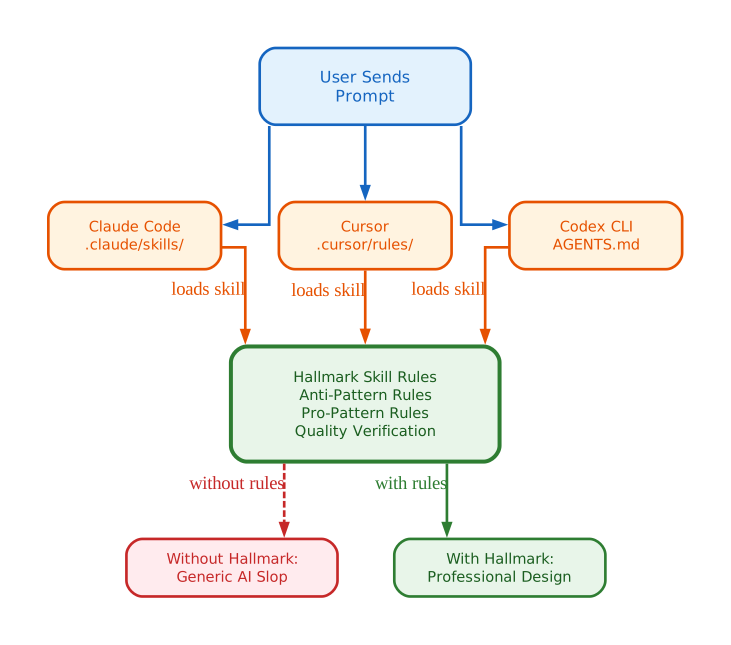
The architecture flow diagram shows how Hallmark integrates with Claude Code, Cursor, and Codex CLI. When a developer sends a prompt to any of these AI coding agents, the agent loads the Hallmark skill rules from its platform-specific directory. For Claude Code, this is the .claude/skills/ directory; for Cursor, it is .cursor/rules/ or project instructions; for Codex, it is the AGENTS.md file or project context.
Skill Injection Flow
When a developer installs Hallmark, the skill files are placed in the platform-specific directory. Each platform has its own convention for loading external skills and rules, but Hallmark’s content is platform-agnostic – the same anti-slop rules work across all three. The skill can be installed via npx skills add nutlope/hallmark or by manually copying the SKILL.md and references/ directory into the appropriate location.
Three-Layer Rule System
Hallmark’s rules are organized into three layers. The anti-pattern layer explicitly lists visual patterns to avoid, such as generic gradients, default Tailwind colors, template layouts, italic headers, and re-drawn UI chrome. Each anti-pattern entry includes the tell (what makes it recognizable as AI-generated), why it fails, and the specific fix. The pro-pattern layer provides specific alternatives for each anti-pattern, such as intentional color palettes, typography hierarchies, and asymmetric layouts. The quality verification layer provides a 58-gate slop test that both the AI agent and the human developer can use to validate the output before shipping.
Output Transformation
Without Hallmark, AI agents produce functional but generic output – the visual equivalent of a default template. With Hallmark’s rules injected into the agent’s context, the same agent produces output with intentional design decisions: deliberate color choices, professional typography, purposeful layout, and emotional design alignment. The transformation happens at the prompt level, not at the code level, which is why it works across different AI platforms without requiring code changes.
Amazing: Hallmark’s anti-slop rules are not just a blacklist of bad patterns – they encode decades of professional design wisdom into a format that AI agents can understand and follow, transforming generic output into intentional design in real time.
Key Features
| Feature | Description |
|---|---|
| Anti-slop rules | Comprehensive list of visual patterns that make AI-generated UI look generic, with specific alternatives for each pattern |
| Multi-agent support | Works with Claude Code, Cursor, and Codex CLI – three of the most popular AI coding platforms |
| SKILL.md format | Standard skill format with YAML frontmatter and Markdown body, compatible with the broader AI skills ecosystem |
| CSS-based design system | Rules expressed in CSS terminology that AI agents understand and can apply directly to generated code |
| Typography hierarchy | Enforces deliberate font sizing, weight, and spacing through a 2+1 font discipline and slop-test gates |
| Color palette rules | Prevents generic blue/purple gradients and enforces intentional color choices with oklch guidance |
| Layout anti-patterns | Identifies and prevents template-like layouts (centered hero, card grid, generic sidebar) |
| Quality verification | 58-gate slop test that validates output against specific, measurable criteria before shipping |
| Zero dependencies | Pure Markdown/CSS skill – no npm packages, no build step, no runtime overhead |
| Open source | MIT license, community-driven, accepts contributions |
Installation and Setup
Hallmark can be installed in three ways depending on your preferred AI coding platform.
Method 1: Claude Code
# Install via npx (recommended)
npx skills add nutlope/hallmark

# Or clone into your Claude Code skills directory
git clone https://github.com/Nutlope/hallmark.git ~/.claude/skills/hallmark

# Or add to your project's .claude/skills/ directory
git clone https://github.com/Nutlope/hallmark.git .claude/skills/hallmark
Method 2: Cursor
# Clone the repository
git clone https://github.com/Nutlope/hallmark.git

# Copy the skill content into .cursor/rules/ or your project instructions
# The SKILL.md body (without frontmatter) goes into your Cursor rules file
Method 3: Codex CLI
# Clone the repository
git clone https://github.com/Nutlope/hallmark.git

# Include the skill rules in your AGENTS.md file
# Or place in ~/.codex/skills/hallmark/ (personal) or .codex/skills/hallmark/ (project-scoped)
After installation, simply ask your AI agent to build a UI component or page. The Hallmark skill rules will be automatically loaded into the agent’s context, guiding it to produce professional, non-generic output. The skill includes a pre-flight scan that reads your existing project’s font stack, palette, framework, and spacing scale before making any design decisions, ensuring it preserves what you already have.
Usage Examples
Example 1: Building a landing page with Hallmark vs without Hallmark
Without Hallmark, an AI agent produces a generic hero section with a blue gradient background, centered text, a large heading, a subtitle, and a CTA button – the default LLM landing page. The 3-column feature grid follows with identical cards, and the footer is the standard 4-column link layout.
With Hallmark, the same agent picks a macrostructure appropriate to the brief (such as Marquee Hero or Stat-Led), selects a theme with intentional color choices, enforces a typography hierarchy with a distinctive display face, and runs the 58-gate slop test before delivering the output. The result is a page that feels like a different site entirely, not a color-swap of the same template.
Example 2: Creating a dashboard with Hallmark
Without Hallmark, an AI agent produces a card grid with identical spacing, default Tailwind colors, and no visual hierarchy between sections. The dashboard looks functional but generic.
With Hallmark, the agent uses deliberate information hierarchy, professional color coding for different data types, intentional whitespace that creates visual rhythm, and a nav archetype that matches the dashboard’s genre (likely N5 Floating pill or N1b SaaS three-section for modern-minimal dashboards).
Example 3: Designing a pricing page with Hallmark
Without Hallmark, the result is three-column pricing cards with identical structure, blue-500 buttons, and the same spacing everywhere.
With Hallmark, the agent creates visual hierarchy emphasizing the recommended plan, uses intentional contrast between tiers, applies professional typography with proper weight variation, and ensures the pricing section follows a macrostructure that serves the content rather than defaulting to a card grid.
Comparison with Alternatives
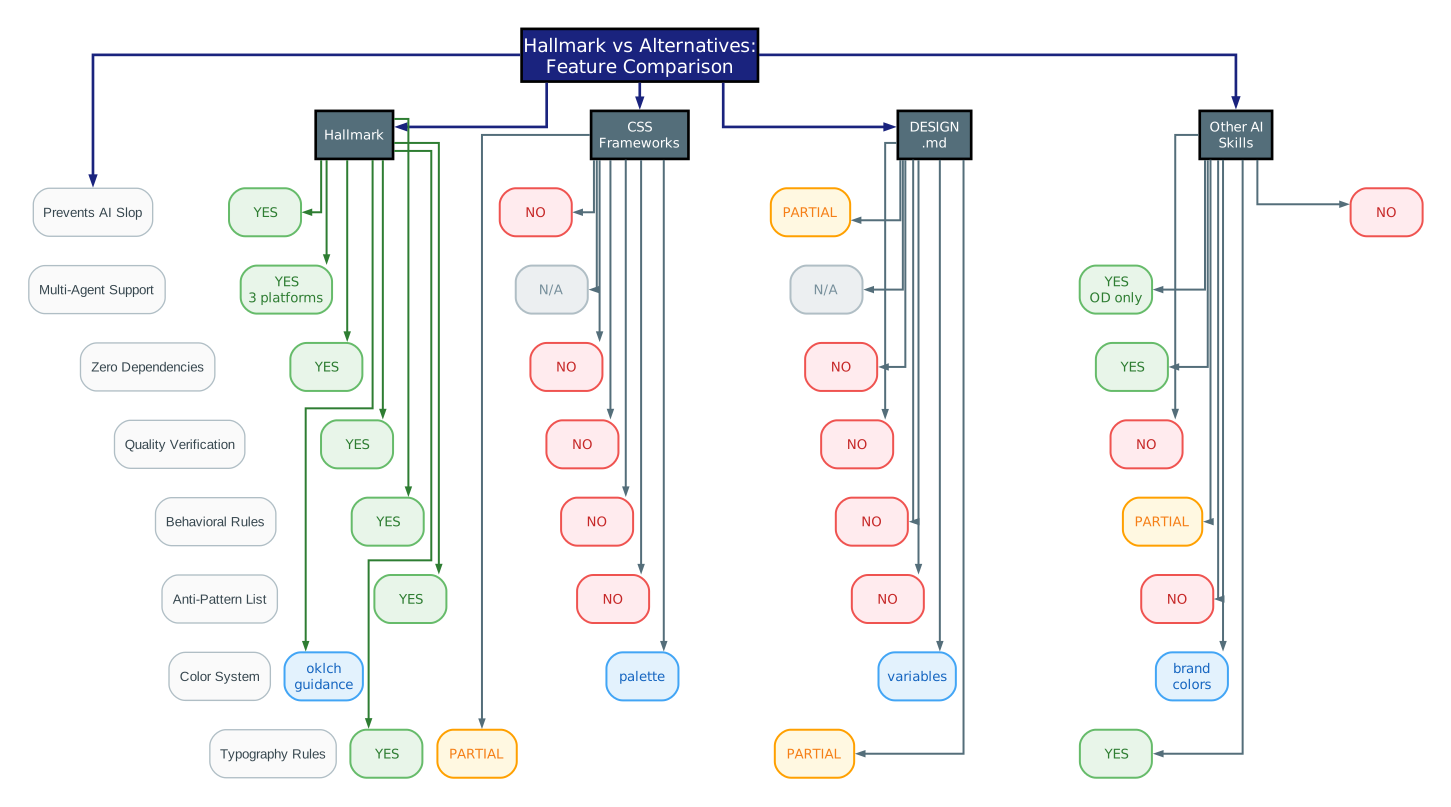
The feature comparison diagram provides a clear visual comparison of Hallmark against four alternative approaches to improving AI-generated UI quality.
Hallmark vs CSS Frameworks
CSS frameworks like Tailwind and Bootstrap provide utility classes and components, but they do not prevent AI agents from using them generically. An AI agent given Tailwind will produce the same blue-500 buttons and gray-100 backgrounds every time. Hallmark operates at a higher level – it does not provide CSS classes but instead provides behavioral rules that guide the agent’s design decisions regardless of which CSS framework is used. The anti-pattern list explicitly names the patterns that emerge from default Tailwind usage and provides specific alternatives.
Hallmark vs Design Tokens
Design token systems like Style Dictionary and Theo define color, spacing, and typography variables. While tokens provide structure, they do not prevent AI agents from using them in generic ways. A token system might define a “primary” color, but the AI agent will still use it in the same template patterns. Hallmark complements token systems by adding the behavioral layer that tokens lack – the rules about how to compose with tokens, not just which tokens exist.
Hallmark vs DESIGN.md
DESIGN.md files (as used in Open Design and similar projects) specify brand identity – colors, typography, spacing, and voice. They tell the AI agent what a brand looks like, but they do not prevent generic composition. A DESIGN.md might specify “use our brand color #0066CC,” but the AI agent will still use it in a centered hero with a gradient background. Hallmark focuses on the anti-patterns that make AI output look like AI output, regardless of the brand specification.
Hallmark vs Other AI Skills
Other AI design skills like web-design-skill and cc-design provide positive design guidance – rules for what good design looks like. Hallmark takes the complementary approach of defining what bad AI design looks like and providing specific alternatives. This “negative space” approach is particularly effective because AI agents are more likely to avoid explicit anti-patterns than to discover positive patterns on their own. The 58-gate slop test provides measurable, binary criteria that both the agent and the developer can verify.
Design Quality Checklist
Hallmark’s quality verification system is built around an 8-point checklist that evaluates whether AI-generated UI meets professional design standards. Each point corresponds to specific slop-test gates that must pass before the output can be shipped.
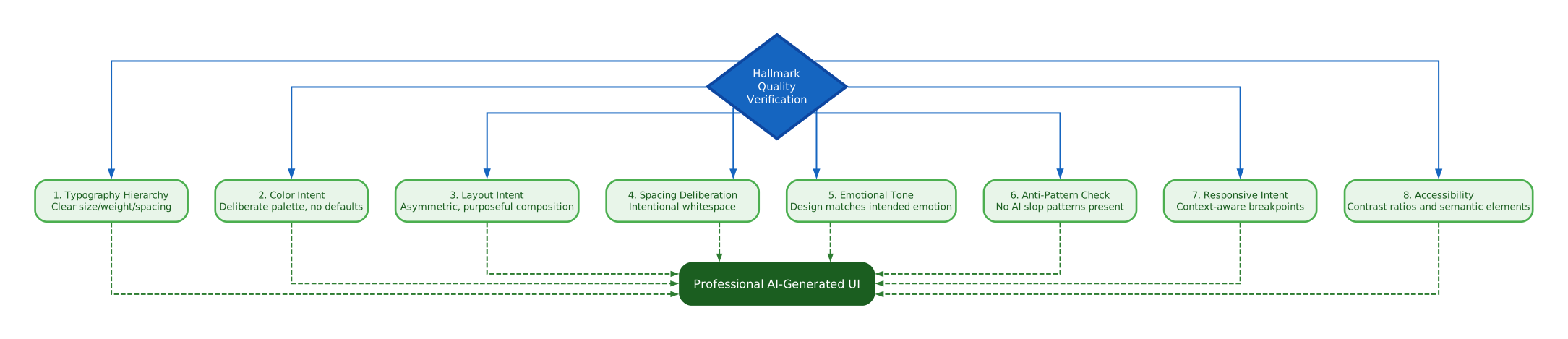
The design quality checklist diagram illustrates Hallmark’s eight-point verification system that evaluates whether AI-generated UI meets professional design standards. Each check item flows from the central quality verification hub and converges on the final output: professional AI-generated UI.
Typography Hierarchy
The first check verifies that the output has a clear typographic hierarchy with intentional size, weight, and spacing choices. This means at least three distinct text levels (heading, subheading, body), deliberate font weight variation, and consistent line-height and letter-spacing decisions. Hallmark enforces a 2+1 font discipline: a distinctive display face, a refined body face, and at most one outlier for wordmarks or hero stats. Italic headers are explicitly banned as one of the most reliable AI tells.
Color Intent
The second check ensures that colors are chosen deliberately rather than defaulting to Tailwind’s blue-500 or generic purple gradients. Hallmark encourages the use of the oklch color system for precise, intentional color selection that matches the emotional tone of the design. The accent color must not cover more than approximately 5% of any single viewport, and every color must reference a named token rather than being inlined mid-render.
Layout Intent
The third check evaluates whether the layout is purposeful and asymmetric rather than a generic template. This means avoiding centered hero sections with a heading, subtitle, and CTA button, and instead creating compositions with visual weight, intentional asymmetry, and clear information hierarchy. Hallmark’s 21 macrostructures provide named layout patterns that go far beyond the default hero-features-CTA-footer rhythm.
Spacing Deliberation
The fourth check verifies that whitespace is used intentionally rather than applying uniform padding everywhere. Professional design uses whitespace to create rhythm, group related elements, and guide the eye. Hallmark requires all spacing values to be on a named 4pt scale with semantic names, and the slop test flags sections separated only by equal whitespace with no rule, ornament, or color shift.
Emotional Tone
The fifth check assesses whether the design matches the intended emotional tone. A financial services dashboard should feel trustworthy and calm, while a gaming landing page should feel exciting and dynamic. Hallmark’s four genres (editorial, modern-minimal, atmospheric, playful) scope which themes, slop-test gates, and voice fixtures apply, ensuring the output matches the brief’s emotional intent.
Anti-Pattern Check
The sixth check explicitly looks for the AI slop patterns that Hallmark is designed to prevent: generic gradients, default colors, template layouts, identical card grids, italic headers, re-drawn UI chrome, and predictable responsive stacking. The 58-gate slop test provides binary yes/no criteria for each pattern, making verification objective rather than subjective.
Responsive Intent
The seventh check ensures that responsive breakpoints are context-aware rather than simply stacking elements vertically on mobile. This means the mobile layout should be a deliberate redesign, not just a reflowed desktop layout. Hallmark requires every emitted page to render flawlessly at 320px, 375px, 414px, and 768px widths, with specific gates for image-bearing grid tracks, display header wrapping, and clickable text that must never wrap to two lines.
Accessibility
The eighth check verifies that contrast ratios meet WCAG standards (4.5:1 for body text, 3:1 for large text and focus rings), semantic HTML elements are used correctly, and interactive elements have proper focus states. Accessibility is not optional in professional design, and Hallmark requires :focus-visible with a visible ring at 3:1 contrast that appears instantly, never animated.
Important: Hallmark’s quality verification step is what separates it from simply adding “make it look good” to your prompt. The checklist provides specific, measurable criteria that both the AI agent and the human developer can use to evaluate whether the output meets professional design standards.
Conclusion
Hallmark fills a critical gap in the AI coding workflow: the design judgment layer. While AI coding agents like Claude Code, Cursor, and Codex excel at producing functional code, they consistently produce interfaces that look generic and template-like. Hallmark addresses this by injecting behavioral rules that prevent the visual patterns making AI-generated UI instantly recognizable as machine-produced.
The skill’s approach is uniquely effective because it operates at the behavioral level rather than the component level. Instead of providing a library of pre-built components or a set of design tokens, Hallmark teaches AI agents what patterns to avoid and what design decisions to make instead. The 58-gate slop test provides objective, measurable criteria for quality verification, and the diversification rule ensures that consecutive outputs feel like different sites rather than color-swaps of the same template.
With zero dependencies, MIT licensing, and support for three major AI coding platforms, Hallmark is the missing design judgment layer for any developer using AI to build user interfaces. Install it once, and every UI your AI agent generates will look intentional rather than automated.
Links
- GitHub Repository: https://github.com/Nutlope/hallmark

Enjoyed this post? Never miss out on future posts by following us


