Introduction
The HTML-Anything agentic HTML editor represents a fundamental shift in how developers produce publishable content. Instead of hand-editing HTML or wrestling with Markdown-to-HTML converters that produce bland output, HTML-Anything delegates the entire design-and-render pipeline to your local AI coding agent. With 75 composable skill templates spanning 9 deliverable surfaces – from magazine articles and keynote decks to Xiaohongshu cards and Hyperframes video scripts – and 1-click export to WeChat, X, Zhihu, standalone HTML, and PNG, it turns any input (Markdown, CSV, Excel, JSON, SQL, or raw notes) into ship-ready single-file HTML in seconds. The key differentiator: zero API keys required, because it reuses the CLI session you already have logged in.
Built by the same team behind Open Design (40k stars, 200+ contributors), HTML-Anything focuses specifically on HTML output – the format that readers actually want. As Anthropic’s Claude Code team announced, they stopped writing internal docs in Markdown and now ship HTML. HTML-Anything makes that workflow available to every developer with a local AI agent.
Key Insight: HTML-Anything ships 75 ready-to-use skills across 9 output surfaces – from magazine layouts and data reports to WeChat articles and X posts – all generated by your local AI agent with zero API key and zero cloud lock-in.
What is HTML-Anything
HTML-Anything is an open-source agentic HTML editor that turns your coding-agent CLI into an HTML design engine. The core problem it solves: AI agents can write code, but producing publishable HTML for specific platforms (WeChat, X, Zhihu) requires format-specific skills that most developers do not have the time or expertise to craft. HTML-Anything provides 75 pre-built skill templates, each a folder following the Claude Code SKILL.md convention, that encode design constraints, typography rules, and export adapters for 9 distinct output surfaces.
The 9 surfaces define not just layout templates but complete publishing pipelines:
| Surface | Description | Key Skills |
|---|---|---|
| Magazine Article | Long-form editorial layouts with rich typography | article-magazine, magazine-poster |
| Keynote Deck | Horizontal-swipe presentation slides | deck-swiss-international, deck-guizang-editorial, 18 more |
| Resume | A4-formatted professional resumes | resume-modern |
| Poster | Visual single-page designs for print and social | poster-hero, magazine-poster |
| Xiaohongshu Card | Lifestyle content format for Chinese social media | card-xiaohongshu, deck-xhs-pastel |
| Tweet Card | X/Twitter card-optimized HTML with metadata | social-x-post-card, card-twitter |
| Web Prototype | Interactive UI mockups with navigation | prototype-web, saas-landing, dashboard |
| Data Report | Dashboard and analytics layouts with charts | data-report, live-dashboard |
| Hyperframes Video | Animated HTML frames for Remotion rendering | video-hyperframes, frame-glitch-title, 8 more |
Unlike general-purpose AI design tools, HTML-Anything is purpose-built for HTML output. Each surface defines layout constraints, typography rules, and export adapters that ensure the generated HTML looks professional on the target platform without any manual touch-up.
| Feature | HTML-Anything | Open Design | Traditional HTML Editors | AI HTML Generators |
|---|---|---|---|---|
| Focus | HTML output (9 surfaces) | Broad design (6 artifact types) | Manual HTML/CSS | Generic HTML |
| Skills | 75 skill templates | 259+ skills | None | None |
| Agent Support | 8 CLIs auto-detected | 8+ CLIs | N/A | API-based |
| Export Targets | WeChat, X, Zhihu, HTML, PNG | Multiple formats | Manual | Limited |
| API Key | Zero (reuses CLI session) | Zero | N/A | Required |
| Preview | Sandboxed iframe | Sandboxed iframe | Browser | Browser |
Takeaway: Unlike general-purpose AI design tools, HTML-Anything is purpose-built for HTML output – each of its 9 surfaces defines not just a layout template but a complete publishing pipeline from prompt to platform-ready HTML.
Architecture – How HTML-Anything Works
HTML-Anything runs as a Next.js 16 application with a clear separation between the browser layer (editor, template picker, iframe preview) and the agent transport layer (CLI detection, SSE streaming, stdin/stdout piping). The architecture follows a straightforward pipeline: your local coding-agent CLI receives a composed prompt (system prompt + SKILL.md constraints + user input + surface template), generates HTML via its stdout stream, which is parsed for text deltas and pushed into the iframe’s srcdoc in real time via server-sent events.
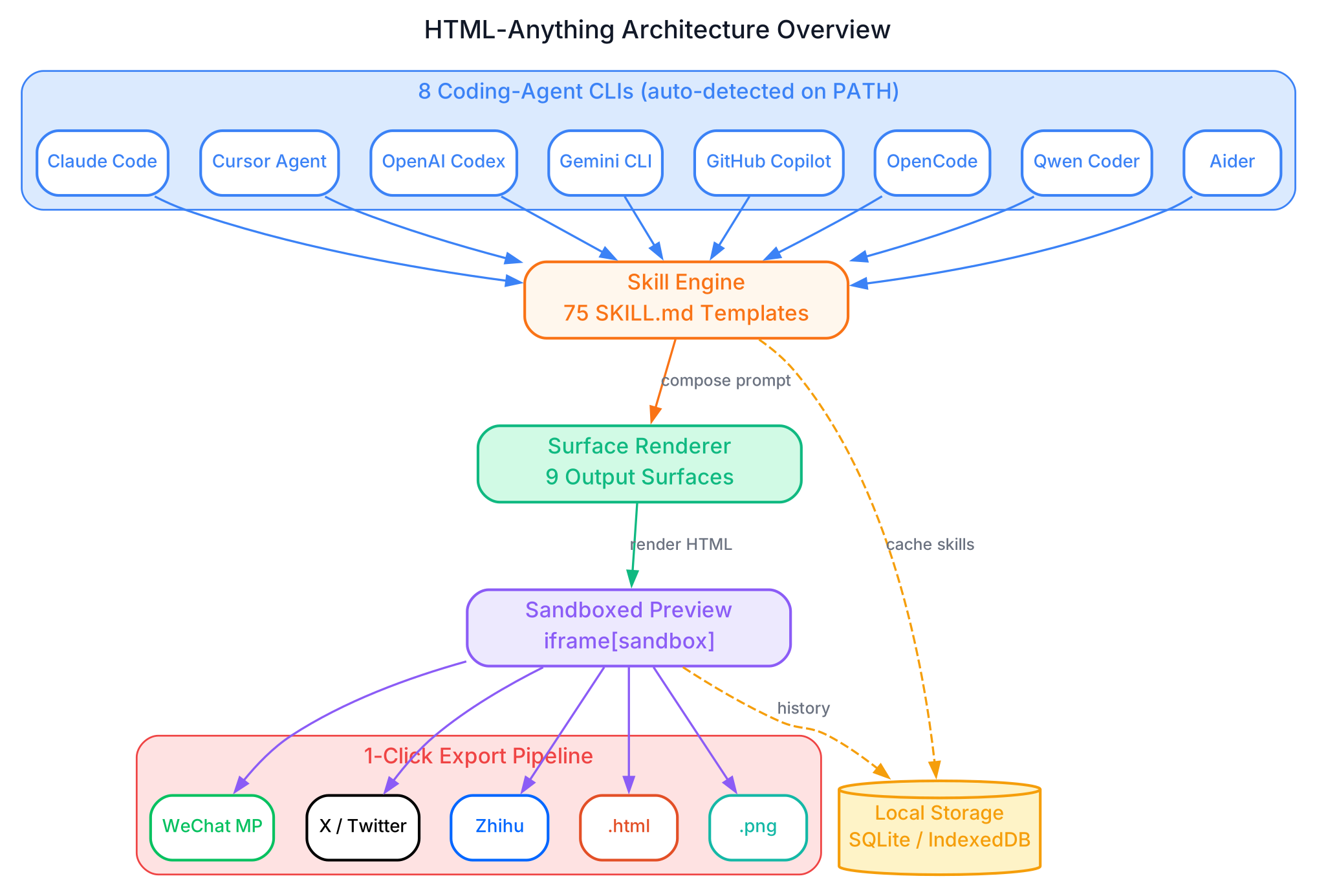
The architecture diagram above illustrates the complete data flow through HTML-Anything. Starting from the left, 8 coding-agent CLIs (Claude Code, Cursor Agent, OpenAI Codex, Gemini CLI, GitHub Copilot CLI, OpenCode, Qwen Coder, and Aider) are auto-detected on your PATH – including directories that GUI-launched Node processes normally miss, such as ~/.local/bin, ~/.bun/bin, /opt/homebrew/bin, and ~/.npm-global/bin. When you press Command+Enter, the selected agent CLI is spawned as a child process via child_process.spawn, with the composed prompt piped through stdin and the output streamed back as JSON-line stdout.
The Skill Engine in the center holds all 75 SKILL.md templates, each defining the mode (prototype, deck, frame, social, office, doc), scenario (design, marketing, engineering, product, finance, hr, sale, personal), surface type, preview configuration, and design system constraints. When a skill is selected, its frontmatter is merged into the system prompt, ensuring the agent produces output that conforms to the surface’s layout rules, typography standards, and export requirements.
The Surface Renderer takes the agent’s raw HTML output and applies the appropriate surface constraints – CJK-first font stacks, 8px baseline grids, contrast ratios of 4.5 or higher, and the “must use real data” rule that prevents lorem ipsum filler. The rendered HTML is then pushed into a sandboxed iframe (<iframe sandbox="allow-scripts allow-same-origin">) for live preview, where third-party scripts like Tailwind CDN and Google Fonts still execute, but cookies and localStorage are quarantined from the host page.
From the sandboxed preview, the Export Pipeline provides 1-click export to five targets: WeChat MP (via juice-inlined CSS with data-tool markers), X/Twitter (via modern-screenshot rendering to 2x PNG and ClipboardItem), Zhihu (with <mjx-container> replaced by data-eeimg LaTeX image placeholders), standalone .html download, and high-DPI .png download. Local Storage (SQLite/IndexedDB) caches skills and history without any cloud round-trip.
The 75 Skills x 9 Surfaces Matrix
HTML-Anything organizes its 75 skill templates across 6 modes and 8 scenarios, creating a rich matrix of capabilities that map to the 9 output surfaces. Each skill is a self-contained folder following the Claude Code SKILL.md convention, with YAML frontmatter defining its mode, scenario, surface, preview, and design system properties, plus a workflow body that instructs the agent on how to produce the output.
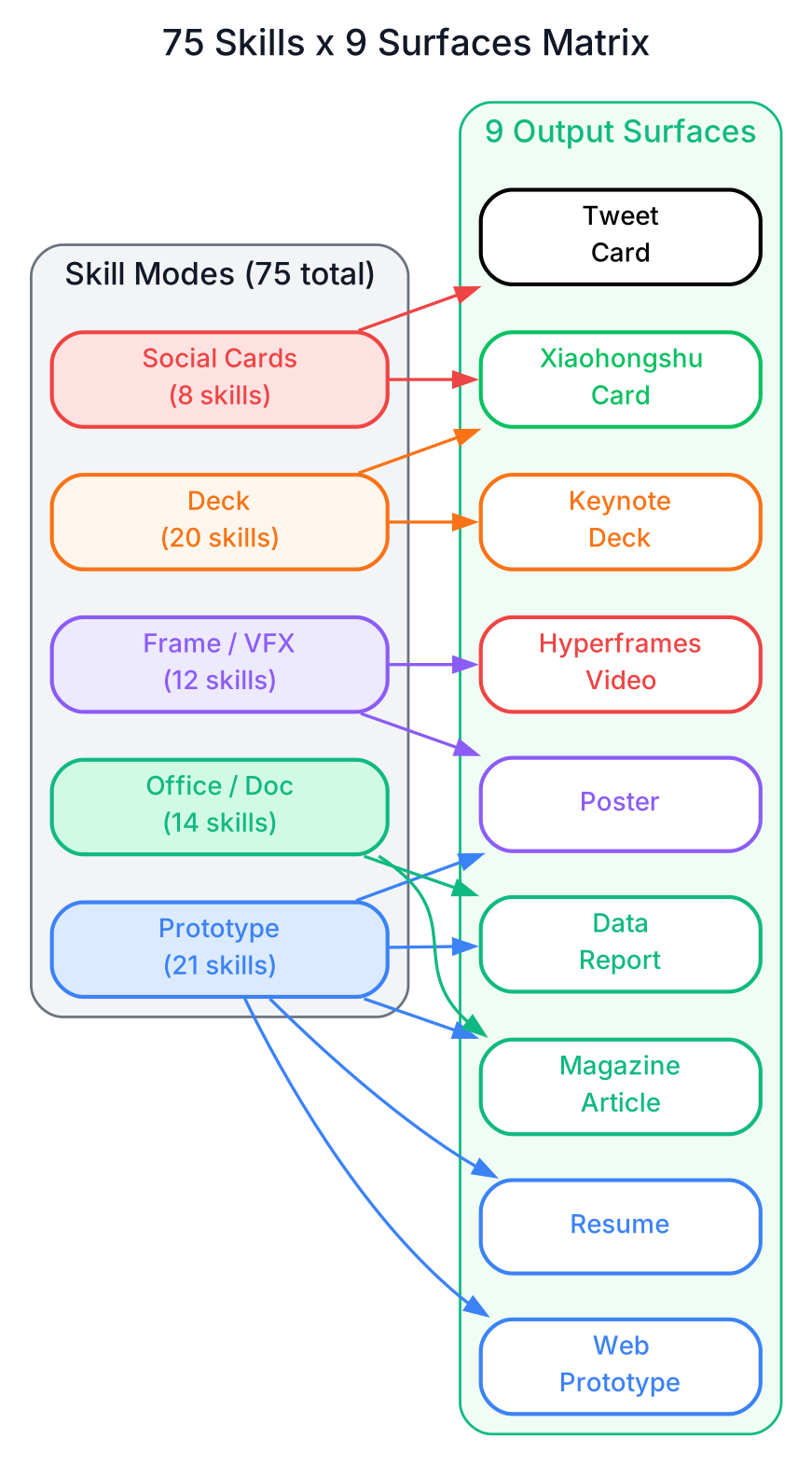
The diagram above shows how the 5 skill modes map to the 9 output surfaces. The Prototype mode (21 skills) is the most versatile, covering web prototypes, SaaS landing pages, dashboards, documentation, blog posts, mobile apps, resumes, posters, and data reports. The Deck mode (20 skills) produces horizontal-swipe presentations ranging from Swiss International grid layouts to Xiaohongshu pastel decks. The Frame/VFX/Mockup mode (12 skills) generates Hyperframes video frames and visual effects for Remotion rendering. The Social mode (8 skills) creates platform-specific share cards for X, Xiaohongshu, Spotify, and Reddit. The Office/Doc mode (14 skills) handles operational documents like PM specs, engineering runbooks, finance reports, HR onboarding plans, and OKR scoresheets.
The SKILL.md format is what makes this matrix work. Each skill folder contains a SKILL.md file with YAML frontmatter that specifies:
---
name: prototype-web
zh_name: "Web 产品原型"
en_name: "Web Prototype"
emoji: "🛠️"
description: "可点击的功能性 Web 原型, 含导航、英雄区、特性区、CTA"
category: prototype
scenario: design
aspect_hint: "1440×900 桌面"
tags: ["prototype", "landing", "原型"]
---
This frontmatter drives the template picker, determines which surface constraints to apply, and ensures the agent output conforms to the target format. Adding a new skill is as simple as dropping a folder into next/src/lib/templates/skills/ and restarting the dev server – the picker auto-discovers it.
The hard constraints encoded in every SKILL.md are what prevent AI slop: CJK-first font stacks (Noto Sans/Serif SC for Chinese, Inter/Manrope for Latin), 8px baseline grids, rounded corners with soft shadows, no pure black or pure white, color contrast ratios of 4.5 or higher, and a strict “must use real data” rule that bans lorem ipsum. These constraints are lifted from the anti-AI-slop discipline in alchaincyf/huashu-design.
Amazing: The 75 skills x 9 surfaces matrix creates 675 possible combinations – each one producing platform-optimized HTML that respects the typography, layout, and export constraints of its target surface, from WeChat articles to data dashboards.
Agent Integration – 8+ CLIs Supported
HTML-Anything is agent-native and model-agnostic. It does not ship its own agent – instead, it detects and reuses whichever coding-agent CLIs you already have installed on your system. On startup, the browser calls GET /api/agents, which scans your PATH (including ~/.local/bin, ~/.bun/bin, /opt/homebrew/bin, and ~/.npm-global/bin – directories that GUI-launched Node processes normally miss) and surfaces every CLI it recognizes.
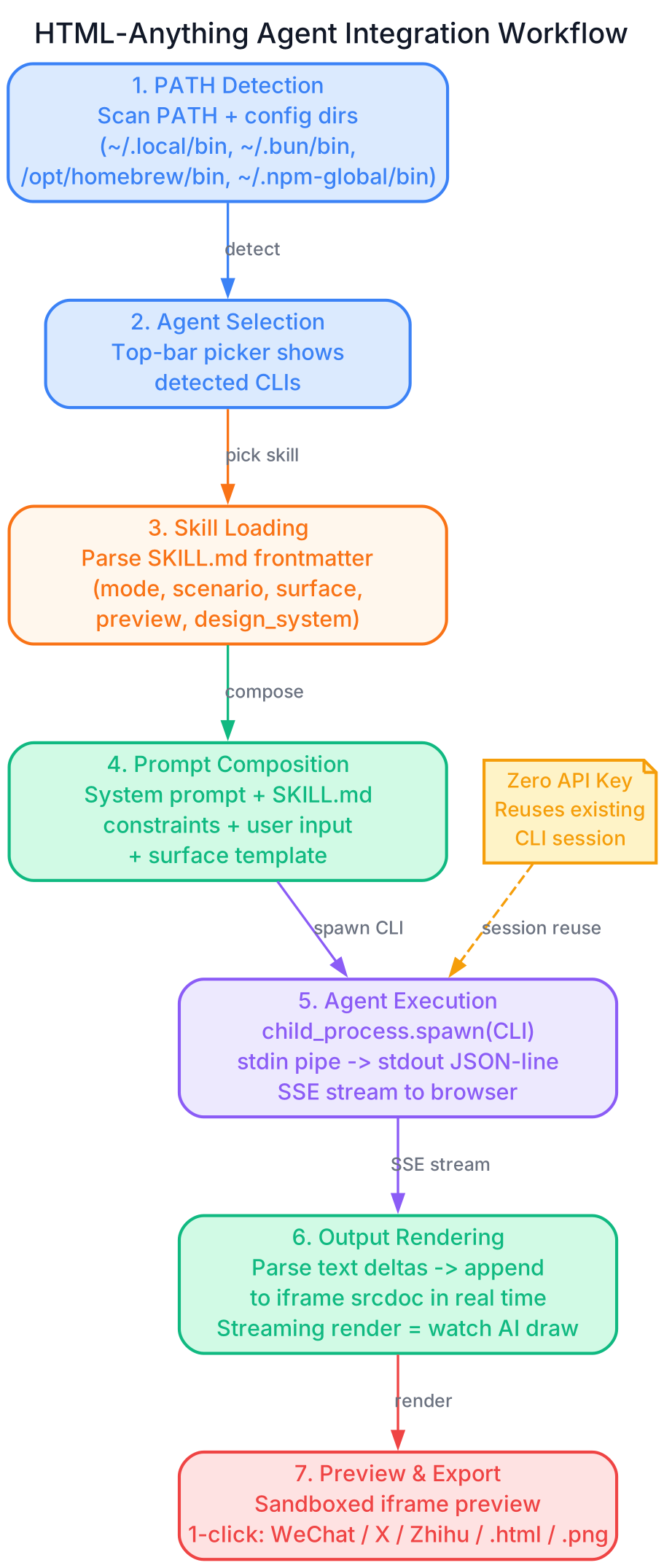
The diagram above illustrates the 7-step agent integration workflow. Step 1 is PATH Detection, where the server scans for installed CLIs across standard and non-standard binary directories. Step 2 is Agent Selection, where the top-bar picker shows which CLIs were detected and lets you swap between them. Step 3 is Skill Loading, where the selected SKILL.md’s frontmatter is parsed to extract the mode, scenario, surface, preview, and design system properties. Step 4 is Prompt Composition, where the system prompt, SKILL.md constraints, user input, and surface template are merged into a single prompt. Step 5 is Agent Execution, where the CLI is spawned as a child process with child_process.spawn, the prompt is piped through stdin, and the stdout JSON-line stream is parsed for text deltas. Step 6 is Output Rendering, where the parsed text deltas are appended to the iframe’s srcdoc in real time via server-sent events – the experience is like watching the agent type in a terminal, except the artifact is HTML. Step 7 is Preview and Export, where the sandboxed iframe shows the final result and 1-click export sends it to WeChat, X, Zhihu, HTML, or PNG.
The 8 supported agents and their invocation patterns:
| Agent | Detection Binary | Invocation |
|---|---|---|
| Claude Code | claude | claude -p --output-format stream-json |
| OpenAI Codex | codex | codex exec --json --sandbox workspace-write |
| Cursor Agent | cursor-agent | cursor-agent --print --output-format stream-json --force --trust |
| Gemini CLI | gemini | gemini --output-format stream-json --yolo |
| GitHub Copilot CLI | copilot | copilot --allow-all-tools --output-format json |
| OpenCode | opencode-cli / opencode | opencode run --format json --dangerously-skip-permissions - |
| Qwen Coder | qwen | qwen --yolo - |
| Aider | aider | aider --no-pretty --no-stream --yes-always --message-file - |
Each CLI has a thin adapter in next/src/lib/agents/argv.ts that defines the detection binary, argv builder, stdin/stdout protocol, and stream parser. The detection strategy and adapter shape are borrowed directly from nexu-io/open-design and multica-ai/multica: one privileged process spawns CLIs, JSON-line is the wire protocol, and every CLI gets a thin adapter.
Important: HTML-Anything requires zero API keys – it leverages your existing coding-agent CLI installations (Claude Code, Cursor, Codex, Gemini, Copilot, OpenCode, Qwen, Aider) as the design engine, making it the most accessible agentic HTML editor for developers already using AI coding tools.
Surfaces Deep Dive – 9 Output Formats
Each of the 9 surfaces defines a complete publishing pipeline, not just a layout template. Here is what makes each surface unique:
Magazine Article produces long-form editorial layouts with rich typography, multi-column design, and serif display fonts. Skills like article-magazine and magazine-poster generate A4/long-page formats that read like printed publications, not web pages.
Keynote Deck produces horizontal-swipe presentation slides with 20 dedicated skills. From the Swiss International deck (16-column grid, Klein Blue accent) to the Guizang Editorial deck (magazine ink aesthetic inspired by op7418/guizang-ppt-skill), each deck skill includes slide navigation, presenter notes, and PDF export.
Resume produces A4-formatted professional resumes with the resume-modern skill, using a 210x297mm layout with clean typography and section-based information architecture.
Poster produces visual single-page designs optimized for print and social sharing. The poster-hero skill creates marketing posters with oversized headlines and two-column body layouts.
Xiaohongshu Card produces lifestyle content formats for the popular Chinese social media platform. Skills like card-xiaohongshu and deck-xhs-pastel generate image-with-text cards that match the platform’s visual language.
Tweet Card produces X/Twitter card-optimized HTML with metadata for social sharing. The social-x-post-card skill generates 1600x900 quote cards, while card-twitter creates pull-quote cards.
Web Prototype produces interactive UI mockups with navigation, state management, and responsive breakpoints. With 21 skills covering SaaS landing pages, dashboards, documentation, mobile apps, and more, this is the most versatile surface.
Data Report produces dashboard and analytics layouts with charts, KPI displays, and data visualizations. The data-report skill accepts CSV/Excel input and generates visual reports, while live-dashboard creates real-time data dashboards.
Hyperframes Video produces animated HTML frames conforming to the heygen-com/hyperframes spec, ready for hand-off to Remotion for .mp4 rendering. With 10 motion frame scripts (liquid hero, NYT data chart, glitch title, cinema light-leak, and more), this surface bridges the gap between static HTML and video content.
Export Pipeline – 1-Click Publishing
The export pipeline is where HTML-Anything delivers on its “ship-ready” promise. After the agent generates HTML and it renders in the sandboxed preview, a single click sends it to the target platform with zero manual re-formatting.
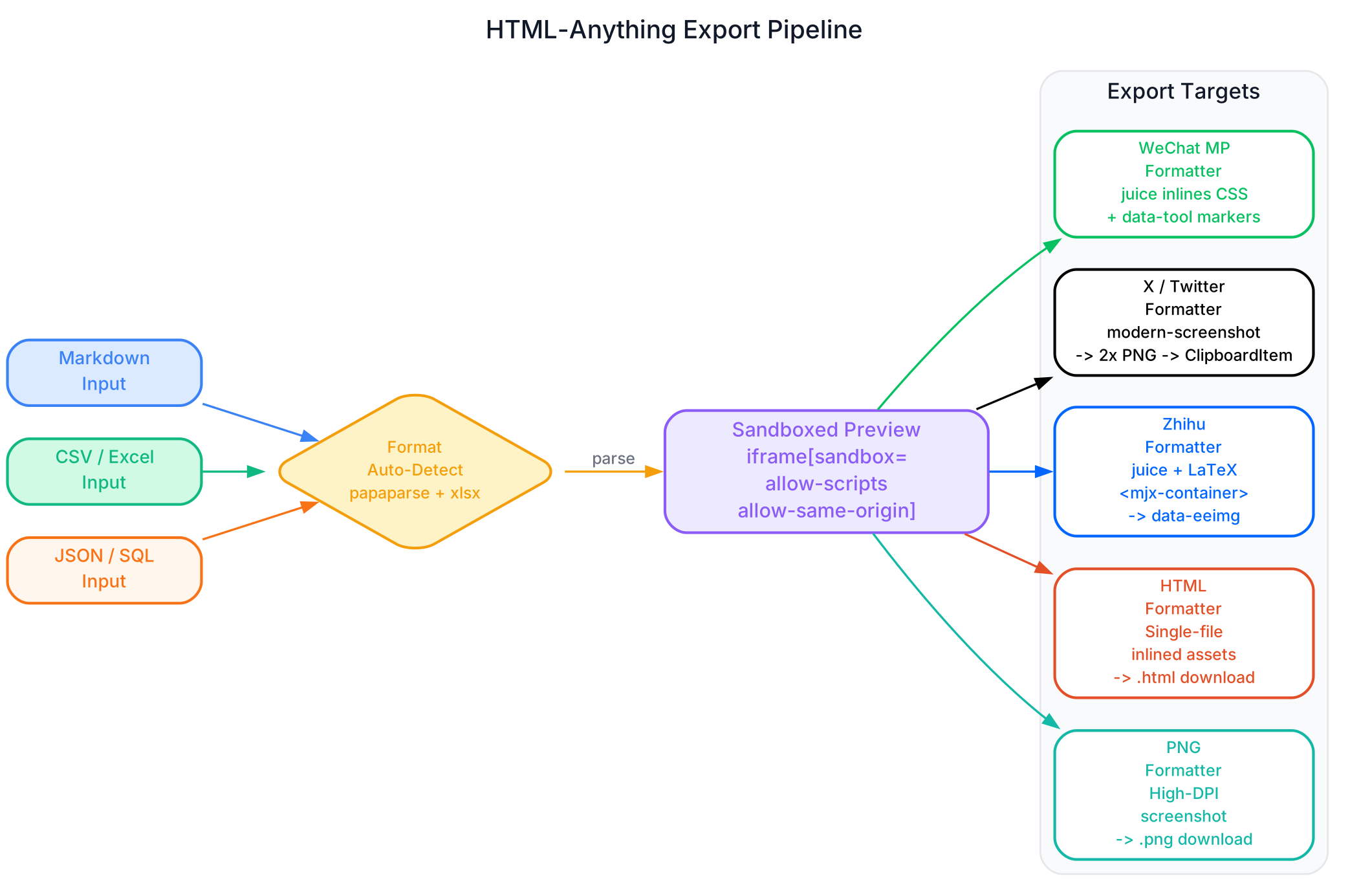
The diagram above shows the complete export pipeline. On the left, three input formats (Markdown, CSV/Excel, and JSON/SQL) are auto-detected by papaparse and xlsx in the browser – nothing is uploaded to a server. The parsed input flows into the sandboxed preview, where the agent’s HTML output renders in an isolated iframe.
From the sandboxed preview, five export targets are available:
WeChat MP uses juice to inline all CSS and add data-tool markers, producing HTML that pastes directly into the WeChat Official Account editor with styles surviving end-to-end. No second pass of manual formatting is needed.
X / Twitter / Weibo / Xiaohongshu uses modern-screenshot to render the iframe to a 2x PNG, which is then placed on the clipboard as a ClipboardItem. You drop it straight into the tweet composer – no screenshot tool, no image editor, no manual cropping.
Zhihu uses the same juice inlining as WeChat, plus replaces <mjx-container> elements with data-eeimg LaTeX image placeholders. Zhihu does not render KaTeX live, so math equations must be images – this replacement happens automatically.
Download .html produces a self-contained single-file HTML with all assets inlined. Open it anywhere with a browser.
Download .png produces a high-DPI screenshot for visual sharing anywhere.
The streaming render architecture means you can watch the AI draw in real time. POST /api/convert uses server-sent events (SSE): the agent’s stdout is line-delimited JSON, the server pulls out text deltas and re-emits them as SSE events, and the client appends to the iframe’s srcdoc. If you do not like where the generation is going, interrupt and re-prompt – no wasted full generation.
Installation
HTML-Anything runs locally as a Next.js application. Here are the three installation methods:
Method 1: Run from Source (Recommended)
git clone https://github.com/nexu-io/html-anything
cd html-anything
pnpm install
pnpm -F @html-anything/next dev
# -> http://localhost:3000
Open the browser and the top bar auto-detects whichever coding-agent CLI you already have signed in. Pick a template, paste content, and press Command+Enter.
Method 2: Development Commands
# Install dependencies
pnpm install --frozen-lockfile

# Guard shape (validate project structure)
pnpm exec tsx scripts/guard.ts

# Run the app
pnpm -F @html-anything/next dev

# Type checking
pnpm -F @html-anything/next typecheck

# Unit tests
pnpm -F @html-anything/next test

# Production build
pnpm -F @html-anything/next build
Method 3: Deploy to Vercel
The web layer can be deployed to Vercel with one click. The agent always stays on your local machine – only the browser-facing Next.js app runs in the cloud. Set HTML_ANYTHING_ALLOWED_HOSTS for LAN access or HTML_ANYTHING_ALLOW_ANY_HOST=1 for reverse-proxy setups.
No API key is required. HTML-Anything reuses the session you already have logged in via claude login, cursor login, gemini auth, or any other CLI authentication method. Your existing subscription does the work; marginal cost is zero.
Features Table
| Feature | Description |
|---|---|
| 75 Skill Templates | SKILL.md-based capabilities organized by mode (prototype, deck, frame, social, office, doc) and scenario (design, marketing, engineering, product, finance, hr, sale, personal) |
| 9 Surface Modes | Magazine article, keynote deck, resume, poster, Xiaohongshu card, tweet card, web prototype, data report, Hyperframes video |
| 8 Agent CLIs | Claude Code, Cursor Agent, OpenAI Codex, Gemini CLI, GitHub Copilot CLI, OpenCode, Qwen Coder, Aider – auto-detected on PATH |
| Zero API Key | Reuses existing local agent sessions (claude login, cursor login, gemini auth). No additional keys needed |
| Sandboxed Preview | <iframe sandbox="allow-scripts allow-same-origin"> with CSP isolation. Third-party scripts work; cookies and localStorage are quarantined |
| 1-Click Export | WeChat (juice-inlined CSS), X/Twitter (2x PNG ClipboardItem), Zhihu (LaTeX image placeholders), standalone HTML, high-DPI PNG |
| Streaming Render | SSE-based real-time rendering. Watch the AI draw HTML line by line. Interrupt and re-prompt at any time |
| Format Auto-Detect | Accepts Markdown, CSV, TSV, JSON, SQL, and plain text. papaparse + xlsx parse tabular data in the browser |
| Hard Constraints | CJK-first font stacks, 8px baseline grid, contrast >= 4.5, rounded corners, no pure black/white, must-use-real-data rule |
| Local-First | SQLite/IndexedDB storage. No cloud round-trip. Data stays on your machine |
| Agent-Agnostic | Uses CLIs on PATH. No built-in agent. No lock-in. Swap agents from the top-bar picker |
| Security | Host-header allowlist in middleware. Default: only loopback addresses accepted. Configurable for LAN and reverse-proxy |
HTML-Anything vs Open Design
HTML-Anything and Open Design come from the same organization (nexu-io) and share the same agent-adapter architecture and SKILL.md format, but they serve different purposes:
| Aspect | HTML-Anything | Open Design |
|---|---|---|
| Focus | HTML output across 9 surfaces | Broad design artifacts (6 types) |
| Skills | 75 skill templates | 259+ skill templates |
| Surfaces | 9 HTML surfaces | 6 design artifact types |
| Agent Adapters | 8 CLIs (shared code) | 8+ CLIs |
| Export | WeChat, X, Zhihu, HTML, PNG | Multiple design formats |
| Best For | Developers who need publishable HTML | Designers who need multi-format artifacts |
| Weight | Lighter, focused | More comprehensive |
| Relationship | Built on Open Design’s agent layer | Upstream project |
HTML-Anything is the focused, HTML-specific tool for developers who need to produce publishable HTML content. Open Design is the comprehensive design tool for designers who need multi-format design artifacts. Both share the same agent-detection layer (next/src/lib/agents/argv.ts mirrors the architecture verbatim), the same SKILL.md protocol, and the same zero-API-key philosophy. If HTML-Anything clicks for you, Open Design is where the same team ships at scale.
Conclusion
HTML-Anything fills a specific and increasingly important niche: agentic HTML generation for publishable content. In the era of AI coding agents, Markdown is just an intermediate state during writing – HTML is what readers actually want. With 75 skill templates across 9 output surfaces, zero API key requirement, 1-click export to WeChat, X, and Zhihu, and a sandboxed preview that lets you watch the AI draw in real time, HTML-Anything bridges the gap between agent output and platform-ready HTML.
The hard constraints encoded in every SKILL.md – CJK-first font stacks, 8px baseline grids, contrast ratios of 4.5 or higher, and the must-use-real-data rule – are what separate professional output from AI slop. The streaming render architecture means you never pay for a full generation you do not want. And the agent-agnostic design means you can use whichever CLI you already have installed, swapping between them with a single click.
Star the HTML-Anything repository, try the one-line install, and join the Discord community for demos, template requests, and debugging help. If you need broader design capabilities beyond HTML, check out Open Design from the same team. Enjoyed this post? Never miss out on future posts by following us 


