Introduction
The pi coding agent from the pi-mono monorepo is a minimal terminal harness for LLM-driven coding. It stores every conversation as an append-only .jsonl session file under ~/.pi/agent/sessions/, supports mid-session model switching, branching, compaction, and works across many model providers through OAuth and API key flows. That terminal workflow is fast and scriptable, but browsing old sessions, comparing branches, configuring models, and previewing project files alongside the conversation all require context switching that the terminal is not built for.
Pi Web is a local web UI that closes that gap. It runs a Next.js server on your machine, reads the same .jsonl session files that pi writes, and exposes them through a browser workspace with session browsing, real-time chat with SSE streaming, model and skill management, file preview, Git worktree switching, and fork and branch navigation. It does not replace pi - it shares pi’s data directory, drives the same AgentSession runtime in-process, and presents the results in a richer surface than the terminal can offer.
This post walks through what Pi Web is, how the browser, server, AgentSession, and session files fit together, the feature set, the install commands, day-to-day usage, and the configuration options you will likely touch when running Pi Web on a single machine or behind a reverse proxy.
What is Pi Web
Pi Web is an npm package called @agegr/pi-web that ships a pre-built Next.js application plus a small CLI entrypoint in bin/pi-web.js. When you run pi-web (or npx @agegr/pi-web@latest), the CLI starts the Next.js server bound to 127.0.0.1:30141 by default and tries to open the browser once the server is ready. The package is published with the built .next/ output, so end users do not need to run next build; they only need Node.js 22.19.0 or newer.
The browser side is a single-page React app composed of an AppShell that holds the URL state and tab bar, a SessionSidebar that lists projects, sessions, and the file explorer, a ChatWindow with the message list and the SSE minimap, a ChatInput with model, thinking, tools, compact, and slash controls, plus ModelsConfig and SkillsConfig modals for configuration. The server side exposes API routes under /api/ for sessions, agent, models, skills, files, auth, worktrees, and plugins. The agent runtime itself - pi’s AgentSession from @earendil-works/pi-coding-agent - lives in-process inside the Next.js server, wrapped by lib/rpc-manager.ts so it survives Next.js hot-reload and shares a single start Promise across concurrent requests.
Pi Web does not spawn a separate pi process. Sending a message through the browser calls POST /api/agent/[id], which calls startRpcSession() in the rpc manager, which calls createAgentSession() from the pi SDK with the selected cwd, model, thinking level, and tool allow-list. The AgentSession emits events as it runs, and /api/agent/[id]/events streams those events back to the browser as Server-Sent Events. Session browsing, in contrast, never creates an AgentSession - it reads the .jsonl files directly through the SDK’s SessionManager and the lib/session-reader.ts adapter.
How It Works
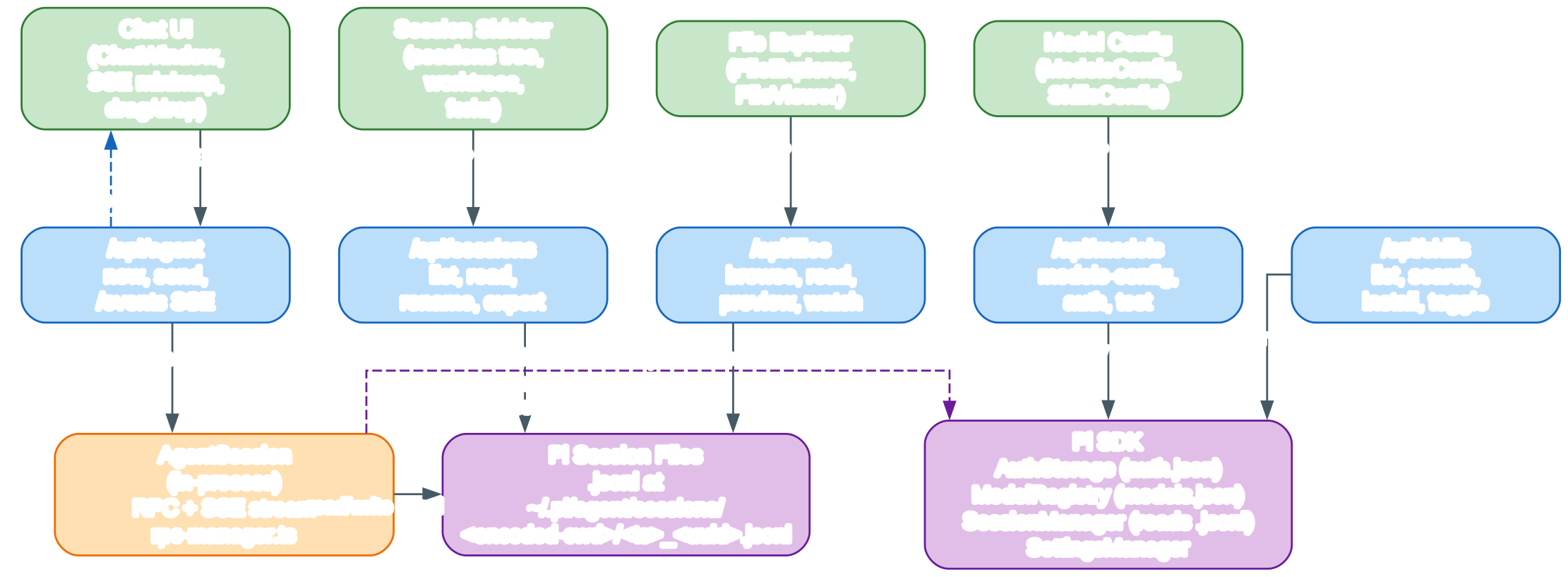
The architecture diagram above shows how the browser workspace, the Next.js server, the in-process AgentSession, the pi session files on disk, and the pi SDK building blocks communicate. The diagram uses orthogonal splines for routing, xlabel for edge labels so they never become edge tooltips, white text halos through paint-order: stroke so labels stay readable against the boxes they cross, and a four-color semantic palette: green for the browser and user-facing layer, blue for the Next.js server and API routes, orange for the in-process runtime, and purple for the storage and SDK backend.
The top row, rendered in green, is the browser layer. It is a single-page React app made of an AppShell that holds URL state and tab management, plus four panels that each own a slice of the workspace: the Chat UI (the ChatWindow component with its SSE minimap and image drag-and-drop), the File Explorer (FileExplorer plus FileViewer for source, diffs, images, audio, and PDFs), the Session Sidebar (the session tree, the worktree switcher, and the in-page file tree), and the Model and Skills Config panels (ModelsConfig and SkillsConfig).
Each browser component talks to exactly the API route it needs. The Chat UI posts prompts to /api/agent and consumes the SSE stream that comes back from /api/agent/[id]/events. The File Explorer reads through /api/files, which is intentionally scoped by lib/file-access.ts to session cwds, their resolved project roots, ~/pi-cwd-* directories, and explicitly allowed roots - it is not a general filesystem browser. The Session Sidebar reads through /api/sessions to list, rename, and delete sessions, and to fetch the context for a specific leaf through /api/sessions/[id]/context. The configuration panels read and write through /api/models and /api/skills.
The middle row, rendered in blue, is the Next.js server. It is the single entrypoint the browser talks to and the single process that owns the AgentSession lifecycle. The five API routes shown - /api/sessions, /api/agent, /api/models, /api/skills, and /api/files - are the load-bearing ones for the workspace. The full app also exposes /api/auth for OAuth and API key flows, /api/worktrees for Git worktree management, /api/plugins for package plugin management, /api/cwd for directory validation, /api/home for the user home directory lookup, and /api/app-update for update notifications.
Session browsing goes straight from /api/sessions down to the purple storage layer, because reading a .jsonl file does not require a running AgentSession. The route uses pi’s SessionManager helpers and the lib/session-reader.ts adapter to parse the file format, normalize toolCall field names through lib/normalize.ts, and resolve branch and leaf contexts. The same path is used to render the HTML export at /api/sessions/[id]/export, which patches the recursive tree helpers in pi’s export output into iterative versions so very deep linear sessions do not overflow the browser call stack.
The bottom-left box, rendered in orange, is the in-process AgentSession. It is created lazily the first time a browser tab sends a prompt for a given session id, through startRpcSession() in lib/rpc-manager.ts. The wrapper is keyed in globalThis.__piSessions so it survives Next.js hot-reload - a plain module-level Map would be discarded on reload. Concurrent startRpcSession() calls share a single start Promise through globalThis.__piStartLocks, and idle sessions are torn down after a ten-minute timeout. Fork is special-cased: AgentSession.fork() mutates the wrapper’s inner state in place, so the wrapper is destroyed immediately after a fork and reloaded from the original file on the next request.
The bottom-right box, rendered in purple, is the on-disk storage layer. The .jsonl session files live at ~/.pi/agent/sessions/<encoded-cwd>/<timestamp>_<uuid>.jsonl. Each line is a JSON entry of type session, model_change, message, toolResult, compaction, or session_info. The same files are read by both /api/sessions for browsing and by the AgentSession for live runs, and written by the AgentSession during a prompt. The parentSession header field is display metadata only - it lets the sidebar render forks as children of their parent, but has zero effect on chat content.
The side box, also rendered in purple, is the pi SDK itself. AuthStorage owns auth.json, holding one credential per provider and rendering dual-auth providers (such as anthropic and github-copilot) exactly once through capability-driven listing in lib/provider-listing.ts. ModelRegistry reads and writes models.json for the model list, defaults, and per-model overrides. SessionManager parses .jsonl files. SettingsManager merges project-local .pi/settings.json with the global ~/.pi/agent/settings.json. The HTTP dispatcher in lib/http-dispatcher.ts wires HTTP_PROXY, HTTPS_PROXY, and NO_PROXY into the SDK’s outbound fetch.
The edges in the diagram show the data flow. Solid blue edges are the synchronous request path from the browser through an API route to either the AgentSession or the session files. The dashed blue edge from /api/agent back to the Chat UI is the SSE stream that delivers token-level updates, tool calls, tool results, thinking, compaction events, and the final prompt_done. The dashed purple edges are the SDK touchpoints the AgentSession uses internally - authentication lookup through AuthStorage, model resolution through ModelRegistry, and persistence through SessionManager. The forcelabels=true and overlap=false settings injected into the DOT source keep every edge label visible and the layout uncluttered.
The SSE stream has a careful lifecycle. useAgentSession opens the stream before each prompt, and prompt_done completes the current UI stage and notification. The idle stream is not closed immediately - it stays open for a thirty-second grace window and is reused by the next prompt. agent_start cancels the close timer, and agent_settled finishes extension-injected runs that have no wrapper-level prompt_done and starts a fresh grace window. The stream is never closed on the first agent_end because retries, compaction, and extension-queued messages can continue the same logical prompt.
A second SSE stream exists at /api/agent/running/events for the sidebar. The sidebar polls /api/agent/running every 2.5 seconds while its tab is visible and pauses polling in background tabs. While a run is active, useAgentSession periodically calls GET /api/agent/[id] and reconciles on visibilitychange and online events, which fixes missed terminal events from background tabs or half-open connections. Prompt runs use a monotonic run id, so late SSE or slow reconciliation responses from an old run are ignored and cannot resurrect stale streaming bubbles.
On page refresh mid-stream, ChatWindow calls GET /api/agent/[id] on mount; if state.isStreaming === true, the SSE stream is reconnected automatically, and thinkingLevel and isCompacting are synced from the same response. Compaction SSE events come in two flavors depending on pi version: newer pi emits compaction_start and compaction_end, while older versions emitted auto_compaction_start and auto_compaction_end. handleAgentEvent accepts both sets so isCompacting stays in sync regardless of the SDK version installed.
Features
Pi Web’s feature list maps closely onto the panels and API routes shown in the diagram:
- Session browsing: every
.jsonlfile under~/.pi/agent/sessions/is listed in the sidebar grouped by project (and by Git worktree, when worktrees are involved). Selecting a session loads it throughlib/session-reader.tswithout starting an AgentSession. - Real-time chat with SSE streaming: sending a message creates or reuses an AgentSession and opens an SSE stream at
/api/agent/[id]/events. Token deltas, tool calls, tool results, thinking, compaction events, andprompt_doneare streamed live into the ChatWindow and its minimap. - Model configuration: the
ModelsConfigpanel reads and writesmodels.jsonin the pi agent directory, exposes provider auth status throughAuthStorage, and can run a model test through/api/models-config/test. - Skill management: the
SkillsConfigpanel lists skills discovered through pi’sDefaultResourceLoader, supports search and install throughnpx skills add, and toggles thedisable-model-invocationfrontmatter key onSKILL.mdfiles. - File preview: the
FileViewerrenders source with syntax highlighting, diffs, images, audio, PDFs, and DOCX inside a tab next to the chat. Access is scoped bylib/file-access.tsto session cwds, their resolved project roots,~/pi-cwd-*directories, and explicitly allowed roots. - Git worktree support: the sidebar shows a worktree switcher when the current project is a worktree or has linked worktrees, and
/api/worktreescreates, lists, and removes worktrees under<repoRoot>-worktrees/<sanitized-branch>. - Branch navigation and fork sessions: in-session branches (via
navigate_tree) live inside the same.jsonlfile and are switched through the BranchNavigator; forks create a new.jsonlfile and appear as children in the sidebar tree via theparentSessionheader field. - Context usage display: the top bar shows context usage, cost, compaction state, and system prompt details by reading the AgentSession state through
GET /api/agent/[id]. - Multi-language UI: the interface ships with English and Simplified Chinese translations in
lib/i18n/messages/, and the language switch lives in the top bar. Seedocs/i18n.mdfor adding more languages. - Basic Auth support: setting
PI_WEB_PASSWORDprotects every web and API endpoint with HTTP Basic Auth (usernamepi). - HTTP proxy support: the server reads
HTTP_PROXY,HTTPS_PROXY, andNO_PROXYthroughlib/http-dispatcher.tsfor outbound model and provider calls.
Installation
Pi Web requires Node.js 22.19.0 or newer. Check your version first:
node --version
Run it once without installing anything globally:
npx @agegr/pi-web@latest
Or install it globally so the pi-web command is on your PATH:
npm install -g @agegr/pi-web
pi-web
After the server is ready, the CLI tries to open http://127.0.0.1:30141 automatically. If you are developing Pi Web itself, clone the repository and use the dev script instead - never run next build during local development, since it writes to .next/ and interferes with the dev server:
git clone https://github.com/agegr/pi-web.git
cd pi-web
npm install
npm run dev
Common local checks for contributors:
npm test
node_modules/.bin/tsc --noEmit
npm run lint
Usage
The default pi-web command starts the server bound to 127.0.0.1 on port 30141. The most common flags are --port (or -p) and --hostname (or -H):
pi-web --port 8080
pi-web --hostname 0.0.0.0
pi-web -p 8080 -H 0.0.0.0
pi-web --no-open
The same options accept environment variables, which is useful when running Pi Web as a background service or under systemd:
PORT=8080 pi-web
PI_WEB_HOSTNAME=0.0.0.0 pi-web
PI_WEB_NO_OPEN=1 pi-web
If your network egress needs a proxy, set the standard proxy environment variables before launching. On macOS or Linux:
HTTP_PROXY=http://127.0.0.1:7890 \
HTTPS_PROXY=http://127.0.0.1:7890 \
NO_PROXY=localhost,127.0.0.1 \
npx @agegr/pi-web@latest
On Windows PowerShell:
$env:HTTP_PROXY = "http://127.0.0.1:7890"
$env:HTTPS_PROXY = "http://127.0.0.1:7890"
$env:NO_PROXY = "localhost,127.0.0.1"
npx @agegr/pi-web@latest
Inside the browser, the typical workflow is:
- Pick a project from the Session Sidebar on the left.
- Pick an existing session, or use the input bar to start a new one with the default model pre-selected from
GET /api/models. - Send a message; the ChatWindow opens the SSE stream and renders tokens, tool calls, and tool results as they arrive.
- Drag files from the File Explorer into the input bar to attach them, or open them as tabs beside the chat to preview source, diffs, images, audio, or PDFs.
- Use the Fork button on any user message to branch into a new
.jsonlfile, or use the BranchNavigator to switch between in-session branches. - Use the top bar to watch context usage, cost, compaction state, and the active system prompt.
Configuration
Pi Web is configured almost entirely through environment variables and through pi’s own files in ~/.pi/agent/. The most important environment variables are:
| Variable | Purpose |
|---|---|
PI_WEB_PASSWORD | Sets a password for HTTP Basic Auth (username pi). Unset or empty disables auth. |
PI_WEB_HOSTNAME | The hostname to bind to. Defaults to 127.0.0.1. |
PI_WEB_ALLOWED_HOSTS | Comma-separated exact hostnames a reverse proxy may use. |
PI_WEB_NO_OPEN | When set to 1, the CLI does not try to open the browser. |
PORT | Override the port (also accepted as --port). |
PI_CODING_AGENT_DIR | Point Pi Web at a non-default pi agent directory. |
HTTP_PROXY / HTTPS_PROXY / NO_PROXY | Standard proxy variables for outbound model and API calls. |
The on-disk files Pi Web reads and writes are:
~/.pi/agent/sessions/<encoded-cwd>/<timestamp>_<uuid>.jsonl- the session files. Each line is a JSON entry of typesession,model_change,message,toolResult,compaction, orsession_info.~/.pi/agent/models.json- the model list, defaults, and per-model overrides. Edited through theModelsConfigpanel.~/.pi/agent/settings.json- pi’s settings, including the default model.GET /api/modelsreadsdefaultModelfrom here.~/.pi/agent/auth.json- per-provider credentials (one per provider), managed throughAuthStorage.
A minimal session file looks like this (one JSON object per line):
{"type":"session","version":3,"id":"<uuid>","timestamp":"2026-08-08T09:00:00Z","cwd":"/home/me/proj","parentSession":"/abs/path/to/parent.jsonl"}
{"type":"model_change","id":"a1b2c3d4","parentId":null,"provider":"zenmux","modelId":"claude-sonnet-4-6","timestamp":"2026-08-08T09:00:01Z"}
{"type":"message","id":"e5f6a7b8","parentId":"a1b2c3d4","message":{"role":"user","content":"refactor the parser"}}
{"type":"message","id":"c9d0e1f2","parentId":"e5f6a7b8","message":{"role":"assistant","content":[...]}}
{"type":"message","id":"34567abc","parentId":"c9d0e1f2","message":{"role":"toolResult","toolCallId":"...","content":[...]}}
{"type":"compaction","id":"89abcdef","parentId":"34567abc","summary":"...","firstKeptEntryId":"e5f6a7b8","tokensBefore":120000}
For HTTPS through a reverse proxy, set PI_WEB_HOSTNAME to the address Pi Web should listen on behind the proxy and PI_WEB_ALLOWED_HOSTS to the external hostname the proxy presents. Never expose plain HTTP with PI_WEB_PASSWORD over the open internet - Basic Auth does not encrypt the password in transit. Use HTTPS through a trusted reverse proxy or a trusted VPN for remote access instead.
API requests accept loopback names, IP literals, the selected bind hostname, and exact comma-separated names in PI_WEB_ALLOWED_HOSTS. Configure that variable when a trusted reverse proxy uses a different external hostname so that Next.js accepts the forwarded Host header.
Conclusion
Pi Web is the browser counterpart to the pi terminal coding agent. It reuses pi’s on-disk session files and pi’s in-process AgentSession runtime instead of re-implementing them, so anything you do in the browser is visible in the terminal and vice versa. The Next.js server is the single entrypoint the browser talks to, the single owner of the AgentSession lifecycle, and the single place where HTTP proxy, Basic Auth, and allowed-host rules are enforced. The browser layer keeps session browsing, chat, file preview, model and skill configuration, and worktree switching in one workspace.
If you already use pi and want a richer surface for browsing sessions, watching tool calls, previewing files, and configuring models, install Pi Web with Enjoyed this post? Never miss out on future posts by following us npm install -g @agegr/pi-web and run pi-web. The project lives at github.com/agegr/pi-web, the upstream pi coding agent lives in the pi-mono monorepo, and the npm package is at npmjs.com/package/@agegr/pi-web. 


