Introduction
Prime Agent is an open-source coding and research agent for general and long-running work, developed by Prime Intellect. It is designed around two core abstractions that separate it from typical chat-driven coding assistants: the Recursive Language Model (RLM) and the Continual Harness. Together, they turn the agent into a programmatic control environment where useful working context and reusable operating patterns can outlive a single chat window.
Instead of presenting the model with a flat list of disconnected tools, Prime Agent gives it a persistent Python kernel as its primary surface. File operations, shell commands, skill invocations, and subagent delegation all begin as code executed inside that kernel, so state such as variables, parsed results, and task handles survives across turns and across compaction. A daemon-backed runtime keeps active sessions running after the terminal detaches, which makes Prime Agent suitable for evaluations, research workflows, and other tasks that take hours rather than minutes.
The harness can also improve itself. The /refine command reviews the current trajectory and can persist small, evidence-backed updates to supplemental state, without ever rewriting the immutable base system prompt. This post walks through the RLM programming model, the architecture, the self-improvement loop, executable skills, background sessions, and the practical installation and usage steps.
What is RLM
The Recursive Language Model (RLM) treats context as variables and tools like recursive subagents as function calls inside a persistent REPL. The model works inside a persistent Python control environment and composes capabilities as code. Provider calls, session persistence, child lifecycles, scheduling, and safety policy remain in the TypeScript host, while IPython is the model-facing programming surface.
RLM is built on four core invariants. First, execution is programmatic: the default runtime exposes a single built-in model tool, ipython, so reading and editing files, running project commands, transforming results, invoking skills, and delegating work all begin from that persistent kernel instead of separate built-in tool calls. Second, subagents are native RLM calls: the callable rlm object is preloaded in the kernel, and spawning a child is a direct function call that returns a handle immediately. Third, skills add programmatic capability through importable Python packages. Fourth, state is designed to outlive one turn through compaction, daemon-backed workers, child registries, heartbeats, schedules, persistent goals, and bounded autonomous mode.
The prompt-as-a-variable idea means the parent keeps its own context focused while Python holds working state and child agents receive only the context needed for their subtasks. This keeps the parent context window clean and lets each subagent work on a bounded problem with its own independent session directory.
How It Works
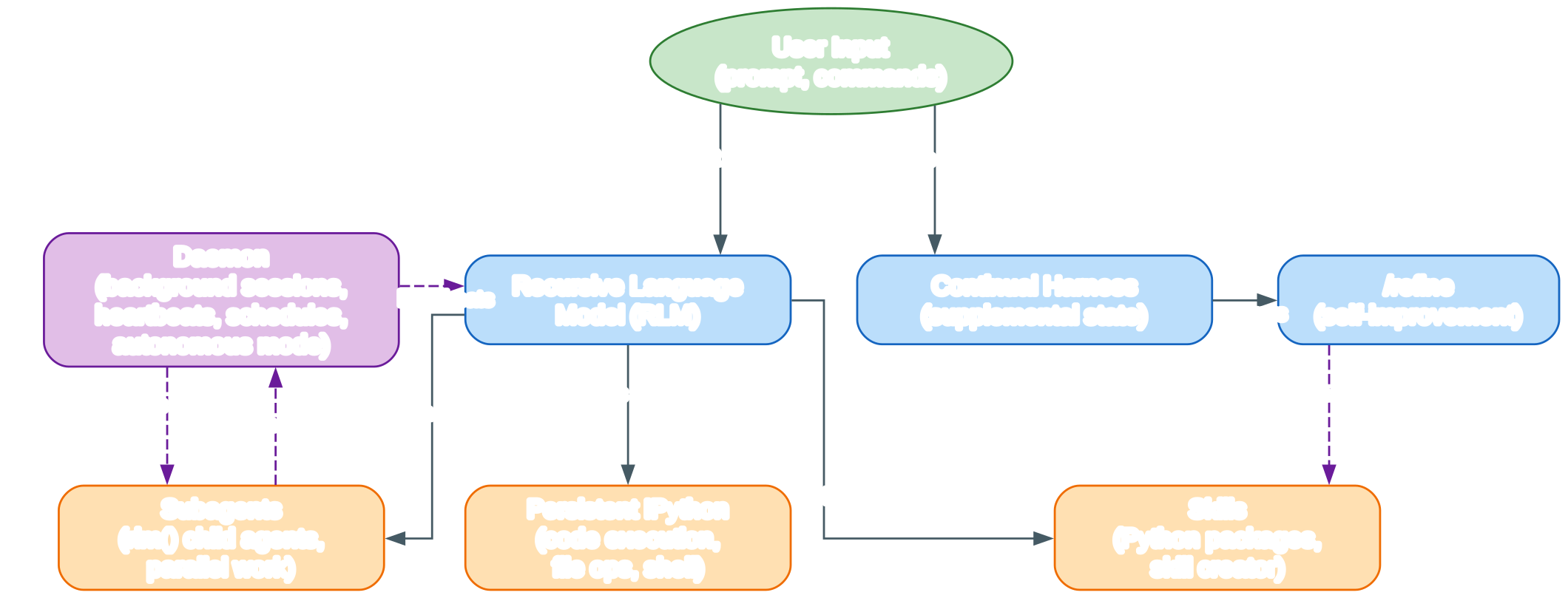
The architecture diagram above illustrates how Prime Agent orchestrates a prompt from the user all the way through durable, long-running work.
At the top, the green User Input node marks the boundary where a natural-language prompt or a slash command enters the system.
That input is handed to the Prime Agent Core, the blue middle layer built around three cooperating abstractions.
Those abstractions are the Recursive Language Model, the Continual Harness, and the /refine self-improvement loop.
The Recursive Language Model node is the heart of the system.
Instead of exposing a flat list of separate tools, RLM gives the model a single persistent IPython kernel as its only built-in model tool.
Every file read, shell command, skill invocation, and subagent spawn begins as Python code executed inside that kernel.
Working state such as variables, parsed results, and task handles therefore survives across turns and across compaction.
The Continual Harness node sits next to RLM and stores supplemental prompts, memories, skill descriptions, and reusable subagent specifications as durable state.
This state is local to the session by default, so the harness accumulates useful context without leaking across unrelated projects.
The /refine node represents the self-improvement path that reviews the current trajectory and applies small, evidence-backed updates to that supplemental harness state.
It never rewrites the immutable base system prompt, and recorded snapshots support rollback, so every improvement is reviewable and reversible.
Below the core, three orange tool nodes carry the actual work of the agent.
Persistent IPython executes code, performs file operations, and runs shell commands through temporary subshells.
Python state and directory changes persist in the kernel, while each %%bash cell is a fresh subshell.
Subagents are spawned by the callable rlm() object, which returns immediately with a child handle and never blocks on the child’s answer.
Children inherit the parent model, provider configuration, skills, tools, retry policy, and resource loader unless the call requests another configured model.
Results arrive only through explicit agent_message replies or files, never as an rlm() return value, which keeps the parent context focused.
Skills are importable Python packages that the model calls directly from the kernel by import name.
The built-in skill creator can turn recurring workflows into new project or personal skills that ship with a SKILL.md and a Python package.
On the right, the purple Daemon node represents the backend infrastructure that keeps long-running work alive.
The daemon drives heartbeats and schedules that re-enter a session periodically or at a specific time.
It runs subagents in the background and preserves active sessions, IPython state, and child registries when the terminal detaches.
The dashed edges show control and lifecycle flows rather than synchronous data returns.
Heartbeats re-enter RLM, background tasks run inside subagents, and the daemon supervises the whole tree.
Because workers and kernels are separate processes, a crash in one root tree does not take down unrelated sessions.
The supervisor owns discovery, routing, attachments, worker health, and cross-agent message delivery, but never executes providers or tools itself.
From the session queue onward, the same execution and persistence path is used whether a prompt comes from a user, a heartbeat, a schedule, a goal, autonomous mode, or another agent.
This unified path is what lets Prime Agent keep moving on long tasks across turns and terminal sessions.
Self-Improvement
The Continual Harness stores supplemental prompts, memories, skill descriptions, and reusable subagent specifications as durable state that Prime Agent can refine through small, evidence-backed updates. The /refine command is the user-facing entry point for this loop. When invoked, it reviews the current trajectory and can persist focused, reviewable lessons as supplemental prompts, memories, reusable skill descriptions, or subagent specifications, with recorded refinement history.
A critical safety property is that /refine never rewrites the immutable base system prompt. All improvements land in supplemental state that sits alongside the base prompt, and recorded snapshots support rollback to an earlier harness state. This makes self-improvement reviewable and reversible: you can inspect what changed, why it changed, and restore a previous snapshot if a refinement hurts behavior.
/refine does not replace packaging and reviewing new executable skills. It is a complementary mechanism for capturing lessons that are local to the session by default. Where a recurring workflow deserves a typed, importable callable, the skill creator is the right tool; where a focused lesson or memory should persist for the current session, /refine is the right tool.
Skills
Skills are self-contained capability packages that Prime Agent loads on demand. A skill provides specialized workflows, setup instructions, helper scripts, and reference documentation for specific tasks. Prime Agent implements the Agent Skills standard and remains lenient about minor violations, while also supporting Python-backed skills, which are a superset of markdown skills that install Python packages into the persistent IPython kernel.
Both markdown and Python-backed skills use a SKILL.md file for discovery, routing, and instructions. A Python-backed skill also contains a Python package that Prime Agent installs into the kernel environment and exposes by import name. For a skill named release-audit, the model can call it directly from the kernel:
report = await release_audit(repository=".", target_version="0.4.0")
This makes Python-backed skills a superset of instruction-only skills: they can provide guidance, scripts, references, dependencies, typed callables, and optional shell commands. They may also call rlm(...) themselves when a capability needs recursive delegation. Only skill metadata is placed in the startup prompt; the agent loads the full SKILL.md when the task matches, then inspects and calls the documented Python API.
Prime Agent ships with several built-in skills that load by default. The prime-intellect skill exposes Prime Intellect products and workflows through the prime CLI, including verifiers environments, evaluations, Hosted Training and prime-rl, sandboxes, tunnels, Prime Inference, GPU compute, and storage. The skill-creator skill teaches the agent to create new skills, including the markdown skill layout, frontmatter rules, placement and precedence, and the full Python-backed skill contract with a working template. The websearch skill is a Python-backed Google search skill using the Serper API.
The skill creator can turn recurring workflows into project or personal skills, so a process the agent repeats manually today can become a typed, importable callable tomorrow.
Background Sessions
Prime Agent is built for long-running work, especially for evaluations in research. A daemon-backed runtime keeps active sessions running when the terminal disconnects and can be reattached later. The supervisor owns discovery, routing, attachments, worker health, and cross-agent message delivery, while each worker owns one root runtime, its scheduler, kernels, and all descendants below that root.
Several features keep long tasks moving. Direct agent-to-agent communication lets running agents and retained subagents discover one another, exchange messages, and steer active work without routing everything through the user. Heartbeats and schedules, exposed through /heartbeat, rlm_heartbeat, and prime-agent schedule, can re-enter a session periodically or at a specific time. Persistent goals, set with /goal, keep an objective and its progress active across turns until it is completed, paused, or cleared.
Automatic compaction summarizes older context while preserving recent messages and kernel state, so the session can keep running without exceeding the context window. Bounded autonomous mode, enabled with /autonomous, continues within configured turn, token, and time budgets and can run user-defined quality gates. A passed gate checks only what that gate verifies, and reaching a limit does not imply task success, so autonomous mode is a bounded continuation mechanism rather than a correctness guarantee.
Daemon-backed children remain addressable while their parent session is open, and the parent-scoped child registry survives compaction, kernel restart, and parent restoration. This means a subagent spawned for a slow integration audit can keep running in the background and report back through an agent_message reply long after the parent turn that created it.
Installation
Install the latest stable release on macOS or Linux with the official installer:
curl -fsSL https://app.primeintellect.ai/prime-agent/install.sh | sh
The installer downloads a versioned release, verifies its SHA-256 checksum, installs the prime-agent command, and can prepare the IPython runtime used by the agent. Start Prime Agent from the repository or directory you want it to work in:
cd /path/to/project
prime-agent
On first launch, run /login to choose a subscription or API-key provider. Prime Agent works in the current directory and can run commands and modify files there, so use a disposable clone, a clean worktree, or another checkpoint you can inspect and restore.
Note that Prime Agent executes model-generated Python and project commands with your user permissions. Its worker and kernel processes improve lifecycle isolation and recovery, but they are not a security sandbox. Review changes and use trusted repositories, instructions, skills, and extensions only, and run untrusted code in an external sandbox or restricted environment.
Usage
Useful Commands
Once installed, the prime-agent CLI exposes commands for browsing, attaching, and managing sessions:
prime-agent agents                   # Browse running, idle, and saved sessions
prime-agent attach <agent>           # Reattach to a running session
prime-agent --resume <path|id>       # Resume a saved session
prime-agent status                   # Inspect background service state
prime-agent doctor [--fix]           # Inspect or repair background services
prime-agent update [--force]         # Update Prime Agent
prime-agent shutdown [--force]       # Stop every agent, worker, and background service
Spawning Subagents with rlm()
The callable rlm object is preloaded in the kernel. Spawn a child with a direct call:
handle = await rlm("Review the authentication flow for security issues", name="auth-reviewer")
print(handle.rlm_child_id, handle.name, handle.session_dir, handle.model)
The call returns immediately after task admission with a child handle; it never waits for or returns the child’s answer. Spawn independent children in separate calls and end the turn instead of awaiting completion:
api_review = await rlm("Review the public API", name="api-reviewer")
test_review = await rlm("Review the test coverage", name="test-reviewer")
integration_audit = await rlm("Run the slow integration audit", name="integration-audit")
Results arrive only through explicit agent_message replies or files. Children reply when an answer is needed:
await agent_message.send(message, receiver_role="parent")
The parent can follow up with a retained child by name:
await agent_message.send(
    "Check the newly added regression test.",
    receiver_role="child",
    receiver_name=api_review.name,
)
Calling Skills
Once a Python-backed skill is loaded, the model calls it directly in the IPython kernel by import name. The built-in websearch skill, for example, is callable like this:
print(await websearch("latest Prime Agent release"))
Persistent Python State
Python state survives across tool calls and compaction. Variables, imports, functions, parsed results, and task handles remain available on later turns:
from pathlib import Path

config_files = list(Path(".").rglob("*.toml"))
large_files = [path for path in config_files if path.stat().st_size > 10_000]
Run a project’s normal commands through its own environment from an IPython cell. Each %%bash cell is a temporary subshell, while Python state and %cd changes persist in the kernel:
%%bash
npm run check
Conclusion
Prime Agent combines a persistent Python control environment with durable harness state, so useful working context and reusable operating patterns can outlive a single chat window. The Recursive Language Model makes execution programmatic by giving the model a single persistent IPython kernel, and native rlm() subagents let it delegate focused work to real child agents that run in parallel or in the background.
The Continual Harness and the /refine loop add a reviewable, reversible self-improvement path that never touches the immutable base system prompt. Executable skills turn recurring workflows into typed, importable callables, and a daemon-backed runtime with heartbeats, schedules, persistent goals, and bounded autonomous mode keeps long tasks moving across turns and terminal sessions.
For research evaluations, long-running coding work, and any task that does not fit in a single chat window, Prime Agent offers an open-source, programmatic alternative to flat tool-list coding assistants. The project is fully open source under the MIT License and is part of a broader ecosystem that includes PRIME-RL, Verifiers, and pi-mono. Enjoyed this post? Never miss out on future posts by following us 


