A toolkit integration platform for AI agents has been one of the most sought-after building blocks in the AI engineering ecosystem, as developers struggle to connect their agents to the ever-growing landscape of external tools and services. Composio, with 27,890 stars on GitHub, addresses this challenge head-on: an open-source platform providing 1000+ pre-built tool integrations with native support for OpenAI, LangChain, CrewAI, AutoGen, and more, featuring authenticated tool calls, automatic function calling conversion, real-time execution, and a unified SDK for both TypeScript and Python – all designed to let AI agents interact with any external service in minutes instead of days.
How It Works – Architecture
Composio’s architecture is designed around a three-layer model that cleanly separates AI frameworks, the integration SDK, and external tool services. The top layer consists of the AI frameworks that developers use to build agents – OpenAI with function calling, LangChain with tools, CrewAI with toolkits, AutoGen with skills, and other frameworks. Each of these has its own native format for defining and executing tools, and Composio’s framework adapters handle the translation automatically.
The middle layer is the Composio SDK, available in both TypeScript and Python. It contains several key subsystems: the Framework Adapters that translate tool definitions between formats, the Tool Registry that stores schemas for 1000+ integrations, the Auth Manager that handles OAuth flows, API keys, and token refresh, and the Execution Engine that manages real-time tool execution with streaming support. A CLI tool provides a command-line interface for testing and managing integrations.
The bottom layer represents the 1000+ external services that Composio integrates with – GitHub, Slack, Gmail, Google Calendar, Notion, Salesforce, and many more. Each integration has its own API endpoints, authentication requirements, and response formats, but Composio normalizes all of these into a consistent interface.
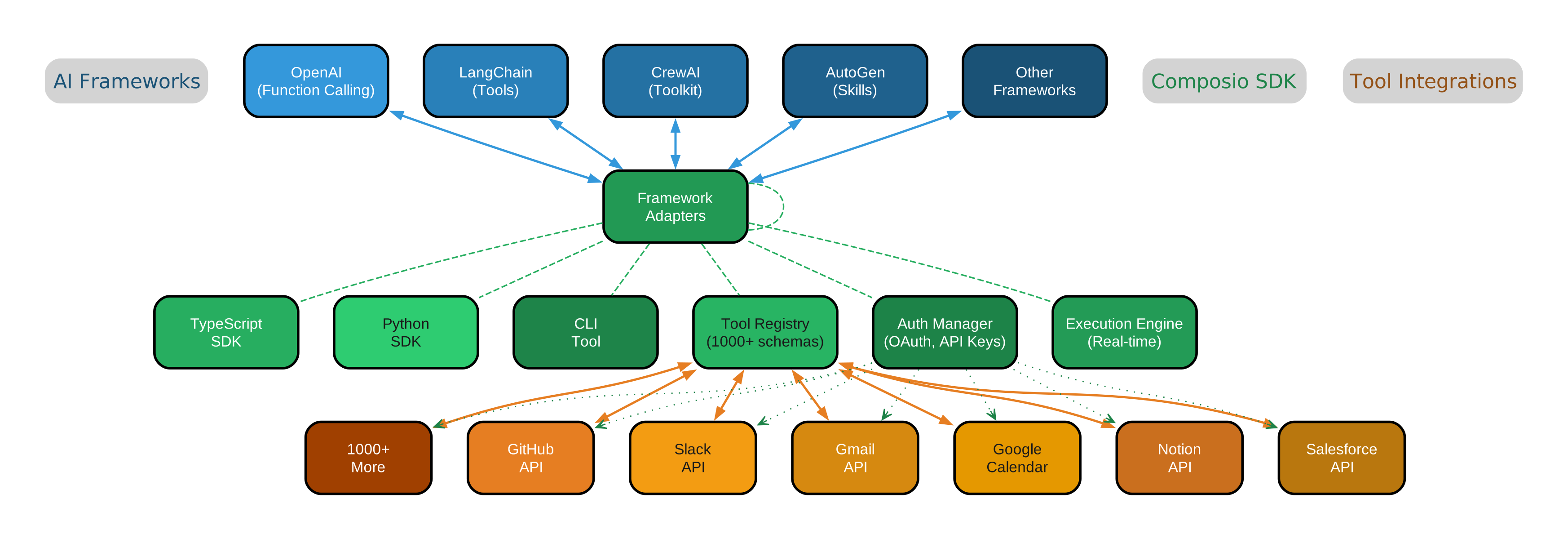
The architecture diagram above illustrates the three-layer flow: AI Frameworks at the top connect bidirectionally to the Composio SDK’s Framework Adapters, which route through the Tool Registry, Auth Manager, and Execution Engine. The SDK then connects to the 1000+ Tool Integrations at the bottom, with the Auth Manager providing authentication pathways (shown as dotted lines) to each external service. This layered design means that adding a new framework or a new tool integration requires changes in only one place, without affecting the rest of the system.
Key Insight: Composio’s architecture is built around framework adapters that translate a single tool definition into the native format expected by each AI framework. An OpenAI adapter converts tools into function calling schemas, a LangChain adapter wraps them as LangChain tools, a CrewAI adapter packages them as CrewAI toolkits, and an AutoGen adapter registers them as skills. This means you define a tool once and it works across every supported framework – no rewriting, no format juggling, no framework lock-in. The authentication layer handles OAuth flows, API key management, and token refresh automatically, so your agent can call authenticated endpoints without managing credentials.
Installation
Getting started with Composio is straightforward. The platform provides SDKs for both TypeScript and Python, along with a CLI tool for testing and management.
# Install TypeScript SDK
npm install composio

# Install Python SDK
pip install composio

# Install CLI tool
npm install -g composio-cli
For Python projects, you can also install framework-specific packages:
# Install with OpenAI support
pip install composio-openai

# Install with LangChain support
pip install composio-langchain

# Install with CrewAI support
pip install composio-crewai
After installation, configure your API key:
# Set your Composio API key
export COMPOSIO_API_KEY="your-api-key-here"

# Or configure via CLI
composio config set api-key your-api-key-here
Usage – Core Patterns
OpenAI Integration
The most common use case is connecting Composio tools to an OpenAI agent. With just a few lines of code, you can give your GPT-4 agent access to GitHub, Slack, Gmail, and hundreds of other services:
from composio_openai import ComposioToolSet, App

# Initialize Composio toolset
composio_toolset = ComposioToolSet()

# Get GitHub tools for OpenAI
tools = composio_toolset.get_tools(apps=[App.GITHUB])

# Use with OpenAI
from openai import OpenAI
client = OpenAI()

response = client.chat.completions.create(
    model="gpt-4",
    messages=[{"role": "user", "content": "Star the composio repo on GitHub"}],
    tools=tools,
)
LangChain Integration
For LangChain users, Composio provides a seamless integration that converts tool definitions into LangChain tool objects:
from composio_langchain import ComposioToolSet, App
from langchain.agents import create_openai_tools_agent

# Initialize Composio toolset
composio_toolset = ComposioToolSet()

# Get tools for LangChain
langchain_tools = composio_toolset.get_tools(apps=[App.GITHUB, App.SLACK])

# Create agent with LangChain tools
agent = create_openai_tools_agent(
    llm=llm,
    tools=langchain_tools,
    prompt=prompt,
)
CrewAI Integration
CrewAI agents can leverage Composio tools through the dedicated CrewAI adapter:
from composio_crewai import ComposioToolSet, App
from crewai import Agent, Task, Crew

# Initialize Composio toolset
composio_toolset = ComposioToolSet()

# Get GitHub tools for CrewAI
crewai_tools = composio_toolset.get_tools(apps=[App.GITHUB])

# Create agent with tools
developer = Agent(
    role="Developer",
    goal="Manage GitHub repositories",
    tools=crewai_tools,
)
Authenticated Tool Calls
Composio handles OAuth flows and API key management automatically. When your agent calls a tool that requires authentication, Composio manages the entire flow:
from composio import Composio

# Initialize Composio
composio = Composio()

# Trigger OAuth flow for GitHub
entity_id = composio.execute_action(
    action="GITHUB_STAR_A_REPOSITORY",
    params={"owner": "composiohq", "repo": "composio"},
)

# Handle OAuth redirect for first-time auth
# Subsequent calls use stored credentials automatically
TypeScript SDK Usage
The TypeScript SDK provides the same functionality with type-safe interfaces:
import { Composio } from "composio";

// Initialize Composio
const composio = new Composio();

// Get GitHub tools for OpenAI
const tools = await composio.tools.get({
  apps: ["github"],
  frameworks: ["openai"],
});

// Execute a tool action
const result = await composio.actions.execute({
  action: "GITHUB_STAR_A_REPOSITORY",
  params: { owner: "composiohq", repo: "composio" },
});
Custom Tool Definition
You can define and register your own tools that get the same framework translation and authentication support as pre-built integrations:
from composio import Composio, Action

# Define a custom tool
@composio.action(
    name="SEND_NOTIFICATION",
    description="Send a notification to a user",
    parameters={
        "user_id": {"type": "string", "description": "User ID"},
        "message": {"type": "string", "description": "Notification message"},
    },
)
def send_notification(user_id: str, message: str) -> dict:
    # Custom logic here
    return {"status": "sent", "user_id": user_id}

# Register and use with any framework
tools = composio_toolset.get_tools(actions=[send_notification])
Real-Time Execution
For long-running operations, Composio supports real-time execution with streaming responses:
from composio import ComposioToolSet, App

# Initialize with real-time execution
composio_toolset = ComposioToolSet()

# Execute with streaming
result = composio_toolset.execute_action(
    action="GITHUB_CREATE_AN_ISSUE",
    params={
        "owner": "composiohq",
        "repo": "composio",
        "title": "Bug report",
        "body": "Description of the issue",
    },
)

print(f"Issue created: {result.data}")
Key Features
Composio provides a comprehensive set of features that make it the go-to platform for AI agent tool integration. Each feature category addresses a specific pain point that developers face when connecting agents to external services.

The features diagram above shows the eight core feature categories radiating from the central Composio node. Multi-Framework Support ensures compatibility with all major AI frameworks through automatic schema translation. The 1000+ Integrations category covers every tool category an agent might need. Authentication handles OAuth 2.0 flows, API key management, and token refresh transparently. Real-Time Execution supports streaming responses and long-running operations. Developer Experience provides type-safe SDKs in both TypeScript and Python with auto-generated types. Function Calling automatically converts tool definitions into OpenAI function calling format. Custom Tools allow developers to register their own APIs. Enterprise features include rate limiting, error handling, retry logic, and team management.
Amazing: Composio provides 1000+ pre-built tool integrations covering every category an AI agent might need – from GitHub and GitLab for developer tools, to Slack and Discord for communication, to Gmail and Google Calendar for productivity, to Salesforce and HubSpot for CRM, to AWS, GCP, and Azure for cloud infrastructure. Each integration comes with type-safe schemas, automatic authentication handling, and real-time execution support. The platform also supports custom tool definitions, so you can register your own APIs and internal services with the same unified interface that the pre-built integrations use.
Integration Ecosystem
Composio’s integration ecosystem spans seven major categories, each containing carefully curated tools with full API coverage. The platform does not just provide basic CRUD operations – it exposes the complete functionality of each integrated service, from creating GitHub pull requests to sending Slack messages with rich formatting to managing Salesforce opportunities.

The ecosystem diagram above illustrates the breadth of Composio’s integration coverage. At the center sits the Composio Platform, which provides the unified interface for all 1000+ tools. Seven categories branch out: Developer Tools (GitHub, GitLab, Jira, VS Code), Communication (Slack, Discord, Telegram, Microsoft Teams), Productivity (Gmail, Google Calendar, Notion, Trello), CRM and Sales (Salesforce, HubSpot), Cloud and Infrastructure (AWS, GCP, Azure), Database (PostgreSQL, MongoDB, Redis), and Social and Media (Twitter/X, LinkedIn). Each category connects bidirectionally to the platform, meaning tools can both send and receive data.
Developer Tools integrations allow AI agents to participate in the full software development lifecycle – creating repositories, managing issues, reviewing pull requests, and triggering CI/CD pipelines. Communication integrations enable agents to send messages, manage channels, and monitor conversations across Slack, Discord, Telegram, and Teams. Productivity integrations give agents the ability to manage email, calendars, documents, and project boards. CRM integrations provide end-to-end customer relationship management. Cloud integrations allow agents to provision and manage infrastructure. Database integrations support querying, migrations, and data operations. Social integrations enable content creation and engagement monitoring.
Takeaway: The real power of Composio lies not in the number of integrations alone, but in the unified interface that makes all 1000+ tools accessible through a single, consistent API. Whether your agent is creating a GitHub issue, sending a Slack message, scheduling a Google Calendar event, or querying a Salesforce database, the calling pattern is identical: define the tool, authenticate once, and execute. This consistency dramatically reduces the learning curve and maintenance burden for AI agent developers, who can focus on agent logic rather than API integration plumbing.
Conclusion
Composio represents a paradigm shift in how AI agents interact with external services. Instead of each agent framework building its own integration ecosystem from scratch, Composio provides a single, framework-agnostic platform that handles authentication, schema translation, and execution for 1000+ tools. With 27,890 stars on GitHub, native TypeScript and Python SDKs, and support for every major AI framework, Composio has become the de facto standard for tool integration in the AI agent ecosystem.
The key differentiators are clear: breadth of integrations covering every major tool category, framework-agnostic design that lets you switch between OpenAI, LangChain, CrewAI, and AutoGen without rewriting integration code, authenticated tool calls that handle OAuth and API keys transparently, and real-time execution support for long-running operations. Whether you are building a simple agent that sends Slack messages or a complex multi-agent system that manages entire business workflows, Composio provides the integration layer that lets your agents focus on reasoning rather than plumbing.
Important: Composio represents a paradigm shift in how AI agents interact with external services. Instead of each agent framework building its own integration ecosystem from scratch, Composio provides a single, framework-agnostic platform that handles authentication, schema translation, and execution for 1000+ tools. With 27,890 stars on GitHub, native TypeScript and Python SDKs, and support for every major AI framework, Composio has become the de facto standard for tool integration in the AI agent ecosystem – and it is fully open source, allowing developers to extend, customize, and self-host as needed.
Links:

Enjoyed this post? Never miss out on future posts by following us


