Ask yourself an uncomfortable question: why did that function in your codebase look the way it does? Git tells you what changed and who committed it - but if the “who” was Claude Code last Tuesday, the commit message is a model’s one-line summary of a diff. The prompt that produced the change, the tool calls it made, the approach it tried first and abandoned - all of that lived in a scrollback buffer until the buffer scrolled. Agents now write a large share of the code, and they keep none of the reasoning behind it.
Atlas (MIT, 4.6k stars, trending right now) is built directly against that gap. It is a desktop IDE - Tauri, Rust core, macOS today - that treats agent sessions the way git treats files: every session is recorded locally, every commit is linked back to the session that produced it as a checkpoint, and months later you can select that checkpoint and chat with it. It runs Claude Code, Codex, its own native agent, and anything from the ACP registry side by side against the same codebase, with shared memory so a decision Claude Code made shows up in Codex’s next prompt.
That combination - version control for reasoning, plus one shared context layer across agents - is genuinely new. Let’s look at how it works.
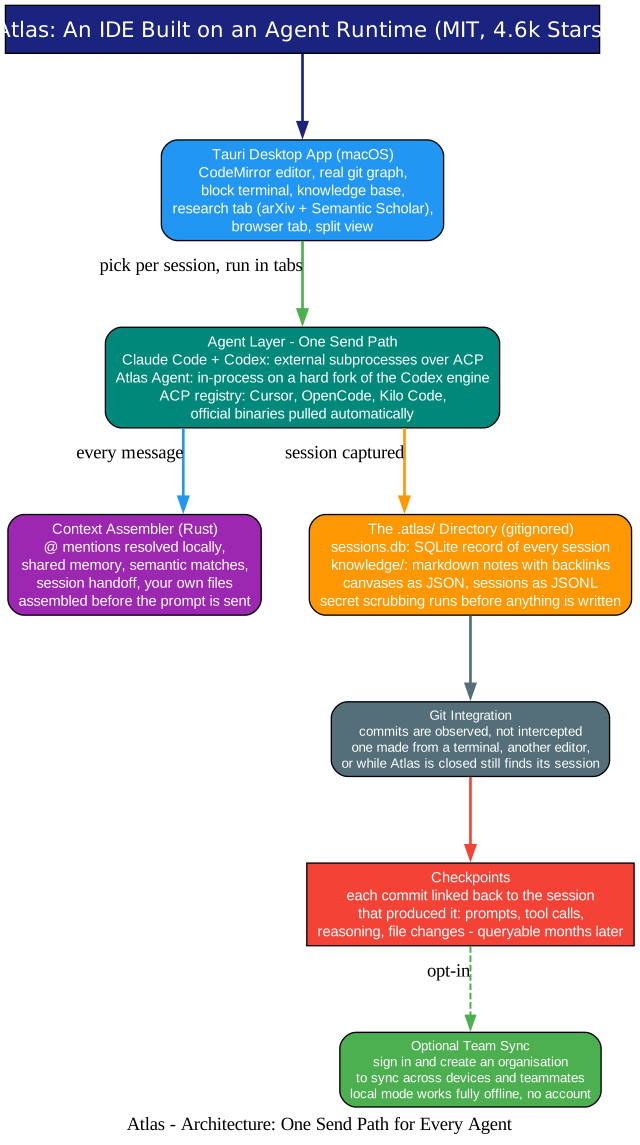
Understanding the Architecture
The diagram above shows the whole system, and the thing that makes it hang together is stated plainly in the README: Atlas runs your agents as they are, and enriches what they see.
1. One send path for every agent. Claude Code and Codex run as external subprocesses over ACP - the most-used, most-tested integration path. Atlas’s native agent runs in-process on a hard fork of the Codex engine (documented in CONTEXT.md and ADR-0004 in the repo). Beyond those, Atlas can spawn any agent from the ACP registry - Cursor, OpenCode, Kilo Code and more - pulling each one’s official binary automatically. All of them go through the same send path, so every feature below applies no matter which agent you pick. Your existing subscriptions keep working as-is.
2. The .atlas/ directory is the record. Every session lands in sessions.db (SQLite, inside the gitignored .atlas/ folder) with prompts, messages, tool calls, the files each one touched, and the patches applied. Secrets are scrubbed before anything touches disk - the local store is never itself a disclosure risk. Around it live the knowledge base (plain markdown with backlinks and a link graph), spaces (spatial boards as JSON), and sessions as JSONL.
3. Commits are observed, not intercepted. This is the detail that makes the checkpoint system trustworthy: Atlas watches git rather than wrapping it. A commit made from a terminal, from another editor, or while Atlas was closed entirely still finds its session. The project calls the one binary-format exception out honestly - the checkpoint record is SQLite because it is queried, not read; everything else is markdown, JSON, and JSONL you can read in vim.
4. It is a real IDE underneath. CodeMirror editor with per-project state, a real git commit graph with stage/unstage/commit and file diffs, a block terminal where each command carries its own output and exit code, split view, a browser tab with real logins and cookies, and a research tab that searches arXiv and Semantic Scholar so you can @-mention a paper into a prompt.
The Context Pipeline: Five Layers Before Every Prompt
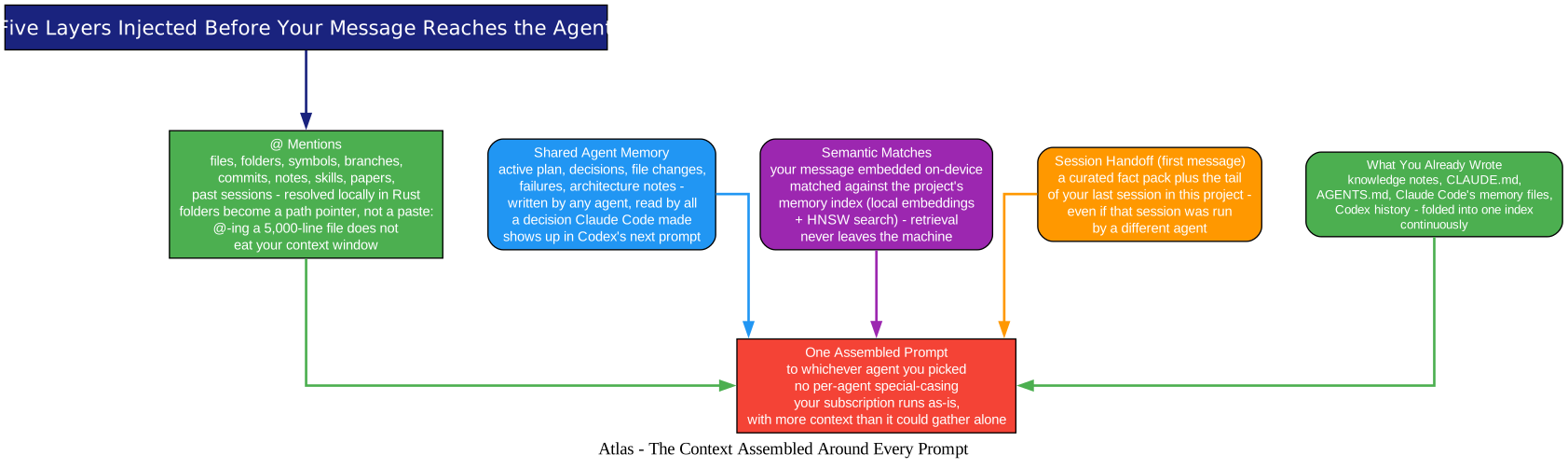
Understanding the Pipeline
Before your message reaches the agent, Atlas assembles context around it - and the layers map exactly to the three chronic failures of agent work (agents start from zero every session; switching agents loses the thread; context lives in ten places).
@ mentions resolve locally, in Rust. Files, folders, symbols, branches, commits, notes, skills, papers, and past sessions all resolve before the prompt is sent. Crucially, folders become a pointer, not a paste: @-ing a 5,000-line file sends a path the agent reads on demand, so one mention does not squat in your context window for the rest of the session.
Shared memory crosses agent boundaries. Active plans, decisions, file changes, failures, and architecture notes are written by any agent and read by all of them. Neither Claude Code nor Codex can read the other’s history on its own - Atlas can, and does, injecting it every turn. Switching agents mid-task no longer means starting the explanation over.
Semantic matching runs on your machine. Your message is embedded on-device and matched against the project’s memory index - local embeddings with HNSW search. Retrieval never leaves the device.
First messages get a handoff. A curated fact pack plus the tail of your last session in this project - including one run by a different agent.
Everything you already wrote feeds in continuously. Your knowledge notes, CLAUDE.md, AGENTS.md, Claude Code’s memory files, and Codex’s history are folded into one index. Skills work the same inclusive way: SKILL.md files scoped globally or per project get enabled per agent by symlinking into that agent’s own skills directory, and packs install a whole GitHub repo of skills, subagents, commands, hooks, and rules via the skills.sh index.
Checkpoints: Version Control for Reasoning
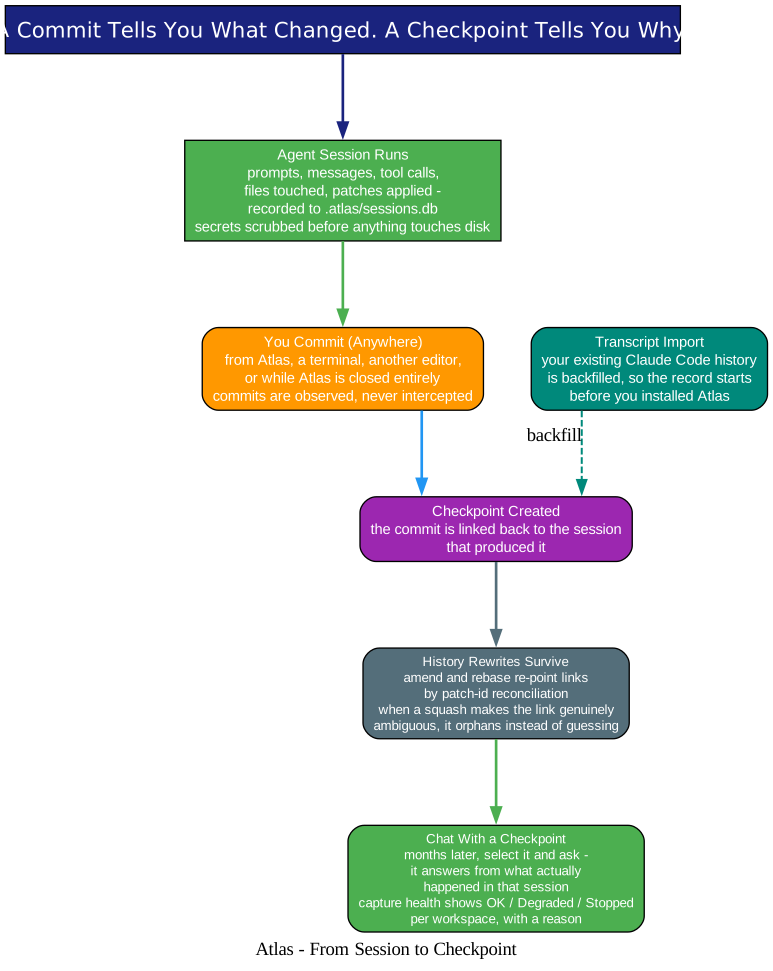
Understanding the Checkpoint Lifecycle
The checkpoint is what a commit does not tell you on its own, and the lifecycle has three genuinely hard problems solved:
Linking. When you commit - from any tool - the commit is linked back to the session that produced it. Sessions and commits are kept together: what was asked, what tools ran, what changed, and why.
Surviving history rewrites. Amend and rebase re-point checkpoint links through patch-id reconciliation. And when a squash makes the link genuinely ambiguous, the link orphans rather than guessing - an honest failure mode, deliberately chosen over confidently wrong metadata.
Recovery, not just recording. You never have to read the raw transcript: select a checkpoint and chat with it directly, and it answers from what actually happened in that session. Existing Claude Code history can be backfilled via transcript import, so the record starts before you installed Atlas. A capture-health signal per workspace (OK, Degraded, Stopped, each with a reason and a next step) tells you when recording is quietly broken - because a silent gap in the record is worse than no record at all. A mission-control dashboard rounds it out with usage over time, consumption breakdowns, and a filterable activity log.
Local by Default, With One Honest Caveat
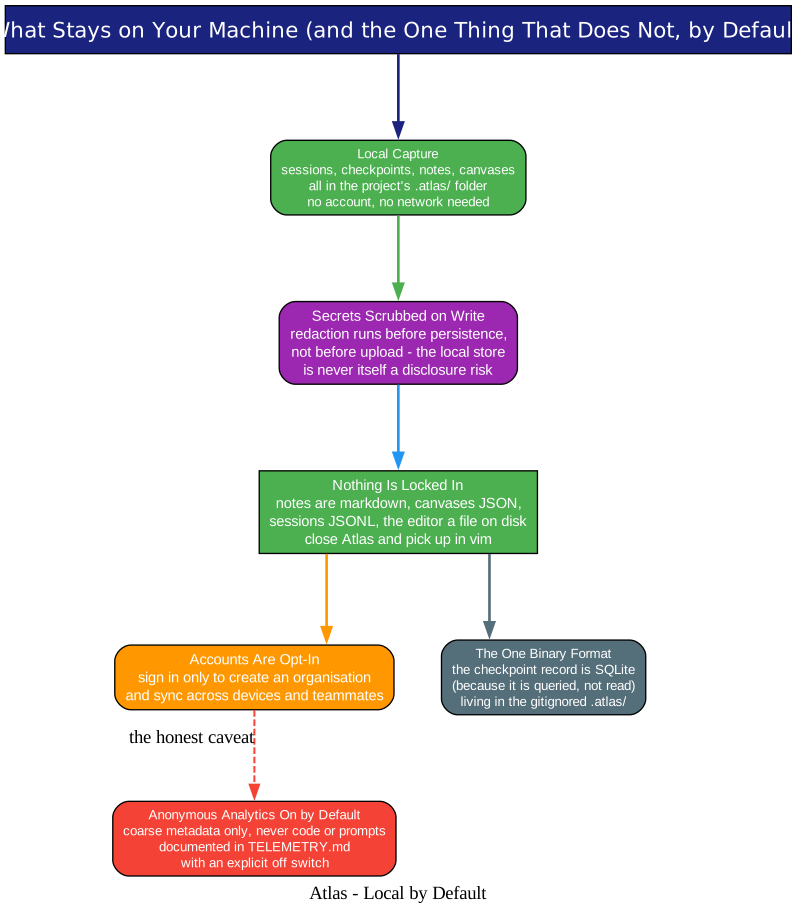
Understanding the Privacy Model
The privacy posture is unusually explicit. Code, notes, and sessions stay on your machine; capture is local-only by default; accounts exist solely for the opt-in organisation sync across teammates. Secret scrubbing happens on write, not on upload.
The one caveat, stated by the project itself: anonymous usage analytics are on by default - coarse metadata, never code or prompts, documented in TELEMETRY.md with an explicit off switch. It is the right way to handle a debatable default: document it, bound it, and let the user decide in one step.
Getting Started
Atlas is macOS-first: grab the latest .dmg from tryatlas.cc or the releases page. To use the Claude Code agent, install the claude CLI; the native Atlas agent needs no external CLI. Local mode works fully offline with no account.
Building from source needs Bun, Rust via rustup, and Xcode Command Line Tools:
git clone https://github.com/pacifio/atlas
cd atlas
bun install
bun run dev:app      # first Rust compile takes a few minutes
bun run build:app:dmg   # .app + .dmg installer
Linux builds from the same Tauri codebase (GTK 3, WebKit2GTK 4.1, and GLib headers required) but is untested upstream - Windows likewise. One contributing quirk worth knowing before you send a PR: feature work targets the current version branch, not main; a merge into main is the release. The architecture doc covers how the whole thing fits together.
Why This Matters
Every tool in the agent stack so far has optimized the forward path - better models, better routing, better parallelism. We have covered that ground here before: Oh My Hermes routes and evidences each run, SkillSpector secures the skills agents load. Atlas optimizes the backward path: the audit trail. It is the first tool we have covered that treats “why did the agent do this?” as a first-class queryable object - with links that survive rebases, capture health that admits when recording breaks, and a privacy model that keeps the record on your disk.
If your repository’s history is increasingly written by models, the commit message is no longer the documentation. Atlas is what comes after it: git remembers what changed, and Atlas remembers why.
Related Posts
- Oh My Hermes: The Operating Layer for Hermes Agent
- NVIDIA SkillSpector: AI Agent Skills Security Scanner
- DSPy Agent Skills: Production-Grade DSPy 3.2 Skills for Coding Agents

Enjoyed this post? Never miss out on future posts by following us


