Here is the dirty secret of machine learning research in 2026: the actual science - run the baseline, tweak one thing, rerun, compare - is bottlenecked by whoever is willing to sit there and do it. Jupyter notebooks multiply, SSH sessions to four GPUs pile up in terminal tabs, and somewhere around the third “wait, which of these results came from which config?” the whole thing collapses into spreadsheet archaeology.
OpenResearch (MIT, 3.5k stars, and it took the number-one spot on GitHub Trending) attacks exactly that. It comes from the alphaXiv team - the people behind the arXiv discussion platform - and it is a local-first workbench that turns the coding agents you already use (Claude Code, Codex, OpenCode, Cursor) into research agents: agents that review literature, develop hypotheses, run experiments, and produce research artifacts. The core mechanic is beautifully simple: stack experiments off a baseline in a git-native tree, run them on whatever compute you have, and compare results - with every run archived immutably against its exact commit.
One install command and your agent is doing science. Let’s look at how it works.
Understanding the Architecture
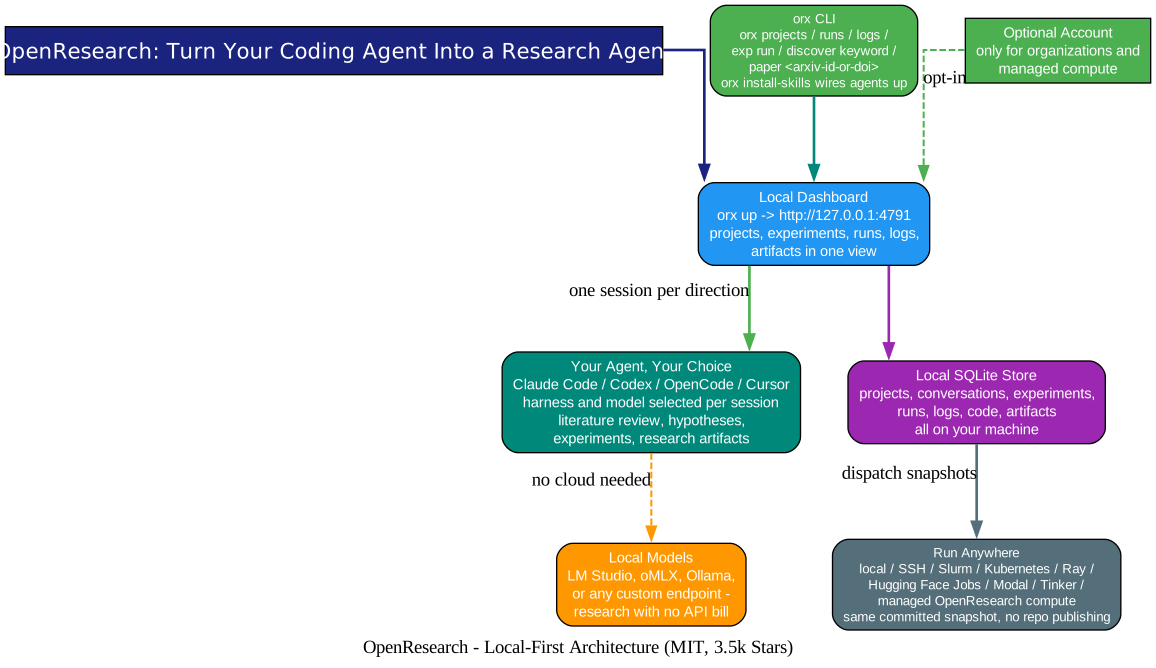
OpenResearch is a local dashboard plus a CLI called orx, and the diagram above shows how the pieces fit.
1. The dashboard runs on your machine. orx up opens the workspace at http://127.0.0.1:4791, backed by a local SQLite store. Projects, conversations, experiments, runs, logs, code, and artifacts all live on your machine - creating a project or launching a run never publishes your code. There is a macOS app and a Windows beta; Linux gets the CLI.
2. Your agent, your choice, your model. Each session picks its harness (Claude Code, Codex, OpenCode, Cursor) and its model independently. And because research bills add up fast, OpenResearch connects to local models - LM Studio, oMLX, Ollama, or any custom endpoint through OpenCode - so exploration can run with zero API spend.
3. Compute is a menu, not a migration. The same committed snapshot runs locally, over SSH (orx up --remote user@host - work in the browser on your laptop while the workspace sits next to your GPU box), or on Slurm, Kubernetes, Ray, Hugging Face Jobs, Modal, Tinker, or managed OpenResearch compute. Publishing your repository is not required for any of it. The orx CLI manages the hosted path end to end: browse GPU offers (orx compute --gpu H100_SXM), create instances, list and terminate them.
4. Agents get wired in properly. orx install-skills installs the OpenResearch skill into supported coding agents, and the CLI covers the research verbs directly: orx discover keyword <query> for literature search, orx paper <arxiv-id-or-doi> to pull a paper in, orx runs, orx logs, orx exp run.
The Experiment Tree: Science as a Git Branch
Understanding the Tree
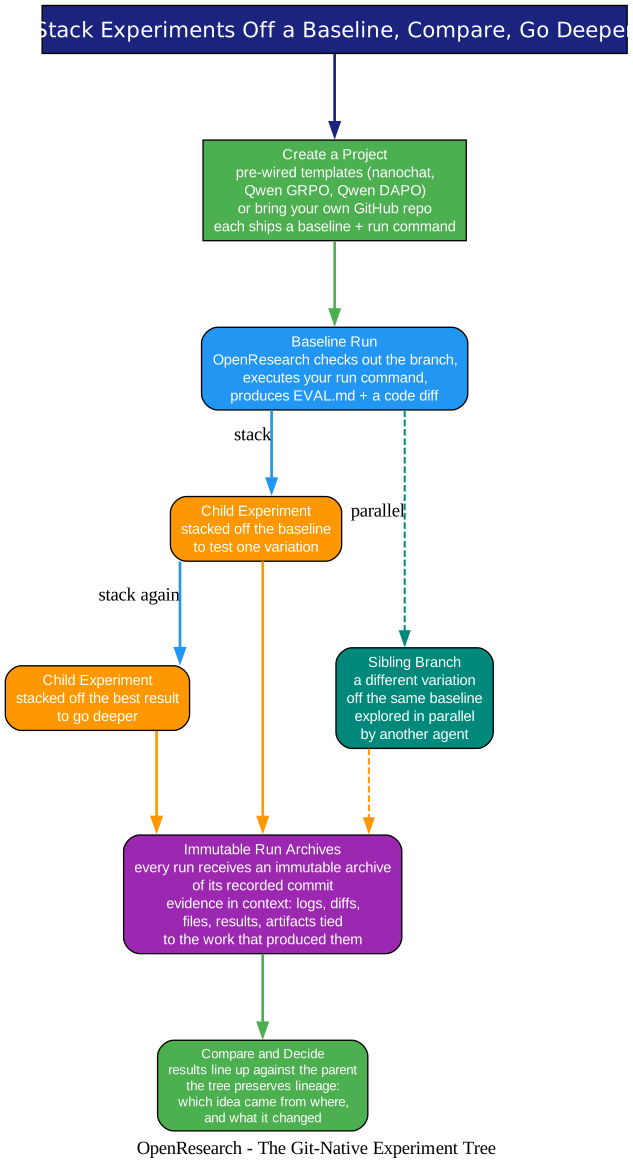
This is the heart of the tool, and it maps one-to-one onto how research actually happens.
Start from a baseline - or from a template. Projects come pre-wired with a baseline and a run command: nanochat (Karpathy’s minimal full-stack ChatGPT clone), Qwen GRPO fine-tuning on GSM math, Qwen DAPO RL training. Or bring your own GitHub repo. Open the baseline experiment, point it at an instance, press Run: OpenResearch checks out the branch, executes your run command, and produces an EVAL.md plus a code diff.
Stack, don’t sprawl. Once the baseline has a result, stack a child experiment off it to test one variation, then stack another off the best result to go deeper. That’s the loop. The tree is git-native, which is what makes the whole thing rigorous rather than vibes-based:
- Every run receives an immutable archive of its recorded commit. The result you are comparing came from exactly this code state, locked.
- Evidence stays in context. Logs, diffs, files, results, and artifacts are tied to the work that produced them - no more cross-referencing three windows to figure out where a number came from.
- Lineage is preserved. Months later, the tree still shows which idea branched from where and what each one changed.
Parallel directions stay independent. Each research direction gets its own agent session and its own isolated git worktree, so two agents can argue about learning rates simultaneously without stepping on each other’s file systems.
Autoresearch: The Loop That Runs Itself
Understanding the Loop
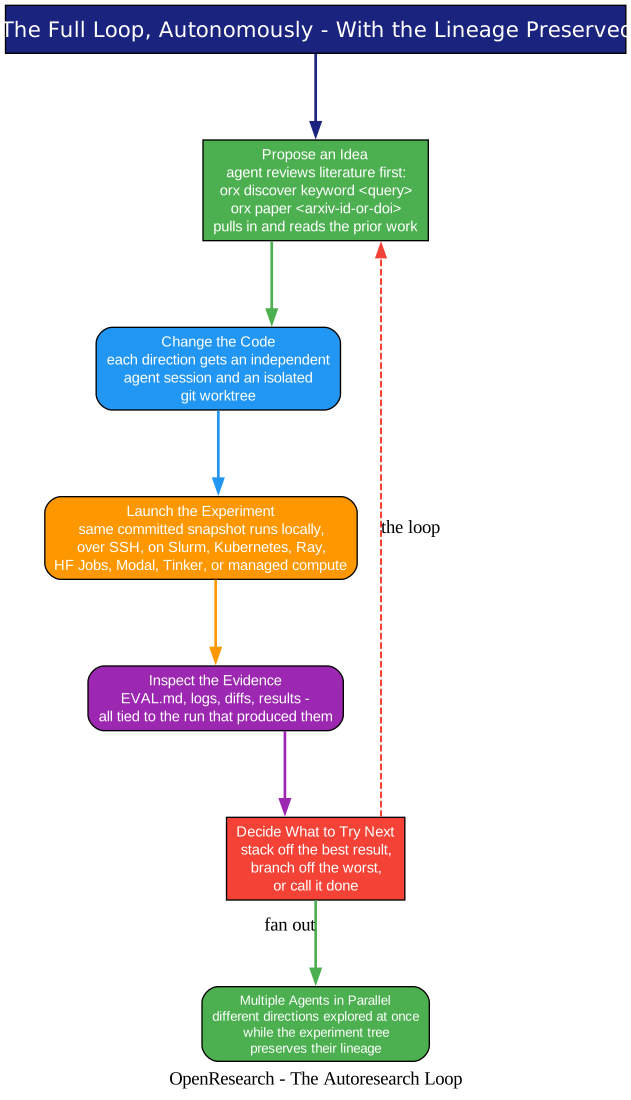
The autonomously-run version of the workflow is where this stops being a dashboard and starts being a colleague. OpenResearch can run the full loop on its own: propose an idea (after reviewing the literature it pulled in through the CLI’s paper tools), change the code in an isolated worktree, launch the experiment on your chosen compute, inspect the evidence, and decide what to try next - stacking off the best result, branching off the worst, or calling it done.
Multiple agents explore different directions in parallel while the experiment tree preserves their lineage. This connects to the trend we have been tracking on this blog: Atlas records why agents changed code, Oh My Hermes routes and evidences each run - and OpenResearch gives agents a hypothesis ledger where every idea, its parent, and its measured outcome live in one tree. The missing piece was never agent intelligence; it was the bookkeeping that makes twenty autonomous attempts legible.
Local by Default - and One Warning Worth Reading Twice
Understanding the Privacy Model
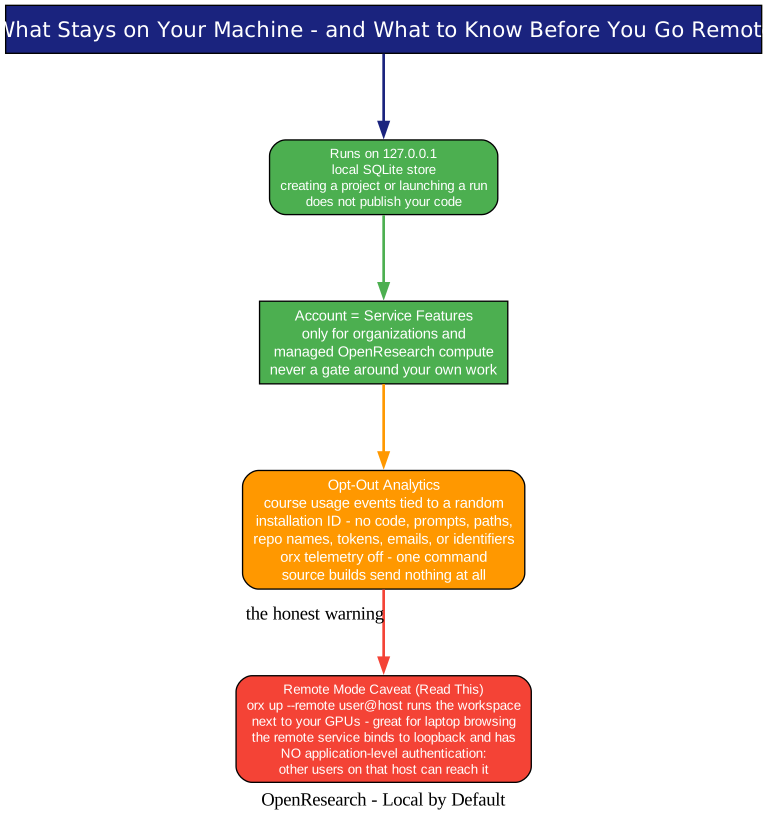
The defaults are the right ones: everything runs on 127.0.0.1 with a local SQLite store; an openresearch.sh account exists only for service-owned capabilities (organizations, managed compute); release builds send opt-out analytics - coarse events tied to a random installation ID, explicitly excluding code, prompts, file paths, repo names, tokens, and identifiers, with orx telemetry off as the escape hatch. Source and development builds send nothing at all.
One caveat the project states plainly and deserves repeating: in remote mode (orx up --remote user@host), the remote service binds to loopback and has no application-level authentication - other users on that host can reach it. On your own single-user GPU box, that is a reasonable trade. On a shared login server, it is something to think about before you run it.
Getting Started
One line on macOS or Linux:
curl -LsSf https://openresearch.sh/install.sh | sh
orx up
That opens the dashboard at http://127.0.0.1:4791. Windows users take the beta download after installing Git for Windows. From there:
- Create a project - a template (nanochat, Qwen GRPO, Qwen DAPO) or your own GitHub repo.
- Press Run on the baseline - OpenResearch checks out the branch and produces
EVAL.mdplus a diff. - Stack a child experiment off the result and keep going. Or connect an agent with
orx install-skillsand let it do the stacking.
The full command reference lives in the docs and on the CLI’s repository page.
Why This Matters
Coding agents gave us machines that can implement an idea. Research needed machines that can test an idea and remember the result. OpenResearch supplies the missing scaffolding: a baseline-branching experiment tree where every run is archived against its commit, evidence stays attached to its work, and the propose-test-learn loop can run unattended across as many directions as you have compute for.
It is also, quietly, a lesson in product focus. The alphaXiv team did not build a new agent - they built the workspace their existing agents were missing, kept it local-first, and made compute swappable. If your week involves rerunning baselines, clone the repo, run orx up, and give one direction to an agent. The spreadsheet archaeology is optional now.
Related Posts
- Atlas: Source Control for Coding Agents - Every Commit Explained
- Oh My Hermes: The Operating Layer for Hermes Agent
- Karpathy’s LLM Wiki: A Compounding Knowledge Base

Enjoyed this post? Never miss out on future posts by following us


