The Trust Problem in AI Agent Skills
NVIDIA SkillSpector is a security scanner for AI agent skills that detects vulnerabilities, malicious patterns, and security risks before you install skills in Claude Code, Codex CLI, or Gemini CLI. With 64 vulnerability patterns across 16 categories and a two-stage analysis pipeline combining fast static analysis with optional LLM semantic evaluation, SkillSpector answers the critical question every AI agent user should ask: is this skill safe to install?
AI agent skills execute with implicit trust and minimal vetting. When you install a skill from a marketplace or a GitHub repository, it gains access to your file system, network, environment variables, and sometimes even your LLM’s system prompt. There is no security gate between the install command and the skill’s execution. This is a fundamental gap in the AI agent ecosystem.
Research from “Agent Skills in the Wild: An Empirical Study of Security Vulnerabilities at Scale” (Liu et al., 2026) quantified the scale of this problem. The study analyzed 42,447 skills from major marketplaces and found that 26.1% contain at least one vulnerability and 5.2% show likely malicious intent. Skills with executable scripts are 2.12x more likely to be vulnerable than those without. These numbers are not theoretical – they represent real skills that users are installing and running every day.
Key Insight: Research analyzing 42,447 skills from major marketplaces found that 26.1% contain at least one vulnerability and 5.2% show likely malicious intent. Skills with executable scripts are 2.12x more likely to be vulnerable.
Before SkillSpector, the only way to evaluate a skill’s safety was manual code review – reading every file, checking every dependency, and understanding every code path. For a skill with dozens of files and hundreds of lines, this is impractical. SkillSpector automates this process, providing a structured security assessment in seconds rather than hours.
What is SkillSpector?
SkillSpector is NVIDIA’s open-source security scanner purpose-built for AI agent skills. It is licensed under Apache 2.0, requires Python 3.12 or later, and works with skills designed for Claude Code, Codex CLI, Gemini CLI, and other AI agent platforms.
The tool scans skills from multiple input sources: Git repositories (cloned automatically), URLs, zip files, local directories, and single SKILL.md files. It produces output in four formats: terminal (rich-formatted console output), JSON (machine-readable for automation), Markdown (for documentation), and SARIF (the standard format for CI/CD integration and IDE tooling like VS Code and GitHub Code Scanning).
At its core, SkillSpector computes a risk score from 0 to 100 with severity labels and actionable recommendations. A score of 0-20 is LOW with a SAFE recommendation. A score of 21-50 is MEDIUM with a CAUTION recommendation. A score of 51-80 is HIGH with a DO NOT INSTALL recommendation. A score of 81-100 is CRITICAL, also with DO NOT INSTALL. The CLI returns exit code 0 for safe skills, exit code 1 when the risk score exceeds 50, and exit code 2 on errors – making it straightforward to integrate as a quality gate in CI/CD pipelines.
SkillSpector detects 64 vulnerability patterns across 16 categories, ranging from prompt injection and data exfiltration to MCP tool poisoning and YARA-based malware matching. This is the broadest coverage of AI agent skill security threats available in any single tool.
The Two-Stage Analysis Pipeline
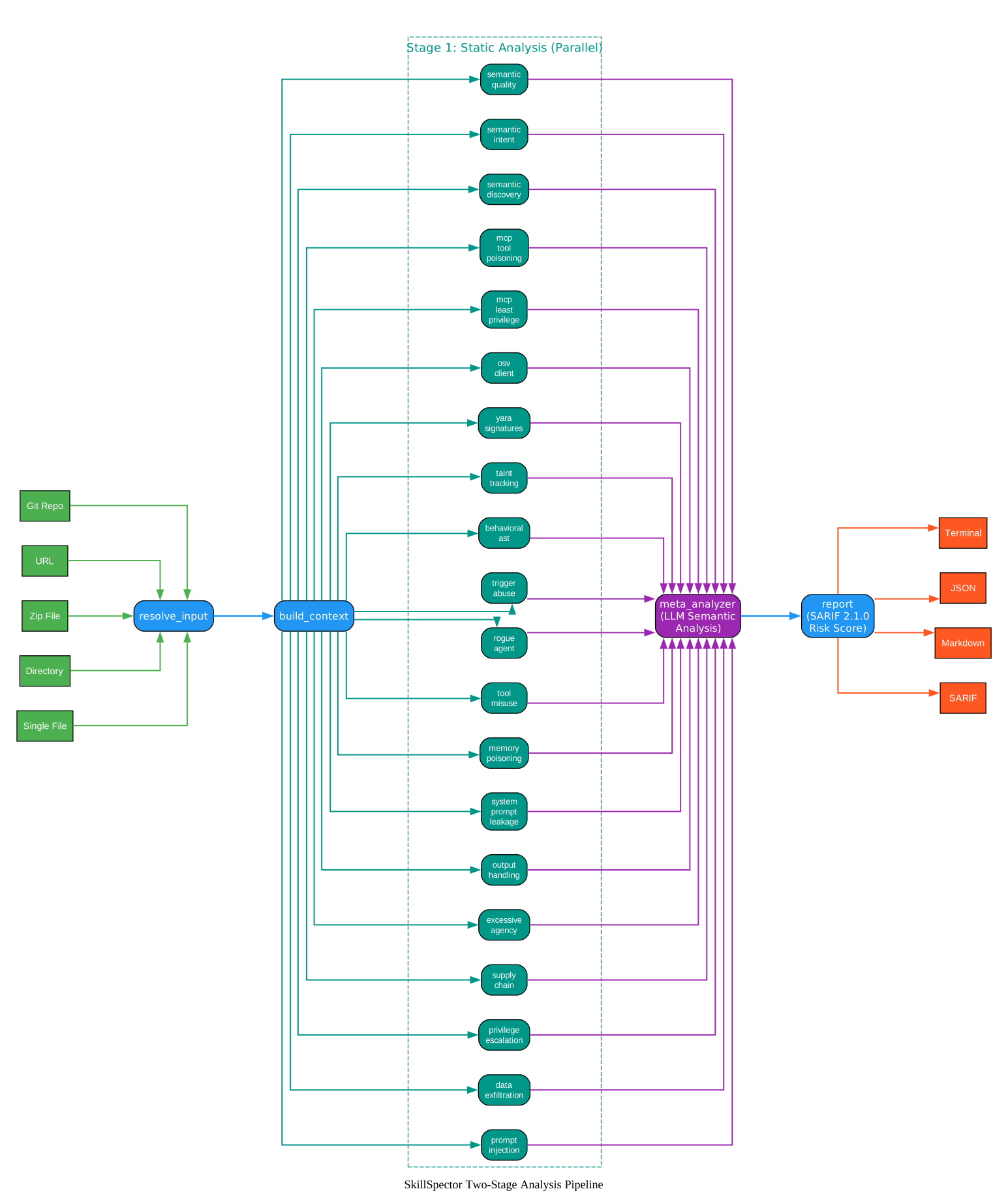
The diagram above illustrates SkillSpector’s LangGraph-based analysis pipeline, which processes a skill through two distinct stages. The pipeline begins at the input layer, where five input types – Git Repo, URL, Zip File, Directory, and Single File – feed into the resolve_input node. This node consumes the raw input_path, resolves URLs by cloning Git repositories, extracting zip files, or handling file URLs, and sets the skill_path for downstream processing. When a temporary directory is created (for cloned repos or extracted zips), it also sets temp_dir_for_cleanup so the caller can clean up after the analysis completes.
The resolve_input node passes control to build_context, which reads the skill directory and populates the state with everything the analyzers need: the list of component files, a file cache mapping paths to contents, AST representations, the parsed skill manifest, component metadata (path, type, line count, executable flag, size), and the has_executable_scripts flag that determines whether the 1.3x risk multiplier applies.
Stage 1 is the static analysis phase, shown as the teal cluster in the diagram. All 20 analyzer nodes run in parallel – this is a fan-out pattern from build_context. The 11 regex-based pattern analyzers cover prompt injection, data exfiltration, privilege escalation, supply chain risks, excessive agency, output handling, system prompt leakage, memory poisoning, tool misuse, rogue agent behavior, and trigger abuse. Alongside these, the behavioral_ast analyzer detects dangerous Python calls like exec(), eval(), and subprocess, the taint_tracking analyzer traces data flows from sources to sinks, the yara_signatures analyzer matches known malware patterns, the osv_client queries OSV.dev for live CVE data, and three MCP analyzers check for least privilege violations, tool poisoning, and rug pulls. Three semantic analyzers (security discovery, developer intent, and quality policy) provide additional LLM-based analysis when enabled. All findings from every analyzer are aggregated via a state reducer that appends to the findings list.
Stage 2 is the LLM semantic analysis, represented by the purple meta_analyzer node. This is a fan-in point where all analyzer results converge. The meta_analyzer uses an LLM to evaluate the context and intent behind each finding, filter false positives, and generate human-readable explanations. This stage improves precision to approximately 87%. The LLM prompts include anti-jailbreak protections to prevent malicious skills from manipulating the analysis itself. When --no-llm is used, the meta_analyzer skips LLM calls and uses a fallback filter instead.
Finally, the report node builds a SARIF 2.1.0 report, computes the risk score, determines the severity and recommendation, and generates the formatted output body in the requested format. The output layer shows the four supported formats: Terminal, JSON, Markdown, and SARIF.
Takeaway: SkillSpector’s two-stage pipeline means you can run fast static scans in CI/CD with –no-llm, then add LLM semantic analysis for deeper review – the same tool adapts to both speed and depth requirements.
The 16 Vulnerability Categories
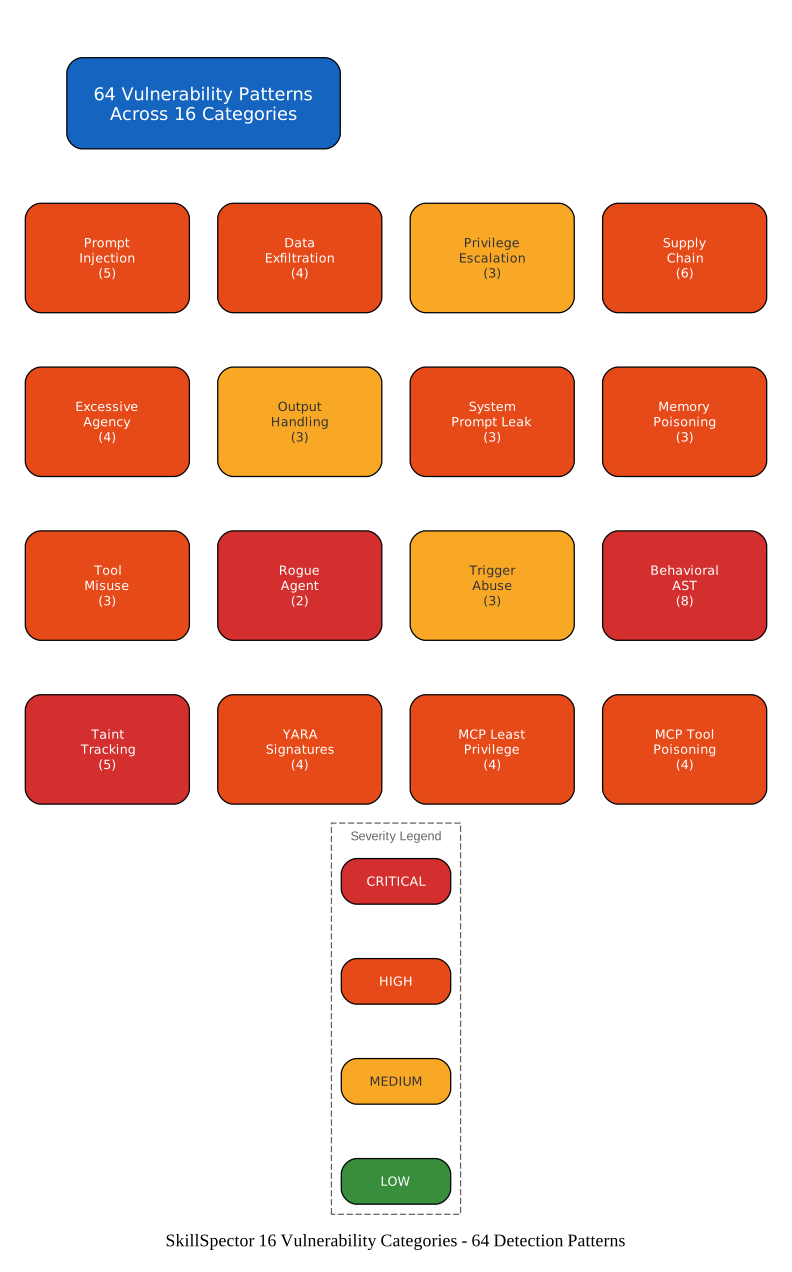
The diagram above shows all 16 vulnerability categories organized by severity. Each card displays the category name and the number of detection patterns it contains. The color coding follows a consistent scheme: red for CRITICAL severity patterns, orange for HIGH, yellow for MEDIUM, and green for LOW.
The most critical categories deserve special attention. Behavioral AST contains 8 patterns (AST1 through AST8) that detect dangerous Python function calls directly in the abstract syntax tree. These include exec() (CRITICAL – enables arbitrary code execution), eval() (HIGH), dynamic imports via __import__() (HIGH), subprocess calls (HIGH), os.system and the exec-family (HIGH), compile() (MEDIUM), dynamic getattr() (MEDIUM), and dangerous execution chains where exec/eval is combined with dynamic data sources like network content or encoded strings (CRITICAL). These patterns are particularly dangerous because they represent direct code execution capabilities that a malicious skill can exploit.
Supply Chain contains 6 patterns (SC1 through SC6) covering unpinned dependencies (LOW), external script fetching via curl | bash patterns (HIGH), obfuscated code using base64 or hex encoding (HIGH), known vulnerable dependencies via live OSV.dev lookups (HIGH), abandoned dependencies without security updates (MEDIUM), and typosquatting with package names designed to mimic popular packages (HIGH). The SC4 pattern is especially valuable because it queries the OSV.dev API in real time, catching vulnerabilities that static analysis alone cannot detect.
Taint Tracking contains 5 patterns (TT1 through TT5) that trace how data flows through a skill’s code. Direct taint flow (HIGH) catches data moving straight from a source to a sink without sanitization. Variable-mediated taint flow (MEDIUM) tracks data through intermediate variables. Credential exfiltration chains (CRITICAL) detect when environment variables containing API keys and secrets flow to network output sinks. File read to network exfiltration (HIGH) catches file contents being sent to external servers. External input to code execution (CRITICAL) detects when network or user input reaches exec/eval/subprocess sinks.
Prompt Injection contains 5 patterns (P1 through P5) covering instruction override (HIGH), hidden instructions in comments or invisible text (HIGH), exfiltration commands (HIGH), behavior manipulation (MEDIUM), and harmful content generation (CRITICAL). These patterns target the LLM’s instruction-following behavior, which is the core attack surface for AI agent skills.
The MCP-specific categories address emerging threats in the Model Context Protocol ecosystem. MCP Least Privilege (4 patterns) detects skills that request permissions beyond their stated functionality, use wildcard permissions, lack permission declarations despite having detectable capabilities, or overdeclare permissions. MCP Tool Poisoning (4 patterns) catches hidden instructions in metadata, Unicode deception via homoglyphs and RTL overrides, parameter description injection, and description-behavior mismatches where a tool’s declared description does not match its actual code behavior.
Amazing: SkillSpector detects 64 vulnerability patterns across 16 categories – from prompt injection and data exfiltration to MCP tool poisoning and YARA-based malware matching. No other tool provides this breadth of AI agent skill security coverage.
Installation and Setup
SkillSpector requires Python 3.12 or later. You can install it from source or run it via Docker without installing Python at all.
From Source
# Clone the repository
git clone https://github.com/NVIDIA/skillspector.git
cd skillspector

# Create and activate virtual environment
uv venv .venv && source .venv/bin/activate

# Install for production use
make install
The Makefile uses uv if available, otherwise falls back to pip. You must create and activate the virtual environment before running any make target.
Docker (No Python Required)
# Build the image
make docker-build

# Scan a local directory (static analysis only)
docker run --rm -v "$PWD:/scan" skillspector scan ./my-skill/ --no-llm
The Docker image is based on Python 3.12-slim-bookworm. Mount your local directory into /scan to access files inside the container.
LLM Provider Configuration
For semantic analysis, configure an LLM provider. Each provider has its own default model:
| Provider | Credential | Default Model |
|---|---|---|
openai | OPENAI_API_KEY | gpt-5.4 |
anthropic | ANTHROPIC_API_KEY | claude-opus-4-6 |
nv_build | NVIDIA_INFERENCE_KEY | deepseek-ai/deepseek-v4-flash |
# Configure Anthropic as the LLM provider
export SKILLSPECTOR_PROVIDER=anthropic
export ANTHROPIC_API_KEY=sk-ant-...

# Or use local Ollama
export SKILLSPECTOR_PROVIDER=openai
export OPENAI_API_KEY=ollama
export OPENAI_BASE_URL=http://localhost:11434/v1
export SKILLSPECTOR_MODEL=llama3.1:8b

# Skip LLM analysis entirely (static only, faster)
skillspector scan ./my-skill/ --no-llm
Usage Examples
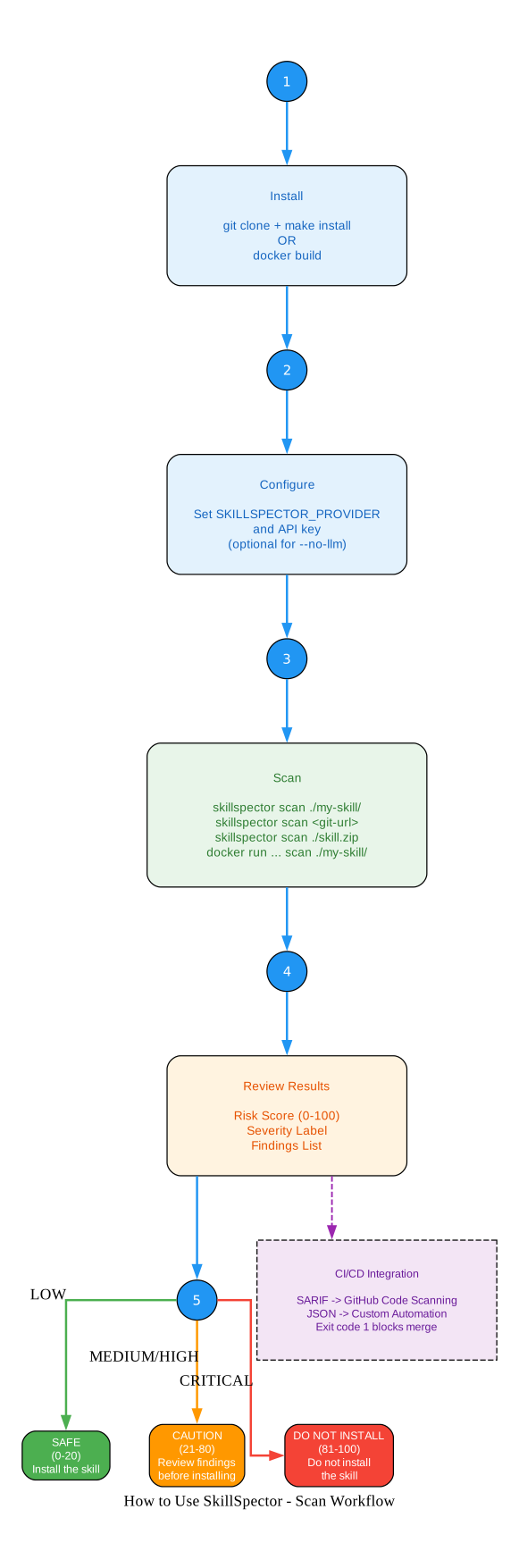
The diagram above shows the complete workflow for using SkillSpector, from installation to action. Step 1 is installation, either from source with git clone and make install, or via Docker with make docker-build. Step 2 is configuration: set the SKILLSPECTOR_PROVIDER environment variable and the corresponding API key. This step is optional when using --no-llm for static-only analysis.
Step 3 is the scan itself. SkillSpector accepts multiple input types: local directories with skillspector scan ./my-skill/, Git repositories with skillspector scan https://github.com/user/repo, zip files with skillspector scan ./skill.zip, and Docker-based scans with docker run --rm -v "$PWD:/scan" skillspector scan ./my-skill/. The tool automatically resolves the input type – it clones Git URLs, extracts zip files, and handles single SKILL.md files without any additional flags.
Step 4 is reviewing the results. The output includes a risk score from 0 to 100, a severity label (LOW, MEDIUM, HIGH, or CRITICAL), and a detailed findings list. Each finding shows the severity, rule ID, location in the source code, the matched pattern, confidence level, and a human-readable explanation (when LLM analysis is enabled).
Step 5 is taking action based on the risk assessment. For LOW risk scores (0-20), the recommendation is SAFE and you can install the skill. For MEDIUM and HIGH scores (21-80), the recommendation is CAUTION – review the findings before installing. For CRITICAL scores (81-100), the recommendation is DO NOT INSTALL. The CI/CD integration branch shows how SARIF output feeds into GitHub Code Scanning, JSON output enables custom automation, and the exit code 1 behavior blocks merge requests when the risk score exceeds 50.
Basic Scans
# Scan a local skill directory
skillspector scan ./my-skill/

# Scan a single SKILL.md file
skillspector scan ./SKILL.md

# Scan a Git repository (clones automatically)
skillspector scan https://github.com/user/my-skill

# Scan a zip file
skillspector scan ./my-skill.zip
Output Formats
# Terminal output (default) - rich formatted
skillspector scan ./my-skill/

# JSON output for CI/CD pipelines
skillspector scan ./my-skill/ --format json --output report.json

# Markdown output for documentation
skillspector scan ./my-skill/ --format markdown --output report.md

# SARIF output for GitHub Code Scanning
skillspector scan ./my-skill/ --format sarif --output report.sarif
Python API Integration
from skillspector import graph

# Invoke the LangGraph workflow
result = graph.invoke({
    "input_path": "/path/to/skill",
    "output_format": "json",
    "use_llm": True,
})

# Access results
print(f"Risk Score: {result['risk_score']}/100")
print(f"Severity: {result['risk_severity']}")
print(f"Recommendation: {result['risk_recommendation']}")

for finding in result["filtered_findings"]:
    print(f"[{finding['severity']}] {finding['rule_id']}: {finding['message']}")
Important: SkillSpector’s CLI returns exit code 1 when risk_score exceeds 50, making it straightforward to integrate into CI/CD pipelines as a quality gate. Use –format sarif for GitHub Code Scanning or –format json for custom automation.
Live Vulnerability Lookups with OSV.dev
The SC4 analyzer in SkillSpector queries the OSV.dev API for real-time CVE data about a skill’s dependencies. This is a capability that static analysis alone cannot provide – it checks your dependencies against a database covering tens of thousands of advisories across PyPI, npm, and other ecosystems.
The OSV.dev integration has several practical advantages. No API key is required – OSV.dev is free and unauthenticated, so there is no signup or configuration step. All dependencies are checked in a single batch HTTP call, making the lookup efficient even for skills with many dependencies. When OSV.dev is unreachable (for example, in air-gapped or offline environments), SkillSpector automatically falls back to a small built-in static list of known vulnerabilities. Results are cached in memory for one hour to avoid redundant API calls during a session.
The tool requires outbound HTTPS access to api.osv.dev for live vulnerability data. When that is not available, SC4 findings are limited to the static fallback list. This means the tool works in both connected and disconnected environments, with reduced coverage when offline.
MCP Security: Least Privilege and Tool Poisoning
The Model Context Protocol (MCP) introduces new attack surfaces that traditional security tools were not designed to address. SkillSpector includes two dedicated MCP analyzer categories to cover these threats.
MCP Least Privilege (4 patterns) detects when an MCP server’s permissions exceed its stated functionality. The LP1 pattern catches underdeclared capabilities – code that uses capabilities not listed in the declared permissions. LP2 flags wildcard permissions like *, all, full, or any that grant excessive access. LP3 identifies skills that have no permissions field but contain code with detectable capabilities. LP4 detects overdeclared permissions where a permission is declared but no corresponding code capability exists, which can indicate a rug pull preparation.
MCP Tool Poisoning (4 patterns) targets the manipulation of tool descriptions and metadata. TP1 catches hidden instructions embedded in metadata using HTML comments, zero-width characters, base64 encoding, or data URIs. TP2 detects Unicode deception attacks including homoglyphs (visually similar characters from different scripts), RTL overrides that reverse text direction, and mixed-script identifiers. TP3 identifies injection patterns in parameter definitions, such as override instructions, system tokens, or malicious default values. TP4 uses LLM-powered analysis to detect description-behavior mismatches where a tool’s declared description does not match its actual code behavior.
MCP security matters because MCP servers have broad system access – they can read files, execute commands, and make network requests. A compromised or malicious MCP server can exfiltrate data, execute arbitrary code, or manipulate the AI agent’s behavior. SkillSpector’s MCP analyzers provide the first automated detection capability for these emerging threats.
Risk Scoring and Recommendations
SkillSpector computes a numeric risk score from 0 to 100 using a weighted sum of findings. CRITICAL issues add 50 points, HIGH issues add 25 points, MEDIUM issues add 10 points, and LOW issues add 5 points. When a skill contains executable scripts (files with extensions like .py, .sh, or .js), a 1.3x multiplier is applied to the raw score, reflecting the research finding that skills with executable scripts are 2.12x more likely to be vulnerable.
The severity bands map directly to recommendations. A score of 0-20 is LOW with a SAFE recommendation – the skill can be installed with confidence. A score of 21-50 is MEDIUM with a CAUTION recommendation – review the findings before installing. A score of 51-80 is HIGH with a DO NOT INSTALL recommendation – the risk is significant. A score of 81-100 is CRITICAL, also with DO NOT INSTALL – the skill poses a severe security risk.
The CLI exit codes support automation. Exit code 0 means the skill is safe (risk score at or below 50). Exit code 1 means the risk score exceeds 50, which can be used to block a CI/CD pipeline or fail a pre-commit hook. Exit code 2 indicates an error in the scan itself, such as an unreachable repository or an invalid input path.
Architecture Deep Dive
SkillSpector is built on LangGraph, which provides the orchestration layer for the multi-node analysis pipeline. The graph is defined in graph.py via create_graph() and exposed as graph from the package’s __init__.py.
The state is defined as SkillspectorState, a TypedDict with key fields including input_path, skill_path, temp_dir_for_cleanup, components, file_cache, ast_cache, manifest, component_metadata, has_executable_scripts, output_format, report_body, use_llm, findings, filtered_findings, risk_score, risk_severity, and risk_recommendation. The findings field uses operator.add as a reducer, so each analyzer node appends its results to the shared list.
There are no conditional edges in the graph. After resolve_input passes to build_context, all 20 analyzer nodes run in parallel (fan-out). They all feed into meta_analyzer (fan-in), which then passes to report. Adding a new analyzer requires only implementing a node that returns {"findings": list[Finding]} and registering it in ANALYZER_NODE_IDS and ANALYZER_NODES in nodes/analyzers/__init__.py. No changes to graph.py are needed because edges are added in a loop.
The report node builds a SARIF 2.1.0 report from the filtered findings, computes the risk score using the weighted sum and multiplier, determines the severity band and recommendation, and generates the formatted output body based on the requested format (terminal, JSON, markdown, or SARIF).
Conclusion
SkillSpector is the first purpose-built security scanner for AI agent skills. Its 64 patterns across 16 categories provide the broadest security coverage available for the AI agent skills ecosystem. The two-stage analysis pipeline balances speed and depth – static analysis runs fast in CI/CD with --no-llm, while LLM semantic analysis provides deeper review when needed. SARIF output enables integration with GitHub Code Scanning and existing CI/CD tooling. The research foundation, based on analysis of 42,447 real-world skills, ensures that the detection patterns address actual threats rather than theoretical ones.
Getting started takes just two commands:
git clone https://github.com/NVIDIA/skillspector.git
cd skillspector && make install
For security vulnerabilities in SkillSpector itself, NVIDIA provides a PSIRT vulnerability reporting process for coordinated disclosure. Enjoyed this post? Never miss out on future posts by following us 


